battery KIA K900 2016 User Guide
[x] Cancel search | Manufacturer: KIA, Model Year: 2016, Model line: K900, Model: KIA K900 2016Pages: 542, PDF Size: 38.35 MB
Page 103 of 542
Features of your vehicle
4
4-23
To close:
Do one of the following:
- Press the power trunk main controlbutton until the power trunk is
closed securely (for type A).
- Push the power trunk main control lever until the power trunk is closed
securely (for type B).
- Press the close button on the trunk.
- Press the lock button on the trunk while carrying the smart key and all
the vehicle’s doors and trunk are
closed. All doors and trunk will lock
and arm the theft alarm system.
If you push a button or lever while the
trunk is opening or closing, it could
stop moving. Press any button to
operate the power trunk again.
✽ NOTICE
The power trunk lock button will
not work if you press the button
when:
- Any door is open.
- The engine start/stop button is not
in the OFF position.
- The smart key is in the vehicle.
Do not leave the power trunk open
for a long period of time. This may
drain the battery.
✽ NOTICE
In cold and wet climates, trunk lock
and trunk mechanisms may not
work properly due to freezing condi-
tions.
Never leave children or animals
unattended in your vehicle.
Children or animals might oper-
ate the power trunk that could
result in injury to themselves or
others, or damage to the vehicle.
WARNING
Exhaust fumes
The trunk lid should always be
kept completely closed while the
vehicle is in motion. If it is left
open or ajar, exhaust gases may
enter the car and serious illness
or death may result.
WARNING
Make sure there are no people
or objects around the trunk
before opening or closing the
power trunk. Wait until the trunk
is open fully and stopped
before loading or unloading
cargo from the vehicle.
WARNING
Do not close or open the
power trunk manually. This
may cause damage to the
power trunk. If it is necessary
to close or open the power
trunk manually when the bat-
tery is drained or disconnect-
ed, do not apply excessive
force.
To prevent damage to the trunk lift cylinders and the
attached hardware, always
close the trunk before driving.
CAUTION
KH USA 4:2015 3/24/2015 4:36 PM Page 23
Page 105 of 542
Features of your vehicle
4
4-25
To Reset the Power Trunk
If the battery has been discharged or
disconnected, or if the related fuse
has been replaced or disconnected,
reset the power trunk as follows:
1. Move the shift lever to the P(Park)position.
2. Close the trunk manually.
If the power trunk doesn't work prop-
erly after performing the above pro-
cedure, have the system checked by
an authorized K900 Kia dealer.
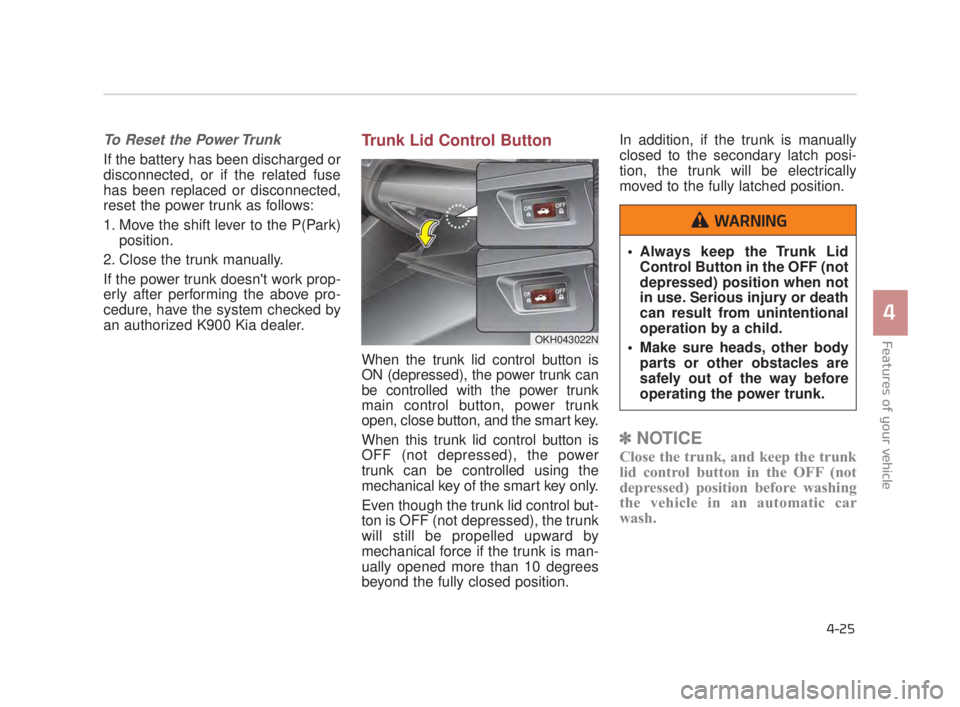
Trunk Lid Control Button
When the trunk lid control button is
ON (depressed), the power trunk can
be controlled with the power trunk
main control button, power trunk
open, close button, and the smart key.
When this trunk lid control button is
OFF (not depressed), the power
trunk can be controlled using the
mechanical key of the smart key only.
Even though the trunk lid control but-
ton is OFF (not depressed), the trunk
will still be propelled upward by
mechanical force if the trunk is man-
ually opened more than 10 degrees
beyond the fully closed position. In addition, if the trunk is manually
closed to the secondary latch posi-
tion, the trunk will be electrically
moved to the fully latched position.
✽
NOTICE
Close the trunk, and keep the trunk
lid control button in the OFF (not
depressed) position before washing
the vehicle in an automatic car
wash.
OKH043022N
Always keep the Trunk Lid
Control Button in the OFF (not
depressed) position when not
in use. Serious injury or death
can result from unintentional
operation by a child.
Make sure heads, other body parts or other obstacles are
safely out of the way before
operating the power trunk.
WARNING
KH USA 4:2015 3/24/2015 4:36 PM Page 25
Page 124 of 542
Features of your vehicle
4-44
Resetting the sunroof
Whenever the vehicle battery is dis-
connected or discharged, or related
fuse is blown, you must reset your
sunroof system as follows:
1. The Engine Start/Stop Button mustbe in the ON position.
2. Release the control lever.
3. Push and hold the control lever for- ward (for more than 10 seconds)
until the sunroof tilts and slightly
moves. Then, release the lever.
4. Push the sunroof control lever for- ward in the direction of close until
the sunroof operates as follows:
Sunroof glass and sunshade open →
Sunroof glass and sunshade close
Then, release the control lever.
When this is complete, the sunroof
system is reset.
❈ For more detailed information, con-
tact an authorized K900 Kia deal-
er.
✽ NOTICE
If the sunroof is not reset when the
vehicle battery is disconnected or
discharged, or related fuse is blown,
the sunroof may operate improperly.
KH USA 4:2015 3/24/2015 4:37 PM Page 44
Page 146 of 542
Features of your vehicle
4-66
Center (AUTO, 3):
The mirror will fold or unfold auto-
matically as follows:
The mirror will fold or unfold when the door is locked or unlocked by
the smart key.
The mirror will fold or unfold when the door is locked or unlocked by the
button on the outside door handle.
The mirror will unfold when you approach the vehicle (all doors
closed and locked) with a smart
key in possession.Electric chromic mirror (ECM)
The electric chromic mirror automati-
cally controls the glare from the head-
lights of the car behind you in night-
time or low light driving conditions. The
sensor mounted in the mirror senses
the light level around the vehicle, and
automatically controls the headlight
glare from vehicles behind you.
When the engine is running, the glare
is automatically controlled by the sen-
sor mounted in the rearview mirror.
Whenever the shift lever is shifted
into R (Reverse), the mirror will auto-
matically go to the brightest setting in
order to improve the drivers view
behind the vehicle. If the ECM of
inside rear view mirror operates, it
will be working.
Electric type outside
rearview mirror
The electric type outside rearview
mirror operates even though the
engine start/stopo button is in the
OFF position. However, to prevent
unnecessary battery discharge,
do not adjust the mirrors longer
than necessary while the engine
is not running.
In case it is an electric type out-
side rearview mirror, don’t fold it
by hand. It could cause motor
failure.
CAUTION
When cleaning the mirror, use a
paper towel or similar material
dampened with glass cleaner.
Do not spray glass cleaner
directly on the mirror as that
may cause the liquid cleaner to
enter the mirror housing.
CAUTION
KH USA 4:2015 3/24/2015 4:38 PM Page 66
Page 157 of 542
Features of your vehicle
4
4-77
Service interval OFF
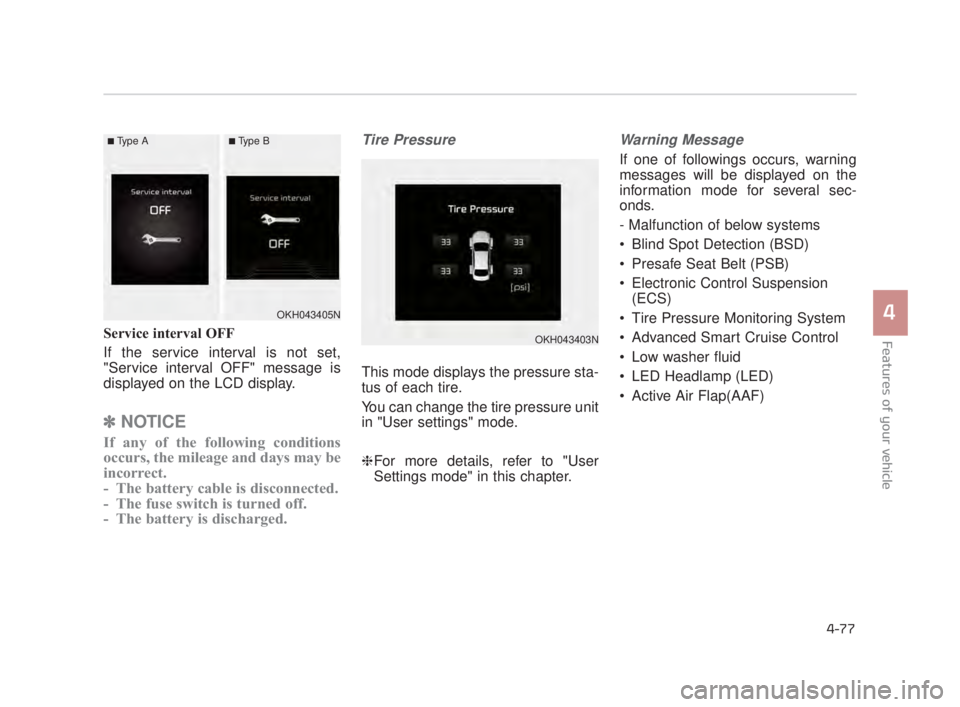
If the service interval is not set,
"Service interval OFF" message is
displayed on the LCD display.
✽NOTICE
If any of the following conditions
occurs, the mileage and days may be
incorrect.
- The battery cable is disconnected.
- The fuse switch is turned off.
- The battery is discharged.
Tire Pressure
This mode displays the pressure sta-
tus of each tire.
You can change the tire pressure unit
in "User settings" mode.
❈For more details, refer to "User
Settings mode" in this chapter.
Warning Message
If one of followings occurs, warning
messages will be displayed on the
information mode for several sec-
onds.
- Malfunction of below systems
Blind Spot Detection (BSD)
Presafe Seat Belt (PSB)
Electronic Control Suspension
(ECS)
Tire Pressure Monitoring System
Advanced Smart Cruise Control
Low washer fluid
LED Headlamp (LED)
Active Air Flap(AAF)
OKH043403N
OKH043405N
■Type A■Type B
KH USA 4:2015 3/24/2015 4:39 PM Page 77
Page 165 of 542
Features of your vehicle
4
4-85
Warning Messages
(if equipped)
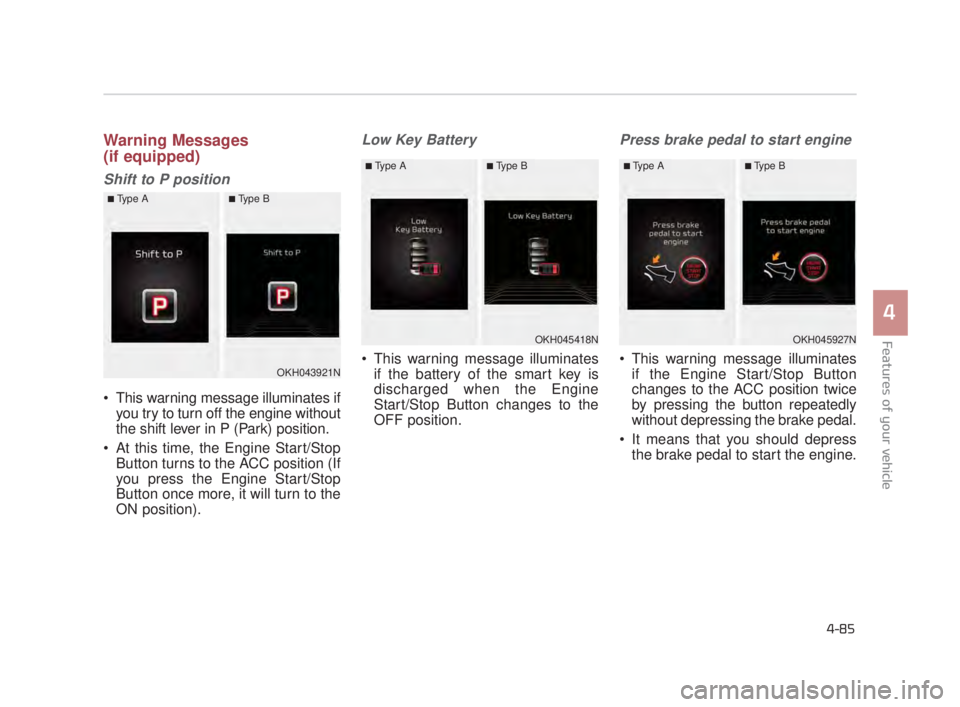
Shift to P position
This warning message illuminates ifyou try to turn off the engine without
the shift lever in P (Park) position.
At this time, the Engine Start/Stop Button turns to the ACC position (If
you press the Engine Start/Stop
Button once more, it will turn to the
ON position).
Low Key Battery
This warning message illuminatesif the battery of the smart key is
discharged when the Engine
Start/Stop Button changes to the
OFF position.
Press brake pedal to start engine
This warning message illuminatesif the Engine Start/Stop Button
changes to the ACC position twice
by pressing the button repeatedly
without depressing the brake pedal.
It means that you should depress the brake pedal to start the engine.OKH043921N
■Type A■Type B
OKH045418N
■Type A■Type B
OKH045927N
■Type A■Type B
KH USA 4:2015 3/24/2015 4:39 PM Page 85
Page 168 of 542
Features of your vehicle
4-88
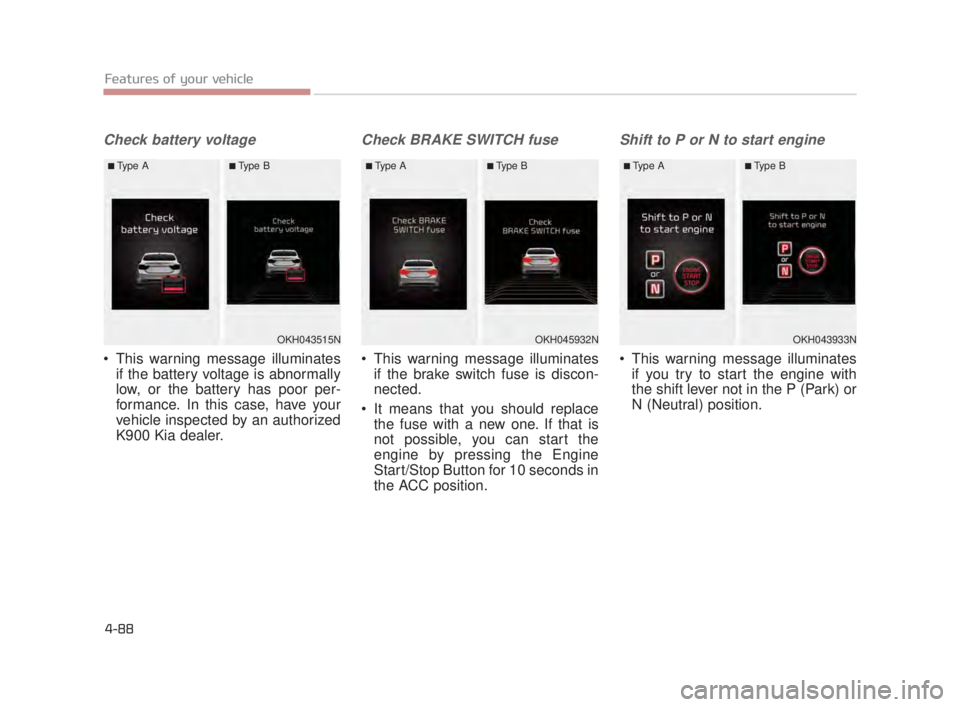
Check battery voltage
This warning message illuminatesif the battery voltage is abnormally
low, or the battery has poor per-
formance. In this case, have your
vehicle inspected by an authorized
K900 Kia dealer.
Check BRAKE SWITCH fuse
This warning message illuminatesif the brake switch fuse is discon-
nected.
It means that you should replace the fuse with a new one. If that is
not possible, you can start the
engine by pressing the Engine
Start/Stop Button for 10 seconds in
the ACC position.
Shift to P or N to start engine
This warning message illuminatesif you try to start the engine with
the shift lever not in the P (Park) or
N (Neutral) position.
OKH043515N
■Type A■Type B
OKH045932N
■Type A■Type B
OKH043933N
■Type A■Type B
KH USA 4:2015 3/24/2015 4:39 PM Page 88
Page 176 of 542
Features of your vehicle
4-96
Overview
Description
The trip computer is a microcomput-
er-controlled driver information sys-
tem that displays information related
to driving.
✽NOTICE
Some driving information stored in
the trip computer (for example
Average Vehicle Speed) resets if the
battery is disconnected.
Trip ModesFuel Economy
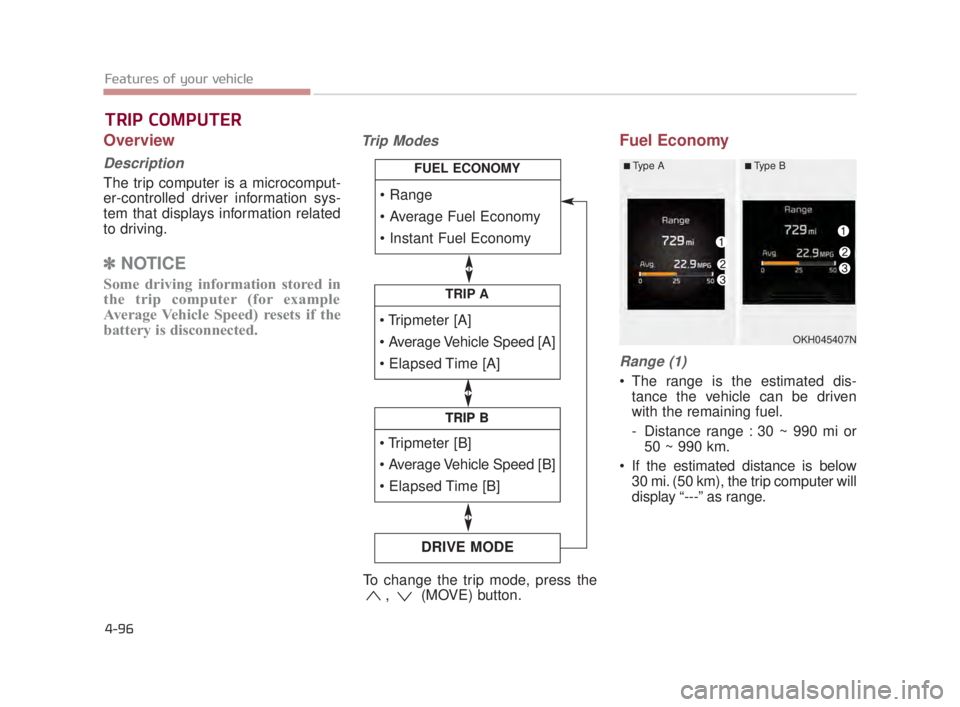
Range (1)
The range is the estimated dis-
tance the vehicle can be driven
with the remaining fuel.
- Distance range : 30 ~ 990 mi or50 ~ 990 km.
If the estimated distance is below 30 mi. (50 km), the trip computer will
display “---” as range.
TRIP COMPUTER
TRIP A
TRIP B
DRIVE MODE
TRIP B
FUEL ECONOMY
To change the trip mode, press the , (MOVE) button.
OKH045407N
■Type A■Type B
KH USA 4:2015 3/24/2015 4:40 PM Page 96
Page 177 of 542
Features of your vehicle
4
4-97
✽NOTICE
• If the vehicle is not on level ground
or the battery power has been
interrupted, the range function
may not operate correctly.
• The range may differ from the actual driving distance as it is an
estimate of the available driving
distance.
• The trip computer may not register additional fuel if less than 1.6 gal-
lons (6 liters) of fuel are added to
the vehicle.
• The fuel economy and range may vary significantly based on driving
conditions, driving habits, and con-
dition of the vehicle.
Average Fuel Economy (2)
The average fuel economy is calcu-
lated by the total driving distance
and fuel consumption since the last
average fuel economy reset.
- Fuel economy range: 0.0 ~ 99.9MPG or L/100km
The average fuel economy can be reset both manually and automati-
cally.
Manual reset
To clear the average fuel economy
manually, press the OK (RESET) but-
ton on the steering wheel for more
than 1 second when the average fuel
economy is displayed. Automatic reset
To make the average fuel economy
be reset automatically whenever refu-
eling, select the “Auto Reset” mode in
User Setting menu of the LCD display
(Refer to “LCD Display”).
Under “Auto Reset” mode, the aver-
age fuel economy will be cleared to
zero (---) when the vehicle speed
exceeds 1 km/h after refueling more
than 1.6 gallons (6 liters).
✽
NOTICE
The average fuel economy is not dis-
played for more accurate calculation
if the vehicle does not drive more
than 0.19 miles (300 meters) since
the Engine Start/Stop button is
turned to ON.
KH USA 4:2015 3/24/2015 4:40 PM Page 97
Page 193 of 542
Features of your vehicle
4
4-113
This indicator light illuminates for 2
seconds and goes off:
When the vehicle can not detectthe smart key which is in the vehi-
cle while the Engine Start/Stop
Button is ON.
In this case, have your vehicle
inspected by an authorized K900
Kia dealer.
This indicator light blinks:
When the battery of the smart key is weak.
- At this time, you can not start theengine. However, you can start
the engine if you press the Engine
Start/Stop Button with the smart
key. (For more details, refer to
“Starting the Engine” in chapter
5).
When there is a malfunction with the immobilizer system.
In this case, have your vehicle
inspected by an authorized K900
Kia dealer.Turn Signal Indicator
Light
This indicator light blinks:
When you turn the turn signal light on.
If any of the following occurs, there
may be a malfunction with the turn
signal system. In this case, have your
vehicle inspected by an authorized
K900 Kia dealer. - The indicator light does not blinkbut illuminates.
- The indicator light blinks more rapidly.
- The indicator light does not illu- minate at all.
High Beam Indicator
Light
This indicator light illuminates:
When the headlights are on and in the high beam position.
When the turn signal lever is pulled into the Flash-to-Pass position.
KH USA 4:2015 3/24/2015 4:40 PM Page 113