buttons KIA K900 2016 User Guide
[x] Cancel search | Manufacturer: KIA, Model Year: 2016, Model line: K900, Model: KIA K900 2016Pages: 542, PDF Size: 38.35 MB
Page 225 of 542
Features of your vehicle
4
4-145
Automatic heating and air con-
ditioning
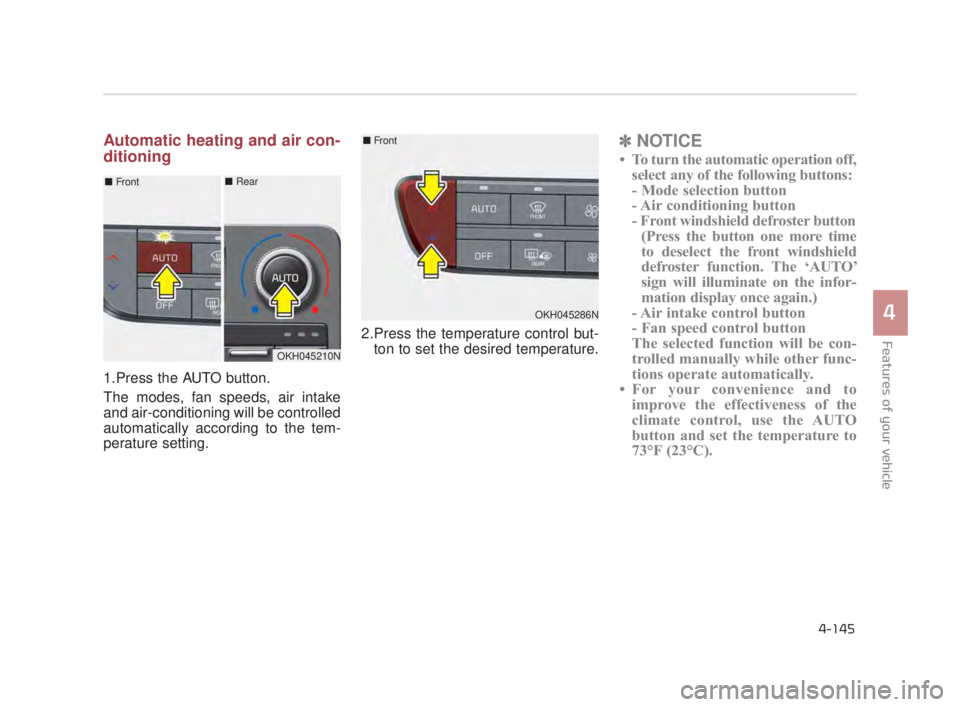
1.Press the AUTO button.
The modes, fan speeds, air intake
and air-conditioning will be controlled
automatically according to the tem-
perature setting.2.Press the temperature control but-
ton to set the desired temperature.
✽ NOTICE
• To turn the automatic operation off,
select any of the following buttons:
- Mode selection button
- Air conditioning button
- Front windshield defroster button(Press the button one more time
to deselect the front windshield
defroster function. The ‘AUTO’
sign will illuminate on the infor-
mation display once again.)
- Air intake control button
- Fan speed control button
The selected function will be con-
trolled manually while other func-
tions operate automatically.
• For your convenience and to improve the effectiveness of the
climate control, use the AUTO
button and set the temperature to
73°F (23°C).
OKH045210N
■ Front■Rear
OKH045286N
■Front
KH USA 4:2015 3/24/2015 4:42 PM Page 145
Page 226 of 542
Features of your vehicle
4-146
✽NOTICE
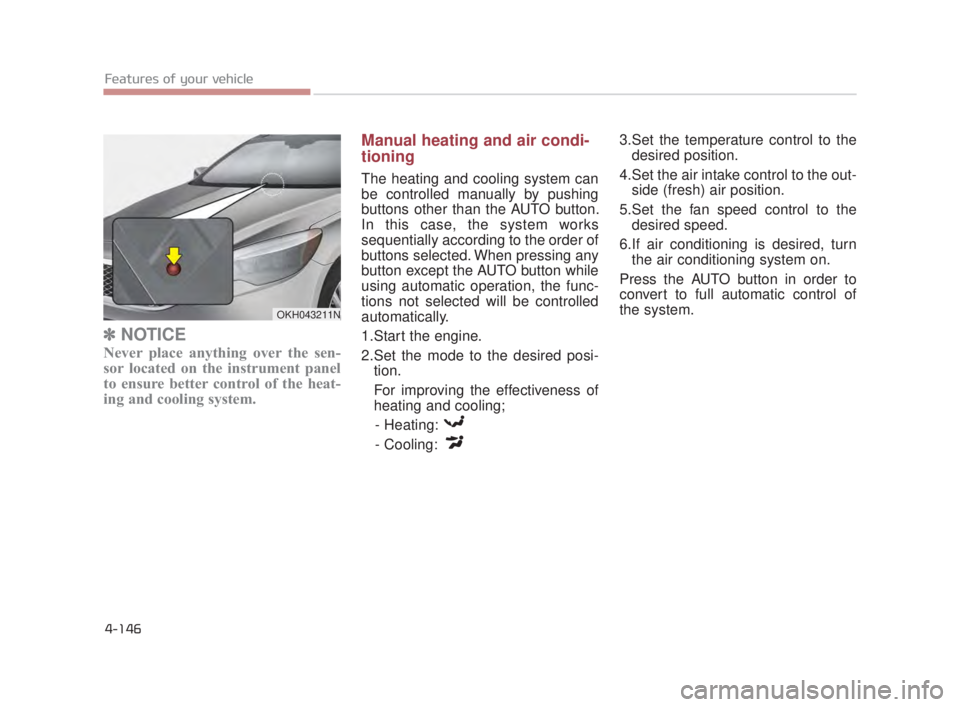
Never place anything over the sen-
sor located on the instrument panel
to ensure better control of the heat-
ing and cooling system.
Manual heating and air condi-
tioning
The heating and cooling system can
be controlled manually by pushing
buttons other than the AUTO button.
In this case, the system works
sequentially according to the order of
buttons selected. When pressing any
button except the AUTO button while
using automatic operation, the func-
tions not selected will be controlled
automatically.
1.Start the engine.
2.Set the mode to the desired posi-
tion.
For improving the effectiveness of
heating and cooling;
- Heating:
- Cooling: 3.Set the temperature control to the
desired position.
4.Set the air intake control to the out- side (fresh) air position.
5.Set the fan speed control to the desired speed.
6.If air conditioning is desired, turn the air conditioning system on.
Press the AUTO button in order to
convert to full automatic control of
the system.
OKH043211N
KH USA 4:2015 3/24/2015 4:42 PM Page 146
Page 233 of 542
Features of your vehicle
4
4-153
Fan speed control
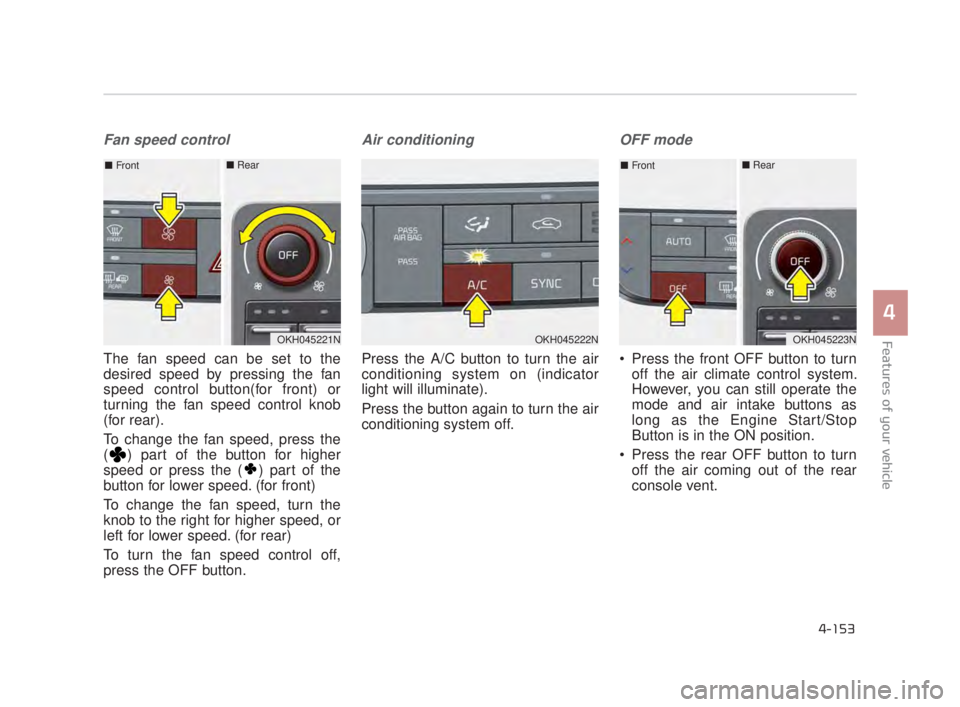
The fan speed can be set to the
desired speed by pressing the fan
speed control button(for front) or
turning the fan speed control knob
(for rear).
To change the fan speed, press the
( ) part of the button for higher
speed or press the ( ) part of the
button for lower speed. (for front)
To change the fan speed, turn the
knob to the right for higher speed, or
left for lower speed. (for rear)
To turn the fan speed control off,
press the OFF button.
Air conditioning
Press the A/C button to turn the air
conditioning system on (indicator
light will illuminate).
Press the button again to turn the air
conditioning system off.
OFF mode
Press the front OFF button to turnoff the air climate control system.
However, you can still operate the
mode and air intake buttons as
long as the Engine Start/Stop
Button is in the ON position.
Press the rear OFF button to turn off the air coming out of the rear
console vent.
OKH045222NOKH045221N
■ Front■ Rear
OKH045223N
■Front■ Rear
KH USA 4:2015 3/24/2015 4:43 PM Page 153
Page 262 of 542
Steering wheel audio control
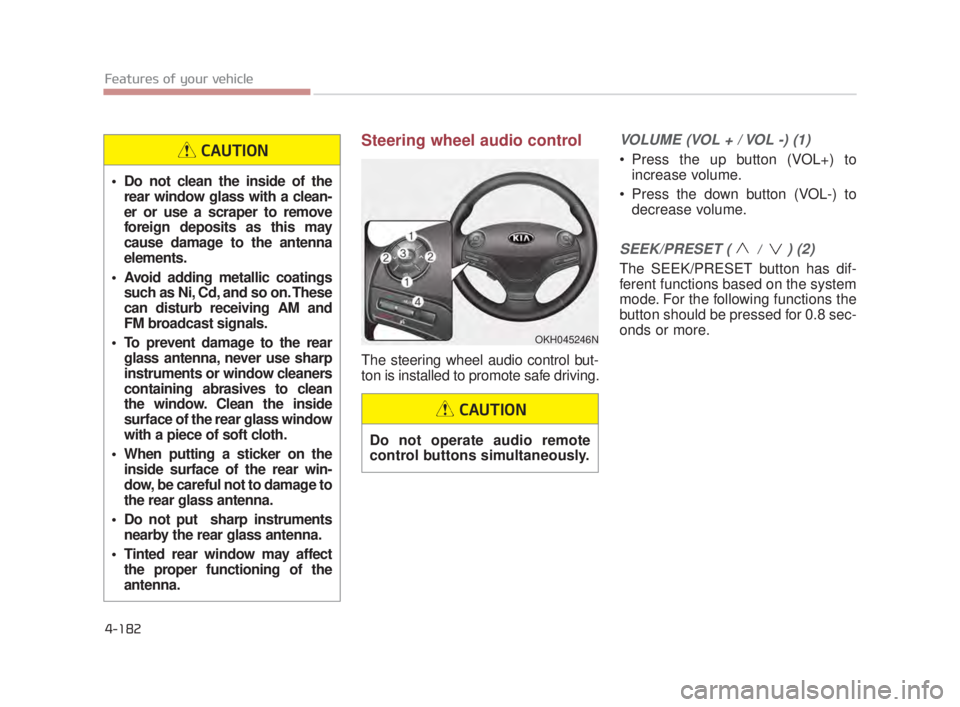
The steering wheel audio control but-
ton is installed to promote safe driving.
VOLUME (VOL + / VOL -) (1)
Press the up button (VOL+) toincrease volume.
Press the down button (VOL-) to decrease volume.
SEEK/PRESET ( / ) (2)
The SEEK/PRESET button has dif-
ferent functions based on the system
mode. For the following functions the
button should be pressed for 0.8 sec-
onds or more.
OKH045246N
Do not clean the inside of therear window glass with a clean-
er or use a scraper to remove
foreign deposits as this may
cause damage to the antenna
elements.
Avoid adding metallic coatings such as Ni, Cd, and so on. These
can disturb receiving AM and
FM broadcast signals.
To prevent damage to the rear glass antenna, never use sharp
instruments or window cleaners
containing abrasives to clean
the window. Clean the inside
surface of the rear glass window
with a piece of soft cloth.
When putting a sticker on the inside surface of the rear win-
dow, be careful not to damage to
the rear glass antenna.
Do not put sharp instruments nearby the rear glass antenna.
Tinted rear window may affect the proper functioning of the
antenna.
CAUTION
Do not operate audio remote
control buttons simultaneously.
CAUTION
4-182 Features of your vehicle
KH USA 4:2015 3/24/2015 4:45 PM Page 182
Page 263 of 542
RADIO mode
It will function as the AUTO SEEK
select button.
CD/USB/iPod mode
It will function as the FF/REW button.
If the SEEK/PRESET button is
pressed for less than 0.8 seconds, it
will work as follows in each mode.
RADIO mode
It will function as the PRESET STA-
TION buttons.
CD/USB/iPod mode
It will function as TRACK UP/DOWN
button.MODE (3)
Press the MODE button to select
Radio, DISC, USB or AUX.
When the AV is OFF and the MODE
button is pressed for less than 0.8
second, the AV will turn on.
When the AV is ON and the MODE
button is press for more than 0.8 sec-
ond, the AV will turn off.
MUTE (4)
Move the MUTE lever up to cancelthe sound.
Move the MUTE lever up again to activate the sound.
Detailed information is described in a
separately supplied manual.
4-183
4
Features of your vehicle
4
KH USA 4:2015 3/24/2015 4:45 PM Page 183