door lock KIA K900 2016 User Guide
[x] Cancel search | Manufacturer: KIA, Model Year: 2016, Model line: K900, Model: KIA K900 2016Pages: 542, PDF Size: 38.35 MB
Page 92 of 542
Features of your vehicle
4-12
To lock:
1.Remove the mechanical key fromthe Smart Key.
2.Unlock the glove box by using the mechanical key, then open it.
3.Set the Trunk Lid Control button to the OFF position (not depressed).
4.Close and lock the glove box using the mechanical key.
5.Leave the Smart Key with the attendant and keep the mechanical
key with you.
The Smart Key can only be used to
start the engine and operate door
locks.
To release:
1.Open the glove box with the mechanical key.
2.Set the Trunk Lid Control button to the ON position (depressed).
In this position the trunk lid will open
with the Trunk Lid button or the
Smart Key. Immobilizer system
Your vehicle is equipped with an
electronic engine immobilizer system
to reduce the risk of unauthorized
vehicle use.
Whenever the ENGINE START/STOP
button is changed to the ON position,
the immobilizer system checks and
verifies if the key is valid or not.
If the key is valid, the engine will start.
If the key is invalid, the engine will
not start.
To deactivate the immobilizer system
Change the ENGINE START/STOP
button to the ON position.
To activate the immobilizer system
Change the ENGINE START/STOP
button to the OFF position. The immo-
bilizer system activates automatically.
Without a valid smart key for your
vehicle, the engine will not start.
Your immobilizer password is a cus-
tomer unique password and should
be kept confidential. Do not leave this
number anywhere in your vehicle.
✽ NOTICE
Keep each key separate in order to
avoid a starting malfunction.
KH USA 4:2015 3/24/2015 4:35 PM Page 12
Page 94 of 542
Features of your vehicle
4-14
THEFT-ALARM SYSTEM
This system is designed to provide
protection from unauthorized entry
into the vehicle. This system is operat-
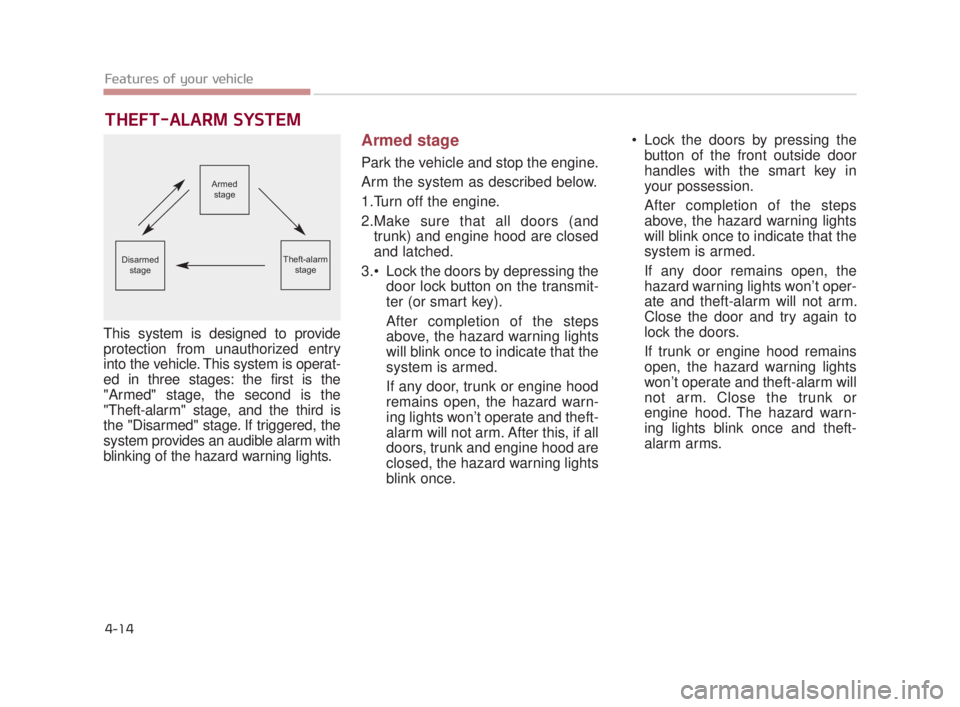
ed in three stages: the first is the
"Armed" stage, the second is the
"Theft-alarm" stage, and the third is
the "Disarmed" stage. If triggered, the
system provides an audible alarm with
blinking of the hazard warning lights.
Armed stage
Park the vehicle and stop the engine.
Arm the system as described below.
1.Turn off the engine.
2.Make sure that all doors (andtrunk) and engine hood are closed
and latched.
Lock the doors by depressing the door lock button on the transmit-
ter (or smart key).
After completion of the steps
above, the hazard warning lights
will blink once to indicate that the
system is armed.
If any door, trunk or engine hood
remains open, the hazard warn-
ing lights won’t operate and theft-
alarm will not arm. After this, if all
doors, trunk and engine hood are
closed, the hazard warning lights
blink once. Lock the doors by pressing the
button of the front outside door
handles with the smart key in
your possession.
After completion of the steps
above, the hazard warning lights
will blink once to indicate that the
system is armed.
If any door remains open, the
hazard warning lights won’t oper-
ate and theft-alarm will not arm.
Close the door and try again to
lock the doors.
If trunk or engine hood remains
open, the hazard warning lights
won’t operate and theft-alarm will
not arm. Close the trunk or
engine hood. The hazard warn-
ing lights blink once and theft-
alarm arms.
Armed
stage
Theft-alarm stageDisarmedstage
KH USA 4:2015 3/24/2015 4:35 PM Page 14
Page 95 of 542
Features of your vehicle
4
4-15
The theft-alarm system by the key
can be activated by an authorized
Kia dealer.
If you want this feature, consult an
authorized K900 Kia dealer.
Do not arm the system until all
passengers have left the vehicle. If
the system is armed while a pas-
senger(s) remains in the vehicle,
the alarm may be activated when
the remaining passenger(s)
leaves the vehicle. If any door (or
trunk) or engine hood is opened
within 30 seconds after the sys-
tem enters the armed stage, the
system will be disarmed to pre-
vent unnecessary alarm.Theft-alarm stage
The alarm will be activated if any of
the following occurs while the system
is armed.
A front or rear door is opened with-out using the smart key (or
mechanical key).
The trunk is opened without using the smart key (or mechanical key).
The engine hood is opened.
The horn will sound and the hazard
warning lights will blink continuously
for approximately 27 seconds. To
turn off the system, unlock the doors
with the smart key.
Disarmed stage
The system will be disarmed when:
- The door unlock button is pressed.
- The button of the front outside door is pressed while carrying the smart
key.
- The engine is started. (within 3 seconds)
After the doors are unlocked, the haz-
ard warning lights will blink twice to
indicate that the system is disarmed.
After pressing the unlock button, if
any door (or trunk) is not opened
within 30 seconds, the system will be
rearmed.
KH USA 4:2015 3/24/2015 4:35 PM Page 15
Page 97 of 542
Features of your vehicle
4
4-17
DOOR LOCKS
Operating door locks from
outside the vehicle
Mechanical key
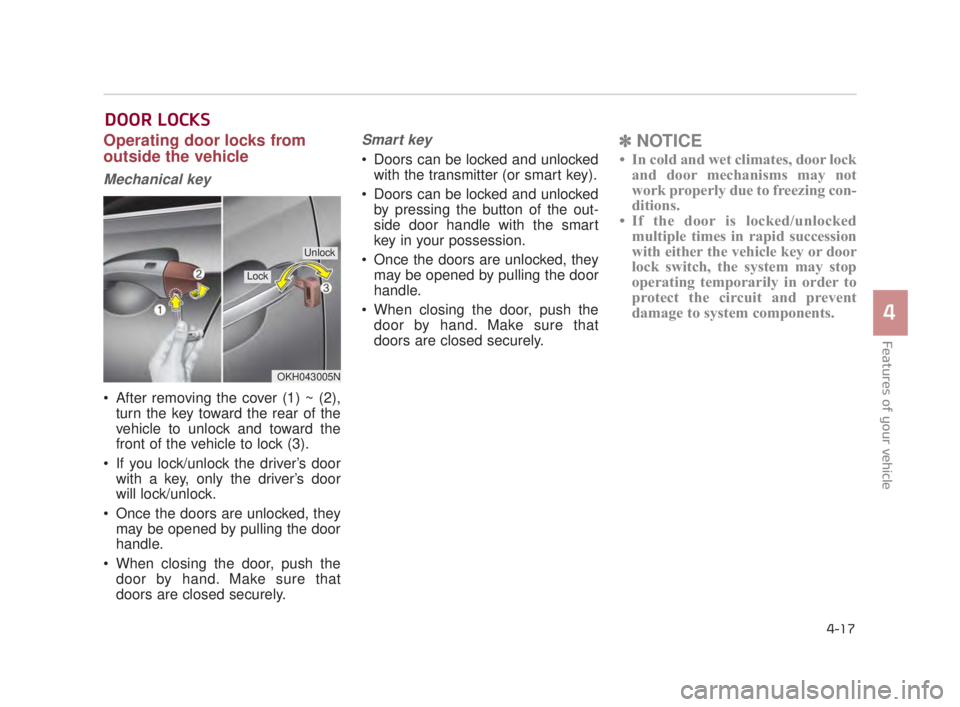
After removing the cover (1) ~ (2),turn the key toward the rear of the
vehicle to unlock and toward the
front of the vehicle to lock (3).
If you lock/unlock the driver’s door with a key, only the driver’s door
will lock/unlock.
Once the doors are unlocked, they may be opened by pulling the door
handle.
When closing the door, push the door by hand. Make sure that
doors are closed securely.
Smart key
Doors can be locked and unlockedwith the transmitter (or smart key).
Doors can be locked and unlocked by pressing the button of the out-
side door handle with the smart
key in your possession.
Once the doors are unlocked, they may be opened by pulling the door
handle.
When closing the door, push the door by hand. Make sure that
doors are closed securely.
✽ NOTICE
• In cold and wet climates, door lock
and door mechanisms may not
work properly due to freezing con-
ditions.
• If the door is locked/unlocked multiple times in rapid succession
with either the vehicle key or door
lock switch, the system may stop
operating temporarily in order to
protect the circuit and prevent
damage to system components.
OKH043005N
Lock
Unlock
KH USA 4:2015 3/24/2015 4:35 PM Page 17
Page 98 of 542
Features of your vehicle
4-18
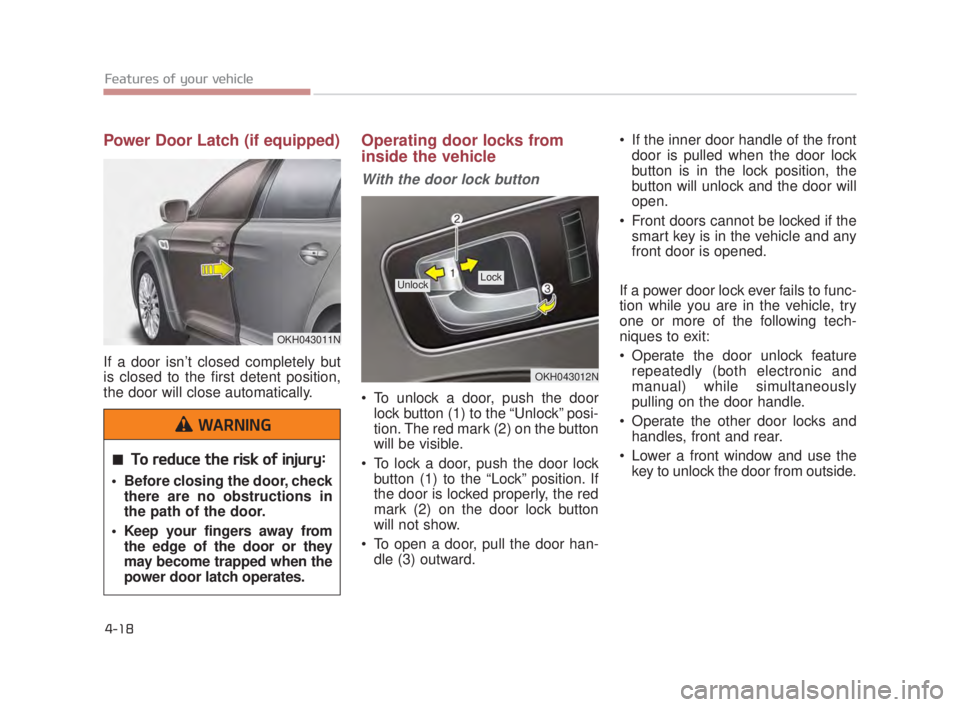
Power Door Latch (if equipped)
If a door isn’t closed completely but
is closed to the first detent position,
the door will close automatically.
Operating door locks from
inside the vehicle
With the door lock button
To unlock a door, push the doorlock button (1) to the “Unlock” posi-
tion. The red mark (2) on the button
will be visible.
To lock a door, push the door lock button (1) to the “Lock” position. If
the door is locked properly, the red
mark (2) on the door lock button
will not show.
To open a door, pull the door han- dle (3) outward. If the inner door handle of the front
door is pulled when the door lock
button is in the lock position, the
button will unlock and the door will
open.
Front doors cannot be locked if the smart key is in the vehicle and any
front door is opened.
If a power door lock ever fails to func-
tion while you are in the vehicle, try
one or more of the following tech-
niques to exit:
Operate the door unlock feature repeatedly (both electronic and
manual) while simultaneously
pulling on the door handle.
Operate the other door locks and handles, front and rear.
Lower a front window and use the key to unlock the door from outside.
OKH043012N
Lock Unlock
OKH043011N
To reduce the risk of injury:
Before closing the door, checkthere are no obstructions in
the path of the door.
Keep your fingers away from the edge of the door or they
may become trapped when the
power door latch operates.
WARNING
KH USA 4:2015 3/24/2015 4:35 PM Page 18
Page 99 of 542
Features of your vehicle
4
4-19
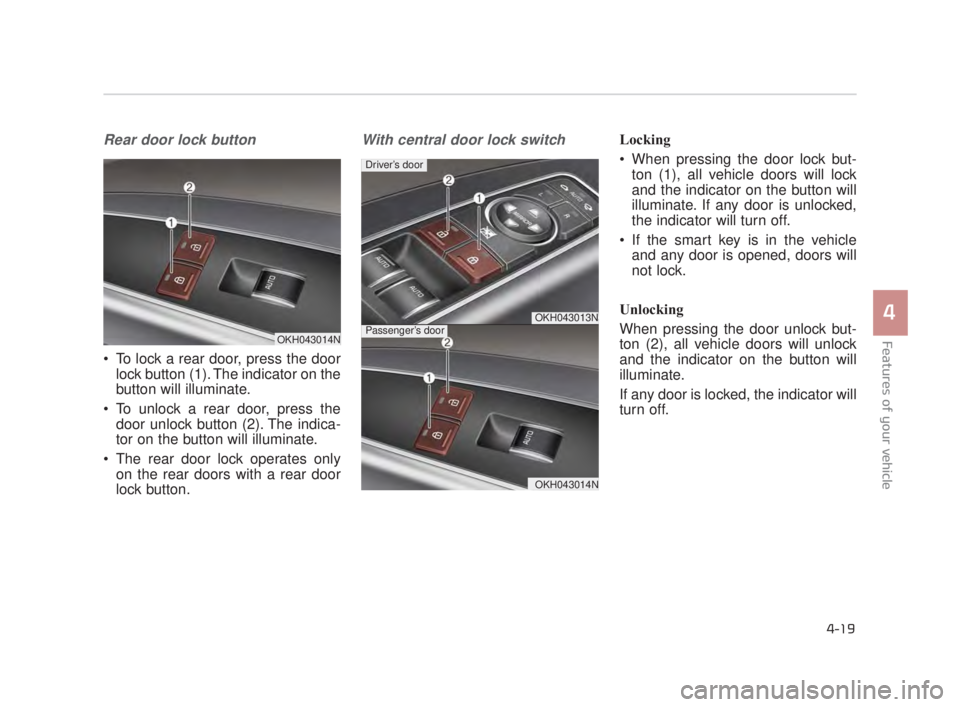
Rear door lock button
To lock a rear door, press the doorlock button (1). The indicator on the
button will illuminate.
To unlock a rear door, press the door unlock button (2). The indica-
tor on the button will illuminate.
The rear door lock operates only on the rear doors with a rear door
lock button.
With central door lock switchLocking
When pressing the door lock but-ton (1), all vehicle doors will lock
and the indicator on the button will
illuminate. If any door is unlocked,
the indicator will turn off.
If the smart key is in the vehicle and any door is opened, doors will
not lock.
Unlocking
When pressing the door unlock but-
ton (2), all vehicle doors will unlock
and the indicator on the button will
illuminate.
If any door is locked, the indicator will
turn off.
OKH043013N
OKH043014N
Driver’s door
Passenger’s doorOKH043014N
KH USA 4:2015 3/24/2015 4:35 PM Page 19
Page 100 of 542
Features of your vehicle
4-20
Impact sensing door unlock
system
All doors will automatically unlock
when an impact causes the air bags
to deploy.
Auto door lock/unlock feature
You can activate or deactivate the
auto door lock/unlock features in the
vehicle. Refer to "LCD display" in this
chapter.
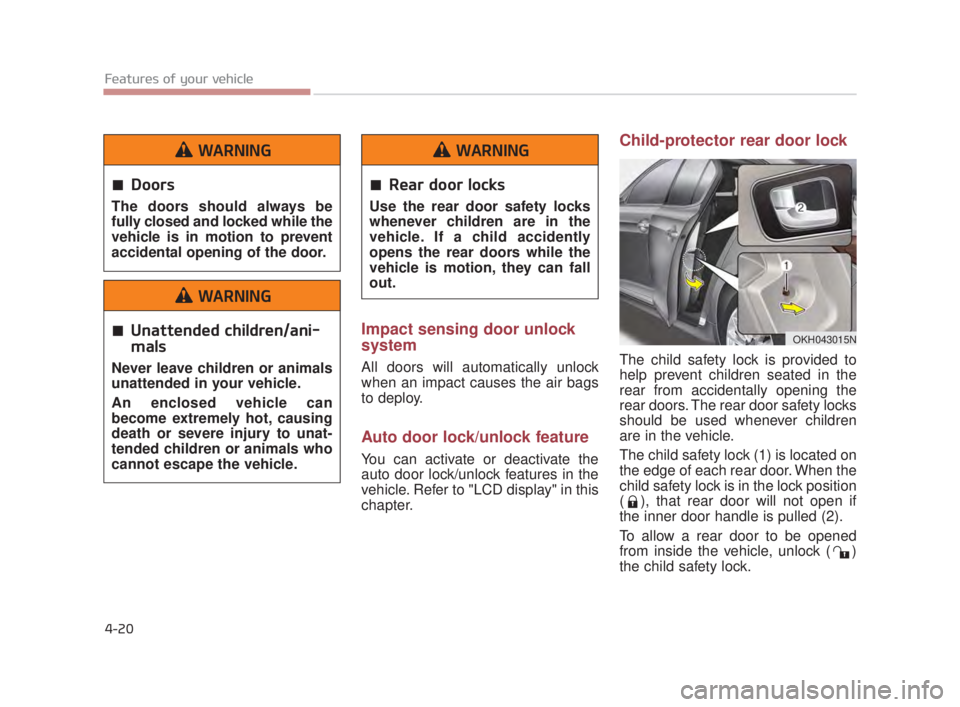
Child-protector rear door lock
The child safety lock is provided to
help prevent children seated in the
rear from accidentally opening the
rear doors. The rear door safety locks
should be used whenever children
are in the vehicle.
The child safety lock (1) is located on
the edge of each rear door. When the
child safety lock is in the lock position
( ), that rear door will not open if
the inner door handle is pulled (2).
To allow a rear door to be opened
from inside the vehicle, unlock ( )
the child safety lock.
OKH043015N
Doors
The doors should always be
fully closed and locked while the
vehicle is in motion to prevent
accidental opening of the door.
WARNING
Unattended children/ani-
mals
Never leave children or animals
unattended in your vehicle.
An enclosed vehicle can
become extremely hot, causing
death or severe injury to unat-
tended children or animals who
cannot escape the vehicle.
WARNING
Rear door locks
Use the rear door safety locks
whenever children are in the
vehicle. If a child accidently
opens the rear doors while the
vehicle is motion, they can fall
out.
WARNING
KH USA 4:2015 3/24/2015 4:36 PM Page 20
Page 102 of 542
Features of your vehicle
4-22
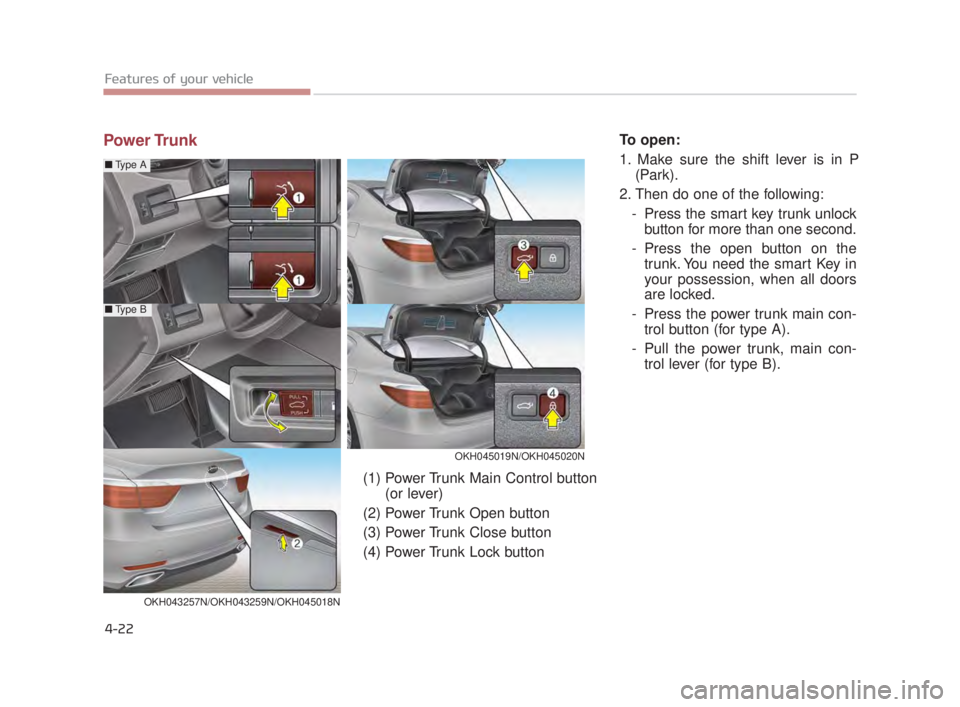
Power TrunkTo open:
1. Make sure the shift lever is in P(Park).
2. Then do one of the following: - Press the smart key trunk unlockbutton for more than one second.
- Press the open button on the trunk. You need the smart Key in
your possession, when all doors
are locked.
- Press the power trunk main con- trol button (for type A).
- Pull the power trunk, main con- trol lever (for type B).
OKH045019N/OKH045020N
■ Type A
■Type B
OKH043257N/OKH043259N/OKH045018N
(1) Power Trunk Main Control button
(or lever)
(2) Power Trunk Open button
(3) Power Trunk Close button
(4) Power Trunk Lock button
KH USA 4:2015 3/24/2015 4:36 PM Page 22
Page 103 of 542
Features of your vehicle
4
4-23
To close:
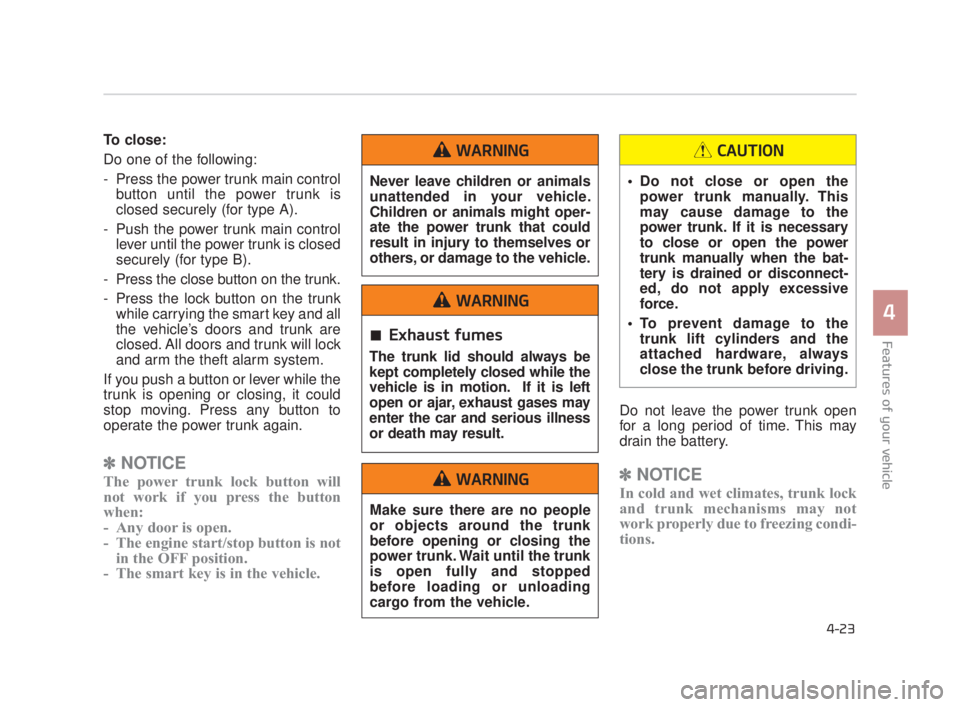
Do one of the following:
- Press the power trunk main controlbutton until the power trunk is
closed securely (for type A).
- Push the power trunk main control lever until the power trunk is closed
securely (for type B).
- Press the close button on the trunk.
- Press the lock button on the trunk while carrying the smart key and all
the vehicle’s doors and trunk are
closed. All doors and trunk will lock
and arm the theft alarm system.
If you push a button or lever while the
trunk is opening or closing, it could
stop moving. Press any button to
operate the power trunk again.
✽ NOTICE
The power trunk lock button will
not work if you press the button
when:
- Any door is open.
- The engine start/stop button is not
in the OFF position.
- The smart key is in the vehicle.
Do not leave the power trunk open
for a long period of time. This may
drain the battery.
✽ NOTICE
In cold and wet climates, trunk lock
and trunk mechanisms may not
work properly due to freezing condi-
tions.
Never leave children or animals
unattended in your vehicle.
Children or animals might oper-
ate the power trunk that could
result in injury to themselves or
others, or damage to the vehicle.
WARNING
Exhaust fumes
The trunk lid should always be
kept completely closed while the
vehicle is in motion. If it is left
open or ajar, exhaust gases may
enter the car and serious illness
or death may result.
WARNING
Make sure there are no people
or objects around the trunk
before opening or closing the
power trunk. Wait until the trunk
is open fully and stopped
before loading or unloading
cargo from the vehicle.
WARNING
Do not close or open the
power trunk manually. This
may cause damage to the
power trunk. If it is necessary
to close or open the power
trunk manually when the bat-
tery is drained or disconnect-
ed, do not apply excessive
force.
To prevent damage to the trunk lift cylinders and the
attached hardware, always
close the trunk before driving.
CAUTION
KH USA 4:2015 3/24/2015 4:36 PM Page 23
Page 108 of 542
How to use the Smart Trunk
The trunk can be opened with
notouch activation satisfying all the
conditions below.
After 15 seconds when all doorsare closed and locked
Positioned in the detecting area for more than 3 seconds.
✽ NOTICE
• The Smart Trunk does not operate
when:
- The smart key is detected within15 seconds after the doors are
closed and locked, and is contin-
uously detected.
- The smart key is detected within 15 seconds after the doors are
closed and locked, and within 60
inches (1.5 m) from the front
door handles. (for vehicles
equipped with Welcome Light)
- A door is not locked or closed.
- The smart key is in the vehicle.
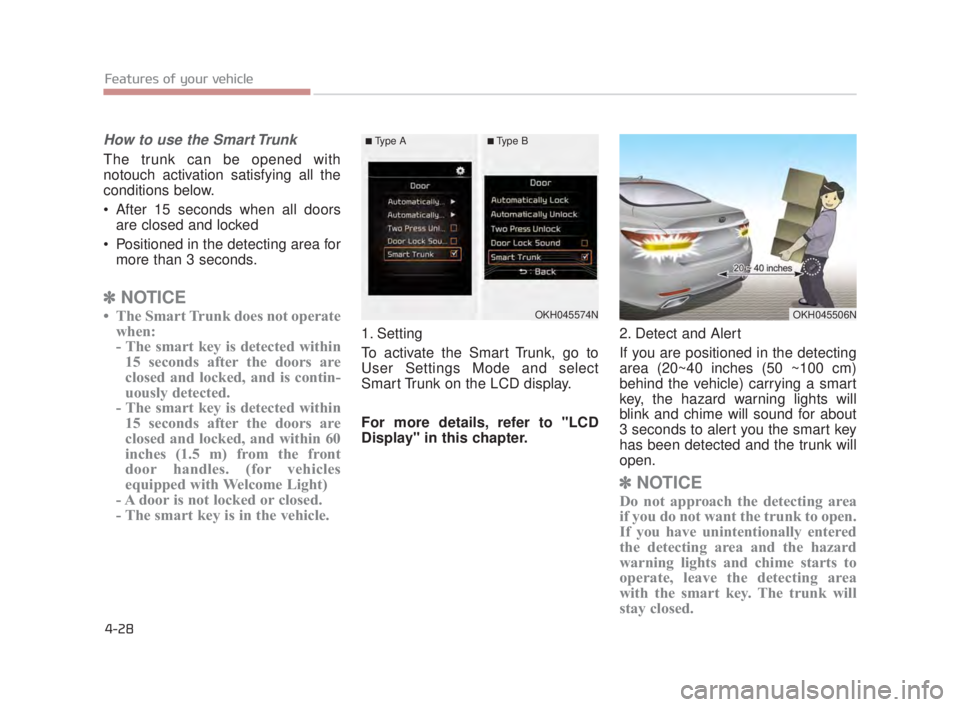
1. Setting
To activate the Smart Trunk, go to
User Settings Mode and select
Smart Trunk on the LCD display.
For more details, refer to "LCD
Display" in this chapter. 2. Detect and Alert
If you are positioned in the detecting
area (20~40 inches (50 ~100 cm)
behind the vehicle) carrying a smart
key, the hazard warning lights will
blink and chime will sound for about
3 seconds to alert you the smart key
has been detected and the trunk will
open.
✽
NOTICE
Do not approach the detecting area
if you do not want the trunk to open.
If you have unintentionally entered
the detecting area and the hazard
warning lights and chime starts to
operate, leave the detecting area
with the smart key. The trunk will
stay closed.
Features of your vehicle
4-28
OKH045574NOKH045506N
■Type A■Type B
KH USA 4:2015 3/24/2015 4:36 PM Page 28