lock KIA K900 2016 Service Manual
[x] Cancel search | Manufacturer: KIA, Model Year: 2016, Model line: K900, Model: KIA K900 2016Pages: 542, PDF Size: 38.35 MB
Page 112 of 542
Features of your vehicle
4-32
In cold and wet climates, power win-
dows may not work properly due to
freezing conditions.
Power windows
The Engine Start/Stop button must
be in the ON position for power win-
dows to operate. Each door has a
power window switch that controls
the door’s window. The driver has a
power window lock switch which can
block the operation of rear passen-
ger windows.
The power windows can be operated
for approximately 30 seconds after
engine is turned off. However, if the
front doors are opened, the power
windows cannot be operated even
within the 30 second period.
✽NOTICE
While driving with the rear windows
down or with the sunroof (if
equipped) in an open (or partially
open) position, your vehicle may
demonstrate a wind buffeting or
pulsation noise. This noise is a nor-
mal occurrence and can be reduced
or eliminated by taking the follow-
ing actions. If the noise occurs with
one or both of the rear windows
down, partially lower both front
windows approximately one inch. If
you experience the noise with the
sunroof open, slightly reduce the
size of the sunroof opening.
Window opening and closing
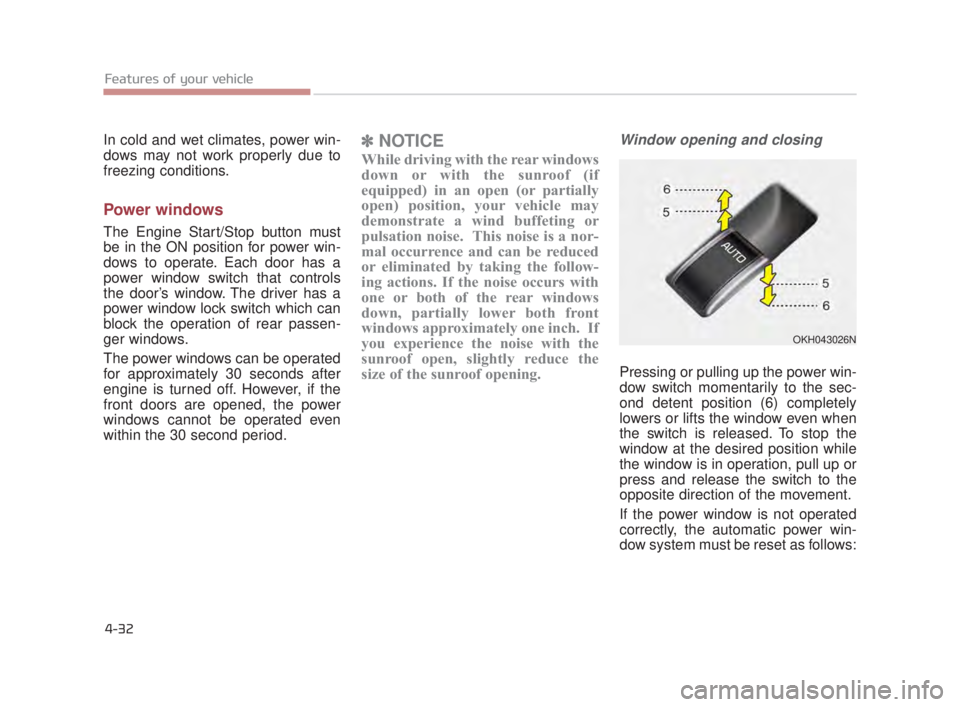
Pressing or pulling up the power win-
dow switch momentarily to the sec-
ond detent position (6) completely
lowers or lifts the window even when
the switch is released. To stop the
window at the desired position while
the window is in operation, pull up or
press and release the switch to the
opposite direction of the movement.
If the power window is not operated
correctly, the automatic power win-
dow system must be reset as follows:
OKH043026N
KH USA 4:2015 3/24/2015 4:36 PM Page 32
Page 113 of 542
Features of your vehicle
4
4-33
1.Press the Engine Start/Stop Buttontwice to the ON position.
2.Close the window and continue pulling up on the driver’s power
window switch for at least 1 second
after the window is completely
closed.
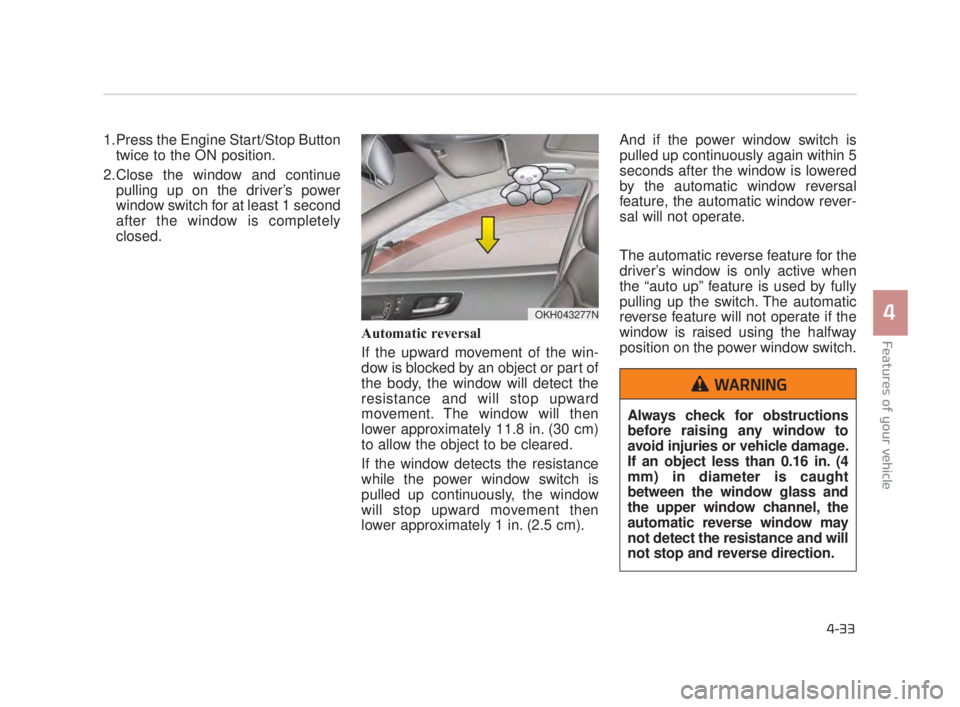
Automatic reversal
If the upward movement of the win-
dow is blocked by an object or part of
the body, the window will detect the
resistance and will stop upward
movement. The window will then
lower approximately 11.8 in. (30 cm)
to allow the object to be cleared.
If the window detects the resistance
while the power window switch is
pulled up continuously, the window
will stop upward movement then
lower approximately 1 in. (2.5 cm). And if the power window switch is
pulled up continuously again within 5
seconds after the window is lowered
by the automatic window reversal
feature, the automatic window rever-
sal will not operate.
The automatic reverse feature for the
driver’s window is only active when
the “auto up” feature is used by fully
pulling up the switch. The automatic
reverse feature will not operate if the
window is raised using the halfway
position on the power window switch.
OKH043277N
Always check for obstructions
before raising any window to
avoid injuries or vehicle damage.
If an object less than 0.16 in. (4
mm) in diameter is caught
between the window glass and
the upper window channel, the
automatic reverse window may
not detect the resistance and will
not stop and reverse direction.
WARNING
KH USA 4:2015 3/24/2015 4:36 PM Page 33
Page 114 of 542
Features of your vehicle
4-34
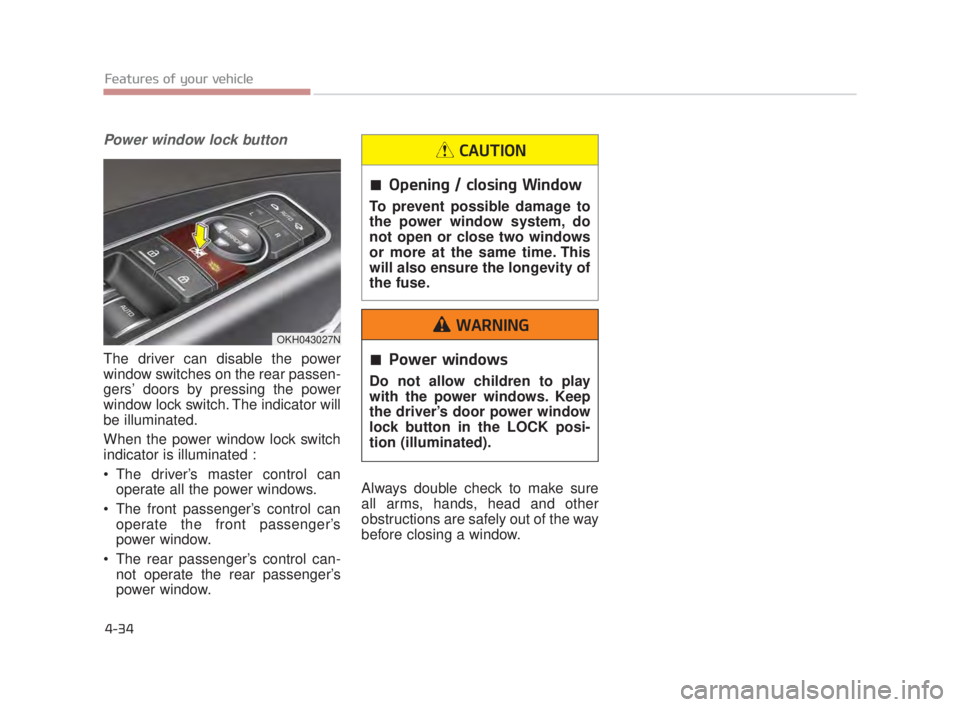
Power window lock button
The driver can disable the power
window switches on the rear passen-
gers’ doors by pressing the power
window lock switch. The indicator will
be illuminated.
When the power window lock switch
indicator is illuminated :
The driver’s master control canoperate all the power windows.
The front passenger’s control can operate the front passenger’s
power window.
The rear passenger’s control can- not operate the rear passenger’s
power window. Always double check to make sure
all arms, hands, head and other
obstructions are safely out of the way
before closing a window.
OKH043027N
Power windows
Do not allow children to play
with the power windows. Keep
the driver’s door power window
lock button in the LOCK posi-
tion (illuminated).
WARNING
Opening / closing Window
To prevent possible damage to
the power window system, do
not open or close two windows
or more at the same time. This
will also ensure the longevity of
the fuse.
CAUTION
KH USA 4:2015 3/24/2015 4:36 PM Page 34
Page 116 of 542
Features of your vehicle
4-36
Closing the hood
1.Before closing the hood, check thefollowing:
All filler caps in engine compart-ment must be correctly installed.
Gloves, rags or any other com- bustible material must be
removed from the engine com-
partment.
2.Lower the hood halfway and push down to securely lock in place.
Hood obstrution
Before closing the hood, ensure
that all obstructions are
removed from the hood open-
ing. Closing the hood with an
obstruction present in the hood
opening may result in property
damage or severe personal
injury.
WARNING
Fire risk
Do not leave gloves, rags or any
other combustible material in
the engine compartment. Doing
so may cause a heat-induced
fire.
WARNING
KH USA 4:2015 3/24/2015 4:36 PM Page 36
Page 117 of 542
Features of your vehicle
4
4-37
FUEL FILLER LID
Opening the fuel filler lid
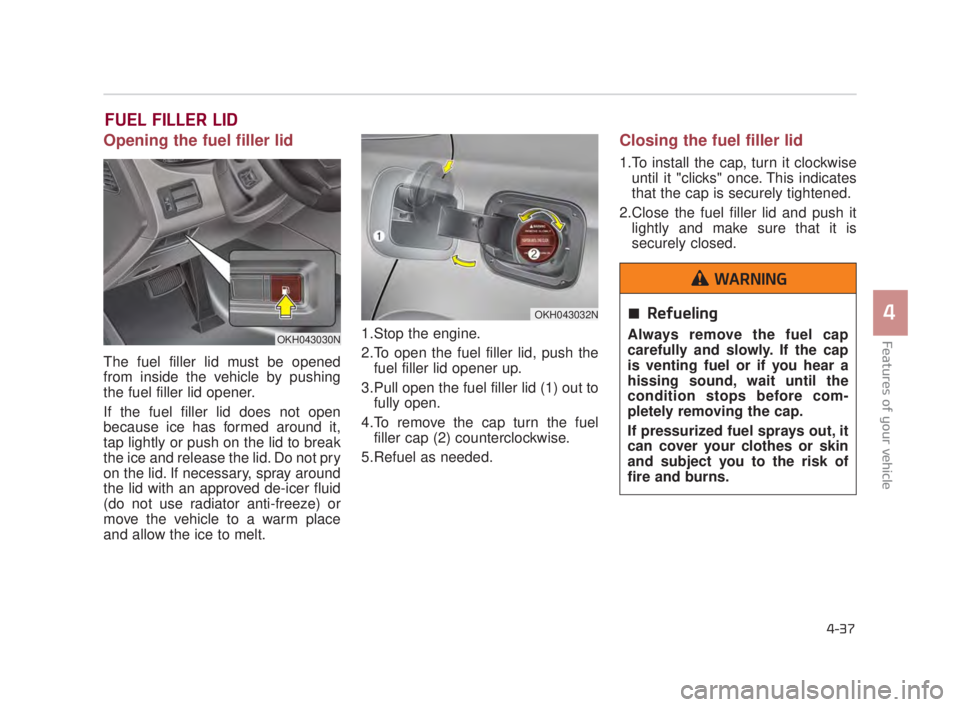
The fuel filler lid must be opened
from inside the vehicle by pushing
the fuel filler lid opener.
If the fuel filler lid does not open
because ice has formed around it,
tap lightly or push on the lid to break
the ice and release the lid. Do not pry
on the lid. If necessary, spray around
the lid with an approved de-icer fluid
(do not use radiator anti-freeze) or
move the vehicle to a warm place
and allow the ice to melt.1.Stop the engine.
2.To open the fuel filler lid, push the
fuel filler lid opener up.
3.Pull open the fuel filler lid (1) out to fully open.
4.To remove the cap turn the fuel filler cap (2) counterclockwise.
5.Refuel as needed.
Closing the fuel filler lid
1.To install the cap, turn it clockwise until it "clicks" once. This indicates
that the cap is securely tightened.
2.Close the fuel filler lid and push it lightly and make sure that it is
securely closed.
Refueling
Always remove the fuel cap
carefully and slowly. If the cap
is venting fuel or if you hear a
hissing sound, wait until the
condition stops before com-
pletely removing the cap.
If pressurized fuel sprays out, it
can cover your clothes or skin
and subject you to the risk of
fire and burns.
WARNING
OKH043030N
OKH043032N
KH USA 4:2015 3/24/2015 4:36 PM Page 37
Page 125 of 542

Features of your vehicle
4
4-45
STEERING WHEEL
Electronic Hydraulic Power
Steering (EHPS)
This system uses an electromotor to
assist you with steering the vehicle.
If the engine is turned off or if the
EHPS becomes inoperative, you
may still steer the vehicle, but it will
require increased steering effort.
Should you notice any change in the
effort required to steer during normal
vehicle operation, have the EHPS
checked by an authorized K900 Kia
dealer.
✽NOTICE
If the EHPS motor pump malfunc-
tions, the steering effort will greatly
increase.
✽NOTICE
If the vehicle is parked for extended
periods outside in cold weather
(below 14°F/-10°C), the power steer-
ing may require increased effort
when the engine is first started. This
is caused by increased fluid viscosity
due to the cold weather and does not
indicate a malfunction.
When this happens, increase the
engine RPM by depressing accelera-
tor until the RPM reaches 1,500 rpm
then release or let the engine idle for
two or three minutes to warm up the
fluid.
Tilt Steering/Telescope Steering
Adjust the steering wheel angle (2)
and position (3) with the knob (1) on
the steering column. Move the steer-
ing wheel, so it points toward your
chest, not toward your face. Make
sure you can see the instrument
panel warning lights and gauges.
After adjusting, push the steering
wheel both up and down to be cer-
tain it is locked in position. Always
adjust the position of the steering
wheel before driving.
Do not hold the steering wheel
to the extreme right or left for
more than five (5) seconds with
the engine running. This may
cause damage to the EHPS
motor pump.
CAUTION
OKH043042N
KH USA 4:2015 3/24/2015 4:37 PM Page 45
Page 131 of 542
Features of your vehicle
4
4-51
To adjust the Zone setting:
1.Determine the desired ZoneNumber based upon your current
location on the Zone Map.
2.Press and hold the button for more than 3, but less than 6 sec-
onds, the current Zone Number will
appear on the display.
3.Pressing and holding the button again will cause the numbers to
increment (Note: they will repeat
…13, 14, 15, 1, 2, …). Releasing
the button when the desired Zone
Number appears on the display will
set the new Zone.
4.Within about 5 seconds, the com- pass will start displaying a com-
pass heading again. There are some conditions that can
cause changes to the vehicle mag-
nets, such as installing a ski rack or a
CB antenna. Body repair work on the
vehicle can also cause changes to the
vehicle's magnetic field. In these situa-
tions, the compass will need to be re-
calibrated to quickly correct for these
changes. To re-calibrate the compass:
1.Press and hold the button for
more than 6 seconds. When the
compass memory is cleared, a "C"
will appear in the display.
2.To calibrate the compass, drive the vehicle in 2 complete circles at less
than 5 mph (8 km/h). Integrated HomeLink®
Wireless Control System
The HomeLink
®Wireless Control
System provides a convenient way to
replace up to three hand-held radio-
frequency (RF) transmitters with a
single built-in device. This innovative
feature will learn the radio frequency
codes of most current transmitters to
operate devices such as gate opera-
tors, garage door openers, entry
door locks, security systems, even
home lighting. Both standard and
rolling code-equipped transmitters
can be programmed by following the
outlined procedures. Additional
HomeLink
®information can be found
at: www.homelink.com or by calling
1-800-355-3515.
❈ HomeLink
®is a registered trade-
mark of Johnson Controls, Inc.
KH USA 4:2015 3/24/2015 4:37 PM Page 51
Page 134 of 542
Features of your vehicle
4-54
3. Return to the vehicle, firmly pressand hold for two seconds the desired
HomeLink
®button then release.
Repeat the "press/hold/release"
sequence a second time to com-
plete the programming. (Some
devices may require you to repeat
this sequence a third time to com-
plete the programming.)
4. Press and hold the just-trained HomeLink
®button and observe
the red Status Indicator LED. If the
indicator light stays on constantly,
programming is complete and
your device should activate.
5. To program the remaining two HomeLink
®buttons, follow either
steps 1 through 4 above for other
Rolling Code devices or steps 2
through 5 in Standard
Programming for standard devices. Gate operator &
Canadian programming
During programming, your handheld
transmitter may automatically stop
transmitting. Continue to press the
Integrated HomeLink
®Wireless
Control System button (note steps 2
through 4 in the Standard
Programming portion of this docu-
ment) while you press and re-press
("cycle") your handheld transmitter
every two seconds until the frequen-
cy signal has been learned. The indi-
cator light will flash slowly and then
rapidly after several seconds upon
successful training. Operating HomeLink
®
To operate, simply press and release
the programmed HomeLink®button.
Activation will now occur for the
trained device (i.e. garage door
opener, gate operator, security sys-
tem, entry door lock, home/office
lighting, etc.). For convenience, the
hand-held transmitter of the device
may also be used at any time.
KH USA 4:2015 3/24/2015 4:37 PM Page 54
Page 139 of 542
To adjust the Zone setting:
1.Determine the desired ZoneNumber based upon your current
location on the Zone Map.
2.Press and hold the button for 6 seconds, the current Zone Number
will appear on the display.
3.Pressing and holding the button again will cause the numbers to
increment (Note: they will repeat
…13, 14, 15, 1, 2, …). Releasing
the button when the desired Zone
Number appears on the display will
set the new Zone.
4.Within about 5 seconds the com- pass will start displaying a com-
pass heading again.
There are some conditions that can
cause changes to the vehicle mag-
nets, such as installing a ski rack or
a CB antenna. Body repair work on
the vehicle can also cause changes
to the vehicle’s magnetic field. In
these situations, the compass will
need to be re-calibrated to quickly
correct these changes. If you need to recalibrate the com-
pass:
1.Press and hold the button for
more than 9 seconds. When the
compass memory is cleared a "C"
will appear in the display.
2.Drive the vehicle in 2 complete cir- cles at less than 5 mph (8 km/h). Integrated HomeLink®Wireless
Control System
The HomeLink
®Wireless Control
System can replace up to three
hand-held radio-frequency (RF)
transmitters with a single built-in
device. This innovative feature will
learn the radio frequency codes of
most current transmitters to operate
devices such as gate operators,
garage door openers, entry door
locks, security systems, even home
lighting. Both standard and rolling
code-equipped transmitters can be
programmed by following the out-
lined procedures.
Additional HomeLink
®information
can be found at: www.homelink.com
or by calling 1-800-355-3515.
Retain the original transmitter of the
RF device you are programming for
use in other vehicles as well as for
future HomeLink
®programming. It is
also suggested that upon the sale of
the vehicle, the programmed
HomeLink
®buttons be erased for
security purposes.
Features of your vehicle
4
4-59
KH USA 4:2015 3/24/2015 4:37 PM Page 59
Page 142 of 542
Gate operator & Canadian pro-gramming
During programming, your handheld
transmitter may automatically stop
transmitting. Continue to press the
Integrated HomeLink
® Wireless
Control System button (note steps 2
through 3 in the Programming por-
tion of this document) while you
press and re-press ("cycle") your
handheld transmitter every two sec-
onds until the frequency signal has
been learned. The indicator light will
flash slowly and then rapidly after
several seconds upon successful
training.
Operating HomeLink®
To operate, simply press and release
the programmed HomeLink®button.
Activation will now occur for the
trained device (i.e. garage door
opener, gate operator, security sys-
tem, entry door lock, home/office
lighting, etc.). For convenience, the
hand-held transmitter of the device
may also be used at any time.
Reprogramming a single HomeLink®button
To program a device to HomeLink®
using a HomeLink®button previous-
ly trained, follow these steps:
1. Press and hold the desired HomeLink
®button. DO NOT
release the button.
2. The indicator light will begin to flash after 20 seconds. Without releasing
the HomeLink
®button, proceed
with "Programming" step 2.
For questions or comments, contact
HomeLink
®at www.homelink.comor
1-800-355-3515.
Features of your vehicle
4-62
KH USA 4:2015 3/24/2015 4:38 PM Page 62