sport mode KIA K900 2016 Owners Manual
[x] Cancel search | Manufacturer: KIA, Model Year: 2016, Model line: K900, Model: KIA K900 2016Pages: 542, PDF Size: 38.35 MB
Page 152 of 542
Features of your vehicle
4-72
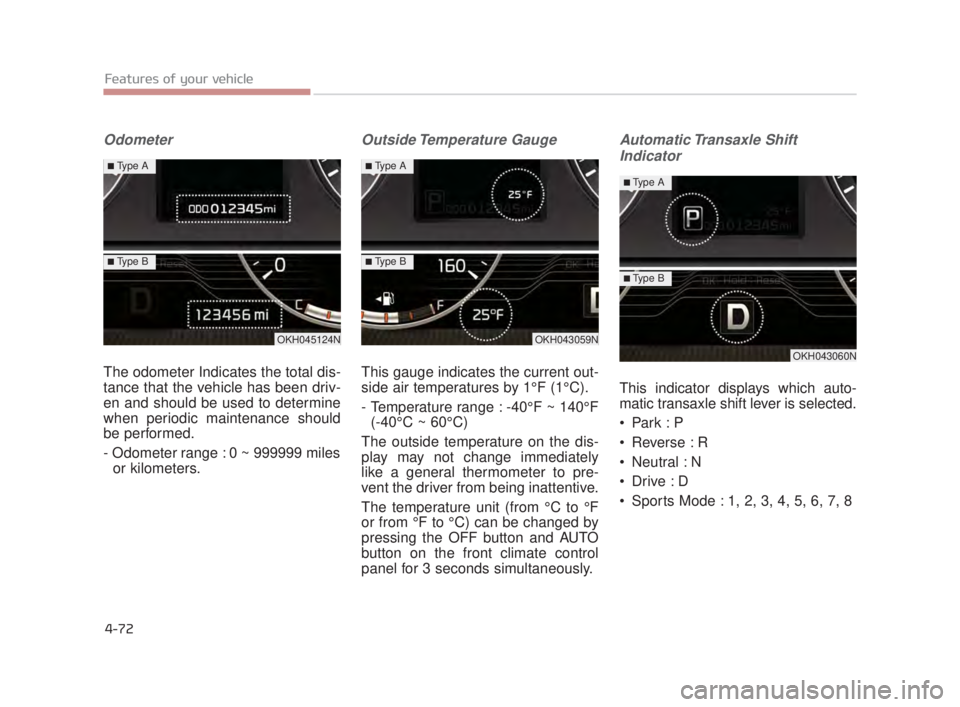
Odometer
The odometer Indicates the total dis-
tance that the vehicle has been driv-
en and should be used to determine
when periodic maintenance should
be performed.
- Odometer range : 0 ~ 999999 milesor kilometers.
Outside Temperature Gauge
This gauge indicates the current out-
side air temperatures by 1°F (1°C).
- Temperature range : -40°F ~ 140°F (-40°C ~ 60°C)
The outside temperature on the dis-
play may not change immediately
like a general thermometer to pre-
vent the driver from being inattentive.
The temperature unit (from °C to °F
or from °F to °C) can be changed by
pressing the OFF button and AUTO
button on the front climate control
panel for 3 seconds simultaneously.
Automatic Transaxle Shift Indicator
This indicator displays which auto-
matic transaxle shift lever is selected.
Park : P
Reverse : R
Neutral : N
Sports Mode : 1, 2, 3, 4, 5, 6, 7, 8
OKH045124N
■Type A
■Type B
OKH043059N
■Type A
■Type B
OKH043060N
■Type A
■Type B
KH USA 4:2015 3/24/2015 4:39 PM Page 72
Page 191 of 542
Features of your vehicle
4
4-111
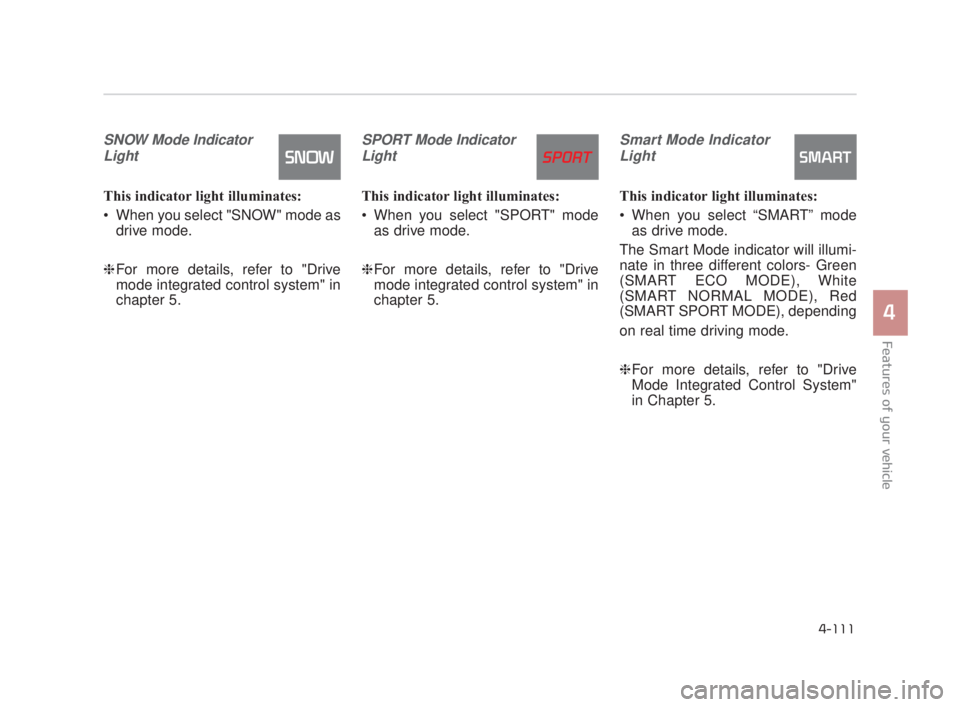
SNOW Mode IndicatorLight
This indicator light illuminates:
When you select "SNOW" mode as drive mode.
❈ For more details, refer to "Drive
mode integrated control system" in
chapter 5.
SPORT Mode Indicator
Light
This indicator light illuminates:
When you select "SPORT" mode as drive mode.
❈ For more details, refer to "Drive
mode integrated control system" in
chapter 5.
Smart Mode Indicator
Light
This indicator light illuminates:
When you select “SMART” mode as drive mode.
The Smart Mode indicator will illumi-
nate in three different colors- Green
(SMART ECO MODE), White
(SMART NORMAL MODE), Red
(SMART SPORT MODE), depending
on real time driving mode.
❈ For more details, refer to "Drive
Mode Integrated Control System"
in Chapter 5.
KH USA 4:2015 3/24/2015 4:40 PM Page 111
Page 276 of 542
Driving your vehicle
5
5-13
R (Reverse)
Use this position to drive the vehicle
backward.
N (Neutral)
The wheels and transmission are not
engaged. The vehicle will roll freely
even on the slightest incline unless
the parking brake or service brakes
are applied.D (Drive)
This is the normal forward driving
position. The transmission will auto-
matically shift through a 8-gear
sequence, providing the best fuel
economy and power.
For extra power when passing anoth-
er vehicle or climbing grades,
depress the accelerator fully, at
which time the transmission will
automatically downshift to the next
lower gear.
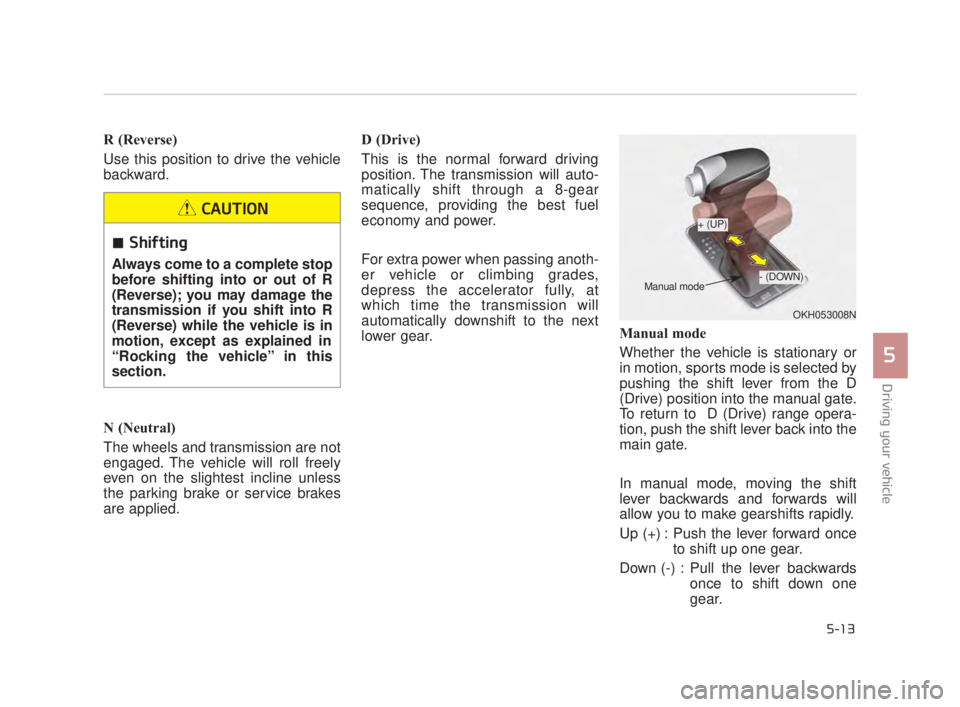
Manual mode
Whether the vehicle is stationary or
in motion, sports mode is selected by
pushing the shift lever from the D
(Drive) position into the manual gate.
To return to D (Drive) range opera-
tion, push the shift lever back into the
main gate.
In manual mode, moving the shift
lever backwards and forwards will
allow you to make gearshifts rapidly.
Up (+) : Push the lever forward once
to shift up one gear.
Down (-) : Pull the lever backwards once to shift down one
gear.
OKH053008N
+ (UP)
- (DOWN)
Manual mode
Shifting
Always come to a complete stop
before shifting into or out of R
(Reverse); you may damage the
transmission if you shift into R
(Reverse) while the vehicle is in
motion, except as explained in
“Rocking the vehicle” in this
section.
CAUTION
KH USA 5:2015 3/25/2015 9:14 AM Page 13
Page 284 of 542
Driving your vehicle
5
5-21
In manual mode, the driver mustexecute upshifts in accordance
with road conditions, taking care to
keep the engine speed below the
red zone.
In manual mode, only the 8 forward gears can be selected. To reverse
or park the vehicle, move the shift
lever to the R (Reverse) or P (Park)
position as required.
In manual mode, downshifts are made automatically when the vehi-
cle slows down. When the vehicle
stops, 1st gear is automatically
selected.
In manual mode, when the engine rpm approaches the red zone shift
points are varied to upshift auto-
matically.
To maintain the required levels of vehicle performance and safety,
the system may not execute cer-
tain gearshifts when the shift lever
is operated. When driving on a slippery road,
push the shift lever forward into the
+(up) position. This causes the
transmission to shift into the 2nd
gear which is better for smooth
driving on a slippery road. Push
the shift lever to the -(down) side to
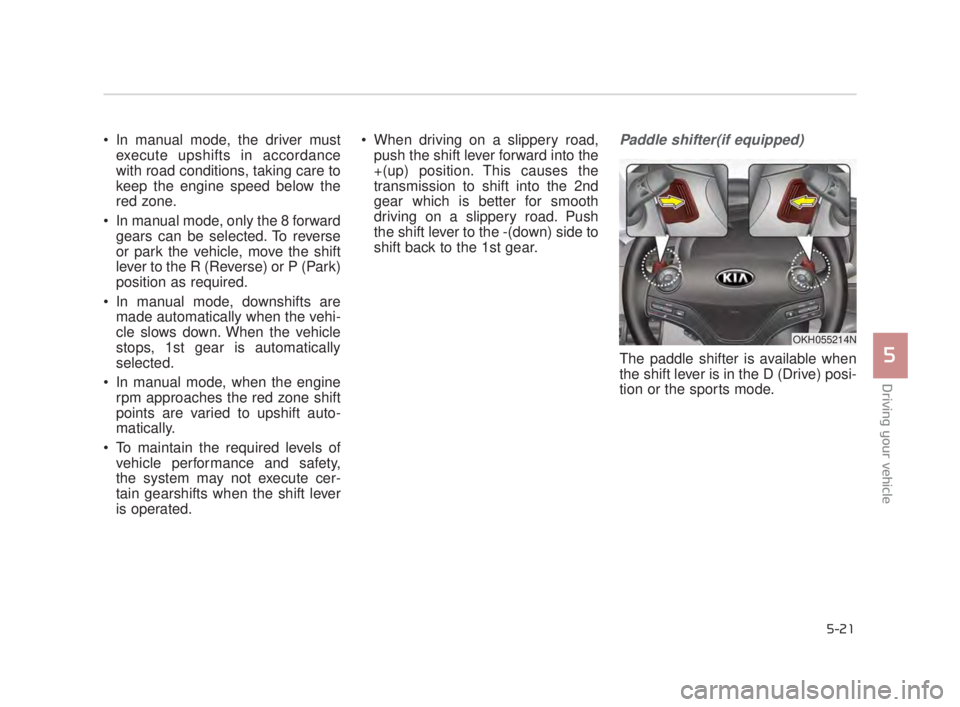
shift back to the 1st gear.Paddle shifter(if equipped)
The paddle shifter is available when
the shift lever is in the D (Drive) posi-
tion or the sports mode.
OKH055214N
KH USA 5:2015 3/25/2015 9:14 AM Page 21
Page 285 of 542
![KIA K900 2016 Owners Manual With the shift lever in the D position
The paddle shifter will operate when
the vehicle speed is more than 6
mph (10 km/h).
Pull the [+] or [-] paddle shifter once
to shift up or down one gear and the](/img/2/55064/w960_55064-284.png "KIA K900 2016 Owners Manual With the shift lever in the D position
The paddle shifter will operate when
the vehicle speed is more than 6
mph (10 km/h).
Pull the [+] or [-] paddle shifter once
to shift up or down one gear and the")
With the shift lever in the D position
The paddle shifter will operate when
the vehicle speed is more than 6
mph (10 km/h).
Pull the [+] or [-] paddle shifter once
to shift up or down one gear and the
system changes from automatic
mode to manual mode.
When the vehicle speed is lower
than 6 mph (10 km/h), if you depress
the accelerator pedal for more than 5
seconds or if you move the shift lever
from D (Drive) to Sports Mode and
move it from Sports Mode to D
(Drive) again, the system changes
from manual mode to automatic
mode.With the shift lever in the sports mode
Pull the [+] or [-] paddle shifter once
to shift up or down one gear.
✽
NOTICE
If the [+] and [-] paddle shifters are
pulled at the same time, gear change
may not occur.
Shift lock system (if equipped)
For your safety, the automatic trans-
mission has a shift lock system
which prevents shifting the transmis-
sion from P (Park) into R (Reverse)
unless the brake pedal is depressed.
To shift the transmission from P
(Park) into R (Reverse) or D (Drive) :
1. Depress and hold the brake pedal.
2. Start the engine or turn the Engine
Start / Stop Button to the ON posi-
tion.
3. Move the shift lever to R (Reverse) or D (Drive) with pressing [UNLOCK]
button.
If the brake pedal is repeatedly
depressed and released with the
shift lever in the P (Park) position, a
chattering noise near the shift lever
may be heard. This is a normal con-
dition.
5-22
Driving your vehicle
KH USA 5:2015 3/25/2015 9:14 AM Page 22
Page 317 of 542
5-54
Driving your vehicle
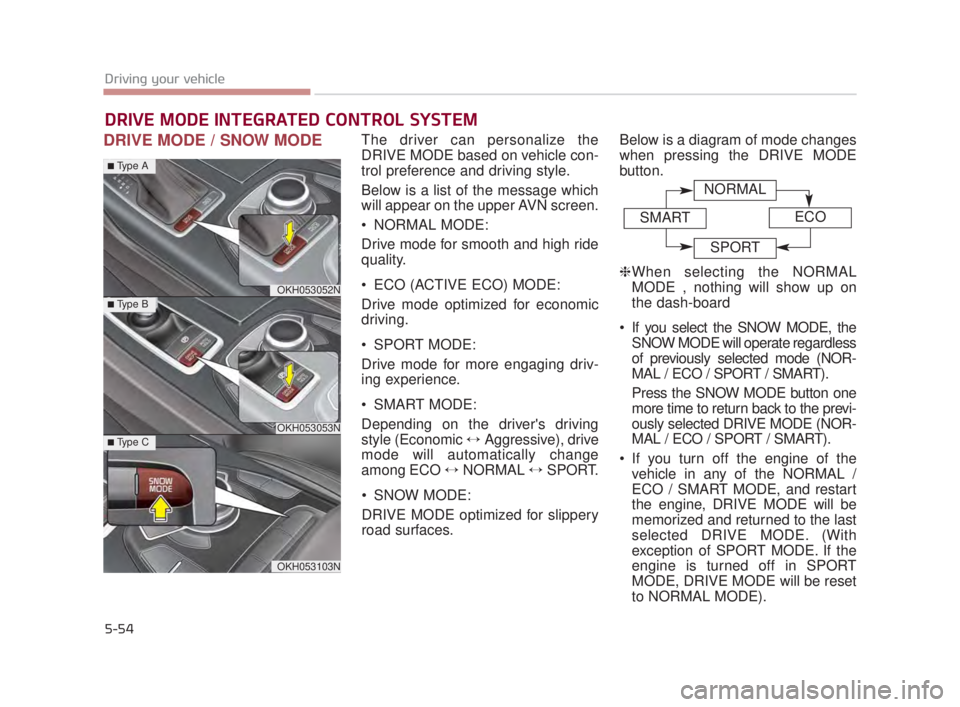
DRIVE MODE / SNOW MODEThe driver can personalize the
DRIVE MODE based on vehicle con-
trol preference and driving style.
Below is a list of the message which
will appear on the upper AVN screen.
NORMAL MODE:
Drive mode for smooth and high ride
quality.
ECO (ACTIVE ECO) MODE:
Drive mode optimized for economic
driving.
SPORT MODE:
Drive mode for more engaging driv-
ing experience.
SMART MODE:
Depending on the driver's driving
style (Economic ↔Aggressive), drive
mode will automatically change
among ECO ↔ NORMAL ↔SPORT.
SNOW MODE:
DRIVE MODE optimized for slippery
road surfaces. Below is a diagram of mode changes
when pressing the DRIVE MODE
button.
❈
When selecting the NORMAL
MODE , nothing will show up on
the dash-board
If you select the SNOW MODE, the SNOW MODE will operate regardless
of previously selected mode (NOR-
MAL / ECO / SPORT / SMART).
Press the SNOW MODE button one
more time to return back to the previ-
ously selected DRIVE MODE (NOR-
MAL / ECO / SPORT / SMART).
If you turn off the engine of the vehicle in any of the NORMAL /
ECO / SMART MODE, and restart
the engine, DRIVE MODE will be
memorized and returned to the last
selected DRIVE MODE. (With
exception of SPORT MODE. If the
engine is turned off in SPORT
MODE, DRIVE MODE will be reset
to NORMAL MODE).
DRIVE MODE INTEGRATED CONTROL SYSTEM
OKH053052N
OKH053053N
OKH053103N
■Type A
■Type B
■Type C
NORMAL
SMARTECO
SPORT
KH USA 5:2015 3/25/2015 9:15 AM Page 54
Page 319 of 542
5-56
Driving your vehicle
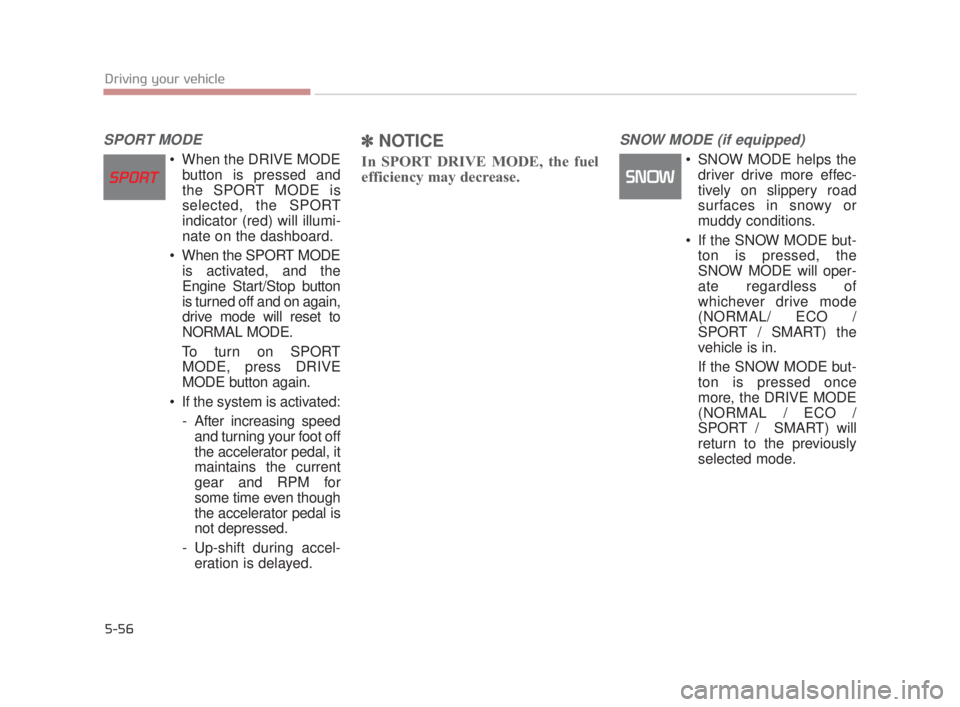
SPORT MODE
When the DRIVE MODEbutton is pressed and
the SPORT MODE is
selected, the SPORT
indicator (red) will illumi-
nate on the dashboard.
When the SPORT MODE is activated, and the
Engine Start/Stop button
is turned off and on again,
drive mode will reset to
NORMAL MODE.
To turn on SPORT MODE, press DRIVE
MODE button again.
If the system is activated: - After increasing speedand turning your foot off
the accelerator pedal, it
maintains the current
gear and RPM for
some time even though
the accelerator pedal is
not depressed.
- Up-shift during accel- eration is delayed.
✽ NOTICE
In SPORT DRIVE MODE, the fuel
efficiency may decrease.
SNOW MODE (if equipped)
SNOW MODE helps the
driver drive more effec-
tively on slippery road
surfaces in snowy or
muddy conditions.
If the SNOW MODE but- ton is pressed, the
SNOW MODE will oper-
ate regardless of
whichever drive mode
(NORMAL/ ECO /
SPORT / SMART) the
vehicle is in.
If the SNOW MODE but- ton is pressed once
more, the DRIVE MODE
(NORMAL / ECO /
SPORT / SMART) will
return to the previously
selected mode.
KH USA 5:2015 3/25/2015 9:15 AM Page 56
Page 320 of 542
Driving your vehicle
5
5-57
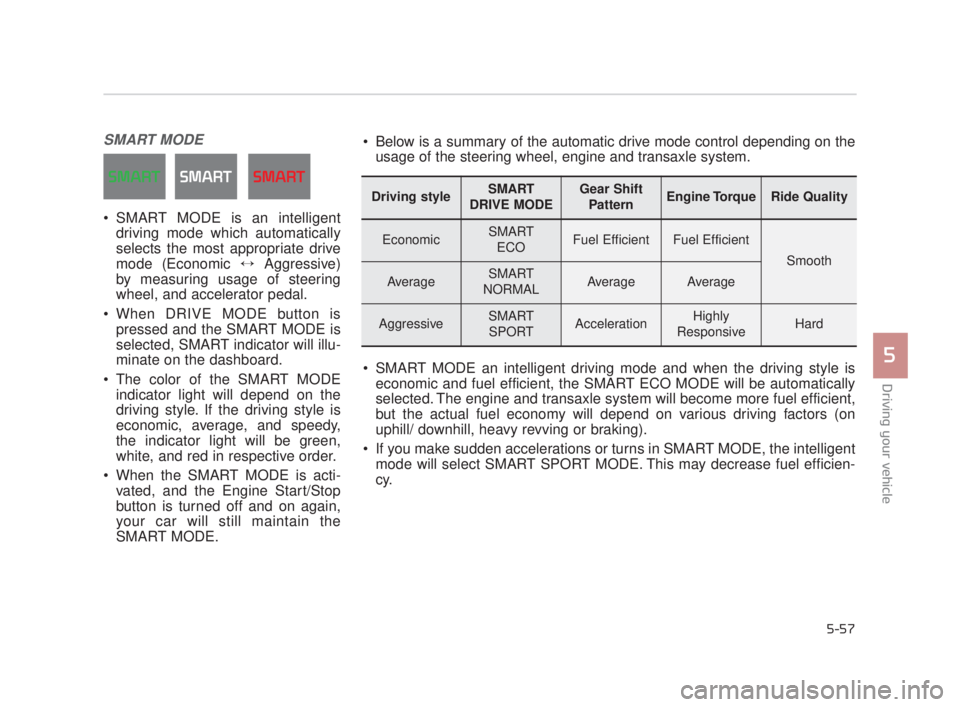
SMART MODE
SMART MODE is an intelligentdriving mode which automatically
selects the most appropriate drive
mode (Economic ↔ Aggressive)
by measuring usage of steering
wheel, and accelerator pedal.
When DRIVE MODE button is pressed and the SMART MODE is
selected, SMART indicator will illu-
minate on the dashboard.
The color of the SMART MODE indicator light will depend on the
driving style. If the driving style is
economic, average, and speedy,
the indicator light will be green,
white, and red in respective order.
When the SMART MODE is acti- vated, and the Engine Start/Stop
button is turned off and on again,
your car will still maintain the
SMART MODE.
Driving styleSMART
DRIVE MODEGear Shift PatternEngine TorqueRide Quality
EconomicSMART ECOFuel EfficientFuel Efficient
Smooth
AverageSMART
NORMALAverageAverage
AggressiveSMART SPORTAccelerationHighly
ResponsiveHard
Below is a summary of the automatic drive mode control depending on the usage of the steering wheel, engine and transaxle system.
SMART MODE an intelligent driving mode and when the driving style is economic and fuel efficient, the SMART ECO MODE will be automatically
selected. The engine and transaxle system will become more fuel efficient,
but the actual fuel economy will depend on various driving factors (on
uphill/ downhill, heavy revving or braking).
If you make sudden accelerations or turns in SMART MODE, the intelligent mode will select SMART SPORT MODE. This may decrease fuel efficien-
cy.
KH USA 5:2015 3/25/2015 9:16 AM Page 57
Page 321 of 542
5-58
Driving your vehicle
DRIVE MODE Indicator Screen
The DRIVE MODE indicator screen
can be displayed by using the trip com-
puter button on the steering wheel.
DRIVE MODE indicator screen dis-
plays status of current drive mode.
DRIVE MODE button is located onthe lower part of the transmission
lever for selecting drive mode.
If drive mode is selected manually
by the user, the drive mode indica-
tor screen will show user-selected
drive mode. (NORMAL, ECO, or
SPORT)
If SMART MODE is selected by
DRIVE MODE button, the drive
mode indicator screen will show
current drive mode automatically
selected by SMART MODE sys-
tem. (SMART NORMAL, SMART
ECO, or SMART SPORT) When the trip computer mode is
selected to show DRIVE MODE
and the SMART MODE is in oper-
ation, an automatically selected
driving mode SMART ECO,
SMART NORMAL, or SMART
SPORT, will be selected on the
cluster's center.
And right below is the horizontal
driving style gauge which reflects
the driving style in real time.
If you drive carefully and slowly in SMART MODE, the left side of the
driving style gauge will illuminate,
and be automatically shifted to the
SMART ECO MODE.
When the driver accelerates more
frequently, the right side of the driv-
ing style gauge will fill up, and shift
to SMART NORMAL MODE.
In addition, if the rate of accelera-
tion and speed is high, drive mode
will change to SMART SPORT
MODE. If the auto cruise control function is
operated or the transmission is
shifted to manual mode while
SMART MODE is on, the SMART
MODE will stop temporarily, and
the DRIVE MODE will be displayed
as OFF. The driving style gauge
light will be turned off accordingly.
If the trip computer is not set to show DRIVE MODE indicator
screen, and you want to know the
on/off status of the SMART MODE,
simply check whether the letters
'SMART' is lighten up on the
screen or not (green - ECO MODE,
white - NORMAL MODE, red -
SPORT MODE).
KH USA 5:2015 3/25/2015 9:16 AM Page 58
Page 322 of 542
Driving your vehicle
5
5-59
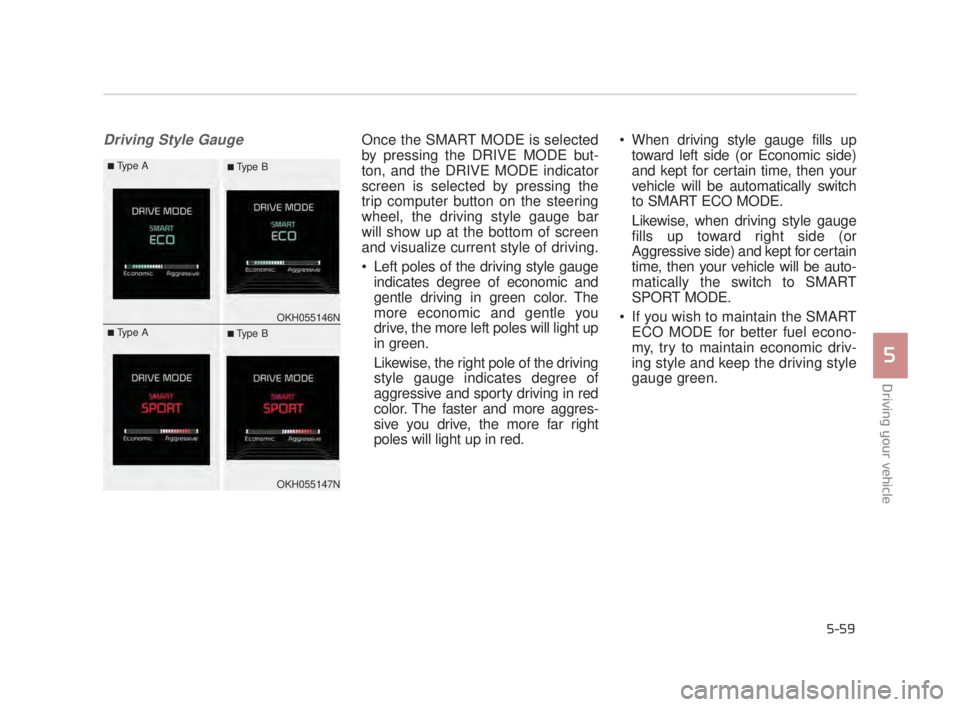
Driving Style GaugeOnce the SMART MODE is selected
by pressing the DRIVE MODE but-
ton, and the DRIVE MODE indicator
screen is selected by pressing the
trip computer button on the steering
wheel, the driving style gauge bar
will show up at the bottom of screen
and visualize current style of driving.
Left poles of the driving style gaugeindicates degree of economic and
gentle driving in green color. The
more economic and gentle you
drive, the more left poles will light up
in green.
Likewise, the right pole of the driving
style gauge indicates degree of
aggressive and sporty driving in red
color. The faster and more aggres-
sive you drive, the more far right
poles will light up in red. When driving style gauge fills up
toward left side (or Economic side)
and kept for certain time, then your
vehicle will be automatically switch
to SMART ECO MODE.
Likewise, when driving style gauge
fills up toward right side (or
Aggressive side) and kept for certain
time, then your vehicle will be auto-
matically the switch to SMART
SPORT MODE.
If you wish to maintain the SMART ECO MODE for better fuel econo-
my, try to maintain economic driv-
ing style and keep the driving style
gauge green.
OKH055146N
OKH055147N
■Type A■ Type B
■Type A■ Type B
KH USA 5:2015 3/25/2015 9:16 AM Page 59