warning KIA K900 2018 Owners Manual
[x] Cancel search | Manufacturer: KIA, Model Year: 2018, Model line: K900, Model: KIA K900 2018Pages: 544, PDF Size: 14.82 MB
Page 338 of 544
Driving your vehicle
5
5-73
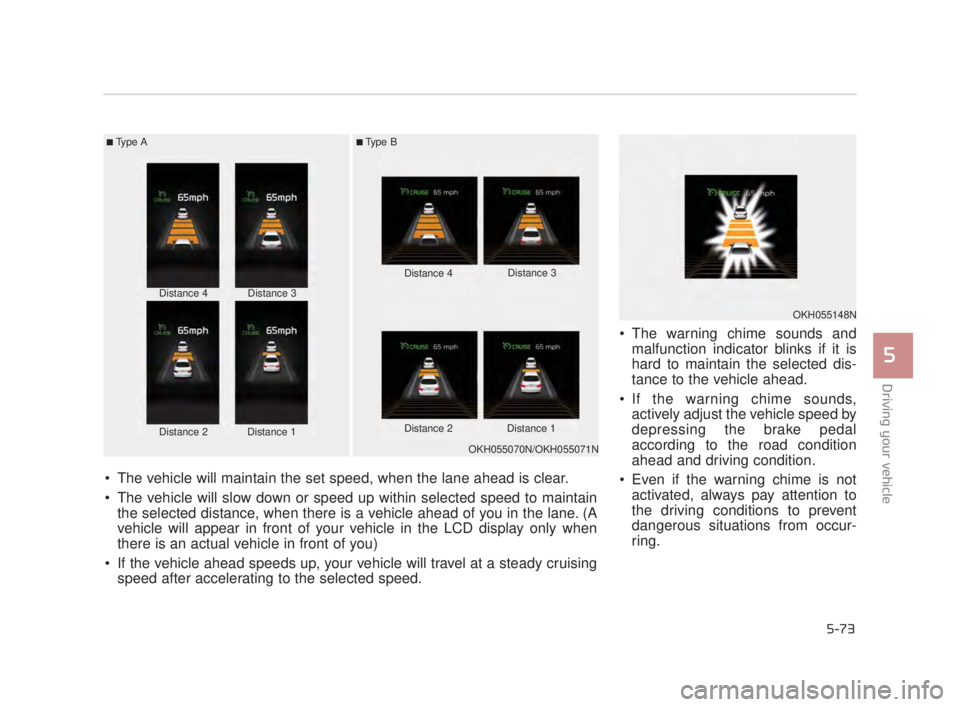
The warning chime sounds andmalfunction indicator blinks if it is
hard to maintain the selected dis-
tance to the vehicle ahead.
If the warning chime sounds, actively adjust the vehicle speed by
depressing the brake pedal
according to the road condition
ahead and driving condition.
Even if the warning chime is not activated, always pay attention to
the driving conditions to prevent
dangerous situations from occur-
ring.
■Type A■Type B
Distance 4
Distance 2Distance 1
Distance 3 Distance 4
Distance 3
Distance 2 Distance 1
The vehicle will maintain the set speed, when the lane ahead is clear.
The vehicle will slow down or speed up within selected speed to maintain the selected distance, when there is a vehicle ahead of you in the lane. (A
vehicle will appear in front of your vehicle in the LCD display only when
there is an actual vehicle in front of you)
If the vehicle ahead speeds up, your vehicle will travel at a steady cruising speed after accelerating to the selected speed.
OKH055070N/OKH055071N
OKH055148N
KH USA 5:2018 4/12/2017 10:01 AM Page 73
Page 339 of 544
5-74
Driving your vehicle
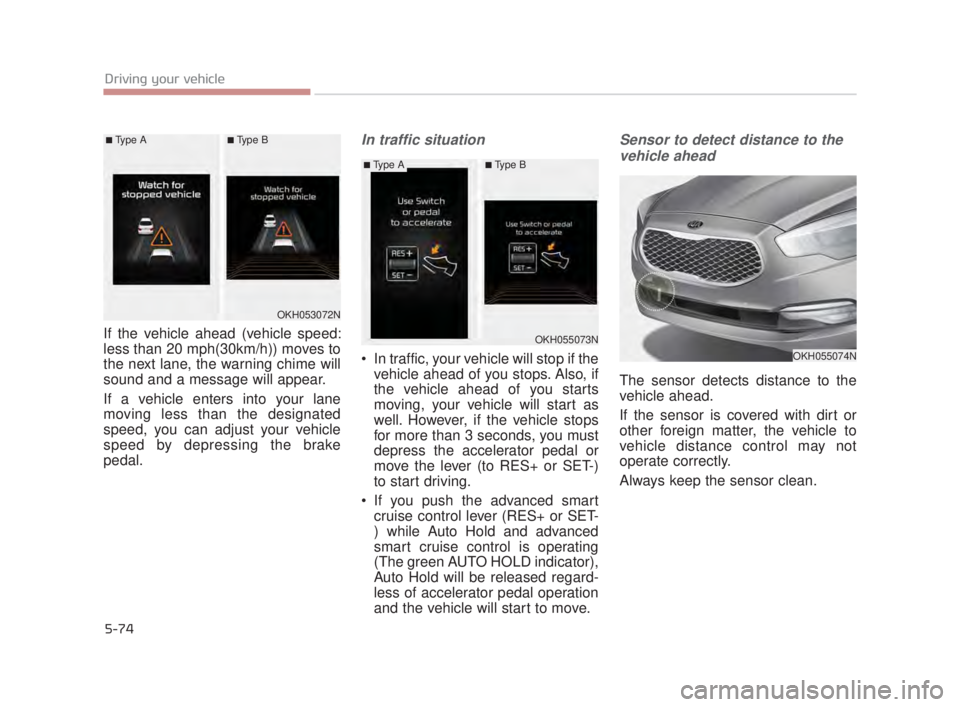
If the vehicle ahead (vehicle speed:
less than 20 mph(30km/h)) moves to
the next lane, the warning chime will
sound and a message will appear.
If a vehicle enters into your lane
moving less than the designated
speed, you can adjust your vehicle
speed by depressing the brake
pedal.
In traffic situation
In traffic, your vehicle will stop if thevehicle ahead of you stops. Also, if
the vehicle ahead of you starts
moving, your vehicle will start as
well. However, if the vehicle stops
for more than 3 seconds, you must
depress the accelerator pedal or
move the lever (to RES+ or SET-)
to start driving.
If you push the advanced smart cruise control lever (RES+ or SET-
) while Auto Hold and advanced
smart cruise control is operating
(The green AUTO HOLD indicator),
Auto Hold will be released regard-
less of accelerator pedal operation
and the vehicle will start to move.
Sensor to detect distance to the
vehicle ahead
The sensor detects distance to the
vehicle ahead.
If the sensor is covered with dirt or
other foreign matter, the vehicle to
vehicle distance control may not
operate correctly.
Always keep the sensor clean.
OKH053072N
OKH055073N
OKH055074N
■Type A■Type B
■Type A■Type B
KH USA 5:2018 4/12/2017 10:01 AM Page 74
Page 340 of 544
Driving your vehicle
5
5-75
Sensor warning message
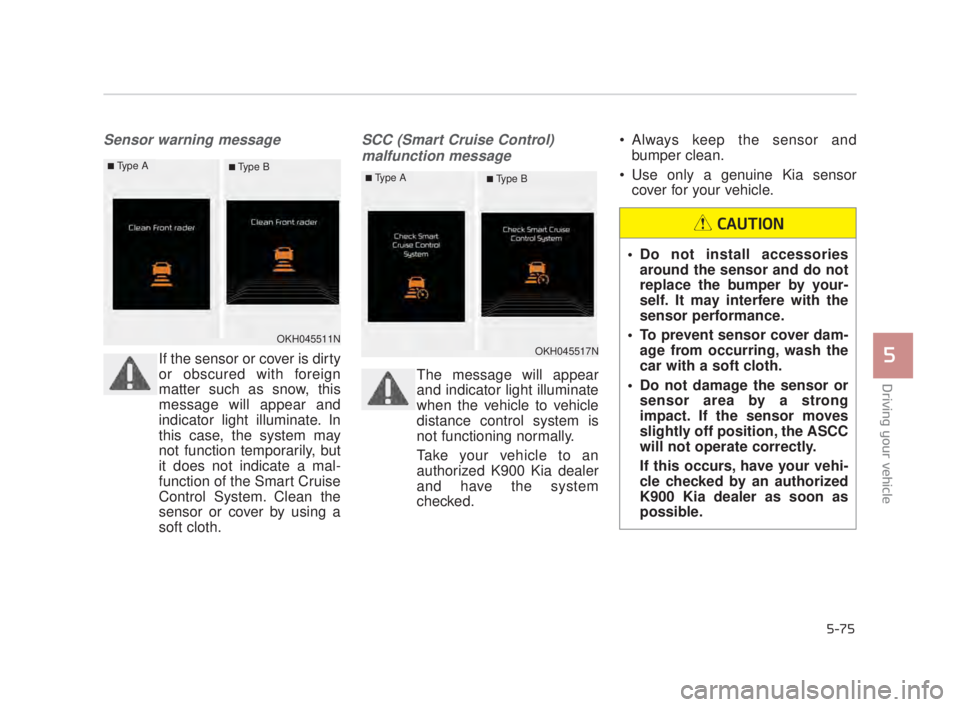
If the sensor or cover is dirty
or obscured with foreign
matter such as snow, this
message will appear and
indicator light illuminate. In
this case, the system may
not function temporarily, but
it does not indicate a mal-
function of the Smart Cruise
Control System. Clean the
sensor or cover by using a
soft cloth.
SCC (Smart Cruise Control) malfunction message
The message will appear
and indicator light illuminate
when the vehicle to vehicle
distance control system is
not functioning normally.
Take your vehicle to an
authorized K900 Kia dealer
and have the system
checked. Always keep the sensor and
bumper clean.
Use only a genuine Kia sensor cover for your vehicle.
Do not install accessoriesaround the sensor and do not
replace the bumper by your-
self. It may interfere with the
sensor performance.
To prevent sensor cover dam- age from occurring, wash the
car with a soft cloth.
Do not damage the sensor or sensor area by a strong
impact. If the sensor moves
slightly off position, the ASCC
will not operate correctly.
If this occurs, have your vehi-
cle checked by an authorized
K900 Kia dealer as soon as
possible.
CAUTION
OKH045511NOKH045517N
■Type A■ Type B■Type A■ Type B
KH USA 5:2018 4/12/2017 10:01 AM Page 75
Page 341 of 544
5-76
Driving your vehicle
To convert to cruise control
mode:
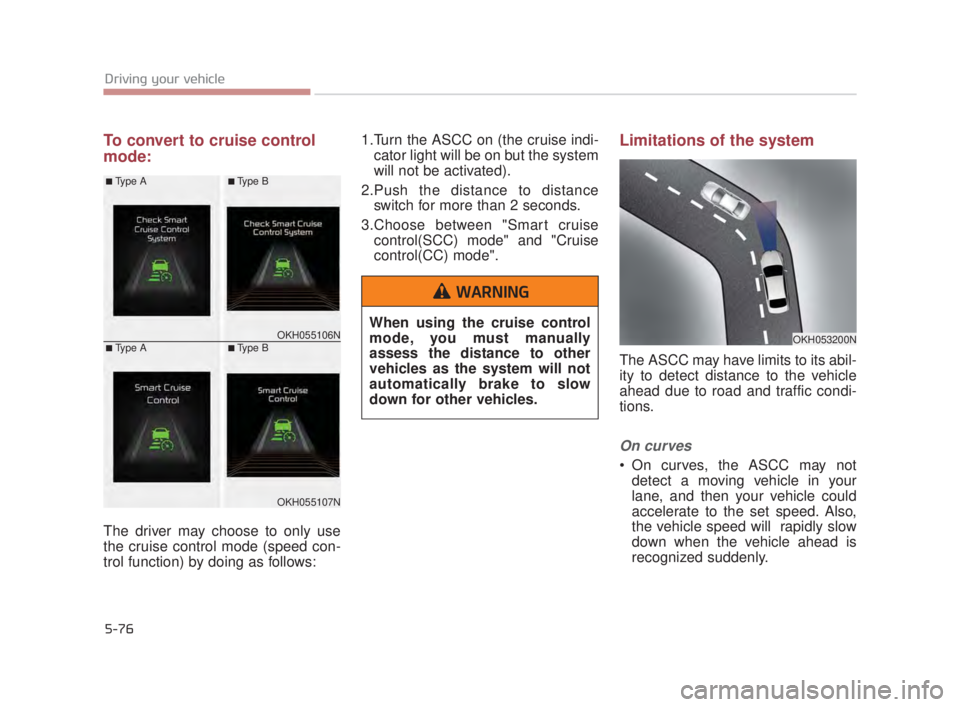
The driver may choose to only use
the cruise control mode (speed con-
trol function) by doing as follows:1.Turn the ASCC on (the cruise indi-
cator light will be on but the system
will not be activated).
2.Push the distance to distance switch for more than 2 seconds.
3.Choose between "Smart cruise control(SCC) mode" and "Cruise
control(CC) mode".
Limitations of the system
The ASCC may have limits to its abil-
ity to detect distance to the vehicle
ahead due to road and traffic condi-
tions.
On curves
On curves, the ASCC may notdetect a moving vehicle in your
lane, and then your vehicle could
accelerate to the set speed. Also,
the vehicle speed will rapidly slow
down when the vehicle ahead is
recognized suddenly.
OKH053200NOKH055106N
OKH055107N
■Type A
■Type A
■Type B
■Type B
When using the cruise control
mode, you must manually
assess the distance to other
vehicles as the system will not
automatically brake to slow
down for other vehicles.
WARNING
KH USA 5:2018 4/12/2017 10:01 AM Page 76
Page 345 of 544
5-80
Driving your vehicle
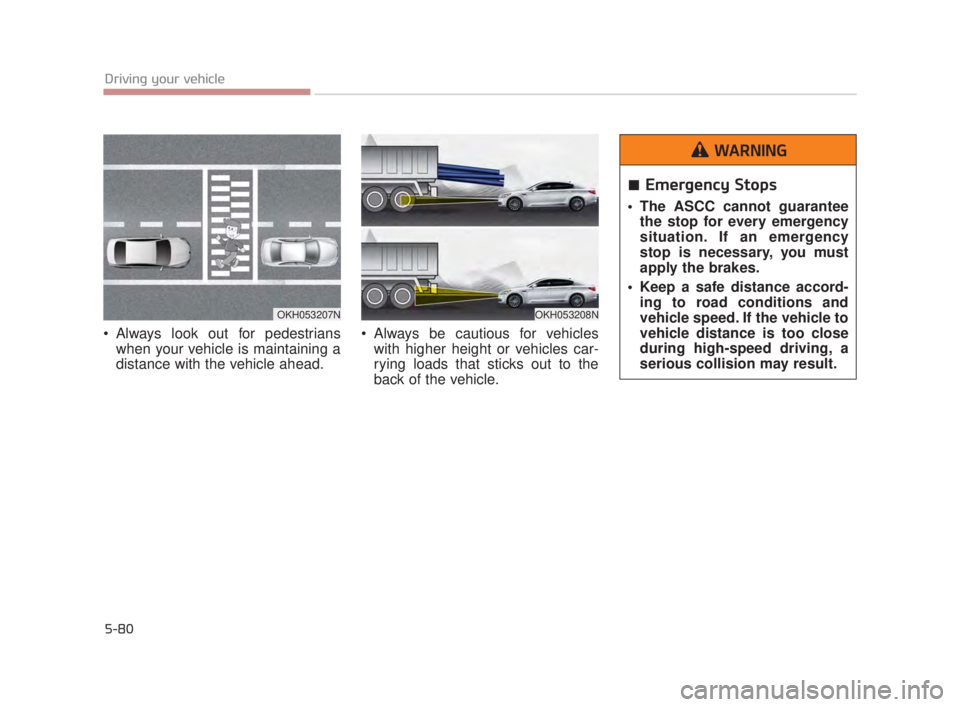
Always look out for pedestrianswhen your vehicle is maintaining a
distance with the vehicle ahead. Always be cautious for vehicles
with higher height or vehicles car-
rying loads that sticks out to the
back of the vehicle.
OKH053207NOKH053208N
Emergency Stops
The ASCC cannot guaranteethe stop for every emergency
situation. If an emergency
stop is necessary, you must
apply the brakes.
Keep a safe distance accord- ing to road conditions and
vehicle speed. If the vehicle to
vehicle distance is too close
during high-speed driving, a
serious collision may result.
WARNING
KH USA 5:2018 4/12/2017 10:01 AM Page 80
Page 346 of 544
Driving your vehicle
5
5-81
When other vehicles are changing
lanes in front of you frequently, the
ASCC may not detect the vehicle
at certain times. Always look ahead
cautiously to prevent unexpected
and sudden situations from occur-
ring.
✽NOTICE
The ASCC may not operate tem-
porarily due to electrical interfer-
ence.
Pursuant to Code of Federal
Regulations, Title 47, Part 15
("FCC Rules").
Operation is subject to the following
two conditions:
1.This device may not cause harmful
interference, and
2.This device must accept any inter- ference received, including inter-
ference that may cause undesired
operation.ASCC Following Distance
To avoid collisions, always beaware of the selected speed
and vehicle to vehicle dis-
tance settings when activat-
ing your smart cruise control
system.
Always maintain sufficient braking distance and deceler-
ate your vehicle by applying
the brakes if necessary.
WARNING
KH USA 5:2018 4/12/2017 10:01 AM Page 81
Page 347 of 544
5-82
Driving your vehicle
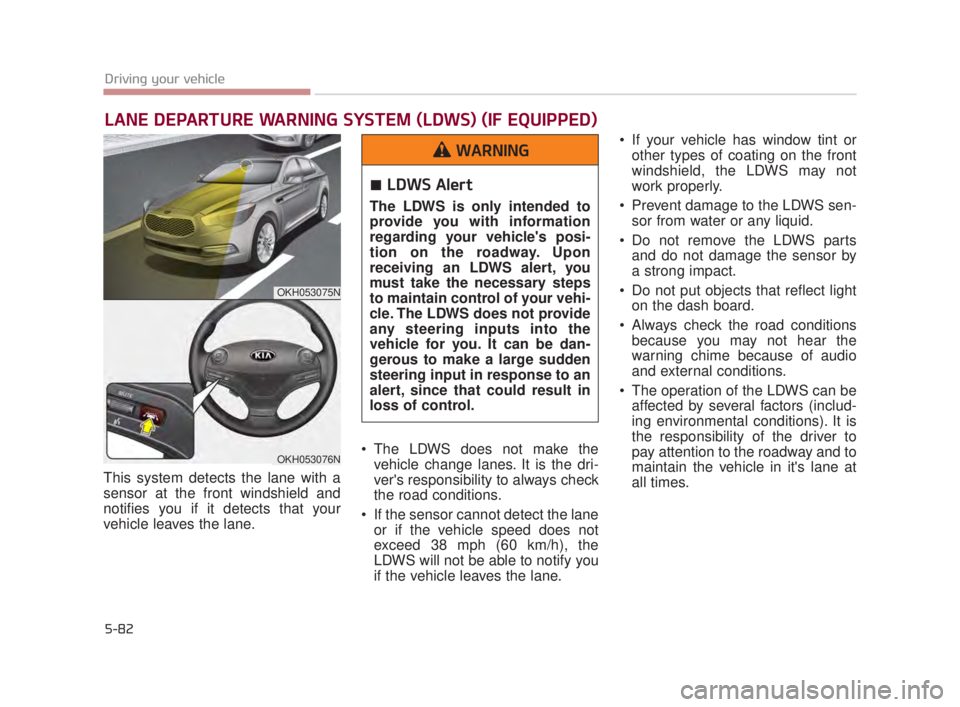
This system detects the lane with a
sensor at the front windshield and
notifies you if it detects that your
vehicle leaves the lane. The LDWS does not make the
vehicle change lanes. It is the dri-
ver's responsibility to always check
the road conditions.
If the sensor cannot detect the lane or if the vehicle speed does not
exceed 38 mph (60 km/h), the
LDWS will not be able to notify you
if the vehicle leaves the lane. If your vehicle has window tint or
other types of coating on the front
windshield, the LDWS may not
work properly.
Prevent damage to the LDWS sen- sor from water or any liquid.
Do not remove the LDWS parts and do not damage the sensor by
a strong impact.
Do not put objects that reflect light on the dash board.
Always check the road conditions because you may not hear the
warning chime because of audio
and external conditions.
The operation of the LDWS can be affected by several factors (includ-
ing environmental conditions). It is
the responsibility of the driver to
pay attention to the roadway and to
maintain the vehicle in it's lane at
all times.
LANE DEPARTURE WARNING SYSTEM (LDWS) (IF EQUIPPED)
OKH053075N
OKH053076N
LDWS Alert
The LDWS is only intended to
provide you with information
regarding your vehicle's posi-
tion on the roadway. Upon
receiving an LDWS alert, you
must take the necessary steps
to maintain control of your vehi-
cle. The LDWS does not provide
any steering inputs into the
vehicle for you. It can be dan-
gerous to make a large sudden
steering input in response to an
alert, since that could result in
loss of control.
WARNING
KH USA 5:2018 4/12/2017 10:01 AM Page 82
Page 348 of 544
Driving your vehicle
5
5-83
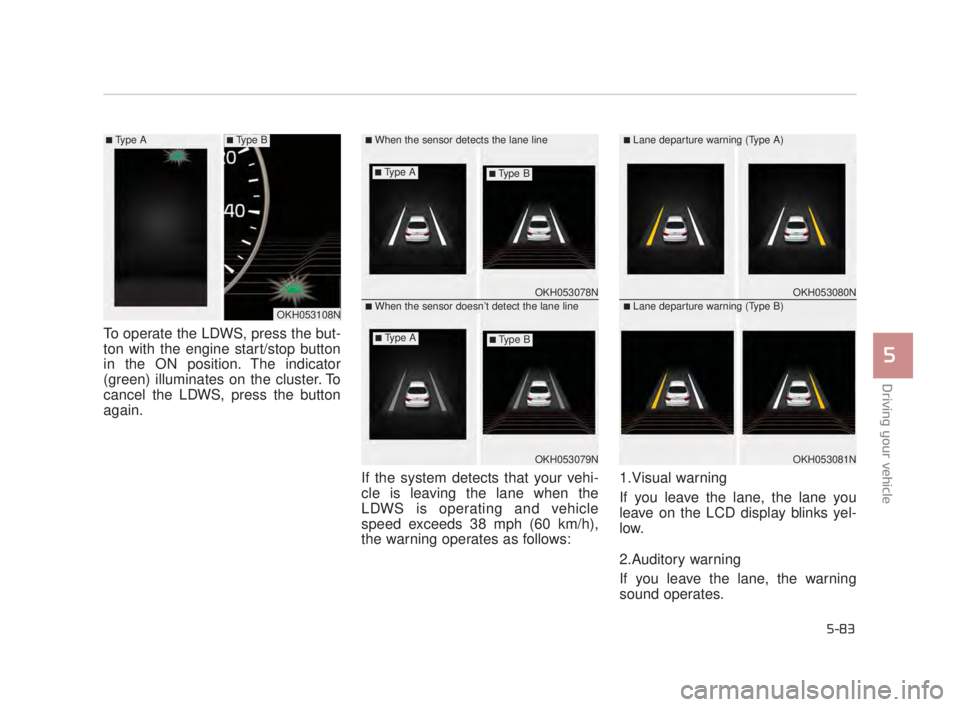
To operate the LDWS, press the but-
ton with the engine start/stop button
in the ON position. The indicator
(green) illuminates on the cluster. To
cancel the LDWS, press the button
again.If the system detects that your vehi-
cle is leaving the lane when the
LDWS is operating and vehicle
speed exceeds 38 mph (60 km/h),
the warning operates as follows:1.Visual warning
If you leave the lane, the lane you
leave on the LCD display blinks yel-
low.
2.Auditory warning
If you leave the lane, the warning
sound operates.
OKH053078N
OKH053079N
■When the sensor detects the lane line
■When the sensor doesn’t detect the lane lineOKH053080N
OKH053081N
■Lane departure warning (Type A)
■Lane departure warning (Type B)OKH053108N
■Type A■Type B
■Type A■Type B
■Type A■Type B
KH USA 5:2018 4/12/2017 10:01 AM Page 83
Page 349 of 544
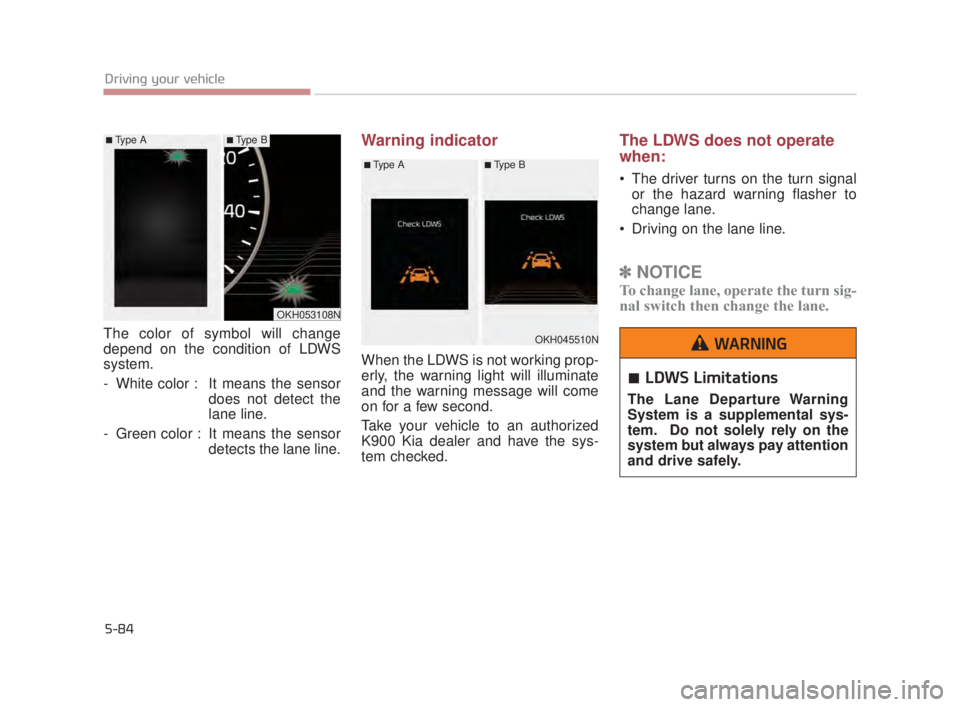
The color of symbol will change
depend on the condition of LDWS
system.
- White color : It means the sensordoes not detect the
lane line.
- Green color : It means the sensor detects the lane line.
Warning indicator
When the LDWS is not working prop-
erly, the warning light will illuminate
and the warning message will come
on for a few second.
Take your vehicle to an authorized
K900 Kia dealer and have the sys-
tem checked.
The LDWS does not operate
when:
The driver turns on the turn signalor the hazard warning flasher to
change lane.
Driving on the lane line.
✽ NOTICE
To change lane, operate the turn sig-
nal switch then change the lane.
5-84
Driving your vehicle
OKH053108N
■Type A■Type B
OKH045510N
■Type A■Type B
LDWS Limitations
The Lane Departure Warning
System is a supplemental sys-
tem. Do not solely rely on the
system but always pay attention
and drive safely.
WARNING
KH USA 5:2018 4/12/2017 10:01 AM Page 84
Page 351 of 544
5-86
Driving your vehicle
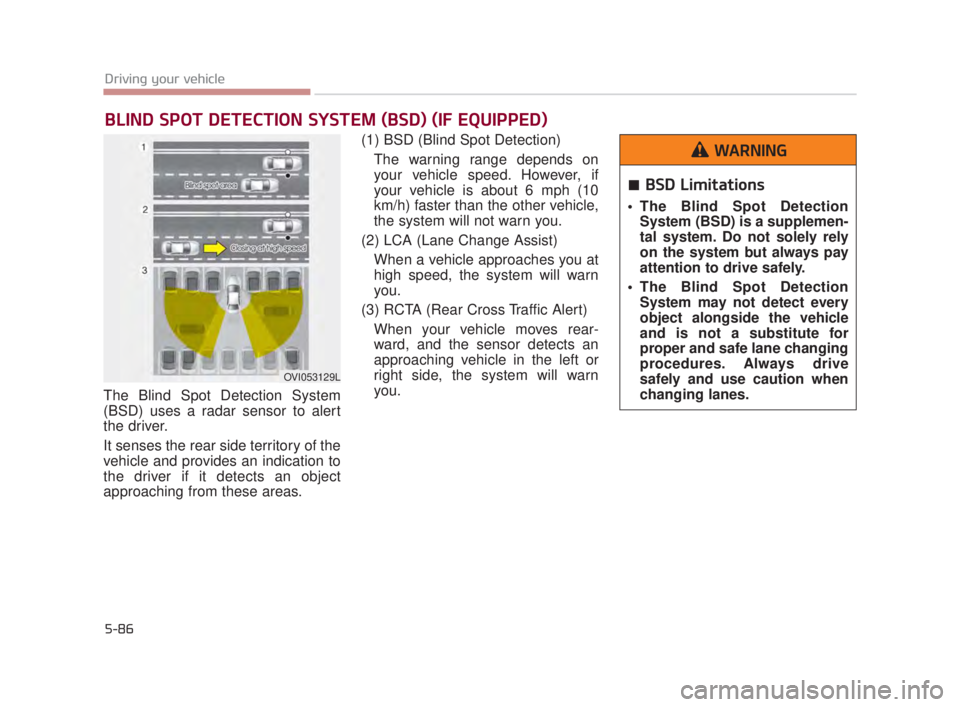
The Blind Spot Detection System
(BSD) uses a radar sensor to alert
the driver.
It senses the rear side territory of the
vehicle and provides an indication to
the driver if it detects an object
approaching from these areas.(1) BSD (Blind Spot Detection)
The warning range depends on
your vehicle speed. However, if
your vehicle is about 6 mph (10
km/h) faster than the other vehicle,
the system will not warn you.
(2) LCA (Lane Change Assist) When a vehicle approaches you at
high speed, the system will warn
you.
(3) RCTA (Rear Cross Traffic Alert) When your vehicle moves rear-
ward, and the sensor detects an
approaching vehicle in the left or
right side, the system will warn
you.
BLIND SPOT DETECTION SYSTEM (BSD) (IF EQUIPPED)
OVI053129L
BSD Limitations
The Blind Spot DetectionSystem (BSD) is a supplemen-
tal system. Do not solely rely
on the system but always pay
attention to drive safely.
The Blind Spot Detection System may not detect every
object alongside the vehicle
and is not a substitute for
proper and safe lane changing
procedures. Always drive
safely and use caution when
changing lanes.
WARNING
KH USA 5:2018 4/12/2017 10:01 AM Page 86