cruise control KIA K900 2019 Owners Manual
[x] Cancel search | Manufacturer: KIA, Model Year: 2019, Model line: K900, Model: KIA K900 2019Pages: 580, PDF Size: 15.11 MB
Page 16 of 580
25
Your vehicle at a glance
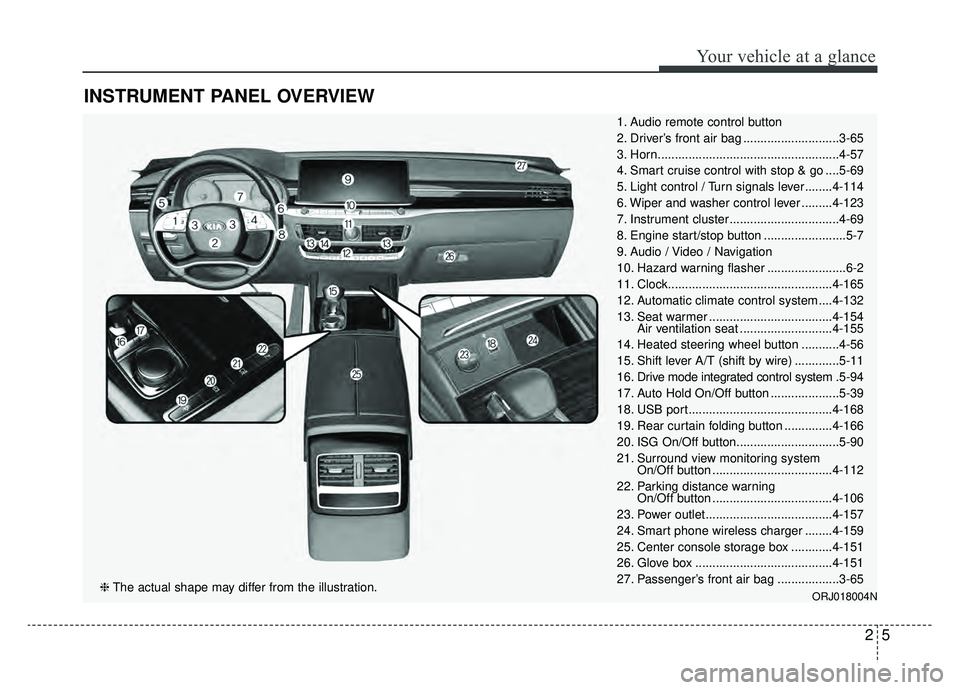
INSTRUMENT PANEL OVERVIEW
1. Audio remote control button
2. Driver’s front air bag ............................3-65
3. Horn.....................................................4-57
4. Smart cruise control with stop & go ....5-69
5. Light control / Turn signals lever ........4-114
6. Wiper and washer control lever .........4-123
7. Instrument cluster ................................4-69
8. Engine start/stop button ........................5-7
9. Audio / Video / Navigation
10. Hazard warning flasher .......................6-2
11. Clock................................................4-165
12. Automatic climate control system ....4-132
13. Seat warmer ....................................4-154Air ventilation seat ...........................4-155
14. Heated steering wheel button ...........4-56
15. Shift lever A/T (shift by wire) .............5-11
16. Drive mode integrated control system .5-94
17. Auto Hold On/Off button ....................5-39
18. USB port..........................................4-168
19. Rear curtain folding button ..............4-166
20. ISG On/Off button..............................5-90
21. Surround view monitoring system On/Off button ...................................4-112
22. Parking distance warning On/Off button ...................................4-106
23. Power outlet.....................................4-157
24. Smart phone wireless charger ........4-159
25. Center console storage box ............4-151
26. Glove box ........................................4-151
27. Passenger’s front air bag ..................3-65
ORJ018004N❈ The actual shape may differ from the illustration.
Page 174 of 580
481
Features of your vehicle
(3) Assist mode
This mode displays the state of the
lane safety systems (Lane Keeping
Assist, Lane Following Assist),Smart
Cruise Control, Driver Attention
Warning and Tire pressure.
❈For more details, refer to chapters
5 and 6.
(4) Master warning mode
This mode informs of warning mes-
sages related to low tire pressure or
malfunction of Blind-spot Collision
Warning and so on.
❈ For controlling the LCD modes,
refer to “LCD window Control” in
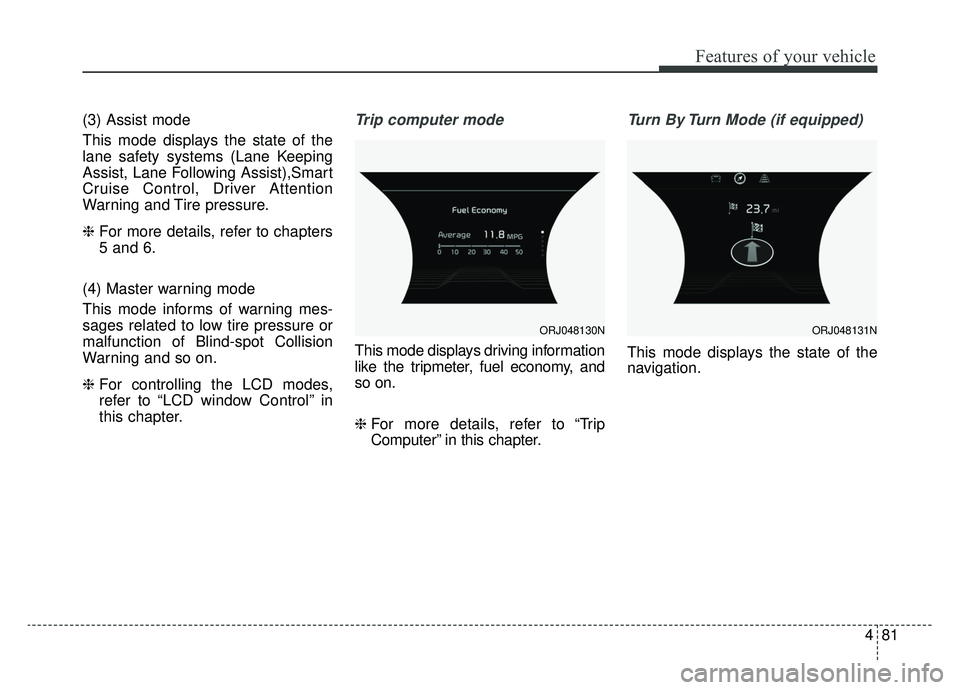
this chapter.Trip computer mode
This mode displays driving information
like the tripmeter, fuel economy, and
so on.
❈ For more details, refer to “Trip
Computer” in this chapter.
Turn By Turn Mode (if equipped)
This mode displays the state of the
navigation.
ORJ048130NORJ048131N
Page 175 of 580
Features of your vehicle
82
4
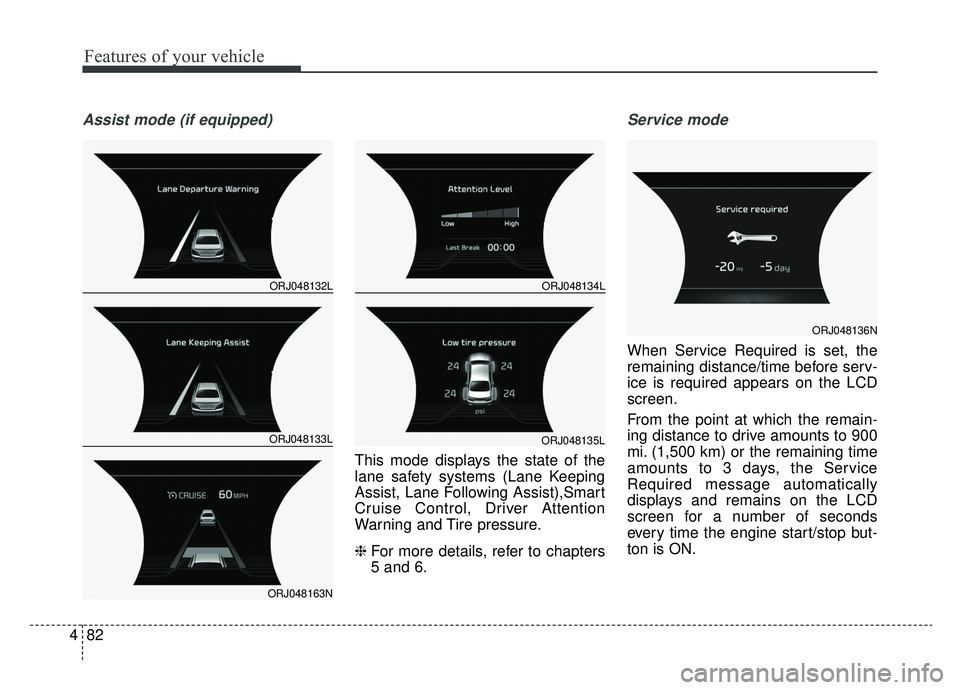
Assist mode (if equipped)
This mode displays the state of the
lane safety systems (Lane Keeping
Assist, Lane Following Assist),Smart
Cruise Control, Driver Attention
Warning and Tire pressure.
❈ For more details, refer to chapters
5 and 6.
Service mode
When Service Required is set, the
remaining distance/time before serv-
ice is required appears on the LCD
screen.
From the point at which the remain-
ing distance to drive amounts to 900
mi. (1,500 km) or the remaining time
amounts to 3 days, the Service
Required message automatically
displays and remains on the LCD
screen for a number of seconds
every time the engine start/stop but-
ton is ON.
ORJ048132L
ORJ048133L
ORJ048163N
ORJ048134L
ORJ048135L
ORJ048136N
Page 176 of 580
483
Features of your vehicle
When Service Required is set, a
Service Required Alarm message
pops up when an aggregated
amount of miles/time driven reaches
a certain point.
With Service Required mode, press
OK button for more than 1 second.
The values will return to initial setting
values.
❈Service Required Setting
If the Battery Cable is disconnected,
Fuse Switch is turned OFF, the
Service Required Setting values (an
amount of miles/time driven) may
change. In this situation, re-enter
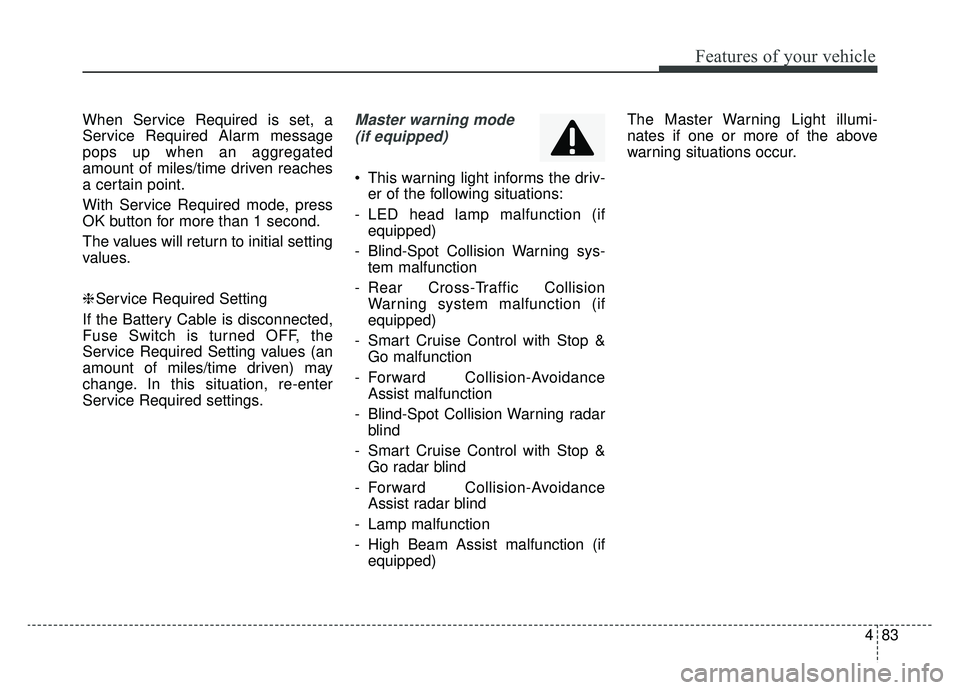
Service Required settings.Master warning mode (if equipped)
This warning light informs the driv- er of the following situations:
- LED head lamp malfunction (if equipped)
- Blind-Spot Collision Warning sys- tem malfunction
- Rear Cross-Traffic Collision Warning system malfunction (if
equipped)
- Smart Cruise Control with Stop & Go malfunction
- Forward Collision-Avoidance Assist malfunction
- Blind-Spot Collision Warning radar blind
- Smart Cruise Control with Stop & Go radar blind
- Forward Collision-Avoidance Assist radar blind
- Lamp malfunction
- High Beam Assist malfunction (if equipped) The Master Warning Light illumi-
nates if one or more of the above
warning situations occur.
Page 192 of 580

499
Features of your vehicle
Master Warning Light
\
This indicator light illuminates:
- LED head lamp malfunction
- Blind-Spot Collision Warning sys-tem malfunction
- Rear Cross-Traffic Collision Warning system malfunction (if
equipped)
- Smart Cruise Control with Stop & Go malfunction
- Forward Collision-Avoidance Assist malfunction
- Blind-Spot Collision Warning radar blind
- Smart Cruise Control with Stop & Go radar blind
- Forward Collision-Avoidance Assist radar blind
- Lamp malfunction
- High Beam Assist malfunction (if equipped)
Dynamic Bending Light
(DBL) Warning Light(if equipped)
This warning light blinks:
When there is a malfunction with the Dynamic Bending Light (DBL).
If there is a malfunction with the
Dynamic Bending Light (DBL):
1. Drive carefully to the nearest safe location and stop your vehicle.
2. Turn the engine off and restart the engine. If the warning light
remains on, have the vehicle
inspected by an authorized K900
Kia dealer.
Electronic Parking Brake
(EPB) Warning Light
This warning light illuminates:
Once you set the Engine Start/Stop Button to the ON position.
- It illuminates for approximately 3seconds and then goes off.
When there is a malfunction with the EPB.
In this case, have the vehicle
inspected by an authorized K900
Kia dealer.
✽ ✽ NOTICE-Electronic Parking
Brake (EPB) Warning Light
The Electronic Parking Brake
(EPB) Warning Light may illumi-
nate when the Electronic Stability
control (ESC) Indicator Light comes
on to indicate that the ESC is not
working properly (This does not
indicate malfunction of the EPB).
EPB
Page 198 of 580
4105
Features of your vehicle
Head Up Display ON/OFF
The HUD display will be activated or
deactivated in Set Up mode while
engine is ON.
Head Up Display Information
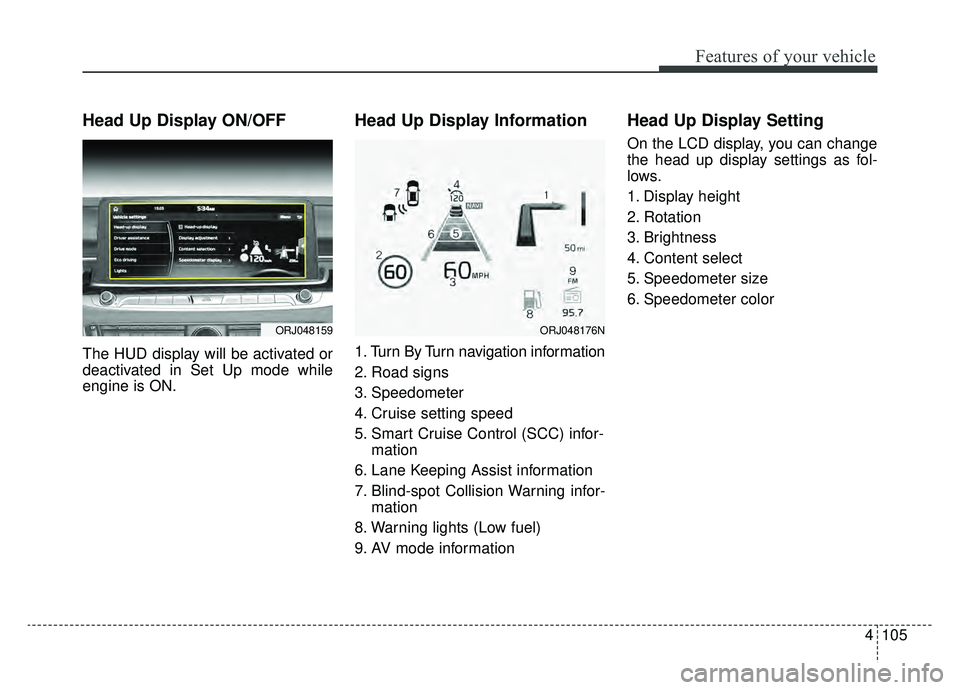
1. Turn By Turn navigation information
2. Road signs
3. Speedometer
4. Cruise setting speed
5. Smart Cruise Control (SCC) infor-mation
6. Lane Keeping Assist information
7. Blind-spot Collision Warning infor- mation
8. Warning lights (Low fuel)
9. AV mode information
Head Up Display Setting
On the LCD display, you can change
the head up display settings as fol-
lows.
1. Display height
2. Rotation
3. Brightness
4. Content select
5. Speedometer size
6. Speedometer color
ORJ048159ORJ048176N
Page 266 of 580
Driving your vehicle
Before driving . . . . . . . . . . . . . . . . . . . . . . . . . . . . . . 5-5
• Before entering vehicle . . . . . . . . . . . . . . . . . . . . . . . . . 5-5
. . . . . . . . . . . . . . . . . . . . . . . . . . 5-5
. . . . . . . . . . . . . . . . . . . . . . . . . . . . . . . . 5-5
Engine start/stop button . . . . . . . . . . . . . . . . . . . . . 5-7
. . . . . . . . . . . . . . 5-7
. . . . . . . . . . . . . 5-9
Automatic transmission (shift-by-wire) . . . . . . . . 5-11
. . . . . . . . . . . . . . . 5-11
. . . . . . . . . . . . . . . . . . . . . . . . . . . . . . . . . . . . \
. 5-18
The ECO-coasting system . . . . . . . . . . . . . . . . . . . 5-23
. . . . . . . . . . . . . . . 5-23
. . . . . . . . . . . . . 5-24
. . . . . 5-24
All Wheel Drive (AWD) . . . . . . . . . . . . . . . . . . . . . 5-26
. . . . . . . . . . . . . . . . . . 5-26
Brake system . . . . . . . . . . . . . . . . . . . . . . . . . . . . . . 5-31
. . . . . . . . . . . . . . . . . . . . . . . . . . . . . . . . 5-31
. . . . . . . . . . . . . . . . 5-33
. . . . . . . . . . . . . . . . . . . . . . . . . . . . . . . . . . . 5-\
39
. . . . . . . . . . . . . . . . . . . . . . . . . . . . 5-42
. . . . . . . . . . . . . . 5-45
. . . . . . . . . . . . 5-49
. . . . . . . . . . . . . . . . . 5-51
Forward Collision-avoidance Assist (FCA) system
- sensor fusion type (front radar + front
camera) . . . . . . . . . . . . . . . . . . . . . . . . . . . . . . . . . 5-53
. . . . . . . . . . . . . . . . . . . 5-53
. . . . . . . . 5-55
. . . . . . . . . . . . . . . . . . . . . . . . . . . . . . . . . . 5-58\
. . . . . . . . . . . . . . . . . . . . . . . . . . . 5-60
. . . . . . . . . . . . . . . . . . . . . . 5-62
. . . . . . . . . . . . . . . . . . . . . . . 5-66
Smart cruise control with Stop & Go system . . . 5-69
. . . . . . . . . . . . . . . . . . . 5-69
. . . . . . . . . . . . . . . . . . . . 5-70
. . 5-76
. . . . . 5-79
. . 5-81
. . . . . . . . . . . . . . . 5-82
. . . . . . . . . . . . . . . . . . . . . . 5-82
Leading vehicle departure alert . . . . . . . . . . . . . . 5-88
5
Page 289 of 580
Driving your vehicle
24
5
Eco-Coasting operation condi-
tions
The Eco-Coasting system is activat-
ed when the accelerator pedal is
depressed and released under the
following conditions.
When the driving mode is ECO
mode.
When driver acceleration is SMART ECO in SMART mode.
When the shift lever is in the D (Drive) position.
When Cruise Control/Smart Cruise Control button is OFF.
The accelerator or brake pedal is not depressed.
When the vehicle speed is within the range of 55 km/h to 160 km/h.
If the road gradient is within the range of -5% to +5%.
In SMART mode, if the distance between the vehicle ahead and the
relative speed is within a certain
range (if the Smart Cruise system
is equipped) ❈
If the front radar for smart cruise
system cannot operate normally,
the inter-vehicle distance and rela-
tive speed condition are automati-
cally ignored.
❈ The Eco-Coasting system works
after the engine is turned on, the
transmission is warmed up, and
the engine sensor self-diagnosis is
completed after starting.
❈ Depending on the driving situation,
Eco-Coasting operation may be
temporarily delayed even if the
above conditions are met.
The Eco-Coasting system
release conditions
The Eco-Coasting system will be
automatically released when the fol-
lowing conditions are met.
When the drive mode is COM-
FORT or SPORT mode.
In SMART mode, when driver acceleration is SMART COMFORT
or SMART SPORT.
When using the paddle shift of the steering wheel.
When the Cruise Control/Smart Cruise Control button is on (The /CRUISE indicator is on.).
When pressing the accelerator pedal or brake pedal.
When the vehicle speed is outside the rage of 55 km/h to 160 km/h.
Road inclination is less than -5% or exceeds +5%.
In SMART mode, if the headway distance to the vehicle ahead is too
close of the relative speed
changes momentarily (if the smart
cruise control system is equipped)
Page 334 of 580
569
Driving your vehicle
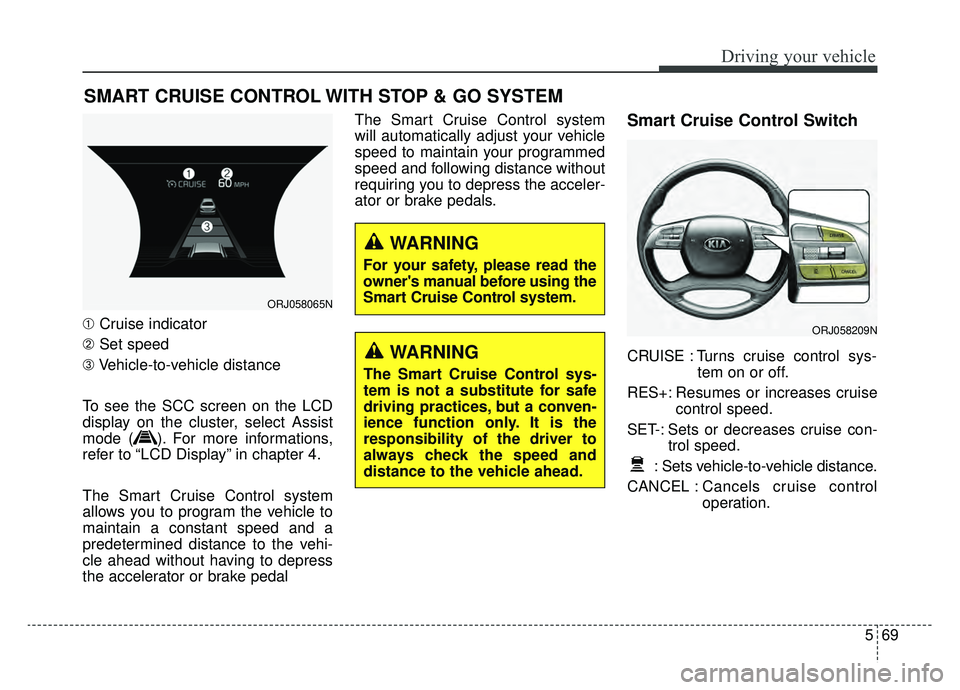
➀Cruise indicator
➁ Set speed
\b Vehicle-to-vehicle distance
To see the SCC screen on the LCD
display on the cluster, select Assist
mode ( ). For more informations,
refer to “LCD Display” in chapter 4.
The Smart Cruise Control system
allows you to program the vehicle to
maintain a constant speed and a
predetermined distance to the vehi-
cle ahead without having to depress
the accelerator or brake pedal The Smart Cruise Control system
will automatically adjust your vehicle
speed to maintain your programmed
speed and following distance without
requiring you to depress the acceler-
ator or brake pedals.
Smart Cruise Control Switch
CRUISE : Turns cruise control sys-
tem on or off.
RES+: Resumes or increases cruise control speed.
SET-: Sets or decreases cruise con- trol speed.
: Sets vehicle-to-vehicle distance.
CANCEL : Cancels cruise control
operation.
SMART CRUISE CONTROL WITH STOP & GO SYSTEM
ORJ058065N
ORJ058209N
WARNING
The Smart Cruise Control sys-
tem is not a substitute for safe
driving practices, but a conven-
ience function only. It is the
responsibility of the driver to
always check the speed and
distance to the vehicle ahead.
WARNING
For your safety, please read the
owner's manual before using the
Smart Cruise Control system.
Page 335 of 580
Driving your vehicle
70
5
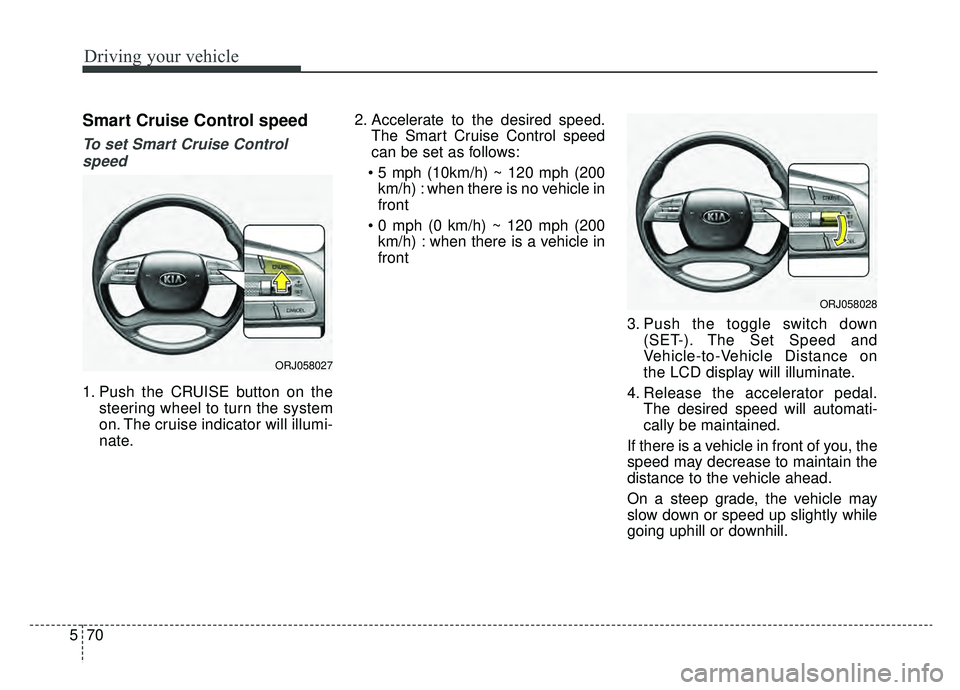
Smart Cruise Control speed
To set Smart Cruise Control
speed
1. Push the CRUISE button on the steering wheel to turn the system
on. The cruise indicator will illumi-
nate. 2. Accelerate to the desired speed.
The Smart Cruise Control speed
can be set as follows:
km/h) : when there is no vehicle in
front
km/h) : when there is a vehicle in
front
3. Push the toggle switch down(SET-). The Set Speed and
Vehicle-to-Vehicle Distance on
the LCD display will illuminate.
4. Release the accelerator pedal. The desired speed will automati-
cally be maintained.
If there is a vehicle in front of you, the
speed may decrease to maintain the
distance to the vehicle ahead.
On a steep grade, the vehicle may
slow down or speed up slightly while
going uphill or downhill.
ORJ058027
ORJ058028