navigation KIA K900 2020 Owner's Manual
[x] Cancel search | Manufacturer: KIA, Model Year: 2020, Model line: K900, Model: KIA K900 2020Pages: 593, PDF Size: 14.99 MB
Page 389 of 593
5123
Driving your vehicle
The system responds to curveslocated on the destination set in
the navigation. If the destination is
not set, the system will respond to
road information of the expected
route.✽ ✽ NOTICE
• Navigation-based Smart Cruise
Control is limited in other coun-
tries.
• The system may not operate due to the existence of leading vehicles
and the driving situations of the
vehicle.
• The system operates regardless of whether the sharp curve warning
appears on the navigation, but the
time gap could occur between the
warning and system operation.
• The navigation only provides curve information within permit-
ted speed ranges so that the system
may not decrease its speed during
extreme over-speed driving.
• The system is not designed to work on highways other than mentioned
as a controlled access road.
• The system automatically cancels when you leave the highway. (Continued)(Continued)
• Highway Driving Assist and
Navigation-based Smart Cruise
Control uses the same “AUTO”
symbol that indicates the status of
the system. Therefore, even if the
Navigation-based Cruise Control
is off, the “AUTO” symbol may be
displayed.
• If there is a problem with Navigation-based Smart Cruise
Control, the system cannot be acti-
vated in the AVN system screen,
and the “AUTO” symbol will turn
off. However, if Highway Driving
Assist is activated, the “AUTO”
symbol will be displayed.
• After you pass through a tollgate on a highway, the system operates
based on the first lane. If you enter
one of the other lanes, the system
might not properly decelerate.
• If you over speed, the system may not decelerate the vehicle in a
curve.
• Deceleration by the system may not be sufficient if the driver accel-
erates while the system is operat-
ing, (Continued)
Page 390 of 593
Driving your vehicle
124
5
(Continued)
• Deceleration by the system may
not be sufficient due to road con-
ditions such as uneven road sur-
faces, narrow lanes, etc.
• If the road is controlled, due to construction or holiday events, the
system might not work properly.CAUTION
The Navigation-based Cruise
Control system may not func-tion properly in the following sit-uations:
The navigation is not working properly.
The navigation is not updated. The real-time GPS or map information provided haserrors.
The navigation is overloaded by performing functions suchas route search, video play-back, voice recognition, etc.are performing simultaneous-ly.
GPS signals are blocked in areas such as a tunnel.
The driver goes off course or the route to the destination ischanged or canceled by reset-ting the navigation.
The vehicle enters a service station or rest area.
(Continued)
(Continued) A section of the highway’s shape has changed.
Android Auto or Car Play is operating.
The navigation cannot detect the current vehicle position(ex: elevated roads includingoverpass adjacent to generalroads or nearby roads exist ina parallel way).
The navigation is being updat- ed while driving.
The navigation is being reset while driving.
The road is slippery due to bad weather such as rain orsnow.
Page 408 of 593
Driving your vehicle
142
5
Highway Driving Assist (HDA) sys-
tem is designed to control the vehicle
distance and speed of the vehicle
when driving on a highway.
The system assists drivers by receiv-
ing information about the speed limit
of the highway that the vehicle is on
and automatically changing the set
speed of Smart Cruise Control
(SCC) system when needed.✽ ✽
NOTICE
• Highway Driving Assist (HDA)
system is available only on con-
trolled access road of certain high-
ways.❈ ❈ Controlled access road indi-
cates roads with limited
entrances and exits that allow
uninterrupted high speed traf-
fic flow. Only passenger cars
and motorcycles are allowed on
controlled access roads.
• Additional highways may be expanded by navigation updates.
HIGHWAY DRIVING ASSIST (HDA) SYSTEM (IF EQUIPPED)
WARNING
HDA system is not a substi-
tute for safe driving practices,
but a convenience function. It
is the responsibility of the
driver to always be aware of
the surroundings and drive
safely.
HDA system relies entirely on the road information provided
by the navigation system. It is
the responsibility of the driver
to follow traffic laws and avoid
accidents.
For your safety, please read the owner's manual before
using the system.
Available highway
(Controlled access road)
USASelect Interstate Highways
CanadaSelect Provincial and Territorial Highways
Page 412 of 593
Driving your vehicle
146
5
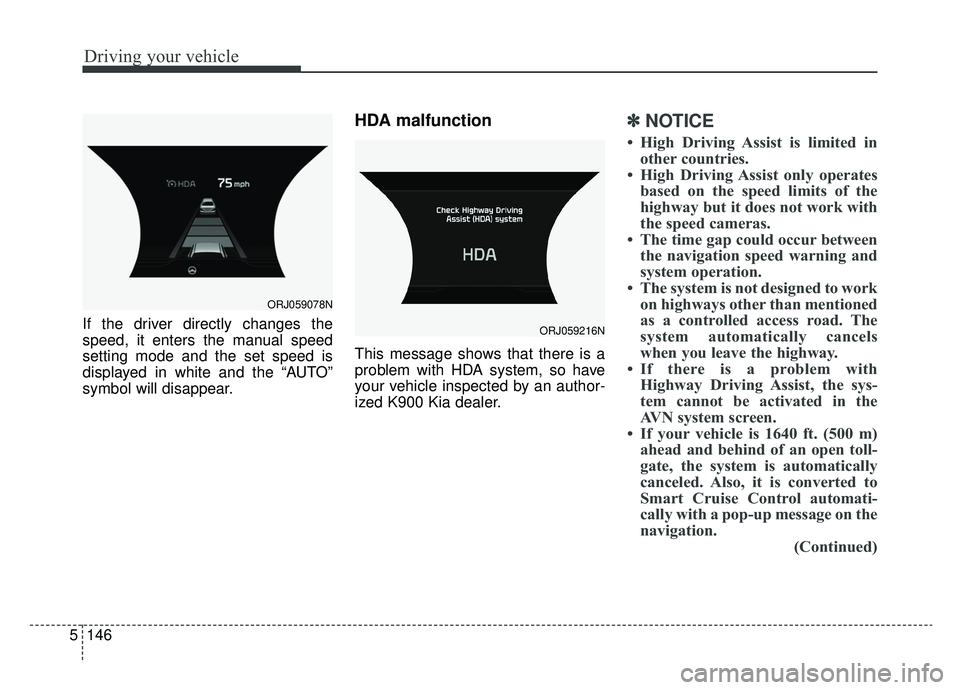
If the driver directly changes the
speed, it enters the manual speed
setting mode and the set speed is
displayed in white and the “AUTO”
symbol will disappear.
HDA malfunction
This message shows that there is a
problem with HDA system, so have
your vehicle inspected by an author-
ized K900 Kia dealer.
✽ ✽
NOTICE
• High Driving Assist is limited in
other countries.
• High Driving Assist only operates based on the speed limits of the
highway but it does not work with
the speed cameras.
• The time gap could occur between the navigation speed warning and
system operation.
• The system is not designed to work on highways other than mentioned
as a controlled access road. The
system automatically cancels
when you leave the highway.
• If there is a problem with Highway Driving Assist, the sys-
tem cannot be activated in the
AVN system screen.
• If your vehicle is 1640 ft. (500 m) ahead and behind of an open toll-
gate, the system is automatically
canceled. Also, it is converted to
Smart Cruise Control automati-
cally with a pop-up message on the
navigation. (Continued)
ORJ059216N
ORJ059078N
Page 413 of 593
5147
Driving your vehicle
(Continued)
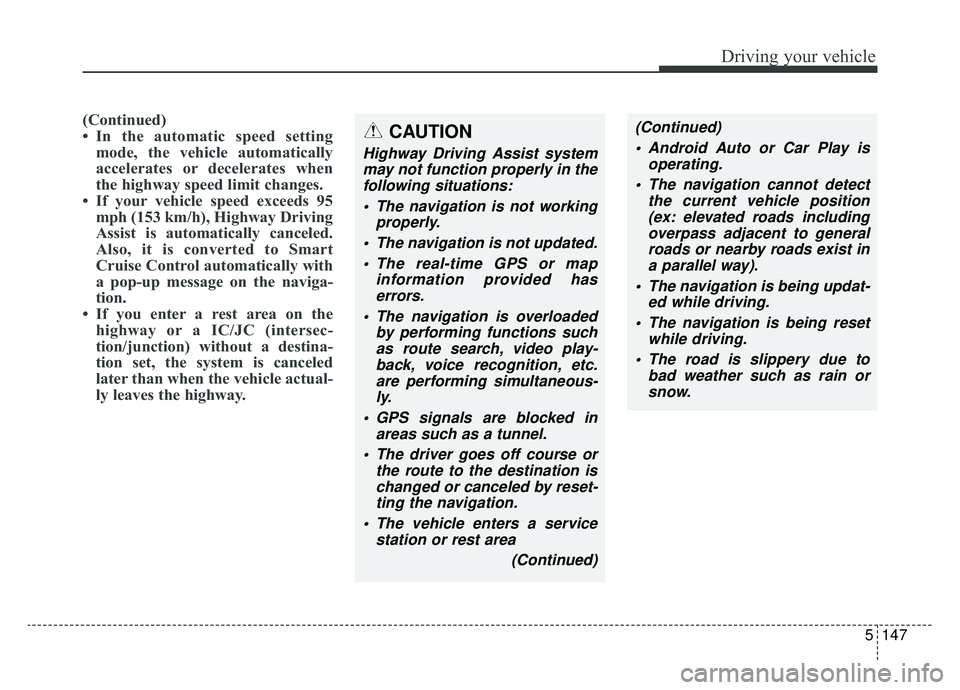
• In the automatic speed settingmode, the vehicle automatically
accelerates or decelerates when
the highway speed limit changes.
• If your vehicle speed exceeds 95 mph (153 km/h), Highway Driving
Assist is automatically canceled.
Also, it is converted to Smart
Cruise Control automatically with
a pop-up message on the naviga-
tion.
• If you enter a rest area on the highway or a IC/JC (intersec-
tion/junction) without a destina-
tion set, the system is canceled
later than when the vehicle actual-
ly leaves the highway. CAUTION
Highway Driving Assist system
may not function properly in thefollowing situations:
The navigation is not working properly.
The navigation is not updated. The real-time GPS or map information provided haserrors.
The navigation is overloaded by performing functions suchas route search, video play-back, voice recognition, etc.are performing simultaneous-ly.
GPS signals are blocked in areas such as a tunnel.
The driver goes off course or the route to the destination ischanged or canceled by reset-ting the navigation.
The vehicle enters a service station or rest area
(Continued)
(Continued) Android Auto or Car Play is operating.
The navigation cannot detect the current vehicle position(ex: elevated roads includingoverpass adjacent to generalroads or nearby roads exist ina parallel way).
The navigation is being updat- ed while driving.
The navigation is being reset while driving.
The road is slippery due to bad weather such as rain orsnow.
Page 450 of 593
What to do in an emergency
86
TIRE PRESSURE MONITORING SYSTEM (TPMS)
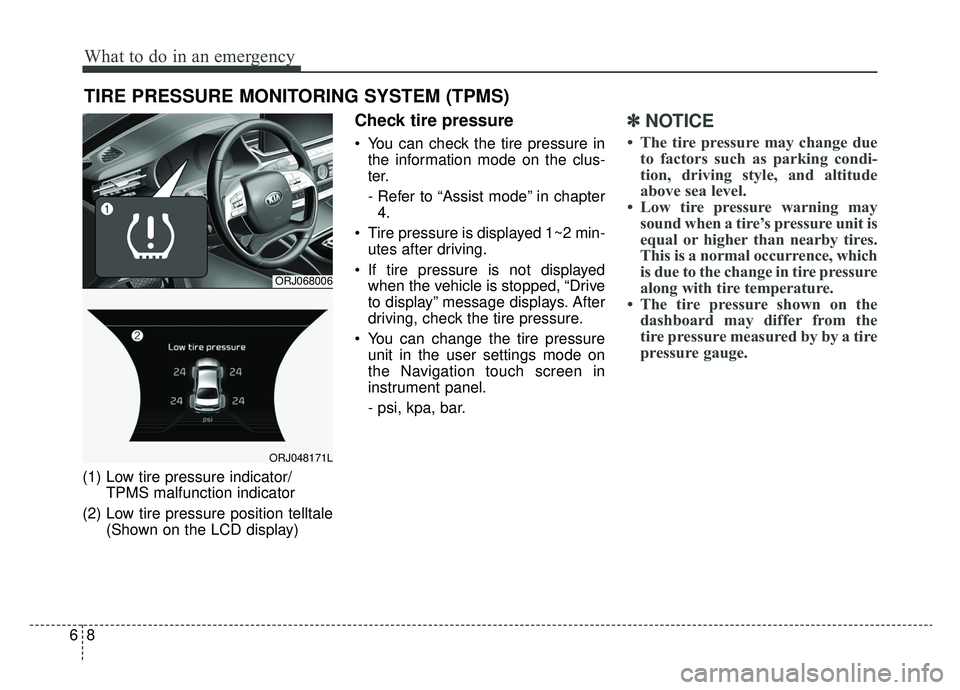
(1) Low tire pressure indicator/TPMS malfunction indicator
(2) Low tire pressure position telltale (Shown on the LCD display)
Check tire pressure
You can check the tire pressure inthe information mode on the clus-
ter.
- Refer to “Assist mode” in chapter4.
Tire pressure is displayed 1~2 min- utes after driving.
If tire pressure is not displayed when the vehicle is stopped, “Drive
to display” message displays. After
driving, check the tire pressure.
You can change the tire pressure unit in the user settings mode on
the Navigation touch screen in
instrument panel.
- psi, kpa, bar.
✽ ✽ NOTICE
• The tire pressure may change due
to factors such as parking condi-
tion, driving style, and altitude
above sea level.
• Low tire pressure warning may sound when a tire’s pressure unit is
equal or higher than nearby tires.
This is a normal occurrence, which
is due to the change in tire pressure
along with tire temperature.
• The tire pressure shown on the dashboard may differ from the
tire pressure measured by by a tire
pressure gauge.
ORJ068006
ORJ048171L
Page 453 of 593

611
What to do in an emergency
When you drive your vehicle from a
warm area to a cold area or from a
cold area to a warm area, or the out-
side temperature is significantly
higher or lower, you should check the
tire inflation pressure and adjust the
tires to the recommended tire infla-
tion pressure.
When filling tires with more air, con-
ditions to turn off the low tire pres-
sure telltale may not be met. This is
because a tire inflator has a margin
of error in performance. The low tire
pressure telltale will be turned off if
the tire pressure is above the recom-
mended tire inflation pressure.TPMS (Tire PressureMonitoring System)malfunction indicator
The low tire pressure telltale will illu-
minate after it blinks for approximate-
ly one minute when there is a prob-
lem with the Tire Pressure
Monitoring System. If the system is
able to correctly detect an underinfla-
tion warning at the same time as sys-
tem failure then it will illuminate both
the TPMS malfunction and low tire
pressure position telltales e.g. if
Front Left sensor fails, the TPMS
malfunction indicator illuminates, but
if the Front Right, Rear Left, or Rear
Right tire is under-inflated, the low
tire pressure position telltales may
illuminate together with the TPMS
malfunction indicator.
Have the system checked by an
authorized K900 Kia dealer as soon
as possible to determine the cause
of the problem. The TPMS malfunction indicator
may be illuminated if the vehicle is
moving around electric power sup-
ply cables or radios transmitters
such as at police stations, govern-
ment and public offices, broadcast-
ing stations, military installations,
airports, or transmitting towers,
etc. This can interfere with normal
operation of the Tire Pressure
Monitoring System (TPMS).
The TPMS malfunction indicator may be illuminated if snow chains
are used or some separate elec-
tronic devices such as notebook
computer, mobile charger, remote
starter or navigation etc., are used
in the vehicle. This can interfere
with normal operation of the Tire
Pressure Monitoring System
(TPMS).
WARNING- Low pressure
damage
Do not drive on low pressure
tires. Significantly low tire pres-
sure can cause the tires to over-
heat and fail making the vehicle
unstable resulting in increased
braking distances and a loss of
vehicle control.
Page 532 of 593
Maintenance
62
7
Fuse NameFuse ratingCircuit Protected
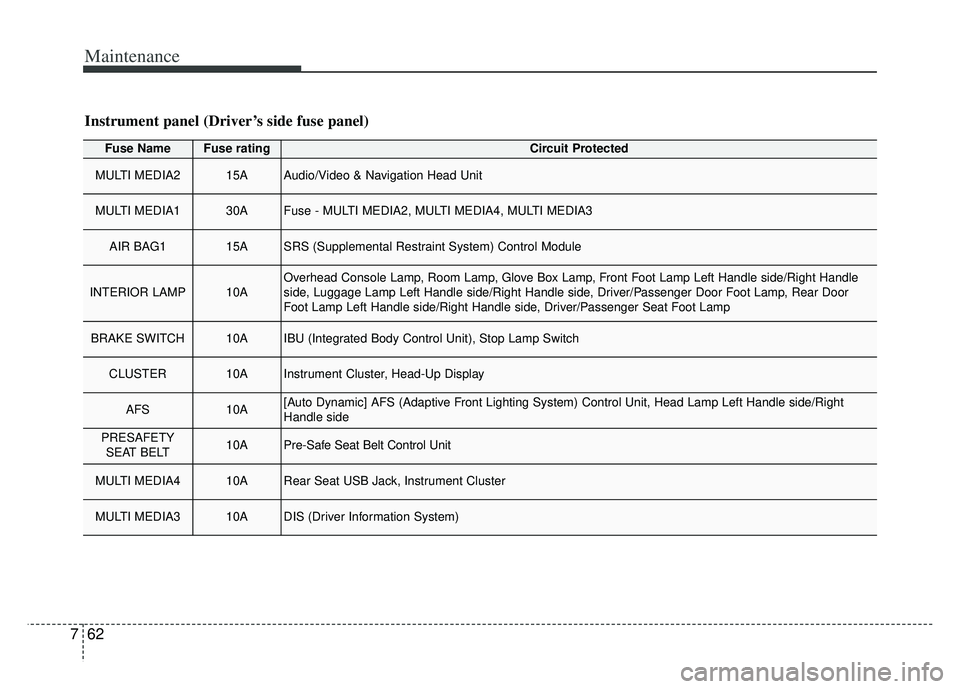
MULTI MEDIA215AAudio/Video & Navigation Head Unit
MULTI MEDIA130AFuse - MULTI MEDIA2, MULTI MEDIA4, MULTI MEDIA3
AIR BAG115ASRS (Supplemental Restraint System) Control Module
INTERIOR LAMP10AOverhead Console Lamp, Room Lamp, Glove Box Lamp, Front Foot Lamp Left Handle side/Right Handle
side, Luggage Lamp Left Handle side/Right Handle side, Driver/Passenger Door Foot Lamp, Rear Door
Foot Lamp Left Handle side/Right Handle side, Driver/Passenger Seat Foot Lamp
BRAKE SWITCH10AIBU (Integrated Body Control Unit), Stop Lamp Switch
CLUSTER10AInstrument Cluster, Head-Up Display
AFS10A[Auto Dynamic] AFS (Adaptive Front Lighting System) Control Unit, Head Lamp Left Handle side/Right
Handle side
PRESAFETY
SEAT BELT10APre-Safe Seat Belt Control Unit
MULTI MEDIA410ARear Seat USB Jack, Instrument Cluster
MULTI MEDIA310ADIS (Driver Information System)
Instrument panel (Driver’s side fuse panel)
Page 534 of 593

Maintenance
64
7
Fuse NameFuse ratingCircuit Protected
DRIVER POWER
SEAT225ADriver Power Seat Module, Driver Seat Relay Module, Driver Lumbar Support Unit
TRUNK LID10ATrunk Lid Relay, Fuel Lid Relay, Fuel Filler Door & Trunk Lid Switch
MODULE910AMultifunction Switch, Cooling Fan Controller (BLDC (Brushless Direct Current) Type), Surround View
Monitor Unit, Rear Seat Armrest Console Switch
MODULE610AIBU (Integrated Body Control Unit), 4WD (4 Wheel Drive) ECM (Electronic Control Module), ESC
(Electronic Stability Control) Unit, Lane Keeping Assist Unit (Line), Crash Pad Switch, Steering Tilt &
Telescopic Module
POWER HANDLE15ASteering Tilt & Telescopic Module
REAR LH POWER SEAT215ARear Seat Relay Module Left Handle side (8WAY)
PASSENGER
POWER SEAT225APassenger Power Seat Module, Passenger Seat Relay Module, Passenger Lumbar Support Unit
MODULE310AData Link Connector, Front Console Switch, Rain Sensor, Blind-Spot Collision Warning Unit Left Handle
side/Right Handle side, Rear Seat Armrest Console Switch, Rain Sensor
MODULE710A
Multipurpose Check Connector, Multifunction Switch, Keyboard, Audio/Video & Navigation Head Unit, MTS
(Mozen Telematics System) E-Call Module, Air Quality Sensor, AMP (Amplifier), Air Conditioner Control
Module, Electro Chromic Mirror, Front Air Conditioner Controller, Driver/Passenger Seat Relay Module,
Driver/Passenger Seat Warmer Control Module, Rear Seat Warmer Control Module Left Handle side/Right
Handle side, Driver/Passenger Power Seat Module, Driver/Passenger CCS (Climate Control Seat) Module,
Rear Seat CCS (Climate Control Seat) Module Left Handle side/Right Han\
dle side, Rear Seat Armrest
Console Switch
SUNROOF20ASunroof Control Unit (Glass)
Page 535 of 593
765
Maintenance
Fuse NameFuse ratingCircuit Protected
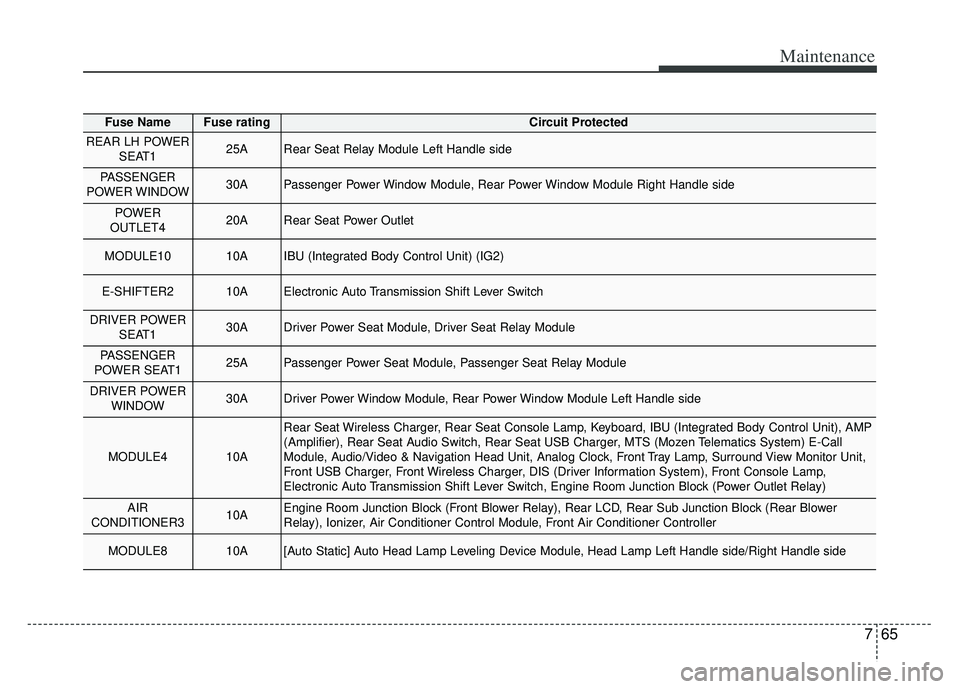
REAR LH POWERSEAT125ARear Seat Relay Module Left Handle side
PASSENGER
POWER WINDOW30APassenger Power Window Module, Rear Power Window Module Right Handle side
POWER
OUTLET420ARear Seat Power Outlet
MODULE1010AIBU (Integrated Body Control Unit) (IG2)
E-SHIFTER210AElectronic Auto Transmission Shift Lever Switch
DRIVER POWER SEAT130ADriver Power Seat Module, Driver Seat Relay Module
PASSENGER
POWER SEAT125APassenger Power Seat Module, Passenger Seat Relay Module
DRIVER POWER WINDOW30ADriver Power Window Module, Rear Power Window Module Left Handle side
MODULE410A
Rear Seat Wireless Charger, Rear Seat Console Lamp, Keyboard, IBU (Integrated Body Control Unit), AMP
(Amplifier), Rear Seat Audio Switch, Rear Seat USB Charger, MTS (Mozen Telematics System) E-Call
Module, Audio/Video & Navigation Head Unit, Analog Clock, Front Tray Lamp, Surround View Monitor Unit,
Front USB Charger, Front Wireless Charger, DIS (Driver Information System), Front Console Lamp,
Electronic Auto Transmission Shift Lever Switch, Engine Room Junction Block (Power Outlet Relay)
AIR
CONDITIONER310AEngine Room Junction Block (Front Blower Relay), Rear LCD, Rear Sub Junction Block (Rear Blower
Relay), Ionizer, Air Conditioner Control Module, Front Air Conditioner Controller
MODULE810A[Auto Static] Auto Head Lamp Leveling Device Module, Head Lamp Left Handle side/Right Handle side