engine KIA NIRO 2019 Manual Online
[x] Cancel search | Manufacturer: KIA, Model Year: 2019, Model line: NIRO, Model: KIA NIRO 2019Pages: 611, PDF Size: 15.28 MB
Page 205 of 611
Features of your vehicle
70
4
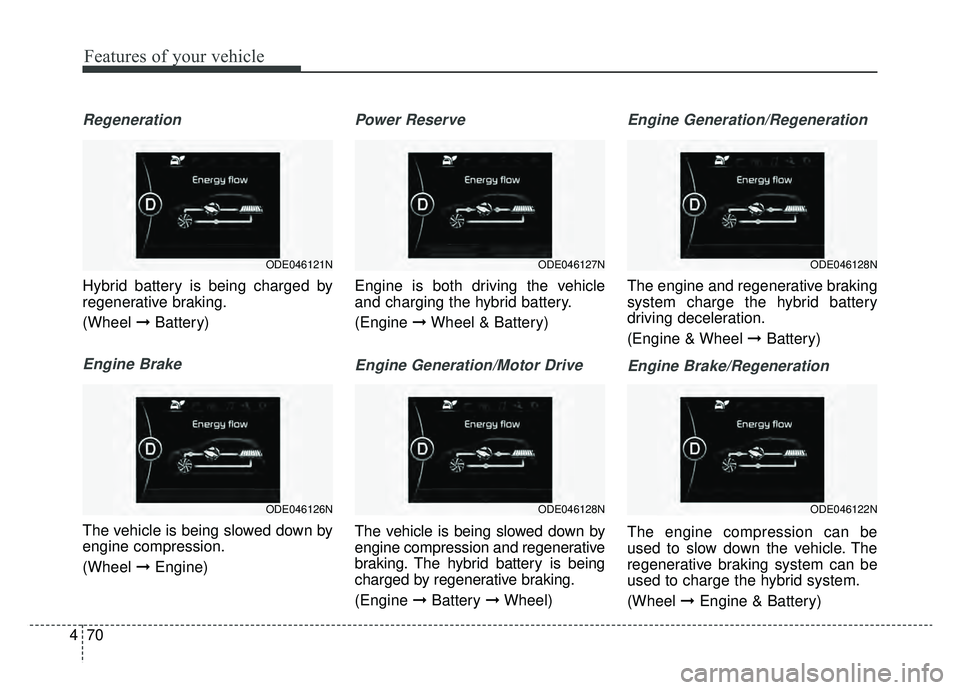
Regeneration
Hybrid battery is being charged by
regenerative braking.
(Wheel ➞Battery)
Engine Brake
The vehicle is being slowed down by
engine compression.
(Wheel ➞Engine)
Power Reserve
Engine is both driving the vehicle
and charging the hybrid battery.
(Engine ➞Wheel & Battery)
Engine Generation/Motor Drive
The vehicle is being slowed down by
engine compression and regenerative
braking. The hybrid battery is being
charged by regenerative braking.
(Engine ➞Battery ➞Wheel)
Engine Generation/Regeneration
The engine and regenerative braking
system charge the hybrid battery
driving deceleration.
(Engine & Wheel ➞ Battery)
Engine Brake/Regeneration
The engine compression can be
used to slow down the vehicle. The
regenerative braking system can be
used to charge the hybrid system.
(Wheel ➞Engine & Battery)
ODE046128N
ODE046122N
ODE046127N
ODE046128N
ODE046121N
ODE046126N
Page 206 of 611
471
Features of your vehicle
Trip information (Trip computer,
for Plug-in Hybrid)
The trip computer is a microcomput-
er-controlled driver information sys-
tem that displays information related
to driving.
✽ ✽NOTICE
Some driving information stored in
the trip computer (for example
Average Vehicle Speed) resets if the
battery is disconnected.
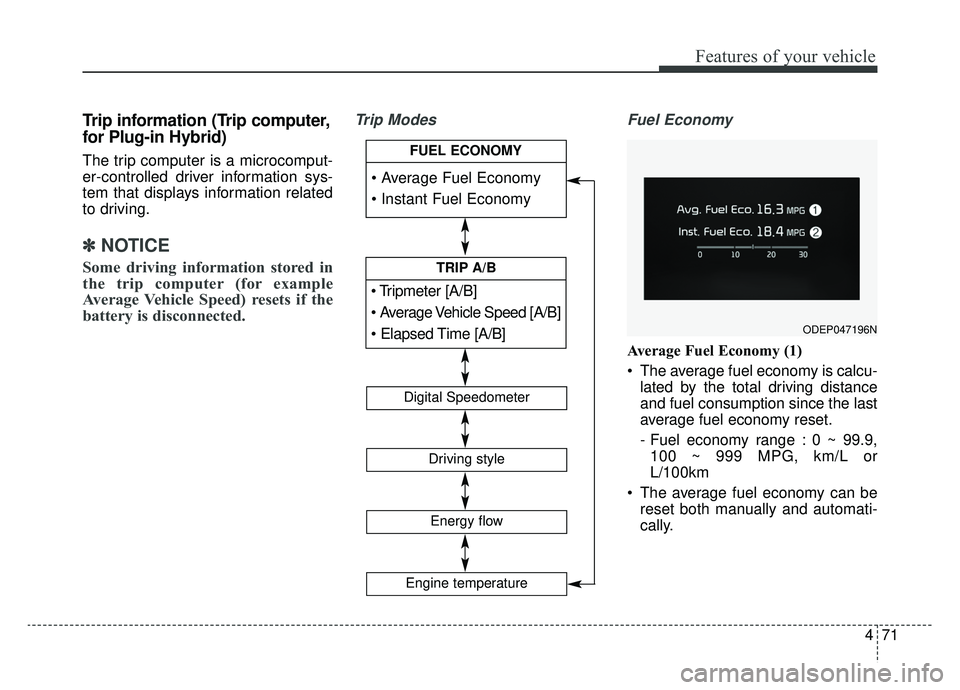
Trip Modes Fuel Economy
Average Fuel Economy (1)
The average fuel economy is calcu-
lated by the total driving distance
and fuel consumption since the last
average fuel economy reset.
- Fuel economy range : 0 ~ 99.9,100 ~ 999 MPG, km/L or
L/100km
The average fuel economy can be reset both manually and automati-
cally.
ODEP047196N
[A/B]
TRIP A/B
Digital Speedometer
Driving style
Energy flow
FUEL ECONOMY
Engine temperature
Page 207 of 611
Features of your vehicle
72
4
Manual reset
To clear the average fuel economy
manually, press the OK button
(reset) on the steering wheel for
more than 1 second when the aver-
age fuel economy is displayed. Automatic reset
To make the average fuel economy
be reset automatically whenever
refueling, select the “Fuel economy
auto reset” mode in User Setting
menu of the LCD display (Refer to
“LCD window”).
OFF - You may set to default man-
ually by using the trip switch reset
button.
After ignition - The vehicle will automatically set to default once 4
hours pass after the Engine
start/stop button is turned to the
OFF position.
After refueling - After refueling more than 1.5 gallons (6 liters) and
driving over 1 mph (1 km/h), the
vehicle will reset to default auto-
matically.
✽ ✽ NOTICE
The average vehicle speed is not dis-
played, when the vehicle drives
shorter than 0.19 miles (300 meters)
or less than 10 seconds after turning
ON the Engine Start/Stop button.
Instant Fuel Economy (2)
This mode displays the instant fuel
economy during the last few sec-
onds when the vehicle speed is
more than 6.2 MPH (10 km/h).
- Fuel economy range : 0.0 ~ 50.0MPG or 0.0 ~ 30L/100km
Page 208 of 611
473
Features of your vehicle
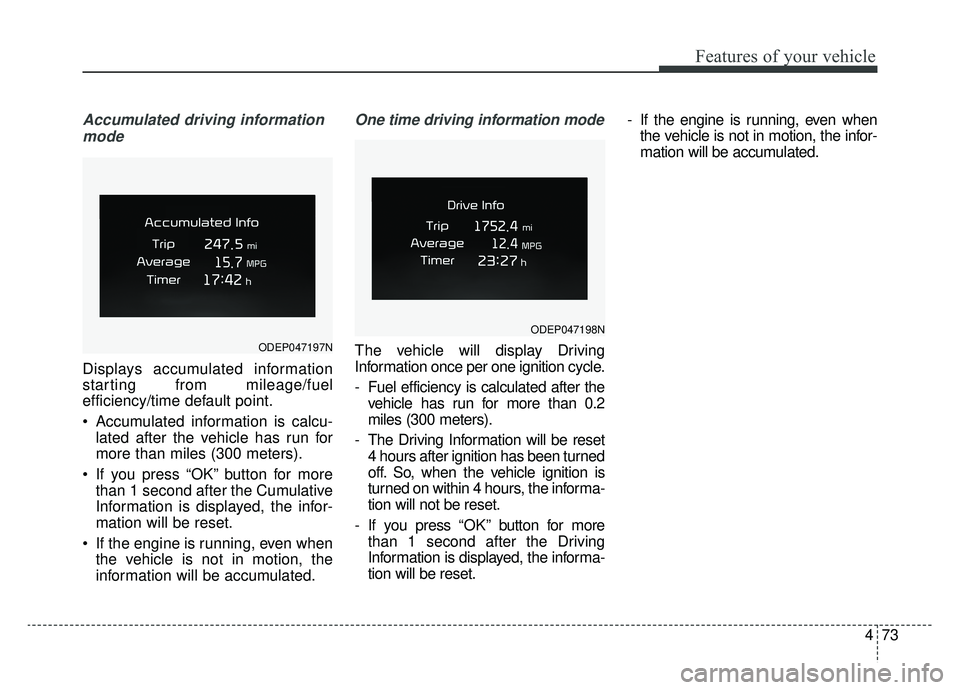
Accumulated driving informationmode
Displays accumulated information
starting from mileage/fuel
efficiency/time default point.
Accumulated information is calcu- lated after the vehicle has run for
more than miles (300 meters).
If you press “OK” button for more than 1 second after the Cumulative
Information is displayed, the infor-
mation will be reset.
If the engine is running, even when the vehicle is not in motion, the
information will be accumulated.
One time driving information mode
The vehicle will display Driving
Information once per one ignition cycle.
- Fuel efficiency is calculated after thevehicle has run for more than 0.2
miles (300 meters).
- The Driving Information will be reset 4 hours after ignition has been turned
off. So, when the vehicle ignition is
turned on within 4 hours, the informa-
tion will not be reset.
- If you press “OK” button for more
than 1 second after the Driving
Information is displayed, the informa-
tion will be reset. - If the engine is running, even when
the vehicle is not in motion, the infor-
mation will be accumulated.ODEP047197N
ODEP047198N
Page 210 of 611
475
Features of your vehicle
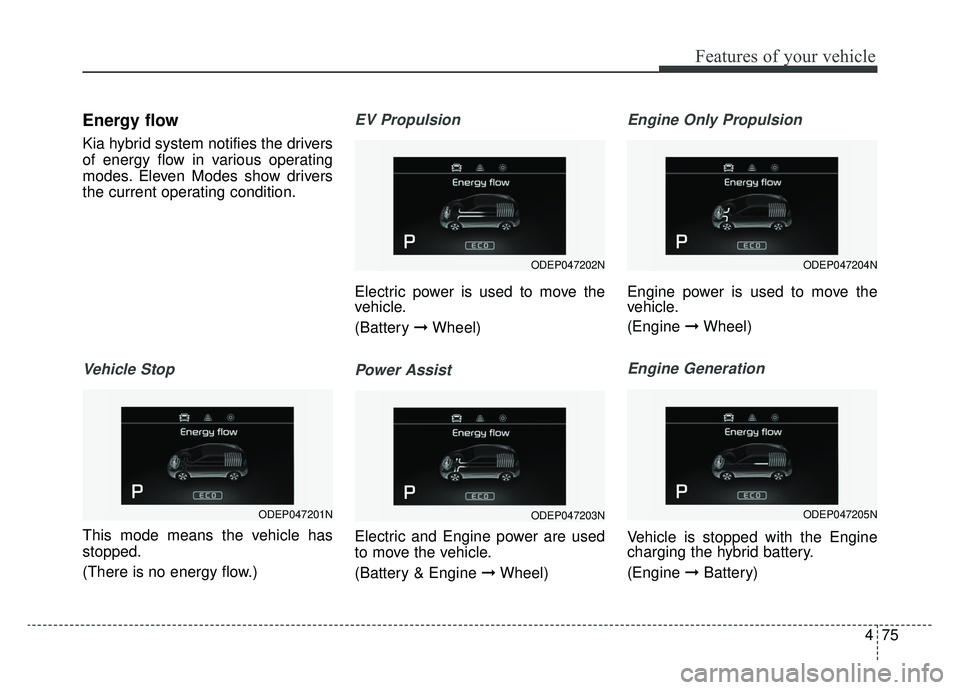
Energy flow
Kia hybrid system notifies the drivers
of energy flow in various operating
modes. Eleven Modes show drivers
the current operating condition.
Vehicle Stop
This mode means the vehicle has
stopped.
(There is no energy flow.)
EV Propulsion
Electric power is used to move the
vehicle.
(Battery ➞Wheel)
Power Assist
Electric and Engine power are used
to move the vehicle.
(Battery & Engine ➞ Wheel)
Engine Only Propulsion
Engine power is used to move the
vehicle.
(Engine ➞Wheel)
Engine Generation
Vehicle is stopped with the Engine
charging the hybrid battery.
(Engine ➞Battery)
ODEP047202N
ODEP047203N
ODEP047204N
ODEP047205NODEP047201N
Page 211 of 611
Features of your vehicle
76
4
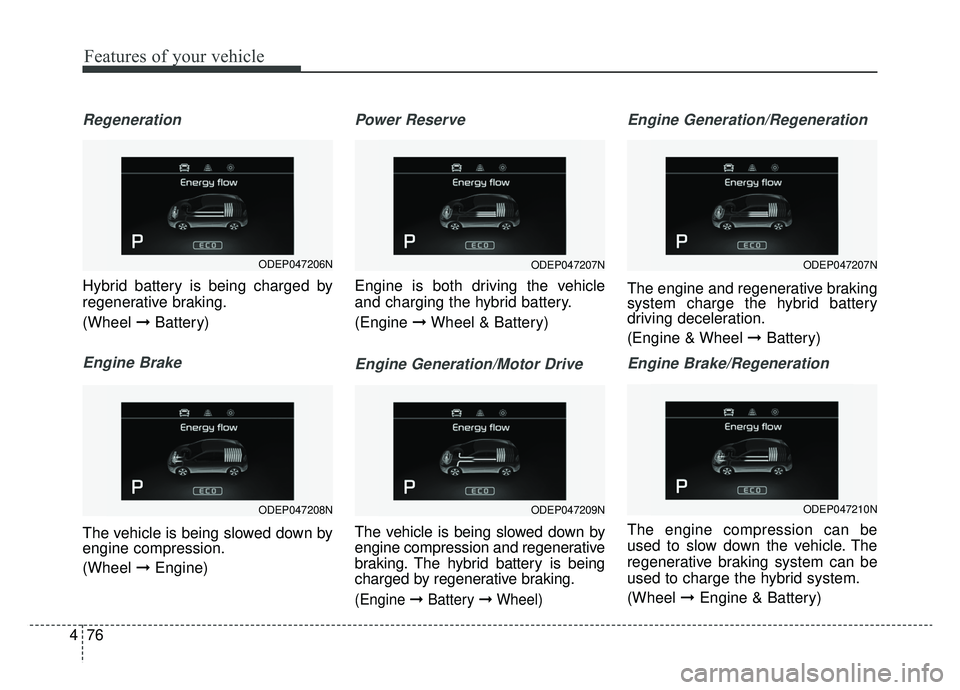
Regeneration
Hybrid battery is being charged by
regenerative braking.
(Wheel ➞Battery)
Engine Brake
The vehicle is being slowed down by
engine compression.
(Wheel ➞Engine)
Power Reserve
Engine is both driving the vehicle
and charging the hybrid battery.
(Engine ➞Wheel & Battery)
Engine Generation/Motor Drive
The vehicle is being slowed down by
engine compression and regenerative
braking. The hybrid battery is being
charged by regenerative braking.
(Engine ➞Battery ➞Wheel)
Engine Generation/Regeneration
The engine and regenerative braking
system charge the hybrid battery
driving deceleration.
(Engine & Wheel ➞ Battery)
Engine Brake/Regeneration
The engine compression can be
used to slow down the vehicle. The
regenerative braking system can be
used to charge the hybrid system.
(Wheel ➞Engine & Battery)
ODEP047207N
ODEP047209N
ODEP047207N
ODEP047210N
ODEP047206N
ODEP047208N
Page 212 of 611
477
Features of your vehicle
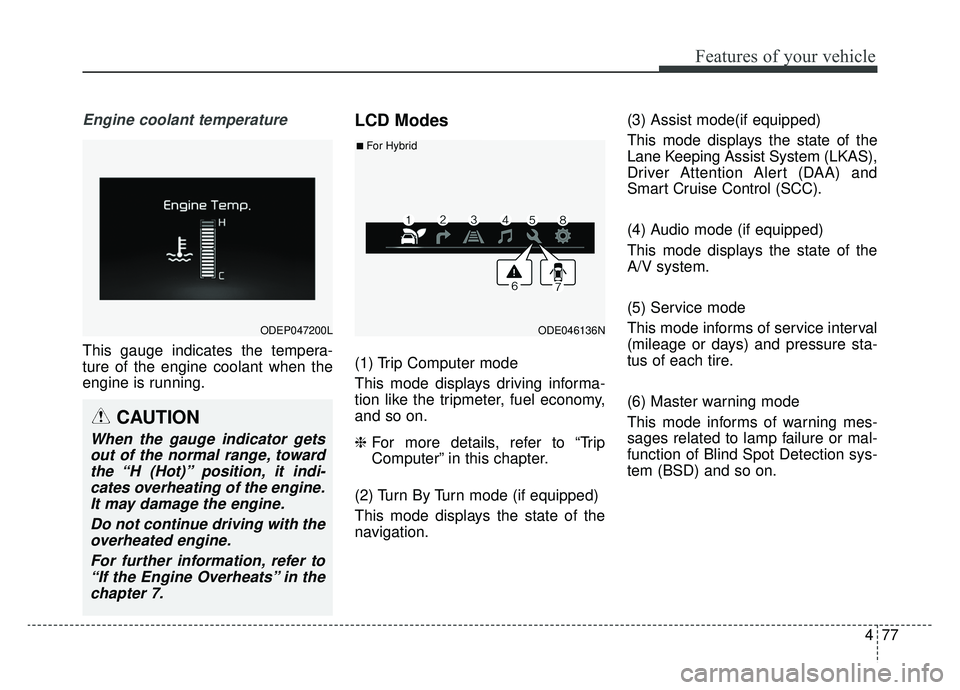
Engine coolant temperature
This gauge indicates the tempera-
ture of the engine coolant when the
engine is running.
LCD Modes
(1) Trip Computer mode
This mode displays driving informa-
tion like the tripmeter, fuel economy,
and so on.
❈For more details, refer to “Trip
Computer” in this chapter.
(2) Turn By Turn mode (if equipped)
This mode displays the state of the
navigation. (3) Assist mode(if equipped)
This mode displays the state of the
Lane Keeping Assist System (LKAS),
Driver Attention Alert (DAA) and
Smart Cruise Control (SCC).
(4) Audio mode (if equipped)
This mode displays the state of the
A/V system.
(5) Service mode
This mode informs of service interval
(mileage or days) and pressure sta-
tus of each tire.
(6) Master warning mode
This mode informs of warning mes-
sages related to lamp failure or mal-
function of Blind Spot Detection sys-
tem (BSD) and so on.
ODEP047200LODE046136N
■For Hybrid
CAUTION
When the gauge indicator gets
out of the normal range, towardthe “H (Hot)” position, it indi-cates overheating of the engine.It may damage the engine.
Do not continue driving with theoverheated engine.
For further information, refer to“If the Engine Overheats” in thechapter 7.
Page 215 of 611
Features of your vehicle
80
4
Service Mode
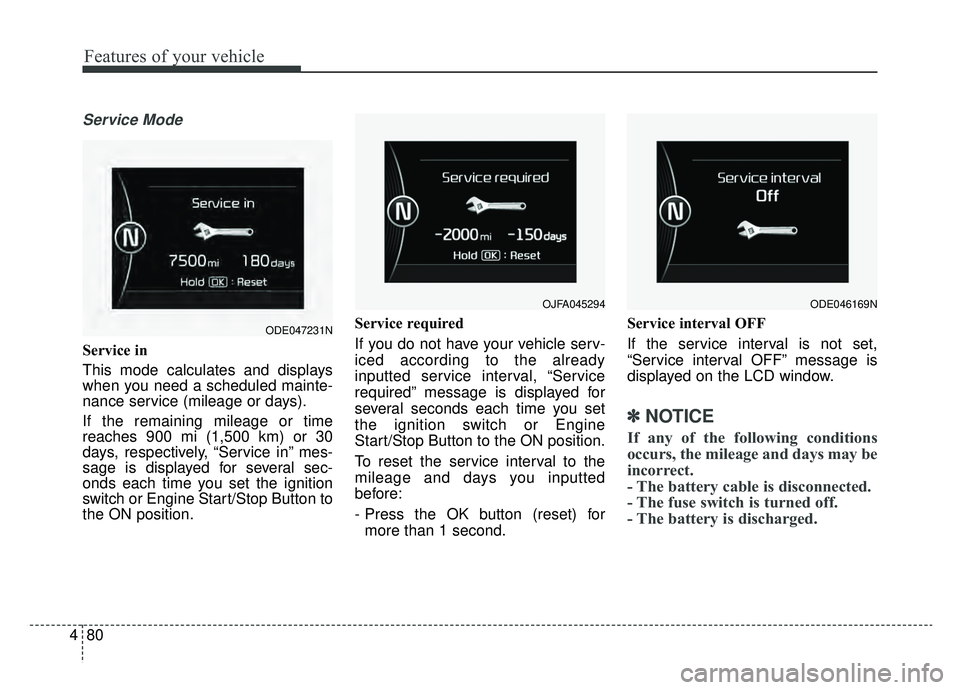
Service in
This mode calculates and displays
when you need a scheduled mainte-
nance service (mileage or days).
If the remaining mileage or time
reaches 900 mi (1,500 km) or 30
days, respectively, “Service in” mes-
sage is displayed for several sec-
onds each time you set the ignition
switch or Engine Start/Stop Button to
the ON position. Service required
If you do not have your vehicle serv-
iced according to the already
inputted service interval, “Service
required” message is displayed for
several seconds each time you set
the ignition switch or Engine
Start/Stop Button to the ON position.
To reset the service interval to the
mileage and days you inputted
before:
- Press the OK button (reset) for
more than 1 second. Service interval OFF
If the service interval is not set,
“Service interval OFF” message is
displayed on the LCD window.
✽ ✽
NOTICE
If any of the following conditions
occurs, the mileage and days may be
incorrect.
- The battery cable is disconnected.
- The fuse switch is turned off.
- The battery is discharged.
OJFA045294
ODE047231N
ODE046169N
Page 217 of 611
Features of your vehicle
82
4
Smart Cruise Control Response (if
equipped) : Choose the sensitivi-
ty(Slow/Normal/Fast) of the smart
cruise control.
❈ For more details, refer to “Smart
Cruise Control System” in chapter
6.
Autonomous Emergency Braking (if equipped) : If this item is
checked, the AEB function will be
activated.
❈ For more details, refer to
“Autonomous Emergency Braking
(AEB)” in chapter 6.
Forward Collision Warning (if equipped) : Choose the sensitivity
of the forward collision warning.
- Late/Normal/Early
❈ For more details, refer to
“Autonomous Emergency Braking
(AEB)” in chapter 6. BSD (Blind Spot Detection) Sound
(if equipped) : If this item is
checked, the blind spot detection
sound will be activated.
❈ For more details, refer to “Blind Spot
Detection System” in chapter 6.
Rear Cross Traffic Alert (if equipped) : If this item is checked,
the rear cross traffic alert function
will be activate
❈ For more details, refer to “Blind Spot
Detection System” in chapter 6.
Coasting Guide (if equipped) : To activate or deactivate the Coasting
Guide system and sound.
❈ For more information, refer to
“Coasting Guide” in this chapter.
Start Coasting (if equipped) : To adjust the
sensitivity(Late/Normal/Early) of
the Coasting Guide.
❈ For more information, refer to
“Coasting Guide” in this chapter. Door
Automatic Lock
- Enable on Speed : All doors willbe automatically locked when the
vehicle speed exceeds 9.3 mph
(15 km/h).
- Enable on Shift: All doors will be automatically locked if the trans-
mission shift lever is shifted from
the P (Park) position to the R
(Reverse), N (Neutral), or D
(Drive) position.
Automatic Unlock - Disable : The auto door unlockoperation will be canceled.
- Vehicle Off : All doors will be auto- matically unlocked when the
Engine Start/Stop button is set to
the OFF position.
- On Shift to P : All doors will be auto- matically unlocked if the shift lever
is shifted to the P (Park) position.
Two Press Unlock : If this item is checked, the two press unlock will
be activated.
Page 218 of 611
483
Features of your vehicle
Lights
One Touch Turn Signal- Off : The one touch turn signalfunction will be deactivated.
- 3, 5, 7 Flashes : The lane change signals will blink 3, 5, or 7 times
when the turn signal lever is
moved slightly.
❈ For more details, refer to “Light” in
this chapter.
Head Lamp Delay (if equipped) If this item is checked, the head
lamp delay function will be activat-
ed.
Welcome Light (if equipped) If this item is checked, the wel-
come light function will be activat-
ed.
Sound
Park Assist System Vol. (if equipped) : Adjust the Park Assist
System volume. (Level 1 ~ 3) Convenience
Seat Easy Access (if equipped)
- None : The seat easy accessfunction will be deactivated.
- Normal/Extended : When you turn off the engine, the driver's
seat will automatically move rear-
ward short (Normal) or long
(Extended) for you to enter or exit
the vehicle more comfortably.
❈ For more details, refer to “Driver
Position Memory System” in chap-
ter 3.
Wireless charging system (if equipped) : If this item is checked,
the Wireless smart phone will be
activated.
Wiper/Light Display (if equipped) : If this item is checked, the Wiper/
Light Display will be activated.
: To activate or deactivate the gear
position pop-up. When activated,
the gear position will be displayed
on the LCD display. Service interval
Service Interval
To activate or deactivate the serv-
ice interval function.
Adjust Interval If the service interval menu is acti-
vated, you may adjust the time and
distance.
Reset : To reset the service interval func-tion.
If the service interval is activated
and the time and distance is
adjusted, messages are displayed
in the following situations each
time the vehicle is turned on.
- Service in : Displayed to informthe driver the remaining mileage
and days to service.
- Service required : Displayed when the mileage and days to
service has been reached or
passed.