steering KIA NIRO 2021 Workshop Manual
[x] Cancel search | Manufacturer: KIA, Model Year: 2021, Model line: NIRO, Model: KIA NIRO 2021Pages: 710, PDF Size: 14.77 MB
Page 480 of 710
![KIA NIRO 2021 Workshop Manual 5157
Driving your vehicle
Setting and activating HDA
With the ignition switch or ENGINE
START/STOP button in the [ON],
select or release the setting from
“User Setting Driver Assistance
Drivi](/img/2/54800/w960_54800-479.png "KIA NIRO 2021 Workshop Manual 5157
Driving your vehicle
Setting and activating HDA
With the ignition switch or ENGINE
START/STOP button in the [ON],
select or release the setting from
“User Setting Driver Assistance
Drivi")
5157
Driving your vehicle
Setting and activating HDA
With the ignition switch or ENGINE
START/STOP button in the [ON],
select or release the setting from
“User Setting Driver Assistance
Driving Assist Highway Driving
Assist”.
Select HDA in the User setting of the
instrument panel. and the function
will operate if the following conditions
are met :
If the engine is turned off then on
again, the function maintains the last
setting.
Operating conditions
If you activate HDA in the User set-
ting of the instrument panel. and the
following conditions are met, HDA
will be ready to operate, and the indi-
cator light ( ) will come on
green in the cluster.
When driving on the highway main
line.
When Smart Cruise Control is in
operation (Vehicle deceleration
and acceleration control)
- Refer to “Smart Cruise Control
(SCC)” in this chapter.
- If SCC is in standby mode (SCC
is on but speed is not set), HDA
will be in the same mode. The
white indicator ( ) light will
be turned on.
When the vehicle speed is below
95 mph (153 km/h)
HDA operation
The speed is automatically set in
accordance with the steering control
and the highway speed limit when all
the operating conditions are met.
Page 481 of 710
Driving your vehicle
158 5
Steering control
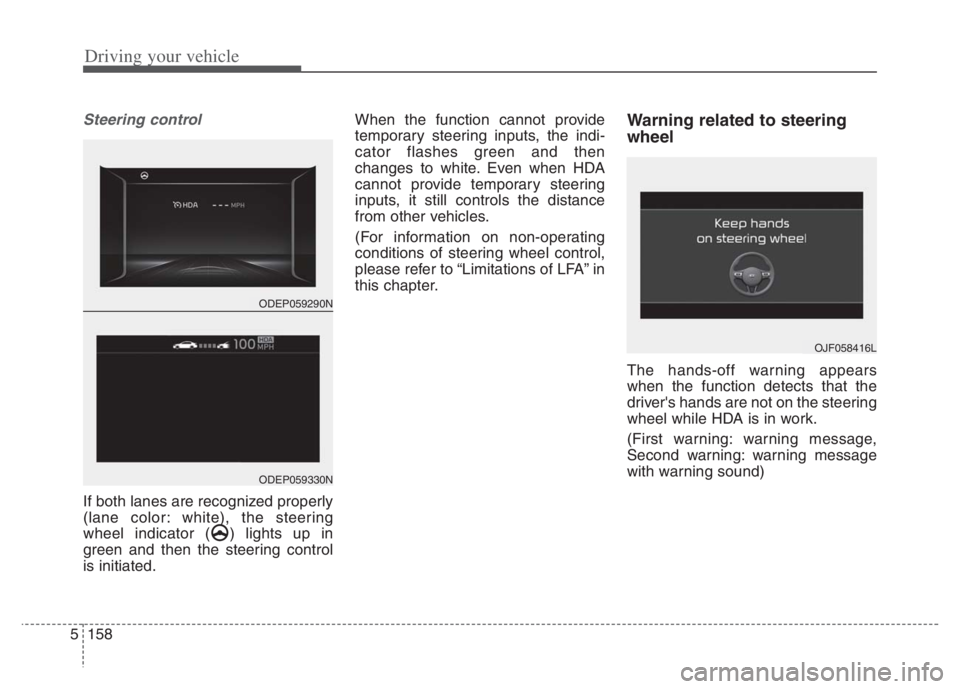
If both lanes are recognized properly
(lane color: white), the steering
wheel indicator ( ) lights up in
green and then the steering control
is initiated.When the function cannot provide
temporary steering inputs, the indi-
cator flashes green and then
changes to white. Even when HDA
cannot provide temporary steering
inputs, it still controls the distance
from other vehicles.
(For information on non-operating
conditions of steering wheel control,
please refer to “Limitations of LFA” in
this chapter.
Warning related to steering
wheel
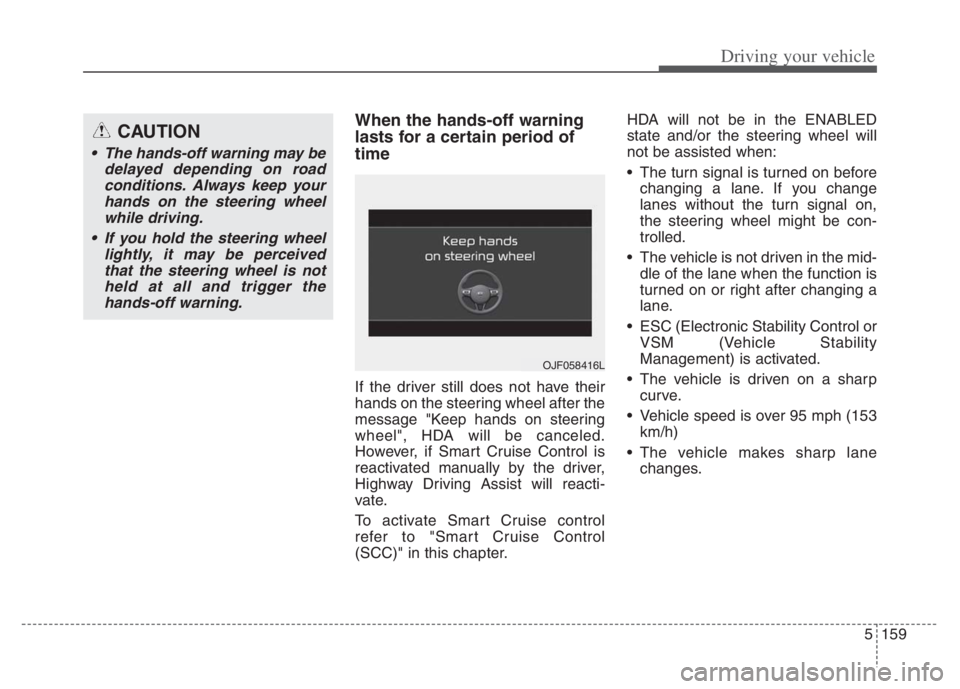
The hands-off warning appears
when the function detects that the
driver's hands are not on the steering
wheel while HDA is in work.
(First warning: warning message,
Second warning: warning message
with warning sound)
OJF058416L
ODEP059290N
ODEP059330N
Page 482 of 710
5159
Driving your vehicle
When the hands-off warning
lasts for a certain period of
time
If the driver still does not have their
hands on the steering wheel after the
message "Keep hands on steering
wheel", HDA will be canceled.
However, if Smart Cruise Control is
reactivated manually by the driver,
Highway Driving Assist will reacti-
vate.
To activate Smart Cruise control
refer to "Smart Cruise Control
(SCC)" in this chapter.HDA will not be in the ENABLED
state and/or the steering wheel will
not be assisted when:
The turn signal is turned on before
changing a lane. If you change
lanes without the turn signal on,
the steering wheel might be con-
trolled.
The vehicle is not driven in the mid-
dle of the lane when the function is
turned on or right after changing a
lane.
ESC (Electronic Stability Control or
VSM (Vehicle Stability
Management) is activated.
The vehicle is driven on a sharp
curve.
Vehicle speed is over 95 mph (153
km/h)
The vehicle makes sharp lane
changes.
CAUTION
The hands-off warning may be
delayed depending on road
conditions. Always keep your
hands on the steering wheel
while driving.
If you hold the steering wheel
lightly, it may be perceived
that the steering wheel is not
held at all and trigger the
hands-off warning.
OJF058416L
Page 483 of 710
Driving your vehicle
160 5
The vehicle brakes suddenly.
Only one lane marker is detected.
The lane is very wide or narrow.
There are more than two lane
markers on the road (e.g. construc-
tion area).
Radius of a curve is too small.
The vehicle is driven on a steep
incline.
The steering wheel is turned sud-
denly.Automatic speed setting
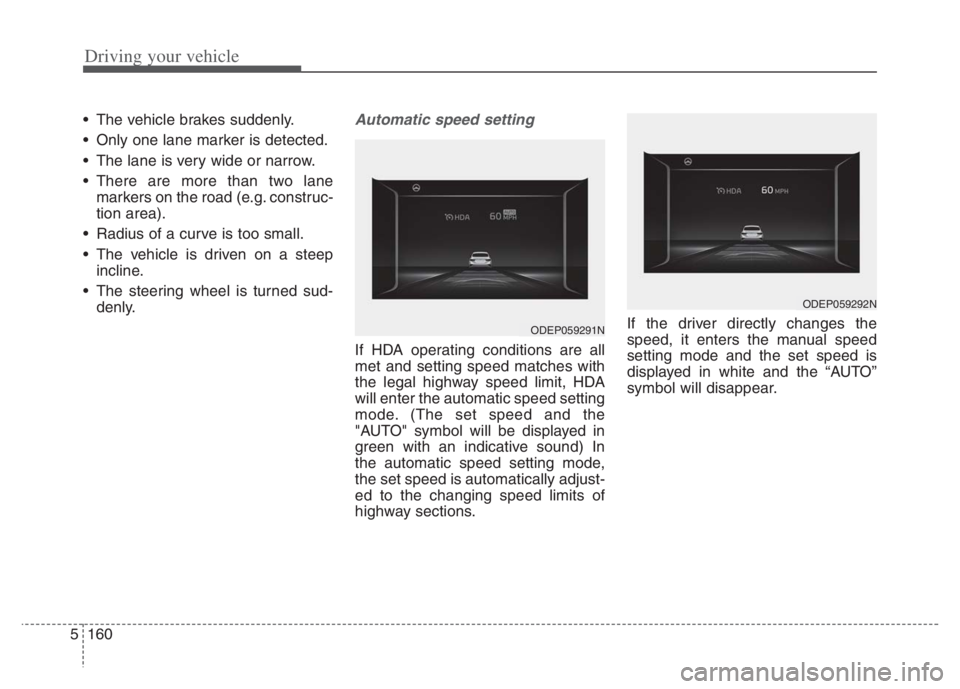
If HDA operating conditions are all
met and setting speed matches with
the legal highway speed limit, HDA
will enter the automatic speed setting
mode. (The set speed and the
"AUTO" symbol will be displayed in
green with an indicative sound) In
the automatic speed setting mode,
the set speed is automatically adjust-
ed to the changing speed limits of
highway sections.If the driver directly changes the
speed, it enters the manual speed
setting mode and the set speed is
displayed in white and the “AUTO”
symbol will disappear.
ODEP059291N
ODEP059292N
Page 485 of 710
Driving your vehicle
162 5
* Refer to “Smart Cruise Control
(SCC)” in this chapter. for cautions
and warnings about vehicle dis-
tance control and front radar.
* Refer to “Lane Following Assist
(LFA) “ in this chapter. for cautions
and warnings about steering con-
trol and front view camera.CAUTION
Highway Driving Assist may not
function properly in the follow-
ing situations:
The navigation is not working
properly.
The navigation is not updated.
The real-time GPS or map
information provided has
errors.
The navigation is overloaded
by performing functions such
as route search, video play-
back, voice recognition, etc.
are performing simultaneously.
The navigation is recalculat-
ing the route while driving.
GPS signals are blocked in
areas such as a tunnel.
The driver goes off course or
the route to the destination is
changed or canceled by reset-
ting the navigation.
The vehicle enters a service
station or rest area
(Continued)
(Continued)
The speed limit of selected
highway section is changed
due to road conditions.
Android Auto or Car Play is
operating.
The navigation cannot detect
the current vehicle position
(ex: elevated roads including
overpass adjacent to general
roads or nearby roads exist in
a parallel way).
The navigation is being updat-
ed while driving.
The navigation is being reset
while driving.
The road is slippery due to
bad weather such as rain or
snow.
If your vehicle tows a trailer or
another vehicle, you should
release Highway Driving
Assist system. Operating the
brake system or steering sys-
tem while towing may
adversely affect the safety.
Page 506 of 710

5183
Driving your vehicle
Remember, your vehicle does not
require extended warm-up. After
the engine has started, allow the
engine to run for 10 to 20 seconds
prior to placing the vehicle in gear.
In very cold weather, however, give
your engine a slightly longer warm-
up period.
Don't "lug" or "over-rev" the engine.
Lugging is driving too slowly in a
very high gear resulting in engine
bucking. If this happens, shift to a
lower gear. Over-revving is racing
the engine beyond its safe limit.
This can be avoided by shifting at
the recommended speed. Use your air conditioning sparingly.
The air conditioning system is
operated by engine power so your
fuel economy is reduced when you
use it.
Opening windows at high speeds
can reduce fuel economy.
Fuel economy is less in crosswinds
and headwinds. To help offset
some of this loss, slow down when
driving in these conditions.
Keeping a vehicle in good operating
condition is important both for econ-
omy and safety. Therefore, have an
authorized Kia dealer perform
scheduled inspections and mainte-
nance.
WARNING - Engine off
during motion
Never turn the engine off to
coast down hills or anytime the
vehicle is in motion. The power
steering and power brakes will
not function properly without
the engine running.
In addition, turning off the
engine start/stop button while
driving could engage the steer-
ing wheel lock, resulting in loss
of vehicle steering. Keep the
engine on and downshift to an
appropriate gear for an engine
braking effect.
Page 507 of 710
Driving your vehicle
184 5
Hazardous driving conditions
When hazardous driving conditions
are encountered such as water,
snow, ice, mud, sand, or similar haz-
ards, follow these suggestions:
Drive cautiously and allow extra
distance for braking.
Avoid sudden braking or steering.
When braking with non-ABS
brakes pump the brake pedal with
a light up-and-down motion until
the vehicle is stopped.
Do not pump the brake pedal on a
vehicle equipped with ABS. If stalled in snow, mud, or sand,
use the second gear. Accelerate
slowly to avoid spinning the drive
wheels.
Use sand, rock salt, or other non-
slip material under the drive
wheels to provide traction when
stalled in ice, snow, or mud.
Reducing the risk of a rollover
This multi-purpose passenger vehi-
cle is defined as a Sports Utility
Vehicle (SUV). Utility vehicles have a
significantly higher rollover rate than
other types of vehicles. SUV's have
higher ground clearance and a nar-
rower track to make them capable of
performing in a wide variety of off-
road applications. Specific design
characteristics give them a higher
center of gravity than ordinary vehi-
cles. An advantage of the higher
ground clearance is a better view of
the road, which allows you to antici-
pate problems. They are not
designed for cornering at the same
speeds as conventional passenger
vehicles, any more than low-slung
sports vehicles are designed to per-
form satisfactorily in off-road condi-
tions. Due to this risk, driver and pas-
sengers are strongly recommended
to buckle their seat belts. In a rollover
crash, an unbelted person is signifi-
cantly more likely to die than a per-
son wearing a seat belt. There are
steps that a driver can make to
reduce the risk of a rollover.
SPECIAL DRIVING CONDITIONS
WARNING- Downshifting
Do not downshift with a dual
clutch transmission while driv-
ing on slippery surfaces. The
sudden change in tire speed
could cause the tires to skid
and result in an accident.
Page 508 of 710
5185
Driving your vehicle
If at all possible, avoid sharp turns or
abrupt maneuvers, do not load your
roof rack with heavy cargo, and
never modify your vehicle in any way.
WARNING
Your vehicle is equipped with
tires designed to provide safe
ride and handling capability. Do
not use a size and type of tire
and wheel that is different from
the one that is originally
installed on your vehicle. It can
affect the safety and perform-
ance of your vehicle, which
could lead to steering failure or
rollover and serious injury.
When replacing the tires, be
sure to equip all four tires with
the tire and wheel of the same
size, type, tread, brand and
load-carrying capacity. If you
nevertheless decide to equip
your vehicle with any tire/wheel
combination not recommended
by Kia for off road driving, you
should not use these tires for
highway driving.
WARNING - Rollover
As with other Sports Utility
Vehicles (SUV), failure to oper-
ate this vehicle correctly may
result in loss of control, an acci-
dent or vehicle rollover.
Utility vehicles have a signifi-
cantly higher rollover rate
than other types of vehicles.
Specific design characteris-
tics (higher ground clearance,
narrower track, etc.) give this
vehicle a higher center of
gravity than ordinary vehicles.
A SUV is not designed for cor-
nering at the same speeds as
conventional vehicles.
Avoid sharp turns or abrupt
maneuvers.
(Continued)
(Continued)
In a rollover crash, an unbelt-
ed person is significantly
more likely to die than a per-
son wearing a seat belt. Make
sure everyone in the vehicle is
properly buckled up.
Page 509 of 710
Driving your vehicle
186 5
Rocking the vehicle
If it is necessary to rock the vehicle
to free it from snow, sand, or mud,
first turn the steering wheel right and
left to clear the area around your
front wheels. Then, shift back and
forth between R (Reverse) and any
forward gear in vehicles equipped
with a dual clutch transmission. Do
not race the engine, and spin the
wheels as little as possible. If you are
still stuck after a few tries, have the
vehicle pulled out by a tow vehicle to
avoid engine overheating and possi-
ble damage to the transaxle.
The ESC system should be turned
OFF prior to rocking the vehicle.
Smooth cornering
Avoid braking or gear changing in
corners, especially when roads are
wet. Ideally, corners should always
be taken under gentle acceleration. If
you follow these suggestions, tire
wear will be held to a minimum.CAUTION- Vehicle rocking
Prolonged rocking may cause
engine overheating, transaxle
damage or failure, and tire dam-
age.
CAUTION- Spinning tires
Do not spin the wheels, espe-
cially at speeds more than 35
mph (56 km/h). Spinning the
wheels at high speeds when the
vehicle is stationary could
cause a tire to overheat which
could result in tire damage that
may injure bystanders.
WARNING- Sudden
Vehicle Movement
Do not attempt to rock the vehi-
cle if people or objects are near-
by. The vehicle may suddenly
move forward or backwards as it
becomes unstuck.
Page 515 of 710
Driving your vehicle
192 5
To keep locks from freezing
To keep the locks from freezing,
squirt an approved de-icer fluid or
glycerine into the key opening. If a
lock is covered with ice, squirt it with
an approved de-icing fluid to remove
the ice. If the lock is frozen internally,
you may be able to thaw it out by
using a heated key. Handle the heat-
ed key with care to avoid injury.
Use approved window washer
anti-freeze in system
To keep the water in the window
washer system from freezing, add an
approved window washer anti-freeze
solution in accordance with instruc-
tions on the container. Window wash-
er anti-freeze is available from an
authorized Kia dealer and most auto
parts outlets. Do not use engine
coolant or other types of anti-freeze
as these may damage the paint fin-
ish.
Don’t let your parking brake
freeze
Under some conditions your parking
brake can freeze in the engaged
position. This is most likely to happen
when there is an accumulation of
snow or ice around or near the rear
brakes or if the brakes are wet. If
there is a risk the parking brake may
freeze, apply it only temporarily while
you put the gear shift lever in P (Park,
Dual clutch transmission) and block
the rear wheels so the vehicle cannot
roll. Then release the parking brake.
Don't let ice and snow accu-
mulate underneath
Under some conditions, snow and
ice can build up under the fenders
and interfere with the steering. When
driving in severe winter conditions
where this may happen, you should
periodically check underneath the
vehicle to be sure the movement of
the front wheels and the steering
components are not obstructed.
Carry emergency equipment
Depending on the severity of the
weather, you should carry appropri-
ate emergency equipment. Some of
the items you may want to carry
include tow straps or chains, flash-
light, emergency flares, sand, shov-
el, jumper cables, window scraper,
gloves, ground cloth, coveralls, blan-
ket, etc.
TRAILER TOWING
We do not recommend using this
vehicle for trailer towing.