phone KIA NIRO EV 2020 Navigation System Quick Reference Guide
[x] Cancel search | Manufacturer: KIA, Model Year: 2020, Model line: NIRO EV, Model: KIA NIRO EV 2020Pages: 244, PDF Size: 5.65 MB
Page 156 of 244
7-6
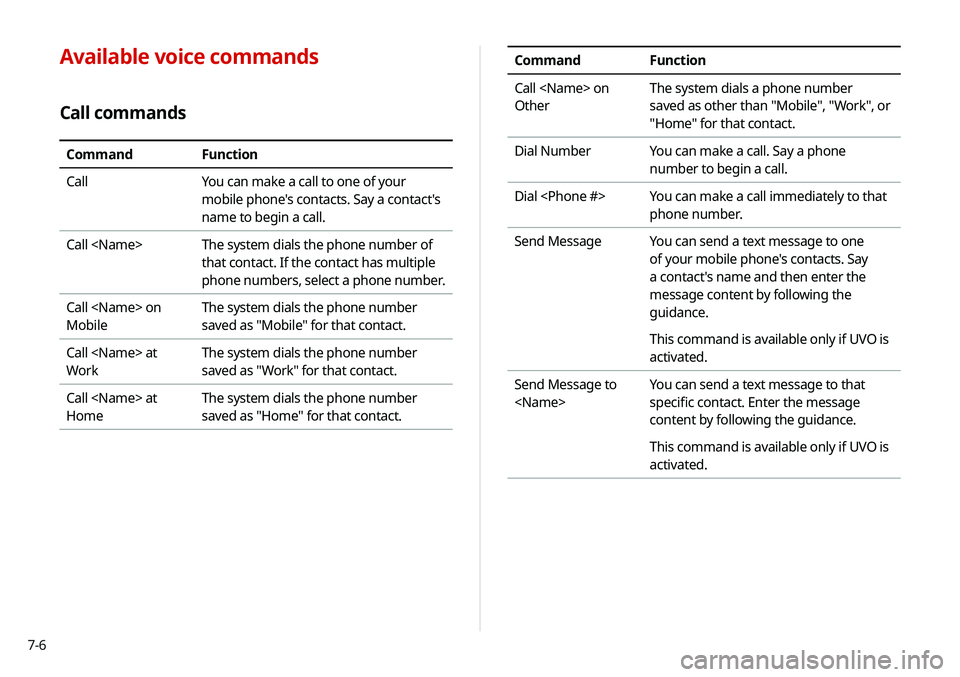
CommandFunction
Call
Other The system dials a phone number
saved as other than "Mobile", "Work", or
"Home" for that contact.
Dial Number You can make a call. Say a phone
number to begin a call.
Dial
phone number.
Send Message You can send a text message to one
of your mobile phone's contacts. Say
a contact's name and then enter the
message content by following the
guidance.
This command is available only if UVO is
activated.
Send Message to
specific contact. Enter the message
content by following the guidance.
This command is available only if UVO is
activated.Available voice commands
Call commands
Command
Function
Call You can make a call to one of your
mobile phone's contacts. Say a contact's
name to begin a call.
Call
that contact. If the contact has multiple
phone numbers, select a phone number.
Call
Mobile The system dials the phone number
saved as "Mobile" for that contact.
Call
Work The system dials the phone number
saved as "Work" for that contact.
Call
Home The system dials the phone number
saved as "Home" for that contact.
Page 157 of 244
7-7
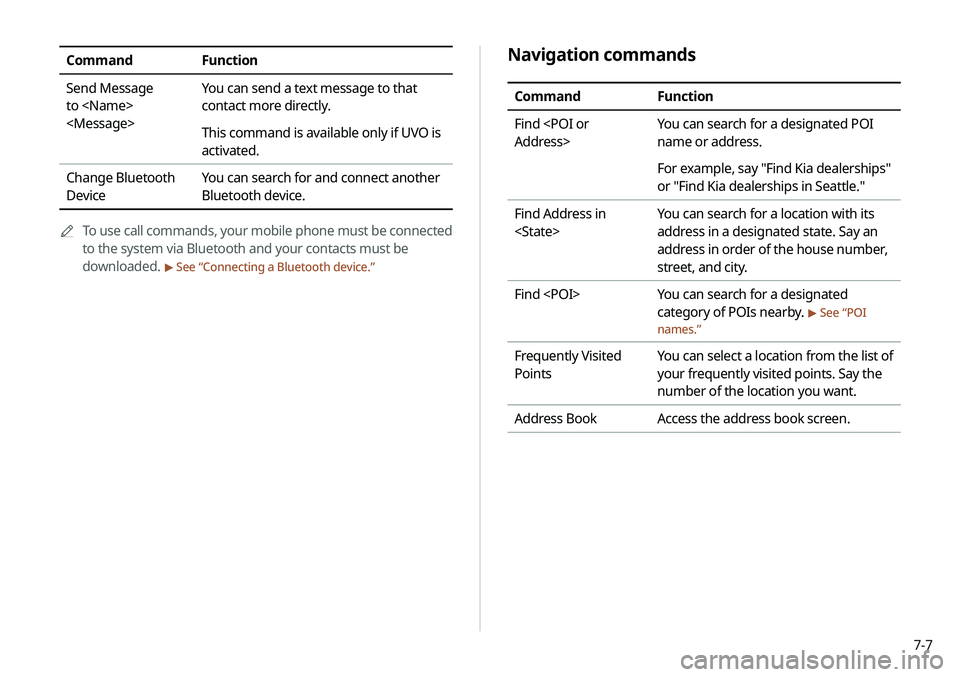
Navigation commands
CommandFunction
Find
name or address.
For example, say "Find Kia dealerships"
or "Find Kia dealerships in Seattle."
Find Address in
address in a designated state. Say an
address in order of the house number,
street, and city.
Find
category of POIs nearby.
> See “POI
names.”
Frequently Visited
Points You can select a location from the list of
your frequently visited points. Say the
number of the location you want.
Address Book Access the address book screen.
CommandFunction
Send Message
to
contact more directly.
This command is available only if UVO is
activated.
Change Bluetooth
Device You can search for and connect another
Bluetooth device.
0000
A
To use call commands, your mobile phone must be connected
to the system via Bluetooth and your contacts must be
downloaded.
> See “Connecting a Bluetooth device.”
Page 160 of 244
7-10
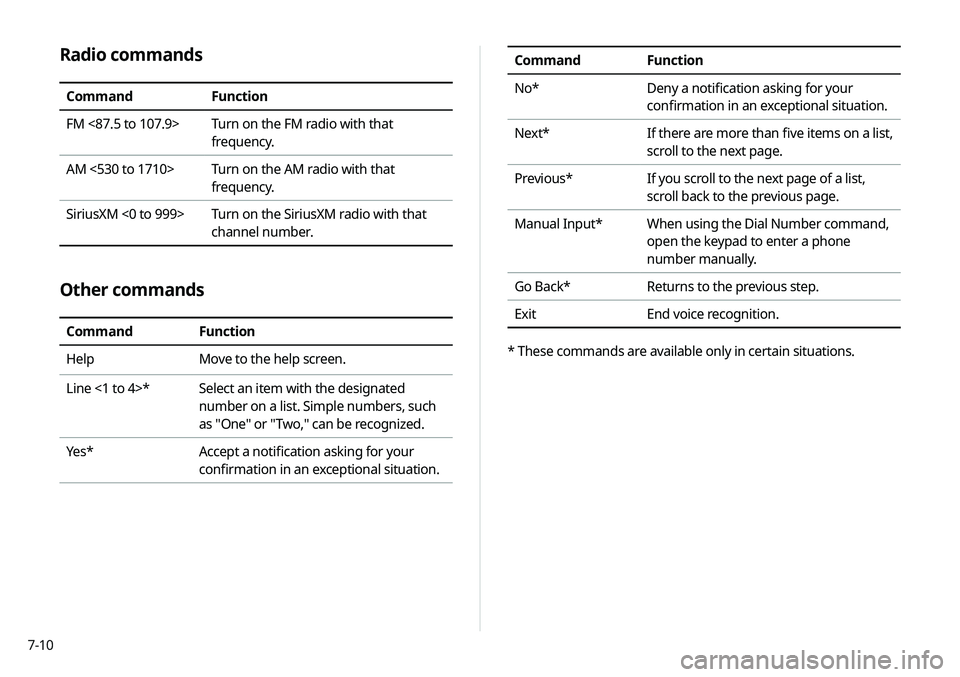
Radio commands
CommandFunction
FM <87.5 to 107.9> Turn on the FM radio with that
frequency.
AM <530 to 1710> Turn on the AM radio with that
frequency.
SiriusXM <0 to 999> Turn on the SiriusXM radio with that
channel number.
Other commands
CommandFunction
Help Move to the help screen.
Line <1 to 4>* Select an item with the designated
number on a list. Simple numbers, such
as "One" or "Two," can be recognized.
Yes * Accept a notification asking for your
confirmation in an exceptional situation.
Command Function
No* Deny a notification asking for your
confirmation in an exceptional situation.
Next* If there are more than five items on a list,
scroll to the next page.
Previous* If you scroll to the next page of a list,
scroll back to the previous page.
Manual Input* When using the Dial Number command,
open the keypad to enter a phone
number manually.
Go Back* Returns to the previous step.
Exit End voice recognition.
* These commands are available only in certain situations.
Page 170 of 244
7-20
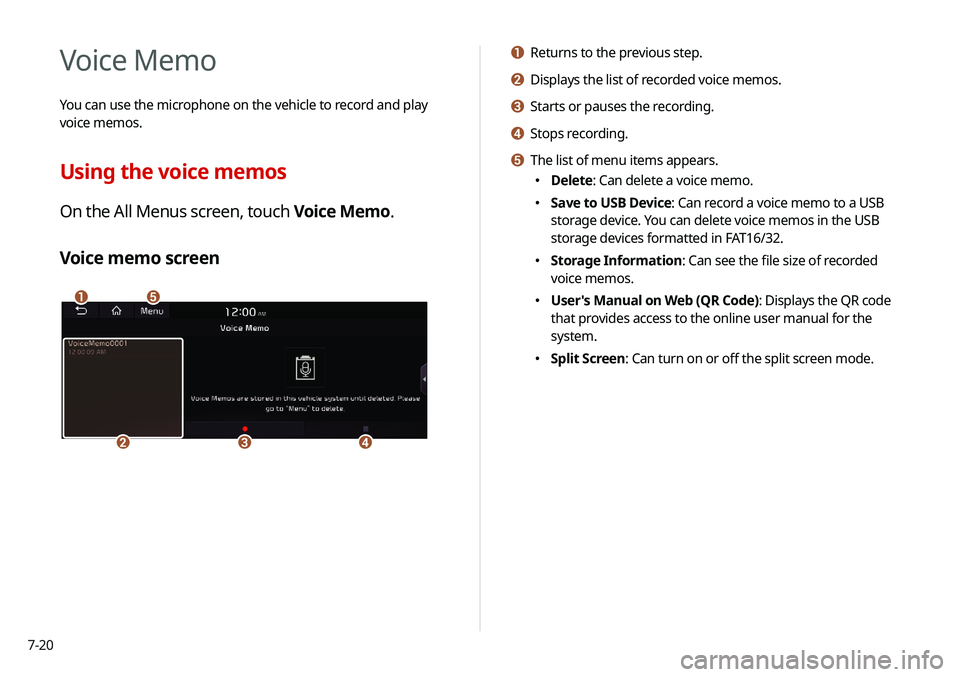
a Returns to the previous step.
b Displays the list of recorded voice memos.
c Starts or pauses the recording.
d Stops recording.
e The list of menu items appears.
000EDelete: Can delete a voice memo.
000ESave to USB Device: Can record a voice memo to a USB
storage device. You can delete voice memos in the USB
storage devices formatted in FAT16/32.
000EStorage Information: Can see the file size of recorded
voice memos.
000EUser's Manual on Web (QR Code): Displays the QR code
that provides access to the online user manual for the
system.
000ESplit Screen: Can turn on or off the split screen mode.
Voice Memo
You can use the microphone on the vehicle to record and play
voice memos.
Using the voice memos
On the All Menus screen, touch Voice Memo.
Voice memo screen
\037\036
\035\034\033
Page 175 of 244
8-3
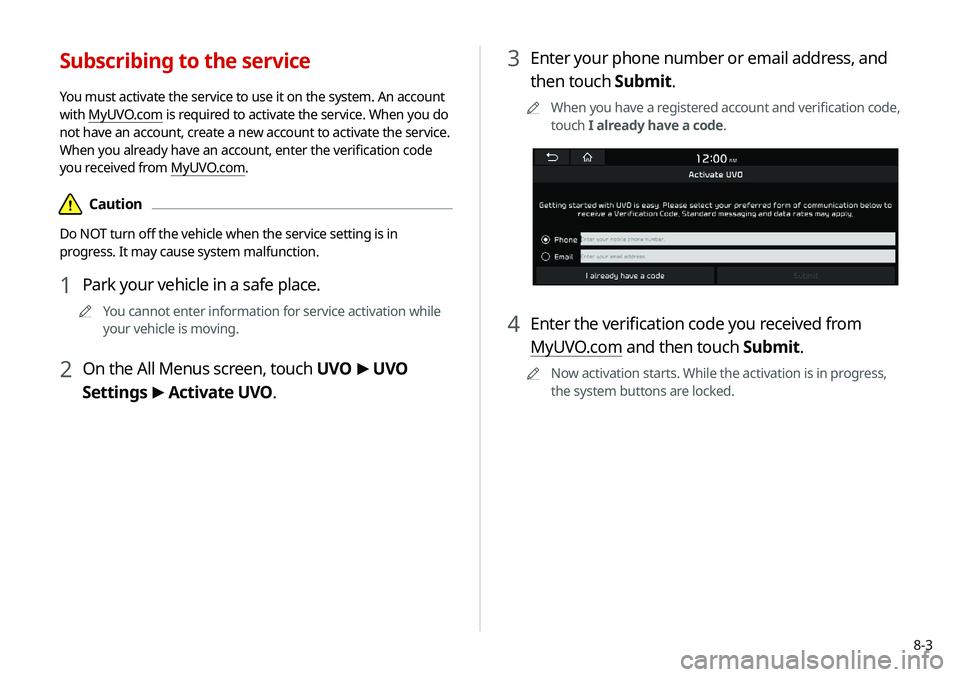
3 Enter your phone number or email address, and
then touch Submit.
0000
A
When you have a registered account and verification code,
touch I already have a code.
4 Enter the verification code you received from
MyUVO.com and then touch Submit.
0000
A
Now activation starts. While the activation is in progress,
the system buttons are locked.
Subscribing to the service
You must activate the service to use it on the system. An account
with MyUVO.com is required to activate the service. When you do
not have an account, create a new account to activate the service.
When you already have an account, enter the verification code
you received from MyUVO.com.
\334Caution
Do NOT turn off the vehicle when the service setting is in
progress. It may cause system malfunction.
1 Park your vehicle in a safe place.
0000
A
You cannot enter information for service activation while
your vehicle is moving.
2 On the All Menus screen, touch UVO >
UVO
Settings >
Activate UVO.
Page 178 of 244
8-6
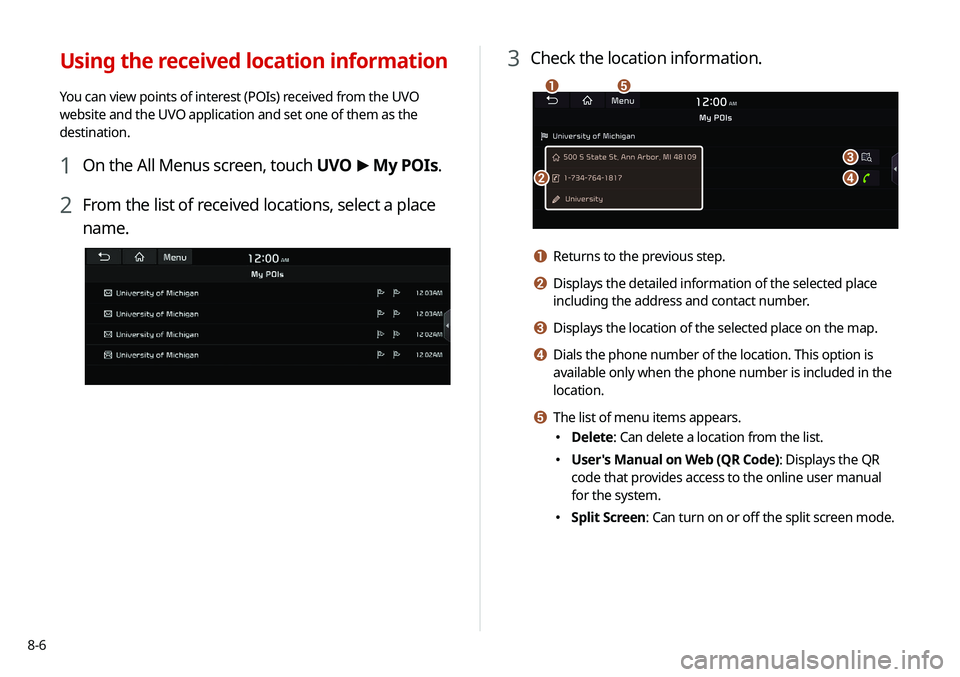
3 Check the location information.
\037
\036
\035
\034
\033
a Returns to the previous step.
b Displays the detailed information of the selected place
including the address and contact number.
c Displays the location of the selected place on the map.
d Dials the phone number of the location. This option is
available only when the phone number is included in the
location.
e The list of menu items appears.
000EDelete: Can delete a location from the list.
000EUser's Manual on Web (QR Code): Displays the QR
code that provides access to the online user manual
for the system.
000ESplit Screen: Can turn on or off the split screen mode.
Using the received location information
You can view points of interest (POIs) received from the UVO
website and the UVO application and set one of them as the
destination.
1 On the All Menus screen, touch UVO
>
My POIs.
2 From the list of received locations, select a place
name.
Page 179 of 244
8-7
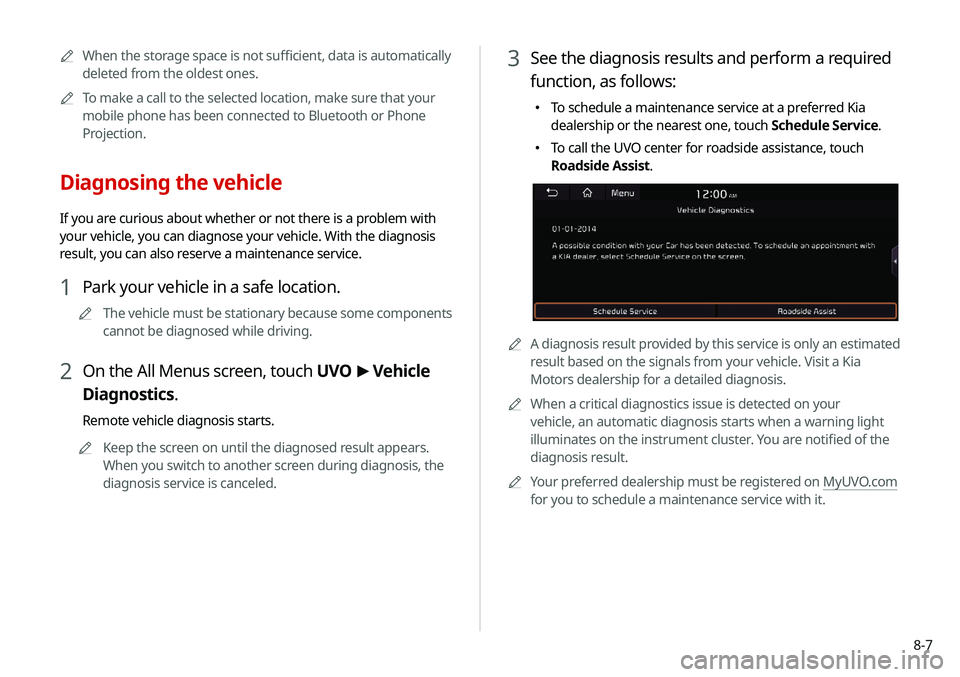
3 See the diagnosis results and perform a required
function, as follows:
000ETo schedule a maintenance service at a preferred Kia
dealership or the nearest one, touch Schedule Service.
000ETo call the UVO center for roadside assistance, touch
Roadside Assist.
0000A
A diagnosis result provided by this service is only an estimated
result based on the signals from your vehicle. Visit a Kia
Motors dealership for a detailed diagnosis.
0000
A
When a critical diagnostics issue is detected on your
vehicle, an automatic diagnosis starts when a warning light
illuminates on the instrument cluster. You are notified of the
diagnosis result.
0000
A
Your preferred dealership must be registered on MyUVO.com
for you to schedule a maintenance service with it.
0000
A
When the storage space is not sufficient, data is automatically
deleted from the oldest ones.
0000
A
To make a call to the selected location, make sure that your
mobile phone has been connected to Bluetooth or Phone
Projection.
Diagnosing the vehicle
If you are curious about whether or not there is a problem with
your vehicle, you can diagnose your vehicle. With the diagnosis
result, you can also reserve a maintenance service.
1 Park your vehicle in a safe location.
0000
A
The vehicle must be stationary because some components
cannot be diagnosed while driving.
2 On the All Menus screen, touch UVO >
Vehicle
Diagnostics.
Remote vehicle diagnosis starts.
0000
A
Keep the screen on until the diagnosed result appears.
When you switch to another screen during diagnosis, the
diagnosis service is canceled.
Page 188 of 244
9-6
Configuring the device
connection settings
You can manage Bluetooth devices or configure their operation
settings. You can also activate the phone projection so that you
can control the smartphone applications on the system screen
after connecting the smartphone to the system.
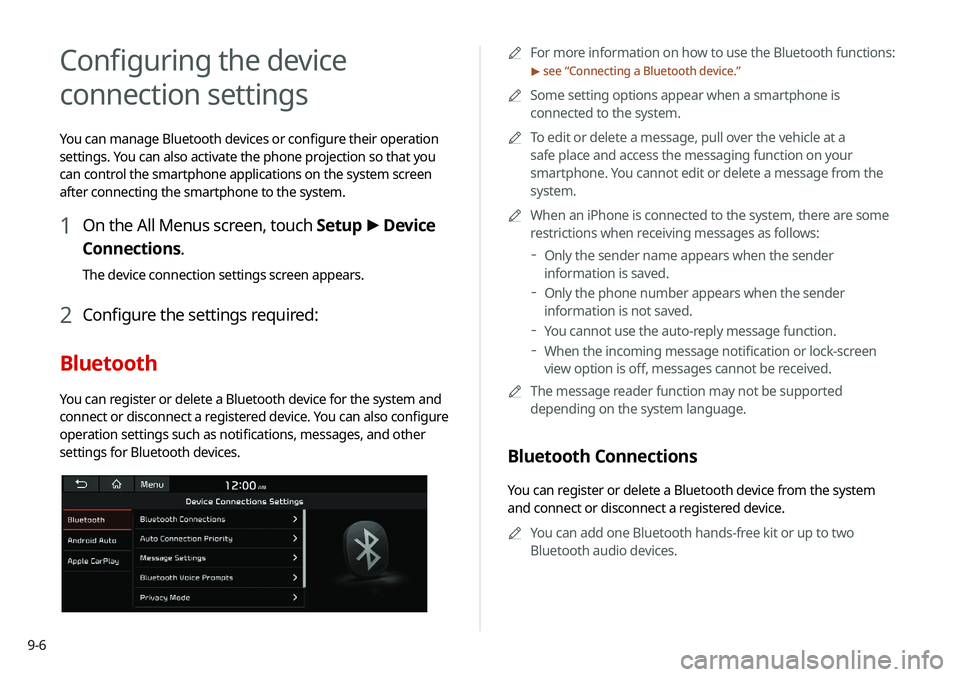
1 On the All Menus screen, touch Setup >
Device
Connections.
The device connection settings screen appears.
2 Configure the settings required:
Bluetooth
You can register or delete a Bluetooth device for the system and
connect or disconnect a registered device. You can also configure
operation settings such as notifications, messages, and other
settings for Bluetooth devices.
0000A For more information on how to use the Bluetooth functions:
> see “Connecting a Bluetooth device.”
0000
A
Some setting options appear when a smartphone is
connected to the system.
0000
A
To edit or delete a message, pull over the vehicle at a
safe place and access the messaging function on your
smartphone. You cannot edit or delete a message from the
system.
0000
A
When an iPhone is connected to the system, there are some
restrictions when receiving messages as follows:
000DOnly the sender name appears when the sender
information is saved.
000DOnly the phone number appears when the sender
information is not saved.
000DYou cannot use the auto-reply message function.
000DWhen the incoming message notification or lock-screen
view option is off, messages cannot be received.
0000
A
The message reader function may not be supported
depending on the system language.
Bluetooth Connections
You can register or delete a Bluetooth device from the system
and connect or disconnect a registered device.
0000
A
You can add one Bluetooth hands-free kit or up to two
Bluetooth audio devices.
Page 189 of 244
9-7
Auto Connection Priority
Set Bluetooth connection priority for devices to automatically
connect them when starting the vehicle.
Message Settings
000EMessage Notification: Sets to receive message notifications.
000EPredefined Messages
: Can edit message templates for replies.
0000
A
This option may not be available in some phone models.
Bluetooth Voice Prompts
Set whether to hear voice prompts for events related to Bluetooth
connections.
Privacy Mode
Enable or disable Privacy Mode.
Hide data including contacts and call history from showing up on
the system screen to protect privacy.
Bluetooth System Info
You can see and edit the Bluetooth information of the system.
Reset
You can delete all registered Bluetooth devices and initialize
Bluetooth settings. All data for Bluetooth devices are also deleted.
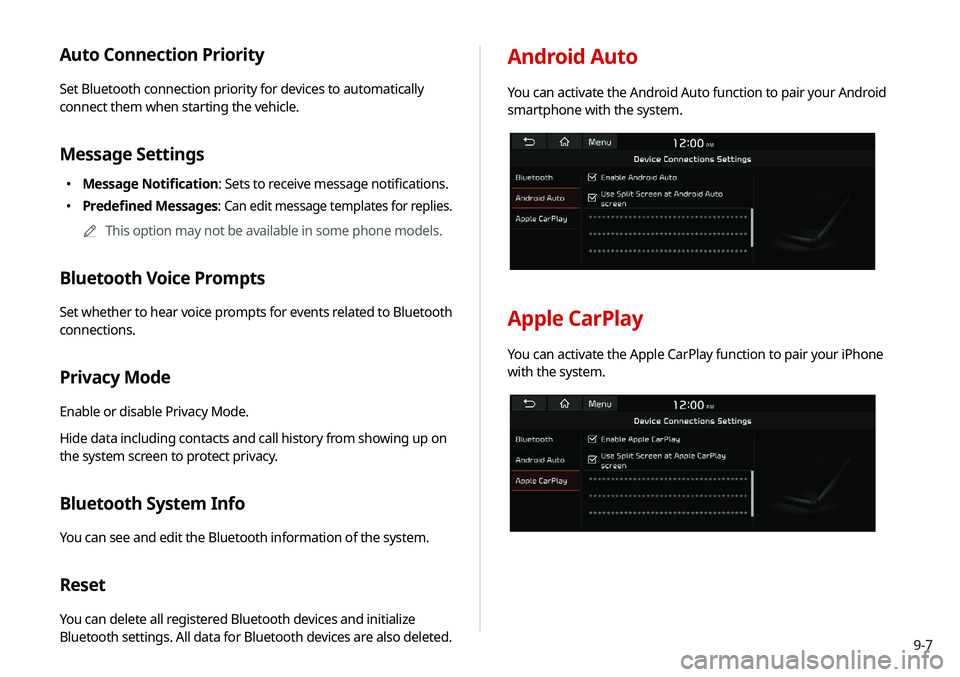
Android Auto
You can activate the Android Auto function to pair your Android
smartphone with the system.
Apple CarPlay
You can activate the Apple CarPlay function to pair your iPhone
with the system.
Page 190 of 244

9-8
Configuring the advanced
system settings
You can configure the settings for notification and button actions.
1 On the All Menus screen, touch Setup >
Advanced.
The advanced settings screen appears.
2 Configure the settings required:
Return to Map: Set Time
You can set the system to automatically display the map screen
after a specified period of time when switched to the Radio/Media
mode screen while using the navigation.
0000
A
This function works while driving once a destination has been
set.
0000
A
This feature is not available on the phone projection screen.
TUNE Knob Function
You can change the [TUNE/ FILE] knob’s function on the map.
Changes Stations, Tracks, etc., in the Audio
System
You can search music or adjust the radio frequency by using the
[TUNE/ FILE] knob on the map.
Zooms In/Out on the Map
You can zoom in or out the map by using the [TUNE/ FILE] knob
on the map.