charging KIA NIRO EV 2020 Navigation System Quick Reference Guide
[x] Cancel search | Manufacturer: KIA, Model Year: 2020, Model line: NIRO EV, Model: KIA NIRO EV 2020Pages: 244, PDF Size: 5.65 MB
Page 19 of 244
7
Using the sound mood lamp 2-16
Playing Sounds of Nature 2-17
Using the HD Radio Data 2-18
Seeing traffic information by using HD radio data 2-19
Seeing weather information by using HD radio data 2-20
Seeing weather information by using Doppler weather radar 2-20
Seeing fuel price information by using HD radio data 2-21
Seeing the driving information 2-21
Seeing notifications 2-22
Using the Electric Vehicle menu 2-23
Electric Vehicle screen 2-23
Checking the drivable range 2-24
Seeing the energy information 2-25
Using the charging management features 2-27
Seeing the eco-driving information 2-31
Configuring the EV settings 2-32
03 Radio
Listening to the radio 3-2
Radio screen 3-2
Changing the radio mode 3-4
Changing the radio channel 3-4
Saving the current radio channel 3-5
Editing the radio channel list 3-6
Listening to HD Radio™ 3-7
HD Radio™ Technology 3-7
Listening to SiriusXM™ radio 3-8
Changing to SiriusXM mode 3-8
Searching for SiriusXM radio channels 3-10
Selecting channels by using channel numbers 3-10
Seeing the program schedule 3-11
Listening to Featured Favorites channels 3-11
04 Media
Using media 4-2
Listening to music from a USB device 4-2
Listening to music via Bluetooth 4-7
Page 20 of 244
8
Searching for gas stations 5-27
Searching for EV (Electric Vehicle) charging stations 5-28
06 Phone
Connecting a Bluetooth device 6-2
Registering a device 6-3
Connecting a registered device 6-4
Disconnecting a registered device 6-6
Deleting a registered device 6-6
Making a call via Bluetooth 6-7
Dialing from the recent call list 6-7
Dialing from the favorites list 6-9
Dialing from the contacts 6-11
Using the dial pad 6-13
Dialing with voice recognition 6-15
Accepting an incoming call over Bluetooth 6-15
Rejecting a call 6-16
Using functions during a call 6-16
Checking a new message over Bluetooth 6-18
Checking a new message 6-18
Checking a new message from the list 6-19
Sending a text by using the voice recognition 6-20
05 Navigation
Navigation functions 5-2
Navigation Menu overview 5-2
Finding a route easily 5-3
Map screen 5-6
Adjusting the navigation volume 5-8
Stopping the route guidance 5-9
Seeing traffic Information 5-9
Various ways to find routes 5-10
Searching by keyword 5-10
Searching by previous destinations 5-12
Searching for Kia Dealerships 5-13
Searching the nearby points of interest 5-14
Searching for restaurants 5-17
Searching for emergency services 5-17
Editing the route 5-18
Changing the route search criteria 5-21
Avoiding specific zones 5-22
Using the address book 5-22
Registering a searched place as a favorite place 5-22
Registering the current position as a favorite place 5-24
Registering a frequently visited place as a favorite place 5-24
Setting a registered favorite place as a destination 5-25
Registering a frequently visited place as a destination 5-25
Editing the registered place 5-26
Deleting a registered favorite place(s) 5-26
Importing/exporting the address book 5-27
Page 59 of 244
2-21
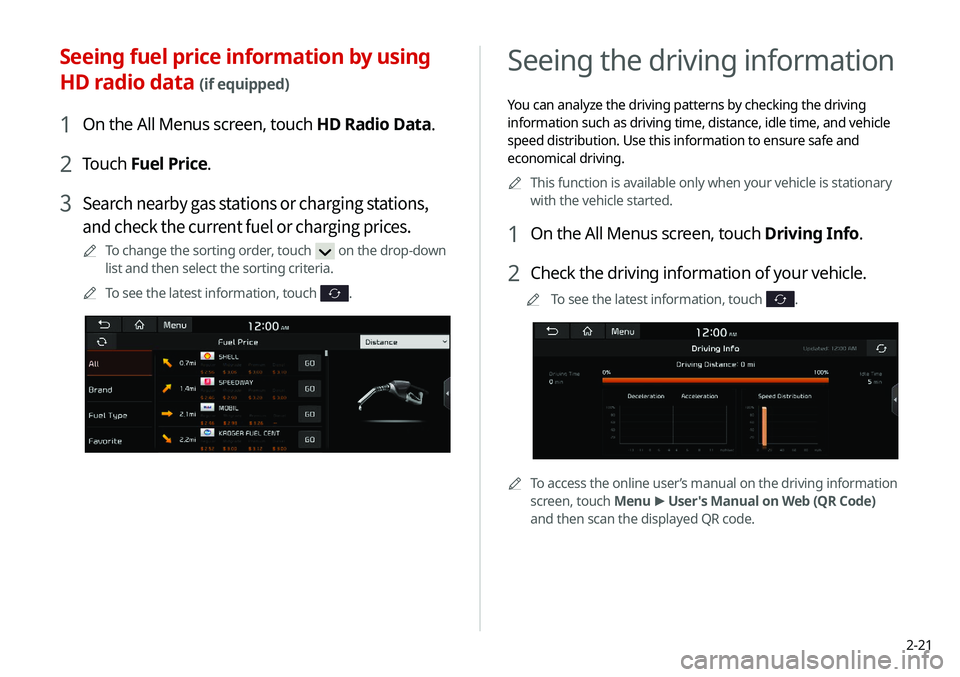
Seeing the driving information
You can analyze the driving patterns by checking the driving
information such as driving time, distance, idle time, and vehicle
speed distribution. Use this information to ensure safe and
economical driving.0000
A
This function is available only when your vehicle is stationary
with the vehicle started.
1 On the All Menus screen, touch Driving Info.
2 Check the driving information of your vehicle.
0000
A
To see the latest information, touch .
0000ATo access the online user’s manual on the driving information
screen, touch Menu >
User's Manual on Web (QR Code)
and then scan the displayed QR code.
Seeing fuel price information by using
HD radio data
(if equipped)
1 On the All Menus screen, touch HD Radio Data.
2 Touch Fuel Price.
3 Search nearby gas stations or charging stations,
and check the current fuel or charging prices.
0000
A
To change the sorting order, touch on the drop-down
list and then select the sorting criteria.
0000
A
To see the latest information, touch
.
Page 61 of 244
2-23
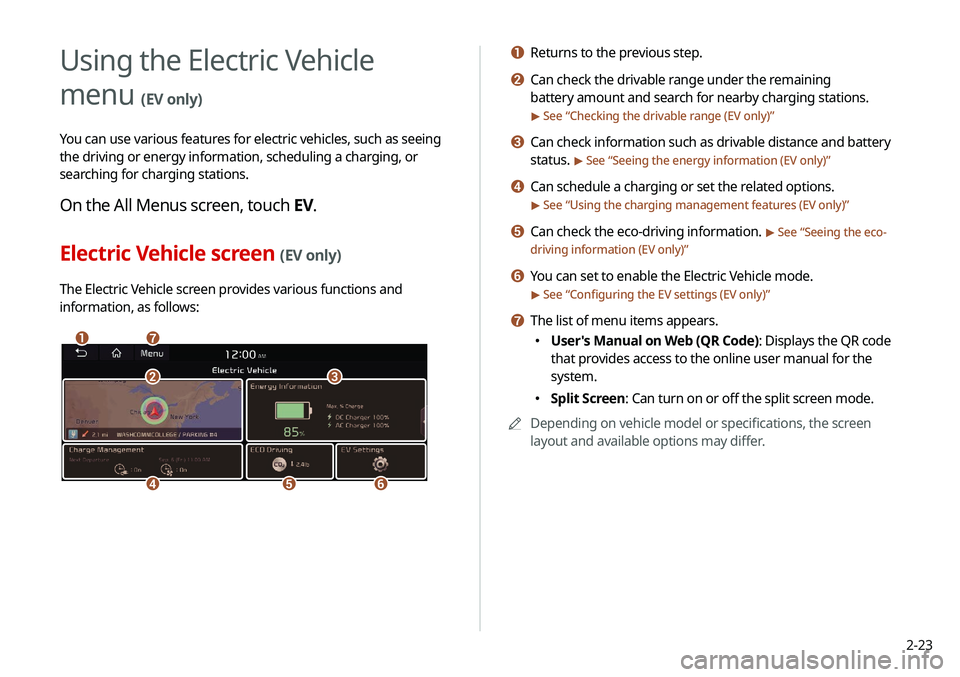
a Returns to the previous step.
b Can check the drivable range under the remaining
battery amount and search for nearby charging stations.
> See “Checking the drivable range (EV only)”
c Can check information such as drivable distance and battery
status.
> See “Seeing the energy information (EV only)”
d Can schedule a charging or set the related options.
> See “Using the charging management features (EV only)”
e Can check the eco-driving information. > See “Seeing the eco-
driving information (EV only)”
f You can set to enable the Electric Vehicle mode.
> See “ Configuring the EV settings (EV only)”
g The list of menu items appears.
000E User's Manual on Web (QR Code): Displays the QR code
that provides access to the online user manual for the
system.
000ESplit Screen: Can turn on or off the split screen mode.
0000
A
Depending on vehicle model or specifications, the screen
layout and available options may differ.
Using the Electric Vehicle
menu
(EV only)
You can use various features for electric vehicles, such as seeing
the driving or energy information, scheduling a charging, or
searching for charging stations.
On the All Menus screen, touch EV.
Electric Vehicle screen (EV only)
The Electric Vehicle screen provides various functions and
information, as follows:
\037\036
\035
\034\033
\032\031
Page 62 of 244
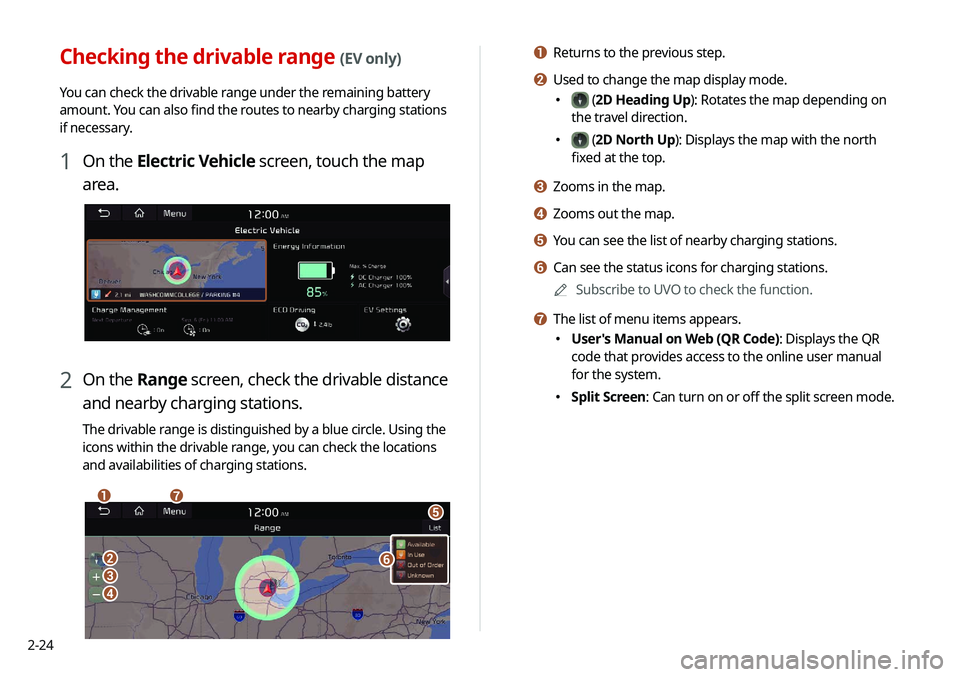
2-24
a Returns to the previous step.
b Used to change the map display mode.
000E (2D Heading Up): Rotates the map depending on
the travel direction.
000E (2D North Up): Displays the map with the north
fixed at the top.
c Zooms in the map.
d Zooms out the map.
e You can see the list of nearby charging stations.
f Can see the status icons for charging stations.
0000
A
Subscribe to UVO to check the function.
g The list of menu items appears.
000EUser's Manual on Web (QR Code): Displays the QR
code that provides access to the online user manual
for the system.
000ESplit Screen: Can turn on or off the split screen mode.
Checking the drivable range (EV only)
You can check the drivable range under the remaining battery
amount. You can also find the routes to nearby charging stations
if necessary.
1 On the Electric Vehicle screen, touch the map
area.
2 On the Range screen, check the drivable distance
and nearby charging stations.
The drivable range is distinguished by a blue circle. Using the
icons within the drivable range, you can check the locations
and availabilities of charging stations.
\037\036
\035
\034
\033
\032
\031
Page 63 of 244
2-25
3 Check the location of the destination and then
touch Set as Destination.
4 Select the desired route from the searched ones
and touch Start Guidance.
0000
A
Depending on the third-party service provider, information
for some charging stations may differ.
Seeing the energy information (EV only)
You can see the drivable distance and the estimated charging
time.
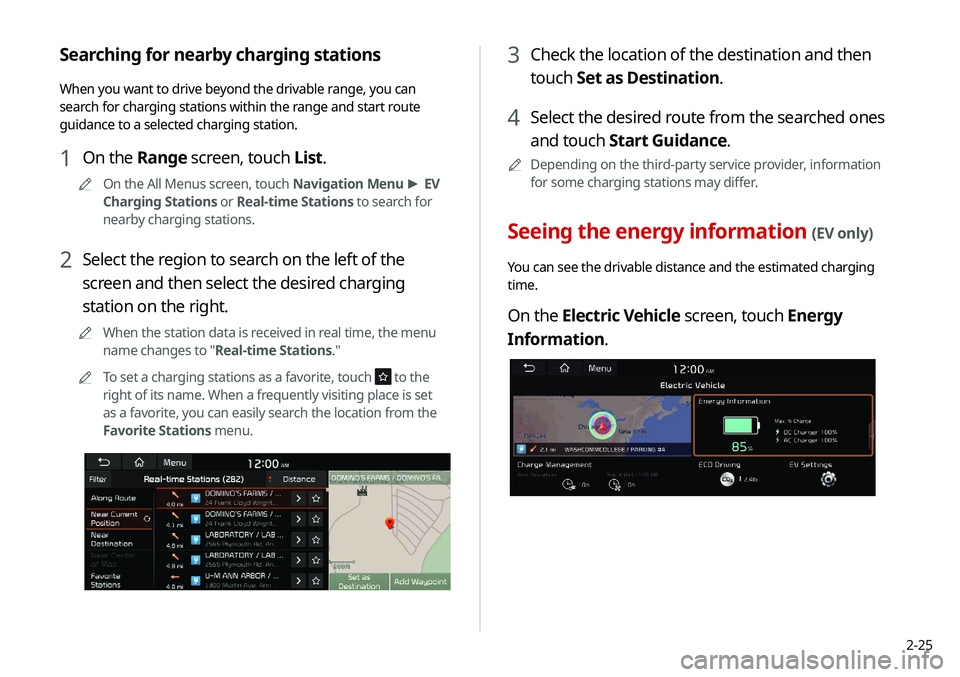
On the Electric Vehicle screen, touch Energy
Information.
Searching for nearby charging stations
When you want to drive beyond the drivable range, you can
search for charging stations within the range and start route
guidance to a selected charging station.
1 On the Range screen, touch List.
0000
A
On the All Menus screen, touch Navigation Menu >
EV
Charging Stations or Real-time Stations to search for
nearby charging stations.
2 Select the region to search on the left of the
screen and then select the desired charging
station on the right.
0000
A
When the station data is received in real time, the menu
name changes to "Real-time Stations."
0000
A
To set a charging stations as a favorite, touch
to the
right of its name. When a frequently visiting place is set
as a favorite, you can easily search the location from the
Favorite Stations menu.
Page 64 of 244
2-26
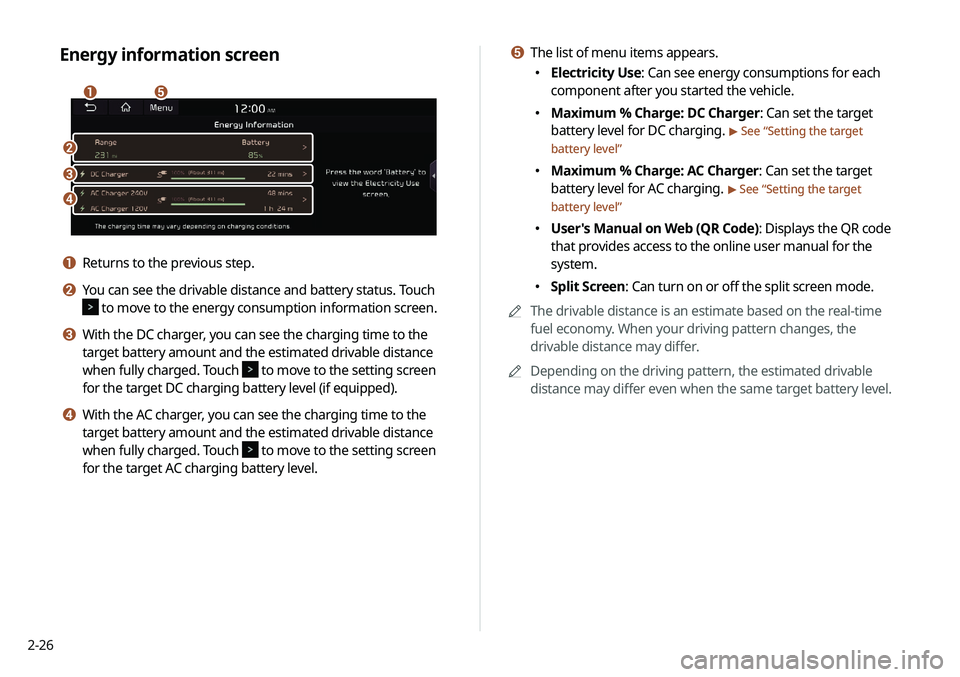
e The list of menu items appears.
000EElectricity Use: Can see energy consumptions for each
component after you started the vehicle.
000EMaximum % Charge: DC Charger: Can set the target
battery level for DC charging.
> See “
Setting the target
battery level”
000E Maximum % Charge: AC Charger: Can set the target
battery level for AC charging.
> See “
Setting the target
battery level”
000E User's Manual on Web (QR Code): Displays the QR code
that provides access to the online user manual for the
system.
000ESplit Screen: Can turn on or off the split screen mode.
0000
A
The drivable distance is an estimate based on the real-time
fuel economy. When your driving pattern changes, the
drivable distance may differ.
0000
A
Depending on the driving pattern, the estimated drivable
distance may differ even when the same target battery level.
Energy information screen
\037\036
\035
\034
\033
a Returns to the previous step.
b You can see the drivable distance and battery status. Touch
to move to the energy consumption information screen.
c With the DC charger, you can see the charging time to the
target battery amount and the estimated drivable distance
when fully charged. Touch
to move to the setting screen
for the target DC charging battery level (if equipped).
d With the AC charger, you can see the charging time to the
target battery amount and the estimated drivable distance
when fully charged. Touch
to move to the setting screen
for the target AC charging battery level.
Page 65 of 244
2-27
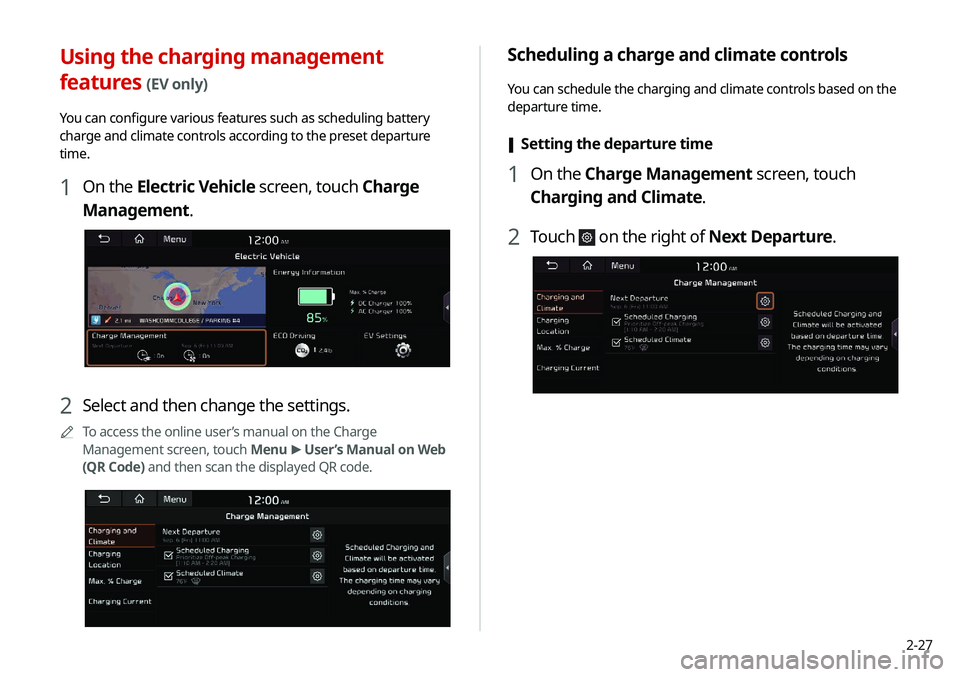
Scheduling a charge and climate controls
You can schedule the charging and climate controls based on the
departure time.
[Setting the departure time
1 On the Charge Management screen, touch
Charging and Climate.
2 Touch on the right of Next Departure.
Using the charging management
features (EV only)
You can configure various features such as scheduling battery
charge and climate controls according to the preset departure
time.
1 On the Electric Vehicle screen, touch Charge
Management.
2 Select and then change the settings.
0000
A
To access the online user’s manual on the Charge
Management screen, touch Menu >
User’s Manual on Web
(QR Code) and then scan the displayed QR code.
Page 66 of 244
2-28
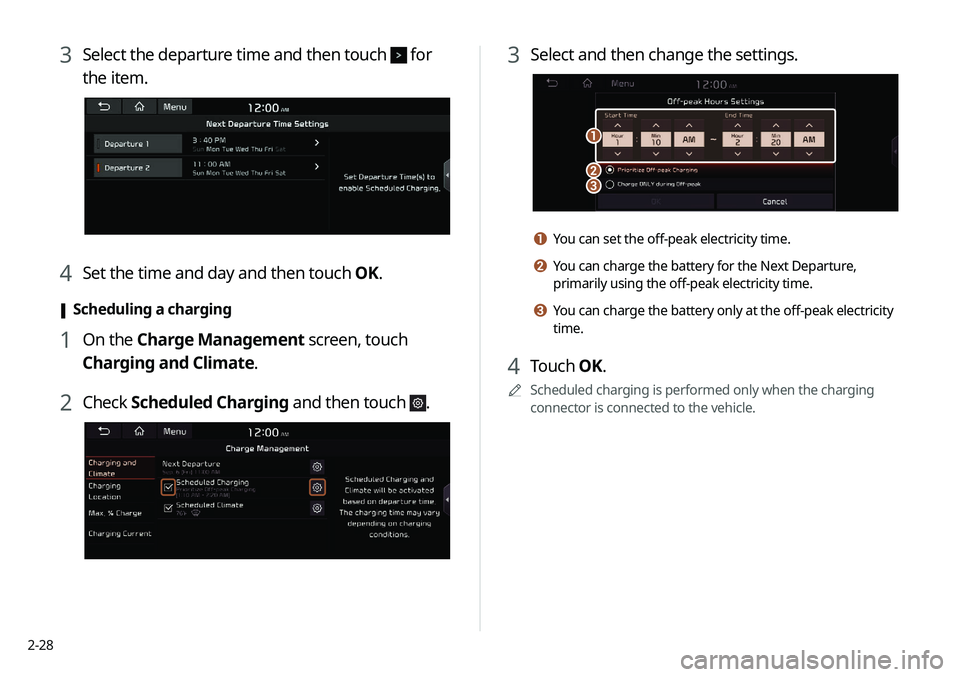
3 Select and then change the settings.
\037
\036\035
a You can set the off-peak electricity time.
b You can charge the battery for the Next Departure,
primarily using the off-peak electricity time.
c You can charge the battery only at the off-peak electricity
time.
4 Touch OK.
0000
A
Scheduled charging is performed only when the charging
connector is connected to the vehicle.
3 Select the departure time and then touch for
the item.
4 Set the time and day and then touch OK.
[Scheduling a charging
1 On the Charge Management screen, touch
Charging and Climate.
2 Check
Scheduled Charging and then touch .
Page 67 of 244
2-29
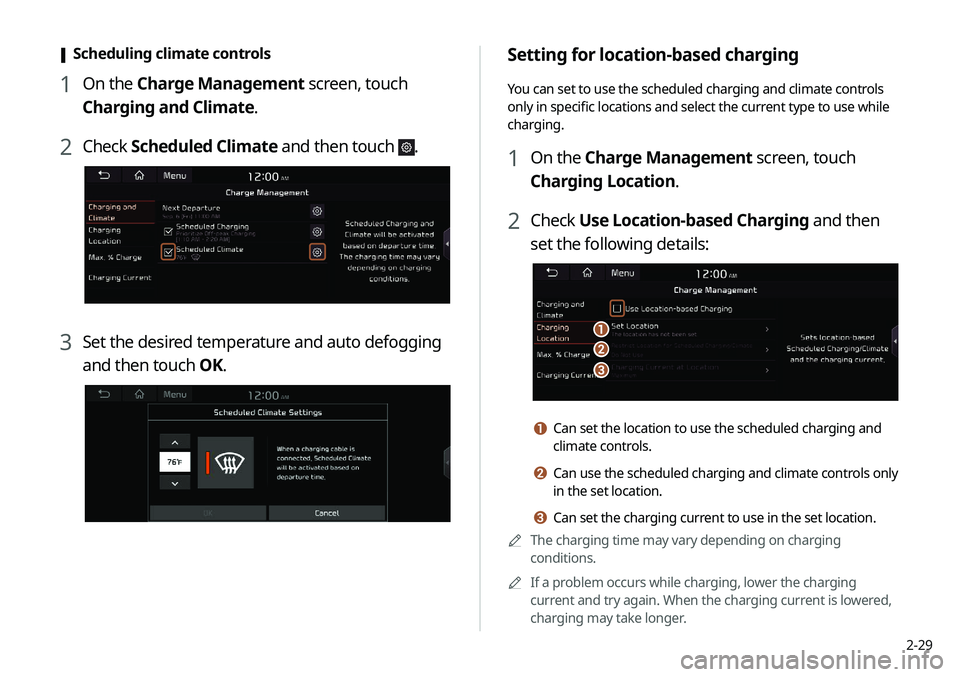
Setting for location-based charging
You can set to use the scheduled charging and climate controls
only in specific locations and select the current type to use while
charging.
1 On the Charge Management screen, touch
Charging Location.
2 Check Use Location-based Charging and then
set the following details:
\037
\036
\035
a Can set the location to use the scheduled charging and
climate controls.
b Can use the scheduled charging and climate controls only
in the set location.
c Can set the charging current to use in the set location.
0000
A
The charging time may vary depending on charging
conditions.
0000
A
If a problem occurs while charging, lower the charging
current and try again. When the charging current is lowered,
charging may take longer.
[Scheduling climate controls
1 On the Charge Management screen, touch
Charging and Climate.
2 Check
Scheduled Climate and then touch .
3 Set the desired temperature and auto defogging
and then touch OK.