navigation KIA NIRO EV 2022 Navigation System Quick Reference Guide
[x] Cancel search | Manufacturer: KIA, Model Year: 2022, Model line: NIRO EV, Model: KIA NIRO EV 2022Pages: 332, PDF Size: 11.18 MB
Page 127 of 332
5-21
5 Select the updated route and then press Start Guidance.
0000
A
When there is any zone under construction ahead on the way, you are prompted to
confirm whether or not to exclude the zone from the route. To avoid the zone, press Yes
to resume routing.
Searching for restaurants
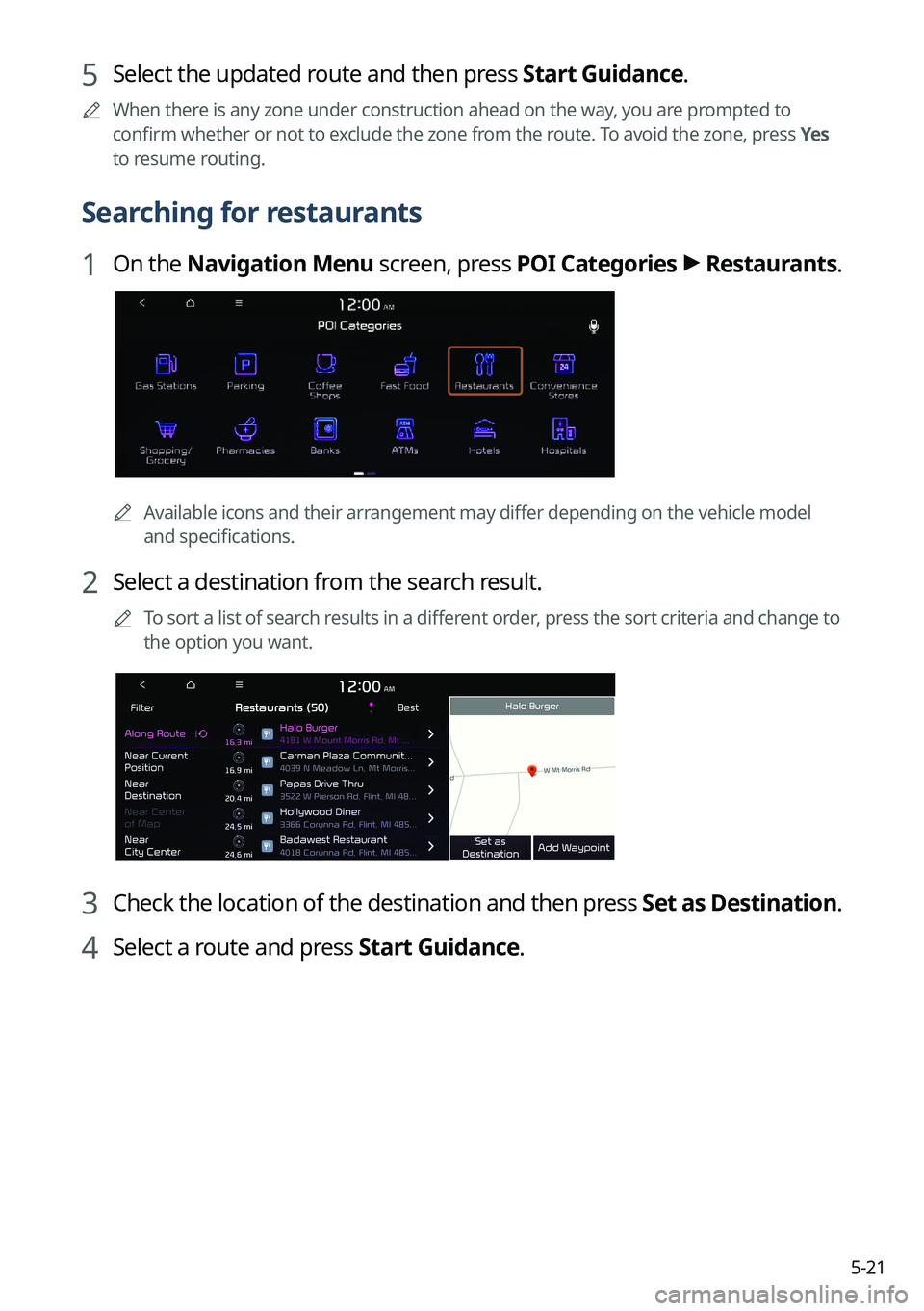
1 On the Navigation Menu screen, press POI Categories >
Restaurants.
0000A
Available icons and their arrangement may differ depending on the vehicle model
and specifications.
2 Select a destination from the search result.
0000
A
To sort a list of search results in a different order, press the sort criteria and change to
the option you want.
3 Check the location of the destination and then press Set as Destination.
4 Select a route and press Start Guidance.
Page 128 of 332

5-22
Searching for emergency services
1 On the Navigation Menu screen, press POI Categories.
0000AAvailable icons and their arrangement may differ depending on the vehicle model
and specifications.
2 Select the type of emergency service.
3 Select a destination from the search result.
0000
A
To sort a list of search results in a different order, press the sort criteria and change to
the option you want.
4 Check the location of the destination and then press Set as Destination.
5 Select a route and press Start Guidance.
Page 129 of 332
5-23
Using saved favorite places
After registering the current location or frequently visited places, you can easily set any of
them as a destination.
Saving a searched place as a favorite place
You can search and register the desired place.
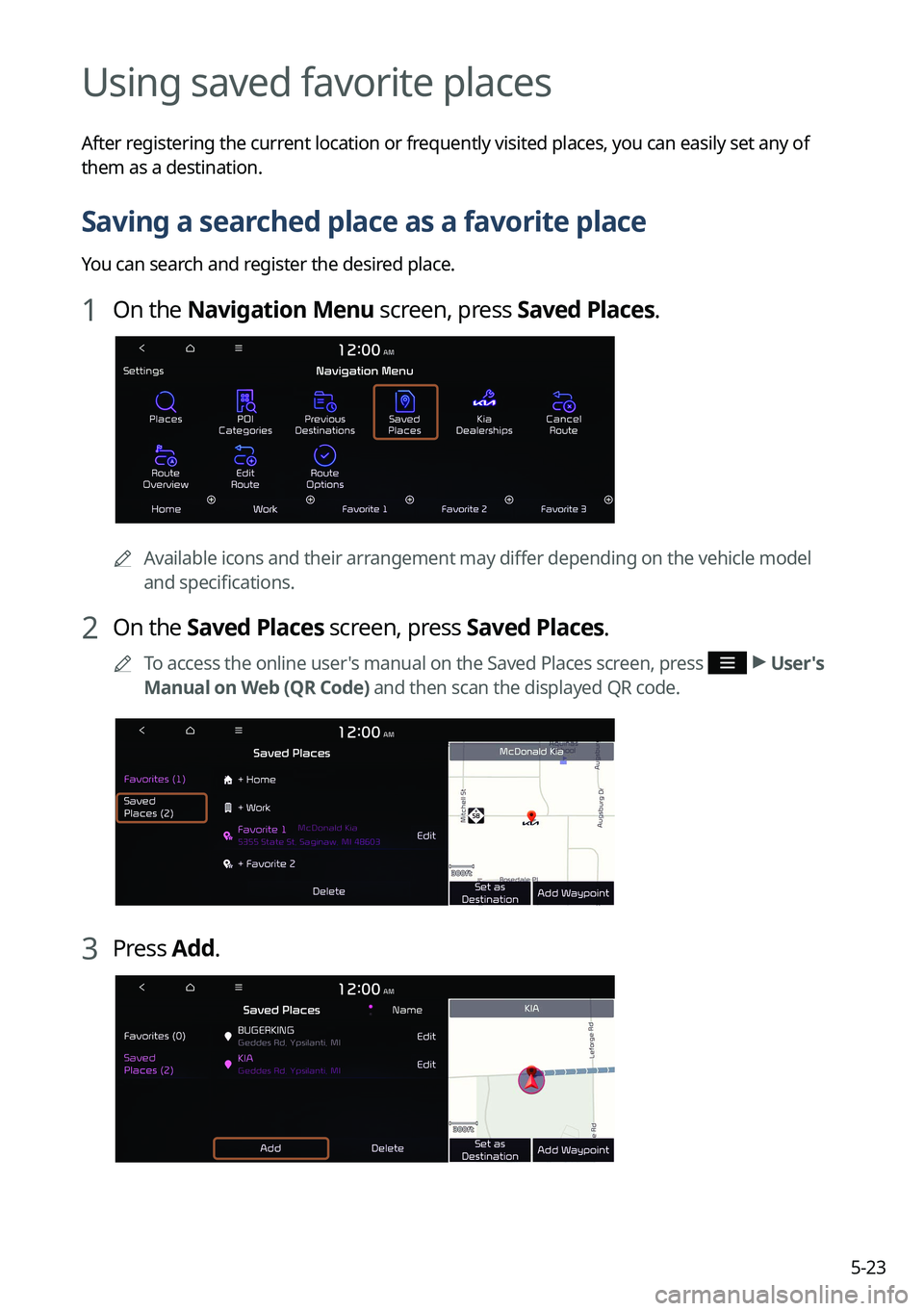
1 On the Navigation Menu screen, press Saved Places.
0000AAvailable icons and their arrangement may differ depending on the vehicle model
and specifications.
2 On the Saved Places screen, press Saved Places.
0000
A
To access the online user's manual on the Saved Places screen, press >
User's
Manual on Web (QR Code) and then scan the displayed QR code.
3 Press Add.
Page 131 of 332
5-25
Saving a frequently visited place as a favorite place
You can register your home, office, or other frequently visited place as a favorite.
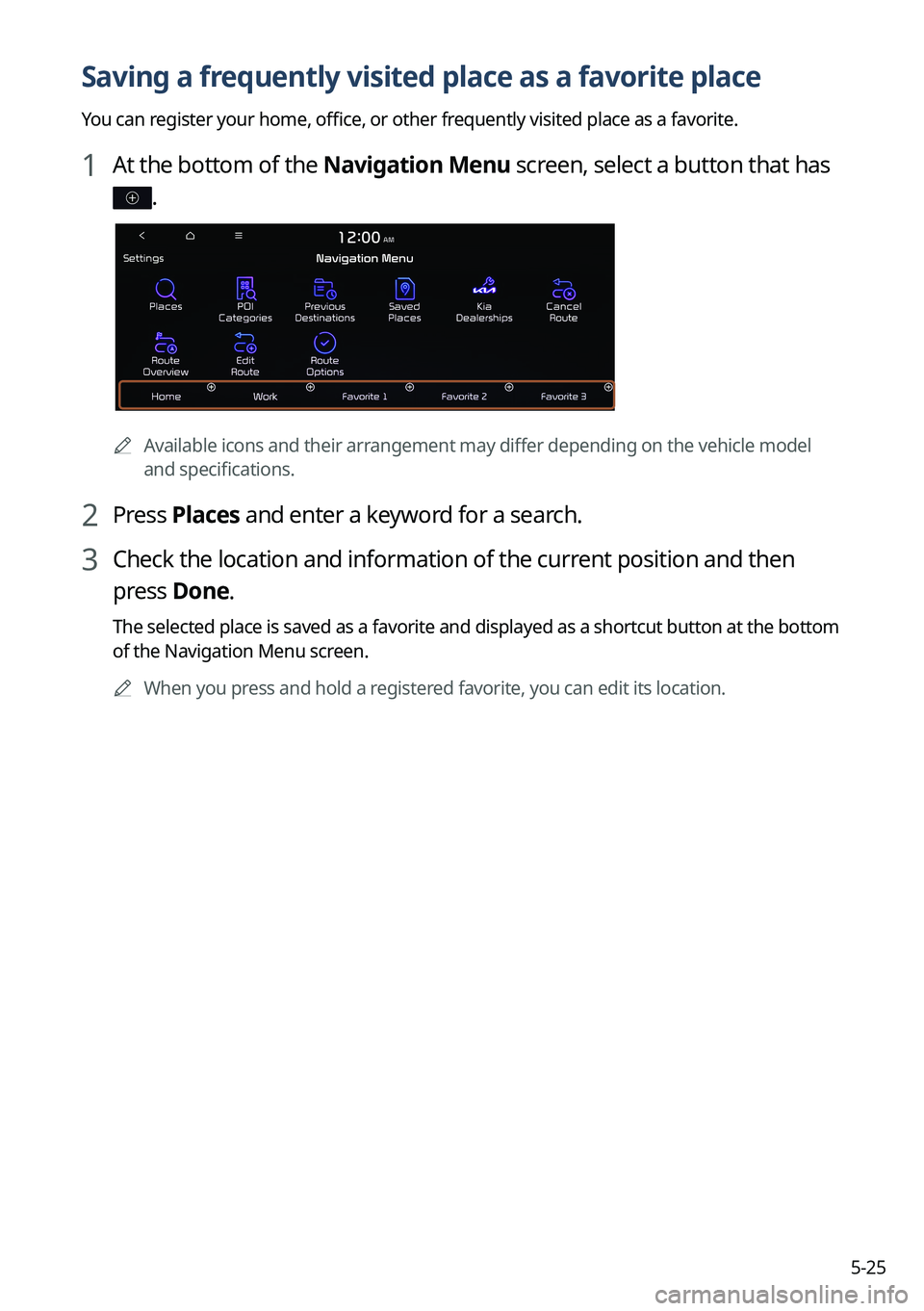
1 At the bottom of the Navigation Menu screen, select a button that has
.
0000AAvailable icons and their arrangement may differ depending on the vehicle model
and specifications.
2 Press Places and enter a keyword for a search.
3 Check the location and information of the current position and then
press Done.
The selected place is saved as a favorite and displayed as a shortcut button at the bottom
of the Navigation Menu screen.
0000
A
When you press and hold a registered favorite, you can edit its location.
Page 132 of 332
5-26
Setting a saved favorite place as the destination
You can set any in the saved places of the navigation system as a destination.
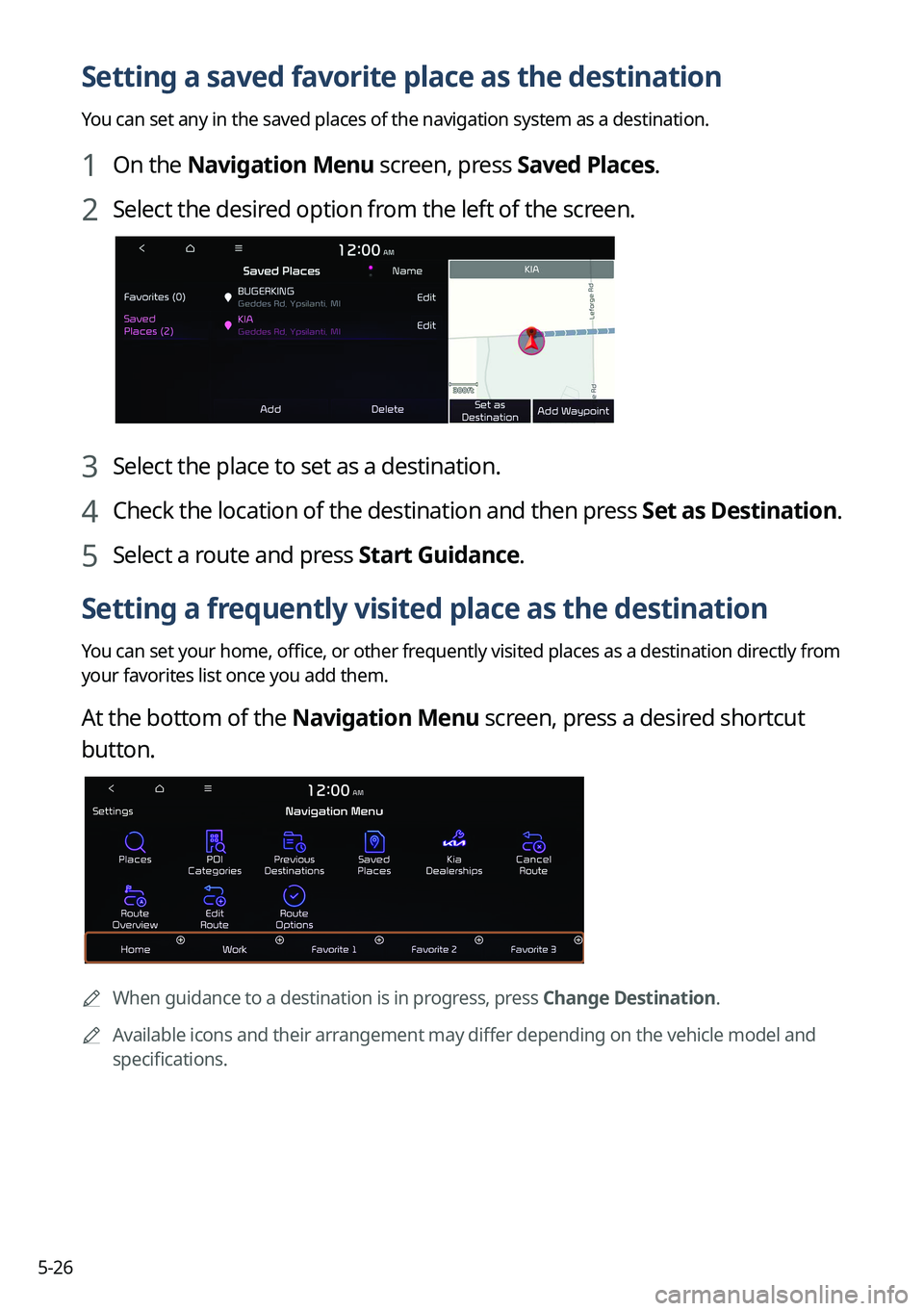
1 On the Navigation Menu screen, press Saved Places.
2 Select the desired option from the left of the screen.
3 Select the place to set as a destination.
4 Check the location of the destination and then press Set as Destination.
5 Select a route and press Start Guidance.
Setting a frequently visited place as the destination
You can set your home, office, or other frequently visited places as a destination directly from
your favorites list once you add them.
At the bottom of the Navigation Menu screen, press a desired shortcut
button.
0000A
When guidance to a destination is in progress, press Change Destination.
0000
A
Available icons and their arrangement may differ depending on the vehicle model and
specifications.
Page 133 of 332
5-27
Editing information about a saved favorite place
You can change information or properties of a registered location.
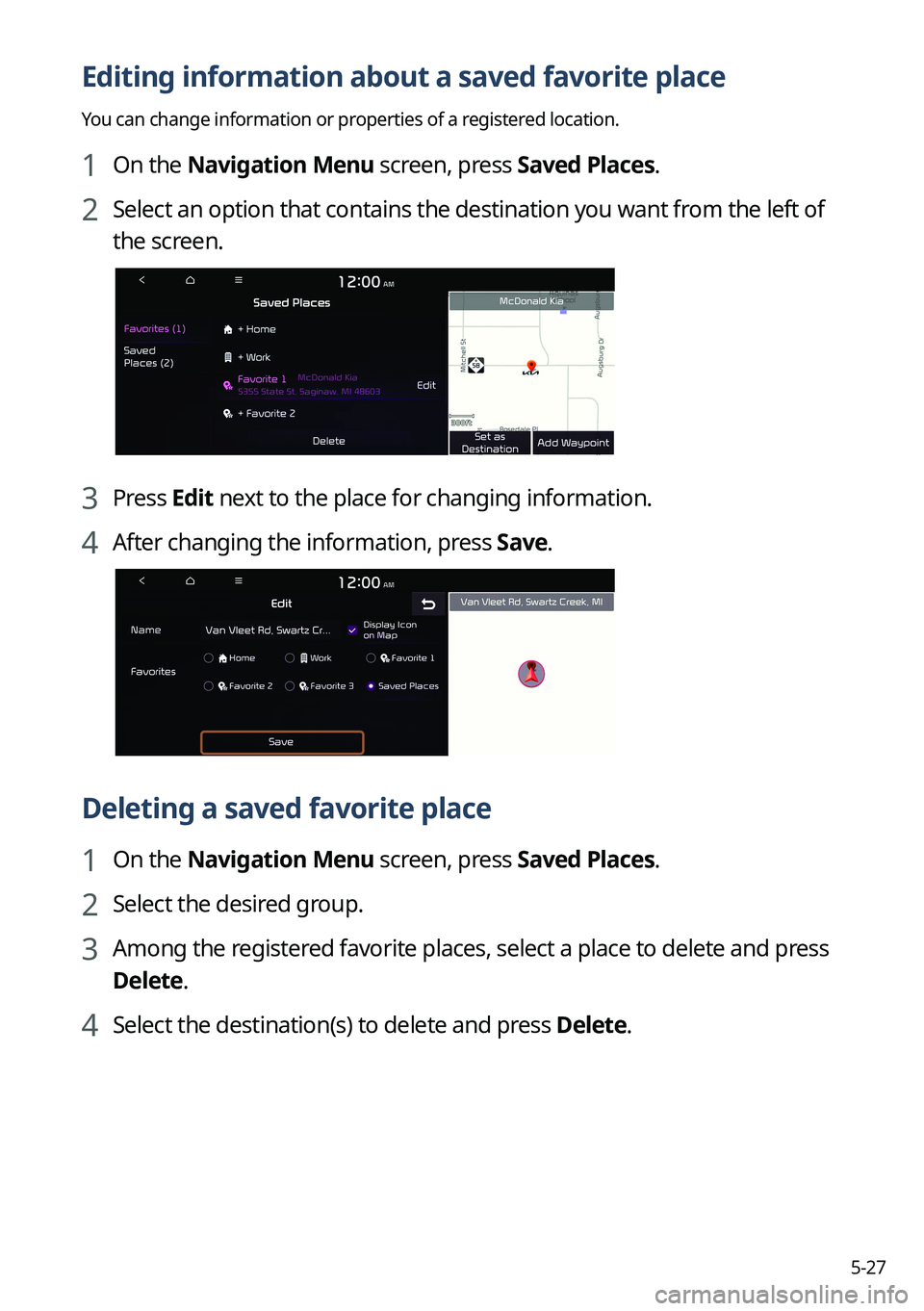
1 On the Navigation Menu screen, press Saved Places.
2 Select an option that contains the destination you want from the left of
the screen.
3 Press Edit next to the place for changing information.
4 After changing the information, press Save.
Deleting a saved favorite place
1 On the Navigation Menu screen, press Saved Places.
2 Select the desired group.
3 Among the registered favorite places, select a place to delete and press
Delete.
4 Select the destination(s) to delete and press Delete.
Page 134 of 332
5-28
Searching for gas stations
You can search nearby gas stations.
1 On the Navigation Menu screen, press POI Categories >
Gas Stations .
0000A
Available icons and their arrangement may differ depending on the vehicle model
and specifications.
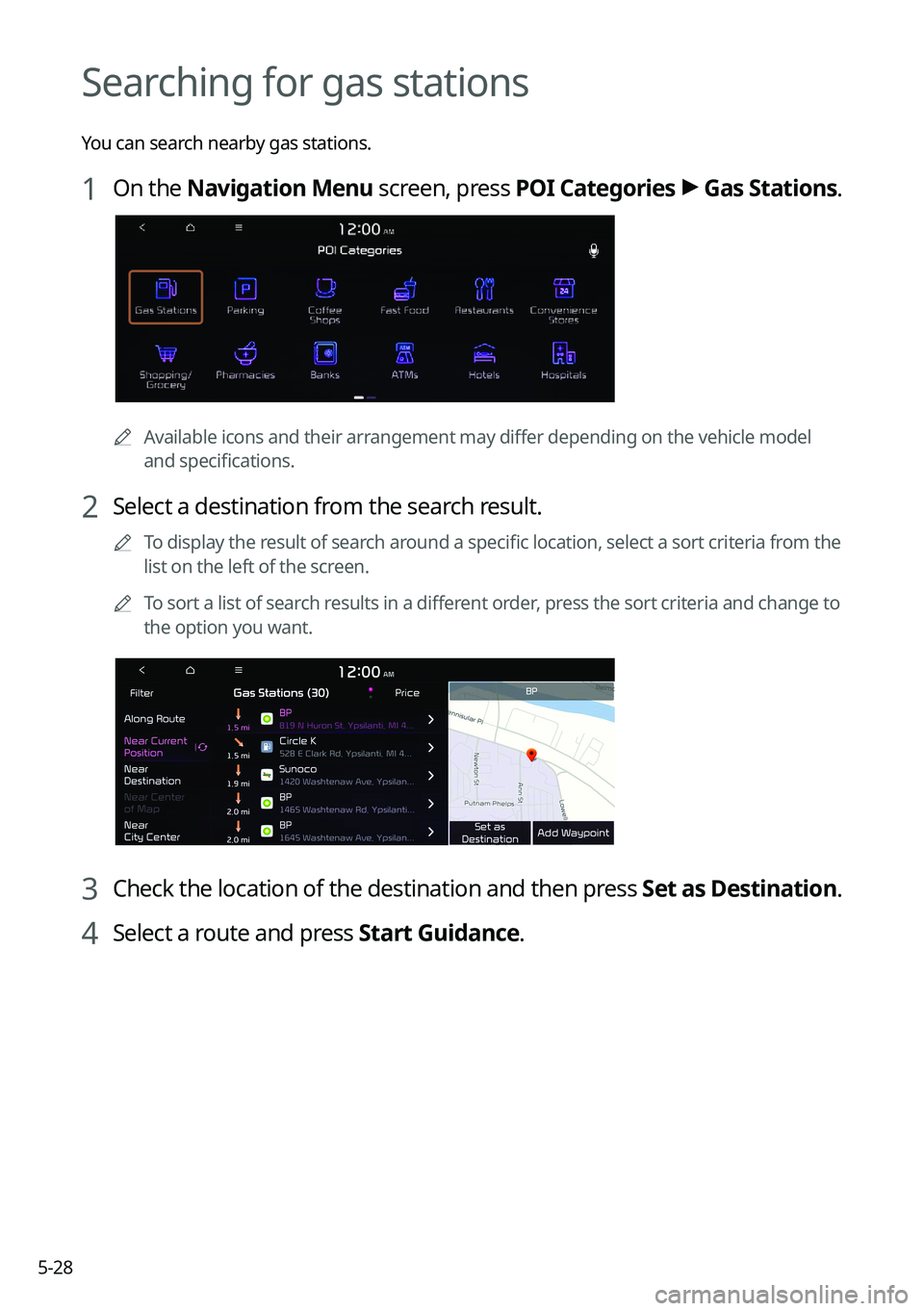
2 Select a destination from the search result.
0000
A
To display the result of search around a specific location, select a sort criteria from the
list on the left of the screen.
0000
A
To sort a list of search results in a different order, press the sort criteria and change to
the option you want.
3 Check the location of the destination and then press Set as Destination.
4 Select a route and press Start Guidance.
Page 135 of 332
5-29
Searching for EV (Electric Vehicle) charging
stations
(EV only)
You can search nearby charging stations.
1 On the Navigation Menu screen, press POI Categories >
EV Charging
Stations.
0000A Available icons and their arrangement may differ depending on the vehicle model
and specifications.
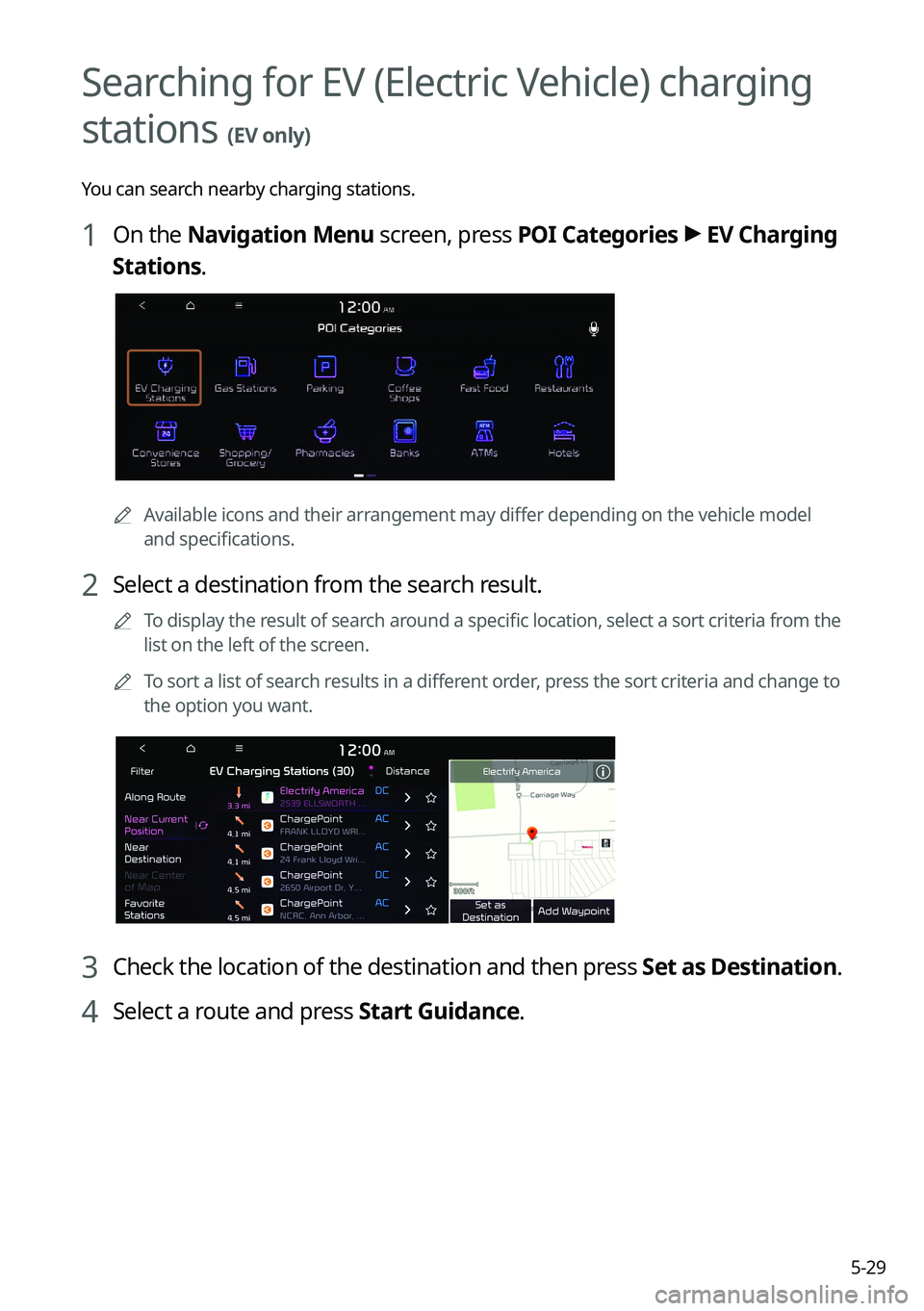
2 Select a destination from the search result.
0000
A
To display the result of search around a specific location, select a sort criteria from the
list on the left of the screen.
0000
A
To sort a list of search results in a different order, press the sort criteria and change to
the option you want.
3 Check the location of the destination and then press Set as Destination.
4 Select a route and press Start Guidance.
Page 136 of 332

5-30
END USER LICENSE AGREEMENT
PLEASE READ THIS END USER LICENSE AGREEMENT ("EULA") CAREFULLY BEFORE USING THE
NAVIGATION SYSTEM.
This is a license agreement between you and Hyundai Autoever, CORP. including its affiliates
("COMPANY") regarding a copy of the COMPANY navigable map database together with
associated software, media and explanatory printed documentation published by COMPANY
(jointly the "Product"). The Product is provided for your personal, internal use only and not for
resale. It is protected by copyright and is subject to the following terms which are agreed to
by you, on the one hand, and COMPANY and its licensors (and their licensors and suppliers)
(collectively, "Licensors") on the other hand.
By using the Product, you accept and agree to all terms and conditions in this End User
License Agreement ("EULA"). IF YOU DO NOT AGREE TO THE TERMS OF THIS EULA, YOU
MUST PROMPTLY EXIT THE PRODUCT OPERATION PROGRAM AND DO NOT USE OR ACCESS
TO THE PRODUCT. YOU AGREE THAT YOUR RIGHTS UNDER THIS EULA MAY BE TERMINATED
AUTOMATICALLY WITHOUT NOTICE IF YOU FAIL TO COMPLY WITH ANY TERM(S) OF THIS
EULA.
Terms and Conditions
Personal Use Only. You agree to use this Product together with COMPANY's authorized
application for the solely personal, non-commercial purposes for which you were licensed,
and not for service bureau, time-sharing or other similar purposes. Accordingly, but subject to
the restrictions set forth in the following paragraphs, you agree not to otherwise reproduce,
copy, modify, decompile, disassemble, create any derivative works of, or reverse engineer any
portion of this Data, and may not transfer or distribute it in any form, for any purpose, except
to the extent permitted by mandatory laws. You may not assign this EULA or any of the rights
or licenses granted under this EULA, except when installed in the system for which it was
created.
Restrictions. Except where you have been specifically licensed to do so by COMPANY, and
without limiting the preceding paragraph, you may not use the Product (i) with any products,
systems, or applications installed or otherwise connected to or in communication with
vehicles, capable of vehicle navigation, positioning, dispatch, real time route guidance, fleet
management or similar applications; or (ii) with or in communication with any positioning
devices or any mobile or wireless-connected electronic or computer devices, including
without limitation cellular phones, palmtop and handheld computers, pagers, and personal
digital assistants or PDAs.
Page 165 of 332
7-3
2 When a beep sound is heard, say a command to perform (e.g.
navigation, music, call).
> See "Available voice commands" or " Viewing the voice
recognition help."
The recognized command appears in text at the top of the screen and the corresponding
function is performed.
0000
A
When an additional command is required to perform, the commands that can be
followed in the next step appear on the screen. Say a command or press a command.
0000
A
When there are several similar commands, say a command number to perform.
3 To end the voice recognition, perform one of the following methods:
\225In standby mode for voice recognition, say "Exit"
\225On the voice recognition screen, press Exit.
\225On the steering wheel, press and hold the Voice Recognition button.
0000
A
When the Voice Recognition button is pressed in standby mode for voice recognition,
the standby time is extended.
0000
A
When the voice recognition is not available, press the Voice Recognition button on
the steering wheel and use the voice recognition on your smartphone via phone
projection.
> See "Using the phone projection function."
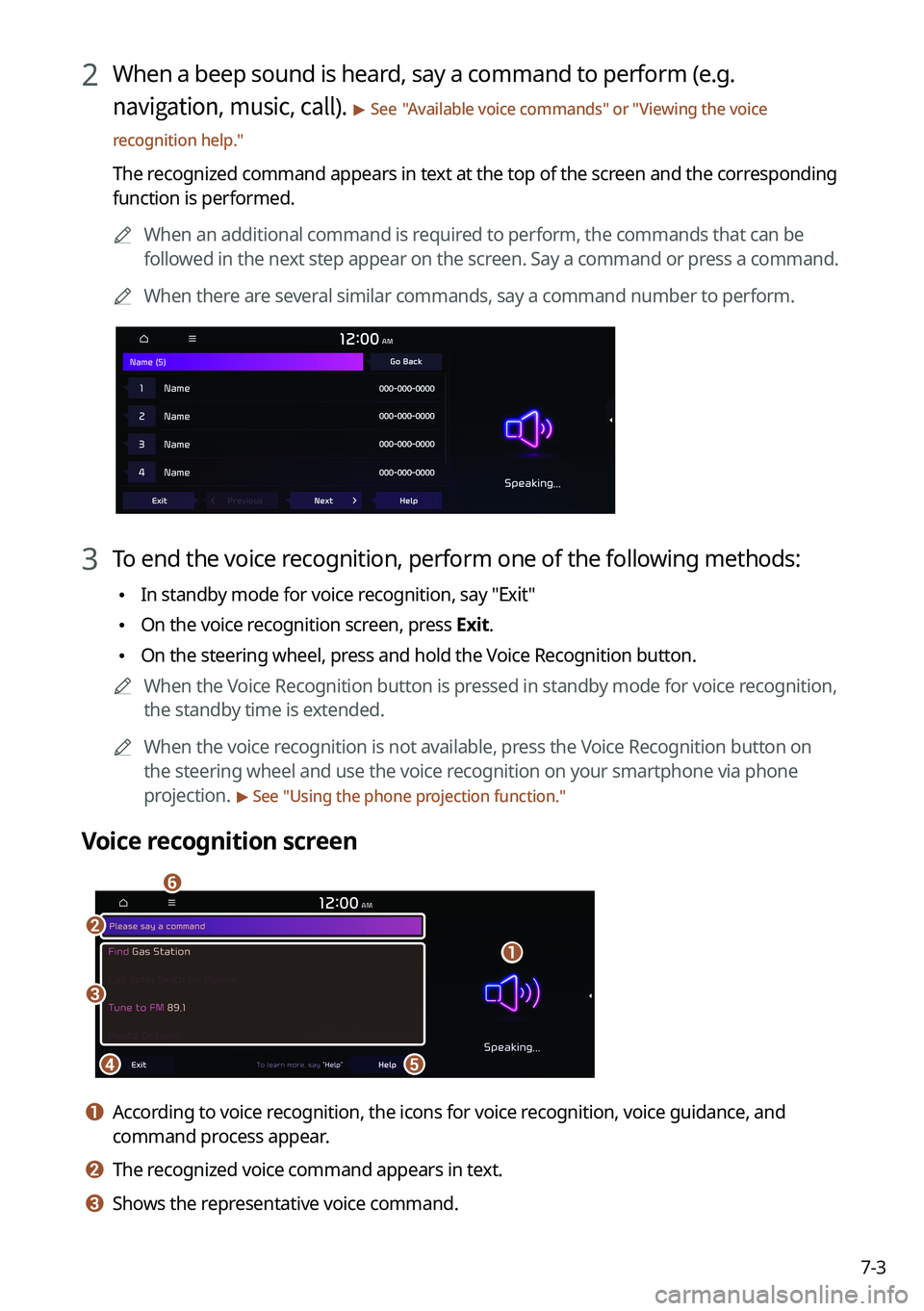
Voice recognition screen
\037
\036
\035\034
\033
\032
a a According to voice recognition, the icons for voice recognition, voice guidance, and
command process appear.
b b The recognized voice command appears in text.
c c Shows the representative voice command.