climate control KIA NIRO HYBRID EV 2022 Owners Manual
[x] Cancel search | Manufacturer: KIA, Model Year: 2022, Model line: NIRO HYBRID EV, Model: KIA NIRO HYBRID EV 2022Pages: 684, PDF Size: 9.67 MB
Page 37 of 684

H34
Switching to Hybrid mode to allow
heating (Plug-in hybrid vehicle)
When the coolant temperature is
lower than outdoor temperature is
lower than -13°C (8.6°F) On for
heating, this message will be dis-
played in the cluster. Then, the
vehicle will automatically switch to
HEV mode.
When the outdoor temperature is
higher than -10°C (14°F), or you
turn the climate control Off, the
vehicle will automatically return to
EV mode.
Wait until fuel door opens
(Plug-in hybrid vehicle)
This message is displayed when you
attempt to open the fuel filler lid with
the fuel tank pressurized. Wait until
the fuel tank is depressurized.
✽ ✽
NOTICE
• It may take up to 20 seconds to
open fuel filler lid.
• When the fuel filler lid is frozen
and does not open after 20 seconds
at freezing temperature, slightly
tap the fuel filler lid and then
attempt to open it.
Fuel door open
(Plug-in hybrid vehicle)
This message is displayed when the
fuel filler lid is opened.
Also means "Ready to refuel".
Check fuel door
(Plug-in hybrid vehicle)
This message is displayed when the
fuel filler lid is open or an abnormal-
ity has occurred.
Charging Door Open
(Plug-in hybrid vehicle)
This message indicates that the
charging door is open.
(Driving with the charging door open
may result in moisture inflow or dam-
age. This message is used to prevent
such occurrences.)
DRIVING THE HYBRID/PLUG-IN HYBRID VEHICLE (CONT.)
Page 64 of 684
25
Your vehicle at a glance
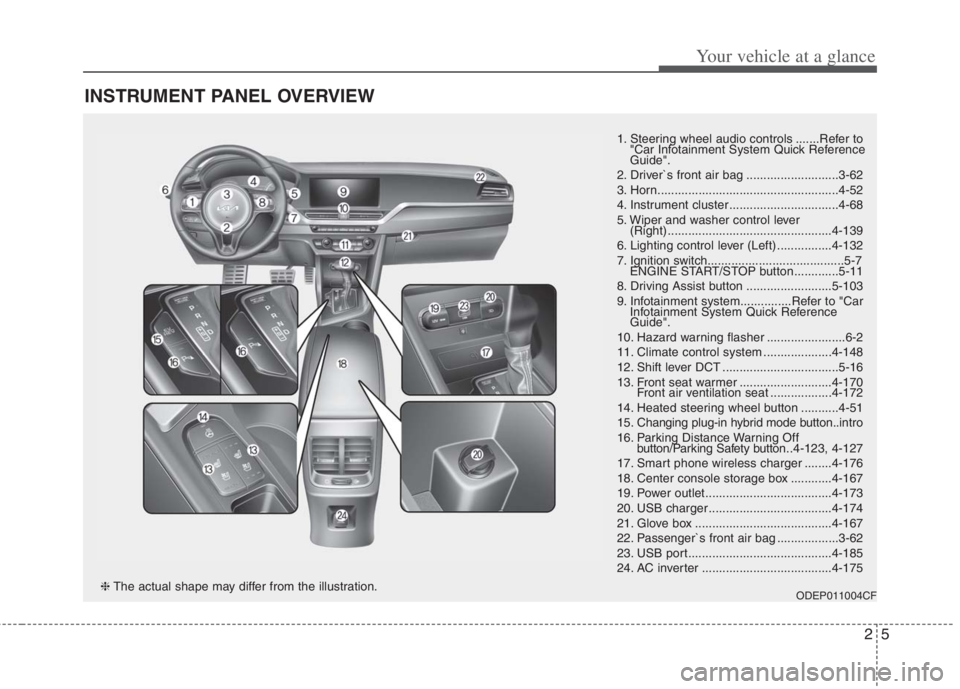
INSTRUMENT PANEL OVERVIEW
1. Steering wheel audio controls .......Refer to
"Car Infotainment System Quick Reference
Guide".
2. Driver`s front air bag ...........................3-62
3. Horn.....................................................4-52
4. Instrument cluster ................................4-68
5. Wiper and washer control lever
(Right) ................................................4-139
6. Lighting control lever (Left) ................4-132
7. Ignition switch........................................5-7
ENGINE START/STOP button .............5-11
8. Driving Assist button .........................5-103
9. Infotainment system...............Refer to "Car
Infotainment System Quick Reference
Guide".
10. Hazard warning flasher .......................6-2
11. Climate control system ....................4-148
12. Shift lever DCT ..................................5-16
13. Front seat warmer ...........................4-170
Front air ventilation seat ..................4-172
14. Heated steering wheel button ...........4-51
15. Changing plug-in hybrid mode button..intro
16. Parking Distance Warning Off
button/Parking Safety button..4-123, 4-127
17. Smart phone wireless charger ........4-176
18. Center console storage box ............4-167
19. Power outlet.....................................4-173
20. USB charger ....................................4-174
21. Glove box ........................................4-167
22. Passenger`s front air bag ..................3-62
23. USB port..........................................4-185
24. AC inverter ......................................4-175
ODEP011004CF❈The actual shape may differ from the illustration.
Page 141 of 684
. . . . . . . . . . . . . . . . . . . . . . . . . . . . . . . 4-146
. . . . . . . . . . . . . . . . . . . . . . . . . . . . . . . . 4-146
Defroster . . . . . . . . . . . . . . . . . . . . . . . . . . . . . . . . 4-147
. . . . . . . . . . . . . . . . . . . . . . . 4-147
Automatic climate control system. . . . . . . . . . . . 4-148
. . . . . . . . . 4-149
. . . . . . . . . . . 4-151
. . . . . . . . . . . . . . . . . . . . . . . . . . . . 4-157
. . . . . . . . . . . . . . . . . . . . . . . . 4-159
. . . . . . . . . . . . . . . . 4-160
. . . . . . . . . . 4-160
. . . . . . . . . . . . . . . . . . . . . . 4-161
and compressor lubricant. . . . . . . . . . . . . . . . . . . . 4-162
Windshield defrosting and defogging . . . . . . . . . 4-163
. . . . . . . . . . . . . . 4-163
Storage compartments . . . . . . . . . . . . . . . . . . . . . 4-167
. . . . . . . . . . . . . . . . . . . . . . . 4-167
. . . . . . . . . . . . . . . . . . . . . . . . . . . . . . . . . . 4-16\
7
. . . . . . . . . . . . . . . . . . . . . . . . . . . . . 4-168
. . . . . . . . . . . . . . . . . . . . . . . . . . . . . . . . 4-169
Interior features . . . . . . . . . . . . . . . . . . . . . . . . . . 4-170
. . . . . . . . . . . . . . . . . . . . . . . . . . . . . . . . . 4-170
. . . . . . . . . . . . . . . . . . . . . . . . . . . . . . . . 4-170 . . . . . . . . . . . . . . . . . . . . . . . . . . 4-172
. . . . . . . . . . . . . . . . . . . . . . . . . . . . . . . . . . . 4-\
173
. . . . . . . . . . . . . . . . . . . . . . . . . . . . . . . . 4-173
. . . . . . . . . . . . . . . . . . . . . . . . . . . . . . . . 4-174
. . . . . . . . . . . . . . . . . . . . . . . . . . . . . . . . . 4-175
. . . . . . . . . . 4-176
. . . . . . . . . . . . . . . . . . . . . . . . . . . . . . 4-180
. . . . . . . . . . . . . . . . . . . . . . . . . . 4-181
. . . . . . . . . . . . . . . . . . . . . . . . 4-182
Exterior features. . . . . . . . . . . . . . . . . . . . . . . . . . 4-183
. . . . . . . . . . . . . . . . . . . . . . . . . . . . . . . . . . 4-18\
3
Infotainment system . . . . . . . . . . . . . . . . . . . . . . . 4-185
. . . . . . . . . . . . . . . . . . . . . . . . . . . . . . . . . . . 4-\
185
. . . . . . . . . . . . . . . . . . . . . 4-186
Declaration of Conformity . . . . . . . . . . . . . . . . . 4-189
4
Page 244 of 684
Features of your vehicle
106 4
Switching to Hybrid mode to
allow heating or air conditioning
(Plug-in hybrid)
When the outdoor temperature is
lower than -13°C (8.6°F), and you
turn the climate control On for
heating, the above message will be
displayed in the cluster. Then, the
vehicle will automatically switch to
HEV mode.
When the outdoor temperature is
higher than -10°C (14°F), or you
turn the climate control Off, the
vehicle will automatically return to
EV mode.
Switching to Hybrid mode for
self-diagnosis (Plug-in hybrid)
This message is displayed for self-
diagnosis of the hybrid mode sys-
tem.
Page 286 of 684
Features of your vehicle
148 4
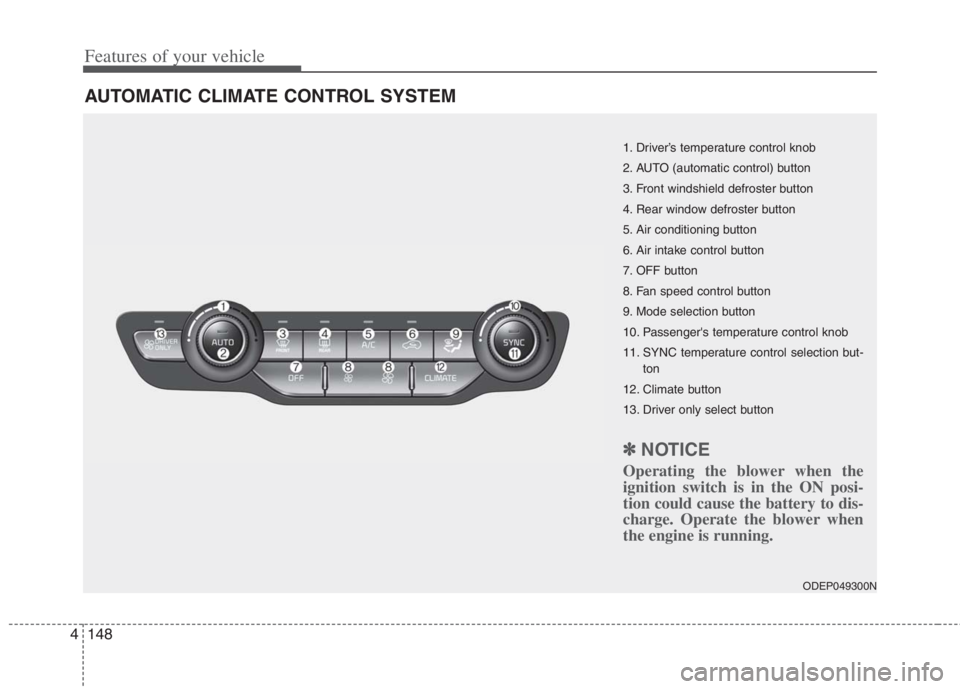
AUTOMATIC CLIMATE CONTROL SYSTEM
ODEP049300N
1. Driver’s temperature control knob
2. AUTO (automatic control) button
3. Front windshield defroster button
4. Rear window defroster button
5. Air conditioning button
6. Air intake control button
7. OFF button
8. Fan speed control button
9. Mode selection button
10. Passenger's temperature control knob
11. SYNC temperature control selection but-
ton
12. Climate button
13. Driver only select button
✽ ✽
NOTICE
Operating the blower when the
ignition switch is in the ON posi-
tion could cause the battery to dis-
charge. Operate the blower when
the engine is running.
Page 287 of 684
4149
Features of your vehicle
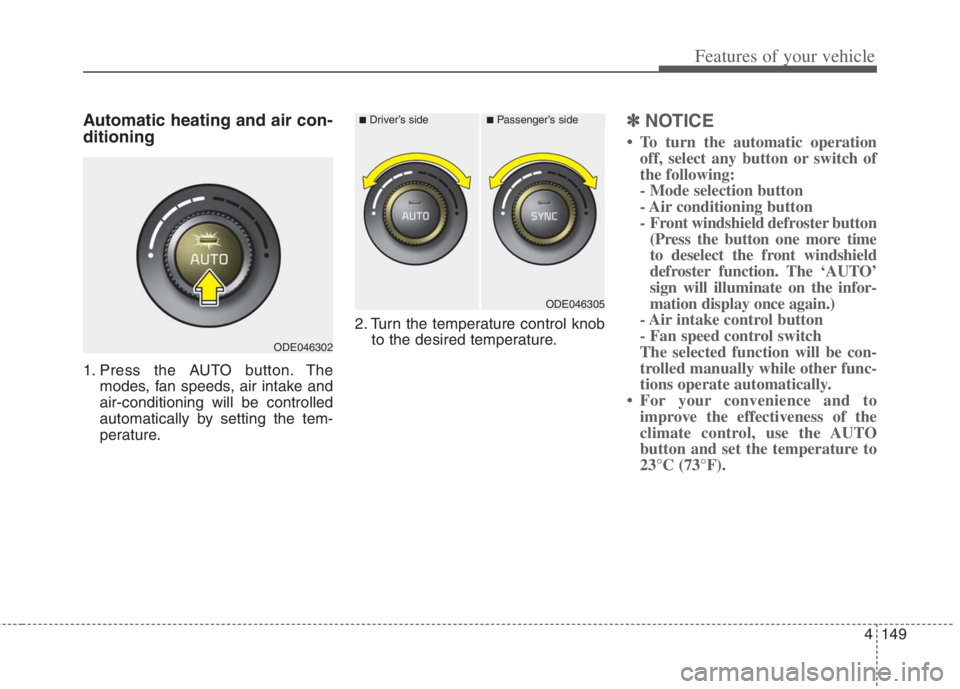
Automatic heating and air con-
ditioning
1. Press the AUTO button. The
modes, fan speeds, air intake and
air-conditioning will be controlled
automatically by setting the tem-
perature.2. Turn the temperature control knob
to the desired temperature.
✽ ✽
NOTICE
• To turn the automatic operation
off, select any button or switch of
the following:
- Mode selection button
- Air conditioning button
- Front windshield defroster button
(Press the button one more time
to deselect the front windshield
defroster function. The ‘AUTO’
sign will illuminate on the infor-
mation display once again.)
- Air intake control button
- Fan speed control switch
The selected function will be con-
trolled manually while other func-
tions operate automatically.
• For your convenience and to
improve the effectiveness of the
climate control, use the AUTO
button and set the temperature to
23°C (73°F).
ODE046302
■Driver’s side■Passenger’s side
ODE046305
Page 294 of 684

Features of your vehicle
156 4
Air conditioning
Press the A/C button to turn the air
conditioning system on (indicator
light will illuminate).
Press the button again to turn the air
conditioning system off.
OFF mode
Press the front blower OFF button to
turn off the front air climate control
system. However, you can still oper-
ate the mode and air intake buttons
as long as the ignition switch is in the
ON position.
WARNING - Recirculated
Air
Continued use of the climate
control system in the recirculat-
ed air position can cause
drowsiness or sleepiness, and
loss of vehicle control. Set the
air intake control to the outside
(fresh) air position as much as
possible while driving.
WARNING - Sleeping with
A/C on
Do not sleep in a vehicle with
the air conditioning or heating
on as this may cause serious
harm or death due to a drop in
your oxygen level and/or body
temperature.
WARNING -Reduced
Visibility
Continuous use of the climate
control system in the recirculat-
ed air position may allow
humidity to increase inside the
vehicle which may fog the glass
and obscure visibility.
ODE046309ODE046310
Page 295 of 684
4157
Features of your vehicle
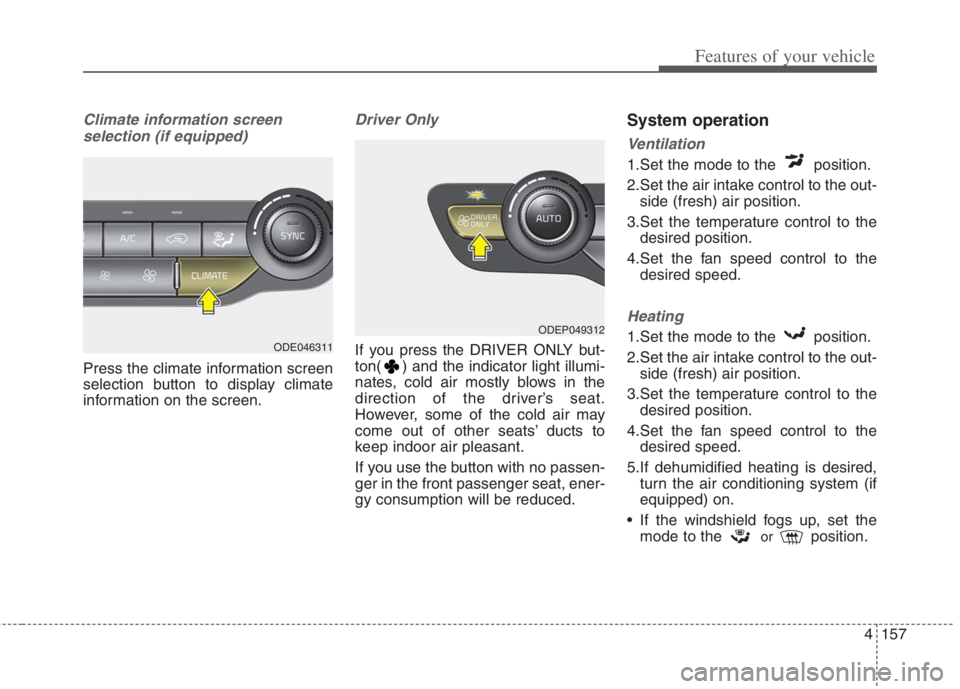
Climate information screen
selection (if equipped)
Press the climate information screen
selection button to display climate
information on the screen.
Driver Only
If you press the DRIVER ONLY but-
ton( ) and the indicator light illumi-
nates, cold air mostly blows in the
direction of the driver’s seat.
However, some of the cold air may
come out of other seats’ ducts to
keep indoor air pleasant.
If you use the button with no passen-
ger in the front passenger seat, ener-
gy consumption will be reduced.
System operation
Ventilation
1.Set the mode to the position.
2.Set the air intake control to the out-
side (fresh) air position.
3.Set the temperature control to the
desired position.
4.Set the fan speed control to the
desired speed.
Heating
1.Set the mode to the position.
2.Set the air intake control to the out-
side (fresh) air position.
3.Set the temperature control to the
desired position.
4.Set the fan speed control to the
desired speed.
5.If dehumidified heating is desired,
turn the air conditioning system (if
equipped) on.
If the windshield fogs up, set the
mode to the
orposition.
ODEP049312
ODE046311
Page 297 of 684
4159
Features of your vehicle
Air conditioning system operation tips
If the vehicle has been parked in
direct sunlight during hot weather,
open the windows for a short time
to let the hot air inside the vehicle
escape.
To help reduce moisture inside of
the windows on rainy or humid
days, decrease the humidity inside
the vehicle by operating the air
conditioning system.
During air conditioning system
operation, you may occasionally
notice a slight change in engine
speed as the air conditioning com-
pressor cycles. This is a normal
system operation characteristic.
Use the air conditioning system
every month only for a few minutes
to ensure maximum system per-
formance.
When using the air conditioning
system, you may notice clear water
dripping (or even puddling) on the
ground under the passenger side
of the vehicle. This is a normal sys-
tem operation characteristic. Operating the air conditioning sys-
tem in the recirculated air position
provides maximum cooling; howev-
er, continual operation in this mode
may cause the air inside the vehi-
cle to become stale.
During cooling operation, you may
occasionally notice a misty air flow
because of rapid cooling and
humid air intake. This is a normal
system operation characteristic.
Automatic ventilation
The system automatically selects the
outside (fresh) air position when the
climate control system operates over
a certain period of time (5 minutes)
in low temperature with the recircu-
lated air position selected. (when
floor mode or bi-level mode)
CAUTION
When using the air condition-
ing system, monitor the tem-
perature gauge closely while
driving up hills or in heavy
traffic when outside tempera-
tures are high. Air condition-
ing system operation may
cause engine overheating.
Continue to use the blower fan
but turn the air conditioning
system off if the temperature
gauge indicates engine over-
heating.
When opening the windows in
humid weather, air condition-
ing may create water droplets
inside the vehicle. Since
excessive water droplets may
cause damage to electrical
equipment, air conditioning
should only be used with the
windows closed.
Page 299 of 684
4161
Features of your vehicle
System cancellation
1. ENGINE START/STOP button is
On or ignition switch ON.
2. Select Floor-Level ( ) air flow
direction by pressing
Mode Selection button.
3. With pressing Air Conditioning but-
ton, press the Recirculated Air but-
ton more than 4 times within 2
seconds.
4. If the system is cancelled, the indi-
cator on Recirculated Air button
will blinks 3 times.
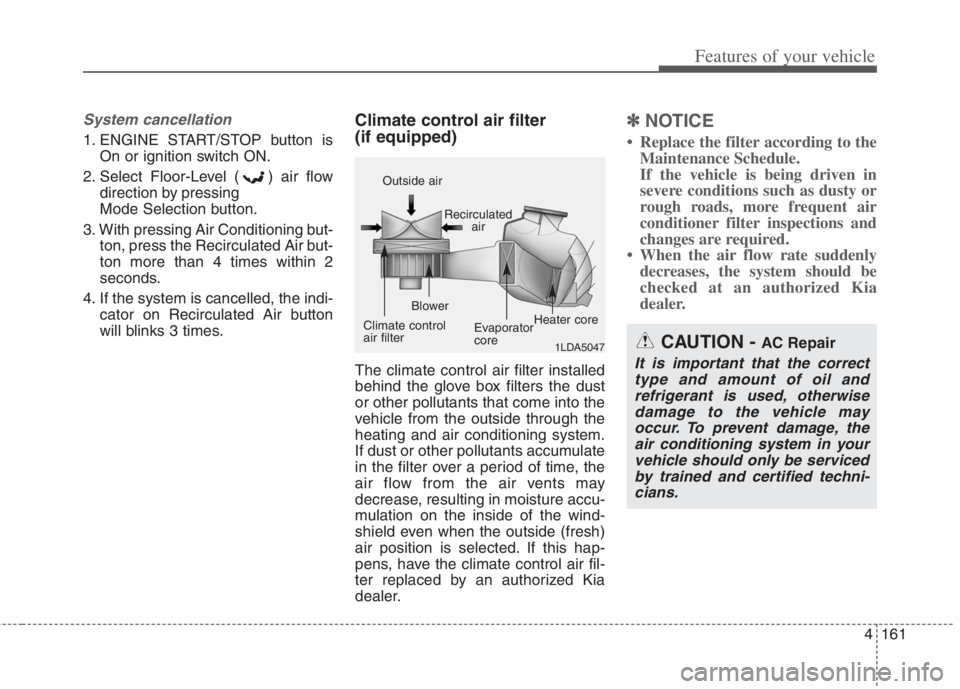
Climate control air filter
(if equipped)
The climate control air filter installed
behind the glove box filters the dust
or other pollutants that come into the
vehicle from the outside through the
heating and air conditioning system.
If dust or other pollutants accumulate
in the filter over a period of time, the
air flow from the air vents may
decrease, resulting in moisture accu-
mulation on the inside of the wind-
shield even when the outside (fresh)
air position is selected. If this hap-
pens, have the climate control air fil-
ter replaced by an authorized Kia
dealer.
✽ ✽
NOTICE
• Replace the filter according to the
Maintenance Schedule.
If the vehicle is being driven in
severe conditions such as dusty or
rough roads, more frequent air
conditioner filter inspections and
changes are required.
• When the air flow rate suddenly
decreases, the system should be
checked at an authorized Kia
dealer.
1LDA5047
Outside air
Recirculated
air
Climate control
air filterBlower
Evaporator
coreHeater core
CAUTION - AC Repair
It is important that the correct
type and amount of oil and
refrigerant is used, otherwise
damage to the vehicle may
occur. To prevent damage, the
air conditioning system in your
vehicle should only be serviced
by trained and certified techni-
cians.