warning KIA NIRO PHEV 2020 Owners Manual
[x] Cancel search | Manufacturer: KIA, Model Year: 2020, Model line: NIRO PHEV, Model: KIA NIRO PHEV 2020Pages: 687, PDF Size: 11.43 MB
Page 464 of 687

Driving your vehicle
154
5
HDA malfunction
This message shows that there is a
problem with HDA system, so have
your vehicle inspected by an author-
ized Kia dealer.
✽ ✽
NOTICE
• High Driving Assist is limited in
other countries.
• High Driving Assist only operates based on the speed limits of the
highway but it does not work with
the speed cameras.
• The time gap could occur between the navigation speed warning and
system operation.
• The system is not designed to work on highways other than mentioned
as a controlled access road. The
system automatically cancels
when you leave the highway.
• If there is a problem with Highway Driving Assist, the sys-
tem cannot be activated in the
Infotainment System screen.
• If your vehicle is 1640 ft. (500 m) ahead and behind of an open toll-
gate, the system is automatically
canceled. Also, it is converted to
Smart Cruise Control automati-
cally with a pop-up message on the
navigation. (Continued)(Continued)
• In the automatic speed setting
mode, the vehicle automatically
accelerates or decelerates when
the highway speed limit changes.
• If your vehicle speed exceeds 95 mph (153 km/h), Highway Driving
Assist is automatically canceled.
Also, it is converted to Smart
Cruise Control automatically with
a pop-up message on the naviga-
tion.
• If you enter a rest area on the highway or a IC/JC
(intersection/junction) without a
destination set, the system is can-
celed later than when the vehicle
actually leaves the highway.
ODEP059331N
Page 465 of 687
5155
Driving your vehicle
* Refer to “Smart Cruise Control(SCC)” in this chapter. for cautions
and warnings about vehicle to
vehicle distance control and front
radar.
* Refer to “Lane Following Assist (LFA) “ in this chapter. for cautions
and warnings about steering con-
trol and front camera.CAUTION
Highway Driving Assist systemmay not function properly in thefollowing situations:
The navigation is not working properly.
The navigation is not updated. The real-time GPS or map information provided haserrors.
The navigation is overloaded by performing functions suchas route search, video play-back, voice recognition, etc.are performing simultaneously.
The navigation is recalculat- ing the route while driving.
GPS signals are blocked in areas such as a tunnel.
The driver goes off course or the route to the destination ischanged or canceled by reset-ting the navigation.
The vehicle enters a service station or rest area
(Continued)
(Continued) The speed limit of selected highway section is changeddue to road conditions.
Android Auto or Car Play is operating.
The navigation cannot detect the current vehicle position(ex: elevated roads includingoverpass adjacent to generalroads or nearby roads exist ina parallel way).
The navigation is being updat- ed while driving.
The navigation is being reset while driving.
The road is slippery due to bad weather such as rain orsnow.
If your vehicle tows a trailer or another vehicle, you shouldrelease Highway DrivingAssist system. Operating thebrake system or steering sys-tem while towing mayadversely affect the safety.
Page 467 of 687

5157
Driving your vehicle
System description
Rear Cross-Traffic CollisionWarning system
Rear Cross-Traffic Collision Warning
system uses radar sensors to moni-
tor the approaching cross traffic from
the left and right side of the vehicle
when your vehicle is in reverse.
The blind spot detection range varies
relative to the approaching vehicle
speed.
System setting and activation
System setting
The driver can activate the sys- tems by placing the START/STOP
button to the ON position and by
selecting ‘User Settings →Driver
Assistance →Parking Safety →
Rear Cross-Traffic Safety’. The
RCCW turn on and get activated.
When the vehicle is turned off then on again, the systems always get
ready to be activated.
When the system is initially turned on and when the vehicle is turned
off then on again, the warning light
will illuminate for 3 seconds on the
outside rearview mirror.
REAR CROSS-TRAFFIC COLLISION WARNING (RCCW) (IF EQUIPPED)
OSK3058092L
WARNING
Always be aware of road con-ditions while driving and be
alert for unexpected situations
even though RCCW system is
operating.
RCCW system is supplemen- tal systems to assist you. Do
not entirely rely on the sys-
tems. Always pay attention,
while driving, for your safety.
RCCW system is not substi- tutes for proper and safe driv-
ing. Always drive safely and
use caution when backing up
the vehicle.
Page 468 of 687
Driving your vehicle
158
5
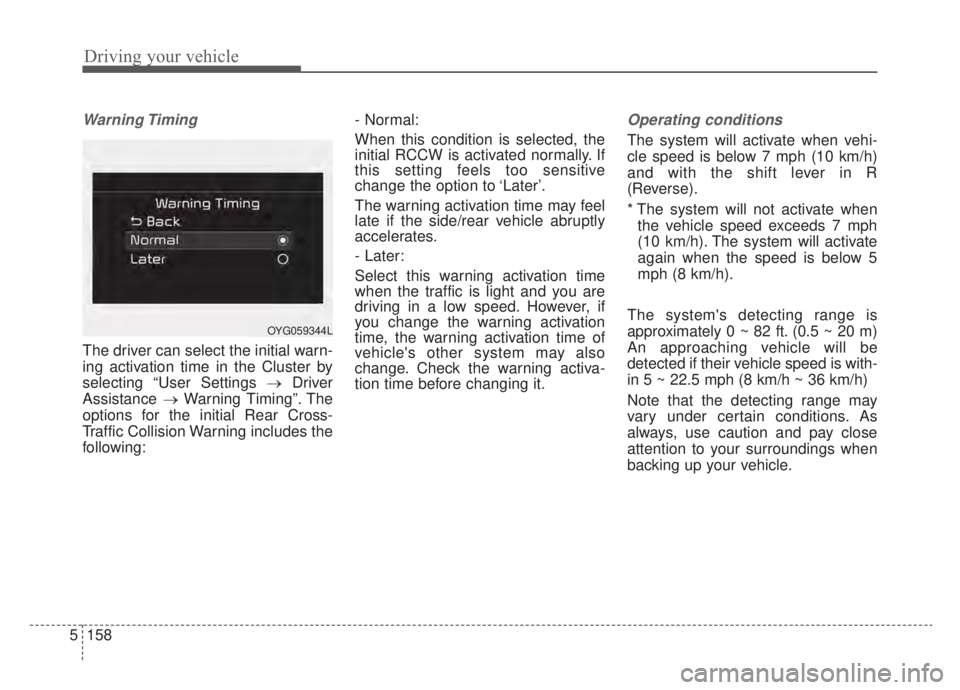
Warning Timing
The driver can select the initial warn-
ing activation time in the Cluster by
selecting “User Settings →Driver
Assistance →Warning Timing”. The
options for the initial Rear Cross-
Traffic Collision Warning includes the
following: - Normal:
When this condition is selected, the
initial RCCW is activated normally. If
this setting feels too sensitive
change the option to ‘Later’.
The warning activation time may feel
late if the side/rear vehicle abruptly
accelerates.
- Later:
Select this warning activation time
when the traffic is light and you are
driving in a low speed. However, if
you change the warning activation
time, the warning activation time of
vehicle's other system may also
change. Check the warning activa-
tion time before changing it.
Operating conditions
The system will activate when vehi-
cle speed is below 7 mph (10 km/h)
and with the shift lever in R
(Reverse).
* The system will not activate when
the vehicle speed exceeds 7 mph
(10 km/h). The system will activate
again when the speed is below 5
mph (8 km/h).
The system's detecting range is
approximately 0 ~ 82 ft. (0.5 ~ 20 m)
An approaching vehicle will be
detected if their vehicle speed is with-
in 5 ~ 22.5 mph (8 km/h ~ 36 km/h)
Note that the detecting range may
vary under certain conditions. As
always, use caution and pay close
attention to your surroundings when
backing up your vehicle.
OYG059344L
Page 469 of 687

5159
Driving your vehicle
Warning message and system
control
Rear Cross-Traffic CollisionWarning system
If the vehicle detected by the sensors
approaches from the rear left/right
side of your vehicle, the warning
chime will sound, the warning light
on the outside rearview mirror will
blink and a message will appear on
the LCD display. If the rear view mon-
itor system is in activation, a mes-
sage will also appear on the
‘Infortainment System’.
The warning will stop when:
- The vehicle moving at the rear left/right side of your vehicle is not
in the detection range.
- The vehicle is right behind your vehicle.
- The vehicle is not driving towards your vehicle.
- The vehicle’s approaching speed is decreased.CAUTION
When the operation condition of RCCW is met, the warningwill occur every time a vehicleapproaches the side or rear ofyour stopped (0 mph (0 km/h)vehicle speed) vehicle.
The system's warning or brake may not operate properly if theleft or right of your vehicle'srear bumper is blocked by avehicle or obstacle.
The driver should always use extreme caution while operat-ing the vehicle, whether or notthe warning light on the outerside view mirror illuminates orthere is a warning alarm.
Playing the vehicle audio sys- tem at high volume may pre-vent occupants from hearingthe system's warning sounds.
If any other warning sound such as seat belt warningchime is already generated,the RCCW warning may notsound.
OSK3058093L
OSK3058094L
■ Left
■ Right
Page 470 of 687

Driving your vehicle
160
5
Detecting Sensor
The rear radars are located inside
the rear bumper for detecting the
side and rear areas.
Always keep the rear bumper clean
for proper operation of the system.
ODEP059158
CAUTION
The system may not work
properly when the bumper hasbeen damaged, or if the rearbumper has been replaced orrepaired.
The system may turn off due to strong electromagnetic waves.
Always keep the sensors clean. NEVER arbitrarily disassem- ble the sensor component norapply any impact on the sen-sor component.
Be careful not to apply unnec- essary force on the radar sen-sor or sensor cover. If the sen-sor is forcibly moved out ofproper alignment, the systemmay not operate correctly. Inthis case, a warning messagemay not be displayed.
(Continued)
WARNING
Drive safely even though thevehicle is equipped with Rear
Cross-Traffic Collision
Warning system. Do not sole-
ly rely on the system but
check your surrounding when
backing the vehicle up.
The driver is responsible for accurate brake control.
Always pay extreme caution while driving. Rear Cross-
Traffic Collision Warning sys-
tem may not operate properly
or unnecessarily operate
depending on traffic and driv-
ing conditions.
Page 471 of 687

5161
Driving your vehicle
Blind-Spot Collision Warning (BCW)
system disabled. Radar blocked
This warning message may appearwhen:
- One or both of the sensors on therear bumper is blocked by dirt or
snow or a foreign object.
- Driving in rural areas where the sensor does not detect another
vehicle for an extended period of
time.
- When there is inclement weather such as heavy snow or rain. A trailer or carrier is installed. (To use
BCW system, remove the trailer or
carrier from your vehicle.)
If any of these conditions occur, the
light on BCW button and the system
will turn off automatically.
When BCW canceled warning mes-
sage is displayed in the cluster,
check to make sure that the rear
bumper is free from any dirt or snow
in the areas where the sensor is
located. Remove any dirt, snow, or
foreign material that could interfere
with the radar sensors.
After any dirt or debris is removed,
BCW system should operate normal-
ly after about 10 minutes of driving
the vehicle.
If the system does not work normally
even though the foreign substance,
trailer or carrier, or other equipment
is removed, have the system
checked by an authorized Kia dealer.
OJF058433L
(Continued)
Take your vehicle to an author-ized Kia dealer and have thesystem checked.
Do not apply foreign objects such as a bumper sticker or abumper guard near the radarsensor or apply paint to thesensor area. Doing so mayadversely affect the perform-ance of the sensor.
Page 472 of 687
Driving your vehicle
162
5
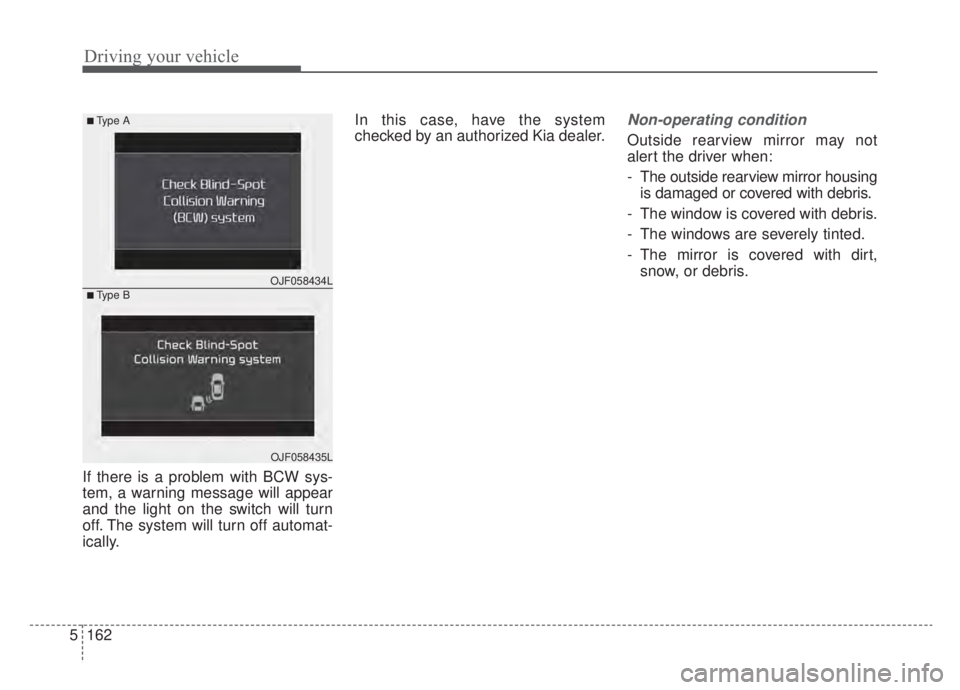
If there is a problem with BCW sys-
tem, a warning message will appear
and the light on the switch will turn
off. The system will turn off automat-
ically. In this case, have the system
checked by an authorized Kia dealer.
Non-operating condition
Outside rearview mirror may not
alert the driver when:
- The outside rearview mirror housing
is damaged or covered with debris.
- The window is covered with debris.
- The windows are severely tinted.
- The mirror is covered with dirt, snow, or debris.
OJF058434L
■Type A
■Type B
OJF058435L
Page 474 of 687
Driving your vehicle
164
5
The brake is reworked.
The vehicle sharply stops.
Temperature is extremely low
around the vehicle.
The vehicle severely vibrates while driving over a bumpy road,
uneven/bumpy road, or concrete
patch.
The vehicle drives on a slippery surface due to snow, water puddle,
or ice.
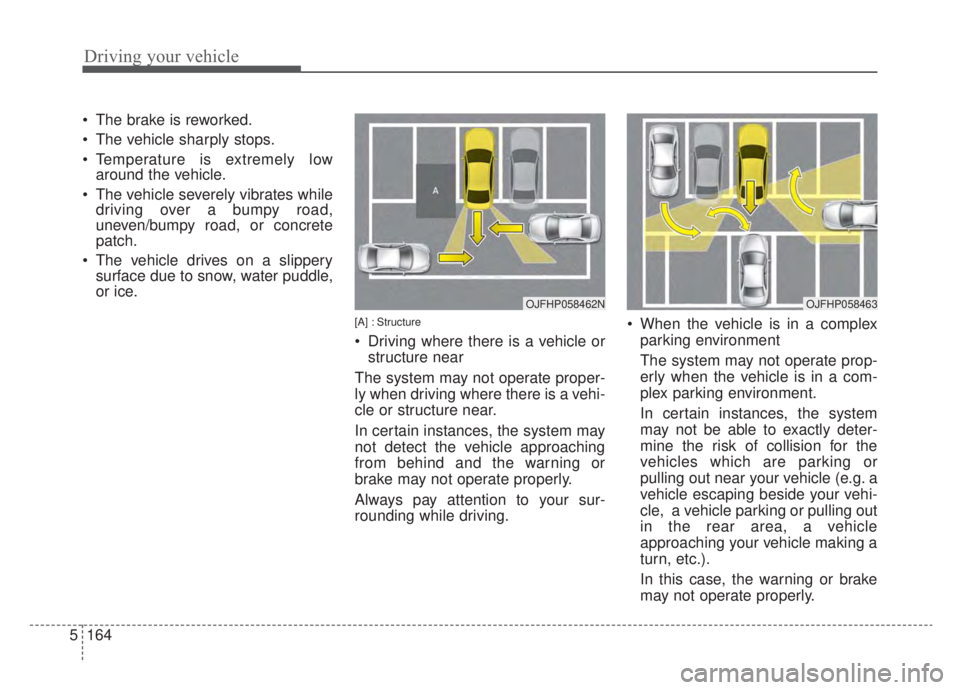
[A] : Structure
Driving where there is a vehicle or
structure near
The system may not operate proper-
ly when driving where there is a vehi-
cle or structure near.
In certain instances, the system may
not detect the vehicle approaching
from behind and the warning or
brake may not operate properly.
Always pay attention to your sur-
rounding while driving. When the vehicle is in a complex
parking environment
The system may not operate prop-
erly when the vehicle is in a com-
plex parking environment.
In certain instances, the system
may not be able to exactly deter-
mine the risk of collision for the
vehicles which are parking or
pulling out near your vehicle (e.g. a
vehicle escaping beside your vehi-
cle, a vehicle parking or pulling out
in the rear area, a vehicle
approaching your vehicle making a
turn, etc.).
In this case, the warning or brake
may not operate properly.
OJFHP058462NOJFHP058463
Page 475 of 687
![KIA NIRO PHEV 2020 Owners Manual 5165
Driving your vehicle
[A] : Vehicle
When the vehicle is parked diago-nally
The system may not operate proper-
ly when the vehicle is parked diago-
nally.
In certain instances, when the diago-
nal](/img/2/55181/w960_55181-474.png "KIA NIRO PHEV 2020 Owners Manual 5165
Driving your vehicle
[A] : Vehicle
When the vehicle is parked diago-nally
The system may not operate proper-
ly when the vehicle is parked diago-
nally.
In certain instances, when the diago-
nal")
5165
Driving your vehicle
[A] : Vehicle
When the vehicle is parked diago-nally
The system may not operate proper-
ly when the vehicle is parked diago-
nally.
In certain instances, when the diago-
nally parked vehicle is pulled out of
the parking space, the system may
not detect the vehicle approaching
from the rear left/right of your vehi-
cle. In this case, the warning or brake
may not operate properly.
Always pay attention to your sur-
rounding while driving. When the vehicle is on/near a
slope
The system may not operate proper-
ly when the vehicle is on/near a
slope.
In certain instances, the system may
not detect the vehicle approaching
from the rear left/right and the warning
or brake may not operate properly.
Always pay attention to your sur-
rounding while driving.
[A] : Structure, [B] : Wall
Pulling into the parking space where there is a structure
The system may not operate properly
when pulling in the vehicle to the park-
ing space where there is a structure at
the back or side of your vehicle.
In certain instances, when backing
into the parking space, the system
may not detect the vehicle moving in
front of your vehicle. In this case, the
warning or brake may not operate
properly.
Always pay attention to the parking
space while driving.
ODEP059162ODEP059309LOJFHP058464N