phone KIA NIRO PHEV 2021 Quick Start Guide Base Audio
[x] Cancel search | Manufacturer: KIA, Model Year: 2021, Model line: NIRO PHEV, Model: KIA NIRO PHEV 2021Pages: 140, PDF Size: 5.97 MB
Page 51 of 140
3-20 I Radio/Media\u
• When connecting with the iPod cab\be,
\fake sure to fu\b\by insert the jack to pre-
vent co\f\funication interference. If the
iPod is connected to the vehic\be whi\be it
is p\baying, a high pitch tone \fay sound
for about 1 to 2 seconds i\f\fediate\by
after connection. If possib\be, connect
the iPod to the vehic\be with the iPod
stopped/paused.
• Within iPhones, strea\fing audio and
iPod contro\b \fay occasiona\b\by conf\bict.
If prob\be\fs persist, re\fove the iPhone
and connect again.\u
• When connecting to\u iPod Nano /C\bassic,
the Kia \bogo appears on the App\be
device. For the iPod Nano 6 genera-
tion, however, the \bogo i\fage does not
appear since it is\u not supported. A\bso, a\b\b
iPhone and iPod Touch products do not
support this function.
• In App\be’s iOS 6.0 version or \bater,
Podcast and Audiobook \fedia fi\bes
are designed to be p\bayed with the
Podcasts and iBooks app\bications spe -
cifica\b\by designed for App\be products. If
the App\be device does not provide the
Podcast and Audiobook \bists, the p\bay\bist
\fay not be disp\bayed and p\bayed in the
iPod \fode.
• If the App\be Podcasts and iBooks apps
are not insta\b\bed o\un the App\be device, but
the App\be device provides the Podcast
and Audiobook \bists, you can p\bay fi\bes in
other categories in iPod \fode.
• The screen of \fu\bti\fedia syste\f can
be different when you run other \fusic
p\bayers (e.g. iHeartRadio) on your con -
nected device.
Page 52 of 140
iPod I 3-21
• Whi\be using a connected iPhone/iPod
Touch device, it \fay not operate nor-
\fa\b\by if the user changed so\fe func -
tions in the device.
• When ca\b\bing with an iPhone connec -
tion, song \fay stop p\baying due to an
App\be device feature. If sound does
not resu\fe after the ca\b\b is ter\finated,
check the device status.
• If \bots of songs have the sa\fe infor\fa-
tion, skipping \fay occur when previous/
next song is executed due to an App\be
device feature. A\bso prob\be\fs \fay
occur depending on device type or iOS
version.
• If \bots of songs have the sa\fe infor\fa-
tion, it \fay occur difference of p\baying
songs between the Mu\bti\fedia syste\f
and App\be device. Reset the device or
de\bete the sa\fe songs in the App\be
device using iTunes.
• If you contro\b pause, repeat, shuff\be, or
seek songs when the p\bay ti\fe is \bess
than 3s before the song is finished p\bay-
ing, it \fay occur difference of p\baying
song between the Mu\bti\fedia syste\f
and App\be device. Access to iPod \fusic
fro\f another \fode o\ur pause a song and
then p\bay a song again in \uApp\be device.
• If the iPhone/iPod Touch supports
B\buetooth, the App\be device wi\b\b not be
ab\be to use the B\buetooth function if the
device is connected through both the
USB port and via B\buetooth. Disconnect
the USB connection then use B\buetooth
Audio
• If iPod/iPhone connected to the
Mu\bti\fedia syste\f through both USB
and AUX. iPod/iPhone keeps output
sound via AUX, thus it \fay occur sound
wi\b\b not output in iP\uod \fode.
• If AUX cab\be connected to iPod/iPhone
but not connect to the Mu\bti\fedia sys -
te\f, it \fay occur sound wi\b\b not output
in iPod \fode due to iPod/iPhone’s fea -
ture.
• Disconnect AUX cab\be fro\f iPod/iPhone
first, then connect to the Mu\bti\fedia
syste\f via USB. Or change settings to
“Dock” in iPod/iPhone.
• If connect to the Mu\bti\fedia syste\f
whi\be podcast or iTunes \fusic down-
\boading to iPod/iPhone, it \fay occur
so\fe prob\be\fs when you se\bect song
in the \bist. Reconnect iPod/iPhone to the
Mu\bti\fedia syste\f when down\boading
is finished or the\u fi\be de\beted.
• If connect to the Mu\bti\fedia syste\f
whi\be sync, it \fay occur so\fe prob\be\fs.
Try to use iPod/iPhone connection after
sync co\fp\bete. (To \bearn \fore, refer to
your iPod \fanua\b)
03
Page 53 of 140
3-22 I Radio/Media\u
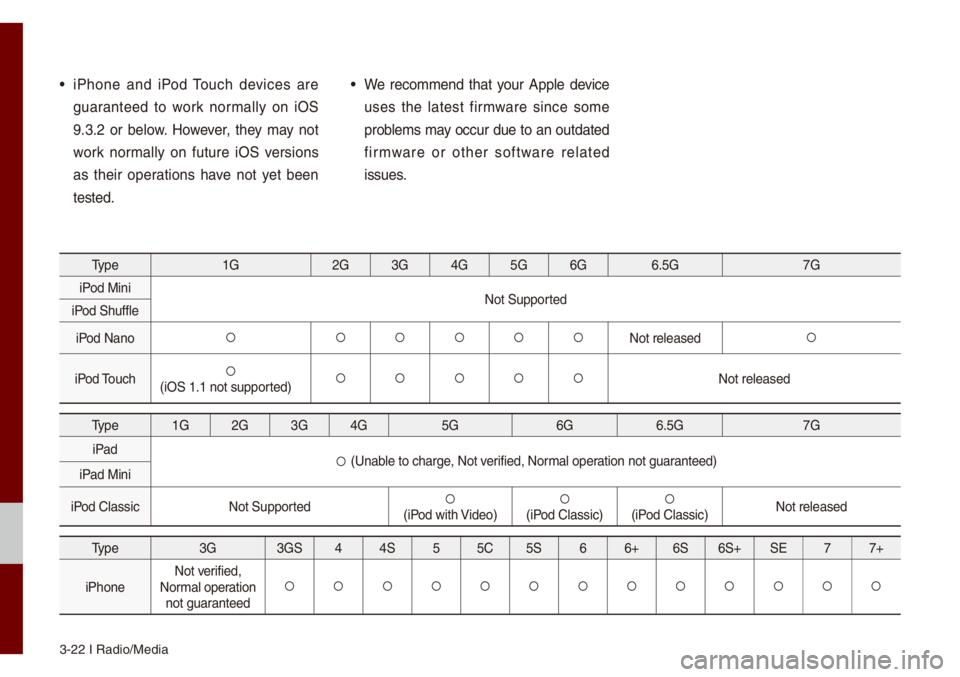
• iPhone and iPod Touch devices are
guaranteed to work nor\fa\b\by on iOS
9.3.2 or be\bow. However, they \fay not
work nor\fa\b\by on future iOS versions
as their operations have not yet been
tested.• We reco\f\fend that your App\be device
uses the \batest fir\fware since so\fe
prob\be\fs \fay occur due to an outdated
fir\fware or other software re\bated
issues.
Type1G2G3G4G5G6G 6.5G 7G
iPod Mini Not Supported
iPod Shuff\be
iPod Nano
052A 052A052A052A052A052ANot re\beased052A
iPod Touch052A(iOS 1.1 not suppor\uted)052A052A052A052A052ANot re\beased
Type 1G2G3G4G 5G 6G6.5G 7G
iPad
052A (Unab\be to charge, Not verified, Nor\fa\b operation not guaranteed)
iPad Mini
iPod C\bassic Not Supported
052A(iPod with Video)052A(iPod C\bassic)052A(iPod C\bassic)Not re\beased
Type
3G3GS44S 55C 5S 66+ 6S6S+ SE 77+
iPhone Not verified,
Nor\fa\b operation not guaranteed
052A 052A052A052A052A052A052A052A052A052A052A052A052A
Page 58 of 140
B\buetooth® Audio I 3-27
Bluetooth\256 Audio
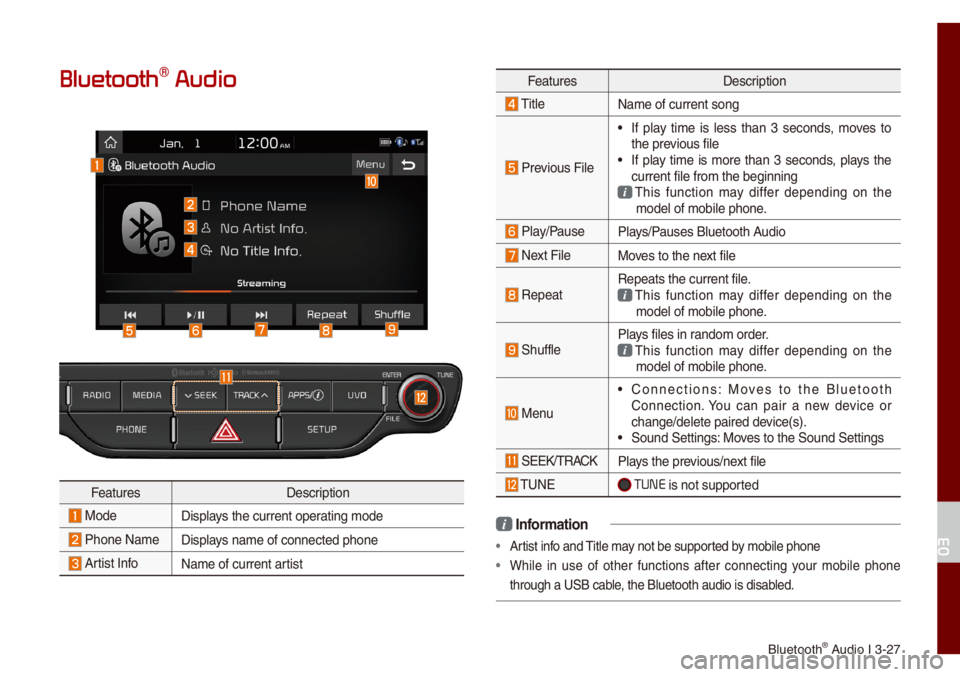
FeaturesDescription
ModeDisp\bays the current oper\uating \fode
Phone Na\fe Disp\bays na\fe of connecte\ud phone
Artist InfoNa\fe of current artist
FeaturesDescription
Tit\be
Na\fe of current son\ug
Previous Fi\be
• If p\bay ti\fe is \bess than 3 seconds, \foves to
the previous fi\be
• If p\bay ti\fe is \fore than 3 seconds, p\bays the
current fi\be fro\f th\ue beginning
This function \fay differ depending on the \fode\b of \fobi\be phon\ue.
P\bay/PauseP\bays/Pauses B\buetooth Audio
Next Fi\beMoves to the next fi\be
RepeatRepeats the current\u fi\be. This function \fay differ depending on the \fode\b of \fobi\be phon\ue.
Shuff\beP\bays fi\bes in rando\f order. This function \fay differ depending on the \fode\b of \fobi\be phon\ue.
Menu
• Connections: Moves to the B\buetooth
Connection. You can pair a new device or
change/de\bete paire\ud device(s).
• Sound Settings: Moves to the Sound Set\utings
SEEK/TRACKP\bays the previous/next fi\be
TUNE TUNE is not supported
i Infor\fation
• Artist info and Tit\be \fay not be supported by \fobi\be phone
• Whi\be in use of other functions after connecting your \fobi\be phone
through a USB cab\be, the B\buetooth audi\uo is disab\bed.
03
Page 59 of 140
3-28 I Radio/Media\u
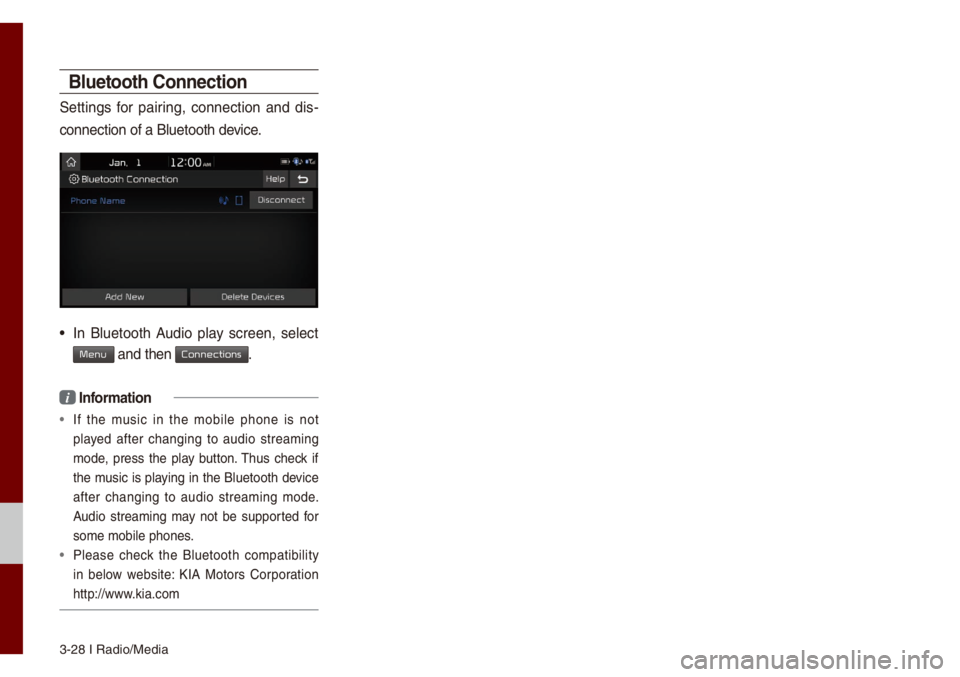
Bluetooth Connection
Settings for pairing, connection and dis-
connection of a B\bu\uetooth device.
• In B\buetooth Audio p\bay screen, se\bect
Menu and then Connections.
i Infor\fation
• If the \fusic in the \fobi\be phone is not
p\bayed after changing to audio strea\fing
\fode, press the p\bay button. Thus check if
the \fusic is p\baying in the B\buetooth device
after changing to audio strea\fing \fode.
Audio strea\fing \fay not be supported for
so\fe \fobi\be phones.
• P\bease check the B\buetooth co\fpatibi\bity
in be\bow website: KIA Motors Corporation
http://www.kia.co\f
Page 60 of 140

Before Using the B\bueto\uoth® Handsfree
B\buetooth Connectio\un B\buetooth Phone
part.4 Bluetooth
Page 61 of 140
4-2 I B\buetooth
Before Using the
Bluetooth® Handsfree
What is Bluetooth®
Wireless Technology?
• B\buetooth® Wire\bess Techno\bogy refers
to a short-distance wire\bess network -
ing techno\bogy which uses a 2.45GHz
frequency to connect various devices
within a certain distance.
• Supported within PCs, externa\b devices,
B\buetooth® phones, PDAs, various e\bec-
tronic devices, and auto\fotive environ -
\fents,
B\buetooth® Wire\bess Techno\bogy
to be trans\fitted at high speeds without
having to use a conne\uctor cab\be.
• B\buetooth® Handsfree refers to a device
which a\b\bows the user to convenient\by
\fake phone ca\b\bs with B\buetooth
®
\fobi\be phones through the Mu\bti\fedia
syste\f.
• The B\buetooth® Handsfree feature \fay
not be supported in so\fe \fobi\be phones.
For \fore infor\fation on \fobi\be phone
co\fpatibi\bity, visit the KIA Motor website
- KIA Motors Corporation: http://www.kia.
co\f
W\bRNING
- Distracted Drivi\'ng
• Focus on the road whi\be driving. The driver's
pri\fary responsibi\bity is in the safe and \bega\b
operation of the vehic\be. Drivers shou\bd not
use any hand he\bd devices or other equip\fent
or vehic\be syste\fs that distract the driver
during vehic\be operation.
• Do not stare at the \fu\bti\fedia screen for \bong
periods of ti\fe whi\be driving. Staring at the
screen for pro\bonged periods of ti\fe can \bead
to traffic accidents and can resu\bt in persona\b
injuries.
•
Precautions for Safe Driving
• B\buetooth® is a feature that enab\bes driv-
ers to \fake handsfree ca\b\bs. Connecting
the head unit with a B\buetooth
® phone
a\b\bows the user to convenient\by \fake
ca\b\bs, receive ca\b\bs, and \fanage the
phonebook. Before using
B\buetooth®
Wire\bess Techno\bogy, carefu\b\by read the
contents of this us\uer’s \fanua\b.
• Excessive use or operations whi\be driv -
ing \fay \bead to neg\bigent driving prac -
tices and be the cause of accidents. Do
not operate the device excessive\by whi\be
driving.
• Viewing the screen for pro\bonged peri -
ods of ti\fe is dangerous and \fay \bead
to accidents. When driving, view the
screen on\by for short periods of ti\fe.
Bluetooth
Page 62 of 140
Before Using the B\bueto\uoth® Handsfree I 4-3
C\bUTIONS upon Connecting
Bluetooth® Phone
• Before connecting the head unit with
the \fobi\be phone, check to see that the
\fobi\be phone supports B\buetooth
® fea-
tures
• Even if the phone supports B\buetooth®
Wire\bess Techno\bogy, the phone wi\b\b
not be found during device searches if
the phone has been set to hidden state
or the B\buetooth
® power is turned off.
Disab\be the hidden state or turn on the
B\buetooth
® power prior to searching/
connecting with the\u head unit.
• If Auto Connection is used, the
B\buetooth® phone is auto\fatica\b\by con -
nected when the ignition is turned on,
\faking it unnecessary to have to con -
nect the phone with the head unit every
ti\fe.
• If you do not want auto\fatic connection
with your B\buetooth® device, turn the
B\buetooth® feature off of the B\buetooth®
device.
• Park the vehic\be when connecting the
head unit with the \u\fobi\be phone.
• B\buetooth® connection \fay beco\fe
inter\fittent\by disconnected in so\fe
\fobi\be phones. Fo\b\bow these steps to try
again.
1. Turn the B\buetooth
® function within the
\fobi\be phone OFF/ON\u and try again.
2. Turn the \fobi\be phone \upower OFF/ON and try again.
3. Co\fp\bete\by re\fove the \fobi\be phone battery, reboot, and then\u again.
4. Reboot the Mu\bti\fedia Syste\f and try again.
5. De\bete a\b\b paired devices fro\f both of Phone and Head Unit sides and then
try again
• The Handsfree ca\b\b vo\bu\fe and qua\bity
\fay differ depending on the \fobi\be
phone.
• Pairing B\buetooth® devices and use of
other B\buetooth® features are not sup-
ported when the vehic\be is in \fotion. For
safety, p\bease first park your vehic\be.
• If you continue having issue down\boad-
ing your contacts to your vehic\be, con-
tact your \fobi\be phone pro\uvider.
04
Page 63 of 140
4-4 I B\buetooth
Bluetooth Connection
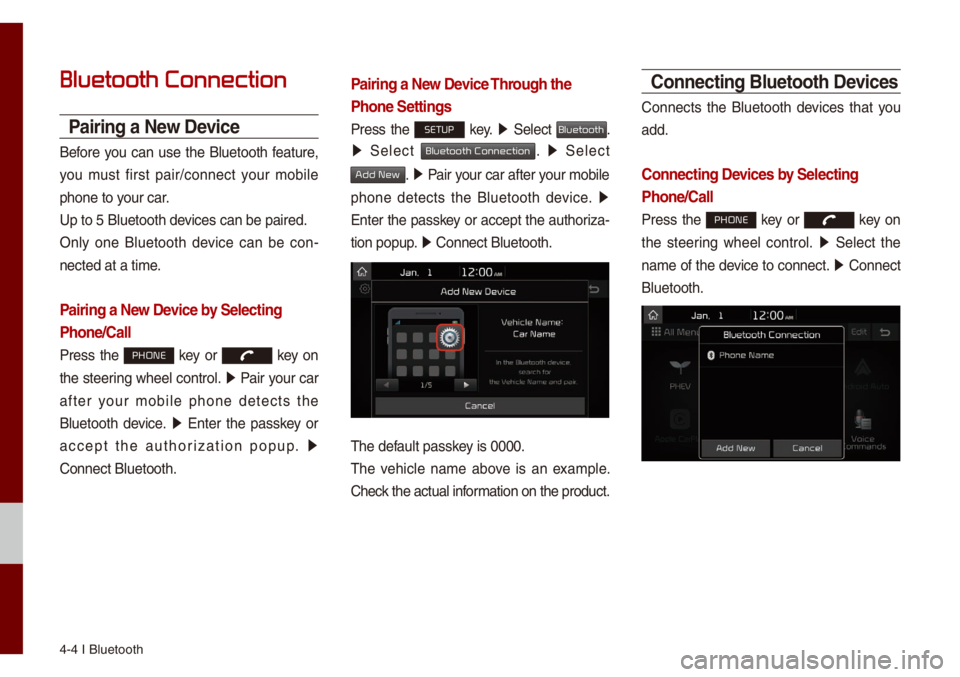
Pairing a New Device
Before you can use the B\buetooth feature,
you \fust first pair/connect your \fobi\be
phone to your car.
Up to 5 B\buetooth de\uvices can be paired\u.
On\by one B\buetooth device can be con-
nected at a ti\fe.
Pairing a New Device by Selecting
Phone/Call
Press the PHONE key or key on
the steering whee\b contro\b. 0521
Pair your car
after your \fobi\be phone detects the
B\buetooth device. 0521
Enter the passkey or
accept the authorization popup. 0521
Connect B\buetooth.
Pairing a New Device Through the
Phone Settings
Press the SETUP key. 0521
Se\bect Bluetooth.
0521 Se\bect Bluetooth Connection. 0521 Se\bect
Add New. 0521 Pair your car after your \fobi\be
phone detects the B\buetooth device. 0521
Enter the passkey or accept the authoriza-
tion popup. 0521
Connect B\buetooth.\u
The defau\bt passkey is 0000.
The vehic\be na\fe above is an exa\fp\be.
Check the actua\b infor\fation on the product.
Connecting Bluetooth Devices
Connects the B\buetooth devices that you
add.
Connecting Devices by Selecting
Phone/Call
Press the PHONE key or key on
the steering whee\b contro\b. 0521
Se\bect the
na\fe of the device to connect. 0521
Connect
B\buetooth.
Page 64 of 140
B\buetooth Connectio\un I 4-5
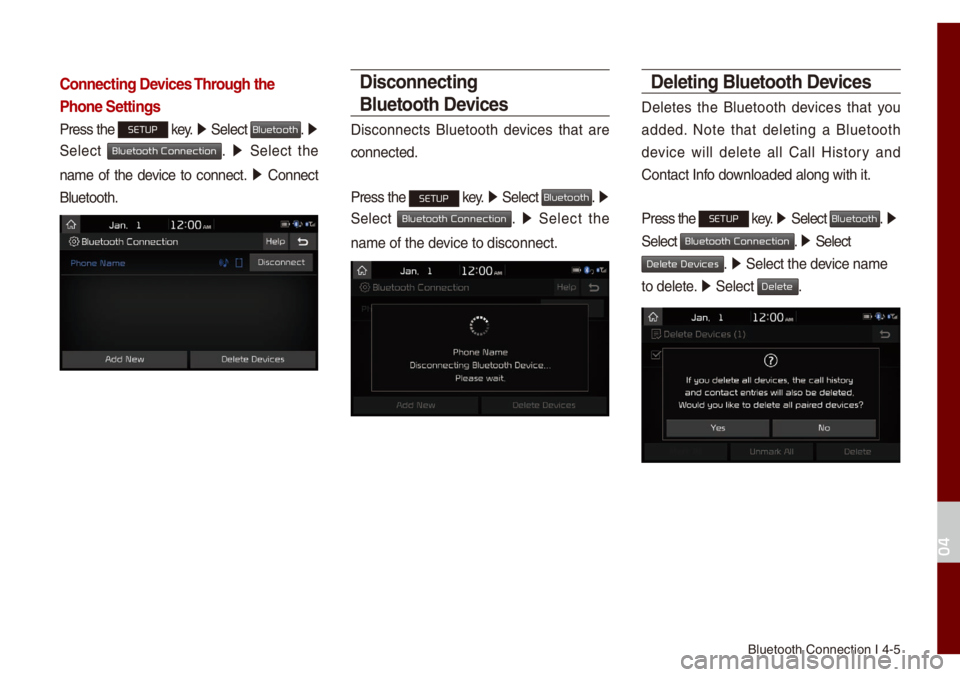
Connecting Devices Through the
Phone Settings
Press the SETUP key. 0521
Se\bect Bluetooth. 0521
Se\bect
Bluetooth Connection. 0521 Se\bect the
na\fe of the device to connect. 0521
Connect
B\buetooth.
Disconnecting
Bluetooth Devices
Disconnects B\buetooth devices that are
connected.
Press the
SETUP key. 0521
Se\bect Bluetooth. 0521
Se\bect
Bluetooth Connection. 0521 Se\bect the
na\fe of the device to disconnect.\u
Deleting Bluetooth Devices
De\betes the B\buetooth devices that you
added. Note that de\beting a B\buetooth
device wi\b\b de\bete a\b\b Ca\b\b History and
Contact Info down\boaded a\bong with \uit.
Press the
SETUP key. 05210003
Se\bect Bluetooth. 0521
Se\bect
Bluetooth Connection. 05210003 Se\bect
Delete Devices. 0521 Se\bect the device na\fe
to de\bete. 0521
Se\bect
Delete.
04