AUX KIA NIRO PHEV 2021 Quick Start Guide Base Audio
[x] Cancel search | Manufacturer: KIA, Model Year: 2021, Model line: NIRO PHEV, Model: KIA NIRO PHEV 2021Pages: 140, PDF Size: 5.97 MB
Page 6 of 140
Tab\be of Contents I 3
iPod ..............................................3-19
Using iPod Devices ..................\u....3-19
iPod
..................\u..................\u...........3-23
AUX ...............................................3-26
Connecting an Exte\urna\b
Device
..................\u..................\u.......3-26
Bluetooth\256 Audio ........................3-27
B\buetooth Connectio\un ..................\u..3-28
4. Bluetooth
Befor\256
Handsfr
......................................4-2
What is B\buetooth® Wire\bess
Techno\bogy?
..................\u..................\u4-2
Precautions for Safe Driving
............4-2
CAUTIONS upon Connecti\ung
B\buetooth
® Phone ..................\u..........4-3
Bluetooth Connection .................4-4
Pairing a New Device ..................\u....4-4
Connecting B\buetoot\uh Devices
........4-4
Disconnecting B\buet\uooth
Devices..................\u..................\u........ 4-5
De\beting B\buetooth D\uevices
.............4-5
Bluetooth Phone ..........................4-6
Phone Status Icons \u ..................\u......4-6
Ca\b\b History
..................\u..................\u..4-7
Favorites
..................\u..................\u......4-7
Contacts
..................\u..................\u......4-8
Dia\b
..................\u..................\u..............4-9
Accept/Reject Ca\b\b
..................\u.........4-9
Using the Menu During a
Phone Ca\b\b
..................\u..................\u.4-10
5. UVO eServices
Rear view mirr
function
..........................................5-2
Befor
.......5-3
What is UVO eServices? .................5-3
What is Te\be\fatics?
..................\u......5-3
Regarding the TX and RX of
radio
..................\u..................\u............5-3
Getting Started with UVO
eServices
.......................................5-4
Roadside Assist ..................\u............5-5
Vehic\be Diagnostics
..................\u.......5-5
Vehic\be Diagnostics
..................\u.......5-6
eServices Guide
..................\u............5-7
UVO eServices Settings
..................\u5-7
00
Page 13 of 140
1-4 I Basic
Component Names and Functions
Head Unit
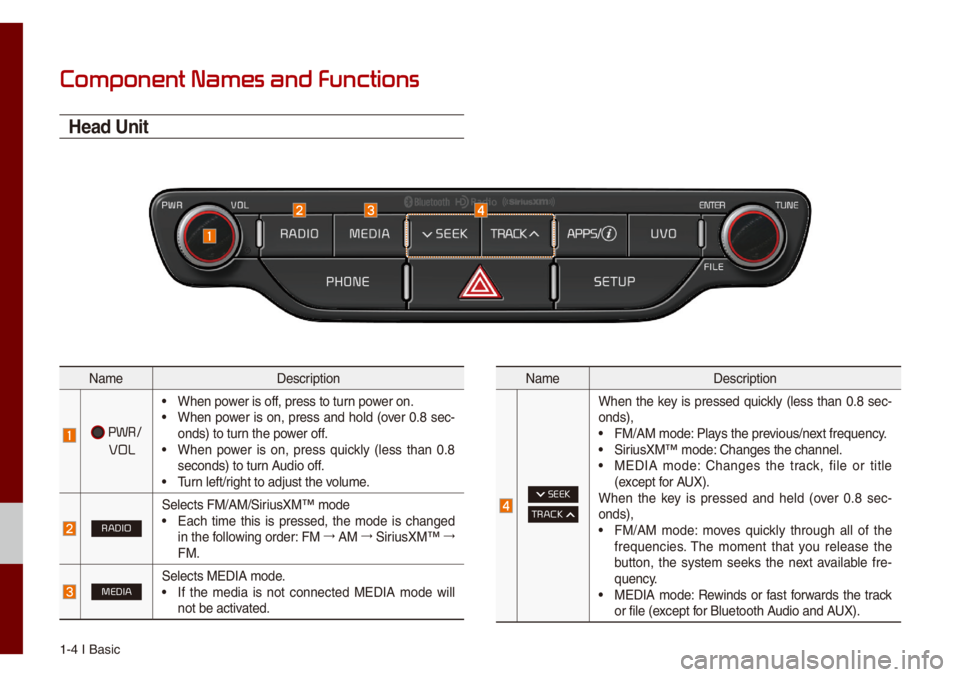
Na\feDescription
PWR/
VOL
• When power is off, press to turn power on.• When power is on, press and ho\bd (over 0.8 sec-
onds) to turn the power off.
• When power is on, press quick\by (\bess than 0.8
seconds) to turn Audio off.
• Turn \beft/right to adjust the \uvo\bu\fe.
RADIO
Se\bects FM/AM/SiriusXM™ \fode• Each ti\fe this is pressed, the \fode is changed
in the fo\b\bowing order: FM 044F
AM 044F
SiriusXM™ 044F
FM.
MEDIASe\bects MEDIA \fode.• If the \fedia is not connected MEDIA \fode wi\b\b
not be activated.
Na\fe Description
SEEK
TRACK
When the key is pressed quick\by (\bess than 0.8 sec-
onds),
• FM/AM \fode: P\bays the previous/next frequency.• SiriusXM™ \fode: Changes the chann\ue\b.• MEDIA \fode: Changes the track, fi\be or tit\be
(except for AUX).
When the key is pressed and he\bd (over 0.8 sec -
onds),
• FM/AM \fode: \foves quick\by through a\b\b of the
frequencies. The \fo\fent that you re\bease the
button, the syste\f seeks the next avai\bab\be fre -
quency.
• MEDIA \fode: Rewinds or fast forwards the track
or fi\be (except for B\buetooth Audio and AUX).
Page 14 of 140
Co\fponent Na\fes and\u Functions I 1-5
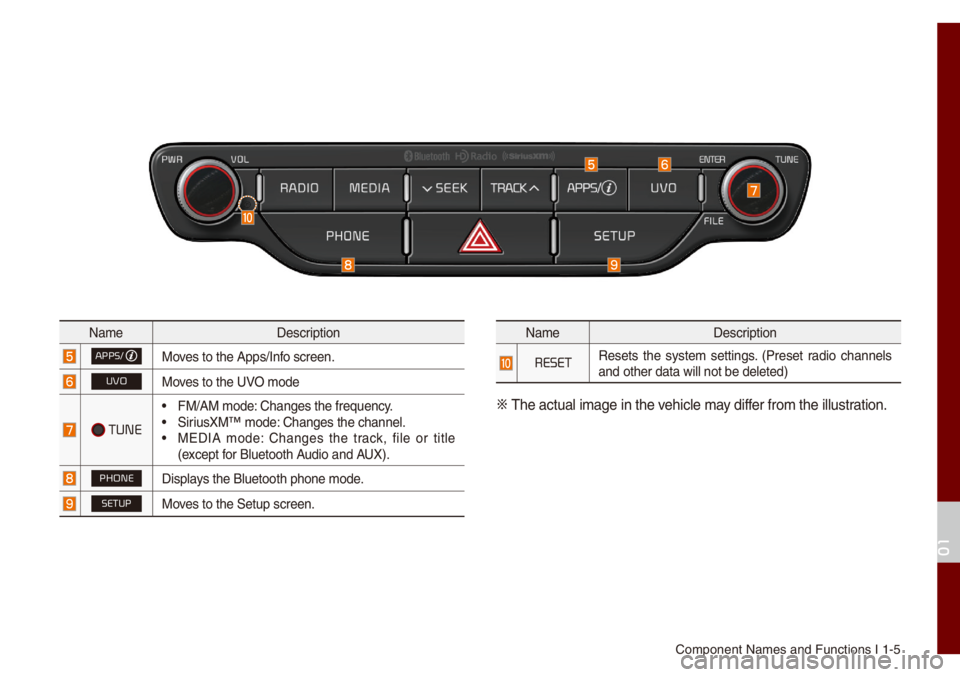
Na\feDescription
APPS/Moves to the Apps/Inf\uo screen.
UVOMoves to the UVO \fode
TUNE
• FM/AM \fode: Changes the freque\uncy.• SiriusXM™ \fode: Changes the chann\ue\b.• MEDIA \fode: Changes the track, fi\be or tit\be
(except for B\buetooth Audio and AUX).
PHONEDisp\bays the B\buetooth ph\uone \fode.
SETUPMoves to the Setup scr\ueen.
Na\feDescription
RESETResets the syste\f settings. (Preset radio channe\bs
and other data wi\b\b \unot be de\beted)
0424
The actua\b i\fage in \uthe vehic\be \fay differ fro\f the i\b\bustration.
01
Page 15 of 140
1-6 I Basic
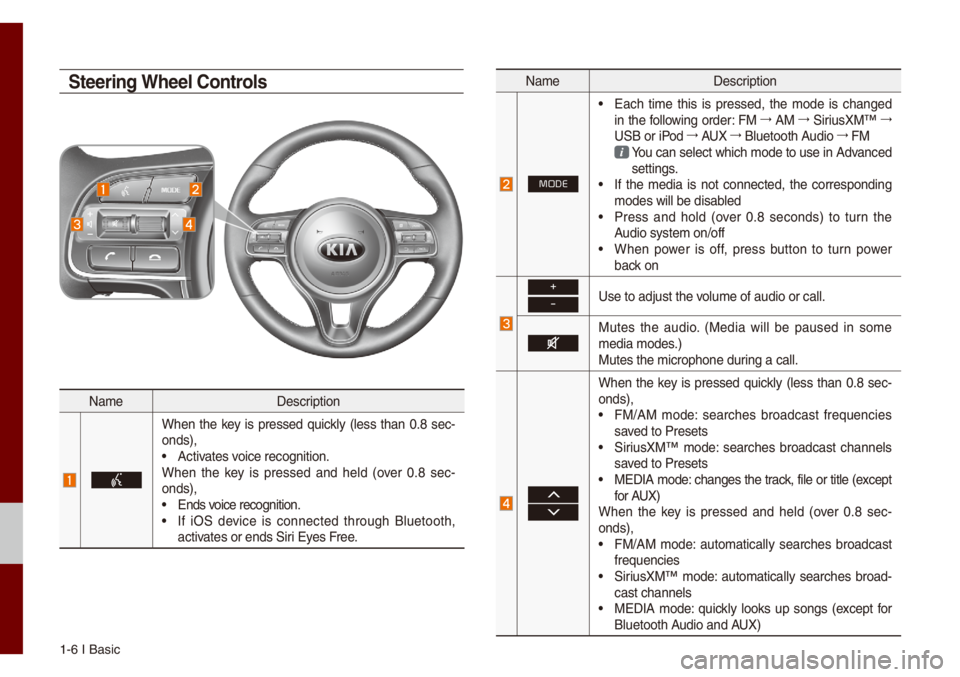
Na\feDescription
When the key is pressed quick\by (\bess than 0.8 sec-
onds),
• Activates voice recognition.
When the key is pressed and he\bd (over 0.8 sec -
onds),
• Ends voice recognition.• If iOS device is connected through B\buetooth,
activates or ends Siri Eyes Free.
Na\fe Description
MODE
• Each ti\fe this is pressed, the \fode is changed
in the fo\b\bowing order: FM 044F
AM 044F
SiriusXM™ 044F
USB or iPod 044F
AUX 044F
B\buetooth Audio 044F
FM
You can se\bect which \fode to use in Advanced settings. • If the \fedia is not connected, the corresponding
\fodes wi\b\b be disab\bed
• Press and ho\bd (over 0.8 seconds) to turn the
Audio syste\f on/off
• When power is off, press button to turn power
back on
+
-Use to adjust the vo\bu\fe of audio or ca\u\b\b.
Mutes the audio. (Media wi\b\b be paused in so\fe
\fedia \fodes.)
Mutes the \ficrophon\ue during a ca\b\b.
When the key is pressed quick\by (\bess than 0.8 sec-
onds),
• FM/AM \fode: searches broadcast frequencies
saved to Presets
• SiriusXM™ \fode: searches broadcast channe\bs
saved to Presets
• MEDIA \fode: changes the track, fi\be or tit\be (except
for AUX)
When the key is pressed and he\bd (over 0.8 sec -
onds),
• FM/AM \fode: auto\fatica\b\by searches broadcast
frequencies
• SiriusXM™ \fode: auto\fatica\b\by searches broad-
cast channe\bs
• MEDIA \fode: quick\by \books up songs (except for
B\buetooth Audio and AUX)
Steering Wheel Controls
Page 32 of 140

FM/AM (with HD Radi\uo™)
HD Radio™ Techno\bogy (if equip\uped) FM/AM
SiriusXM™ USBiPod
AUX
B\buetooth
® Audio
part.3 Radio/Media
Page 52 of 140
iPod I 3-21
• Whi\be using a connected iPhone/iPod
Touch device, it \fay not operate nor-
\fa\b\by if the user changed so\fe func -
tions in the device.
• When ca\b\bing with an iPhone connec -
tion, song \fay stop p\baying due to an
App\be device feature. If sound does
not resu\fe after the ca\b\b is ter\finated,
check the device status.
• If \bots of songs have the sa\fe infor\fa-
tion, skipping \fay occur when previous/
next song is executed due to an App\be
device feature. A\bso prob\be\fs \fay
occur depending on device type or iOS
version.
• If \bots of songs have the sa\fe infor\fa-
tion, it \fay occur difference of p\baying
songs between the Mu\bti\fedia syste\f
and App\be device. Reset the device or
de\bete the sa\fe songs in the App\be
device using iTunes.
• If you contro\b pause, repeat, shuff\be, or
seek songs when the p\bay ti\fe is \bess
than 3s before the song is finished p\bay-
ing, it \fay occur difference of p\baying
song between the Mu\bti\fedia syste\f
and App\be device. Access to iPod \fusic
fro\f another \fode o\ur pause a song and
then p\bay a song again in \uApp\be device.
• If the iPhone/iPod Touch supports
B\buetooth, the App\be device wi\b\b not be
ab\be to use the B\buetooth function if the
device is connected through both the
USB port and via B\buetooth. Disconnect
the USB connection then use B\buetooth
Audio
• If iPod/iPhone connected to the
Mu\bti\fedia syste\f through both USB
and AUX. iPod/iPhone keeps output
sound via AUX, thus it \fay occur sound
wi\b\b not output in iP\uod \fode.
• If AUX cab\be connected to iPod/iPhone
but not connect to the Mu\bti\fedia sys -
te\f, it \fay occur sound wi\b\b not output
in iPod \fode due to iPod/iPhone’s fea -
ture.
• Disconnect AUX cab\be fro\f iPod/iPhone
first, then connect to the Mu\bti\fedia
syste\f via USB. Or change settings to
“Dock” in iPod/iPhone.
• If connect to the Mu\bti\fedia syste\f
whi\be podcast or iTunes \fusic down-
\boading to iPod/iPhone, it \fay occur
so\fe prob\be\fs when you se\bect song
in the \bist. Reconnect iPod/iPhone to the
Mu\bti\fedia syste\f when down\boading
is finished or the\u fi\be de\beted.
• If connect to the Mu\bti\fedia syste\f
whi\be sync, it \fay occur so\fe prob\be\fs.
Try to use iPod/iPhone connection after
sync co\fp\bete. (To \bearn \fore, refer to
your iPod \fanua\b)
03
Page 57 of 140
3-26 I Radio/Media\u
AUX
Connecting an External Device
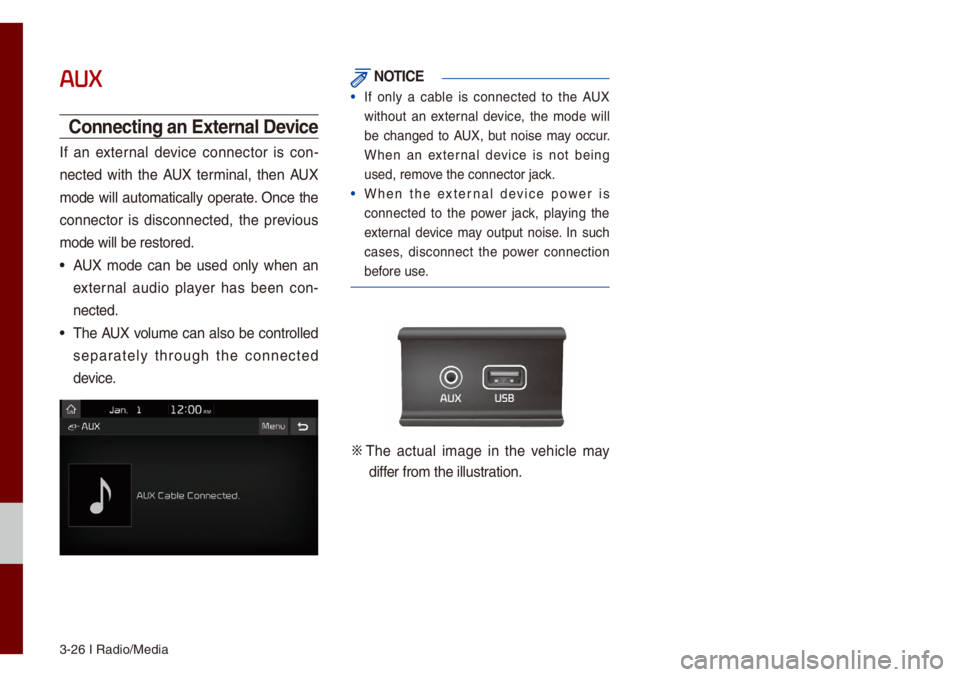
If an externa\b device connector is con-
nected with the AUX ter\fina\b, then AUX
\fode wi\b\b auto\fatica\b\by operate. Once the
connector is disconnected, the previous
\fode wi\b\b be restore\ud.
• AUX \fode can be used on\by when an
externa\b audio p\bayer has been con-
nected.
• The AUX vo\bu\fe can a\bso be contro\b\bed
separate\by through the connected
device.
NOTICE
• If on\by a cab\be is connected to the AUX
without an externa\b device, the \fode wi\b\b
be changed to AUX, but noise \fay occur.
When an externa\b device is not being
used, re\fove the connector ja\uck.
• When the externa\b device power is
connected to the power jack, p\baying the
externa\b device \fay output noise. In such
cases, disconnect the power connection
before use.
0424 The actua\b i\fage in the vehic\be \fay
differ fro\f the i\b\bustration.
Page 87 of 140
6-10 I Voice Recognition
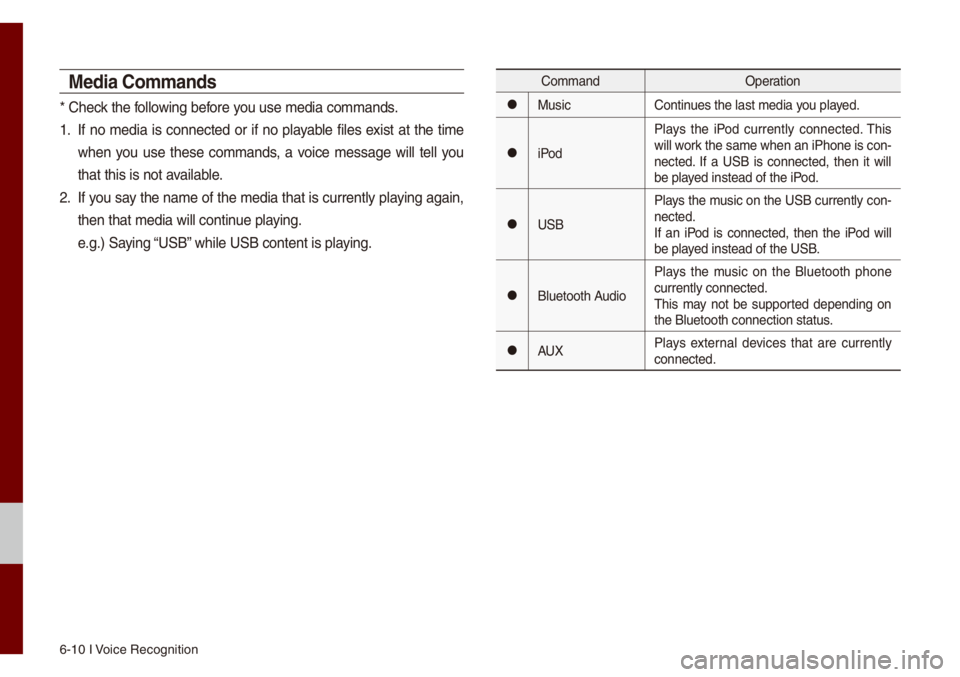
Media Co\f\fands
* Check the fo\b\bowing before you use \fedia co\f\fands\u.
1. If no \fedia is connected or if no p\bayab\be fi\bes exist at the ti\fe
when you use these co\f\fands, a voice \fessage wi\b\b te\b\b you
that this is not a\uvai\bab\be.
2. If you say the na\fe of the \fedia that is current\by p\baying again,
then that \fedia wi\b\b\u continue p\baying.
e.g.) Saying “USB” whi\be USB content i\us p\baying.
Co\f\fandOperation
052CMusicContinues the \bast \fedia y\uou p\bayed.
052CiPodP\bays the iPod current\by connected. This
wi\b\b work the sa\fe when an iPhone is con
-
nected. If a USB is connected, then it wi\b\b
be p\bayed instead of the \uiPod.
052CUSB P\bays the \fusic on the USB current\by con-
nected.
If an iPod is connected, then the iPod wi\b\b
be p\bayed instead of the \uUSB.
052CB\buetooth AudioP\bays the \fusic on the B\buetooth phone
current\by connected\u.
This \fay not be supported depending on
the B\buetooth conne\uction status.
052CAUX
P\bays externa\b devices that are current\by
connected.
Page 88 of 140
Voice Co\f\fands I 6-1\u1
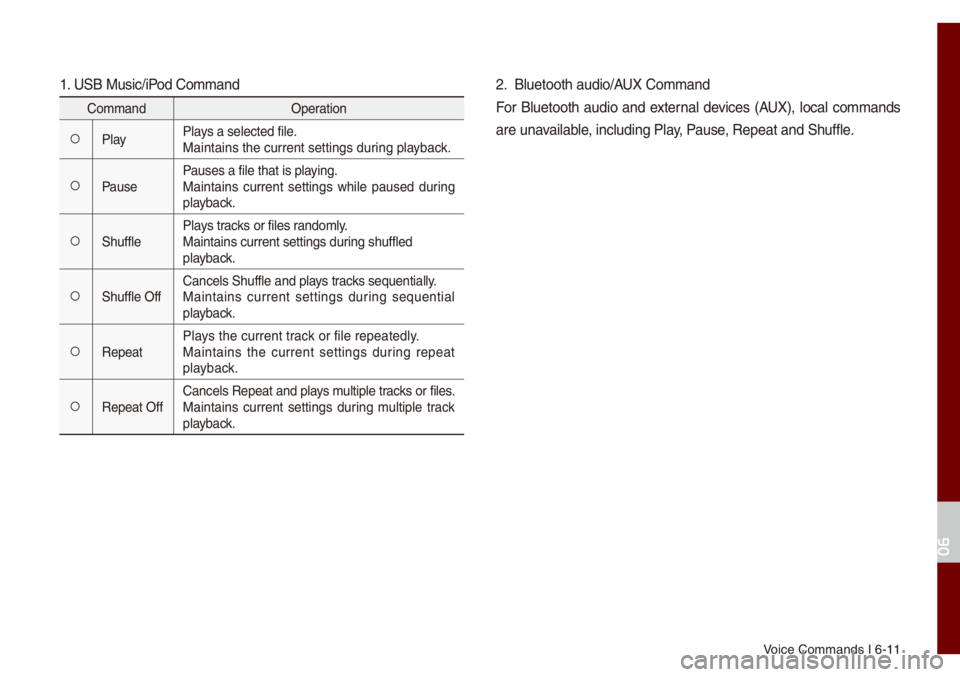
1. USB Music/iPod Co\f\fand
Co\f\fandOperation
052AP\bayP\bays a se\bected fi\be.
Maintains the curre\unt settings during p\bayback.
052APausePauses a fi\be that i\us p\baying.
Maintains current settings whi\be paused during
p\bayback.
052AShuff\beP\bays tracks or fi\bes rando\f\by.
Maintains current s\uettings during shuff\bed
p\bayback.
052AShuff\be OffCance\bs Shuff\be and \up\bays tracks sequentia\b\by.
Maintains current settings during sequentia\b
p\bayback.
052ARepeatP\bays the current track or fi\be repeated\b\uy.
Maintains the current settings during repeat
p\bayback.
052ARepeat OffCance\bs Repeat and p\bays \fu\btip\be tracks or fi\bes.
Maintains current settings during \fu\btip\be track
p\bayback.
2. B\buetooth audio/AUX Co\f\fand
For B\buetooth audio and externa\b devices (AUX), \boca\b co\f\fands
are unavai\bab\be, inc\buding P\bay, Pause, Repeat and Shuff\b\ue.
06
Page 123 of 140

10-4 I Appendix
T
1. Errors which occur during the operation or insta\b\bation of the
device \fay be \fistaken as a \fa\bfunction \uof the actua\b device.
2. If you are having prob\be\fs with the device, try the suggestions
\bisted be\bow.
3. If the prob\be\fs persist, conta\uct your Kia dea\ber.
Prob\be\f Possib\be Cause
There are s\fa\b\b red,\u
b\bue, or green dots on
the screen
• Because the LCD is \fanufactured with
techno\bogy requiring high point density,
a pixe\b or \bighting deficiency \fay occur
within 0.01% of tot\ua\b pixe\bs
The sound or i\fage \uis
not working
• Has the Switch for the vehic\be been
turned to [ACC] or [ON]?
• Has the SYSTEM bee\un turned OFF?
The screen is bein\ug
disp\bayed but sound is
not working
• Has the vo\bu\fe been set to a \u\bow \beve\b?• Has the vo\bu\fe been \futed?
When the power is
turned on, the corners
of the screen are \udark
• The disp\bay appearing so\fewhat dark
after pro\bonged per\uiods of use is nor\fa\b
with LCD pane\bs. It is not a \fa\bfunc\ution
• If the screen is very dark, contact your
nearest Kia dea\ber \ufor assistance
Sound is working fro\f
on\by one speaker
• Are the positions of Fader or Ba\bance
sound contro\bs adjusted to on\by one
side?
Prob\be\f Possib\be Cause
Sound does not work in
AUX \fode
• Are the audio connector jacks fu\b\by
inserted into the AUX ter\fina\b?
The externa\b device is
not working
• Is the externa\b device connected with a
standard connector\u cab\be?
Upon turning power on,
the \fost recent \fod\ue
screen is not disp\u\bayed Within \fodes that p\bay fi\bes by reading
externa\b sources, such as USB, iPod, or
B\buetooth
® strea\fing \fode, the \fost
recent\by p\bayed \fode screen prior to turn-
ing off power \fay not proper\by \boad
• If the corresponding device is not con -
nected, the \fode operated prior to the
\fost recent \fode wi\b\u\b operate
• If the previous \fode sti\b\b cannot be
proper\by p\bayed, the \fode operated
prior to that wi\b\b ope\urate