park KIA NIRO PHEV 2022 Navigation System Quick Reference Guide
[x] Cancel search | Manufacturer: KIA, Model Year: 2022, Model line: NIRO PHEV, Model: KIA NIRO PHEV 2022Pages: 332, PDF Size: 11.29 MB
Page 159 of 332

6-15
Accepting an incoming call over Bluetooth
The system screen alerts you when you receive a call while connected using Bluetooth.
Perform any of the following methods:
•Press
Accept on the screen.
•On the steering wheel, press the Call button.
ÝWarning
•Park the vehicle at a safe place before connecting your mobile phone. It may take the
driver attention off the road and cause a traffic accident which can result in damages,
injuries, and/or death.
•Do not talk on your mobile device while driving. Distraction by the use of a mobile phone
may cause you not to recognize traffic flow around and not to cope with unexpected
situations. As a result, a traffic accident may occur. If necessary, use the Bluetooth hands-
free function and make the call as short as possible.
A
If your mobile phone is connected to the system and you make a call whil\
e stepping out
of the vehicle, the call may be heard through the vehicle's speakers. To disconnect the
call, disable the Bluetooth connection on the system or turn off the Bluetooth function on
the mobile phone.
Rejecting a call
Perform any of the following methods:
•Press
Reject on the screen.
•On the steering wheel, press the End Call button.
A
To reject by sending a call-reject message, press Message. From the list, select the call-
reject message and press Send.
A
The call-reject or auto-reply message may not be supported in some phone models.
Page 164 of 332

6-20
A
The auto-reply messaging may not be available depending on the smartphone model.
A
To edit or delete a message, park the vehicle at a safe place and access \
the messaging
function on your smartphone. You cannot edit or delete a message from the system.
A
When an iPhone is connected to the system, there are some restrictions when receiving
messages as follows:
Only the sender name appears when the sender information is saved.
When the sender information is not saved, only the phone number appears.\
You cannot use the auto-reply message function.
When the incoming message notification or lock-screen view option is off, messages
cannot be received.
A
The message reader function may not be supported depending on the system language.
Sending a text by using the voice recognition
When you connect your mobile device to the system via Bluetooth, contacts from the device
are downloaded to the system so you can text a message to a contact by using the voice
recognition.
A
To call using voice recognition, there must be contacts stored on the system.
A
It is available only when the UVO service is active.
1 Perform any of the following methods:
•On the All Menus screen, press Phone.
•On the steering wheel, press the Call button.
2 On the Bluetooth message screen, press .
3 When a guiding beep is heard, say the message.
The system sends the text to the selected contact.
Page 177 of 332
7-13
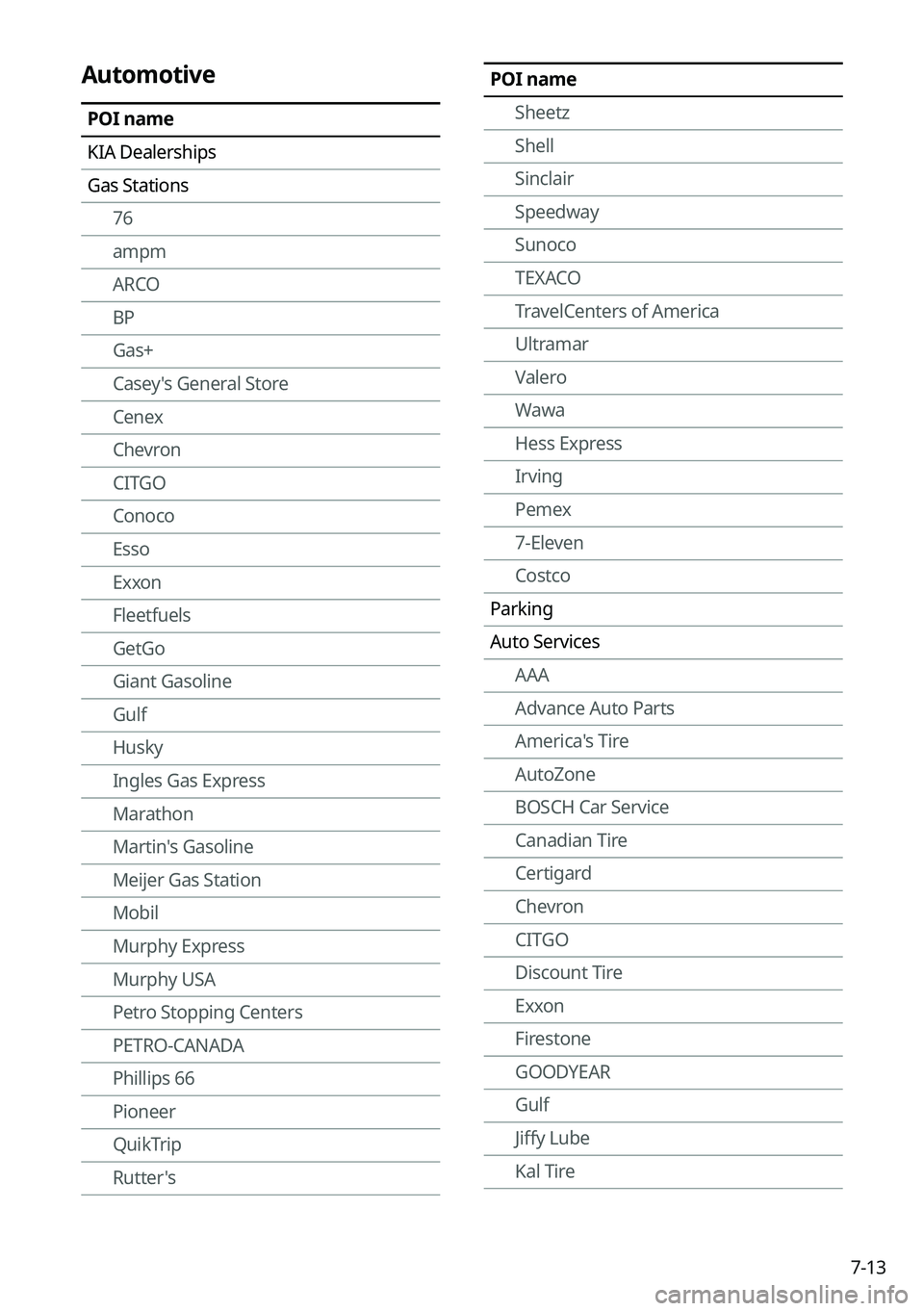
POI nameSheetz
Shell
Sinclair
Speedway
Sunoco
TEXACO
TravelCenters of America
Ultramar
Valero
Wawa
Hess Express
Irving
Pemex
7-Eleven
Costco
Parking
Auto Services AAA
Advance Auto Parts
America's Tire
AutoZone
BOSCH Car Service
Canadian Tire
Certigard
Chevron
CITGO
Discount Tire
Exxon
Firestone
GOODYEAR
Gulf
Jiffy Lube
Kal TireAutomotive
POI name
KIA Dealerships
Gas Stations76
ampm
ARCO
BP
Gas+
Casey's General Store
Cenex
Chevron
CITGO
Conoco
Esso
Exxon
Fleetfuels
GetGo
Giant Gasoline
Gulf
Husky
Ingles Gas Express
Marathon
Martin's Gasoline
Meijer Gas Station
Mobil
Murphy Express
Murphy USA
Petro Stopping Centers
PETRO-CANADA
Phillips 66
Pioneer
QuikTrip
Rutter's
Page 179 of 332

7-15
POI nameStaybridge Suites
Studio 6
Suburban Extended Stay
Super 8
Thriftlodge Canada
Travelodge
Travelodge Canada
WALDORF ASTORIA COLLECTION
Wingate by Wyndham
Wyndham
Extended Stay America
Fairfield Inn by Marriott
SpringHill Suites by Marriott
Towneplace Suites
WESTIN
FOUR POINTS BY SHERATON
Aloft
ST. REGIS
Le MERIDIEN
AC
Ritz-Carlton Club
Best Western PLUS
Best Western PREMIER
Tryp
Rental Car Agencies Alamo
AVIS
Budget
Dollar Rent A Car
Enterprise
Hertz
National
ThriftyPOI name
Homewood Suites
Hotel Indigo
Howard Johnson
Hyatt Place
Hyatt
Hyatt Summerfield Suites
Intercontinental
JW Marriott
La Quinta Inn & Suites
Lexington
Mainstay Suites
Marriott
Marriott VACATION CLUB
Microtel Inns & Suites
Motel 6
NOVOTEL
Omni Hotels
Park Inn
Park Plaza
QUALITY INN
Radisson
RAMADA
Red Roof Inn
Regent Hotels & Resorts
Renaissance
Residence Inn
Ritz-Carlton
Rodeway Inn
Sheraton
Sleep Inn
SOFITEL
Page 180 of 332
7-16
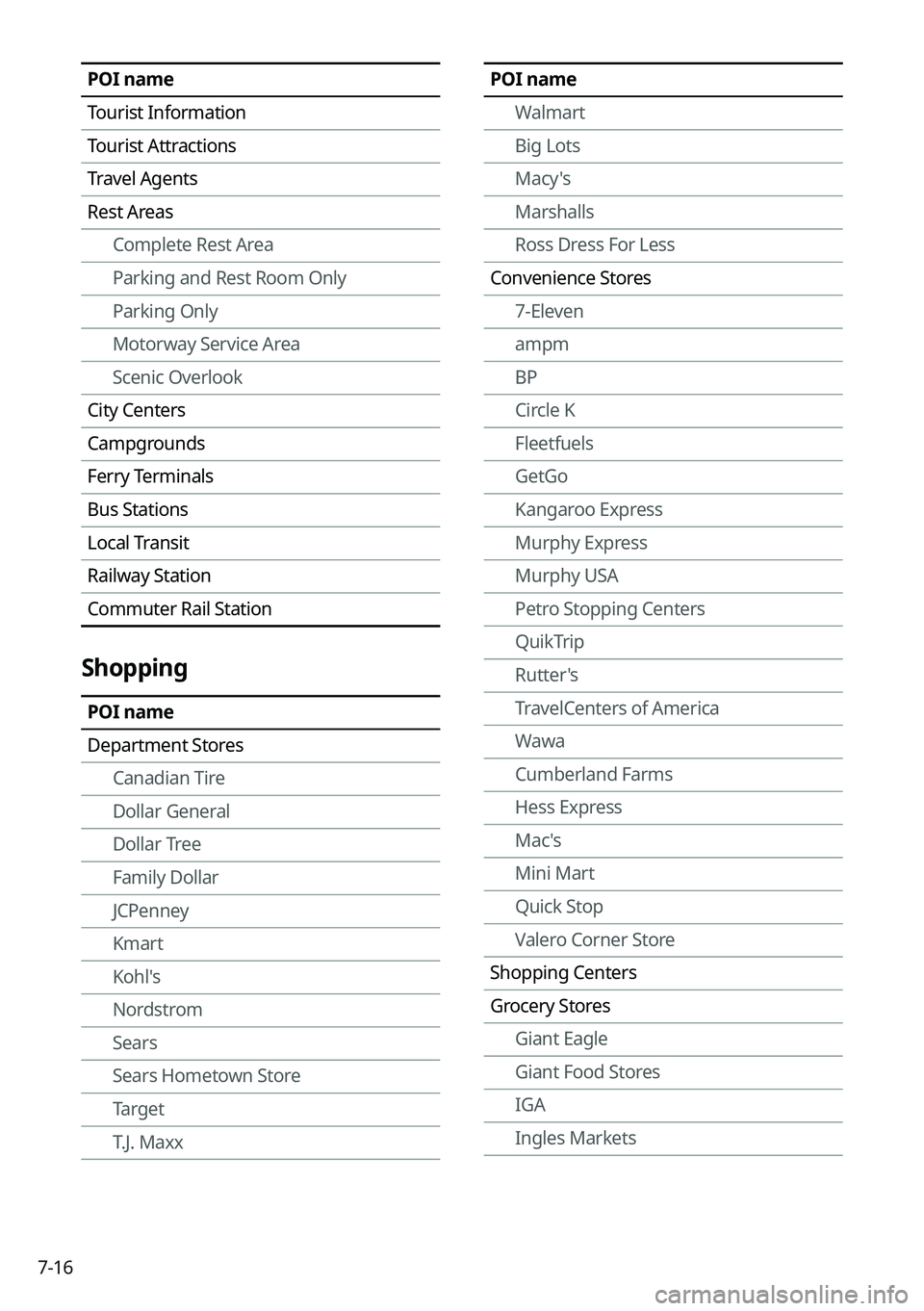
POI nameWalmart
Big Lots
Macy's
Marshalls
Ross Dress For Less
Convenience Stores 7-Eleven
ampm
BP
Circle K
Fleetfuels
GetGo
Kangaroo Express
Murphy Express
Murphy USA
Petro Stopping Centers
QuikTrip
Rutter's
TravelCenters of America
Wawa
Cumberland Farms
Hess Express
Mac's
Mini Mart
Quick Stop
Valero Corner Store
Shopping Centers
Grocery Stores Giant Eagle
Giant Food Stores
IGA
Ingles MarketsPOI name
Tourist Information
Tourist Attractions
Travel Agents
Rest AreasComplete Rest Area
Parking and Rest Room Only
Parking Only
Motorway Service Area
Scenic Overlook
City Centers
Campgrounds
Ferry Terminals
Bus Stations
Local Transit
Railway Station
Commuter Rail Station
Shopping
POI name
Department Stores Canadian Tire
Dollar General
Dollar Tree
Family Dollar
JCPenney
Kmart
Kohl's
Nordstrom
Sears
Sears Hometown Store
Target
T.J. Maxx
Page 182 of 332

7-18
POI nameFoot Locker
GAP
Gymboree
Hot Topic
Journeys
Justice
Lane Bryant
Men's Wearhouse
Old Navy
PacSun
Rainbowshops
rue21
Victoria's Secret
Shoe Stores Payless Shoesource
General Merchandise
Recreation
POI name
Amusement Parks
Museums
Cinemas
Golf Courses
Sports Complexes
Sports Activities
Wineries
Video & Game Rental
Ski Resorts
Recreation Areas
Other Recreation Areas
POI name
Family Video
GNC
HOBBY LOBBY
Home Hardware
Jo-Ann
Michaels
Party City
Pier 1 Imports
Sam's Club
SEPHORA
Sleepy's
Sunglass Hut
Toys"R"Us
Tuesday Morning
Sporting Goods Dick's Sporting Goods
Sports Authority
HIBBETT SPORTS
Music Stores
Bookstores Barnes & Noble Booksellers
Gifts
Clothing Mark's
Aeropostale
American Eagle Outfitters
Cato
Chico's
Children's Place
Dressbarn
Famous Footwear
Finish Line
Page 197 of 332
8-9
•Search: Can see the weather information by searching for an address.
•Forecast: Can see the weather information for today or the next 3 days.
•User's Manual on Web (QR Code): Displays the QR code that provides access to the
online user manual for the system.
•Split Screen: Can turn on or off the split screen mode.
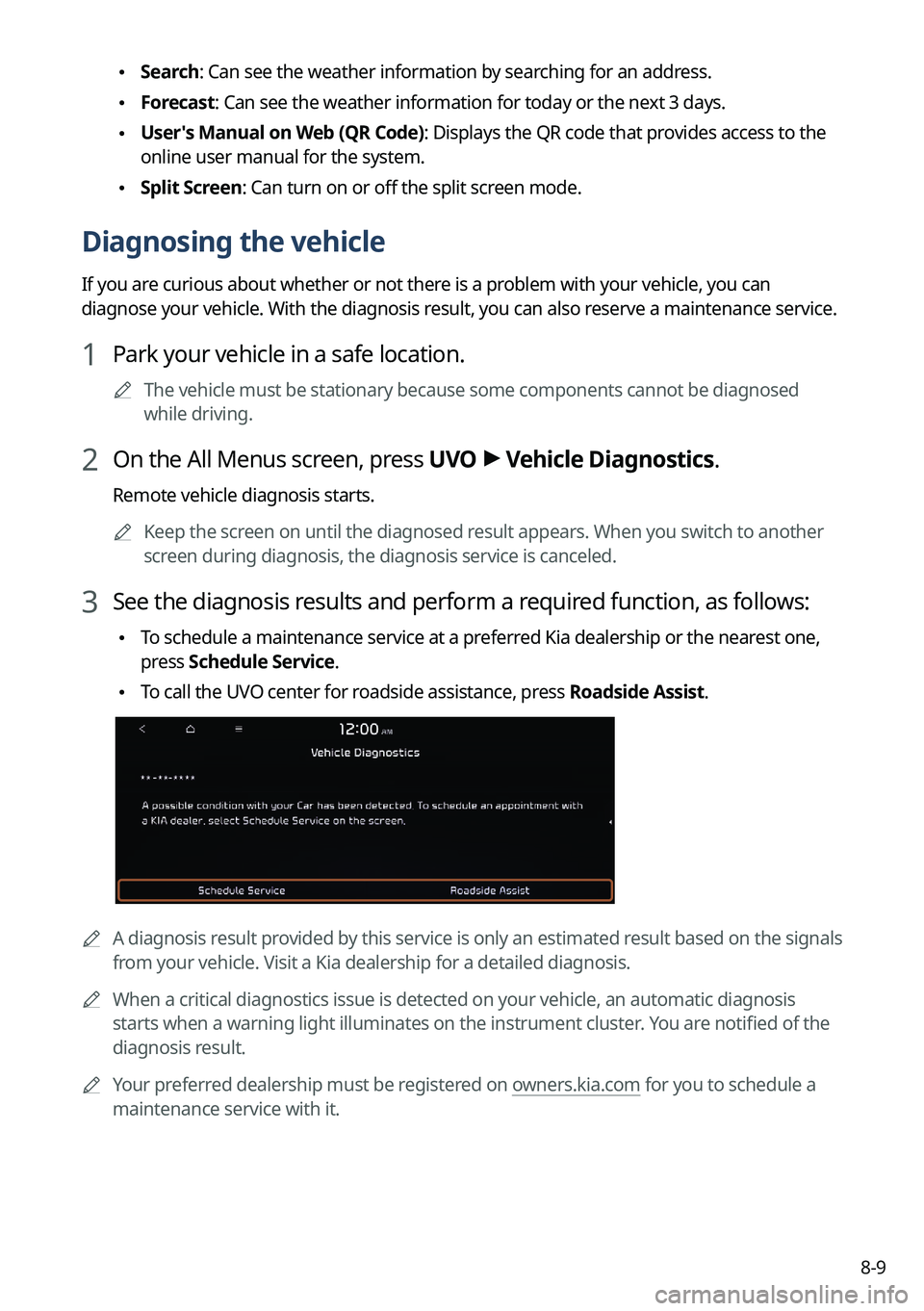
Diagnosing the vehicle
If you are curious about whether or not there is a problem with your vehicle, you can
diagnose your vehicle. With the diagnosis result, you can also reserve a maintenance service.
1 Park your vehicle in a safe location.
A
The vehicle must be stationary because some components cannot be diagnos\
ed
while driving.
2 On the All Menus screen, press UVO >
Vehicle Diagnostics.
Remote vehicle diagnosis starts.
A
Keep the screen on until the diagnosed result appears. When you switch to another
screen during diagnosis, the diagnosis service is canceled.
3 See the diagnosis results and perform a required function, as follows:
•To schedule a maintenance service at a preferred Kia dealership or the nearest one,
press
Schedule Service.
•To call the UVO center for roadside assistance, press Roadside Assist.
A
A diagnosis result provided by this service is only an estimated result based on the signals
from your vehicle. Visit a Kia dealership for a detailed diagnosis.
A
When a critical diagnostics issue is detected on your vehicle, an automa\
tic diagnosis
starts when a warning light illuminates on the instrument cluster. You are notified of the
diagnosis result.
A
Your preferred dealership must be registered on owners.kia.com for you to schedule a
maintenance service with it.
Page 200 of 332
8-12
Route guidance service (if equipped)
Use a more convenient, accurate route guidance service through the UVO route guidance
service.
Finding a route by manually entering a destination
You can use fast and accurate route guidance based on real-time and forecast traffic data
collected by the UVO Center.
Using the UVO quick route guidance
You can use the quick navigation service based on real-time traffic information analyzed by
the UVO Center.
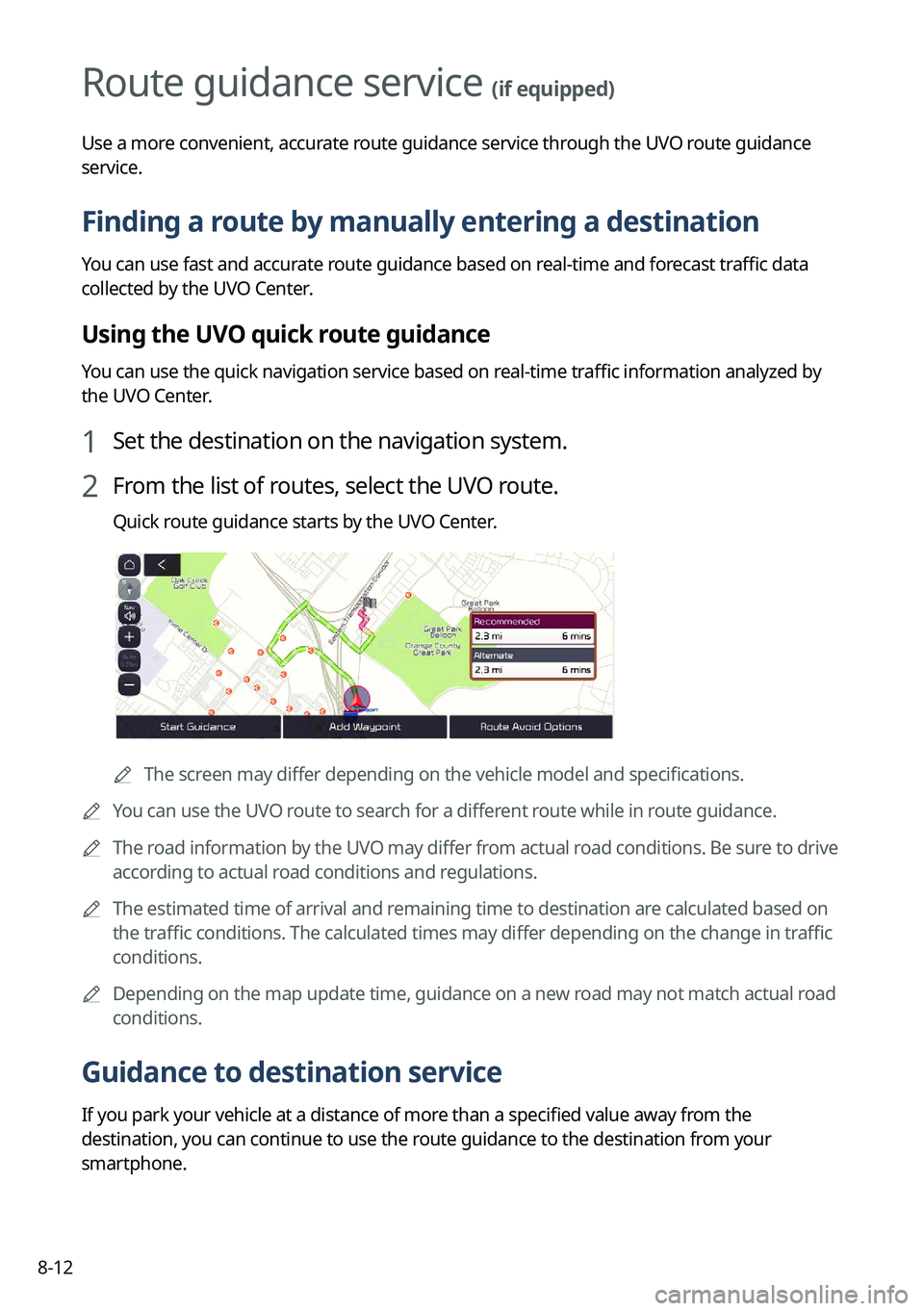
1 Set the destination on the navigation system.
2 From the list of routes, select the UVO route.
Quick route guidance starts by the UVO Center.
AThe screen may differ depending on the vehicle model and specifications.
A
You can use the UVO route to search for a different route while in route guidance.
A
The road information by the UVO may differ from actual road conditions. Be sure to drive
according to actual road conditions and regulations.
A
The estimated time of arrival and remaining time to destination are calculated based on
the traffic conditions. The calculated times may differ depending on the change in traffic
conditions.
A
Depending on the map update time, guidance on a new road may not match actual road
conditions.
Guidance to destination service
If you park your vehicle at a distance of more than a specified value away from the
destination, you can continue to use the route guidance to the destination from your
smartphone.
Page 207 of 332

9-7
ÝWarning
•Safe Exit Assist may not operate properly when a vehicle is coming rapidly two lanes
over from your vehicle or a vehicle is approaching at a fast speed from the rear in the
lane next to your vehicle.
•Safe Exit Assist may not operate properly if there is any vehicle or obstacle at the rear
area of your vehicle.
•Safe Exit Assist may be activated later than normal or may not operate properly if a
vehicle is approaching fast from the rear of your vehicle.
•Safe Exit Assist may not operate when the Blind-Spot Safety system malfunctions as
follows:
-The warning message of the Blind-Spot Safety system appears on the instrument
cluster.
-The sensors of the Blind-Spot Safety system are contaminated or covered.
-The Blind-Spot Safety system does not generate warning or generates a wrong
alert.
•
Active Assist: Provides a warning and vehicle control when a risk of blind-spot collision is
detected.
ÝWarning
Always be aware of road conditions while driving and be alert for unexpected situations
even though Blind-Spot Collision Warning and Blind-Spot Collision-Avoidance Assist are
operating.
•Warning Only: Provides a warning when a risk of blind-spot collision is detected.
•Off: Disables Blind-Spot Safety function.
Parking Safety (if equipped)
Sets the properties of the Parking Safety systems.
•Surround View Monitor Auto On: Automatically activates Surround View Monitor when
Parking Distance Warning is active (if equipped).
•Parking Distance Warning Auto On: Automatically activates Parking Distance Warning
when traveling at low speeds.
•Rear Cross-Traffic Safety: Provides a warning when a risk of rear cross-traffic collision is
detected while reversing. It provides vehicle control to avoid collision, depending on the
vehicle model and specifications.
•Active Assist: Provides a warning and emergency braking when a risk of rear collision is
detected while reversing.
•Warning Only: Provides a warning when a risk of rear collision is detected while backing
up.
•Off: Disables Parking Safety functions.
Page 208 of 332
9-8
ÝWarning
•Even though the vehicle is equipped the Parking Safety system, be sure to check any
obstacles in the surroundings while driving. Relying on the Parking Safety system may
cause an accident. Accordingly, be sure to control the vehicle by your judgment.
•When the sensors cannot detect any obstacles due to the detection limit, it may cause an
accident. Be sure to always check the surroundings while parking.
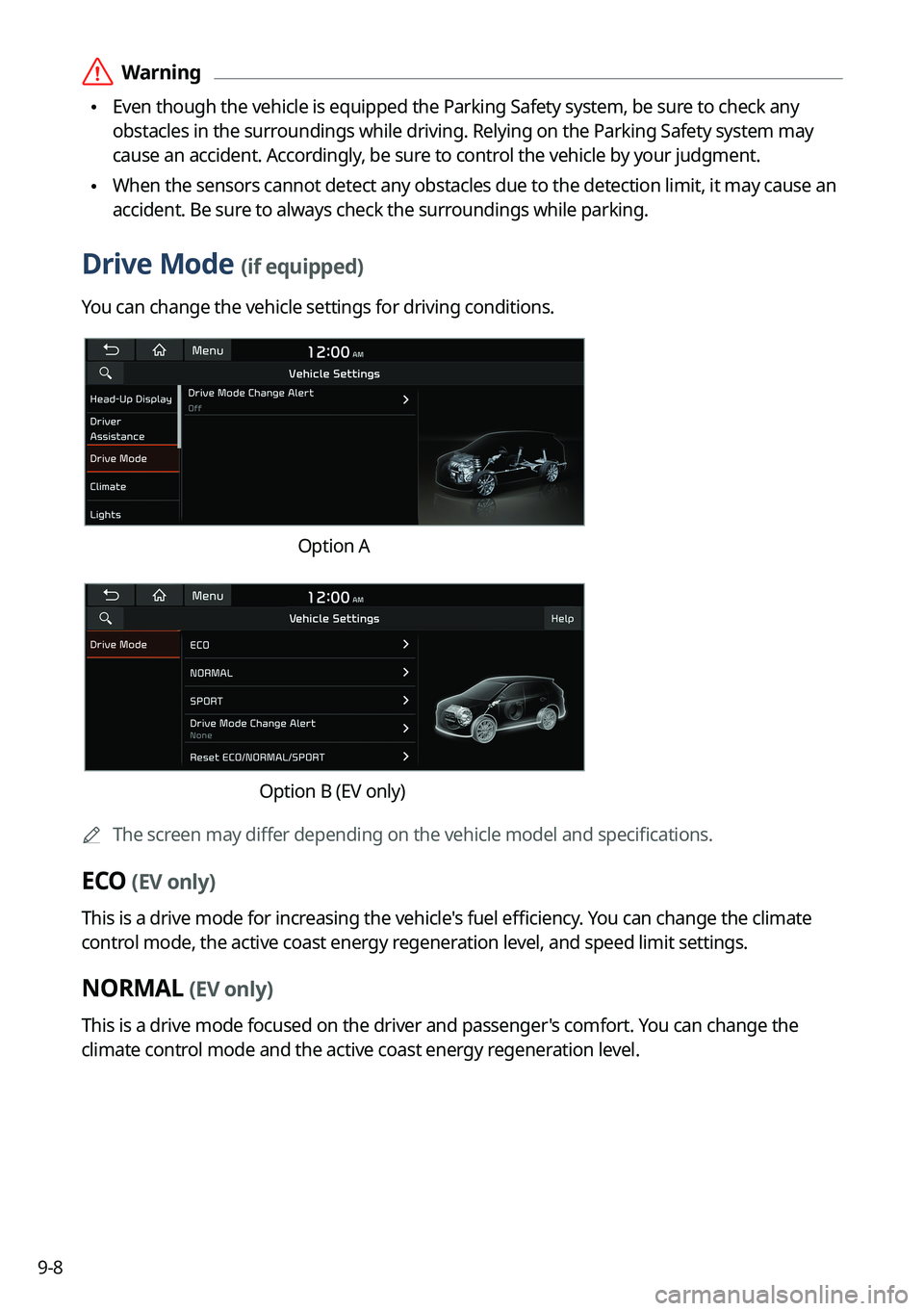
Drive Mode (if equipped)
You can change the vehicle settings for driving conditions.
Option A
Option B (EV only)
A
The screen may differ depending on the vehicle model and specifications.
ECO (EV only)
This is a drive mode for increasing the vehicle's fuel efficiency. You can change the climate
control mode, the active coast energy regeneration level, and speed limit settings.
NORMAL (EV only)
This is a drive mode focused on the driver and passenger's comfort. You can change the
climate control mode and the active coast energy regeneration level.