park KIA NIRO PHEV 2022 Navigation System Quick Reference Guide
[x] Cancel search | Manufacturer: KIA, Model Year: 2022, Model line: NIRO PHEV, Model: KIA NIRO PHEV 2022Pages: 332, PDF Size: 11.29 MB
Page 3 of 332
1
Reading the manual on web with the QR code
You can access the online user's manual of the system by scanning the QR code with your
smartphone.
ÝWarning
Park the vehicle at a safe place and scan the QR code. To ensure your safety, the system does
not provide QR codes while driving.
1 Scan the QR code by using any of the following methods:
•On the All Menus screen, press User's Manual.
•On the All Menus screen, press Setup >
General >
System Info >
User's Manual on
Web (QR Code).
• Or scan the QR code in the Quick Reference Guide.
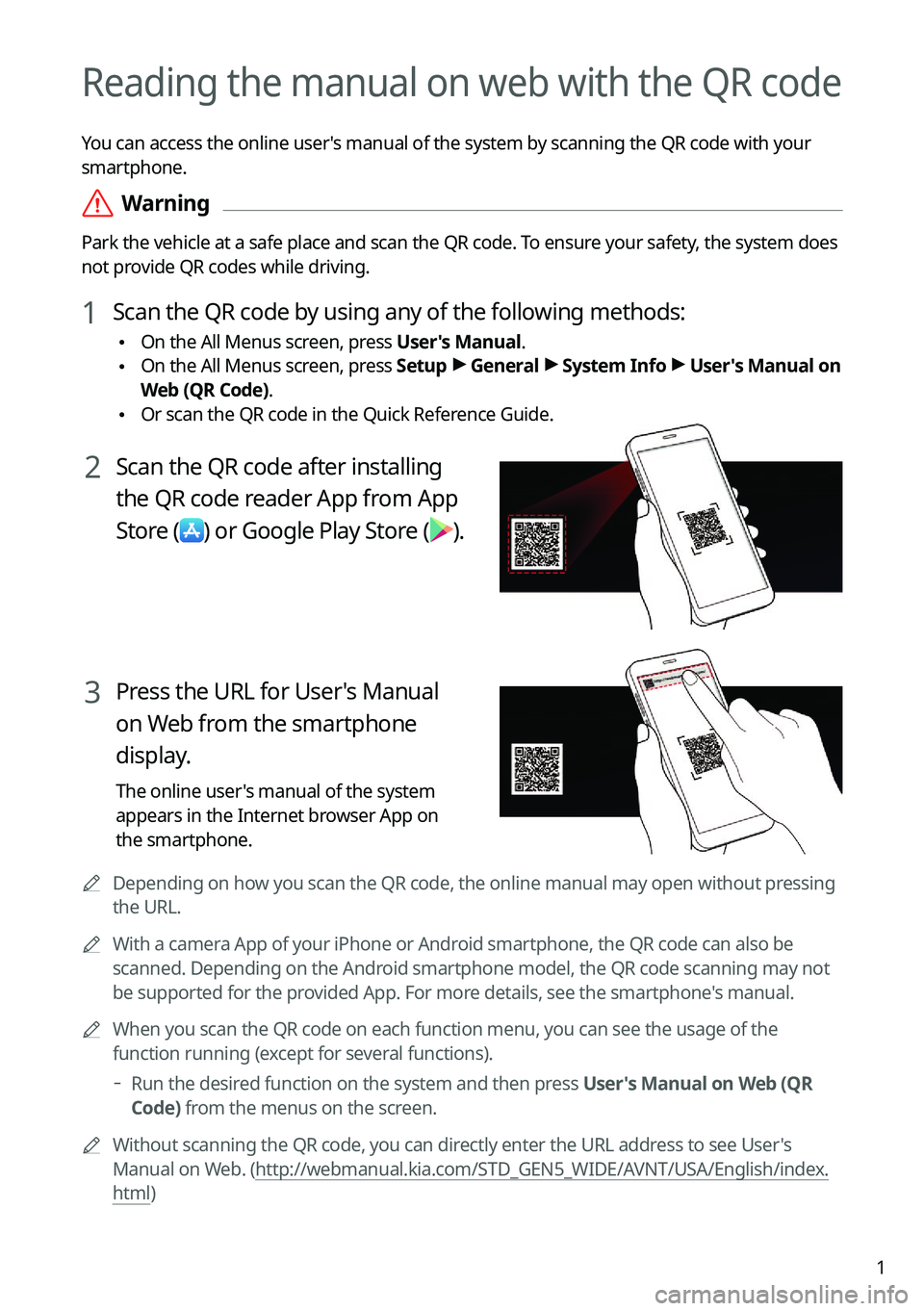
2 Scan the QR code after installing
the QR code reader App from App
Store
(
) or Google Play Store ().
3 Press the URL for User's Manual
on Web from the smartphone
display.
The online user's manual of the system
appears in the Internet browser App on
the smartphone.
A
Depending on how you scan the QR code, the online manual may open without pressing
the URL.
A
With a camera App of your iPhone or Android smartphone, the QR code can also be
scanned. Depending on the Android smartphone model, the QR code scanning may not
be supported for the provided App. For more details, see the smartphone's manual.
A
When you scan the QR code on each function menu, you can see the usage o\
f the
function running (except for several functions).
Run the desired function on the system and then press User's Manual on Web (QR
Code) from the menus on the screen.
A
Without scanning the QR code, you can directly enter the URL address to see User's
Manual on Web. (http://webmanual.kia.com/STD_GEN5_WIDE/AVNT/USA/English/index.
html)
Page 48 of 332
2-10
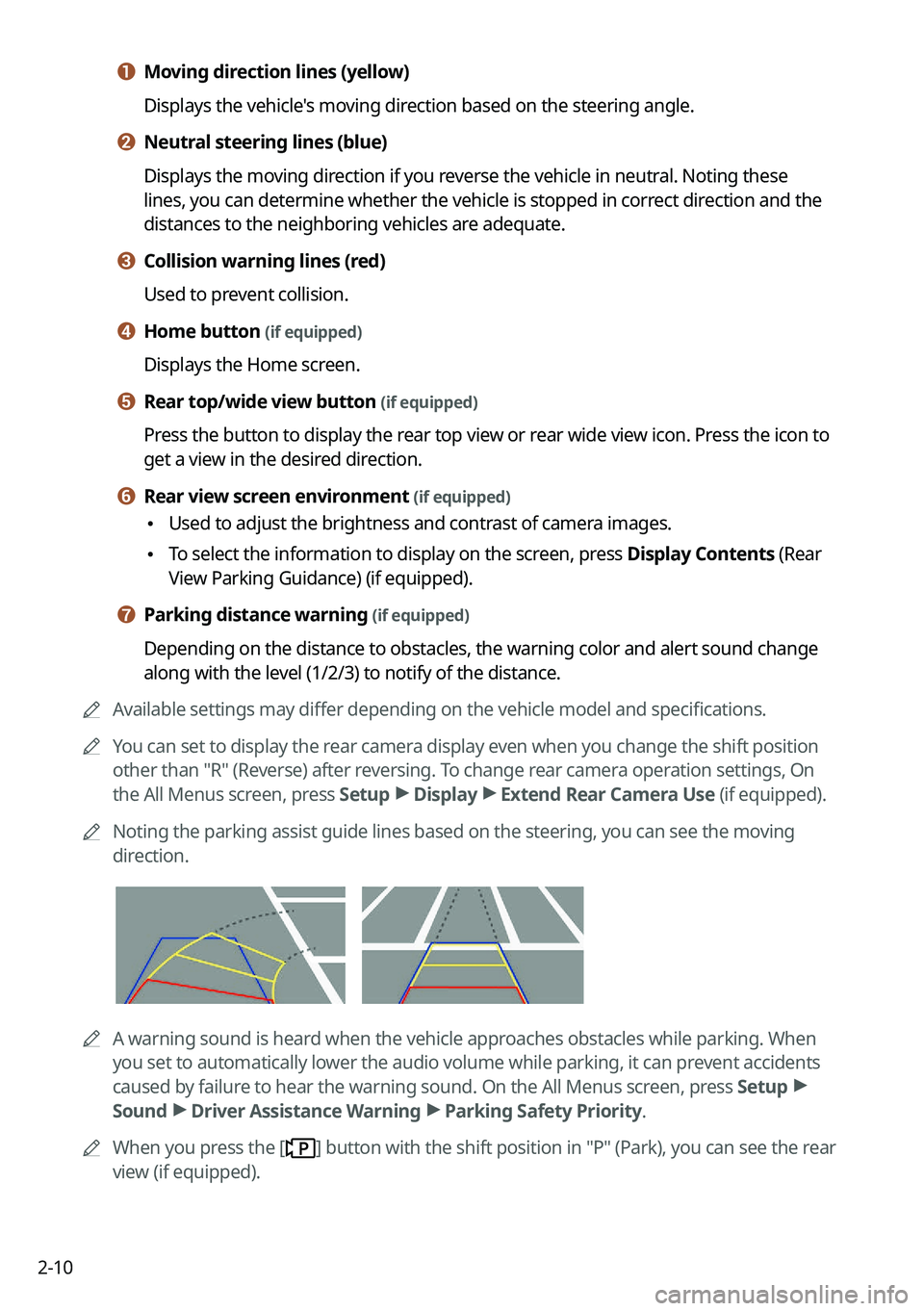
a a Moving direction lines (yellow)
Displays the vehicle's moving direction based on the steering angle.
b b Neutral steering lines (blue)
Displays the moving direction if you reverse the vehicle in neutral. Noting these
lines, you can determine whether the vehicle is stopped in correct direction and the
distances to the neighboring vehicles are adequate.
c c Collision warning lines (red)
Used to prevent collision.
d d Home button (if equipped)
Displays the Home screen.
e e Rear top/wide view button (if equipped)
Press the button to display the rear top view or rear wide view icon. Press the icon to
get a view in the desired direction.
f f Rear view screen environment (if equipped)
•Used to adjust the brightness and contrast of camera images.
•To select the information to display on the screen, press Display Contents (Rear
View Parking Guidance) (if equipped).
g g Parking distance warning (if equipped)
Depending on the distance to obstacles, the warning color and alert soun\
d change
along with the level (1/2/3) to notify of the distance.
A
Available settings may differ depending on the vehicle model and specifications.
A
You can set to display the rear camera display even when you change the shift position
other than "R" (Reverse) after reversing. To change rear camera operation settings, On
the All Menus screen, press Setup >
Display >
Extend Rear Camera Use (if equipped).
A
Noting the parking assist guide lines based on the steering, you can see\
the moving
direction.
AA warning sound is heard when the vehicle approaches obstacles while parking. When
you set to automatically lower the audio volume while parking, it can prevent accidents
caused by failure to hear the warning sound. On the All Menus screen, press Setup >
Sound >
Driver Assistance Warning >
Parking Safety Priority.
A
When you press the [
] button with the shift position in "P" (Park), you can see the rear
view (if equipped).
Page 49 of 332
2-11
Viewing the rear top/wide view screen (if equipped)
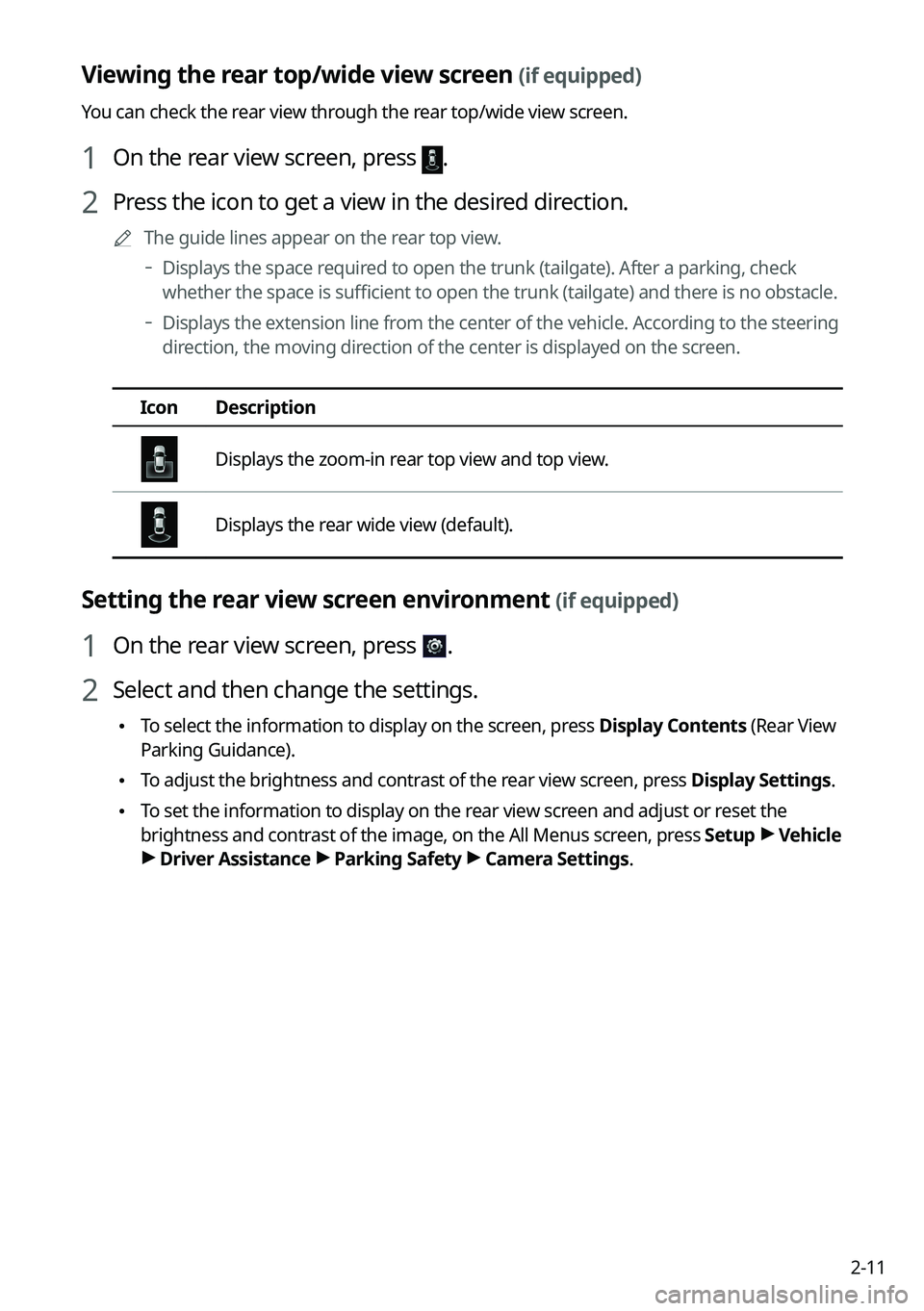
You can check the rear view through the rear top/wide view screen.
1 On the rear view screen, press .
2 Press the icon to get a view in the desired direction.
A
The guide lines appear on the rear top view.
Displays the space required to open the trunk (tailgate). After a parking, check
whether the space is sufficient to open the trunk (tailgate) and there is no obstacle.
Displays the extension line from the center of the vehicle. According to the steering
direction, the moving direction of the center is displayed on the screen.
Icon
Description
Displays the zoom-in rear top view and top view.
Displays the rear wide view (default).
Setting the rear view screen environment (if equipped)
1 On the rear view screen, press .
2 Select and then change the settings.
•To select the information to display on the screen, press Display Contents (Rear View
Parking Guidance).
•To adjust the brightness and contrast of the rear view screen, press Display Settings.
•To set the information to display on the rear view screen and adjust or reset the
brightness and contrast of the image, on the All Menus screen, press Setup >
Vehicle
> Driver Assistance >
Parking Safety >
Camera Settings.
Page 50 of 332
2-12
Surround View Monitor (if equipped)
You can check the surroundings by using multiple cameras on the vehicle.
A
Use the +/- button on the right of the screen to zoom in or out.
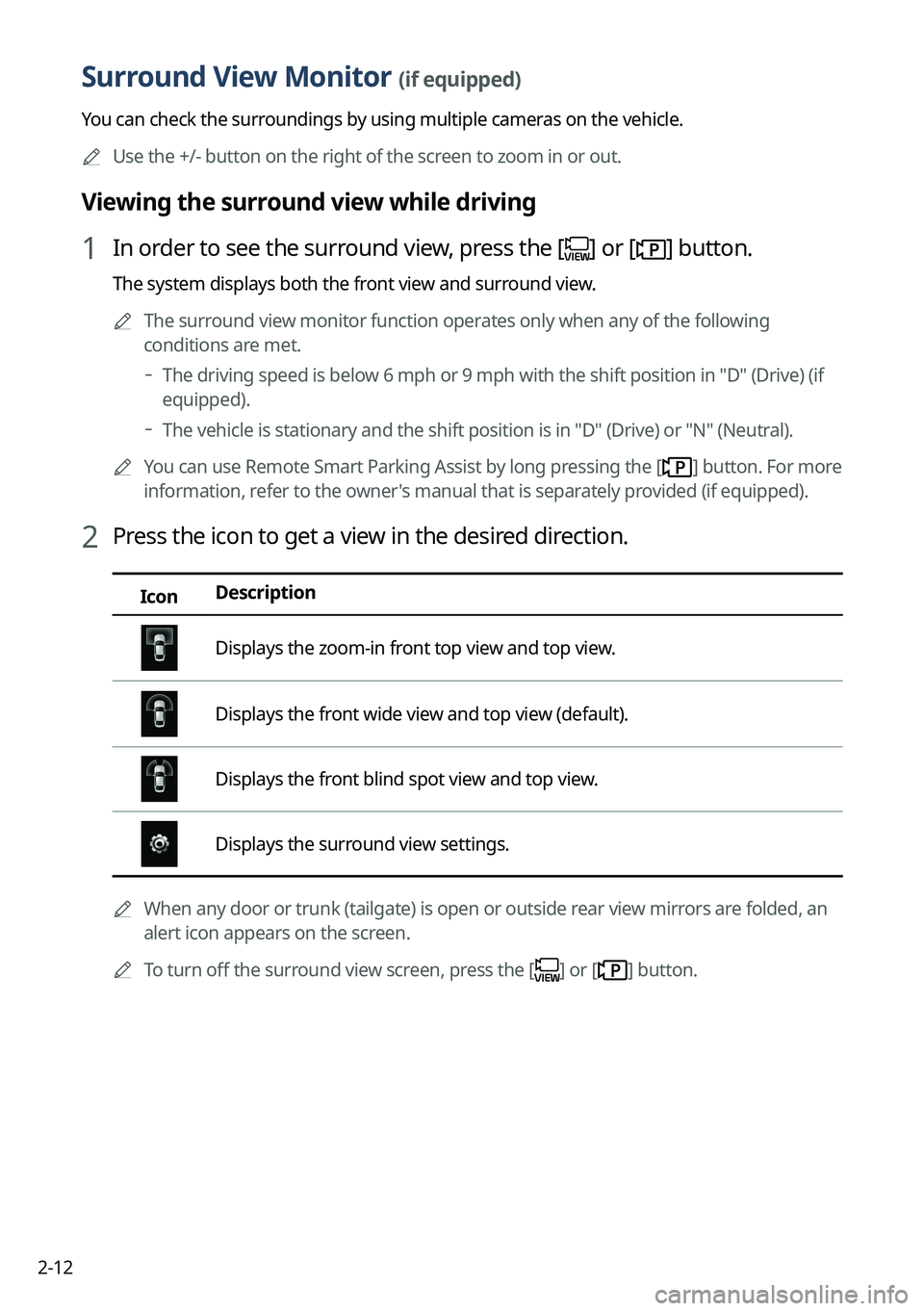
Viewing the surround view while driving
1 In order to see the surround view, press the [] or [] button.
The system displays both the front view and surround view.
A
The surround view monitor function operates only when any of the following
conditions are met.
The driving speed is below 6 mph or 9 mph with the shift position in "D" (Drive) (if
equipped).
The vehicle is stationary and the shift position is in "D" (Drive) or "N" (Neutral).
A
You can use Remote Smart Parking Assist by long pressing the [
] button. For more
information, refer to the owner's manual that is separately provided (if equipped).
2 Press the icon to get a view in the desired direction.
Icon Description
Displays the zoom-in front top view and top view.
Displays the front wide view and top view (default).
Displays the front blind spot view and top view.
Displays the surround view settings.
A
When any door or trunk (tailgate) is open or outside rear view mirrors are folded, an
alert icon appears on the screen.
A
To turn off the surround view screen, press the [
] or [] button.
Page 51 of 332

2-13
Viewing the surround view while reversing
1 Press the "R" (Reverse) button shifter (or move the shift lever to "R" in a
previous vehicle model) with the vehicle turned on.
The system displays the rear view of the vehicle.
A
The surround view monitor function is not available when you change the shift
position to "P" (Park).
A
When you press the [
] button with the shift position in "P" (Park), you can see the
rear view (if equipped).
2 Press the icon to get a view in the desired direction.
Icon Description
Displays the zoom-in rear top view and top view.
Displays the rear wide view and top view (default).
Displays the rear blind spot view and top view.
Displays the surround view settings.
Configuring the surround view monitor settings
1 On the surround view screen, press .
2 Select and then change the settings.
•
To select the information to appear on the video, press Display Contents. (e.g. Top
View Parking Guidance, Rear View Parking Guidance, Parking Distance Warning) (if
equipped).
•To select the default view for top view monitoring, press Top View Default Mode.
•To select the default view for using the surround view monitor function while driving,
press
Front View Default Mode.
•To set the information to display on the Surround View screen and adjust or reset the
brightness and contrast of the image, on the All Menus screen, press Setup >
Vehicle
> Driver Assistance >
Parking Safety >
Camera Settings (if equipped).
Page 112 of 332
5-4
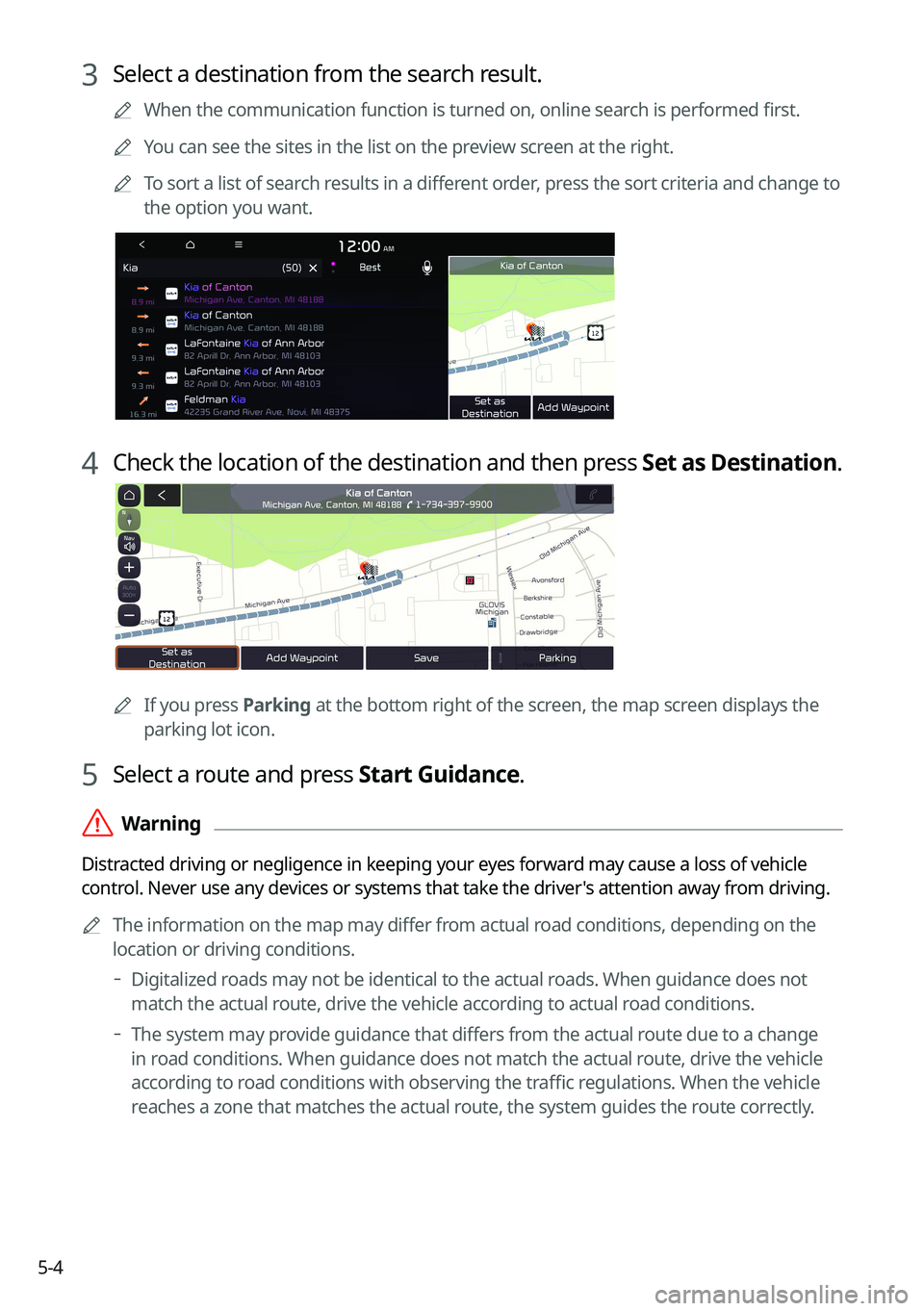
3 Select a destination from the search result.
A
When the communication function is turned on, online search is performed first.
A
You can see the sites in the list on the preview screen at the right.
A
To sort a list of search results in a different order, press the sort criteria and change to
the option you want.
4 Check the location of the destination and then press Set as Destination.
A
If you press Parking at the bottom right of the screen, the map screen displays the
parking lot icon.
5 Select a route and press Start Guidance.
ÝWarning
Distracted driving or negligence in keeping your eyes forward may cause a loss of vehicle
control. Never use any devices or systems that take the driver's attention away from driving.
A
The information on the map may differ from actual road conditions, depending on the
location or driving conditions.
Digitalized roads may not be identical to the actual roads. When guidance does not
match the actual route, drive the vehicle according to actual road conditions.
The system may provide guidance that differs from the actual route due to a change
in road conditions. When guidance does not match the actual route, drive the vehicle
according to road conditions with observing the traffic regulations. When the vehicle
reaches a zone that matches the actual route, the system guides the route correctly.
Page 113 of 332
5-5
A
Vehicle location may not be displayed correctly if:
The vehicle is driving on a Y-shaped or winding road with narrow angles.
The vehicle is driving closely to another road.
The vehicle is driving on a road where there are many tall buildings in the vicinity.
The vehicle is driving on a new road or a road under construction.
The vehicle is transported by a ferry or heavy-duty transport vehicle.
The vehicle is driving in a rugged mountain area or on a steep curve road.
The vehicle is entering a public road after making a turn through the turntable in an
underground parking lot or multi-story parking lot.
The vehicle stops and starts repeatedly or moves slowly in front of an intersection.
The system reboots after the vehicle battery has been recharged or replaced.
The vehicle is driving on a slippery road due to heavy snow, etc.
The tires have been replaced recently or spare tires (or studless tires) are used.
Improper-sized tires are used or the pressure of each tire is different.
The replaced tire is worn out or the studless tires have been used for over two seasons.
A roof carrier is installed on the vehicle.
On a highway continued driving causes the system to perform map matching or apply
the updated GPS data.
A
Navigation service may not be provided correctly under the following conditions:
When the vehicle drives on a straight road continuously, the system may guide you to
drive straight. It is not a malfunction.
Guidance may not be followed immediately after the vehicle makes a turn at an
intersection or drives through an intersection.
The system may guide you to make a U-turn in a prohibited area.
The system may guide you to a traffic-blocked road (e.g. no-entry road or road under
construction).
The system may guide you to a road away from the destination when there is no road
to the destination or there are only narrow roads on the way.
Guidance may not be proper when the vehicle is off the route.
Guidance may not match the actual distance on an overpass or underpass due to the
difference of the start point.
When you are driving at high speeds, route recalculations may take longer.
A
Because the navigation system is used for information purposes only, Kia does not
assume responsibility of the accuracy of the information.
A
When the traffic information is not received, the status icon (
) appears at the top of the
map screen.
Page 120 of 332
5-12
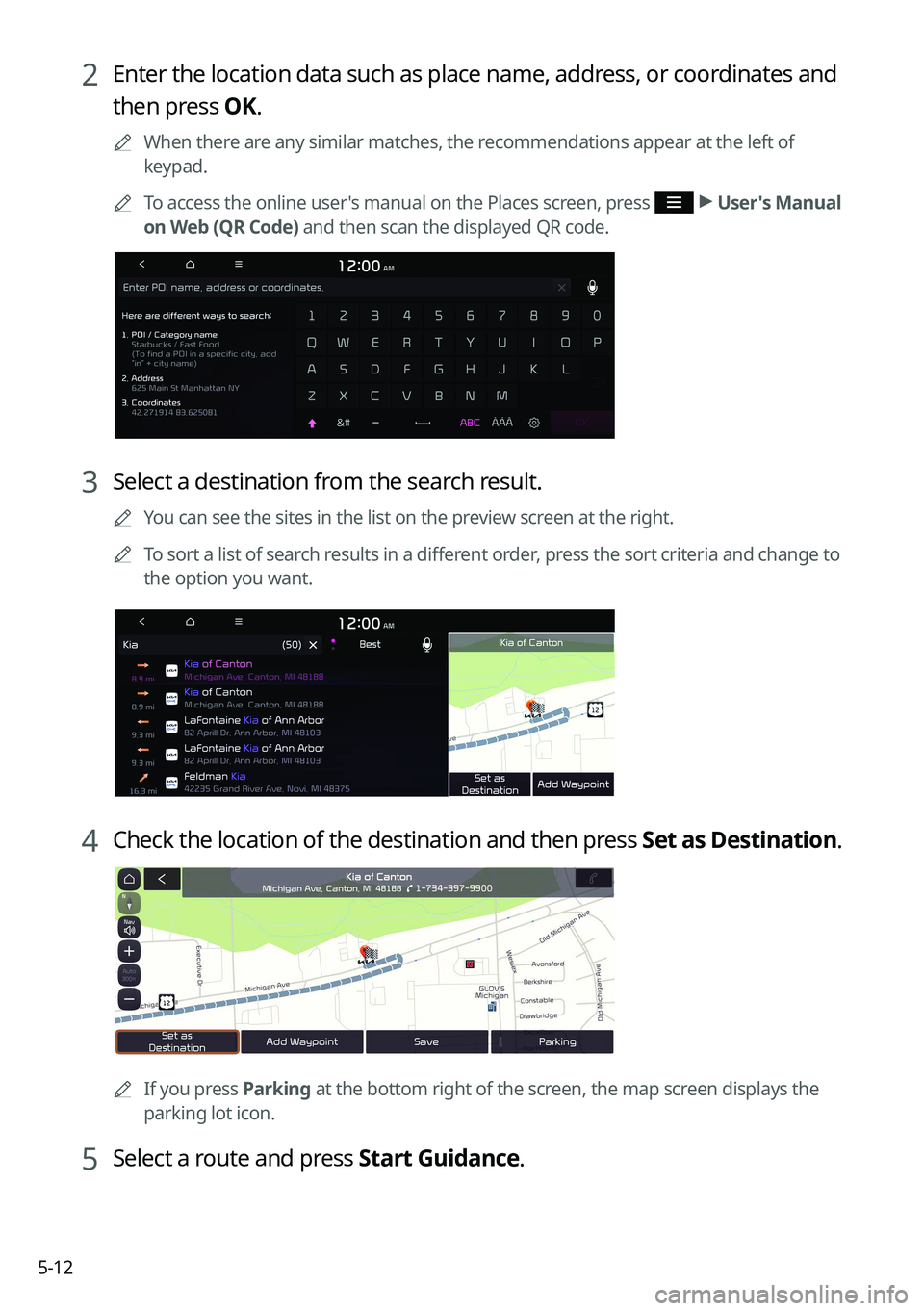
2 Enter the location data such as place name, address, or coordinates and
then press OK.
A
When there are any similar matches, the recommendations appear at the left of
keypad.
A
To access the online user's manual on the Places screen, press
>
User's Manual
on Web (QR Code) and then scan the displayed QR code.
3 Select a destination from the search result.
A
You can see the sites in the list on the preview screen at the right.
A
To sort a list of search results in a different order, press the sort criteria and change to
the option you want.
4 Check the location of the destination and then press Set as Destination.
A
If you press Parking at the bottom right of the screen, the map screen displays the
parking lot icon.
5 Select a route and press Start Guidance.
Page 146 of 332
6-2
Connecting a Bluetooth device
Bluetooth is a short-range wireless networking technology. The Bluetooth communication
function allows you to exchange data by connecting a Bluetooth device to another
neighboring Bluetooth device without a cable connection. With this function, you can use
different types of devices more efficiently.
To make a phone call or play audio from a Bluetooth device, check the following first:
•For a device that is not registered to the system, > see "
Registering a device."
• A registered device will automatically connect to the system when you bring it near
the system. If it does not automatically connect,
> see "
Connecting a registered device ",
" Disconnecting a registered device."
ÝWarning
• Driving while distracted can result in a loss of vehicle control that may lead to an accident,
severe bodily injury, or death. The driver's primary responsibility is the safe and legal
operation of the vehicle, and the use of any vehicle systems, including the \
touch screen
and steering wheel controls, which take the driver's eyes, attention, and focus away from
the safe operation of the vehicle, or which are not permissible by law, should never be
used during the operation of the vehicle.
•Park the vehicle at a safe place before connecting a Bluetooth device to the system. It
may take the driver attention off the road and cause a traffic accident which can result in
damages, injuries, and/or death.
A
The Bluetooth connection function supports only the hands-free and audio related
functions. Connect your mobile phone, MP3 player, or device that supports the hands-
free or audio function.
A
For more information on Bluetooth-enabled devices and their functional compatibility,
visit the KIA America website (https://www.kia.com).
Registering a device
To connect a Bluetooth device to the system, first add the device to the list of Bluetooth
devices on the system.
A
The screen may differ depending on the vehicle model and specifications.
1 On the All Menus screen, press Setup >
Device Connections >
Device
Connections >
Add New.
A
To register a device for the first time, press the Call button on the steering wheel or by
pressing Phone on the All Menus screen.
Page 150 of 332

6-6
Making a call via Bluetooth
You can connect a Bluetooth device with the hands-free function to use a Bluetooth phone.
The Bluetooth connection allows you to view call details directly from the system screen, and
to make calls safely and easily use your vehicle microphone and speaker.
ÝWarning
•Park the vehicle at a safe place before connecting your mobile phone. It may take the
driver attention off the road and cause a traffic accident which can result in damages,
injuries, and/or death.
•While driving, do not make a call by dialing a phone number or do not pick up your phone
to talk. Distraction by the use of a mobile phone may cause you not to recognize traffic
flow around and not to cope with unexpected situations. As a result, a traffic accident
may occur. If necessary, use the Bluetooth hands-free function and make the call as short
as possible.
Dialing from the recent call list
Make calls directly from call history of your mobile device.
When you connect your mobile device and system over Bluetooth, the list of recent calls from
the device will be downloaded to the system and you can call them again by selecting them
from the system screen. Your vehicle has a built-in microphone and speaker that make using
mobile phones safe and easy.
1 Perform any of the following methods:
•On the All Menus screen, press Phone.
•On the steering wheel, press the Call button.
2 On the Bluetooth Call screen, press .
3 Choose a name from the list.
The system dials the selected number.
A
You can also move to a desired number by using the Move lever/button on the
steering wheel without pressing on the screen.