control KIA NIRO PHEV 2022 Navigation System Quick Reference Guide
[x] Cancel search | Manufacturer: KIA, Model Year: 2022, Model line: NIRO PHEV, Model: KIA NIRO PHEV 2022Pages: 332, PDF Size: 11.29 MB
Page 65 of 332
2-27
Using the Valet mode (if equipped)
Use the Valet mode to protect your personal information and view the vehicle information.
Valet mode protects your personal information by disabling control using the screen or
buttons. Vehicle information created during valet mode can be viewed from the UVO App.
The following vehicle-related data can be viewed from the UVO App.
•Valet mode start time
•Engine off time
•Driving distance/hours and maximum vehicle speed after valet mode activa\
tion
A
To use Valet mode, make sure you install the UVO App on your smartphone and sign
up for the UVO Service. Use either Google Play Store or App Store (depending on your
smartphone model) to download and install the UVO App and sign up for the UVO
Service.
> See "Subscribing to the service."
1 On the All Menus screen, press Valet Mode.
A
To access the online user's manual on the Valet Mode screen, press >
User's
Manual on Web (QR Code) and then scan the displayed QR code.
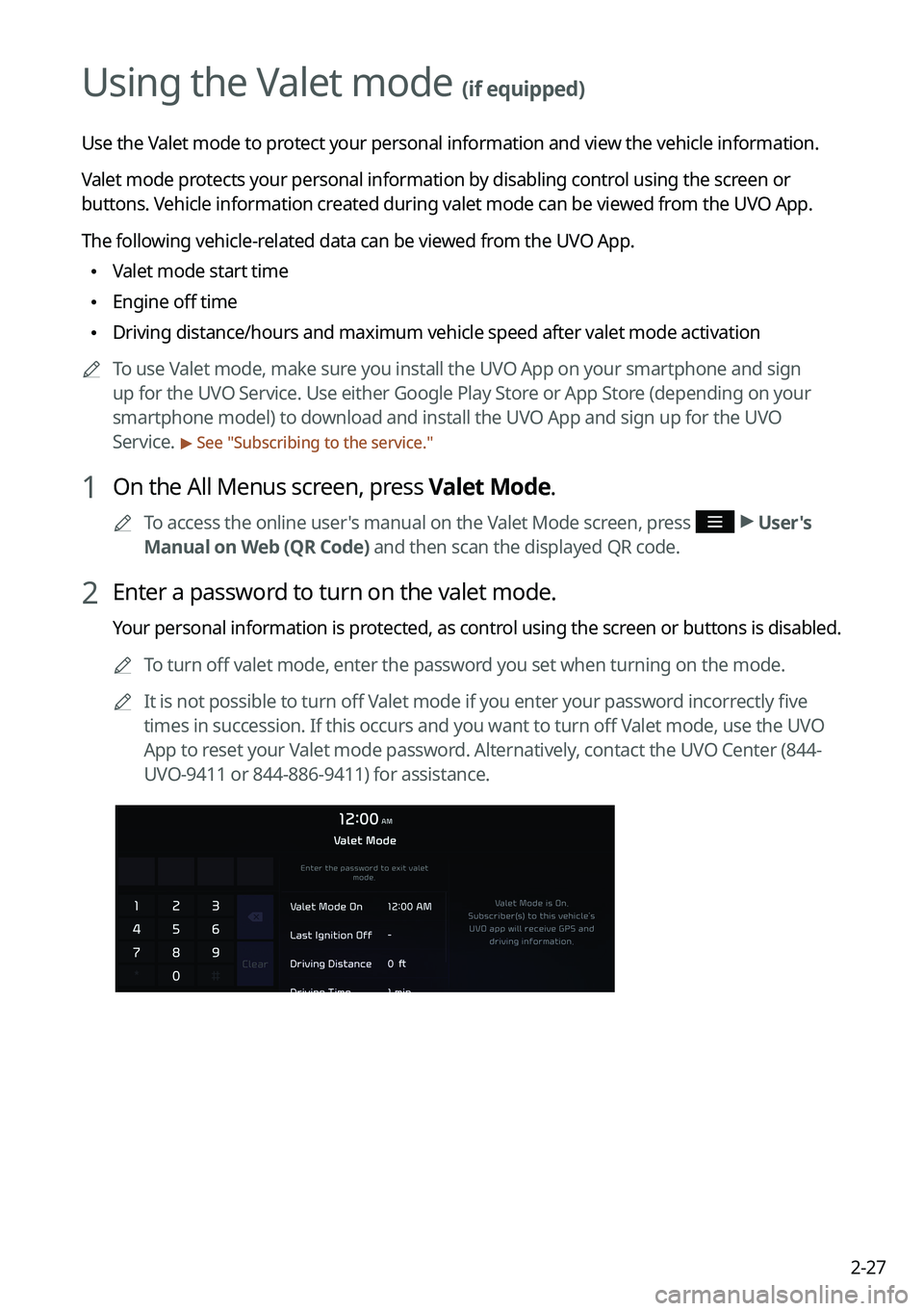
2 Enter a password to turn on the valet mode.
Your personal information is protected, as control using the screen or buttons is disabled.
A
To turn off valet mode, enter the password you set when turning on the mode.
A
It is not possible to turn off Valet mode if you enter your password incorrectly five
times in succession. If this occurs and you want to turn off Valet mode, use the UVO
App to reset your Valet mode password. Alternatively, contact the UVO Center (844-
UVO-9411 or 844-886-9411) for assistance.
Page 80 of 332

3-2
Turning on the radio
You can scan radio channels by using various options. Save your favorite channels to the
presets list.
Perform any of the following methods:
•On the All Menus screen, press Radio.
•On the control panel, press the [
RADIO] button.
A
When multiple media are connected, press the [RADIO] or [MEDIA] button once more
and then press the desired media source from the Radio/Media selection window (if
equipped).
Type1
Type2
A
The displayed screen or menu items may differ, depending on the vehicle model
and features. Check the screen type for your vehicle model and view the appropriate
instructions.
Page 81 of 332

3-3
Radio screen (Type1)
The radio screen provides various functions while listening to radio broadcasts.
a
bc
i
gh
e
d
f
j
a a Returns to the previous step.
b b Can change the radio mode.
c c Activate the HD Radio mode.
d d You can change radio channels by using voice commands. > See "Changing the channel by
using voice commands."
e e Presets list
f f Radio broadcast information
g g You can delete or save the current frequency to the presets list. > See " Saving radio channels
(Type1)."
h h Can turn on or off the split screen mode.
i i You can listen to each radio channel for a short time and select the desired channel.
> See " Using the scan function."
j j The list of menu items appears.
• Enter Station: Can select or directly enter the desired radio frequency.
•Station List: Can see the list of available radio stations.
•FM Radio Noise Control: Customize sound quality when listening to FM radio by
adjusting background noise of the original sound (if equipped).
•Info: Turns the Radio text information transmitted from the broadcasting station on
and off.
•Delete Presets: Can delete a registered channel from the presets list. > See "
Deleting a
registered channel."
• Sound Settings: Displays the system sound settings screen. > See "
Configuring the
sound settings (Type1)."
• User's Manual on Web (QR Code): Displays the QR code that provides access to the
online user manual for the system.
•Split Screen: Can turn on or off the split screen mode.
Page 82 of 332
3-4
ÝWarning
Driving while distracted can result in a loss of vehicle control that may lead to an accident,
severe bodily injury, or death. The driver's primary responsibility is the safe and legal
operation of the vehicle, and the use of any vehicle systems, including the \
touch screen and
steering wheel controls, which take the driver's eyes, attention, and focus away from the safe
operation of the vehicle, or which are not permissible by law, should never be used during
the operation of the vehicle.
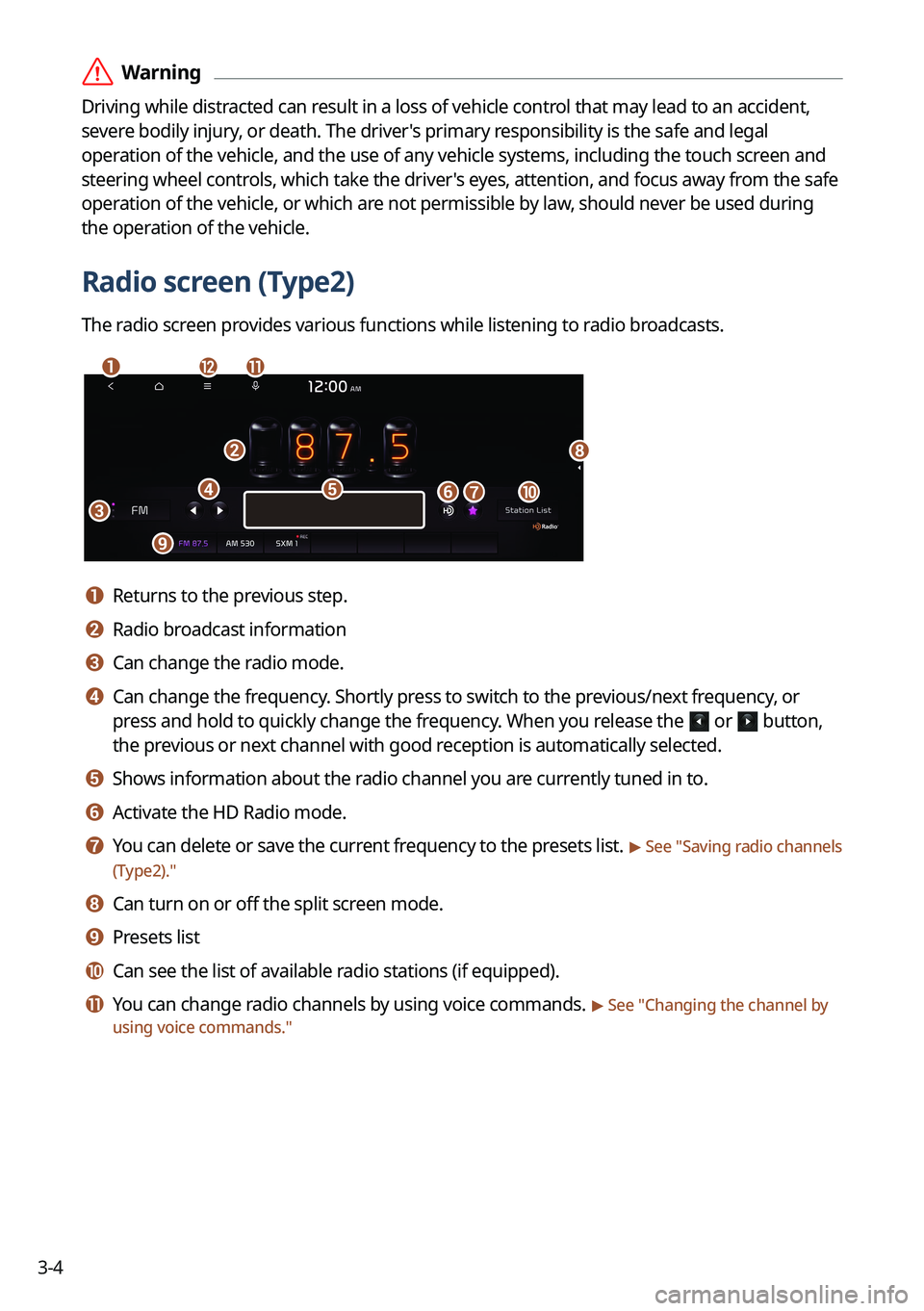
Radio screen (Type2)
The radio screen provides various functions while listening to radio broadcasts.
a
b
c
i
gj
h
ed
lk
f
a a Returns to the previous step.
b b Radio broadcast information
c c Can change the radio mode.
d d Can change the frequency. Shortly press to switch to the previous/next frequency, or
press and hold to quickly change the frequency. When you release the
or button,
the previous or next channel with good reception is automatically selected.
e e Shows information about the radio channel you are currently tuned in to.
f f Activate the HD Radio mode.
g g You can delete or save the current frequency to the presets list. > See "Saving radio channels
(Type2)."
h h Can turn on or off the split screen mode.
i i Presets list
j j Can see the list of available radio stations (if equipped).
k k You can change radio channels by using voice commands. > See " Changing the channel by
using voice commands."
Page 83 of 332

3-5
l l The list of menu items appears.
•Display Off: Turns off the screen. To switch the screen back on, press the screen or
briefly press the power button.
•Enter Station: Can select or directly enter the desired radio frequency.
•Station List: Can see the list of available radio stations.
•Scan FM (Available only with FM): Select a broadcast of your choice after listening
briefly to broadcasts from different radio stations.
•Scan AM (Available only with AM): Select a broadcast of your choice after listening
briefly to broadcasts from different radio stations.
•Delete Presets: Can delete a registered channel from the presets list. > See "
Deleting a
registered channel."
• Info: Turns the Radio text information transmitted from the broadcasting station on
and off.
•Radio Noise (Available only with FM): Customize sound quality when listening to F\
M
radio by adjusting background noise of the original sound (if equipped).
•Sound Settings: Displays the system sound settings screen. > See "
Configuring the
sound settings (Type2)."
• User's Manual on Web (QR Code): Displays the QR code that provides access to the
online user manual for the system.
•Split Screen: Can turn on or off the split screen mode.
A
The screen may differ depending on the vehicle model and specifications.
A
The sound effect settings button may appear on the screen depending on the amp
specifications.
ÝWarning
Driving while distracted can result in a loss of vehicle control that may lead to an accident,
severe bodily injury, or death. The driver's primary responsibility is the safe and legal
operation of the vehicle, and the use of any vehicle systems, including the \
touch screen and
steering wheel controls, which take the driver's eyes, attention, and focus away from the safe
operation of the vehicle, or which are not permissible by law, should never be used during
the operation of the vehicle.
Page 84 of 332
![KIA NIRO PHEV 2022 Navigation System Quick Reference Guide 3-6
Changing the radio mode (Type1)
Perform any of the following methods:
•On the Radio screen, press Band.
•On the control panel, press the [
RADIO] button repeatedly.
Changing the radio mode (](/img/2/54746/w960_54746-83.png "KIA NIRO PHEV 2022 Navigation System Quick Reference Guide 3-6
Changing the radio mode (Type1)
Perform any of the following methods:
•On the Radio screen, press Band.
•On the control panel, press the [
RADIO] button repeatedly.
Changing the radio mode (")
3-6
Changing the radio mode (Type1)
Perform any of the following methods:
•On the Radio screen, press Band.
•On the control panel, press the [
RADIO] button repeatedly.
Changing the radio mode (Type2)
Perform any of the following methods:
•On the Radio screen, press Radio Mode button repeatedly.
•On the control panel, press the [
RADIO] button repeatedly.
The radio mode changes in the order of FM >
AM >
SXM.
A
The screen may differ depending on the vehicle model and specifications.
Page 85 of 332
3-7
Changing the radio channel (Type1)
Perform any of the following methods:
•On the Radio screen, press the desired channel from the presets list.
A
You can also change the channel by using the Move lever/button on the steering
wheel.
•On the control panel, press the [
SEEK] or [TRACK ] button. You can move to the
previous or next channel with good reception.
• When you know an accurate frequency, turn the Search knob on the control panel to
change the frequency.
You can listen to the changed radio broadcast.
Changing the channel by using voice commands
You can change the radio channel by using voice commands.
1 On the Radio screen, press .
2 When a guiding beep is heard, say the desired radio station channel.
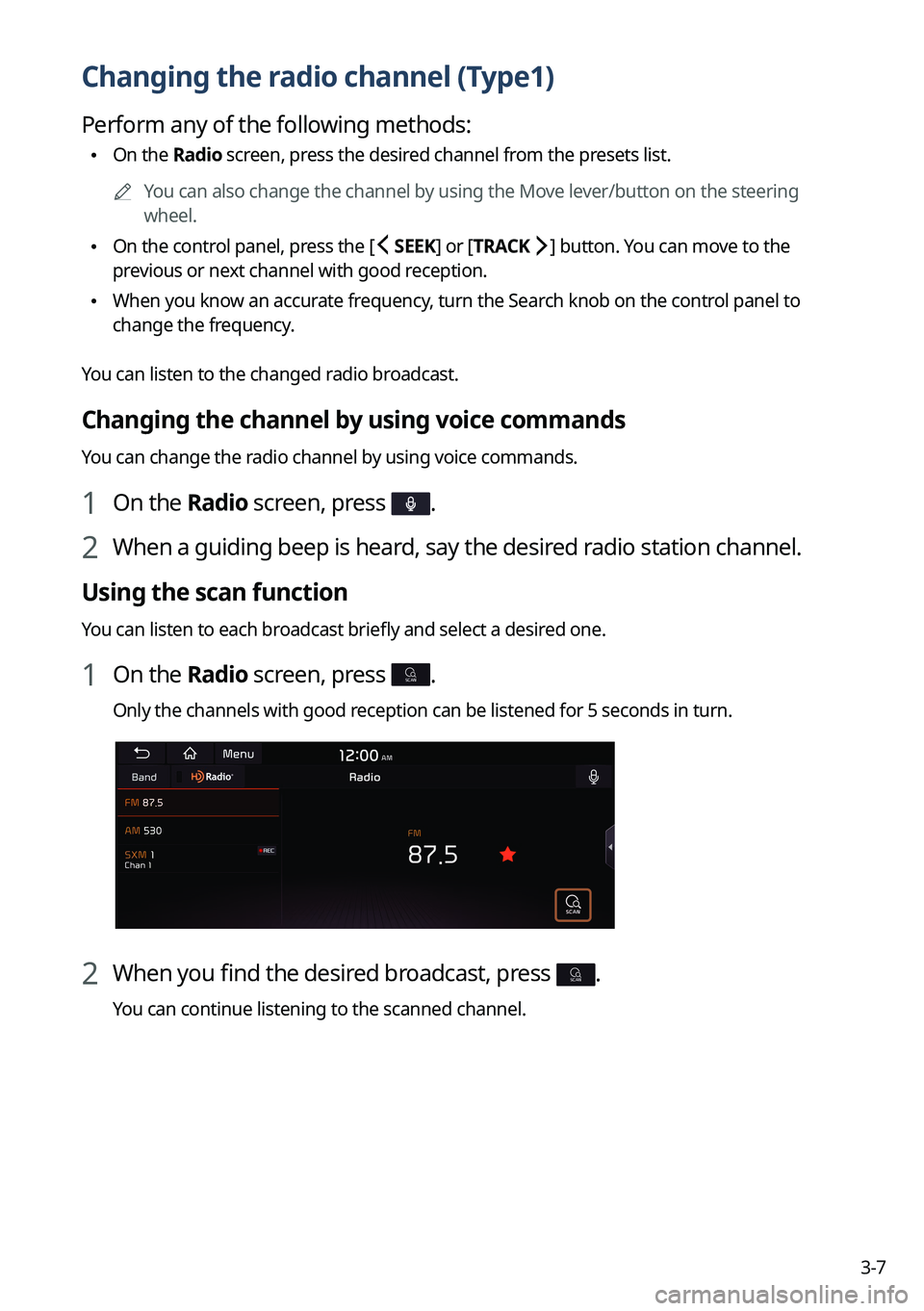
Using the scan function
You can listen to each broadcast briefly and select a desired one.
1 On the Radio screen, press SCAN.
Only the channels with good reception can be listened for 5 seconds in turn.
2 When you find the desired broadcast, press SCAN.
You can continue listening to the scanned channel.
Page 86 of 332
3-8
Changing the radio channel (Type2)
Perform any of the following methods:
•On the Radio screen, press the desired channel from the presets list.
A
You can also change the channel by using the Move lever/button on the steering
wheel.
•On the control panel, press the [
SEEK] or [TRACK ] button. You can move to the
previous or next channel with good reception (if equipped).
You can listen to the changed radio broadcast.
A
If any Search knob on the control panel, you can also change the frequency by using the
knob.
Changing the channel by using voice commands
You can change the radio channel by using voice commands.
1 On the Radio screen, press .
2 When a guiding beep is heard, say the desired radio station channel.
Using the scan function
You can listen to each broadcast briefly and select a desired one.
1 On the Radio screen, press >
Scan FM/Scan AM.
Only the channels with good reception can be listened for 5 seconds in turn.
2 When you find the desired broadcast, press the radio screen.
You can continue listening to the scanned channel.
Page 94 of 332
3-16
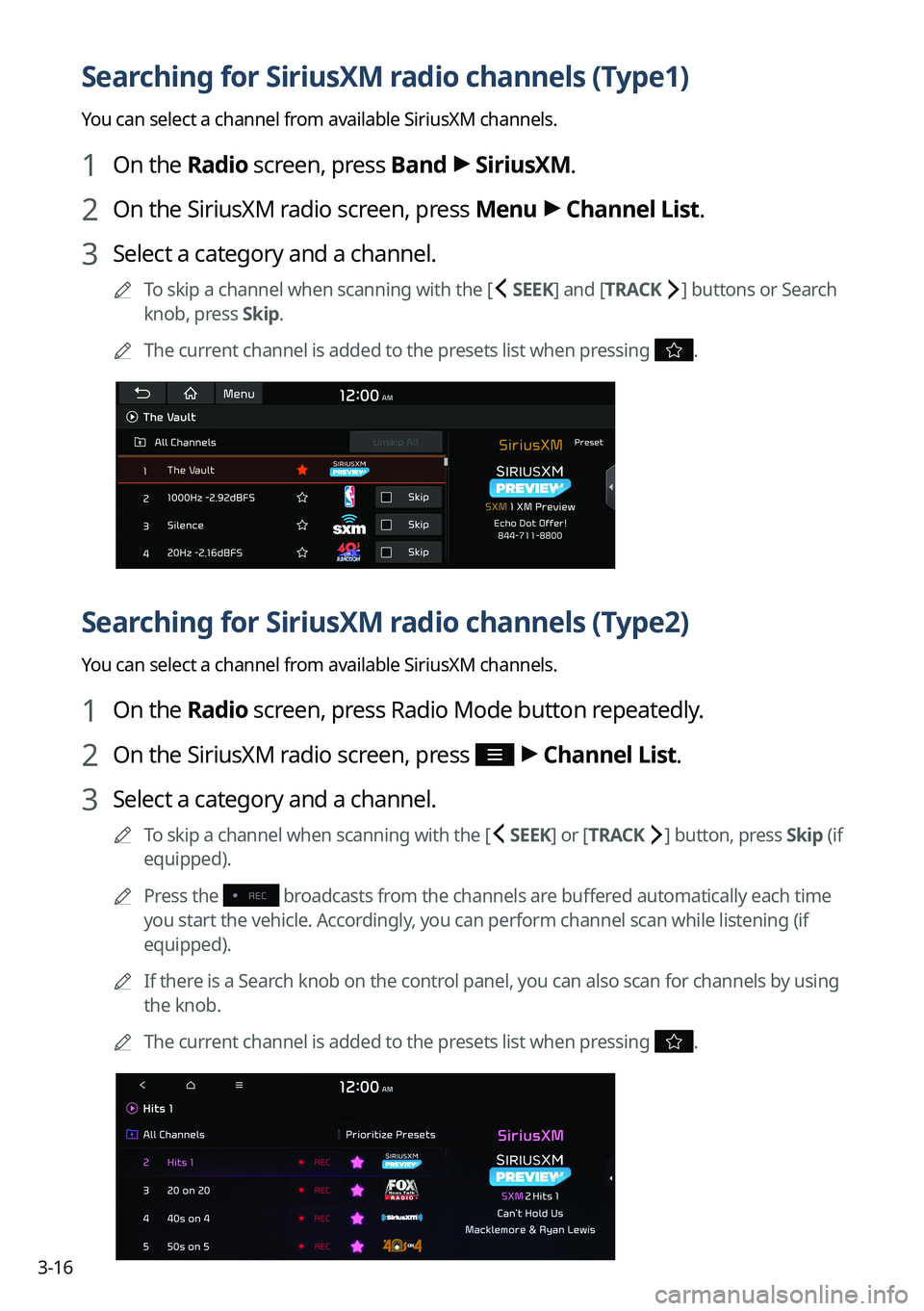
Searching for SiriusXM radio channels (Type1)
You can select a channel from available SiriusXM channels.
1 On the Radio screen, press Band >
SiriusXM.
2 On the SiriusXM radio screen, press Menu >
Channel List.
3 Select a category and a channel.
A
To skip a channel when scanning with the [ SEEK] and [TRACK ] buttons or Search
knob, press Skip.
A
The current channel is added to the presets list when pressing
.
Searching for SiriusXM radio channels (Type2)
You can select a channel from available SiriusXM channels.
1 On the Radio screen, press Radio Mode button repeatedly.
2 On the SiriusXM radio screen, press >
Channel List.
3 Select a category and a channel.
A
To skip a channel when scanning with the [ SEEK ] or [TRACK ] button, press Skip (if
equipped).
A
Press the
broadcasts from the channels are buffered automatically each time
you start the vehicle. Accordingly, you can perform channel scan while listening (if
equipped).
A
If there is a Search knob on the control panel, you can also scan for channels by using
the knob.
A
The current channel is added to the presets list when pressing
.
Page 100 of 332
4-2
Using media
You can use the USB mode to play music files on a connected mobile device, such as USB
device and MP3 player. You can also play Bluetooth music by connecting a Bluetooth device,
which supports a Bluetooth function.
Playing music from a USB device
1 Connect a media device to play to the USB port on the vehicle.
APlayback may start automatically depending on the media type.
A
For more information about supportable devices and file types:
> see "USB mode."
A
The shapes and arrangement of the buttons and USB ports may differ depending on
the vehicle model and specifications.
2 Perform any of the following methods:
•On the Home screen, press the Radio/Media info widget or on the All Menus screen,
press Media.
•On the control panel, press the [
MEDIA] button.
A
When multiple media are connected, press the [ RADIO] or [MEDIA] button once
more and then press the desired media source from the Radio/Media selection
window (if equipped).
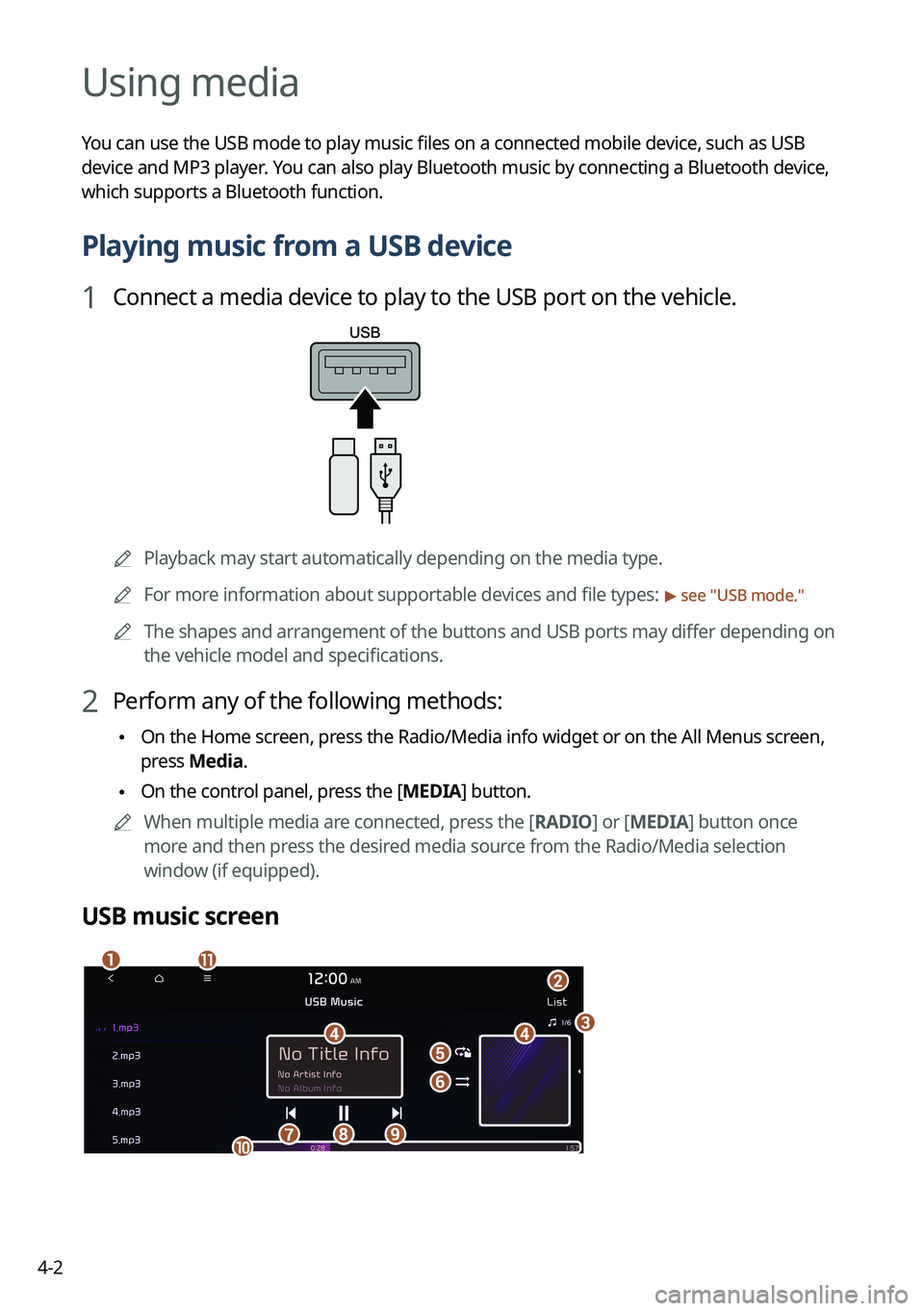
USB music screen
ab
dde
f
gh
k
ij
c