control KIA NIRO PHEV 2022 Navigation System Quick Reference Guide
[x] Cancel search | Manufacturer: KIA, Model Year: 2022, Model line: NIRO PHEV, Model: KIA NIRO PHEV 2022Pages: 332, PDF Size: 11.29 MB
Page 101 of 332
4-3
a a Returns to the previous step.
b b Moves to the file list screen.
c c Displays the sequence number of the current file and the total number of files for
playback.
d d Displays the information of the current music. Press the artist or album info of the current
song to go to list of songs by the artist or from the album.
e e Used to change the repeat playback mode.
f f Used to turn on or off the shuffle playback mode.
g g Restart playing the current file or previous file.
h h Can pause or resume playback.
i i Can play the next file.
j j Can see the duration of the playing song and the current playback position.
k k The list of menu items appears.
•Display Off: Turns off the screen. To switch the screen back on, press the screen or
briefly press the power button.
•Media Sources: Opens the Radio/Media selection window.
•Songs by this Artist: Moves to the list of the artist's songs.
•Songs from this Album: Moves to the list of music albums that contain the current
song.
•Hide Current File: You can hide the file that is playing.
•Sound Settings: Displays the system sound settings screen.
•User's Manual on Web (QR Code): Displays the QR code that provides access to the
online user manual for the system.
•Split Screen: Can turn on or off the split screen mode.
A
The sound effect settings button may appear on the screen depending on the amp
specifications.
ÝWarning
Driving while distracted can result in a loss of vehicle control that may lead to an accident,
severe bodily injury, or death. The driver's primary responsibility is the safe and legal
operation of the vehicle, and the use of any vehicle systems, including the touch screen and
steering wheel controls, which take the driver's eyes, attention, and focus away from the safe
operation of the vehicle, or which are not permissible by law, should never be used during
the operation of the vehicle.
Page 102 of 332
4-4
Pause/Resume
You can pause or resume playback of a USB music file.
On the USB music playback screen, press or .
Rewind
By using the rewind function, you can listen to music in the USB device from the desired point
during playback.
Perform any of the following methods:
•On the USB music playback screen, press and hold .
•On the control panel, press and hold the [
SEEK] button (if equipped).
A
You can also run the function by using the Move lever/button on the steering wheel.
Fast forward
By using the fast forward function, you can listen to music in the USB device from the desired
point during playback.
Perform any of the following methods:
•On the USB music playback screen, press and hold .
•On the control panel, press and hold the [
TRACK ] button (if equipped).
A
You can also run the function by using the Move lever/button on the steering wheel.
Resuming playback of the current music
You can play the current music in the USB device from the beginning.
Perform any of the following methods:
•On the USB music playback screen, press after 3 seconds during playback.
•On the control panel, press the [
SEEK] button after 3 seconds during playback (if
equipped).
A
You can also run the function by using the Move lever/button on the steering wheel.
Page 103 of 332
4-5
Playing the previous file
You can play the previous file during playback in the USB device.
Perform any of the following methods:
•On the USB music playback screen, press within 3 seconds during playback.
•On the control panel, press the [
SEEK] button within 3 seconds during playback (if
equipped).
A
To play the previous music during playback, press
twice or pressing the [ SEEK]
button on the control panel twice after 3 seconds from the start of the playback (if
equipped).
A
You can also run the function by using the Move lever/button on the steering wheel.
A
If any Search knob on the control panel, you can search for the desired music by using
the knob. When you press the knob within 5 seconds, music is played. However, if no
input within 5 seconds, the search stops and the system displays the information of the
current file.
Playing the next file
You can play the next file in the USB device during playback.
Perform any of the following methods:
•On the USB music playback screen, press .
•On the control panel, press the [
TRACK ] button (if equipped).
A
You can also run the function by using the Move lever/button on the steering wheel.
A
If any Search knob on the control panel, you can search for the desired music by using
the knob. When you press the knob within 5 seconds, music is played. However, if no
input within 5 seconds, the search stops and the system displays the information of the
current file.
Changing the repeated playback mode for USB music
You can change the repeated playback mode for USB music: Repeat One, Repeat Folder, and
Repeat All.
On the USB music playback screen, press repeatedly.
Each time the icon is pressed, the playback repetition modes are toggled and the activated
mode icon appears on the screen.
Page 106 of 332
4-8
Playing music via Bluetooth
To use a Bluetooth device for audio playback, connect a device that supports Bluetooth
communication such as mobile phone and MP3 player.
For more information about Bluetooth connection:
> see "Connecting a Bluetooth device."
A
The controls or display screens may differ depending on the connected Bluetooth device,
phone model, and music player App.
A
The streaming may not be supported in some music player Apps.
A
Some functions may not be available depending on the connected Bluetooth device or
phone model.
A
When a media device or mobile phone is connected by both the Bluetooth and USB cable
at the same time, the device or system may not work properly. To use the Bluetooth
connection, remove all cables from the device.
Bluetooth audio playback screen
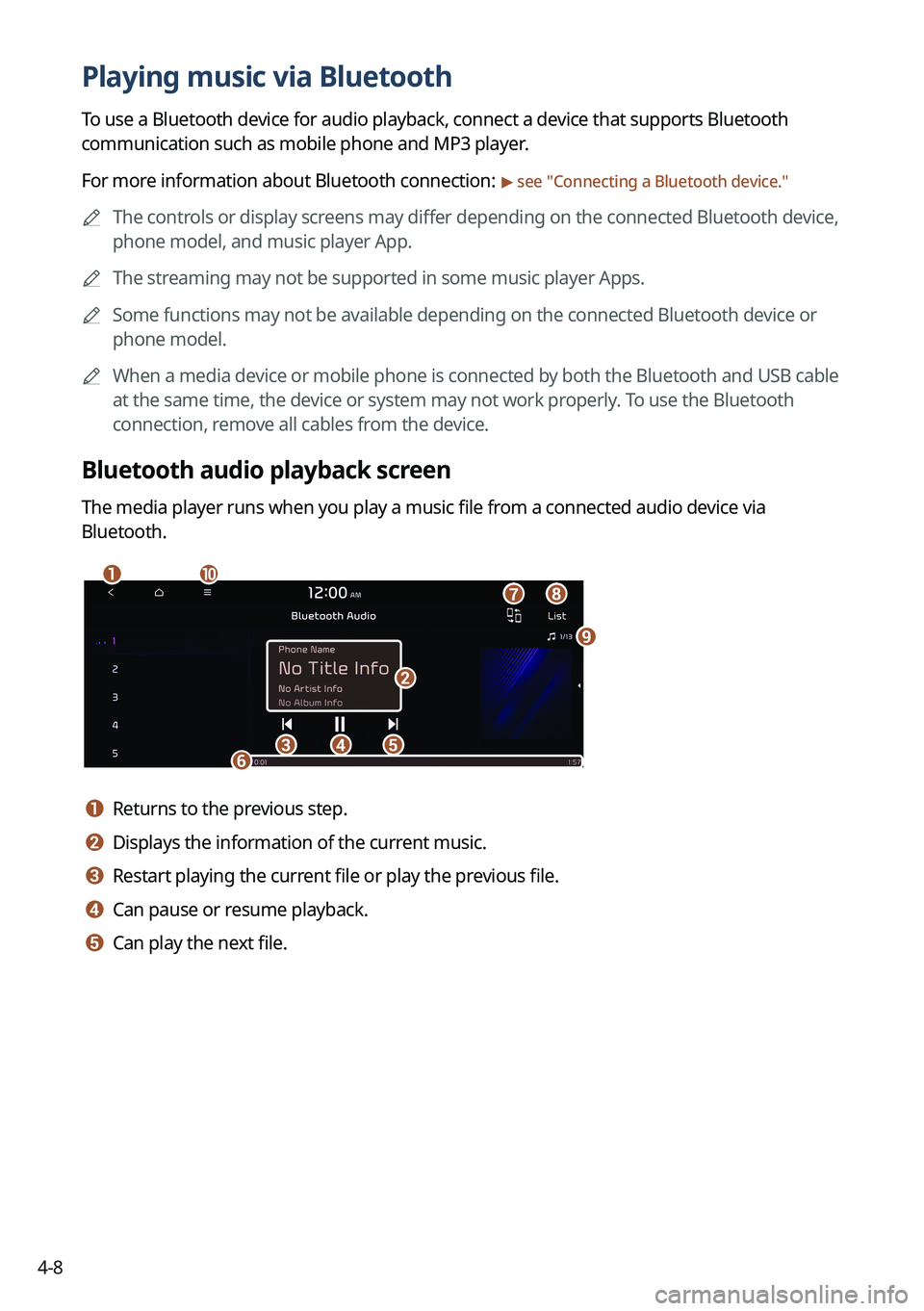
The media player runs when you play a music file from a connected audio device via
Bluetooth.
aj
b
cdef
h
i
g
a a Returns to the previous step.
b b Displays the information of the current music.
c c Restart playing the current file or play the previous file.
d d Can pause or resume playback.
e e Can play the next file.
Page 107 of 332
4-9
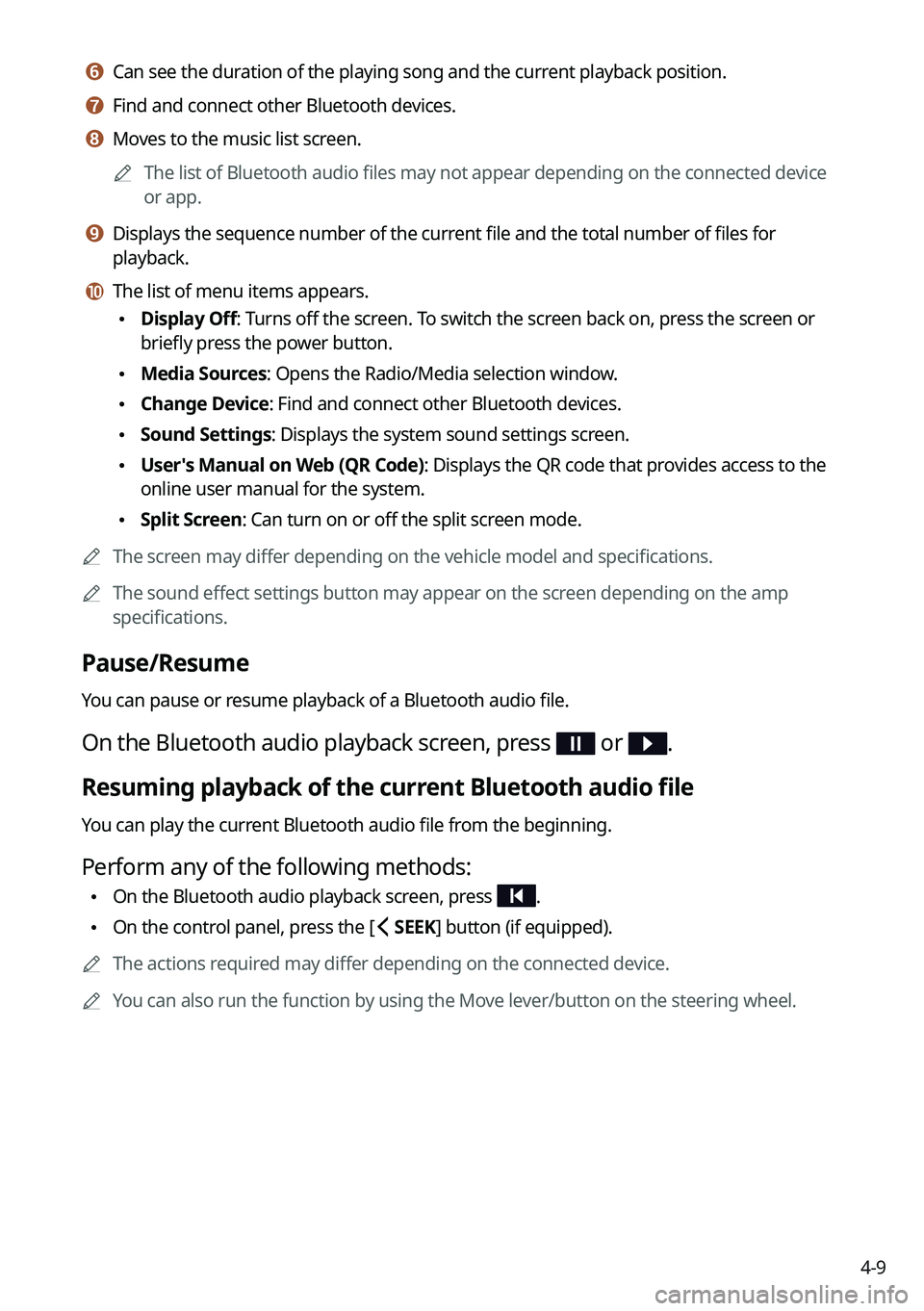
f f Can see the duration of the playing song and the current playback position.
g g Find and connect other Bluetooth devices.
h h Moves to the music list screen.
A
The list of Bluetooth audio files may not appear depending on the connected device
or app.
i i Displays the sequence number of the current file and the total number of files for
playback.
j j The list of menu items appears.
•Display Off: Turns off the screen. To switch the screen back on, press the screen or
briefly press the power button.
•Media Sources: Opens the Radio/Media selection window.
•Change Device: Find and connect other Bluetooth devices.
•Sound Settings: Displays the system sound settings screen.
•User's Manual on Web (QR Code): Displays the QR code that provides access to the
online user manual for the system.
•Split Screen: Can turn on or off the split screen mode.
A
The screen may differ depending on the vehicle model and specifications.
A
The sound effect settings button may appear on the screen depending on the amp
specifications.
Pause/Resume
You can pause or resume playback of a Bluetooth audio file.
On the Bluetooth audio playback screen, press or .
Resuming playback of the current Bluetooth audio file
You can play the current Bluetooth audio file from the beginning.
Perform any of the following methods:
•On the Bluetooth audio playback screen, press .
•On the control panel, press the [
SEEK] button (if equipped).
A
The actions required may differ depending on the connected device.
A
You can also run the function by using the Move lever/button on the steering wheel.
Page 108 of 332

4-10
Resuming playback of the previous Bluetooth audio file
You can play the previous Bluetooth audio file during playback.
Perform any of the following methods:
•On the Bluetooth audio playback screen, press twice.
•On the control panel, press the [
SEEK] button twice (if equipped).
A
The actions required may differ depending on the connected device.
A
You can also run the function by using the Move lever/button on the steering wheel.
A
If any Search knob on the control panel, you can search for the desired music by using
the knob. When you press the knob within 5 seconds, music is played. However, if no
input within 5 seconds, the search stops and the system displays the information of the
current file.
Resuming playback of the next Bluetooth audio file
You can play the next Bluetooth audio file during playback.
Perform any of the following methods:
•On the Bluetooth audio playback screen, press .
•On the control panel, press the [
TRACK ] button (if equipped).
A
The actions required may differ depending on the connected device.
A
You can also run the function by using the Move lever/button on the steering wheel.
A
If any Search knob on the control panel, you can search for the desired music by using
the knob. When you press the knob within 5 seconds, music is played. However, if no
input within 5 seconds, the search stops and the system displays the information of the
current file.
Page 110 of 332
5-2
Navigation functions
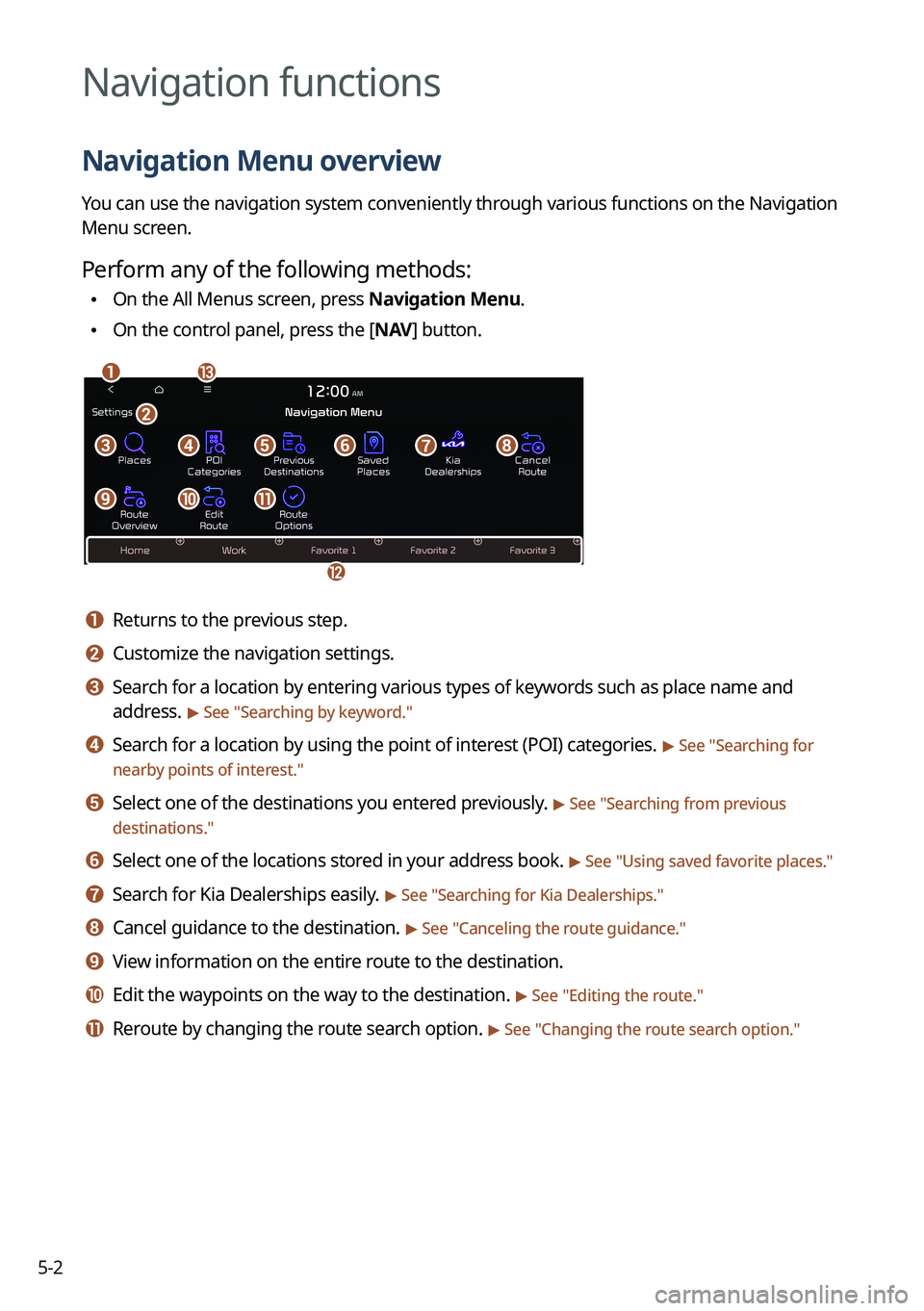
Navigation Menu overview
You can use the navigation system conveniently through various functions on the Navigation
Menu screen.
Perform any of the following methods:
•On the All Menus screen, press Navigation Menu.
•On the control panel, press the [
NAV] button.
am
c
l
defgh
ijk
b
a a Returns to the previous step.
b b Customize the navigation settings.
c c Search for a location by entering various types of keywords such as place name and
address.
> See " Searching by keyword."
d d Search for a location by using the point of interest (POI) categories. > See "Searching for
nearby points of interest."
e e Select one of the destinations you entered previously. > See " Searching from previous
destinations."
f f Select one of the locations stored in your address book. > See " Using saved favorite places."
g g Search for Kia Dealerships easily. > See "Searching for Kia Dealerships."
h h Cancel guidance to the destination. > See "Canceling the route guidance."
i i View information on the entire route to the destination.
j j Edit the waypoints on the way to the destination. > See "Editing the route."
k k Reroute by changing the route search option. > See "Changing the route search option."
Page 111 of 332

5-3
l l Register your home, office or other frequently visited places as a favorite location to
making searching easier.
> See "Saving a frequently visited place as a favorite place."
m m The list of menu items appears.
• Reorder Icons: Can change the location of an icon on the Navigation Menu screen.
•Display Off: Turns off the screen. To switch the screen back on, press the screen or
briefly press the power button.
•User's Manual on Web (QR Code): Displays the QR code that provides access to the
online user manual for the system.
A
Available icons and their arrangement may differ depending on the vehicle model and
specifications.
Finding a route easily
ÝWarning
Driving while distracted may cause a loss of vehicle control that may lead to an accident,
severe bodily injury, or death. The driver's primary responsibility is the safe and legal
operation of the vehicle, and the use of any devices or systems that take the driver's attention
away from driving.
1 Perform any of the following methods:
•On the All Menus screen, press Navigation Menu >
Places.
• On the map screen, press .
A
Press and hold the [ NAV] button on the control panel to enter into Places.
2 Enter the location data such as place name, address, or coordinates and
then press OK.
Page 112 of 332
5-4
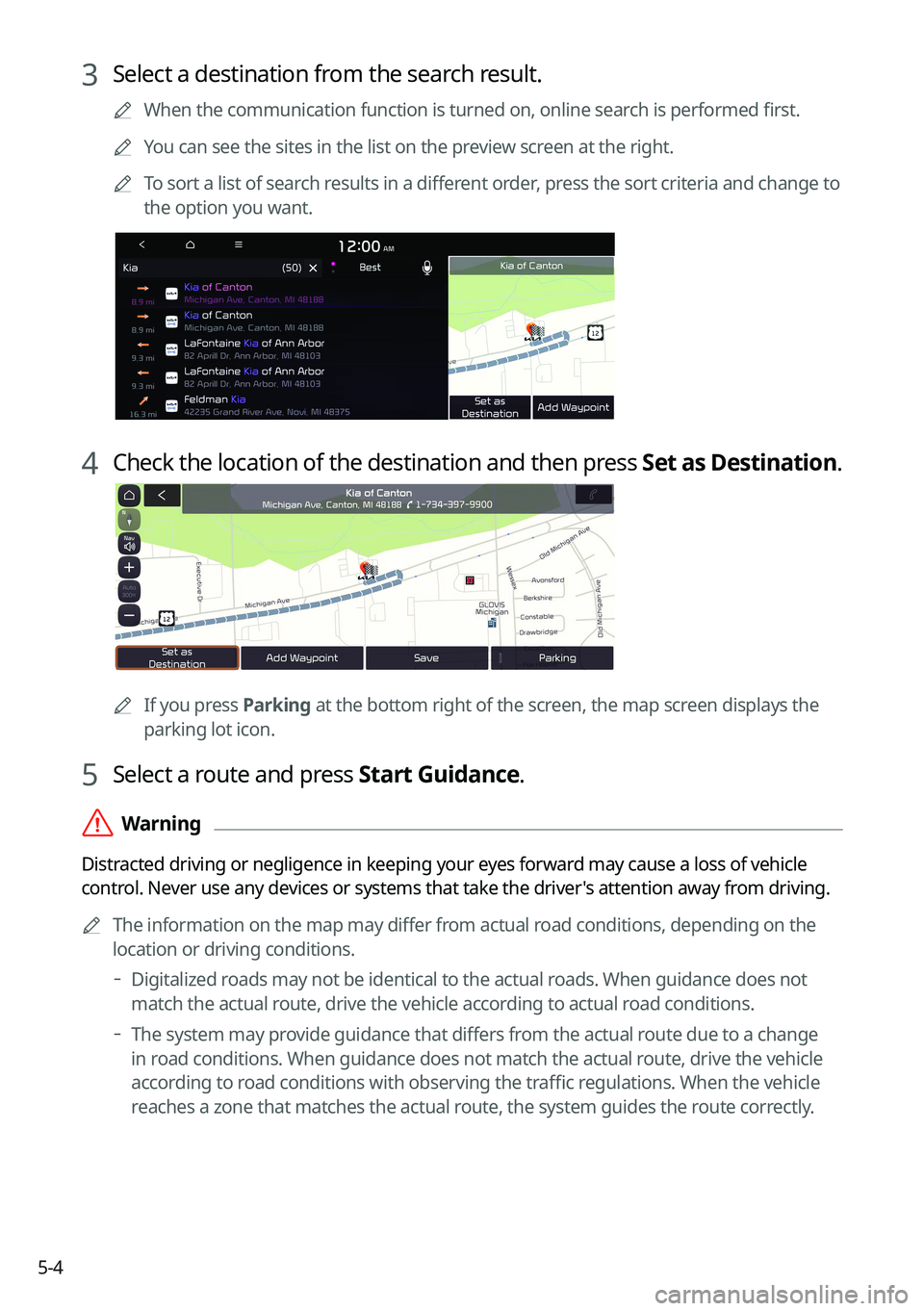
3 Select a destination from the search result.
A
When the communication function is turned on, online search is performed first.
A
You can see the sites in the list on the preview screen at the right.
A
To sort a list of search results in a different order, press the sort criteria and change to
the option you want.
4 Check the location of the destination and then press Set as Destination.
A
If you press Parking at the bottom right of the screen, the map screen displays the
parking lot icon.
5 Select a route and press Start Guidance.
ÝWarning
Distracted driving or negligence in keeping your eyes forward may cause a loss of vehicle
control. Never use any devices or systems that take the driver's attention away from driving.
A
The information on the map may differ from actual road conditions, depending on the
location or driving conditions.
Digitalized roads may not be identical to the actual roads. When guidance does not
match the actual route, drive the vehicle according to actual road conditions.
The system may provide guidance that differs from the actual route due to a change
in road conditions. When guidance does not match the actual route, drive the vehicle
according to road conditions with observing the traffic regulations. When the vehicle
reaches a zone that matches the actual route, the system guides the route correctly.
Page 115 of 332
5-7
g g Displays the system information on the map. (It can display up to two items.)
•Traffic information (with an icon if there is no HD data reception)
•Bluetooth connection status
h h Displays the point to change the driving direction.
i i Displays the next point to change the driving direction.
j j Displays the lanes in different colors.
•Orange: Recommended lane
•White: Available lane
•Gray: Unavailable lane
k k Displays quick menu items that can be used during guidance.
l l Stop the navigation guidance. > See "
Canceling the route guidance."
m m Displays the remaining distance to the destination and the estimated time of arrival. For
more details, press the information item.
n n Displays or hides the detailed guidance.
o o Check the range you can drive with the current amount of battery (EV only).
A
To see only the map with no destination, press the map area on the Home screen or on
the All Menus screen, press Map. Or press the [ MAP] button on the control panel.
A
The screen may differ depending on the vehicle model and specifications.
ÝWarning
Be sure to check the road conditions while driving, because the camera information may get
changed occasionally after a map update to the latest version. Relying solely on the driving
assist system may cause violation of traffic rules and regulations, resulting in an accident.