control KIA NIRO PHEV 2022 Navigation System Quick Reference Guide
[x] Cancel search | Manufacturer: KIA, Model Year: 2022, Model line: NIRO PHEV, Model: KIA NIRO PHEV 2022Pages: 332, PDF Size: 11.29 MB
Page 30 of 332
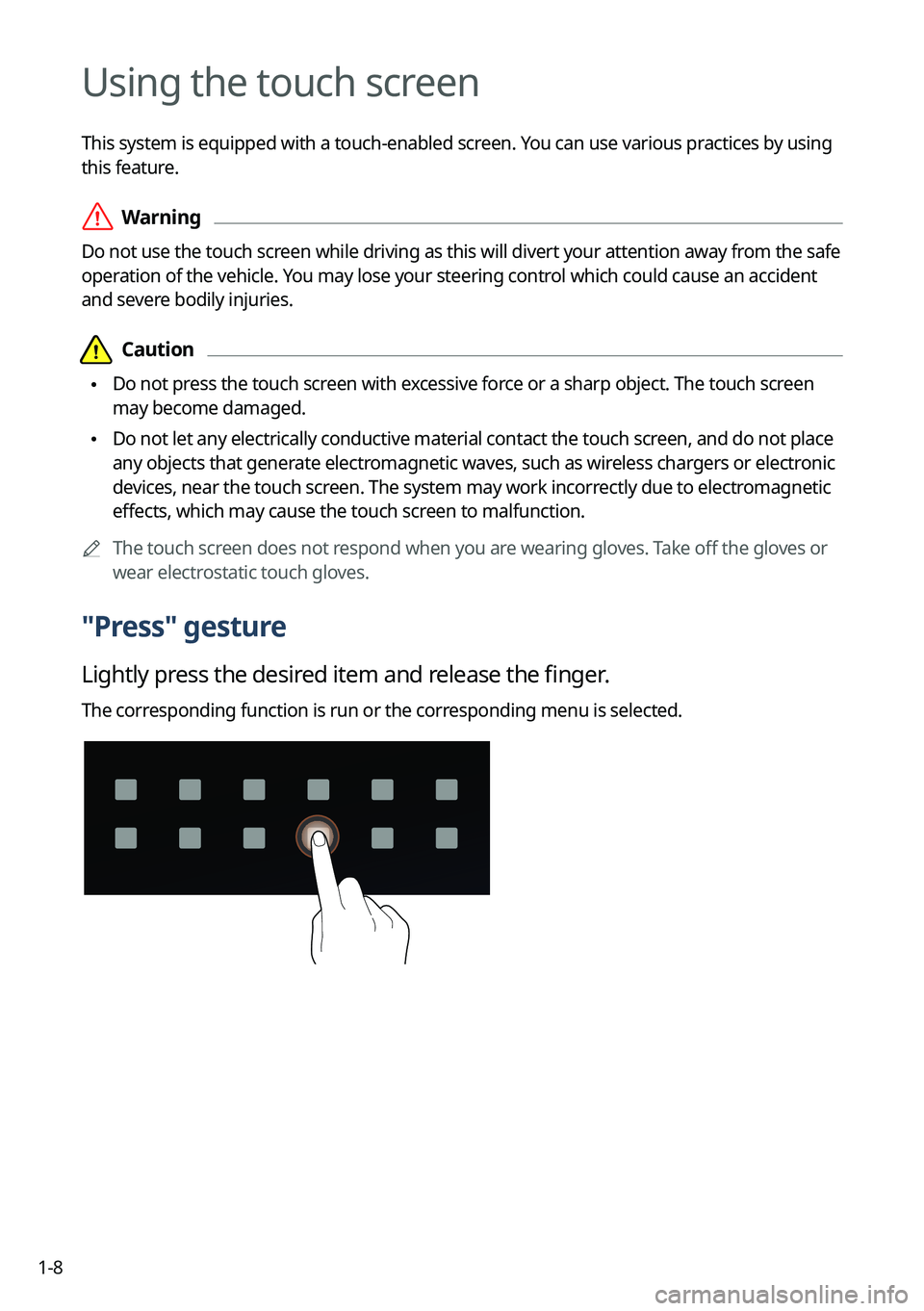
1-8
Using the touch screen
This system is equipped with a touch-enabled screen. You can use various practices by using
this feature.
ÝWarning
Do not use the touch screen while driving as this will divert your attention away from the safe
operation of the vehicle. You may lose your steering control which could cause an accident
and severe bodily injuries.
Page 39 of 332
Using the First Run Setup
Using the phone projection function
Viewing the driving assistance screen Using the climate control function
Using the rear-seat climate control function Using the rear-seat conversation mode Using the rear-seat view
Using the rear-seat quiet mode Using the sound mood lamp Playing Sounds of NatureUsing the HD Radio Data
Viewing the driving information Viewing notifications
Using the Valet mode
Using the Plug-in Hybrid menu
Useful functions
02
Page 42 of 332
2-4
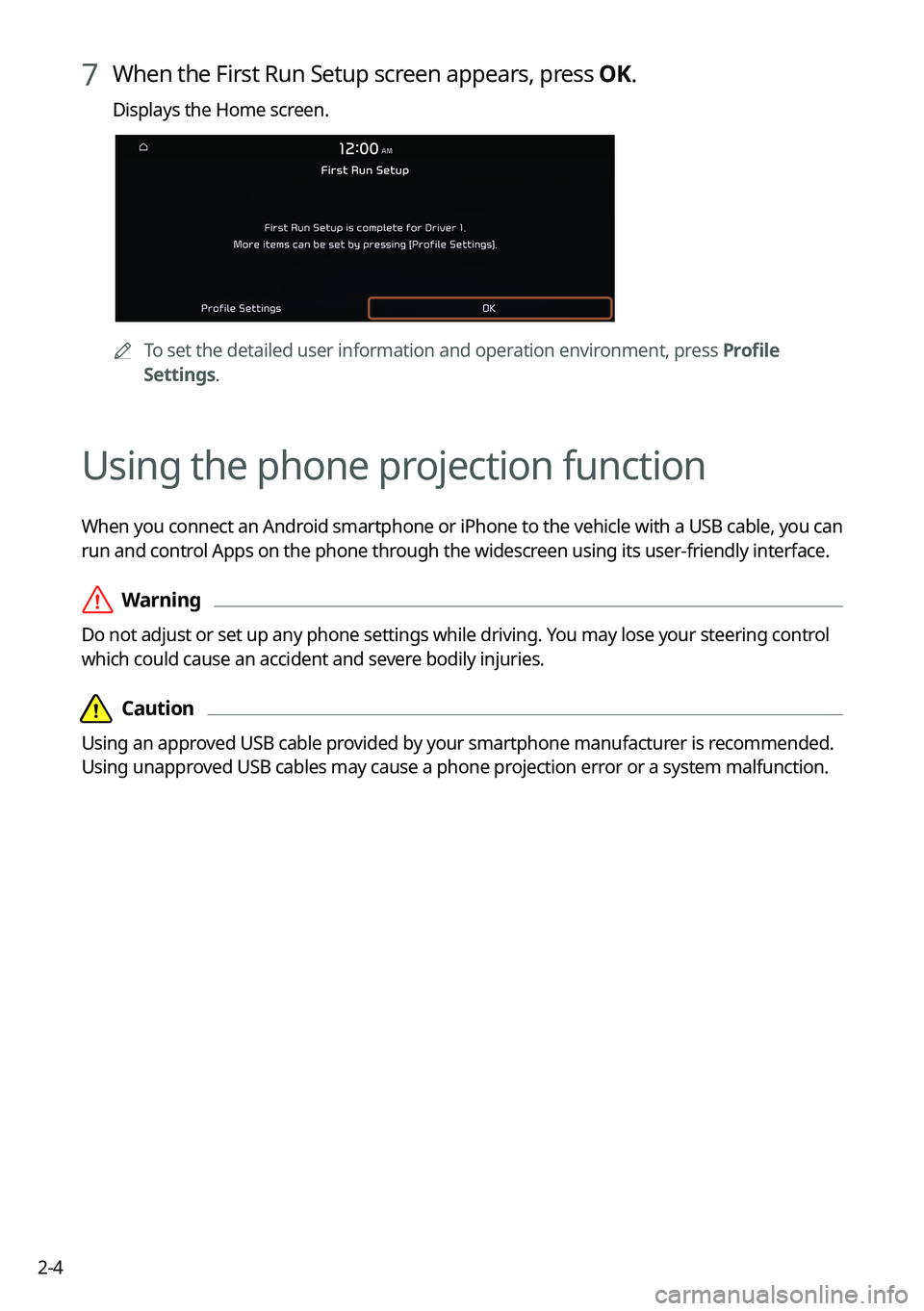
7 When the First Run Setup screen appears, press OK.
Displays the Home screen.
ATo set the detailed user information and operation environment, press Profile
Settings.
Using the phone projection function
When you connect an Android smartphone or iPhone to the vehicle with a USB cable, you can
run and control Apps on the phone through the widescreen using its user-friendly interface.
ÝWarning
Do not adjust or set up any phone settings while driving. You may lose your steering control
which could cause an accident and severe bodily injuries.
Page 43 of 332
2-5
Pairing to an Android smartphone via Android Auto
When you connect an Android smartphone to the vehicle with Android Auto, you can run and
control Apps on the phone through the widescreen using its user-friendly interface.
1 To use Android Auto, first check the following.
•Visit the Android Auto website at https://www.android.com/auto to check the list of
countries, device types, and models that support Android Auto.
•Download and install the Android Auto App from Google Play Store. It is not possible
to install Android Auto in countries that do not support the feature.
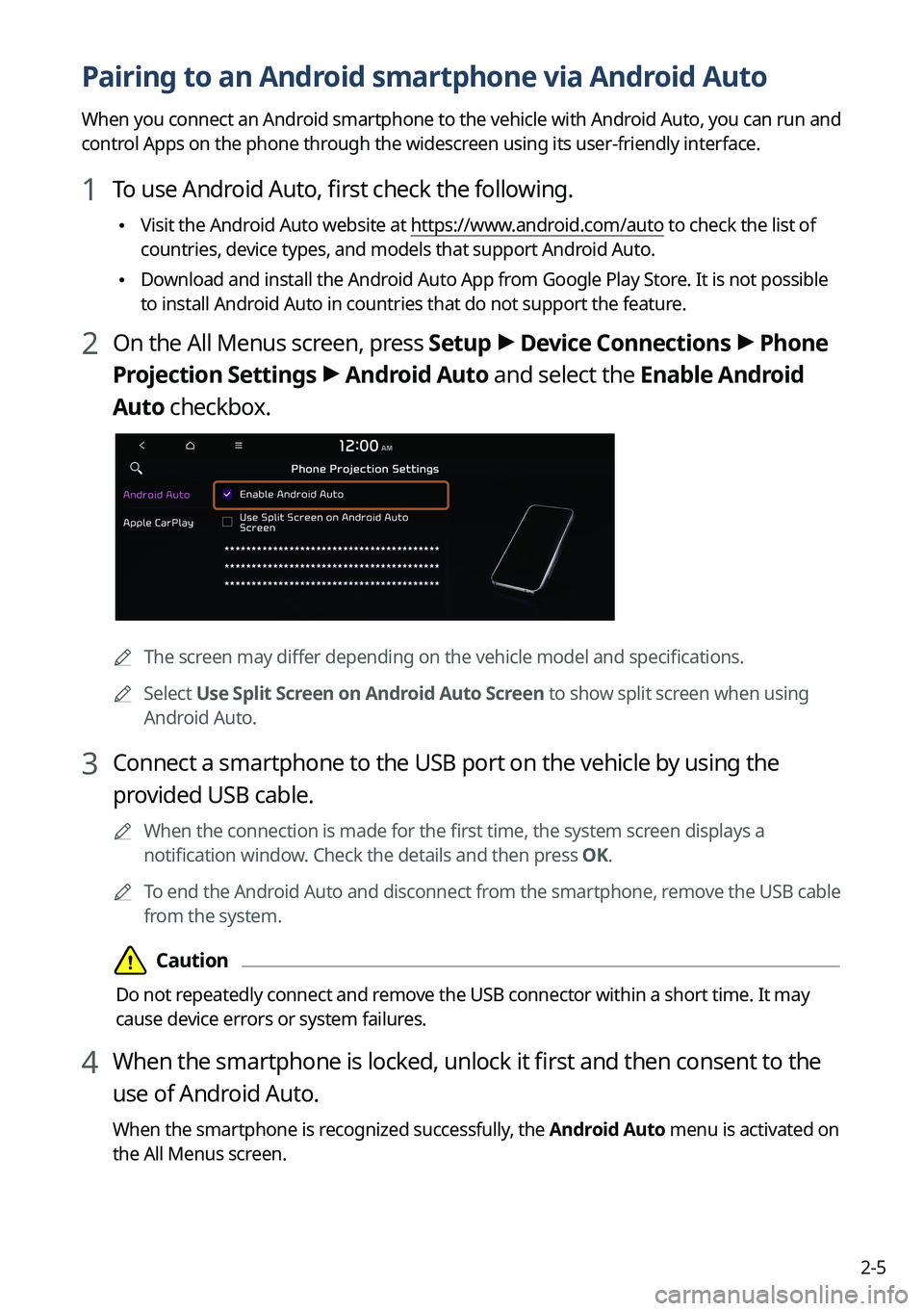
2 On the All Menus screen, press Setup >
Device Connections >
Phone
Projection Settings >
Android Auto and select the Enable Android
Auto checkbox.
A The screen may differ depending on the vehicle model and specifications.
A
Select Use Split Screen on Android Auto Screen to show split screen when using
Android Auto.
3 Connect a smartphone to the USB port on the vehicle by using the
provided USB cable.
A
When the connection is made for the first time, the system screen displays a
notification window. Check the details and then press OK.
A
To end the Android Auto and disconnect from the smartphone, remove the USB cable
from the system.
Page 44 of 332
2-6
Using the Android Auto
1 On the All Menus screen, press Android Auto.
2 Perform the desired function.
•To run the functions for phone, music, or navigation on the smartphone, press the
corresponding app icon.
A
When you are using your smartphone′s navigation via phone projection, sounds
from both the system′s radio/media function and the navigation will be output
through your vehicle′s speakers. When you use the Volume knob while both
sounds are being output, the navigation volume is adjusted first.
•To use the Google voice recognition, press and hold the Voice Recognition button on
the steering wheel.
A
By pressing the [ MODE] button on the steering wheel, you can run the media App on
your smartphone as well as the Radio/Media mode of the system.
A
To specify which functions to run when the [ MODE] button on the steering wheel is
pressed, press and hold the [ MODE] button to display the settings screen.
A
By pressing the Call button on the steering wheel, you can make a call via Bl\
uetooth
connection.
A
When phone projection is active, you cannot change the phone projection settings. To
change the settings, remove the USB cable from your system.
A
The icons on the screen are subject to change according to the policy of Google
Corporation.
A
Apps or functions used through Android Auto are subject to change according to the
policy of Google Corporation. For supportable functions, visit the Android website at
https://www.android.com/auto.
A
To use the functions on your smartphone with the minimized system settings, update the
smartphone OS to the latest version.
A
The recognition time may differ depending on the device type, firmware, and OS version.
A
Charges may apply for any mobile data used while Android Auto is running.
A
Some functions may not work properly depending on the network signal strength.
A
Avoid interacting with the smartphone while using Android Auto.
A
You cannot use the following functions when Android Auto is in use.
USB mode
Apple CarPlay
Searches using the control panel or the steering wheel remote control
Page 45 of 332
2-7
Pairing to an iPhone via Apple CarPlay
After you connect an iPhone to the vehicle with Apple CarPlay, you can run and control Apps
on the phone through the system screen.
1 To use Apple CarPlay, first check the following:
•For iPhone models that support Apple CarPlay, visit the Apple website at
https://www.
apple.com/ios/carplay .
•Make sure Apple CarPlay and Siri are enabled in your iPhone settings. If you do not
see options for Apple CarPlay or Siri, update to the latest iOS version.\
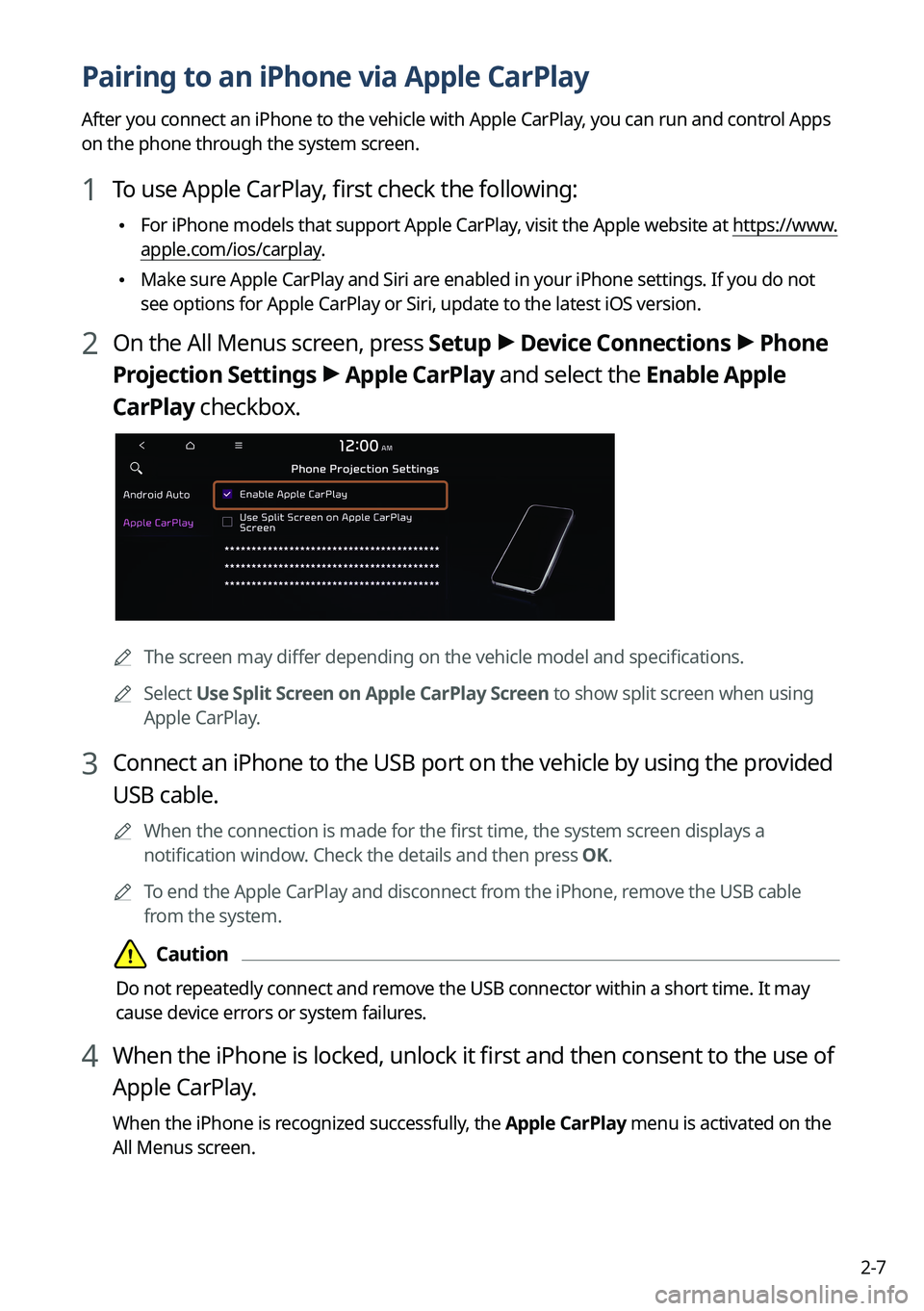
2 On the All Menus screen, press Setup >
Device Connections >
Phone
Projection Settings >
Apple CarPlay and select the Enable Apple
CarPlay checkbox.
A The screen may differ depending on the vehicle model and specifications.
A
Select Use Split Screen on Apple CarPlay Screen to show split screen when using
Apple CarPlay.
3 Connect an iPhone to the USB port on the vehicle by using the provided
USB cable.
A
When the connection is made for the first time, the system screen displays a
notification window. Check the details and then press OK.
A
To end the Apple CarPlay and disconnect from the iPhone, remove the USB cable
from the system.
Page 46 of 332
2-8
Using the Apple CarPlay
1 On the All Menus screen, press Apple CarPlay.
2 Perform the desired function.
•To run any of functions (phone, messaging, navigation, etc.) on your iPhone, press the
corresponding function icon.
A
When you are using your smartphone′s navigation via phone projection, sounds
from both the system′s radio/media function and the navigation will be output
through your vehicle′s speakers. When you use the Volume knob while both
sounds are being output, the navigation volume is adjusted first.
•To run the Siri voice recognition, press and hold the Voice Recognition button on the
steering wheel.
A
By pressing the [ MODE] button on the steering wheel, you can run the media App on
your smartphone as well as the Radio/Media mode of the system.
A
To specify which functions to run when the [ MODE] button on the steering wheel is
pressed, press and hold the [ MODE] button to display the settings screen.
A
When you receive a call, press the Call button on the steering wheel to answer it.
A
When phone projection is active, you cannot change the phone projection settings. To
change the settings, remove the USB cable from your system.
A
Apps or functions used through Apple CarPlay are subject to change according to the
policy of Apple Corporation. For supportable functions, visit the Apple Corporation
website at http://www.apple.com/ios/carplay .
A
To use the functions on your smartphone with the minimized system settings, update the
smartphone OS to the latest version.
A
The recognition time may differ depending on the device type, firmware, and OS version.
A
Charges may apply for any mobile data used while Apple CarPlay is running.
A
Some functions may not work properly depending on the network signal strength.
A
Avoid interacting with the smartphone while using Apple CarPlay.
A
You cannot use the following functions when Apple CarPlay is in use.
Bluetooth phone
USB mode
Android Auto
Browsing using the Search knob on the control panel (if equipped)
Page 52 of 332
2-14
Using the climate control function (if equipped)
You can check and adjust the climate system settings on the screen.
A
For more information about how to use the heater and air conditioner, refer to Owner's
Manual of the vehicle.
A
When you manipulate the climate control system while using the product, the climate
settings appear on the upper part of the screen (if equipped).
A
The screen may differ depending on the vehicle model and specifications.
1 Perform any of the following methods:
•Press the [
CLIMATE] button on the climate control system.
•On the All Menus screen, press Climate.
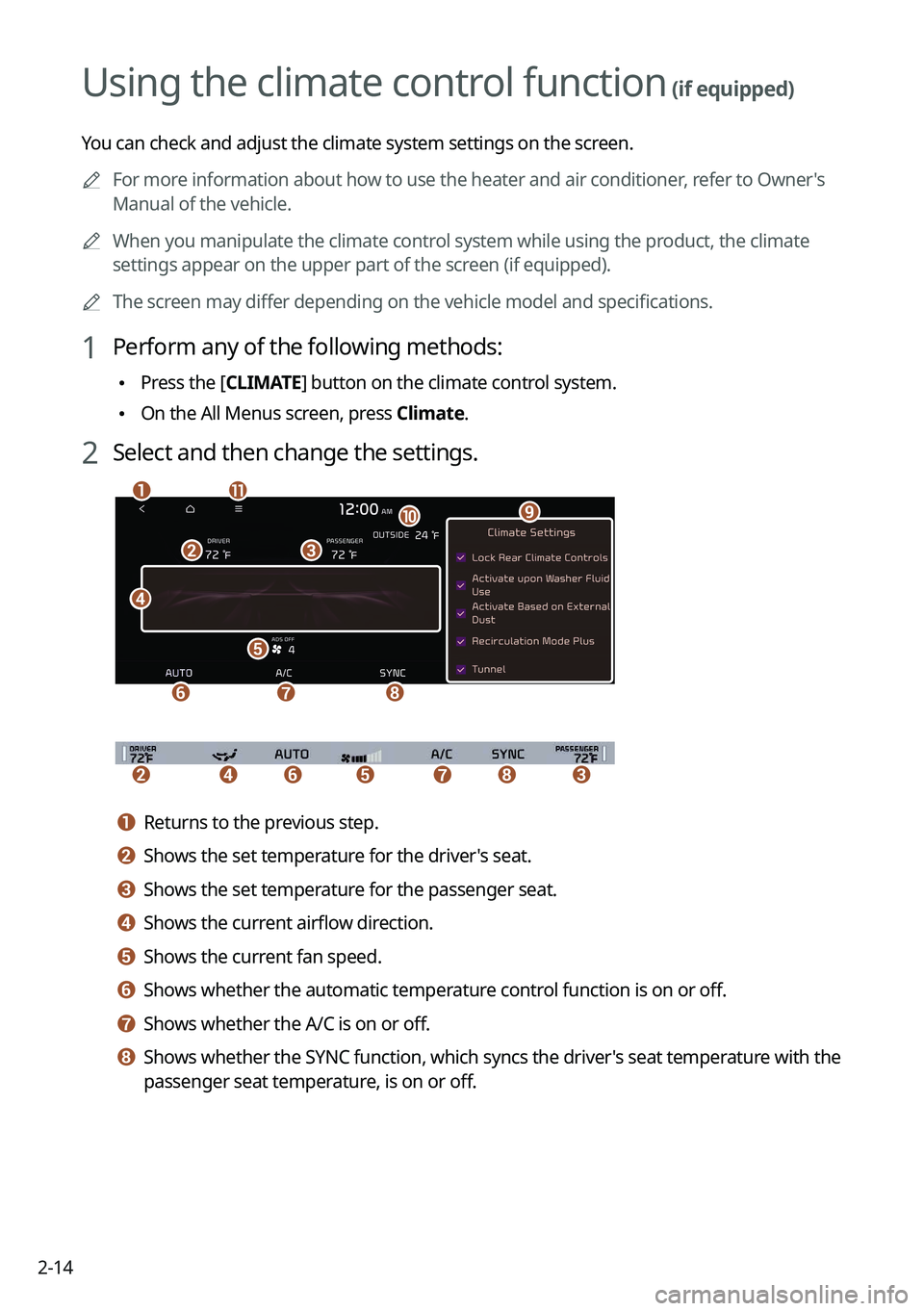
2 Select and then change the settings.
c
d
e
f
b
gh
k
j
ai
bcedfgh
a a Returns to the previous step.
b b Shows the set temperature for the driver's seat.
c c Shows the set temperature for the passenger seat.
d d Shows the current airflow direction.
e e Shows the current fan speed.
f f Shows whether the automatic temperature control function is on or off.
g g Shows whether the A/C is on or off.
h h Shows whether the SYNC function, which syncs the driver's seat temperature with the
passenger seat temperature, is on or off.
Page 53 of 332
2-15
i i Configure specific climate control function settings.
A
Available settings may differ depending on the vehicle model and specifications.
j j Shows the outside temperature of the vehicle.
k k The list of menu items appears.
•Display Off
: Turns off the screen. To switch the screen back on, press the screen or
briefly press the power button.
• User's Manual on Web (QR Code): Displays the QR code that provides access to
the online user manual for the system.
A
The temperature of the climate system can be adjusted by 1 ℉ increments. When the
temperature is set to the lower limit or upper limit, "LOW" or "HIGH" appears on the
screen.
A
Available settings may differ depending on the vehicle model and specifications.
Using the rear-seat climate control function
(if equipped)
You can check or set the rear-seat climate status on the system screen.
1 Perform any of the following methods:
•Press the [
REAR] button on the climate control system.
•On the All Menus screen, press Rear Climate.
Page 54 of 332
2-16
2 Select and then change the settings.
f
a
c
e
h
gb
d
For automatic temperature control
e
ahg
d
c
b
For manual temperature control
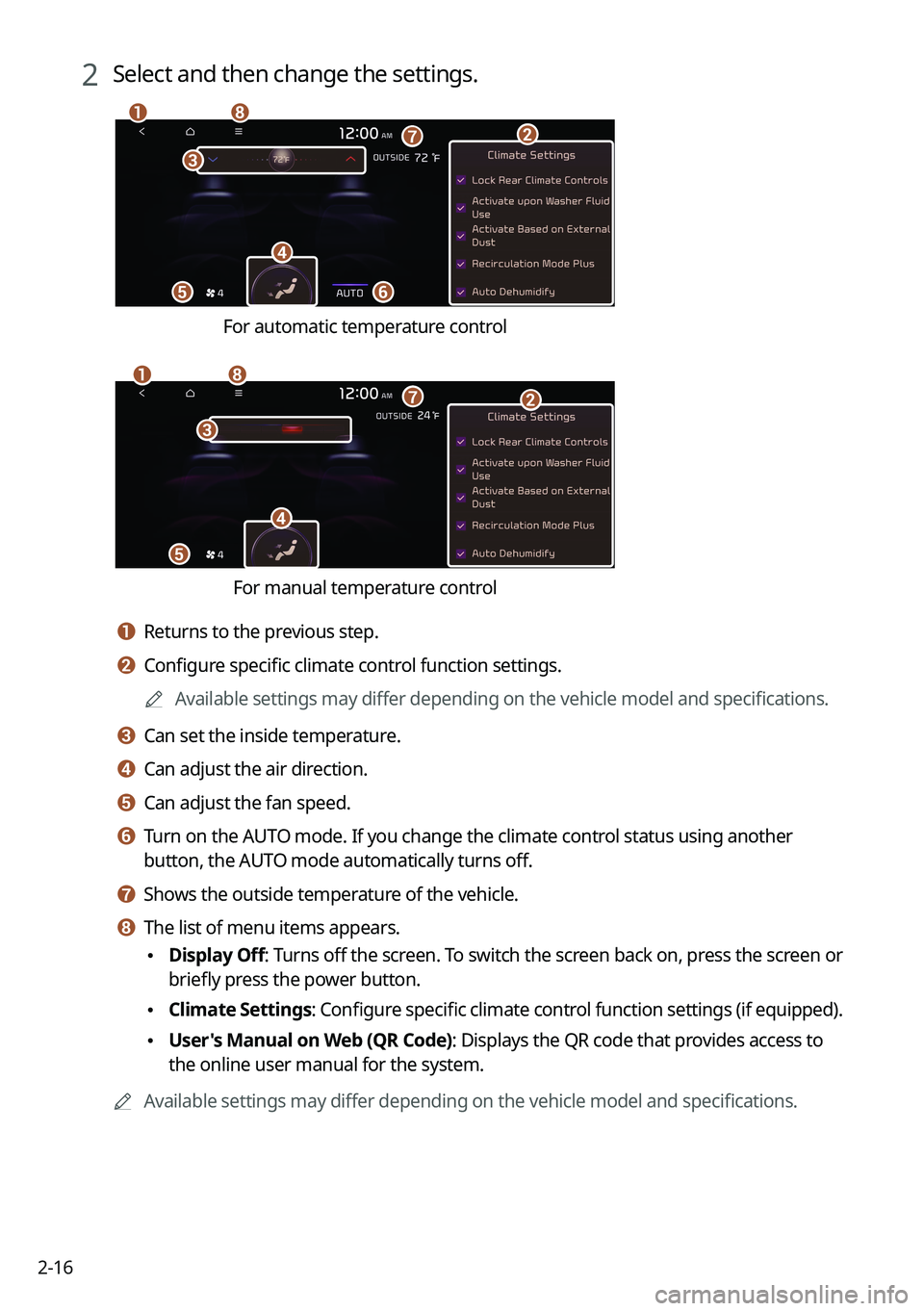
a a Returns to the previous step.
b b Configure specific climate control function settings.
A
Available settings may differ depending on the vehicle model and specifications.
c c Can set the inside temperature.
d d Can adjust the air direction.
e e Can adjust the fan speed.
f f Turn on the AUTO mode. If you change the climate control status using another
button, the AUTO mode automatically turns off.
g g Shows the outside temperature of the vehicle.
h h The list of menu items appears.
•Display Off
: Turns off the screen. To switch the screen back on, press the screen or
briefly press the power button.
• Climate Settings
: Configure specific climate control function settings (if equipped).
•User's Manual on Web (QR Code): Displays the QR code that provides access to
the online user manual for the system.
A
Available settings may differ depending on the vehicle model and specifications.