Driver only KIA NIRO PHEV 2022 Owner's Manual
[x] Cancel search | Manufacturer: KIA, Model Year: 2022, Model line: NIRO PHEV, Model: KIA NIRO PHEV 2022Pages: 710, PDF Size: 10.35 MB
Page 290 of 710

Features of your vehicle
150
4
Climate information screen
selection (if equipped)
Press the climate information screen
selection button to display climate
information on the screen.
Driver Only
If you press the DRIVER ONLY but-
ton( ) and the indicator light illumi-
nates, cold air mostly blows in the
direction of the driver’s seat.
However, some of the cold air may
come out of other seats’ ducts to
keep indoor air pleasant.
If you use the button with no passen-
ger in the front passenger seat, ener-
gy consumption will be reduced.
System operation
Ventilation
1.Set the mode to the position.
2.Set the air intake control to the out- side (fresh) air position.
3.Set the temperature control to the desired position.
4.Set the fan speed control to the desired speed.
Heating
1.Set the mode to the position.
2.Set the air intake control to the out-side (fresh) air position.
3.Set the temperature control to the desired position.
4.Set the fan speed control to the desired speed.
5.If dehumidified heating is desired, turn the air conditioning system (if
equipped) on.
If the windshield fogs up, set the mode to the
orposition.
ODEP049312
ODE046311
Page 313 of 710

4173
Features of your vehicle
Floor mat anchor(s)
(if equipped)
When using a floor mat on the front
floor carpet, make sure it attaches to
the floor mat anchor(s) in your vehi-
cle. This keeps the floor mat from
sliding forward.The following must be observed
when installing ANY floor mat to the
vehicle.
Ensure that the floor mats are
securely attached to the vehicle's
floor mat anchor(s) before driving
the vehicle.
Do not use ANY floor mat that can- not be firmly attached to the vehi-
cle's floor mat anchors.
Do not stack floor mats on top of one another (e.g. all-weather rub-
ber mat on top of a carpeted floor
mat). Only a single floor mat should
be installed in each position.
✽ ✽ NOTICE
Your vehicle was manufactured with
driver's side floor mat anchors that
are designed to securely hold the
floor mat in place. To avoid any
interference with pedal operation,
Kia recommends that only the Kia
floor mat designed for use in your
vehicle be installed.
OXM043309
■Type A■Type B
WARNING - After market
floor mat
Do not install aftermarket floor
mats that are not capable of
being securely attached to the
vehicle's floor mat anchors.
Unsecured floor mats can inter-
fere with pedal operation.
WARNING
Do not hang other objects such
as hangers or hard objects from
the clothes hanger. Also, do not
put heavy, sharp or breakable
objects in the clothing’s pock-
ets. In an accident or when the
curtain air bag is inflated, it may
cause vehicle damage or per-
sonal injury.
OPS046500
Page 336 of 710
513
Driving your vehicle
✽ ✽
NOTICE
If you leave the ENGINE START/
STOP button in the ACC or ON
position for a long time, the battery
will discharge.
Starting the hybrid system✽ ✽ NOTICE
• The hybrid system will start by
pressing the Engine Start/Stop
button, only when the smart key is
in the vehicle.
• Even when the smart key is in the vehicle, if it is far away from the
driver, the hybrid system may not
start.
• When the Engine Start/Stop but- ton is in the ACC or ON position,
and any door is open, the system
checks for the smart key. When
the smart key is not in the vehicle,
the “ ” indicator will blink and
the warning “Key not in vehicle”
will come on. When all doors are
closed, the chime will also sound
for about 5 seconds. Keep the
smart key in the vehicle when in
the ACC position or if the hybrid
system is ON.
WARNING- Starting
vehicle
Never press the ENGINE
START/STOP button while the
vehicle is in motion except in an
emergency. This would result in
loss of directional control and
braking function, which could
cause an accident.
WARNING
Always wear appropriate shoes when operating your
vehicle. Unsuitable shoes,
such as high heels, ski boots,
sandals, flip-flops, etc., may
interfere with your ability to
use the brake and accelerator
pedals.
Do not start the vehicle with the accelerator pedal depressed.
The vehicle can move and
lead to an accident.
Page 345 of 710
![KIA NIRO PHEV 2022 Owners Manual Driving your vehicle
22
5
3.While pressing the brake pedal,
turn the ignition switch or ENGINE
START/STOP button [OFF].
- For smart key equipped vehicles,the ignition switch or ENGINE
START/STOP but](/img/2/54743/w960_54743-344.png "KIA NIRO PHEV 2022 Owners Manual Driving your vehicle
22
5
3.While pressing the brake pedal,
turn the ignition switch or ENGINE
START/STOP button [OFF].
- For smart key equipped vehicles,the ignition switch or ENGINE
START/STOP but")
Driving your vehicle
22
5
3.While pressing the brake pedal,
turn the ignition switch or ENGINE
START/STOP button [OFF].
- For smart key equipped vehicles,the ignition switch or ENGINE
START/STOP button can be
moved to [OFF] only when the
shift lever is in [P].
4.Change the gear shift lever to [N] (Neutral) while pressing the brake
pedal and pushing [SHIFT LOCK
RELEASE] button or inserting,
pressing down a tool (e.g. flathead
screw-driver) into the [SHIFT LOCK
RELEASE] access hole at the same
time. Then, the vehicle will move
when external force is applied.
WARNING - Parking In
Neutral
With the exception of parking in neutral gear, always park the
vehicle in [P] (Park) for safety
and apply the parking brake.
Before parking in [N] (Neutral) gear, make sure the parking
ground is level and flat. Do not
park in [N] gear on any slopes
or gradients. If parked and left
in [N], the vehicle may move
and cause serious damage or
injury.
After the ignition switch or ENGINE START/STOP button
has been turned off, the
Electronic Parking Brake can-
not be disengaged.
(Continued)(Continued)
For EPB (Electronic ParkingBrake) equipped vehicles with
[AUTO HOLD] function used
while driving, if the ignition
switch or ENGINE
START/STOP button has been
turned [OFF], the Electronic
Parking Brake will be engaged
automatically. Therefore,
[AUTO HOLD] function should
be turned off before the igni-
tion button is turned off.
Page 346 of 710

523
Driving your vehicle
D (Drive)
This is the normal driving position.
The transmission will automatically
shift through a six-gear sequence,
providing the best fuel economy and
power.
For extra power when passing anoth-
er vehicle or driving uphill depress
the accelerator pedal further until
you feel the transmission downshift
to a lower gear.
To stop the vehicle during driving,
please press brake pedal fully to pre-
vent unintended movement.Manual mode
Whether the vehicle is stationary or
in motion, manual mode is selected
by pushing the shift lever from the D
(Drive) position into the manual gate.
To return to D (Drive) range opera-
tion, push the shift lever back into the
main gate.
In manual mode, moving the shift lever
backwards and forwards will allow you
to select the desired range of gears for
the current driving conditions.
+ (Up) : Push the lever forward once
to shift up one gear.
- (Down) : Pull the lever backwards
once to shift down one gear.✽ ✽
NOTICE
• Only the six forward gears can be
selected. To reverse or park the
vehicle, move the shift lever to the
R (Reverse) or P (Park) position as
required.
• Downshifts are made automatical- ly when the vehicle slows down.
When the vehicle stops, 1st gear is
automatically selected.
• When the engine rpm approaches the red zone the transmission will
upshift automatically.
• If the driver presses the lever to + (Up) or - (Down) position, the trans-
mission may not make the request-
ed gear change if the next gear is
outside of the allowable rpm range.
ODEP059012
Page 370 of 710
547
Driving your vehicle
✽ ✽NOTICE
When you jump start your vehicle
because of a drained battery, the
engine may not run as smoothly and
the ABS warning light may turn on at
the same time. This happens because
of low battery voltage. It does not
mean your ABS has malfunctioned.
• Do not pump your brakes!
• Have the battery recharged before
driving the vehicle.
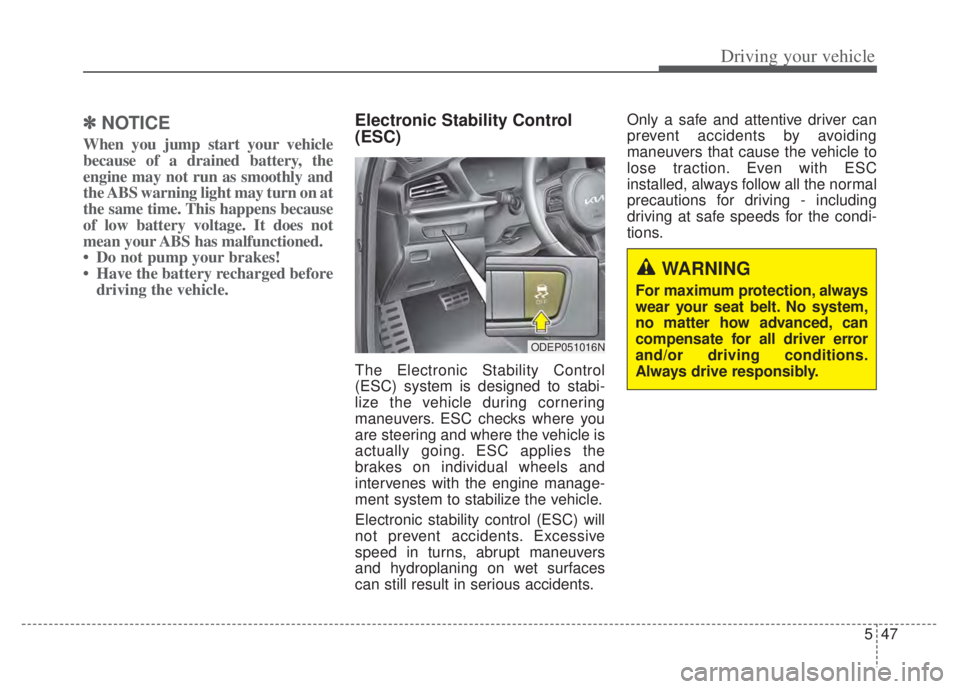
Electronic Stability Control
(ESC)
The Electronic Stability Control
(ESC) system is designed to stabi-
lize the vehicle during cornering
maneuvers. ESC checks where you
are steering and where the vehicle is
actually going. ESC applies the
brakes on individual wheels and
intervenes with the engine manage-
ment system to stabilize the vehicle.
Electronic stability control (ESC) will
not prevent accidents. Excessive
speed in turns, abrupt maneuvers
and hydroplaning on wet surfaces
can still result in serious accidents. Only a safe and attentive driver can
prevent accidents by avoiding
maneuvers that cause the vehicle to
lose traction. Even with ESC
installed, always follow all the normal
precautions for driving - including
driving at safe speeds for the condi-
tions.
ODEP051016N
WARNING
For maximum protection, always
wear your seat belt. No system,
no matter how advanced, can
compensate for all driver error
and/or driving conditions.
Always drive responsibly.
Page 371 of 710

Driving your vehicle
48
5
The Electronic Stability Control (ESC)
system is an electronic system
designed to help the driver maintain
vehicle control under adverse condi-
tions. It is not a substitute for safe driv-
ing practices. Factors including speed,
road conditions and driver steering
input can all affect whether ESC will be
effective in preventing a loss of control.
It is still your responsibility to drive and
corner at reasonable speeds and to
leave a sufficient margin of safety.
When you apply your brakes under
conditions which may lock the wheels,
you may hear a “tik-tik’’ sound from the
brakes, or feel a corresponding sensa-
tion in the brake pedal. This is normal
and it means your ESC is active.
✽ ✽
NOTICE
A click sound may be heard in the
engine compartment when the vehi-
cle begins to move after the engine is
started. These conditions are normal
and indicate that the Electronic
Stability Control System is function-
ing properly.
ESC operation
ESC ON condition
When the ignition switch orthe ENGINE START/STOP
button is turned ON, ESC
and ESC OFF indicator
lights illuminate for approxi-
mately 3 seconds, then
ESC is turned on.
ton for at least half a sec-
ond after turning the igni-
tion switch or the ENGINE
START/STOP button ON
to turn ESC off. (ESC OFF
indicator will illuminate). To
turn the ESC on, press the
ESC OFF button (ESC
OFF indicator light will go
off).
you may hear a slight tick-
ing sound. This is the ESC
performing an automatic
system self-check and does
not indicate a problem. When operating
When the ESC is in opera-
tion, the ESC indicator light
blinks.
Stability Control is operat-
ing properly, you can feel a
slight pulsation in the vehi-
cle. This is only the effect
of brake control and indi-
cates nothing unusual.
mud or driving on a slip-
pery road, pressing the
accelerator pedal may not
cause the engine rpm
(revolutions per minute) to
increase.
-
Page 375 of 710
Driving your vehicle
52
5
Malfunction indicator
The VSM can be deactivated even if
you don’t cancel the VSM operation
by pressing the ESC OFF button. It
indicates that a malfunction has
been detected somewhere in the
Electric Power Steering system or
VSM system. If the ESC indicator
light ( ) or EPS warning light
remains on, take your vehicle to an
authorized Kia dealer and have the
system checked. The Vehicle Stability Management
system is not a substitute for safe
driving practices but a supplemen-
tary function only. It is the responsi-
bility of the driver to always check
the speed and the distance to the
vehicle ahead. Always hold the
steering wheel firmly while driving.
Your vehicle is designed to activate according to the driver’s intention,
even with installed VSM. Always fol-
low all the normal precautions for
driving at safe speeds for the condi-
tions – including driving in inclement
weather and on a slippery road.
Hill-start Assist Control (HAC)
A vehicle has the tendency to roll
back on a steep hill when it starts to
go after stopping. The Hill-start
Assist Control (HAC) prevents the
vehicle from rolling back by applying
the brakes automatically for about 2
seconds. The brakes are released
when the accelerator pedal is
depressed or after about 2 seconds.
The HAC is activated only for about 2
seconds, so when the vehicle is
starting off always depress the accel-
erator pedal.
WARNING
For maximum protection,
always wear your seat belt. No
system, no matter how
advanced, can compensate for
all driver error and/or driving
conditions. Always drive
responsibly.
WARNING- Maintaining
Brake Pressure on Incline
HAC does not replace the need
to apply brakes while stopped on
an incline. While stopped, make
sure you maintain brake pres-
sure sufficient to prevent your
vehicle from rolling backward
and causing an accident. Don’t
release the brake pedal until you
are ready to accelerate forward.
Page 377 of 710

Driving your vehicle
54
5
Forward Collision-Avoidance Assist
is designed to detect Forward
Collision-Avoidance Assist (FCA)
(Sensor fusion) vehicle ahead or
pedestrian ahead in the roadway
through front view camera recogni-
tion to warn the driver that a collision
is imminent, and if necessary, apply
emergency braking.
❈ FCA stands for Forward Collision-
Avoidance AssistForward Collision-Avoidance
Assist setting and activation
Forward Safety
The driver can activate Forward
Collision-Avoidance Assist by plac-
ing the ignition switch or ENGINE
START/STOP button to the ON posi-
tion and by selecting:
“User Settings Driver Assistance
Forward Safety”
- If you select “Active Assist”, Forward Collision-Avoidance Assist acti-
vates. Forward Collision-Avoidance
Assist produces warning messages
and warning alarms in accordance
with the collision risk levels. Also, it
controls the brakes in accordance
with the collision risk levels.
- If you select “Warning Only”, Forward Collision-Avoidance Assist
activates and produces only warn-
ing alarms in accordance with the
collision risk levels. You should con-
trol the brake directly because
Forward Collision-Avoidance Assist
does not control the brake.
- If you select “Off ”, Forward Collision- Avoidance Assist deactivates,
FORWARD COLLISION-AVOIDANCE ASSIST (FCA) (FRONT VIEW CAMERA ONLY)
(IF EQUIPPED)
WARNING
Take the following precautions
when using Forward Collision-
Avoidance Assist :
This function is only a supple-mental function and it is not
intended to, nor does it replace
the need for extreme care and
attention of the driver. The
sensing range and objects
detectable by the sensors are
limited. Pay attention to the
road conditions at all times.
Never drive too fast in accor- dance with the road condi-
tions or while cornering.
Always drive cautiously to prevent unexpected and sud-
den situations from occur-
ring. Forward Collision-
Avoidance Assist does not
stop the vehicle completely
and is only intended to help
mitigate an imminent colli-
sion.
Page 379 of 710
Driving your vehicle
56
5
✽ ✽
NOTICE
If you change the warning timing,
the warning timing of other systems
may change. Always be aware of
warning timing before changing the
warning timing.
Prerequisite for activation
Forward Collision-Avoidance Assist
gets ready to be activated, when the
“Active Assist”, or “Warning Only”,
under the Forward Safety is selected
on the LCD display, and when the fol-
lowing prerequisites are satisfied.
- The ESC is activated.
- The driving speed is over 5 mph (8
km/h). (However, Forward Collision-
Avoidance Assist is activated within
certain driving speed.)
- The function detects a vehicle or a pedestrian in front, which may collide
with your vehicle. (Forward Collision-
Avoidance Assist may not be activat-
ed or may sound a warning alarm in
accordance with the driving situation
or vehicle condition.)
❈ Forward Collision-Avoidance
Assist may not operate properly
according to the frontal situation,
the direction and speed of pedes-
trian.WARNING
Completely stop the vehicle on
a safe location before operating
the switch on the steering
wheel to activate/deactivate
Forward Collision-Avoidance
Assist.
Forward Collision-Avoidance Assist automatically activates
upon placing the ignition switch
to the ON position. The driver
can deactivate Forward
Collision-Avoidance Assist by
canceling the function setting on
the LCD display or Infotainment
System screen.
Forward Collision-Avoidance Assist automatically deacti-
vates upon canceling the ESC.
When the ESC is canceled,
Forward Collision-Avoidance
Assist cannot be activated on
the LCD display or Infotainment
System screen.
Forward Collision-Avoidance
Assist warning light will illu-
minate, which is normal.