engine KIA NIRO PHEV 2023 Quick Start Guide Base Audio
[x] Cancel search | Manufacturer: KIA, Model Year: 2023, Model line: NIRO PHEV, Model: KIA NIRO PHEV 2023Pages: 172, PDF Size: 4.78 MB
Page 69 of 172

3-7
Starting the vehicle
\225Starting the vehicle with the motor′s
power
Driving
\225Driving the vehicle with the engine′s
power and the motor′s power
\225Driving the vehicle with the engine′s
power
\225Driving the vehicle with the motor′s
power
Viewing the energy flow
(PHEV only)
You can view the energy flow between the
engine, the electric motor, and the battery
according to your vehicle′s driving status.
1 On the Home screen, press
All Menus > PHEV > Energy
Flow.
2 View the current energy flow
according to the vehicle′s
driving status.
cc
aabb
dd
a a Display the options list.
\225 User′s Manual on Web (QR
Code): Access the web manual
via the QR code. For safety
reasons, you can access the QR
code only when your vehicle is
stationary.
b b Return to the previous level.
c c Your vehicle′s driving status
d d The energy delivery direction
between the engine, the electric
motor, and the battery
Page 70 of 172

3-8
\225Reducing the engine′s power for
slowing down the vehicle and charging
the battery with the deceleration
energy from the engine′s power
\225Reducing the engine′s power for
slowing down the vehicle
Idle mode
\225Idle mode without delivering any
power
\225Charging the battery with the engine′s
power while the vehicle is in idle mode
\225Charging the battery and driving the
vehicle with the engine′s power
\225Charging the battery with the engine′s
power and driving the vehicle with the
motor′s power
Decelerating
\225Charging the battery with the
deceleration energy from braking and
the engine′s power
\225Charging the battery with the
deceleration energy from braking
Page 83 of 172
5-3
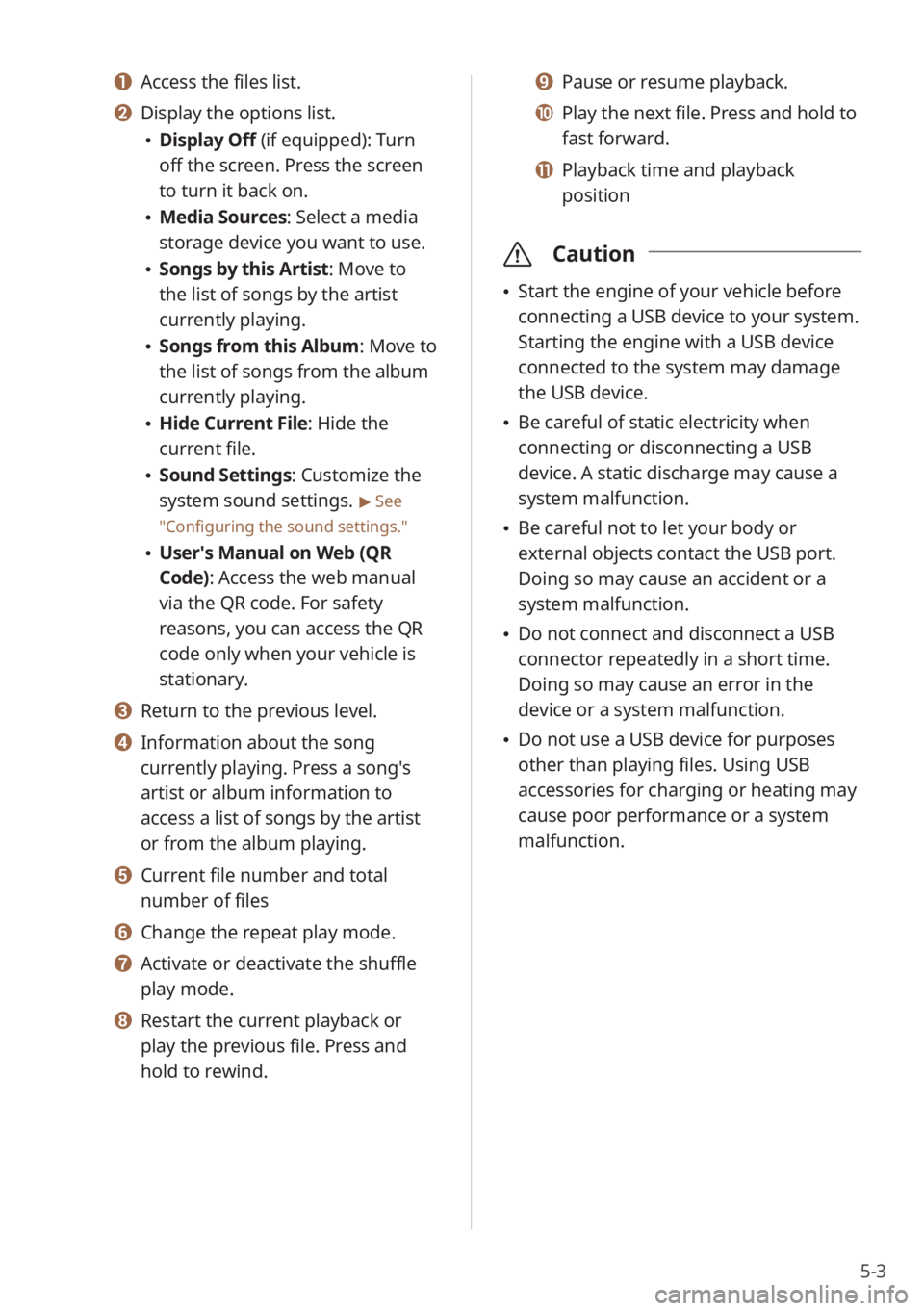
a a Access the files list.
b b Display the options list.
\225Display Off (if equipped): Turn
off the screen. Press the screen
to turn it back on.
\225Media Sources: Select a media
storage device you want to use.
\225Songs by this Artist: Move to
the list of songs by the artist
currently playing.
\225Songs from this Album: Move to
the list of songs from the album
currently playing.
\225Hide Current File: Hide the
current file.
\225Sound Settings: Customize the
system sound settings.
> See
″ Configuring the sound settings.″
\225 User′s Manual on Web (QR
Code): Access the web manual
via the QR code. For safety
reasons, you can access the QR
code only when your vehicle is
stationary.
c c Return to the previous level.
d d Information about the song
currently playing. Press a song′s
artist or album information to
access a list of songs by the artist
or from the album playing.
e e Current file number and total
number of files
f f Change the repeat play mode.
g g Activate or deactivate the shuffle
play mode.
h h Restart the current playback or
play the previous file. Press and
hold to rewind.
i i Pause or resume playback.
j j Play the next file. Press and hold to
fast forward.
k k Playback time and playback
position
\335 Caution
\225Start the engine of your vehicle before
connecting a USB device to your system.
Starting the engine with a USB device
connected to the system may damage
the USB device.
\225Be careful of static electricity when
connecting or disconnecting a USB
device. A static discharge may cause a
system malfunction.
\225Be careful not to let your body or
external objects contact the USB port.
Doing so may cause an accident or a
system malfunction.
\225Do not connect and disconnect a USB
connector repeatedly in a short time.
Doing so may cause an error in the
device or a system malfunction.
\225Do not use a USB device for purposes
other than playing files. Using USB
accessories for charging or heating may
cause poor performance or a system
malfunction.
Page 111 of 172
8-3
Activating Kia Connect
services
You must activate Kia Connect services to
use them. An account with Owners.kia.
com is required for activation. If you do
not already have an account, enter your
information to create one. If you already
have an account, enter the verification
code you received from Owners.kia.com.
1 Park your vehicle in a safe
location.
\225You cannot enter information for
service activation while your vehicle
is moving.
2 On the Home screen, press All
Menus > Kia Connect > Kia
Connect Settings > Activate
Service.
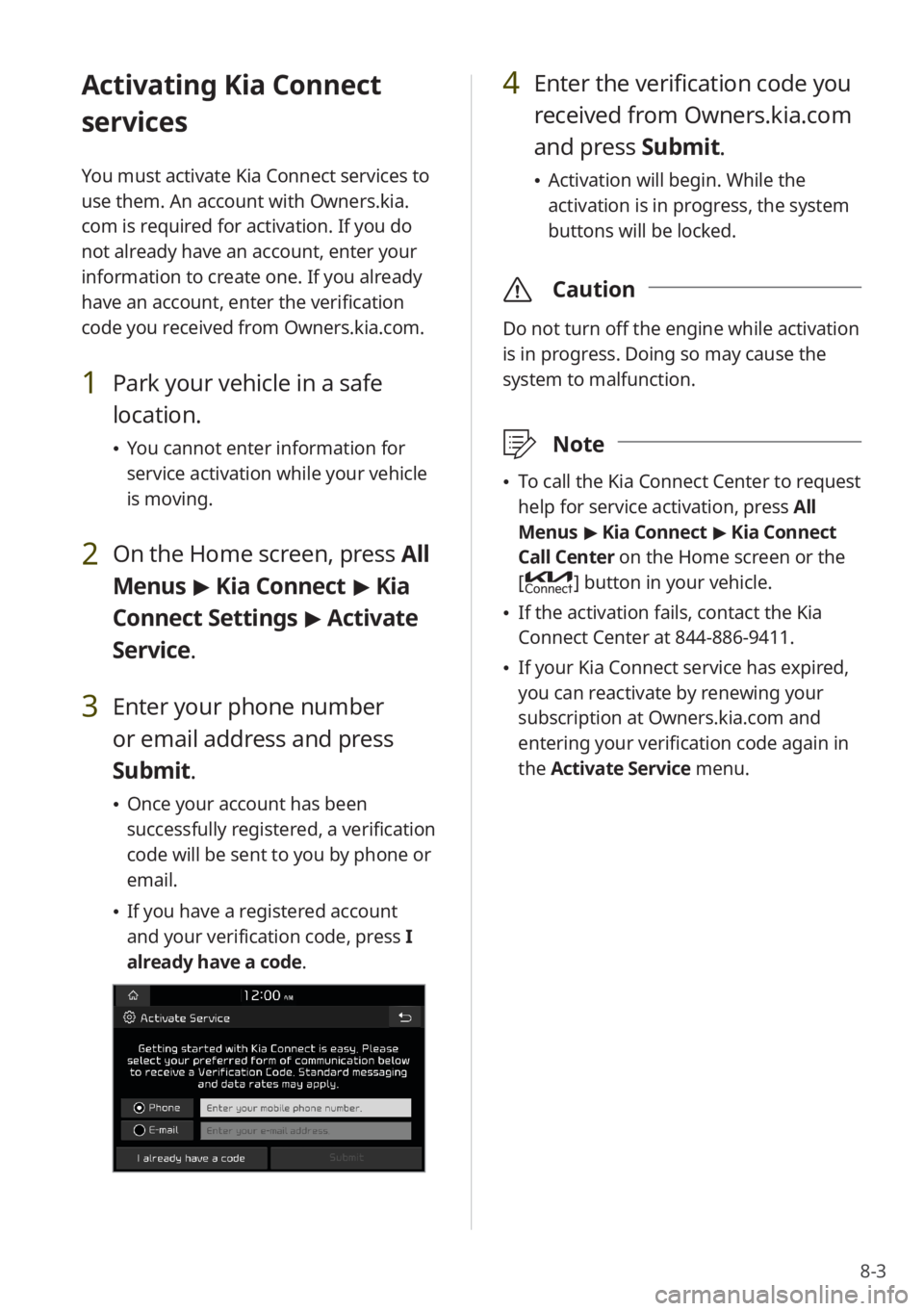
3 Enter your phone number
or email address and press
Submit.
\225 Once your account has been
successfully registered, a verification
code will be sent to you by phone or
email.
\225If you have a registered account
and your verification code, press I
already have a code .
4 Enter the verification code you
received from Owners.kia.com
and press Submit.
\225 Activation will begin. While the
activation is in progress, the system
buttons will be locked.
\335 Caution
Do not turn off the engine while activation
is in progress. Doing so may cause the
system to malfunction.
\333Note
\225To call the Kia Connect Center to request
help for service activation, press All
Menus > Kia Connect > Kia Connect
Call Center on the Home screen or the
[
] button in your vehicle.
\225 If the activation fails, contact the Kia
Connect Center at 844-886-9411.
\225If your Kia Connect service has expired,
you can reactivate by renewing your
subscription at Owners.kia.com and
entering your verification code again in
the Activate Service menu.
Page 112 of 172
8-4
Using the Kia Connect
menu
You can use Kia Connect services via the
Kia Connect menu in your system.
Starting the Kia Connect
menu
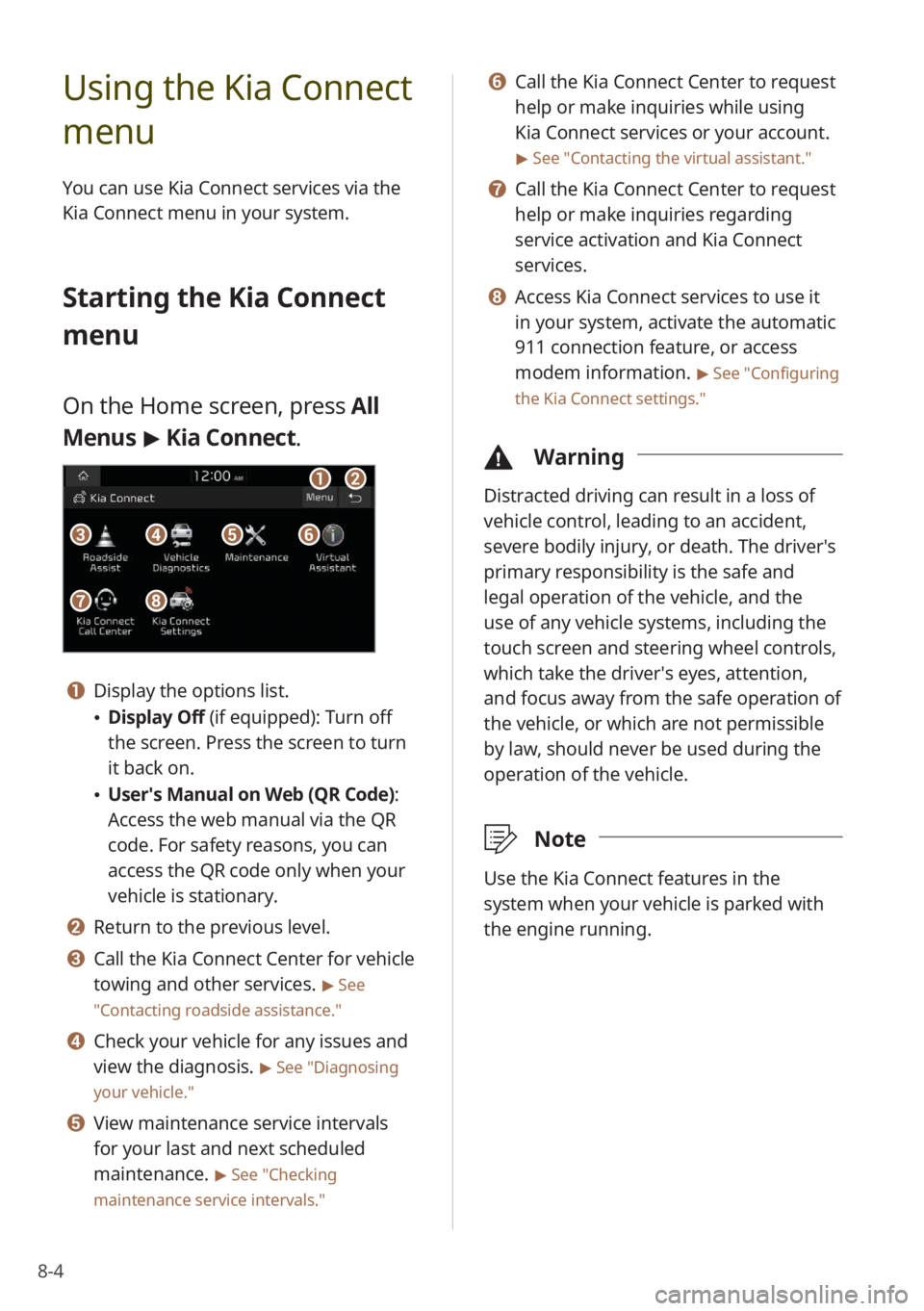
On the Home screen, press All
Menus > Kia Connect .
aa
gg
bb
eeccffdd
hh
a a Display the options list.
\225Display Off (if equipped): Turn off
the screen. Press the screen to turn
it back on.
\225User′s Manual on Web (QR Code) :
Access the web manual via the QR
code. For safety reasons, you can
access the QR code only when your
vehicle is stationary.
b b Return to the previous level.
c c Call the Kia Connect Center for vehicle
towing and other services.
> See
″ Contacting roadside assistance .″
d d Check your vehicle for any issues and
view the diagnosis.
> See ″Diagnosing
your vehicle .″
e e View maintenance service intervals
for your last and next scheduled
maintenance.
> See ″Checking
maintenance service intervals .″
f f Call the Kia Connect Center to request
help or make inquiries while using
Kia Connect services or your account.
> See ″Contacting the virtual assistant .″
g g Call the Kia Connect Center to request
help or make inquiries regarding
service activation and Kia Connect
services.
h h Access Kia Connect services to use it
in your system, activate the automatic
911 connection feature, or access
modem information.
> See ″Configuring
the Kia Connect settings .″
\334Warning
Distracted driving can result in a loss of
vehicle control, leading to an accident,
severe bodily injury, or death. The driver′s
primary responsibility is the safe and
legal operation of the vehicle, and the
use of any vehicle systems, including the
touch screen and steering wheel controls,
which take the driver′s eyes, attention,
and focus away from the safe operation of
the vehicle, or which are not permissible
by law, should never be used during the
operation of the vehicle.
\333Note
Use the Kia Connect features in the
system when your vehicle is parked with
the engine running.
Page 118 of 172
9-2
Configuring the
vehicle settings
(if
equipped)
You can change the settings related
to driving or the interior and exterior
environment of your vehicle.
Depending on the vehicle model or
specifications, displayed screens and
available options may vary.
On the Home screen, press All
Menus > Setup > Vehicle and
select an option to change.
\335 Caution
For your safety, park your vehicle in a safe
location before changing the settings.
\333Note
You can change the vehicle settings only
when the engine is running.
Drive Mode (if equipped)
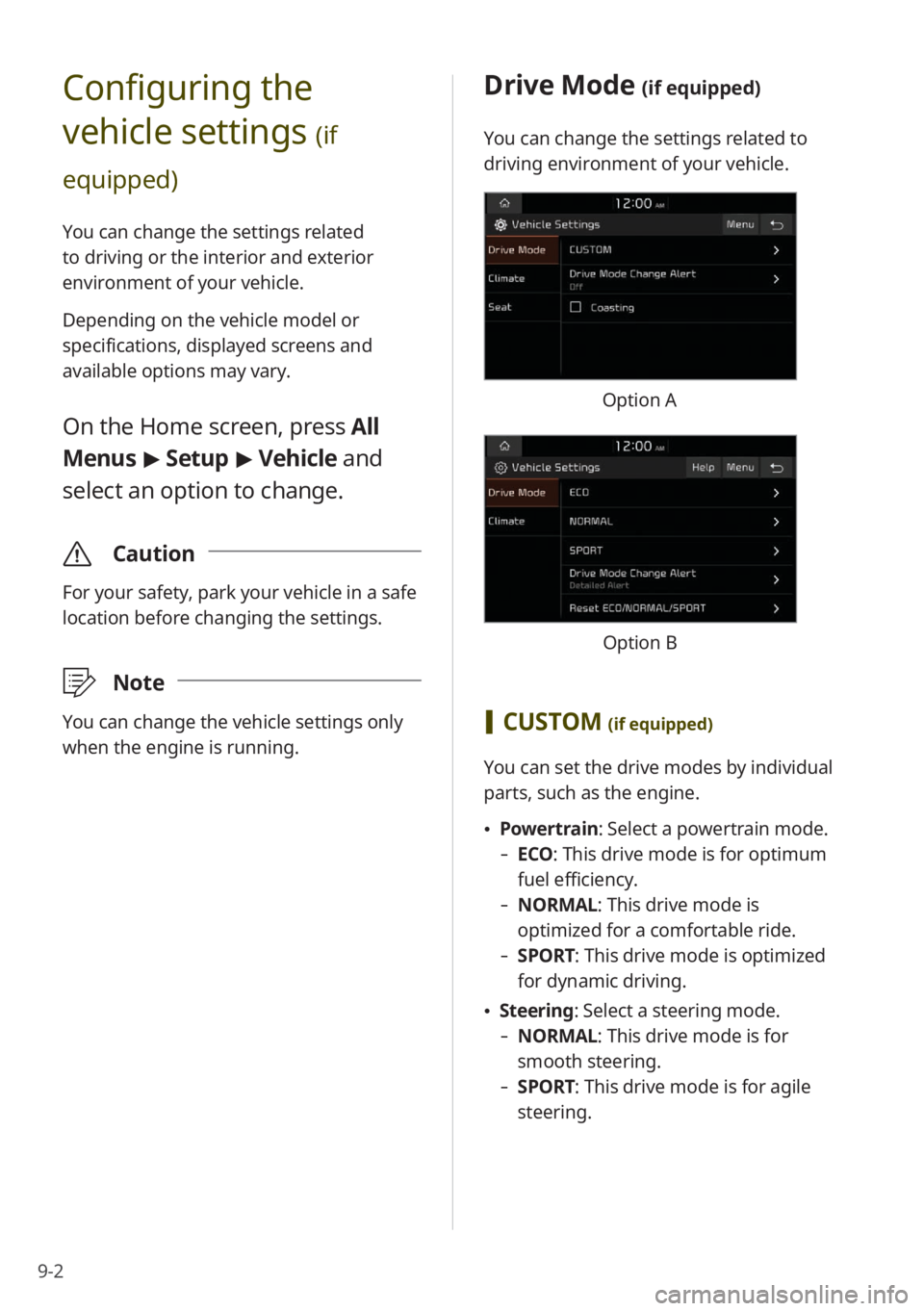
You can change the settings related to
driving environment of your vehicle.
Option A
Option B
[CUSTOM (if equipped)
You can set the drive modes by individual
parts, such as the engine.
\225 Powertrain: Select a powertrain mode.
- ECO : This drive mode is for optimum
fuel efficiency.
- NORMAL: This drive mode is
optimized for a comfortable ride.
-SPORT: This drive mode is optimized
for dynamic driving.
\225Steering: Select a steering mode.
- NORMAL: This drive mode is for
smooth steering.
-SPORT: This drive mode is for agile
steering.
Page 119 of 172
9-3
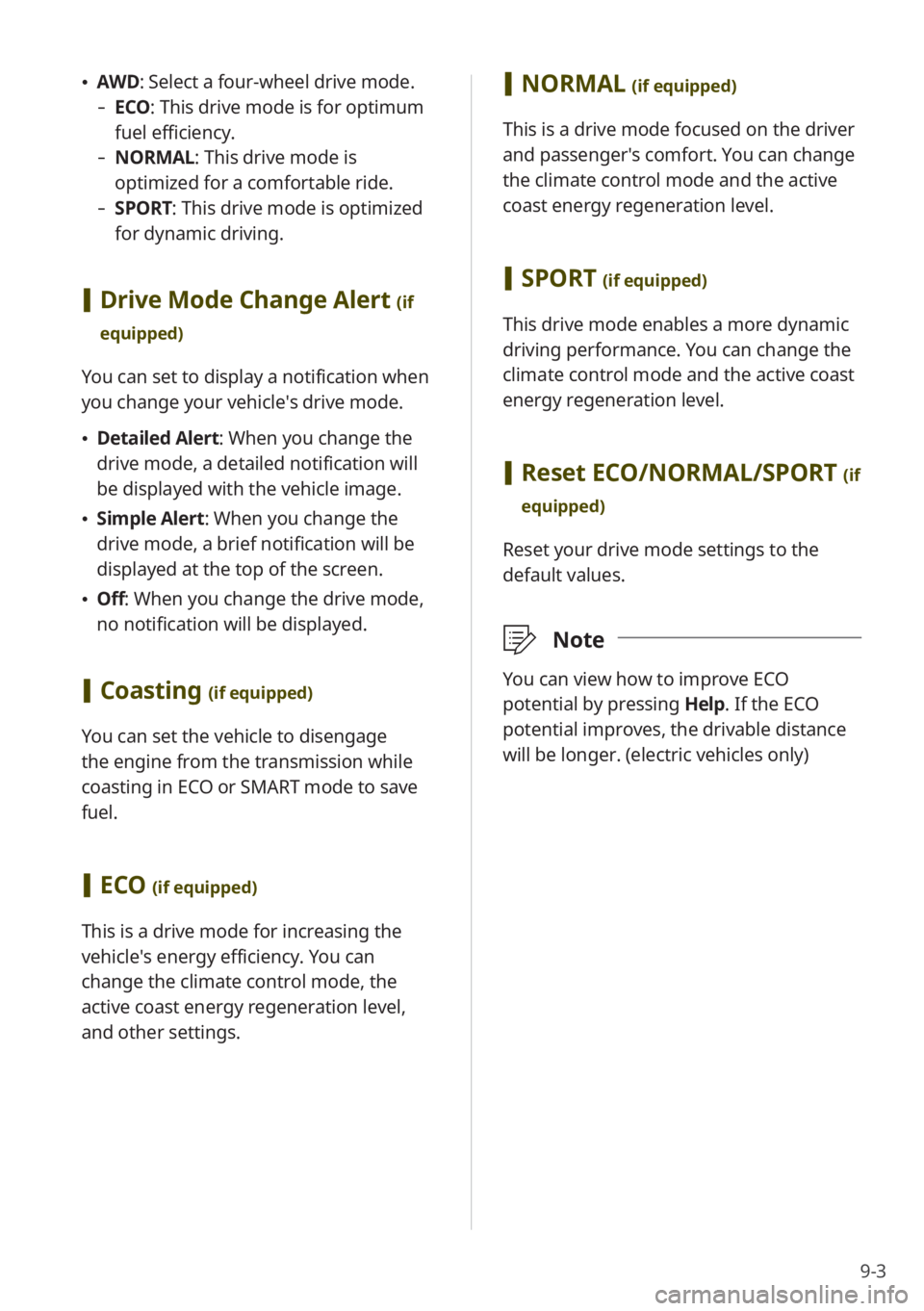
\225AWD : Select a four-wheel drive mode.
-ECO : This drive mode is for optimum
fuel efficiency.
- NORMAL: This drive mode is
optimized for a comfortable ride.
-SPORT: This drive mode is optimized
for dynamic driving.
[Drive Mode Change Alert (if
equipped)
You can set to display a notification when
you change your vehicle′s drive mode.
\225 Detailed Alert: When you change the
drive mode, a detailed notification will
be displayed with the vehicle image.
\225Simple Alert: When you change the
drive mode, a brief notification will be
displayed at the top of the screen.
\225Off: When you change the drive mode,
no notification will be displayed.
[Coasting (if equipped)
You can set the vehicle to disengage
the engine from the transmission while
coasting in ECO or SMART mode to save
fuel.
[ECO (if equipped)
This is a drive mode for increasing the
vehicle′s energy efficiency. You can
change the climate control mode, the
active coast energy regeneration level,
and other settings.
[NORMAL (if equipped)
This is a drive mode focused on the driver
and passenger′s comfort. You can change
the climate control mode and the active
coast energy regeneration level.
[SPORT (if equipped)
This drive mode enables a more dynamic
driving performance. You can change the
climate control mode and the active coast
energy regeneration level.
[Reset ECO/NORMAL/SPORT (if
equipped)
Reset your drive mode settings to the
default values.
\333 Note
You can view how to improve ECO
potential by pressing Help. If the ECO
potential improves, the drivable distance
will be longer. (electric vehicles only)
Page 120 of 172
9-4
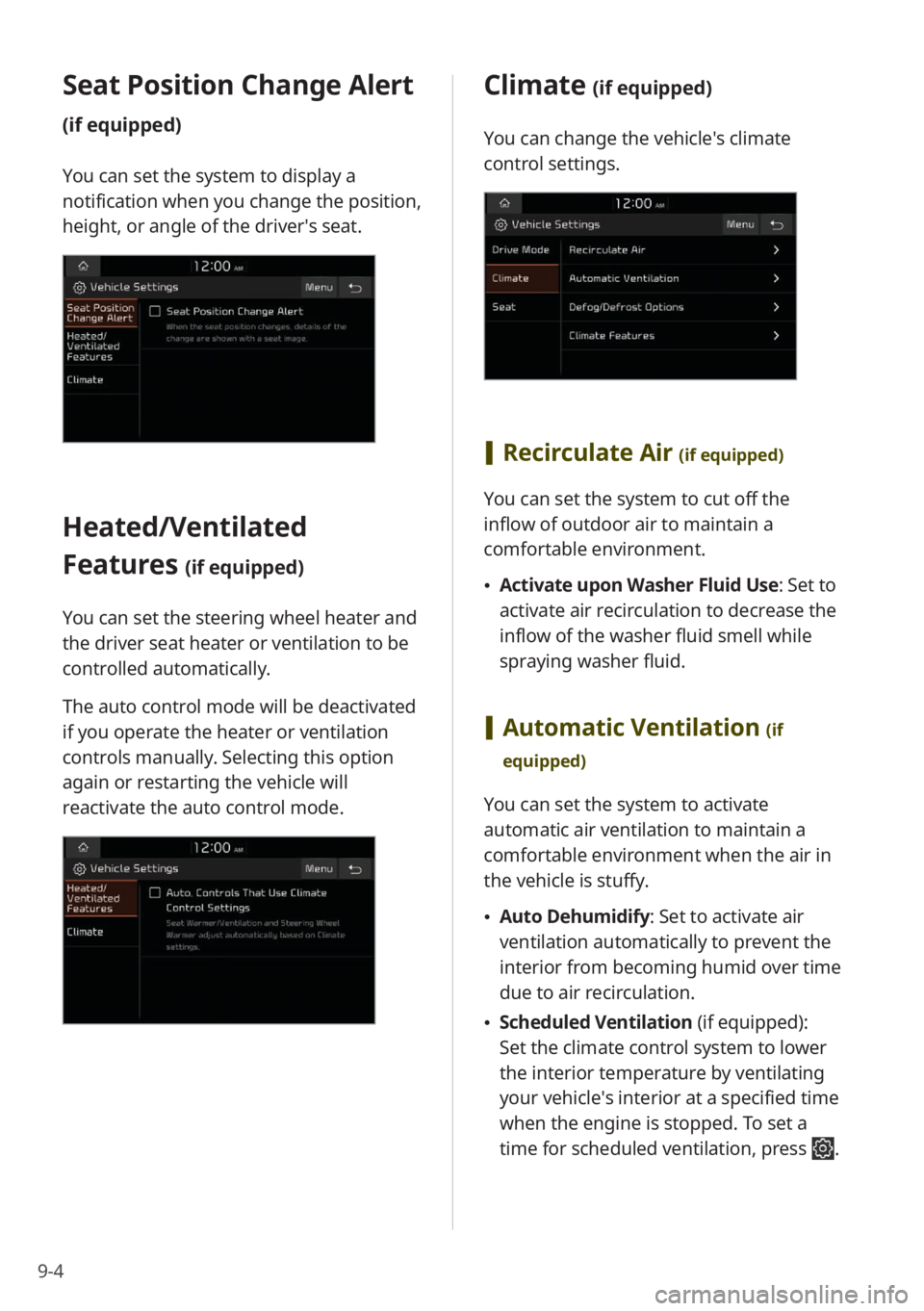
Seat Position Change Alert
(if equipped)
You can set the system to display a
notification when you change the position,
height, or angle of the driver′s seat.
Heated/Ventilated
Features
(if equipped)
You can set the steering wheel heater and
the driver seat heater or ventilation to be
controlled automatically.
The auto control mode will be deactivated
if you operate the heater or ventilation
controls manually. Selecting this option
again or restarting the vehicle will
reactivate the auto control mode.
Climate (if equipped)
You can change the vehicle′s climate
control settings.
[Recirculate Air (if equipped)
You can set the system to cut off the
inflow of outdoor air to maintain a
comfortable environment.
\225Activate upon Washer Fluid Use: Set to
activate air recirculation to decrease the
inflow of the washer fluid smell while
spraying washer fluid.
[Automatic Ventilation (if
equipped)
You can set the system to activate
automatic air ventilation to maintain a
comfortable environment when the air in
the vehicle is stuffy.
\225 Auto Dehumidify : Set to activate air
ventilation automatically to prevent the
interior from becoming humid over time
due to air recirculation.
\225 Scheduled Ventilation (if equipped):
Set the climate control system to lower
the interior temperature by ventilating
your vehicle′s interior at a specified time
when the engine is stopped. To set a
time for scheduled ventilation, press
.
Page 128 of 172
9-12
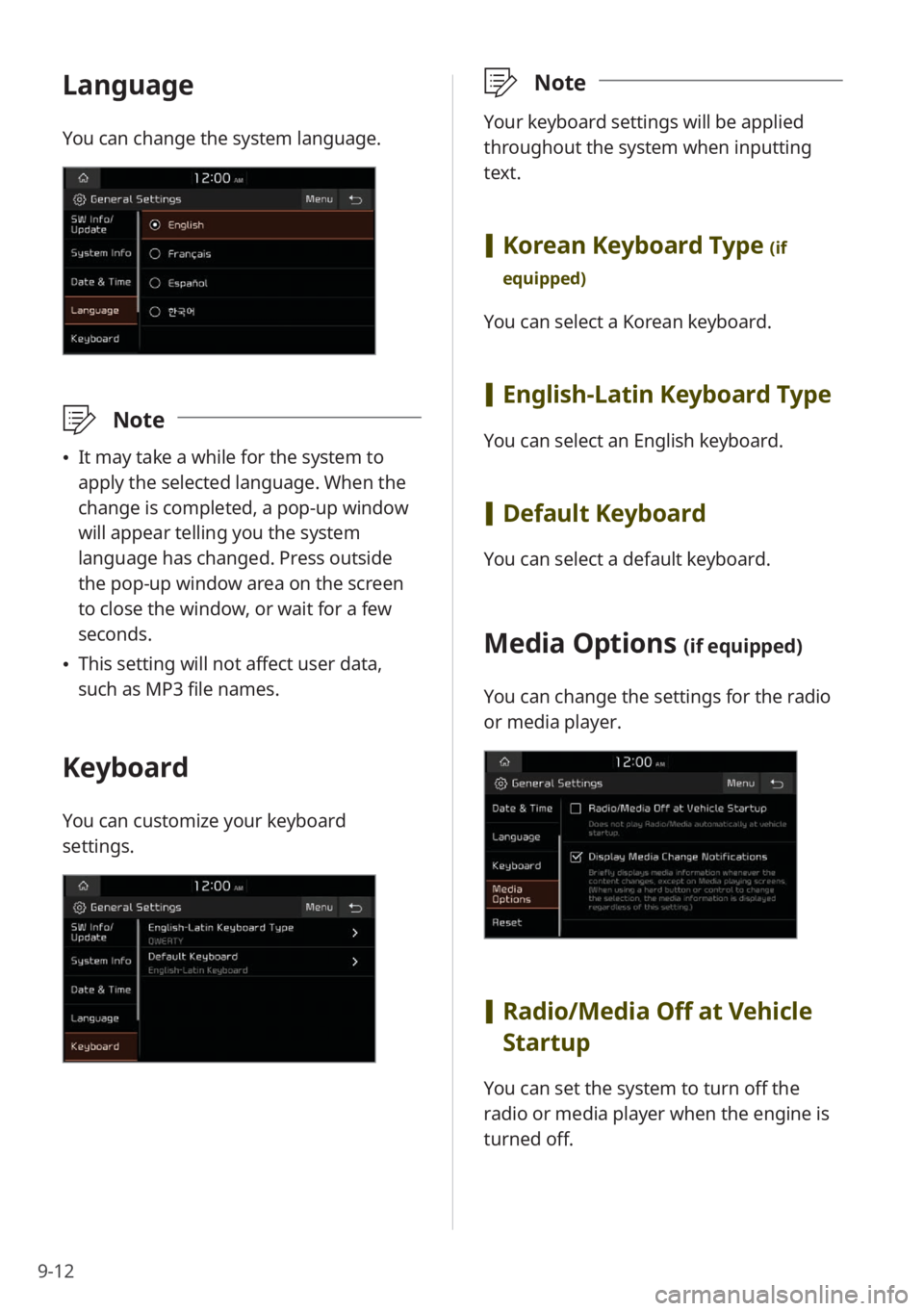
Language
You can change the system language.
\333Note
\225It may take a while for the system to
apply the selected language. When the
change is completed, a pop-up window
will appear telling you the system
language has changed. Press outside
the pop-up window area on the screen
to close the window, or wait for a few
seconds.
\225This setting will not affect user data,
such as MP3 file names.
Keyboard
You can customize your keyboard
settings.
\333 Note
Your keyboard settings will be applied
throughout the system when inputting
text.
[Korean Keyboard Type (if
equipped)
You can select a Korean keyboard.
[ English-Latin Keyboard Type
You can select an English keyboard.
[Default Keyboard
You can select a default keyboard.
Media Options (if equipped)
You can change the settings for the radio
or media player.
[Radio/Media Off at Vehicle
Startup
You can set the system to turn off the
radio or media player when the engine is
turned off.
Page 138 of 172
9-22
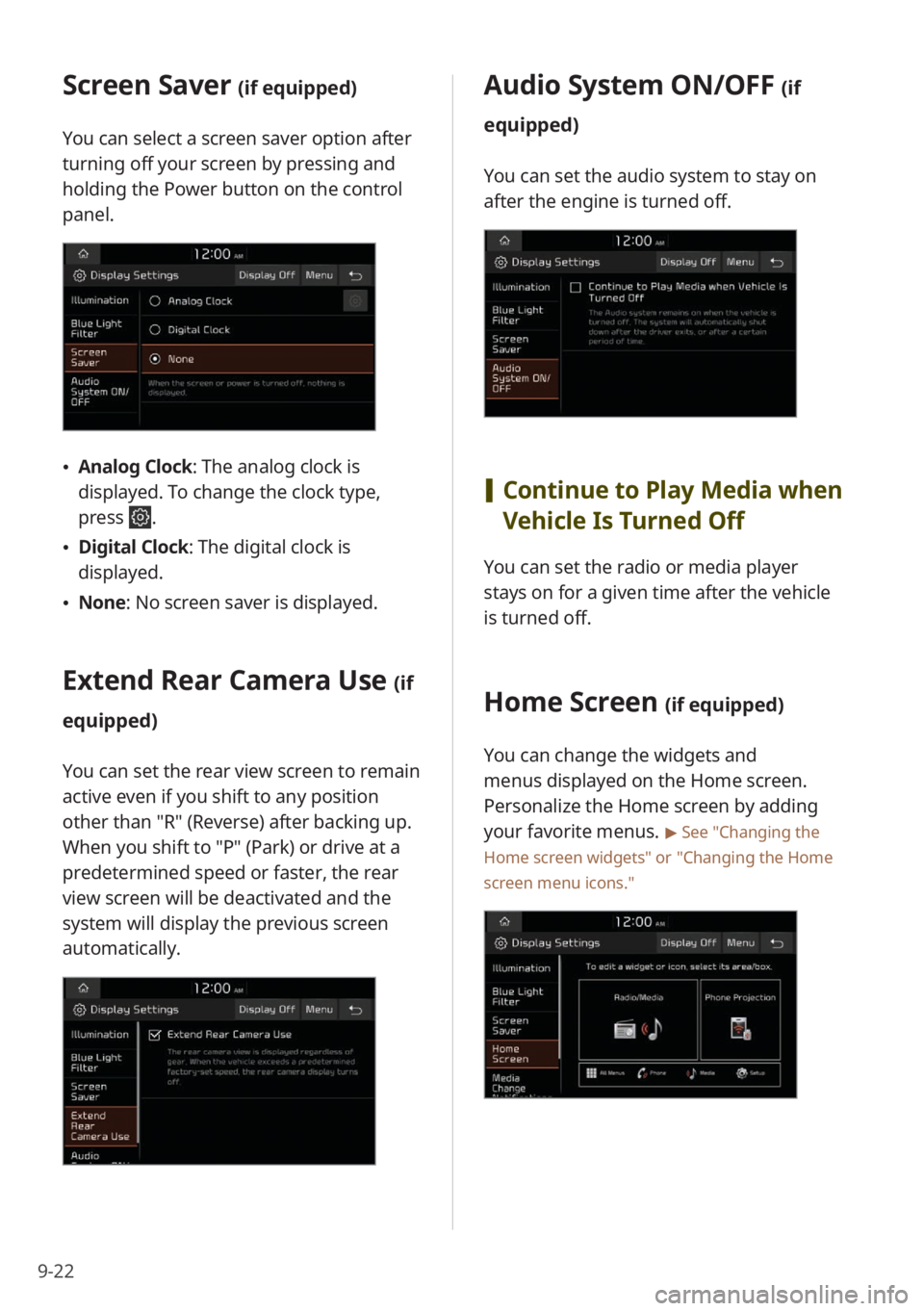
Screen Saver (if equipped)
You can select a screen saver option after
turning off your screen by pressing and
holding the Power button on the control
panel.
\225Analog Clock : The analog clock is
displayed. To change the clock type,
press
.
\225 Digital Clock : The digital clock is
displayed.
\225 None: No screen saver is displayed.
Extend Rear Camera Use (if
equipped)
You can set the rear view screen to remain
active even if you shift to any position
other than ″R″ (Reverse) after backing up.
When you shift to ″P″ (Park) or drive at a
predetermined speed or faster, the rear
view screen will be deactivated and the
system will display the previous screen
automatically.
Audio System ON/OFF (if
equipped)
You can set the audio system to stay on
after the engine is turned off.
[ Continue to Play Media when
Vehicle Is Turned Off
You can set the radio or media player
stays on for a given time after the vehicle
is turned off.
Home Screen (if equipped)
You can change the widgets and
menus displayed on the Home screen.
Personalize the Home screen by adding
your favorite menus.
> See ″Changing the
Home screen widgets″ or
″ Changing the Home
screen menu icons.″