light KIA Optima 2008 2.G Owner's Guide
[x] Cancel search | Manufacturer: KIA, Model Year: 2008, Model line: Optima, Model: KIA Optima 2008 2.GPages: 289, PDF Size: 4.78 MB
Page 80 of 289
371
Knowing your vehicle
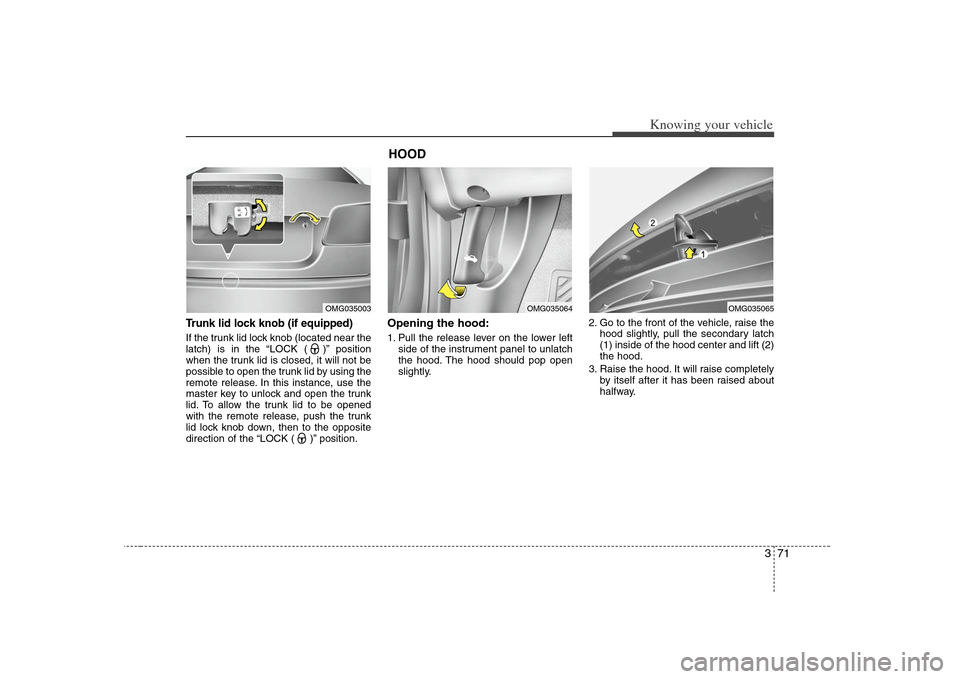
Trunk lid lock knob (if equipped)If the trunk lid lock knob (located near the
latch) is in the “LOCK ( )” position
when the trunk lid is closed, it will not be
possible to open the trunk lid by using the
remote release. In this instance, use the
master key to unlock and open the trunk
lid. To allow the trunk lid to be opened
with the remote release, push the trunk
lid lock knob down, then to the opposite
direction of the “LOCK ( )” position.
Opening the hood:1. Pull the release lever on the lower left
side of the instrument panel to unlatch
the hood. The hood should pop open
slightly.2. Go to the front of the vehicle, raise the
hood slightly, pull the secondary latch
(1) inside of the hood center and lift (2)
the hood.
3. Raise the hood. It will raise completely
by itself after it has been raised about
halfway.
OMG035003
HOOD
OMG035064
OMG035065
Page 81 of 289
Knowing your vehicle72 3Closing the hood1. Before closing the hood, check the fol-
lowing:
must be correctly installed.
bustible material must be removed
from the engine compartment.
2. Lower the hood halfway and push
down to securely lock in place.
Make sure the hood is properly locked
before driving.
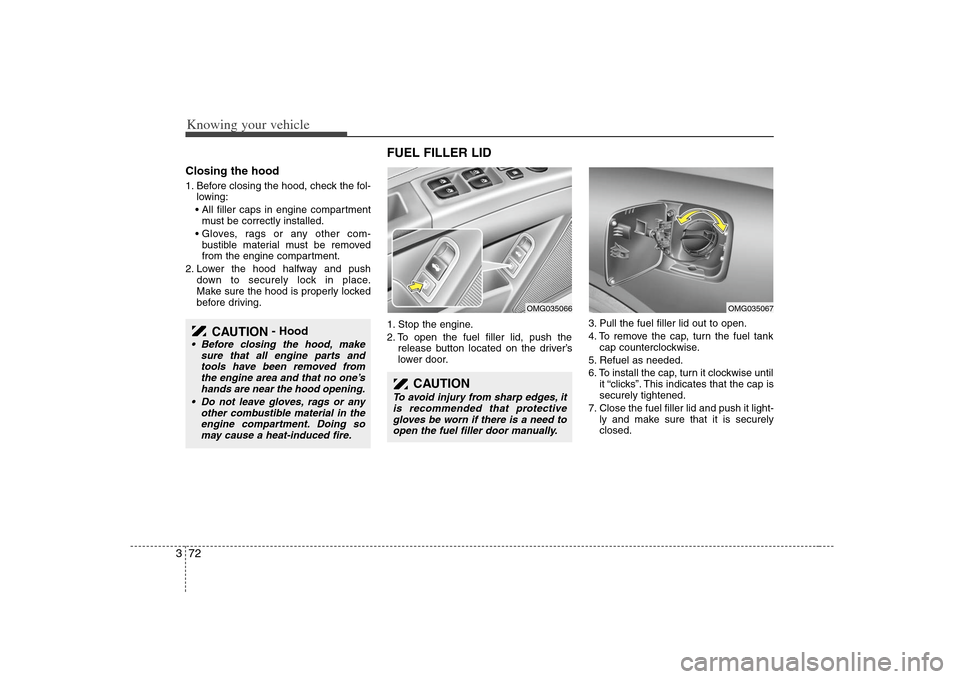
FUEL FILLER LID 1. Stop the engine.
2. To open the fuel filler lid, push the
release button located on the driver’s
lower door.3. Pull the fuel filler lid out to open.
4. To remove the cap, turn the fuel tank
cap counterclockwise.
5. Refuel as needed.
6. To install the cap, turn it clockwise until
it “clicks”. This indicates that the cap is
securely tightened.
7. Close the fuel filler lid and push it light-
ly and make sure that it is securely
closed.
CAUTION
- Hood
Before closing the hood, make
sure that all engine parts and
tools have been removed from
the engine area and that no one’s
hands are near the hood opening.
Do not leave gloves, rags or any
other combustible material in the
engine compartment. Doing so
may cause a heat-induced fire.
CAUTION
To avoid injury from sharp edges, it
is recommended that protective
gloves be worn if there is a need to
open the fuel filler door manually.
OMG035067
OMG035066
Page 83 of 289
Knowing your vehicle74 3
✽
✽
NOTICE• Make sure to refuel with unleaded
fuel only.
• Check to make sure the fuel filler cap is
securely closed after refueling. A loose
fuel filler cap may cause the “Check
Engine (Malfuntion indicator, )”
light in the instrument panel to illumi-
nate unnecessarily.
• If the fuel filler cap requires replace-
ment, use only a genuine Kia cap or
the equivalent specified for your vehi-
cle. An incorrect fuel filler cap can
result in a serious malfunction of the
fuel system or emission control sys-
tem.
• Do not spill fuel on the exterior sur-
faces of the vehicle. Any type of fuel
spilled on painted surfaces may dam-
age the paint.
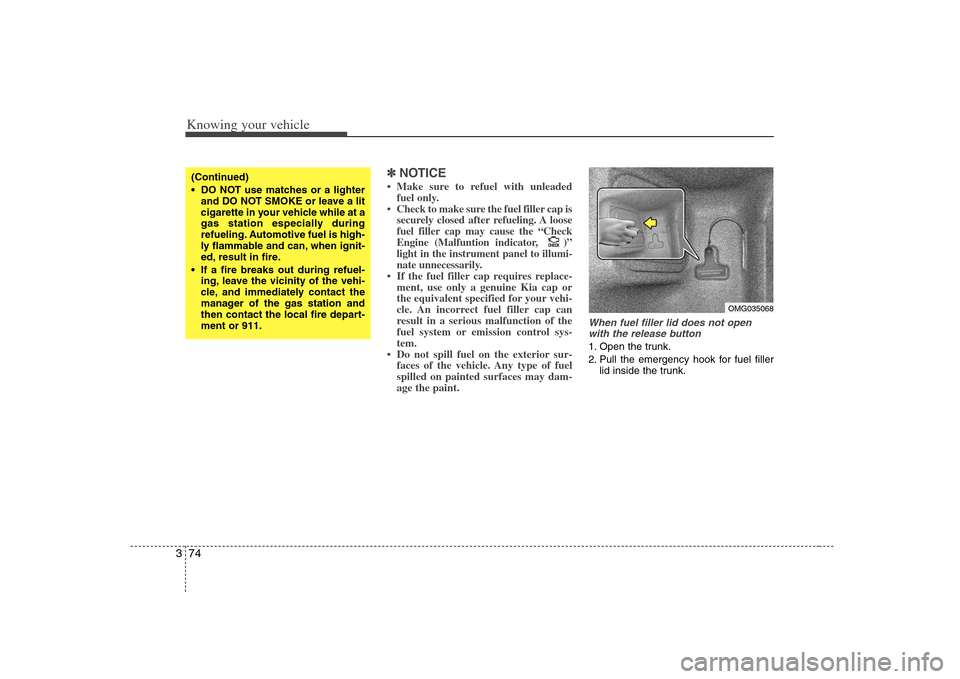
When fuel filler lid does not open
with the release button1. Open the trunk.
2. Pull the emergency hook for fuel filler
lid inside the trunk.
CHECKCHECK
(Continued)
DO NOT use matches or a lighter
and DO NOT SMOKE or leave a lit
cigarette in your vehicle while at a
gas station especially during
refueling. Automotive fuel is high-
ly flammable and can, when ignit-
ed, result in fire.
If a fire breaks out during refuel-
ing, leave the vicinity of the vehi-
cle, and immediately contact the
manager of the gas station and
then contact the local fire depart-
ment or 911.
OMG035068
Page 86 of 289
377
Knowing your vehicle
Outside rearview mirror heater
(if equipped) The outside rearview mirror heater is
automatically turned on when the rear
window defroster is turned on. To heat
the outside rearview mirror glass, push
the button for the rear window defroster.
The rearview mirror heater (and rear win-
dow defroster) will not operate unless the
engine is running.
The outside rearview mirror glass will be
heated for defrosting or defogging and
will give you improved rear vision in
inclement weather conditions. Push the
button again to turn the heater off. The
outside rearview mirror heater automati-
cally turns off after 20 minutes.
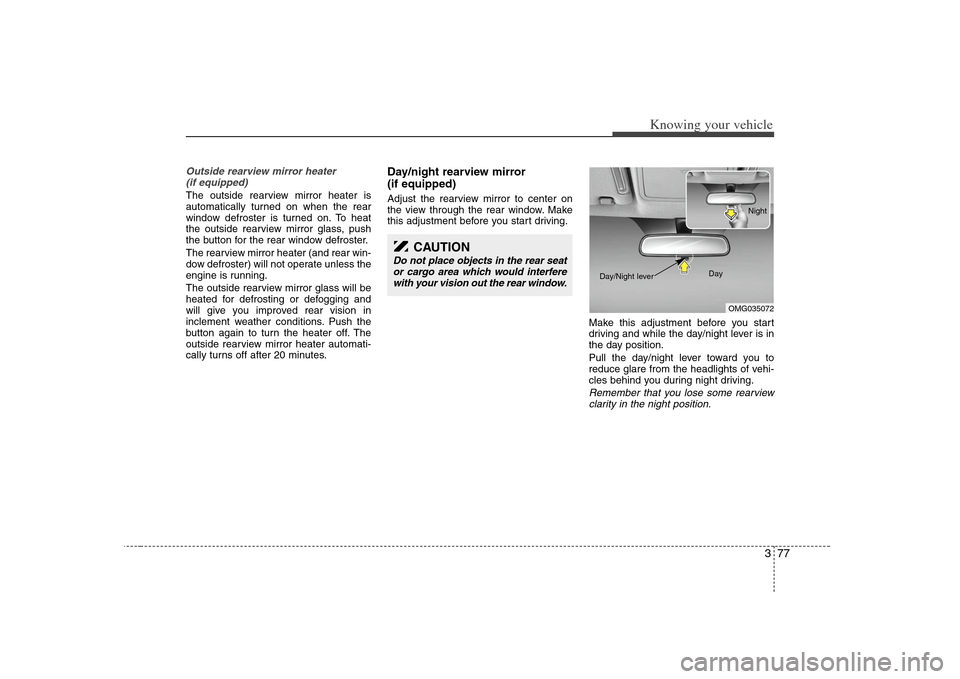
Day/night rearview mirror
(if equipped)Adjust the rearview mirror to center on
the view through the rear window. Make
this adjustment before you start driving.
Make this adjustment before you start
driving and while the day/night lever is in
the day position.
Pull the day/night lever toward you to
reduce glare from the headlights of vehi-
cles behind you during night driving.
Remember that you lose some rearview
clarity in the night position.
CAUTION
Do not place objects in the rear seat
or cargo area which would interfere
with your vision out the rear window.
OMG035072 Day Night
Day/Night lever
Page 87 of 289
Knowing your vehicle78 3Electric type (if equipped)When the engine is running, the glare is
automatically controlled by the sensor
mounted in the rearview mirror. The sen-
sor mounted in the mirror senses the light
level around the vehicle, and through a
chemical reaction, automatically controls
the headlight glare from vehicles behind
you.
Whenever the shift lever is shifted into
reverse (R), the mirror will automatically
go to the brightest setting in order to
improve the drivers view behind the vehi-
cle.
When the ignition switch is ON, the auto-
matic- dimming function will turn on auto-
matically.✽ ✽
NOTICEWhen cleaning the mirror, use a paper
towel or similar material dampened
with glass cleaner. Do not spray glass
cleaner directly on the mirror as that
may cause the liquid cleaner to enter the
mirror housing.
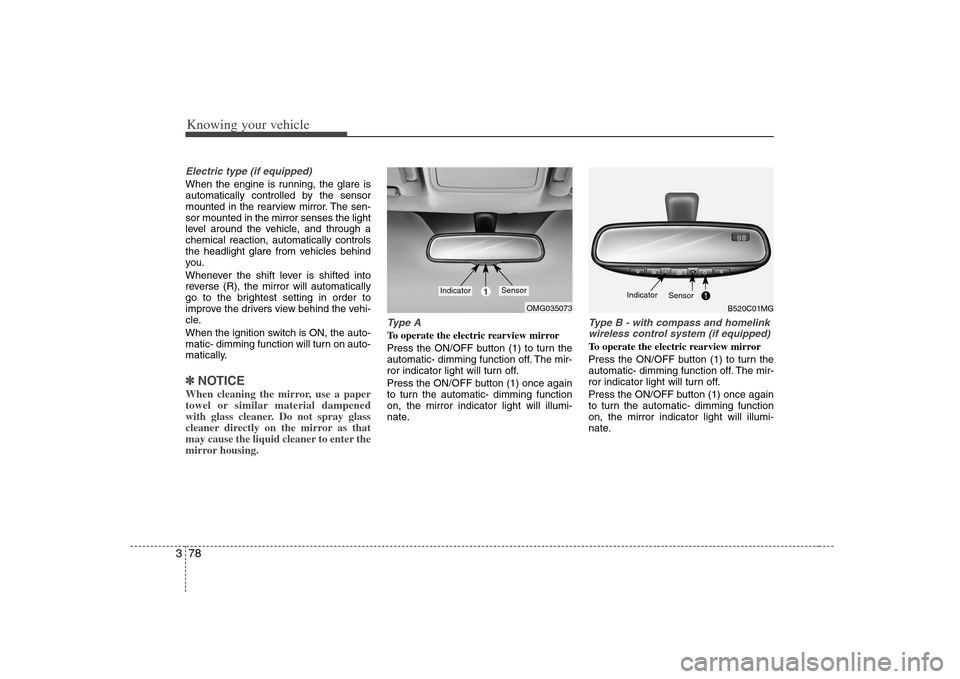
Type ATo operate the electric rearview mirror
Press the ON/OFF button (1) to turn the
automatic- dimming function off. The mir-
ror indicator light will turn off.
Press the ON/OFF button (1) once again
to turn the automatic- dimming function
on, the mirror indicator light will illumi-
nate.
Type B - with compass and homelink
wireless control system (if equipped)To operate the electric rearview mirror
Press the ON/OFF button (1) to turn the
automatic- dimming function off. The mir-
ror indicator light will turn off.
Press the ON/OFF button (1) once again
to turn the automatic- dimming function
on, the mirror indicator light will illumi-
nate.
OMG035073
1
Indicator
Sensor
B520C01MG
Indicator
Sensor
Page 88 of 289
379
Knowing your vehicle
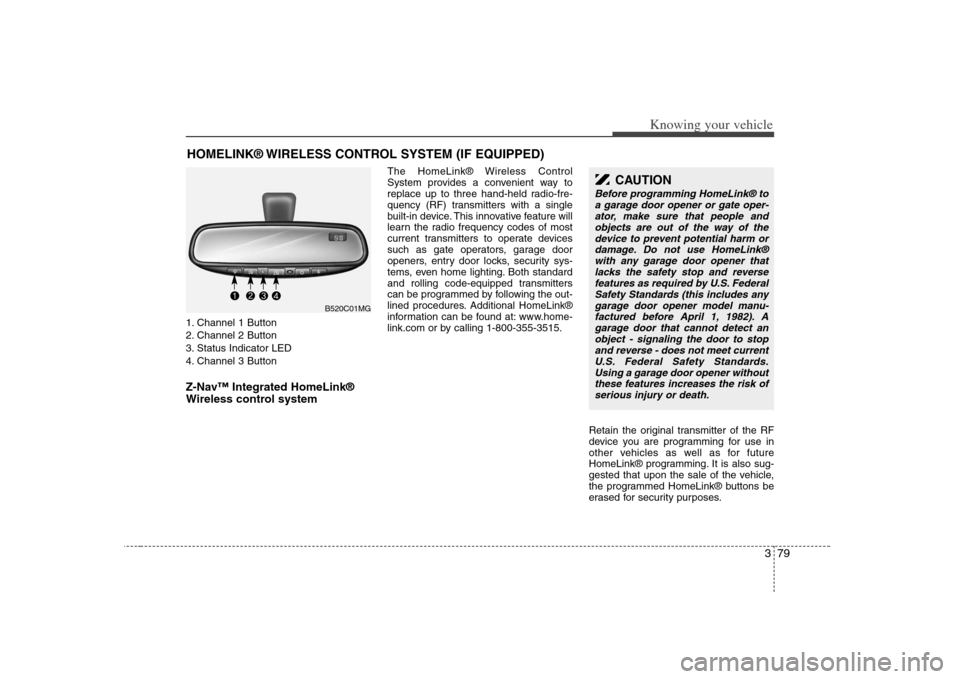
1. Channel 1 Button
2. Channel 2 Button
3. Status Indicator LED
4. Channel 3 ButtonZ-Nav™ Integrated HomeLink®
Wireless control system
The HomeLink® Wireless Control
System provides a convenient way to
replace up to three hand-held radio-fre-
quency (RF) transmitters with a single
built-in device. This innovative feature will
learn the radio frequency codes of most
current transmitters to operate devices
such as gate operators, garage door
openers, entry door locks, security sys-
tems, even home lighting. Both standard
and rolling code-equipped transmitters
can be programmed by following the out-
lined procedures. Additional HomeLink®
information can be found at: www.home-
link.com or by calling 1-800-355-3515.
Retain the original transmitter of the RF
device you are programming for use in
other vehicles as well as for future
HomeLink® programming. It is also sug-
gested that upon the sale of the vehicle,
the programmed HomeLink® buttons be
erased for security purposes.
HOMELINK® WIRELESS CONTROL SYSTEM (IF EQUIPPED)
CAUTION
Before programming HomeLink® to
a garage door opener or gate oper-
ator, make sure that people and
objects are out of the way of the
device to prevent potential harm or
damage. Do not use HomeLink®
with any garage door opener that
lacks the safety stop and reverse
features as required by U.S. Federal
Safety Standards (this includes any
garage door opener model manu-
factured before April 1, 1982). A
garage door that cannot detect an
object - signaling the door to stop
and reverse - does not meet current
U.S. Federal Safety Standards.
Using a garage door opener without
these features increases the risk of
serious injury or death.
B520C01MG
Page 89 of 289
Knowing your vehicle80 3Programming HomeLink® When programming a garage door
opener, it is advised to park the
vehicle outside of the garage.
It is recommended that a new bat-
tery be placed in the hand-held
transmitter of the device being pro-
grammed to HomeLink® for quicker
training and accurate transmission
of the radio-frequency signal.
Some vehicles may require the igni-
tion switch to be turned to the sec-
ond (or "accessories") position for
programming and/or operation of
HomeLink.
In the event that there are still pro-
gramming difficulties or questions
after following the programming
steps listed below, contact
HomeLink® at: www.homelink.com
or 1-800-355-3515.
Standard programmingTo train most devices, follow these
instructions:
1. For first-time programming, press and
hold the two outside buttons,
HomeLink® Channel 1 and Channel 3
Buttons, until the indicator light begins
to flash (after 20 seconds). Release
both buttons. Do not hold the buttons
for longer than 30 seconds.
2. Position the end of your hand-held
transmitter 5-14 cm (1-3 inches) away
from the HomeLink® buttons while
keeping the indicator light in view.
3. Simultaneously press and hold both
the HomeLink® and hand-held trans-
mitter button. DO NOT release the but-
tons until step 4 has been completed.
4. While continuing to hold the buttons
the red Indicator Status LED will flash
slowly and then rapidly after
HomeLink® successfully trains to the
frequency signal from the hand-held
transmitter. Release both buttons.5. Press and hold the just-trained
HomeLink® button and observe the
red Status Indicator LED. If the indica-
tor light stays on constantly, program-
ming is complete and your device
should activate when the HomeLink®
button is pressed and released.
6. To program the remaining two
HomeLink® buttons, follow steps 2
through 5.
Page 90 of 289
381
Knowing your vehicle
Rolling code programmingRolling code devices which are "code-
protected" and manufactured after 1996
may be determined by the following:
Reference the device owner's manual
for verification.
The handheld transmitter appears to
program the HomeLink Universal
Transceiver but does not activate the
device.
Press and hold the trained HomeLink
button. The device has the rolling code
feature if the indicator light flashes rap-
idly and then turns solid after 2 sec-
onds.
To train rolling code devices, follow these
instructions:
1. At the garage door opener receiver
(motor-head unit) in the garage, locate
the "learn" or "smart" button. This can
usually be found where the hanging
antenna wire is attached to the motor-
head unit. Exact location and color of
the button may vary by garage door
opener brand. If there is difficulty locat-
ing the training button, reference the
device owner's manual or please visit
our Web site at www.homelink.com.2. Firmly press and release the "learn" or
"smart" button (which activates the
"training light").
There are 30 seconds in which to initi-
ate step 3.
3. Return to the vehicle and firmly press,
hold for two seconds and then release
the desired HomeLink® button.
Repeat the "press/hold/release"
sequence a second time to complete
the programming. (Some devices may
require you to repeat this sequence a
third time to complete the program-
ming.)
4. Press and hold the just-trained
HomeLink® button and observe the
red Status Indicator LED. If the indica-
tor light stays on constantly, program-
ming is complete and your device
should activate.
5. To program the remaining two
HomeLink® buttons, follow either
steps 1 through 4 above for other
Rolling Code devices or steps 2
through 5 in Standard Programming
for standard devices.
Gate operator & canadian program-
mingDuring programming, your handheld
transmitter may automatically stop trans-
mitting. Continue to press the Integrated
HomeLink® Wireless Control System
button (note steps 2 through 4 in the
Standard Programming portion of this
document) while you press and re-press
("cycle") your handheld transmitter every
two seconds until the frequency signal
has been learned. The indicator light will
flash slowly and then rapidly after sever-
al seconds upon successful training.Operating HomeLink®To operate, simply press and release the
programmed HomeLink® button.
Activation will now occur for the trained
device (i.e. garage door opener, gate
operator, security system, entry door
lock, home/office lighting, etc.). For con-
venience, the hand-held transmitter of
the device may also be used at any time.
Page 91 of 289
Knowing your vehicle82 3Reprogramming a single
HomeLink® buttonTo program a new device to a previously
trained HomeLink® button, follow these
steps:
1. Press and hold the desired
HomeLink® button. Do NOT release
until step 4 has been completed.
2. When the indicator light begins to flash
slowly (after 20 seconds), position the
handheld transmitter 1 to 3 inches
(2 to 8 cm) away from the HomeLink®
surface.
3. Press and hold the handheld transmit-
ter button. The HomeLink® indicator
light will flash, first slowly and then rap-
idly.
4. When the indicator light begins to flash
rapidly, release both buttons.
5. Press and hold the just-trained
HomeLink® button and observe the
red Status Indicator LED. If the indica-
tor light stays on constantly, program-
ming is complete and your new device
should activate.
Erasing HomeLink® buttonsIndividual buttons cannot be erased.
However, to erase all three programmed
buttons:
1. Press and hold the two outer
HomeLink® buttons until the indicator
light begins to flash-after 20 seconds.
2. Release both buttons. Do not hold for
longer than 30 seconds.
The Integrated HomeLink® Wireless
Control System is now in the training
(learn) mode and can be programmed at
any time following the appropriate steps
in the Programming sections above.
FCC ID: NZLZTVHL3
IC: 4112A-ZTVHL3
This device complies with Industry
Canada standard RSS-210.Operation
is subject to the following two conditions:
(1) this device may not cause harmful
interference, and
(2) this device must accept any interfer-
ence received, including interference that
may cause undesired operation.NVS® is a registered trademark and Z-
Nav™ is a trademark of the Gentex
Corporation, Zeeland, Michigan.
HomeLink® is a registered trademark
owned by Johnson Controls,
Incorporated, Milwaukee, Wisconsin.
WARNING
The transceiver has been tested
and complies with FCC and
Industry Canada rules. Changes or
modifications not expressly
approved by the party responsible
for compliance could void the
user's authority to operate the
device.
Page 92 of 289
383
Knowing your vehicle
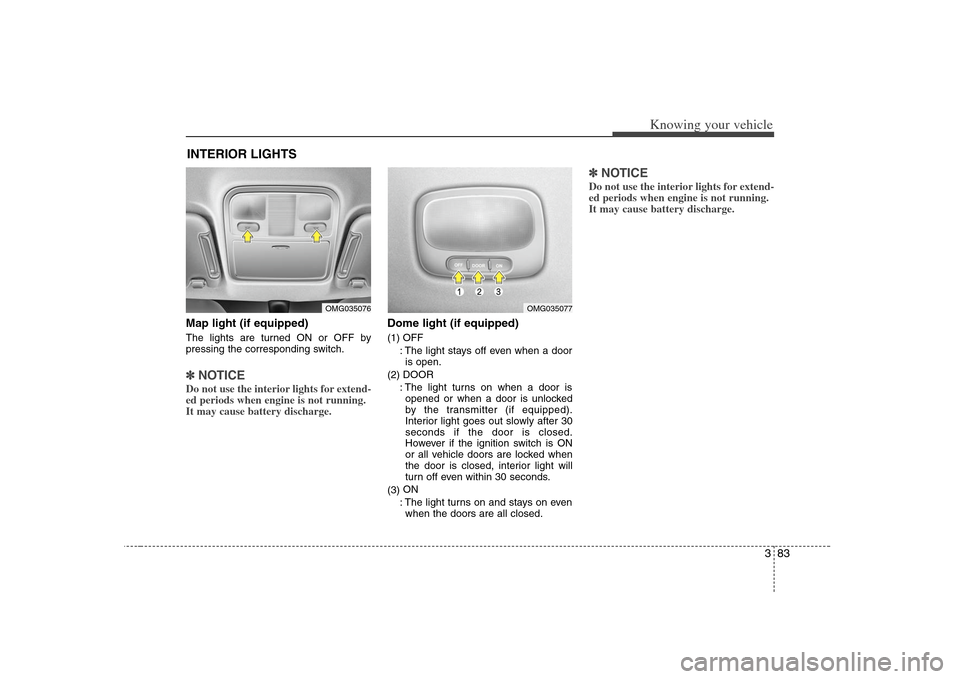
Map light (if equipped)The lights are turned ON or OFF by
pressing the corresponding switch.✽ ✽
NOTICEDo not use the interior lights for extend-
ed periods when engine is not running.
It may cause battery discharge.
Dome light (if equipped)(1) OFF
: The light stays off even when a door
is open.
(2) DOOR
: The light turns on when a door is
opened or when a door is unlocked
by the transmitter (if equipped).
Interior light goes out slowly after 30
seconds if the door is closed.
However if the ignition switch is ON
or all vehicle doors are locked when
the door is closed, interior light will
turn off even within 30 seconds.
(3)ON
: The light turns on and stays on even
when the doors are all closed.
✽ ✽
NOTICEDo not use the interior lights for extend-
ed periods when engine is not running.
It may cause battery discharge.
INTERIOR LIGHTS
OMG035077
OMG035076