Key ignition KIA Optima 2010 3.G User Guide
[x] Cancel search | Manufacturer: KIA, Model Year: 2010, Model line: Optima, Model: KIA Optima 2010 3.GPages: 336, PDF Size: 6.46 MB
Page 83 of 336
417
Features of your vehicle
Operating door locks from inside
the vehicle
D050201AMG-EE
With the door lock button
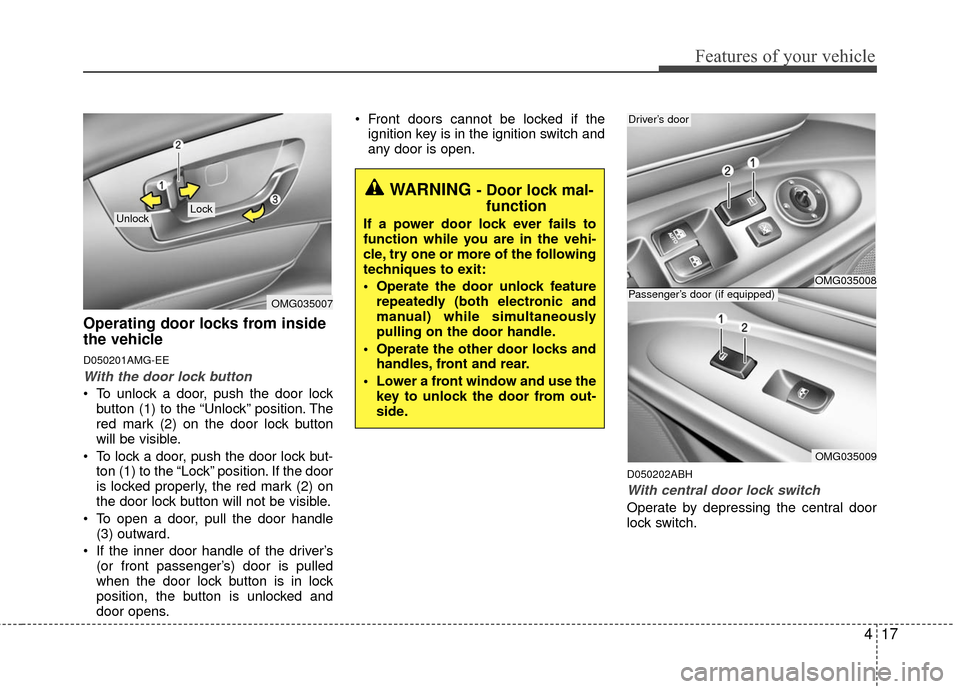
To unlock a door, push the door lockbutton (1) to the “Unlock” position. The
red mark (2) on the door lock button
will be visible.
To lock a door, push the door lock but- ton (1) to the “Lock” position. If the door
is locked properly, the red mark (2) on
the door lock button will not be visible.
To open a door, pull the door handle (3) outward.
If the inner door handle of the driver’s (or front passenger’s) door is pulled
when the door lock button is in lock
position, the button is unlocked and
door opens. Front doors cannot be locked if the
ignition key is in the ignition switch and
any door is open.
D050202ABH
With central door lock switch
Operate by depressing the central door
lock switch.
WARNING - Door lock mal-function
If a power door lock ever fails to
function while you are in the vehi-
cle, try one or more of the following
techniques to exit:
Operate the door unlock feature
repeatedly (both electronic and
manual) while simultaneously
pulling on the door handle.
Operate the other door locks and handles, front and rear.
Lower a front window and use the key to unlock the door from out-
side.
OMG035007
Lock Unlock
OMG035008
OMG035009
Driver’s door
Passenger’s door (if equipped)
Page 84 of 336
Features of your vehicle
18
4
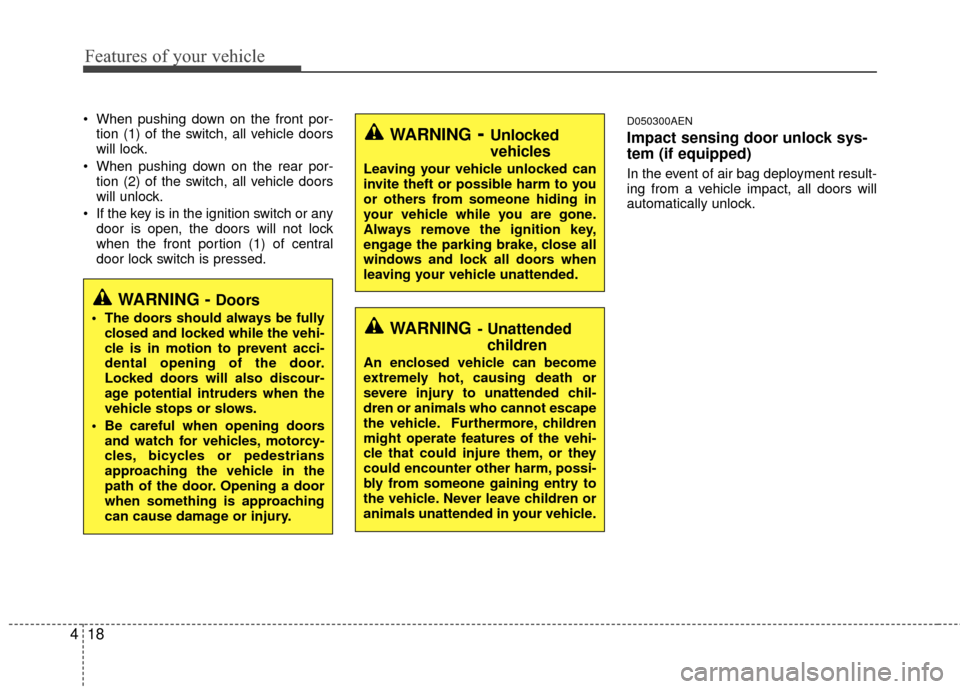
When pushing down on the front por-
tion (1) of the switch, all vehicle doors
will lock.
When pushing down on the rear por- tion (2) of the switch, all vehicle doors
will unlock.
If the key is in the ignition switch or any door is open, the doors will not lock
when the front portion (1) of central
door lock switch is pressed.D050300AEN
Impact sensing door unlock sys-
tem (if equipped)
In the event of air bag deployment result-
ing from a vehicle impact, all doors will
automatically unlock.
WARNING- Unlocked
vehicles
Leaving your vehicle unlocked can
invite theft or possible harm to you
or others from someone hiding in
your vehicle while you are gone.
Always remove the ignition key,
engage the parking brake, close all
windows and lock all doors when
leaving your vehicle unattended.
WARNING- Unattendedchildren
An enclosed vehicle can become
extremely hot, causing death or
severe injury to unattended chil-
dren or animals who cannot escape
the vehicle. Furthermore, children
might operate features of the vehi-
cle that could injure them, or they
could encounter other harm, possi-
bly from someone gaining entry to
the vehicle. Never leave children or
animals unattended in your vehicle.
WARNING - Doors
The doors should always be fully
closed and locked while the vehi-
cle is in motion to prevent acci-
dental opening of the door.
Locked doors will also discour-
age potential intruders when the
vehicle stops or slows.
Be careful when opening doors and watch for vehicles, motorcy-
cles, bicycles or pedestrians
approaching the vehicle in the
path of the door. Opening a door
when something is approaching
can cause damage or injury.
Page 89 of 336
423
Features of your vehicle
D080100ABH
Power windows
The ignition switch must be in the ON
position for power windows to operate.
Each door has a power window switch
that controls the door's window. The driv-
er has a power window lock switch which
can block the operation of passenger
windows. The power windows can be
operated for approximately 30 seconds
after the ignition key is removed or turned
to the ACC or LOCK position. However, if
the front doors are opened, the power
windows cannot be operated within the
30 second period after ignition key
removal.
✽ ✽NOTICE
While driving with the rear windows
down or with the sunroof (if equipped)
in an open (or partially open) position,
your vehicle may demonstrate a wind
buffeting or pulsation noise. This
noise is a normal occurrence and can be
reduced or eliminated by taking the fol-
lowing actions. If the noise occurs with
one or both of the rear windows down,
partially lower both front windows
approximately one inch. If you expe-
rience the noise with the sunroof open,
slightly reduce the size of the sunroof
opening.
D080101AUN
Window opening and closing
The driver’s door has a master power
window switch that controls all the win-
dows in the vehicle.
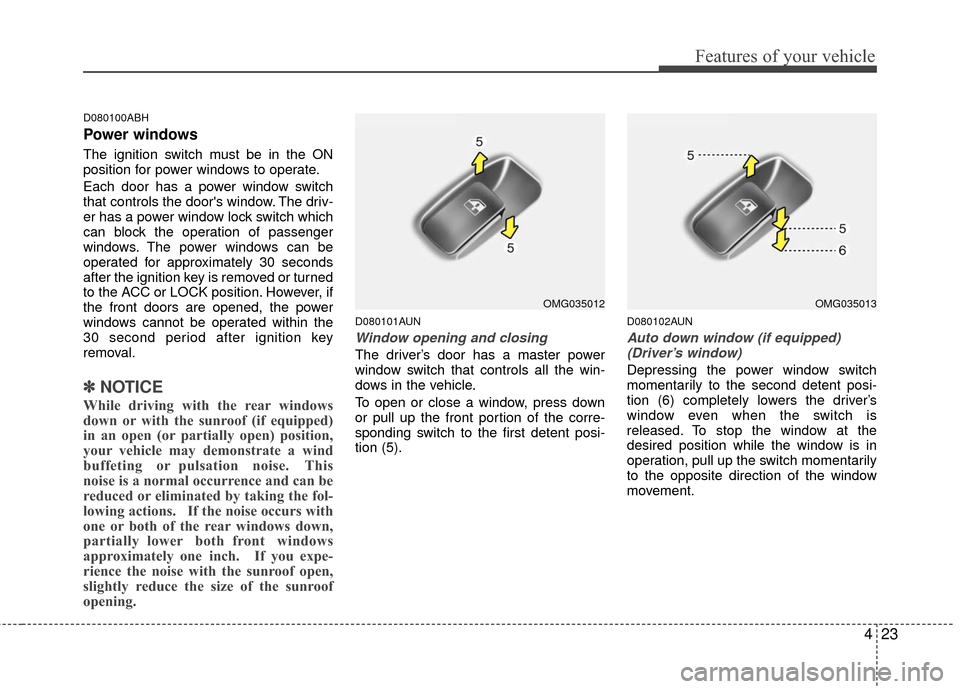
To open or close a window, press down
or pull up the front portion of the corre-
sponding switch to the first detent posi-
tion (5).
D080102AUN
Auto down window (if equipped)
(Driver’s window)
Depressing the power window switch
momentarily to the second detent posi-
tion (6) completely lowers the driver’s
window even when the switch is
released. To stop the window at the
desired position while the window is in
operation, pull up the switch momentarily
to the opposite direction of the window
movement.
OMG035012OMG035013
Page 92 of 336
Features of your vehicle
26
4
WARNING - Windows
NEVER leave the ignition key in
the vehicle.
NEVER leave any child unattend- ed in the vehicle. Even very
young children may inadvertently
cause the vehicle to move, entan-
gle themselves in the windows,
or otherwise injure themselves or
others.
Always double check to make sure all arms, hands, head and
other obstructions are safely out
of the way before closing a win-
dow.
Do not allow children to play with the power windows. Keep the dri-
ver’s door power window lock
switch in the LOCK position
(depressed). Serious injury can
result from unintentional window
operation by the child.
Do not extend any head or arms outside through the window
opening while driving.
CAUTION
To prevent possible damage to the power window system, do notopen or close two windows ormore at the same time. This willalso ensure the longevity of the fuse.
Never try to operate the main switch on the driver's door andthe individual door windowswitch in opposing directions atthe same time. If this is done, thewindow will stop and cannot beopened or closed.
Page 124 of 336

Features of your vehicle
58
4
D150309AUN
Front fog light indicator
(if equipped)
This light comes on when the front fog
lights are ON.
D150315AHD
Trunk lid open warninglight
This warning light illuminates when the
trunk lid is not closed securely with the
ignition in any position.
D150316AUN
Door ajar warning light
This warning light illuminates when a
door is not closed securely with the igni-
tion switch in any position.
D150317AUN
Immobilizer indicator
Without smart key system
This light illuminates when the immobiliz-
er key is inserted and turned to the ON
position to start the engine.
At this time, you can start the engine. The
light goes out after the engine is running.
If this light blinks when the ignition switch
is in the ON position before starting the
engine, have the system checked by an
authorized KIA dealer.
D150318AUN
Low fuel level warning light
This warning light indicates the fuel tank
is nearly empty. When it comes on, you
should add fuel as soon as possible.
Driving with the fuel level warning light on
or with the fuel level below “E” can cause
the engine to misfire and damage the
catalytic converter.
D150319AUN
Low washer fluid levelwarning light (if equipped)
This warning light indicates the washer
fluid reservoir is near empty. Refill the
washer fluid as soon as possible.
Page 127 of 336

461
Features of your vehicle
D150326AMG
ECO indicator (if equipped)
The ECO indicator light assists you to
drive in the most economical way.
The green indicator comes on when you
drive with high fuel efficiency.
To turn the ECO indicator OFF/ON
with trip computer (Type A)
Select the ECO mode by pressing the
TRIP button for less than 1 second.
Then, press the TRIP button for more
than 1 second.
When the instantaneous fuel consump-
tion mode is displayed on the LCD moni-
tor or the system is not working properly,
the indicator turns off.
If the indicator turns off when the instan-
taneousant fuel consumption mode is not
selected, have the system checked by an
authorized KIA dealer as soon as possi-
ble. The fuel efficiency depends on driver's
driving habit and road condition.
The system stops operation when the
transaxle is in the P,R,N position or
sports mode, or instantaneous fuel con-
sumption mode is selected.
D180000AUN
The hazard warning flasher should be
used whenever you find it necessary to
stop the car in a hazardous location.
When you must make such an emer-
gency stop, always pull off the road as far
as possible.
The hazard warning lights are turned on
by pushing in the hazard switch. This
causes all turn signal lights to blink. The
hazard warning lights will operate even
though the key is not in the ignition
switch.
To turn the hazard warning lights off,
push the switch a second time.
HAZARD WARNING FLASHER
OMG049055
ECO
WARNING
Do not focus the indicator too
much. You may lose your steering
control and cause an accident that
results in severe personal injury or
death.
Page 128 of 336

Features of your vehicle
62
4
D190100AMG-EU
Battery saver function
The purpose of this feature is to pre-
vent the battery from being dis-
charged. The system automatically
turns off the exterior lights when the
driver removes the ignition key and
opens the driver-side door.
With this feature, the parking lights will be turned off automatically if the driver
parks on the side of road at night.
If necessary, to keep the lights on
when the ignition key is removed, per-
form the following:
1) Open the driver-side door.
2) Turn the parking lights OFF and ON again using the light switch on the
steering column.
D190400AUN
Lighting control
The light switch has a Headlight and a
Parking light position.
To operate the lights, turn the knob at the
end of the control lever to one of the fol-
lowing positions:
(1) OFF position
(2) Parking light position
(3) Headlight position
(4) Auto light position (if equipped)
D190401AMG
Parking light position ( )
When the light switch is in the parking
light position (1st position), the tail,
license and instrument panel lights are
ON.
LIGHTING
OUN020220OUN020221
Page 132 of 336

Features of your vehicle
66
4
WIPERS AND WASHERS
A : Wiper speed control
· MIST – Single wipe
· OFF – Off
· INT – Intermittent wipe AUTO - AUTO control wipe (if equipped)
· LO – Low wiper speed
· HI – High wiper speed
B : Intermittent or Auto control wipe time adjustment
C : Wash with brief wipesD200100AMG-EU
Windshield wipers
Operates as follows when the ignition
switch is turned ON.
MIST : For a single wiping cycle, push the lever upward and release it
with the lever in the OFF position.
The wipers will operate continu-
ously if the lever is pushed
upward and held.
OFF : Wiper is not in operation
INT : Wiper operates intermittently at the same wiping intervals. Use this
mode in a light rain or mist. To vary
the speed setting, turn the speed
control knob (1).
LO : Normal wiper speed
HI : Fast wiper speed
✽ ✽ NOTICE
If there is heavy accumulation of snow
or ice on the windshield, defrost the
windshield for about 10 minutes, or
until the snow and/or ice is removed
before using the windshield wipers to
ensure proper operation.
✽ ✽NOTICE
• When you operate the wipers, if your
vehicle has a problem in any part of
the wiper operation system, the wiper
may operate in the LO mode regard-
less of the wiper switch position. In
this case, have your vehicle checked
by an authorized KIA dealer as soon
as possible.
• When the ignition key is removed, the wiper blade sometimes may move
slightly to be properly positioned for
reducing the deterioration of the
windshield wipers.
OUN020301OUN020304
INT*
(AUTO)INT*
(AUTO)
Page 165 of 336

499
Features of your vehicle
Antenna
D300102ABH
Glass antenna (if equipped)
When the radio power switch is turned on
while the ignition key is in either the “ON”
or “ACC” position, your car will receive
both AM and FM broadcast signals
through the antenna in the rear window
glass.
D300200AMG
Audio remote control
(if equipped)
The steering wheel audio remote control
button is installed to promote safe driv-
ing.
AUDIO SYSTEM
OMG049200
CAUTION
• Do not clean the inside of the rearwindow glass with a cleaner orscraper to remove foreigndeposits as this may cause dam-age to the antenna elements.
Avoid adding metallic coatings such as Ni, Cd, and so on. Thesecan disturb receiving AM and FMbroadcast signals.
OMG045081C
Page 196 of 336

Driving your vehicle
45
E030100AEN
Illuminated ignition switch
Whenever a front door is opened, the
ignition switch will be illuminated for your
convenience, provided the ignition switch
is not in the ON position. The light will go
off immediately when the ignition switch
is turned on or go off after about 30 sec-
onds when the door is closed.
Ignition switch position
E030201AUN
LOCK
The steering wheel locks to protect against
theft (if equipped). The ignition key can be
removed only in the LOCK position.
When turning the ignition switch to the
LOCK position, push the key inward at the
ACC position and turn the key toward the
LOCK position.
OMG045001
WARNING
When you intend to park or stop the
vehicle with the engine on, be care-
ful not to depress the accelerator
pedal for a long period of time. It
may overheat the engine or exhaust
system and cause fire.
KEY
OMG045002