warning KIA Optima 2014 3.G Owners Manual
[x] Cancel search | Manufacturer: KIA, Model Year: 2014, Model line: Optima, Model: KIA Optima 2014 3.GPages: 479, PDF Size: 13.21 MB
Page 162 of 479
Features of your vehicle
92
4
Non-operational conditions of
back-up warning system
The back-up warning system may
not operate properly when:
1. Moisture is frozen to the sensor. (It
will operate normally when the
moisture has been cleared.)
2. The sensor is covered with foreign matter, such as snow or water, or
the sensor cover is blocked. (It will
operate normally when the materi-
al is removed or the sensor is no
longer blocked.)
3. Driving on uneven road surfaces. (unpaved roads, gravel, bumps,
gradient.)
4. Objects generating excessive noise (vehicle horns, loud motor-
cycle engines, or truck air brakes)
are within range of the sensor.
5. Heavy rain or water spray exists.
6. Wireless transmitters or mobile phones are within range of the
sensor.
7. The sensor is covered with snow.
8. Trailer towing. The detecting range may decrease
when:
1. The sensor is stained with foreign
matter such as snow or water.
(The sensing range will return to
normal when removed.)
2. Outside air temperature is extremely hot or cold.
The following objects may not be
recognized by the sensor:
1. Sharp or slim objects such as ropes, chains or small poles.
2. Objects which tend to absorb the sensor frequency such as clothes,
spongy material or snow.
3. Undetectable objects smaller than 1 m (40 in.) in height and narrower
than 14 cm (6 in.) in diameter.
back-up warning system pre-
cautions
The back-up warning system maynot sound sequentially depending
on the speed and shapes of the
objects detected.
The back-up warning system may malfunction if the vehicle bumper
height or sensor installation has
been modified or damaged. Any
non-factory installed equipment or
accessories may also interfere with
the sensor performance.
The sensor may not recognize objects less than 30 cm (11 in.)
from the sensor, or it may sense an
incorrect distance. Use caution.
When the sensor is frozen or stained with snow, dirt, or water, the sensor
may be inoperative until the stains
are removed using a soft cloth.
Do not push, scratch or strike the sensor. Sensor damage could occur.
Page 163 of 479
493
Features of your vehicle
✽
✽NOTICE
This system can only sense objects
within the range and location of the
sensors. It can not detect objects in
other areas where sensors are not
installed. Also, small or slim objects,
such as poles or objects located
between sensors may not be detected
by the sensors.
Always visually check behind the
vehicle when backing up.
Be sure to inform any drivers of the
vehicle that may be unfamiliar with
the system regarding the systems
capabilities and limitations.
Self-diagnosis
If you don’t hear an audible warning
sound or if the buzzer sounds inter-
mittently when shifting the gear to the
R (Reverse) position, this may indi-
cate a malfunction in the back-up
warning system. If this occurs, have
your vehicle checked by an author-
ized Kia dealer as soon as possible.
Page 164 of 479
Features of your vehicle
94
4
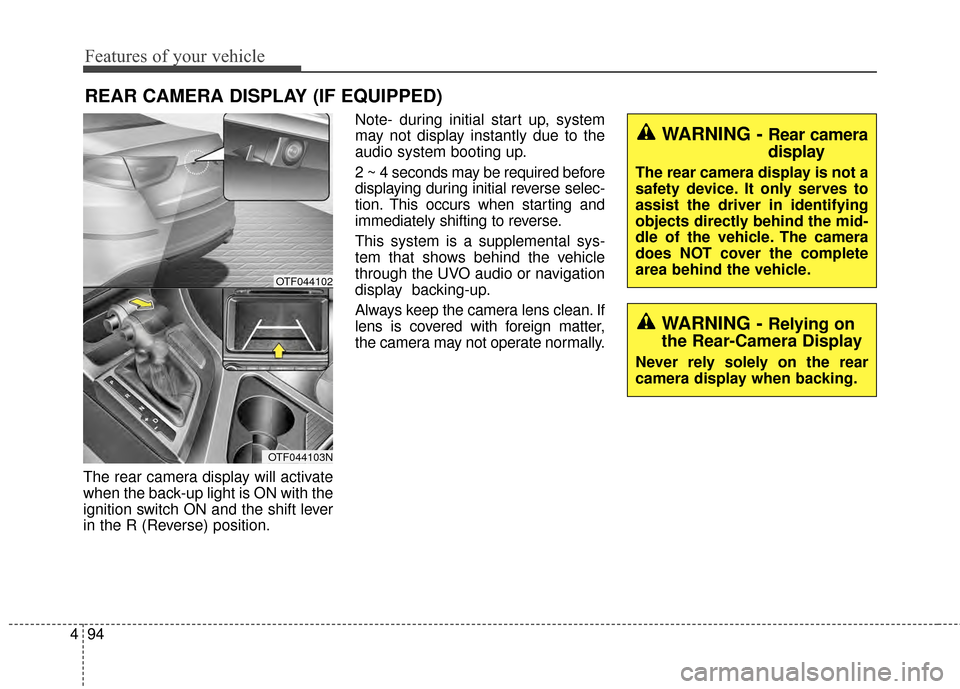
The rear camera display will activate
when the back-up light is ON with the
ignition switch ON and the shift lever
in the R (Reverse) position. Note- during initial start up, system
may not display instantly due to the
audio system booting up.
2 ~ 4 seconds may be required before
displaying during initial reverse selec-
tion. This occurs when starting and
immediately shifting to reverse.
This system is a supplemental sys-
tem that shows behind the vehicle
through the UVO audio or navigation
display backing-up.
Always keep the camera lens clean. If
lens is covered with foreign matter,
the camera may not operate normally.
REAR CAMERA DISPLAY (IF EQUIPPED)
WARNING - Rear camera
display
The rear camera display is not a
safety device. It only serves to
assist the driver in identifying
objects directly behind the mid-
dle of the vehicle. The camera
does NOT cover the complete
area behind the vehicle.
WARNING - Relying on
the Rear-Camera Display
Never rely solely on the rear
camera display when backing.
OTF044102
OTF044103N
Page 166 of 479
Features of your vehicle
96
4
Battery saver function
The purpose of this feature is to
prevent the battery from being dis-
charged. The system automatically
turns off the parking lights when
the driver removes the ignition key
and opens the driver-side door.
With this feature, the parking lights will turn off automatically if the driv-
er parks on the side of the road at
night.
If necessary, to keep the lights on
when the ignition key is removed,
perform the following:
1) Open the driver-side door.
2) Turn the parking lights OFF and ON again using the light switch
on the steering column.
Headlight escort function
(if equipped)
The headlights (and/or taillights) will
remain on for approximately 5 min-
utes after the ignition key is removed
or turned to the ACC or LOCK posi-
tion. However, if the driver’s door is
opened and closed, the headlights
are turned off after 15 seconds.
The headlights can be turned off by
pressing the lock button on the trans-
mitter (or smart key) twice or turning
off the light switch from the headlight
or Auto light position.
Headlight leveling device
(if equipped)
Automatic type
It automatically adjusts the headlight
beam level according to the number
of passengers and the loading
weight in the luggage area.
And it offers the proper headlight
beam under various conditions.
LIGHTING
WARNING
If the headlights are not work-
ing properly have your vehicle
inspected by an authorized Kia
dealer.
Don't attempt to inspect or
replace the wiring yourself to
prevent malfunction.
CAUTION
If the driver gets out of the vehi-cle through other doors (exceptdriver's door), the battery saverfunction does not operate andthe headlight escort functiondoes not turn off automatically.Therefore, causing the batteryto be discharged. In this case,make sure to turn off the lampbefore getting out of the vehicle.
Page 169 of 479
499
Features of your vehicle
High beam operation
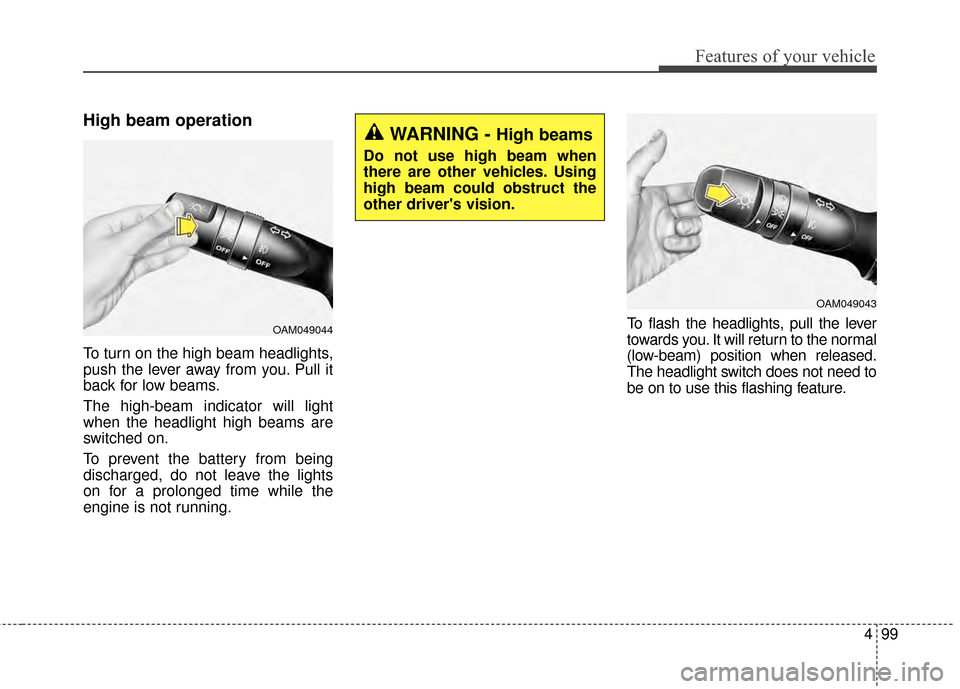
To turn on the high beam headlights,
push the lever away from you. Pull it
back for low beams.
The high-beam indicator will light
when the headlight high beams are
switched on.
To prevent the battery from being
discharged, do not leave the lights
on for a prolonged time while the
engine is not running.To flash the headlights, pull the lever
towards you. It will return to the normal
(low-beam) position when released.
The headlight switch does not need to
be on to use this flashing feature.
OAM049044
WARNING - High beams
Do not use high beam when
there are other vehicles. Using
high beam could obstruct the
other driver's vision.
OAM049043
Page 174 of 479
Features of your vehicle
104
4
The reservoir filler neck is located in
the front of the engine compartment
on the passenger side.
CAUTION - Washer
pump
To prevent possible damage to
the washer pump, do not oper-ate the washer when the fluidreservoir is empty.
WARNING - Obscured
visibility
Do not use the washer in freez-
ing temperatures without first
warming the windshield with
the defrosters; the washer solu-
tion could freeze on the wind-
shield and obscure your vision.
CAUTION - Wipers &
windshields
To prevent possible damage to the wipers or windshield,do not operate the wiperswhen the windshield is dry.
To prevent damage to the wiper blades, do not use gaso-line, kerosene, paint thinner,or other solvents on or nearthem.
To prevent damage to the wiper arms and other compo-nents, do not attempt to movethe wipers manually.
Page 175 of 479
4105
Features of your vehicle
Do not use the interior lights for
extended periods when the engine is
not running.
It may cause battery discharge.Automatic turn off function
(if equipped)
The interior lights automatically turn
off approximately 20 minutes after
the ignition switch is turned off.
If your vehicle is equipped with the
theft alarm system, the interior lights
automatically turn off approximately
3 seconds after the system is in
armed stage.
Map lamp
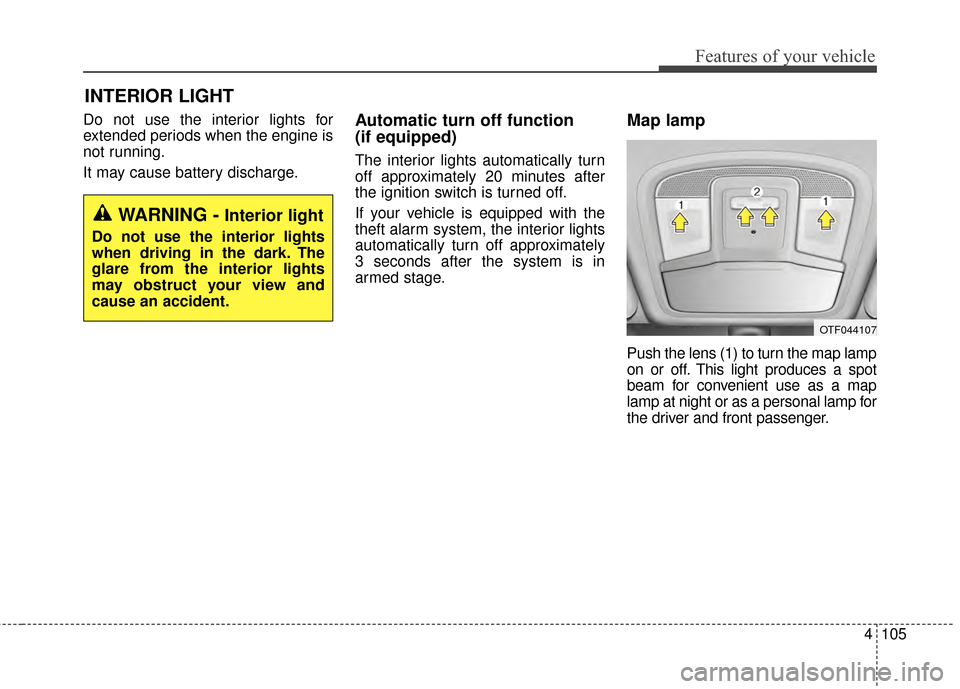
Push the lens (1) to turn the map lamp
on or off. This light produces a spot
beam for convenient use as a map
lamp at night or as a personal lamp for
the driver and front passenger.
INTERIOR LIGHT
WARNING - Interior light
Do not use the interior lights
when driving in the dark. The
glare from the interior lights
may obstruct your view and
cause an accident.
OTF044107
Page 194 of 479
Features of your vehicle
124
4
Adjusting the driver and passenger
side temperature equally
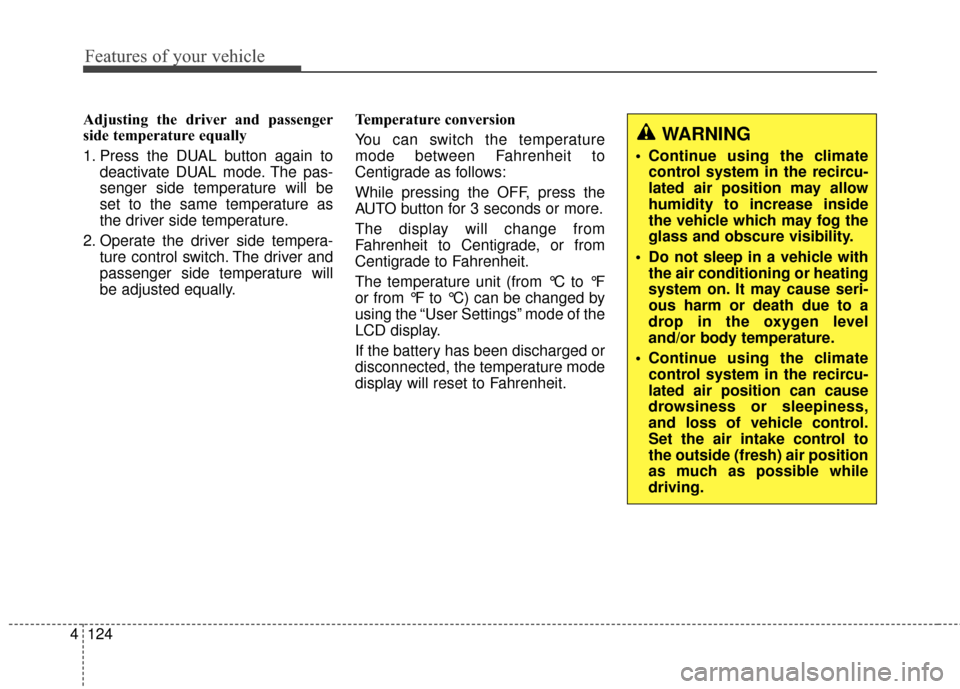
1. Press the DUAL button again to
deactivate DUAL mode. The pas-
senger side temperature will be
set to the same temperature as
the driver side temperature.
2. Operate the driver side tempera- ture control switch. The driver and
passenger side temperature will
be adjusted equally. Temperature conversion
You can switch the temperature
mode between Fahrenheit to
Centigrade as follows:
While pressing the OFF, press the
AUTO button for 3 seconds or more.
The display will change from
Fahrenheit to Centigrade, or from
Centigrade to Fahrenheit.
The temperature unit (from °C to °F
or from °F to °C) can be changed by
using the “User Settings” mode of the
LCD display.
If the battery has been discharged or
disconnected, the temperature mode
display will reset to Fahrenheit.
WARNING
Continue using the climate
control system in the recircu-
lated air position may allow
humidity to increase inside
the vehicle which may fog the
glass and obscure visibility.
Do not sleep in a vehicle with the air conditioning or heating
system on. It may cause seri-
ous harm or death due to a
drop in the oxygen level
and/or body temperature.
Continue using the climate control system in the recircu-
lated air position can cause
drowsiness or sleepiness,
and loss of vehicle control.
Set the air intake control to
the outside (fresh) air position
as much as possible while
driving.
Page 200 of 479
Features of your vehicle
130
4
WINDSHIELD DEFROSTING AND DEFOGGING
For maximum defrosting, set the
temperature control to the extreme
right/hot position and the fan speed
control to the highest speed.
If warm air to the floor is desired while defrosting or defogging, set the
mode to the floor-defrost position.
Before driving, clear all snow and ice from the windshield, rear win-
dow, outside rear view mirrors, and
all side windows.
Clear all snow and ice from the hood and air inlet in the cowl grill to
improve heater and defroster effi-
ciency and to reduce the probabili-
ty of fogging up the inside of the
windshield.Manual climate control system
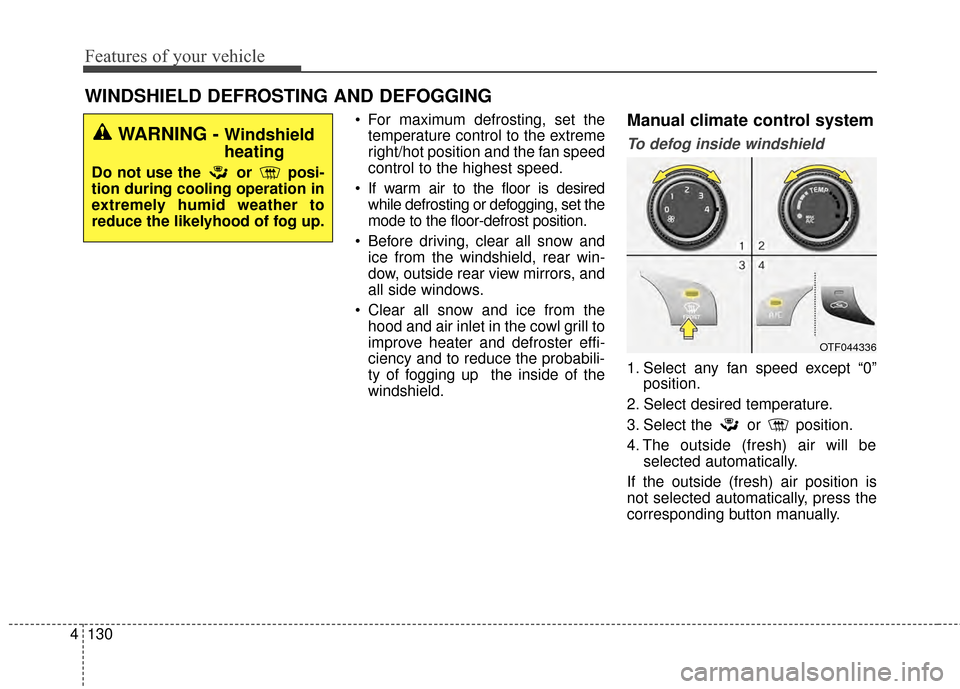
To defog inside windshield
1. Select any fan speed except “0” position.
2. Select desired temperature.
3. Select the or position.
4. The outside (fresh) air will be selected automatically.
If the outside (fresh) air position is
not selected automatically, press the
corresponding button manually.
OTF044336
WARNING - Windshield
heating
Do not use the or posi-
tion during cooling operation in
extremely humid weather to
reduce the likelyhood of fog up.
Page 206 of 479
Features of your vehicle
136
4
STORAGE COMPARTMENT
These compartments can be used to
store small items.
To avoid possible theft, do not leave
valuables in the storage compartment.
Always keep the storage compart-
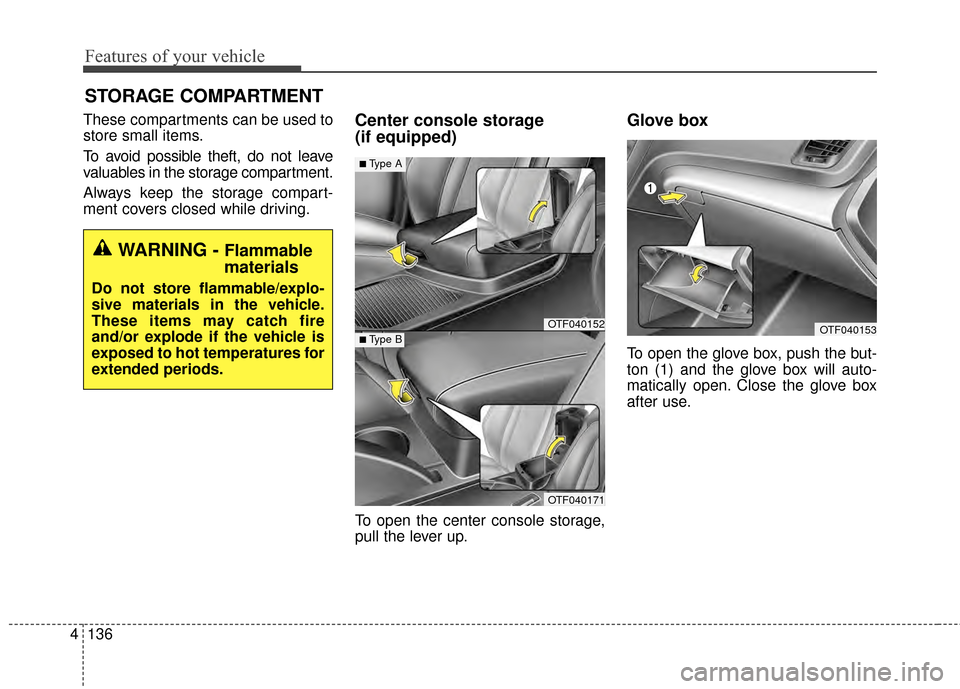
ment covers closed while driving.Center console storage
(if equipped)
To open the center console storage,
pull the lever up.
Glove box
To open the glove box, push the but-
ton (1) and the glove box will auto-
matically open. Close the glove box
after use.
OTF040152
OTF040171
■Type A
■Type BOTF040153
WARNING - Flammable
materials
Do not store flammable/explo-
sive materials in the vehicle.
These items may catch fire
and/or explode if the vehicle is
exposed to hot temperatures for
extended periods.