head lights KIA Optima 2016 4.G Owner's Manual
[x] Cancel search | Manufacturer: KIA, Model Year: 2016, Model line: Optima, Model: KIA Optima 2016 4.GPages: 623, PDF Size: 15.4 MB
Page 89 of 623
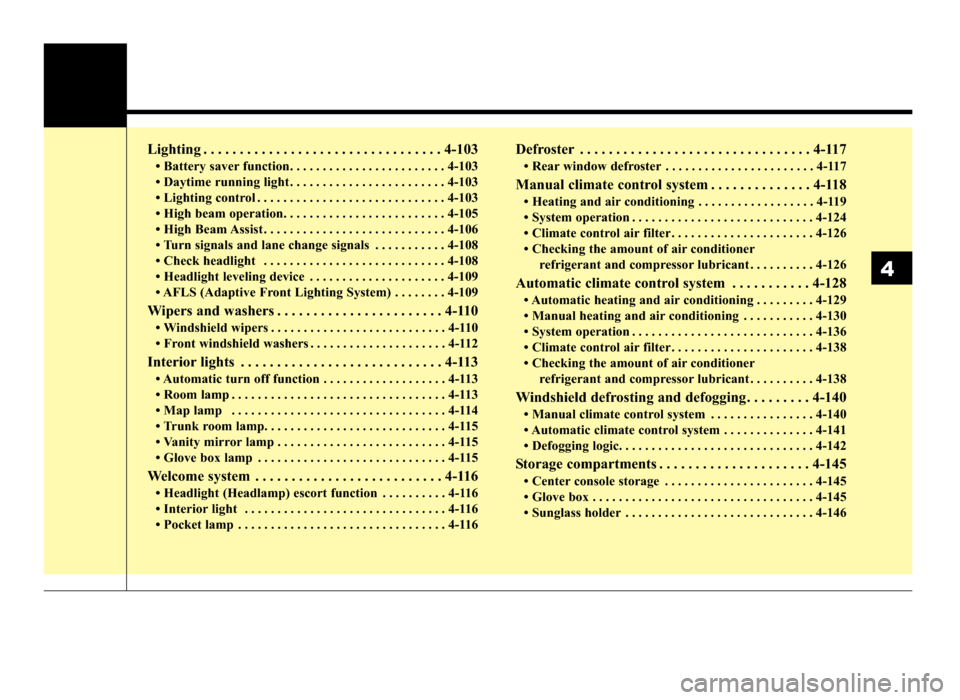
Lighting . . . . . . . . . . . . . . . . . . . . . . . . . . . . . . . . . 4-103
• Battery saver function. . . . . . . . . . . . . . . . . . . . . . . . 4-103
• Daytime running light . . . . . . . . . . . . . . . . . . . . . . . . 4-103
• Lighting control . . . . . . . . . . . . . . . . . . . . . . . . . . . . . 4-103
• High beam operation. . . . . . . . . . . . . . . . . . . . . . . . . 4-105
• High Beam Assist . . . . . . . . . . . . . . . . . . . . . . . . . . . . 4-106
• Turn signals and lane change signals . . . . . . . . . . . 4-108
• Check headlight . . . . . . . . . . . . . . . . . . . . . . . . . . . . 4-108
• Headlight leveling device . . . . . . . . . . . . . . . . . . . . . 4-109
• AFLS (Adaptive Front Lighting System) . . . . . . . . 4-109
Wipers and washers . . . . . . . . . . . . . . . . . . . . . . . 4-110
• Windshield wipers . . . . . . . . . . . . . . . . . . . . . . . . . . . 4-110
• Front windshield washers . . . . . . . . . . . . . . . . . . . . . 4-112
Interior lights . . . . . . . . . . . . . . . . . . . . . . . . . . . . 4-113
• Automatic turn off function . . . . . . . . . . . . . . . . . . . 4-113
• Room lamp . . . . . . . . . . . . . . . . . . . . . . . . . . . . . . . . . 4-113
• Map lamp . . . . . . . . . . . . . . . . . . . . . . . . . . . . . . . . . 4-114
• Trunk room lamp. . . . . . . . . . . . . . . . . . . . . . . . . . . . 4-115
• Vanity mirror lamp . . . . . . . . . . . . . . . . . . . . . . . . . . 4-115
• Glove box lamp . . . . . . . . . . . . . . . . . . . . . . . . . . . . . 4-115
Welcome system . . . . . . . . . . . . . . . . . . . . . . . . . . 4-116
• Headlight (Headlamp) escort function . . . . . . . . . . 4-116
• Interior light . . . . . . . . . . . . . . . . . . . . . . . . . . . . . . . 4-116
• Pocket lamp . . . . . . . . . . . . . . . . . . . . . . . . . . . . . . . . 4-116
Defroster . . . . . . . . . . . . . . . . . . . . . . . . . . . . . . . . 4-117
• Rear window defroster . . . . . . . . . . . . . . . . . . . . . . . 4-117
Manual climate control system . . . . . . . . . . . . . . 4-118
• Heating and air conditioning . . . . . . . . . . . . . . . . . . 4-119
• System operation . . . . . . . . . . . . . . . . . . . . . . . . . . . . 4-124
• Climate control air filter . . . . . . . . . . . . . . . . . . . . . . 4-126
• Checking the amount of air conditionerrefrigerant and compressor lubricant . . . . . . . . . . 4-126
Automatic climate control system . . . . . . . . . . . 4-128
• Automatic heating and air conditioning . . . . . . . . . 4-129
• Manual heating and air conditioning . . . . . . . . . . . 4-130
• System operation . . . . . . . . . . . . . . . . . . . . . . . . . . . . 4-136
• Climate control air filter . . . . . . . . . . . . . . . . . . . . . . 4-138
• Checking the amount of air conditionerrefrigerant and compressor lubricant . . . . . . . . . . 4-138
Windshield defrosting and defogging . . . . . . . . . 4-140
• Manual climate control system . . . . . . . . . . . . . . . . 4-140
• Automatic climate control system . . . . . . . . . . . . . . 4-141
• Defogging logic. . . . . . . . . . . . . . . . . . . . . . . . . . . . . . 4-142
Storage compartments . . . . . . . . . . . . . . . . . . . . . 4-145
• Center console storage . . . . . . . . . . . . . . . . . . . . . . . 4-145
• Glove box . . . . . . . . . . . . . . . . . . . . . . . . . . . . . . . . . . 4-14\
5
• Sunglass holder . . . . . . . . . . . . . . . . . . . . . . . . . . . . . 4-146
4
JF CAN (ENG) 4.qxp 11/5/2015 3:50 PM Page 3
Page 137 of 623
451
Features of your vehicle
MIRRORS
Inside rearview mirror
Adjust the rearview mirror so that the
center view through the rear window
is seen. Make this adjustment before
you start driving.
Do not place objects in the rear seat
or cargo area which would interfere
with your vision through the rear win-
dow.
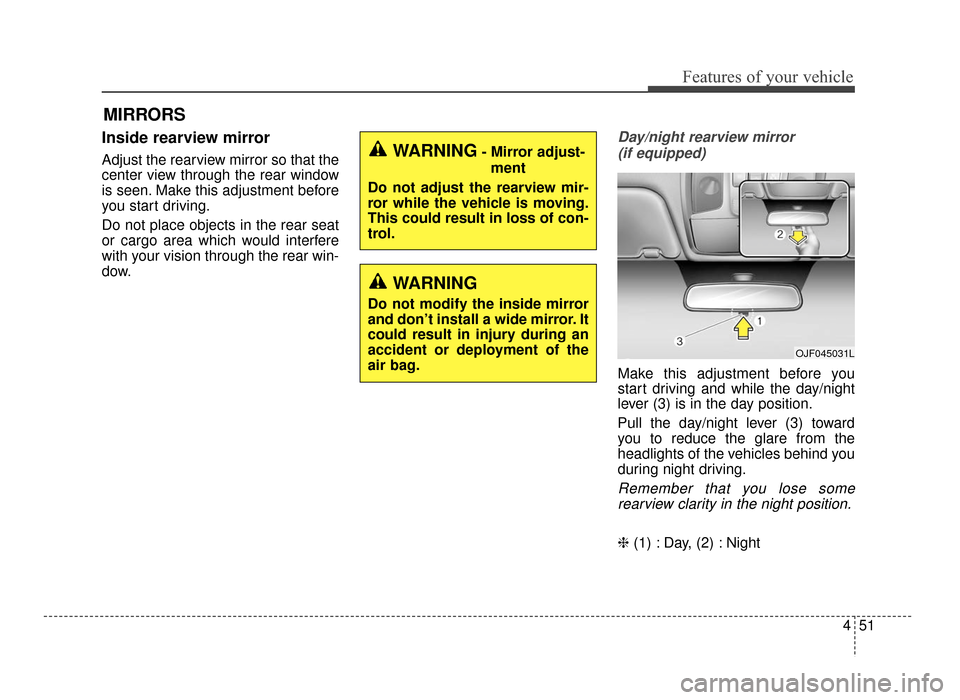
Day/night rearview mirror (if equipped)
Make this adjustment before you
start driving and while the day/night
lever (3) is in the day position.
Pull the day/night lever (3) toward
you to reduce the glare from the
headlights of the vehicles behind you
during night driving.
Remember that you lose somerearview clarity in the night position.
❈ (1) : Day, (2) : Night
WARNING- Mirror adjust-
ment
Do not adjust the rearview mir-
ror while the vehicle is moving.
This could result in loss of con-
trol.
WARNING
Do not modify the inside mirror
and don’t install a wide mirror. It
could result in injury during an
accident or deployment of the
air bag.
OJF045031L
JF CAN (ENG) 4.qxp 11/5/2015 3:50 PM Page 51
Page 138 of 623
Features of your vehicle
52
4
Electric chromatic mirror (ECM)
(if equipped)
The electric rearview mirror automat-
ically controls the glare from the
headlights of the vehicles behind you
in nighttime or low light driving condi-
tions. The sensor mounted in the mir-
ror senses the light level around the
vehicle and automatically controls
the headlight glare from the vehicles
behind you.
When the engine is running, the
glare is automatically controlled by
the sensor mounted in the rearview
mirror.
Whenever the shift lever is shifted
into reverse (R), the mirror will auto-
matically go to the brightest setting in
order to improve the drivers view
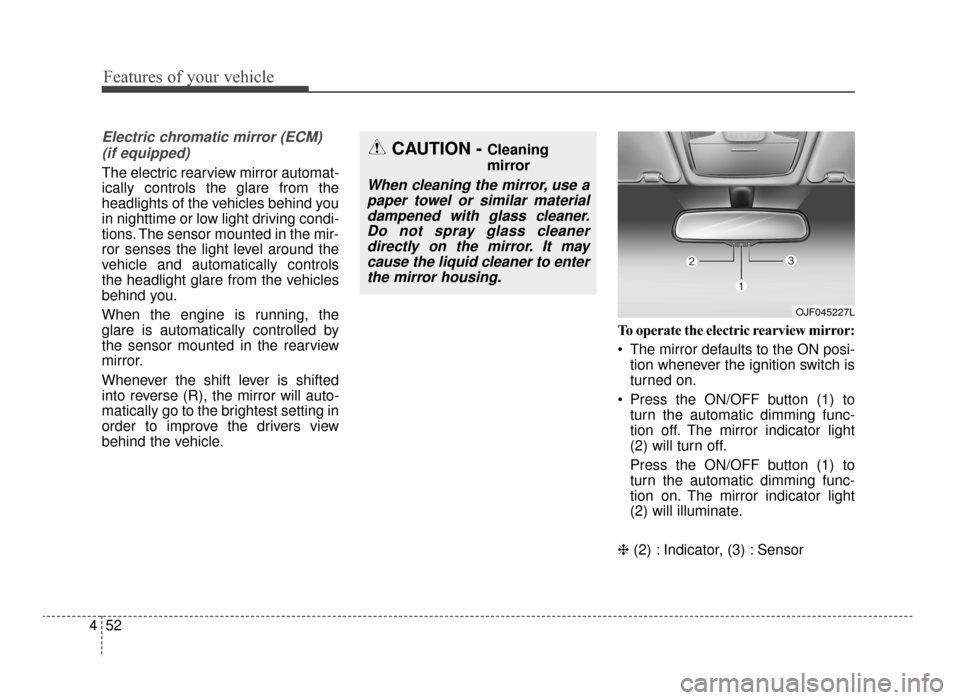
behind the vehicle. To operate the electric rearview mirror:
The mirror defaults to the ON posi-
tion whenever the ignition switch is
turned on.
Press the ON/OFF button (1) to turn the automatic dimming func-
tion off. The mirror indicator light
(2) will turn off.
Press the ON/OFF button (1) to
turn the automatic dimming func-
tion on. The mirror indicator light
(2) will illuminate.
❈ (2) : Indicator, (3) : Sensor
CAUTION - Cleaning
mirror
When cleaning the mirror, use a
paper towel or similar materialdampened with glass cleaner.Do not spray glass cleanerdirectly on the mirror. It maycause the liquid cleaner to enterthe mirror housing.
OJF045227L
JF CAN (ENG) 4.qxp 11/5/2015 3:50 PM Page 52
Page 180 of 623
Features of your vehicle
94
4
Turn Signal Indicator
Light
This indicator light blinks:
When you turn the turn signal light on.
If any of the following occurs, there
may be a malfunction with the turn
signal system. In this case, have your
vehicle inspected by an authorized
Kia dealer. - The indicator light does not blinkbut illuminates.
- The indicator light blinks more rapidly.
- The indicator light does not illumi- nate at all.
High Beam Indicator
Light
This indicator light illuminates:
When the headlights are on and in the high beam position
When the turn signal lever is pulled into the Flash-to-Pass position.
High beam assist indica-
tor (if equipped)
This warning light illuminates :
When the high-Beam is on with the light switch in the AUTO light posi-
tion.
If your vehicle detects oncoming or preceding vehicles, the High beam
assist system will switch the high
beam to low beam automatically.
For more details, refer to "High beam
assist" in this chapter.
Light ON Indicator Light
This indicator light illuminates:
When the tail lights or headlights are on.
Cruise Indicator Light
(if equipped)
This indicator light illuminates:
When the cruise control system is enabled.
For more details, refer to “Cruise
Control System” in chapter 6.
CRUISE
JF CAN (ENG) 4.qxp 11/5/2015 3:51 PM Page 94
Page 189 of 623

4103
Features of your vehicle
Battery saver function
The purpose of this feature is toprevent the battery from being dis-
charged if the lights are left in the
ON position. The system automati-
cally shuts off the parking lights 30
seconds after the ignition key is
removed and the driver’s door is
opened and closed.
With this feature, the parking lights will turn off automatically if the driver
parks on the side of the road at night
and opens the driver’s side door.
If necessary, to keep the parking
lights on when the ignition key is
removed, perform the following:
1) Open the driver-side door.
2) Turn the parking lights OFF and ON again using the light switch
on the steering column.
Daytime running light
The Daytime Running Lights (DRL)
can make it easier for others to see the
front of your vehicle during the day.
DRL can be helpful in many different
driving conditions, and it is especially
helpful after dawn and before sunset.
The DRL system will turn the dedi-
cated lamp OFF when:
1. The headlight switch is ON.
2. The engine is OFF.
Lighting control
The light switch has a Headlight and
a Parking light position.
To operate the lights, turn the knob at
the end of the control lever to one of
the following positions:
(1) OFF position
(2) Auto light position (if equipped)
(3) Parking & Tail light
(4) Headlight position
LIGHTING
OJF045045
JF CAN (ENG) 4.qxp 11/5/2015 3:51 PM Page 103
Page 190 of 623
Features of your vehicle
104
4
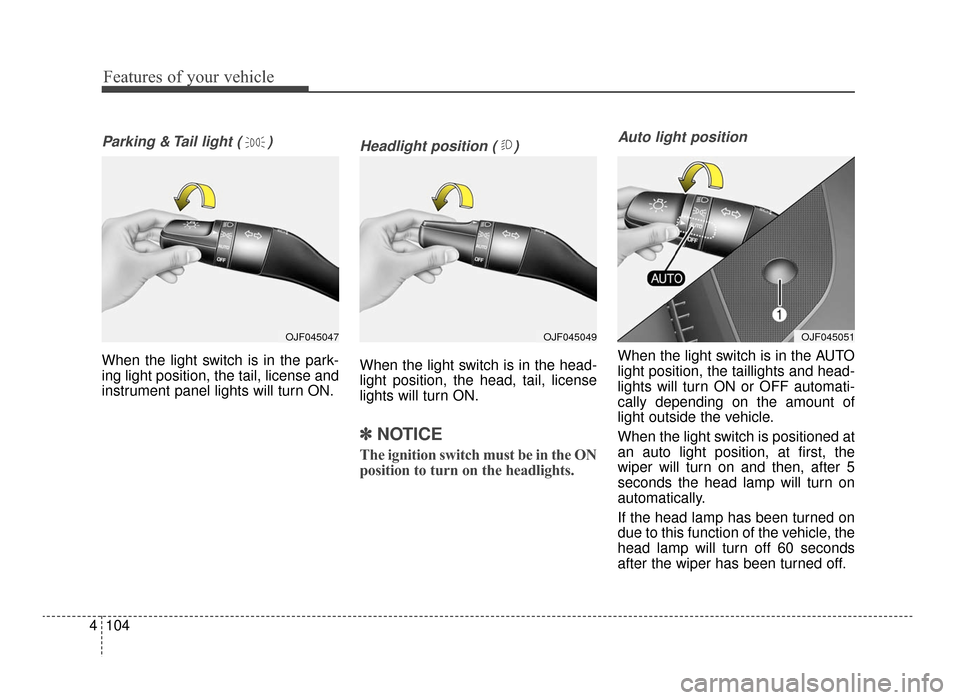
Parking & Tail light ( )
When the light switch is in the park-
ing light position, the tail, license and
instrument panel lights will turn ON.
Headlight position ( )
When the light switch is in the head-
light position, the head, tail, license
lights will turn ON.
✽ ✽
NOTICE
The ignition switch must be in the ON
position to turn on the headlights.
Auto light position
When the light switch is in the AUTO
light position, the taillights and head-
lights will turn ON or OFF automati-
cally depending on the amount of
light outside the vehicle.
When the light switch is positioned at
an auto light position, at first, the
wiper will turn on and then, after 5
seconds the head lamp will turn on
automatically.
If the head lamp has been turned on
due to this function of the vehicle, the
head lamp will turn off 60 seconds
after the wiper has been turned off.
OJF045049OJF045051OJF045047
JF CAN (ENG) 4.qxp 11/5/2015 3:51 PM Page 104
Page 191 of 623
4105
Features of your vehicle
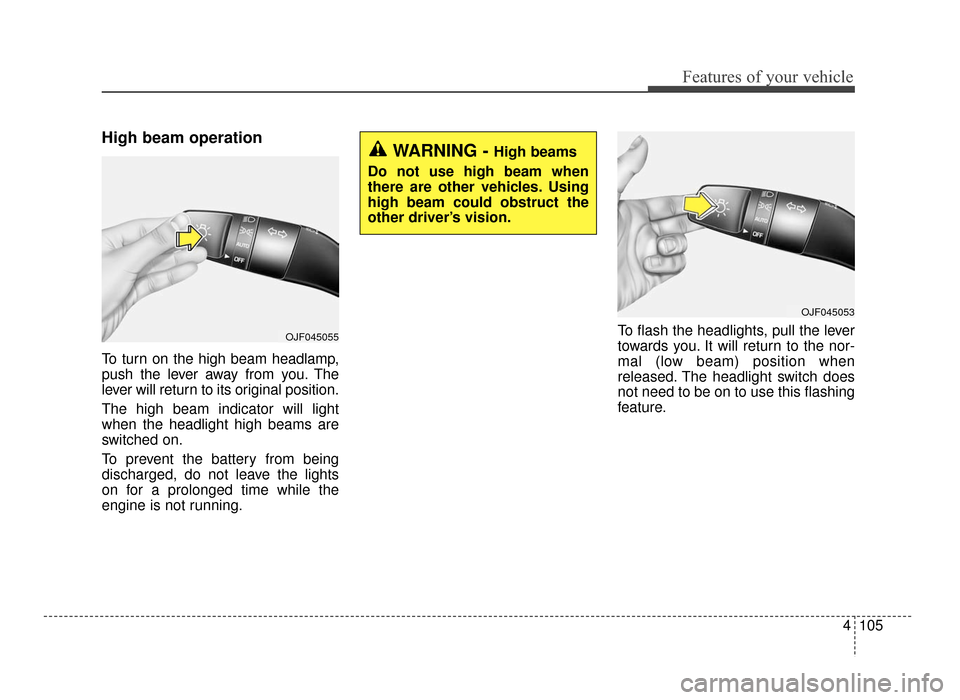
High beam operation
To turn on the high beam headlamp,
push the lever away from you. The
lever will return to its original position.
The high beam indicator will light
when the headlight high beams are
switched on.
To prevent the battery from being
discharged, do not leave the lights
on for a prolonged time while the
engine is not running.To flash the headlights, pull the lever
towards you. It will return to the nor-
mal (low beam) position when
released. The headlight switch does
not need to be on to use this flashing
feature.
WARNING - High beams
Do not use high beam when
there are other vehicles. Using
high beam could obstruct the
other driver’s vision.
OJF045053
OJF045055
JF CAN (ENG) 4.qxp 11/5/2015 3:51 PM Page 105
Page 192 of 623
Features of your vehicle
106
4
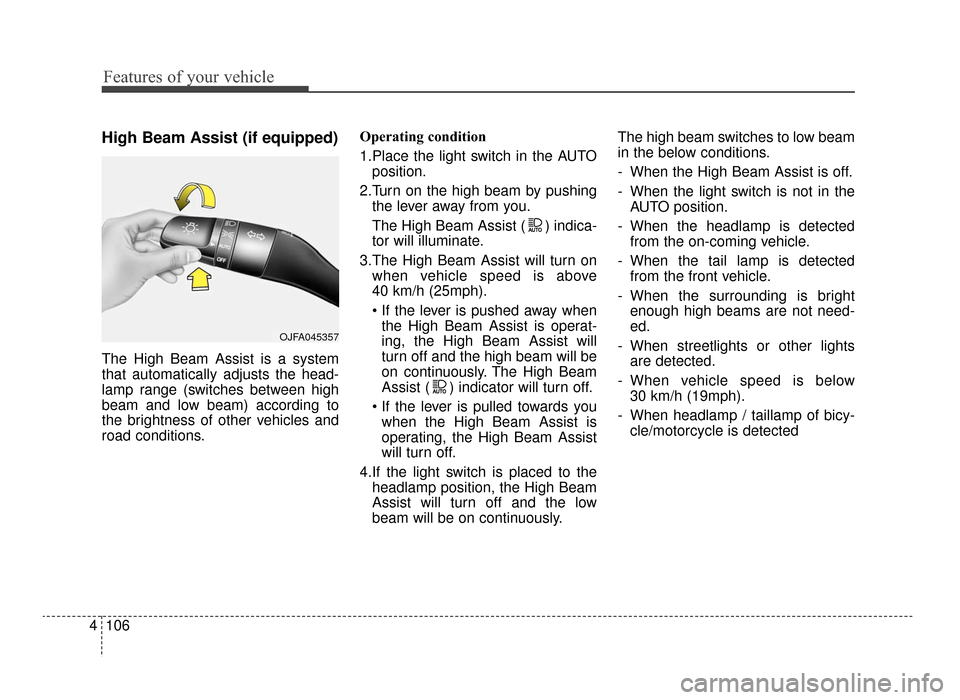
High Beam Assist (if equipped)
The High Beam Assist is a system
that automatically adjusts the head-
lamp range (switches between high
beam and low beam) according to
the brightness of other vehicles and
road conditions. Operating condition
1.Place the light switch in the AUTO
position.
2.Turn on the high beam by pushing the lever away from you.
The High Beam Assist ( ) indica-
tor will illuminate.
3.The High Beam Assist will turn on when vehicle speed is above
40 km/h (25mph).
the High Beam Assist is operat-
ing, the High Beam Assist will
turn off and the high beam will be
on continuously. The High Beam
Assist ( ) indicator will turn off.
when the High Beam Assist is
operating, the High Beam Assist
will turn off.
4.If the light switch is placed to the headlamp position, the High Beam
Assist will turn off and the low
beam will be on continuously. The high beam switches to low beam
in the below conditions.
- When the High Beam Assist is off.
- When the light switch is not in the
AUTO position.
- When the headlamp is detected from the on-coming vehicle.
- When the tail lamp is detected from the front vehicle.
- When the surrounding is bright enough high beams are not need-
ed.
- When streetlights or other lights are detected.
- When vehicle speed is below 30 km/h (19mph).
- When headlamp / taillamp of bicy- cle/motorcycle is detected
OJFA045357
JF CAN (ENG) 4.qxp 11/5/2015 3:51 PM Page 106
Page 202 of 623
Features of your vehicle
116
4
WELCOME SYSTEM (IF EQUIPPED)
Headlight (Headlamp) escort
function
The headlights (and/or taillights)
remain on for approximately 5 min-
utes after the ignition key is removed
or turned to the ACC or LOCK posi-
tion. However, if the driver’s door is
opened and closed, the headlights
are turned off after 15 seconds.
The headlights can be turned off by
pressing the lock button on the trans-
mitter or smart key twice or turning
off the light switch from the headlight
or Auto light position.
Interior light
When the interior light switch is in the
DOOR position and all doors (and
trunk) are locked and closed, the
room lamp will come on for 30 sec-
onds if any of the below is performed.
Without smart key system
- When the door unlock button ispressed on the transmitter.
With the smart key system - When the door unlock button ispressed on the smart key.
- When the button of the outside door handle is pressed.
At this time, if you press the door lock
button, the lamps will turn off imme-
diately.
Pocket lamp (if equipped)
When all doors are locked and
closed, the pocket lamp will come on
for 15 seconds if any of the below is
performed.
With the smart key system - When the door unlock button ispressed on the smart key.
- When the button of the outside door handle is pressed.
At this time, if you press the door lock
button, the lamps will turn off imme-
diately.
JF CAN (ENG) 4.qxp 11/5/2015 3:51 PM Page 116
Page 452 of 623
Driving your vehicle
96
6
Conditions that cause missed
warnings and false warnings:
The lane is not visible due to snow,
rain, debris, puddles or other envi-
ronmental conditions.
The brightness outside changes suddenly such as when
entering/exiting a tunnel.
The headlights are off at night or in a tunnel.
The color of the lane marking from the road is difficult to distinguish.
Driving on a steep grade or a curve.
Light such as street lights, sunlight or oncoming vehicle lights reflect
off of water on the road.
The lens or windshield is obscured by debris.
The sensor cannot detect the lane because of fog, heavy rain or
heavy snow.
The rear view mirror housing has overheated from exposure to direct
sunlight.
The lane is very wide or narrow. The lane line is damaged or indis-
tinct.
The windshield is fogged up by humidity.
Objects in the median or along the side of the road cast shadows over
the lane markings
The sensor cannot distinguish the lane from the road due to the
dust/dirt.
There are other markings similar to lane lines.
There are lane boundaries instead of markings.
The vehicle ahead is very close, obscuring the view of the lane
markings, or the vehicle ahead is
driving over the lane markings.
The vehicle vibrates heavily due to poor road conditions.
The lanes are merging, expanding, or otherwise overlapping
Something reflective is placed on the dashboard. Driving with the sun in front of you.
Driving in areas under construc-
tion.
Lanes are marked by more than two sets of lines.
The windshield is fogged by humid air in the vehicle.
This device complies with
Industry Canada licence-exempt
RSS standard(s).
Operation is subject to the following
two conditions:
(1) This device may not cause inter- ference, and
(2) This device must accept any interference, including interfer-
ence that may cause undesired
operation of the device.
JF CAN (ENG) 6.qxp 11/5/2015 6:39 PM Page 96