warning KIA OPTIMA 2020 Owners Manual
[x] Cancel search | Manufacturer: KIA, Model Year: 2020, Model line: OPTIMA, Model: KIA OPTIMA 2020Pages: 589, PDF Size: 11.37 MB
Page 234 of 589

499
Features of your vehicle
Types of warning sound
When an object is 120 cm to 61 cm(47 in. to 24 in.) from the rear
bumper: Buzzer beeps intermit-
tently.
When an object is 60 cm to 31 cm (24 in. to 12 in.) from the rear
bumper: Buzzer beeps more fre-
quently.
When an object is within 30 cm (12 in.) of the rear bumper:
Buzzer sounds continuously.
Non-operational conditions of
the parking distance warning-
reverse system
The parking distance warning-
reverse system may not operate
properly when:
1. Moisture is frozen to the sensor. (It will operate normally once the
moisture clears.)
2. The sensor is covered with foreign matter, such as snow or water, or
the sensor cover is blocked. (It will
operate normally when the materi-
al is removed or the sensor is no
longer blocked.)
3. Driving on uneven road surfaces (unpaved roads, gravel, bumps,
gradient).
4. Objects generating excessive noise (vehicle horns, loud motor-
cycle engines, or truck air brakes)
are within range of the sensor.
5. Heavy rain or water spray exists.
6. Wireless transmitters or mobile phones are within range of the
sensor.
7. The sensor is covered with snow.
8. Trailer towing. The detecting range may decrease
when:
1. The sensor is covered with foreign
matter such as snow or water.
(The sensing range will return to
normal when removed.)
2. Outside air temperature is extremely hot or cold.
The following objects may not be
recognized by the sensor:
1. Sharp or slim objects such as ropes, chains or small poles.
2. Objects which tend to absorb the sensor frequency such as clothes,
sound absorbent material or snow.
3. Undetectable objects smaller than 1 m (40 in.) in height and narrower
than 14 cm (6 in.) in diameter.
Page 235 of 589

Features of your vehicle
100
4
Parking distance warning-
reverse system precautions
The parking distance warning-
reverse system may not sound
consistently depending on the
speed and shapes of the objects
detected.
The parking distance warning- reverse system may malfunction if
the vehicle bumper height or sen-
sor installation has been modified
or damaged. Any non-factory
installed equipment or accessories
may also interfere with the sensor
performance.
The sensor may not recognize objects less than 40 cm (15 in.)
from the sensor, or it may sense an
incorrect distance. Use caution.
When the sensor is frozen or cov- ered with snow, dirt, or water, the
sensor may be inoperative until the
material is removed using a soft
cloth.
To prevent damage, do not push, scratch or strike the sensor.
✽ ✽ NOTICE
This system can only sense objects
within the range and location of the
sensors. It cannot detect objects in
other areas where sensors are not
installed. Also, small or slim objects,
such as poles or objects located
between sensors may not be detected
by the sensors.
Always visually check behind the
vehicle when backing up.
Be sure to inform any drivers of the
vehicle that may be unfamiliar with
the system regarding the system’s
capabilities and limitations.
Self-diagnosis
If you don’t hear an audible warning
sound or if the buzzer sounds inter-
mittently when shifting the gear to the
R (Reverse) position, this may indi-
cate a malfunction in the parking dis-
tance warning-reverse system. If this
occurs, have your vehicle checked by
an authorized Kia dealer as soon as
possible.
✽ ✽NOTICE
Your new vehicle warranty does not
cover any accidents or damage to
the vehicle or injuries to its occu-
pants due to a parking distance
warning-reverse system malfunc-
tion. Always drive safely and cau-
tiously.
Page 236 of 589
4101
Features of your vehicle
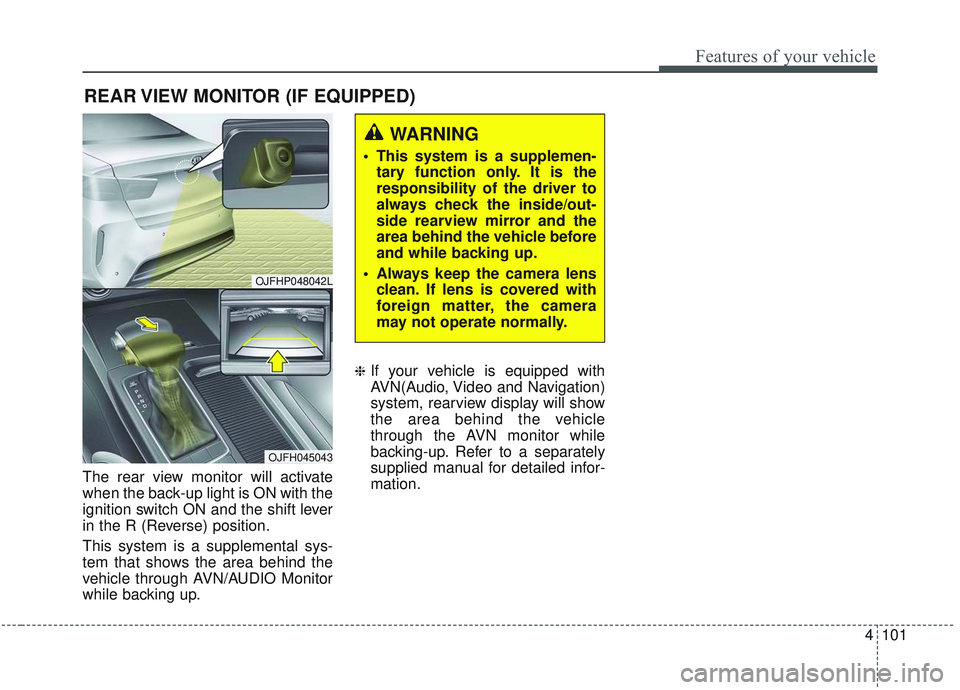
The rear view monitor will activate
when the back-up light is ON with the
ignition switch ON and the shift lever
in the R (Reverse) position.
This system is a supplemental sys-
tem that shows the area behind the
vehicle through AVN/AUDIO Monitor
while backing up.
❈If your vehicle is equipped with
AVN(Audio, Video and Navigation)
system, rearview display will show
the area behind the vehicle
through the AVN monitor while
backing-up. Refer to a separately
supplied manual for detailed infor-
mation.
REAR VIEW MONITOR (IF EQUIPPED)
WARNING
This system is a supplemen-tary function only. It is the
responsibility of the driver to
always check the inside/out-
side rearview mirror and the
area behind the vehicle before
and while backing up.
Always keep the camera lens clean. If lens is covered with
foreign matter, the camera
may not operate normally.
OJFHP048042L
OJFH045043
Page 237 of 589
Features of your vehicle
102
4
The 360° camera monitoring system
is not a substitute for proper and safe
parking procedures. The 360° cam-
era monitoring system may not
detect every object surrounding the
vehicle. Always drive safely and use
caution when parking.
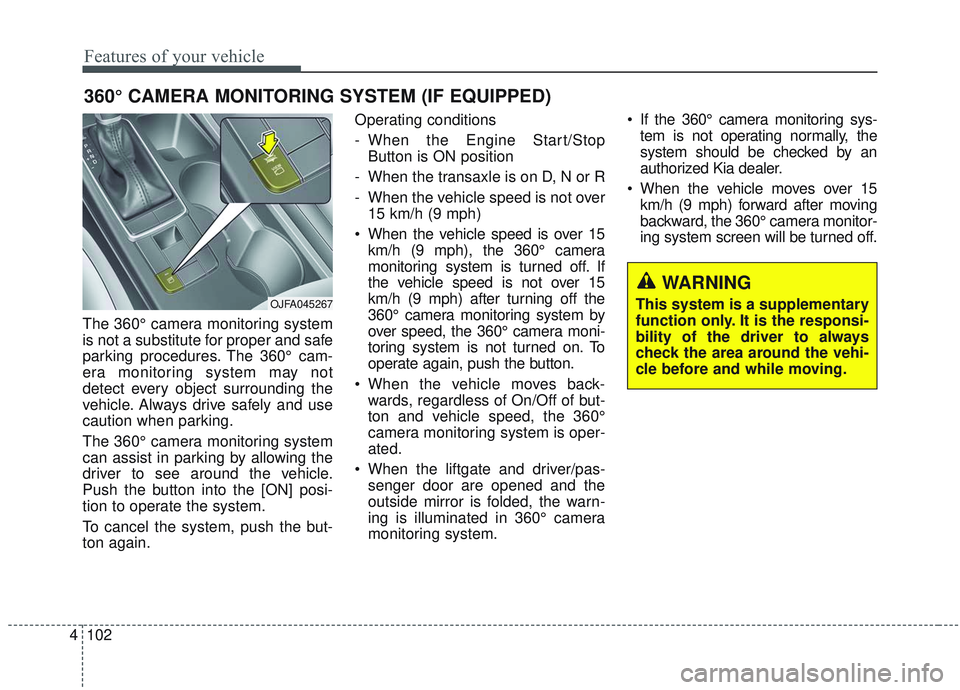
The 360° camera monitoring system
can assist in parking by allowing the
driver to see around the vehicle.
Push the button into the [ON] posi-
tion to operate the system.
To cancel the system, push the but-
ton again. Operating conditions
- When the Engine Start/Stop
Button is ON position
- When the transaxle is on D, N or R
- When the vehicle speed is not over 15 km/h (9 mph)
When the vehicle speed is over 15 km/h (9 mph), the 360° camera
monitoring system is turned off. If
the vehicle speed is not over 15
km/h (9 mph) after turning off the
360° camera monitoring system by
over speed, the 360° camera moni-
toring system is not turned on. To
operate again, push the button.
When the vehicle moves back- wards, regardless of On/Off of but-
ton and vehicle speed, the 360°
camera monitoring system is oper-
ated.
When the liftgate and driver/pas- senger door are opened and the
outside mirror is folded, the warn-
ing is illuminated in 360° camera
monitoring system. If the 360° camera monitoring sys-
tem is not operating normally, the
system should be checked by an
authorized Kia dealer.
When the vehicle moves over 15 km/h (9 mph) forward after moving
backward, the 360° camera monitor-
ing system screen will be turned off.
360° CAMERA MONITORING SYSTEM (IF EQUIPPED)
WARNING
This system is a supplementary
function only. It is the responsi-
bility of the driver to always
check the area around the vehi-
cle before and while moving.OJFA045267
Page 240 of 589

4105
Features of your vehicle
High beam operation
To turn on the high beam headlamp,
push the lever away from you. The
lever will return to its original position.
The high beam indicator will light
when the headlight high beams are
switched on.
To prevent the battery from being
discharged, do not leave the lights
on for a prolonged time while the
engine is not running.
WARNING - High beams
Do not use high beam when
there are other vehicles in front
of or approaching your vehicle.
Using high beam could obstruct
the other driver's vision.
OUM044059
CAUTION
Never place anything over the sensor (1) located on theinstrument panel, this willensure better auto-light sys-tem control.
Don't clean the sensor using a window cleaner, the cleanermay leave a light film whichcould interfere with sensoroperation.
If your vehicle has window tint or other types of metallic coat-ing on the front windshield,the Auto light system may notwork properly.
Page 242 of 589
4107
Features of your vehicle
(3) If the light switch is pulledtowards you when the high
beam is on by the High Beam
Assist, the low beam will be on
and the High Beam Assist will
turn off.
(4) If the light switch is turned to the headlamp position ( )
from AUTO position, the High
Beam Assist will turn off and
the low beam will be on contin-
uously. When the High Beam Assist is oper-
ating, the high beam switches to low
beam in the following conditions.
When the headlamp is detected
from the on-coming vehicle.
When the tail lamp is detected from the front vehicle.
When headlamp/tail lamp of bicy- cle/motorcycle is detected.
When the surrounding is sufficient- ly bright that high beams are not
needed.
When streetlights or other lights are detected.
When the light switch is not in the AUTO position.
When the High Beam Assist is off.
When vehicle speed is below 24 km/h (15 mph).Warning light and message
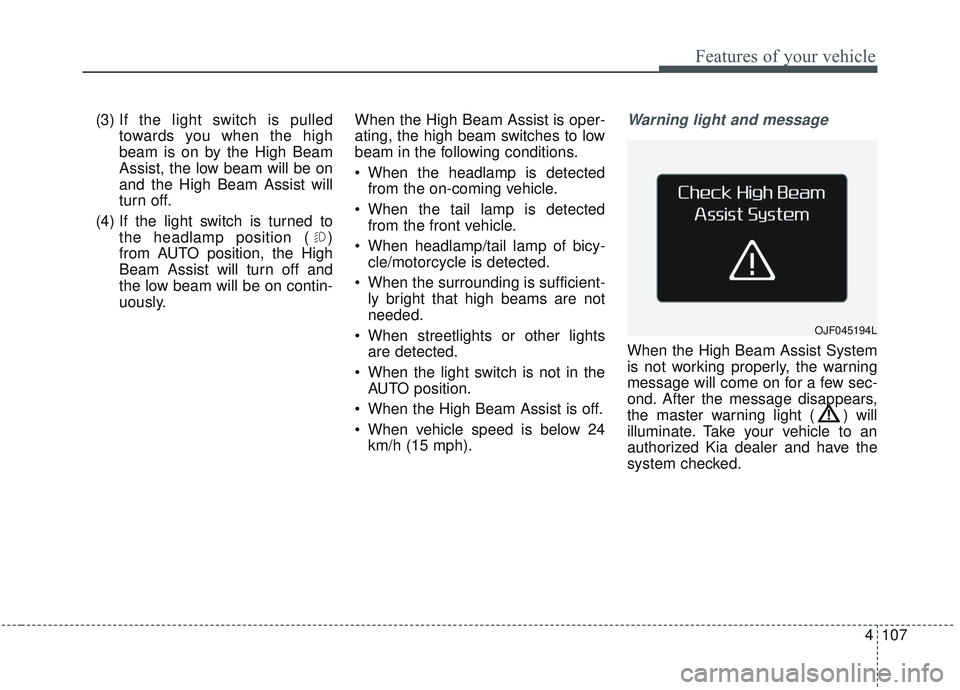
When the High Beam Assist System
is not working properly, the warning
message will come on for a few sec-
ond. After the message disappears,
the master warning light ( ) will
illuminate. Take your vehicle to an
authorized Kia dealer and have the
system checked.
OJF045194L
Page 245 of 589
Features of your vehicle
110
4
If an indicator stays on and does not
flash or if it flashes abnormally, one of
the turn signal bulbs may be burned
out and will require replacement.
✽ ✽
NOTICE
If an indicator flash is abnormally
quick or slow, a bulb may be burned
out or have a poor electrical connec-
tion in the circuit.
Check headlight
This warning message illuminates if
there is a malfunction (burned-out
bulb except LED lamp or circuit mal-
function) with the headlamp. In this
case, have your vehicle inspected by
an authorized Kia dealer.
✽ ✽NOTICE
• When replacing the bulb, use the
same wattage bulb.
For more information, refer to
“BULB WATTAGE” in chapter 8.
• If a different wattage bulb is installed on the vehicle, this warn-
ing message is not displayed.
Front fog light (if equipped)
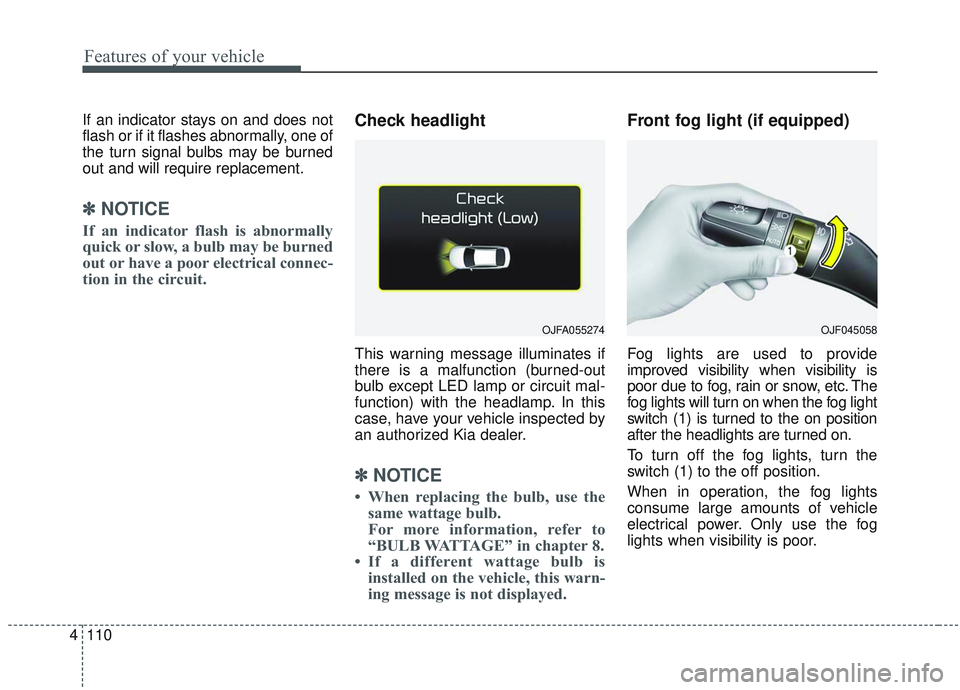
Fog lights are used to provide
improved visibility when visibility is
poor due to fog, rain or snow, etc. The
fog lights will turn on when the fog light
switch (1) is turned to the on position
after the headlights are turned on.
To turn off the fog lights, turn the
switch (1) to the off position.
When in operation, the fog lights
consume large amounts of vehicle
electrical power. Only use the fog
lights when visibility is poor.
OJFA055274OJF045058
Page 250 of 589
4115
Features of your vehicle
The reservoir filler neck is located in
the front of the engine compartment
on the passenger side.
CAUTION - Washer pump
To prevent possible damage tothe washer pump, do not oper-ate the washer when the fluidreservoir is empty.
WARNING - Obscured
visibility
Do not use the washer in freez-
ing temperatures without first
warming the windshield with
the defrosters; the washer solu-
tion could freeze on the wind-
shield and obscure your vision.
CAUTION -Wipers & windshields
To prevent possible damage to the wipers or windshield,do not operate the wiperswhen the windshield is dry.
To prevent damage to the wiper blades, do not use gasoline,kerosene, paint thinner, orother solvents on or near them.
To prevent damage to the wiper arms and other compo-nents, do not attempt to movethe wipers manually.
Page 251 of 589
Features of your vehicle
116
4
Do not use the interior lights for
extended periods when the engine is
not running.
It may cause battery discharge.Automatic turn off function
The interior lights automatically turn
off approximately 20 minutes after
the ignition switch is turned off, if the
lights are in the ON position.
If your vehicle is equipped with the
theft alarm system, the interior lights
automatically turn off approximately
5 seconds after the system is armed.
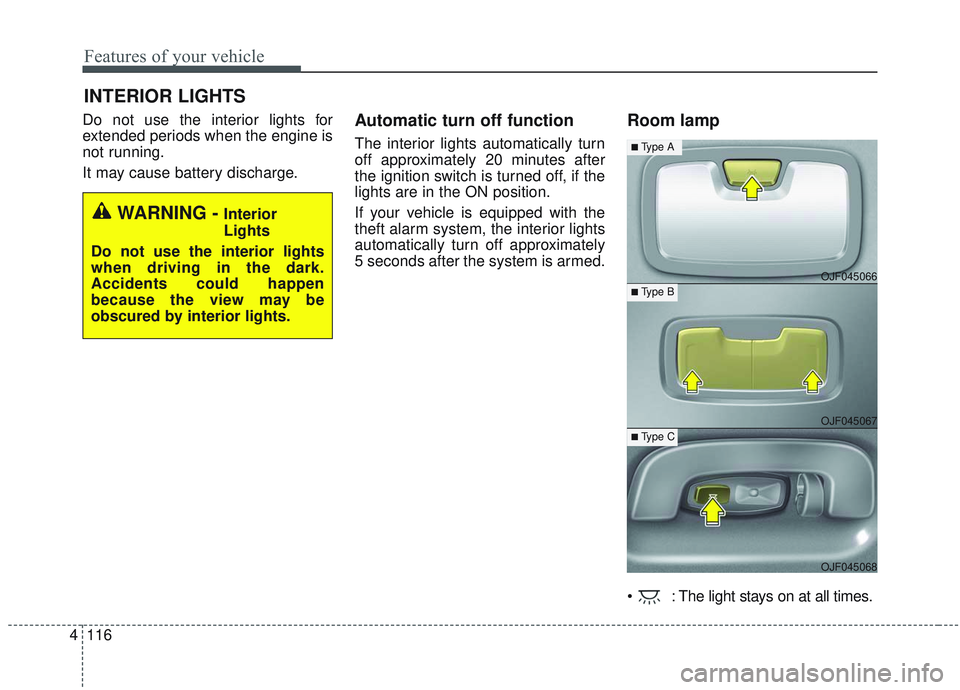
Room lamp
: The light stays on at all times.
INTERIOR LIGHTS
WARNING - Interior
Lights
Do not use the interior lights
when driving in the dark.
Accidents could happen
because the view may be
obscured by interior lights.
OJF045066
OJF045067
OJF045068
■Type A
■ Type B
■ Type C
Page 264 of 589
4129
Features of your vehicle
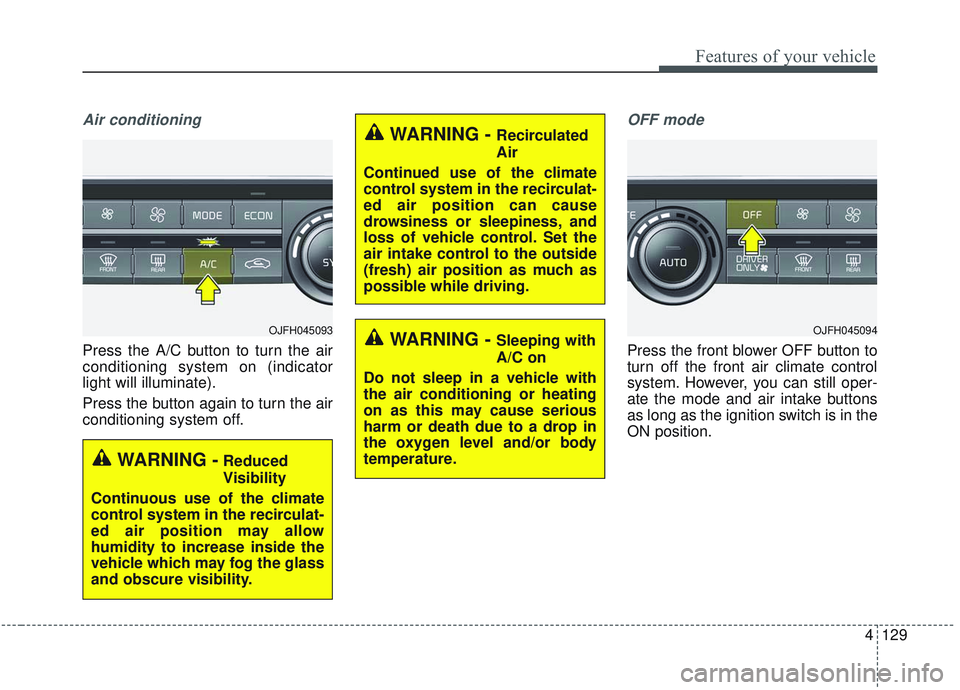
Air conditioning
Press the A/C button to turn the air
conditioning system on (indicator
light will illuminate).
Press the button again to turn the air
conditioning system off.
OFF mode
Press the front blower OFF button to
turn off the front air climate control
system. However, you can still oper-
ate the mode and air intake buttons
as long as the ignition switch is in the
ON position.
WARNING -Reduced
Visibility
Continuous use of the climate
control system in the recirculat-
ed air position may allow
humidity to increase inside the
vehicle which may fog the glass
and obscure visibility.
OJFH045093
WARNING - Recirculated
Air
Continued use of the climate
control system in the recirculat-
ed air position can cause
drowsiness or sleepiness, and
loss of vehicle control. Set the
air intake control to the outside
(fresh) air position as much as
possible while driving.
WARNING - Sleeping with
A/C on
Do not sleep in a vehicle with
the air conditioning or heating
on as this may cause serious
harm or death due to a drop in
the oxygen level and/or body
temperature.OJFH045094