ECO mode KIA OPTIMA 2020 Owner's Manual
[x] Cancel search | Manufacturer: KIA, Model Year: 2020, Model line: OPTIMA, Model: KIA OPTIMA 2020Pages: 589, PDF Size: 11.37 MB
Page 206 of 589
471
Features of your vehicle
✽ ✽NOTICE
The fuel economy may vary signifi-
cantly based on driving conditions,
driving habits, and condition of the
vehicle.
Manual reset
To reset average fuel economy manu-
ally, press the OK button (reset) on
the steering wheel for more than 1
second when the average fuel econ-
omy is displayed. Automatic reset
To make the average fuel economy
reset automatically whenever refuel-
ing, select the “Auto Reset” mode in
User Setting menu of the LCD display
(Refer to “LCD Display”).
OFF - You may set to default manu-
ally by using the trip switch reset but-
ton.
After ignition - The vehicle will auto- matically set to default once 4 hours
pass after the Ignition is in OFF.
After refueling - After refueling more than 6 liters and driving over 1km/h,
the vehicle will reset to default auto-
matically.
✽ ✽ NOTICE
For a more accurate calculation of
the average fuel economy, the vehi-
cle must be continuously driven
more than 10 seconds and 50 meters
(0.03 miles).
Page 207 of 589
Features of your vehicle
72
4
Instant Fuel Economy (2)
This mode displays the instant fuel
economy during the last few sec-
onds when the vehicle speed is
more than 8 km/h (5 MPH).
- Fuel economy range: 0 ~ 30L/100km or 0 ~ 50 MPGAccumulated driving information
mode
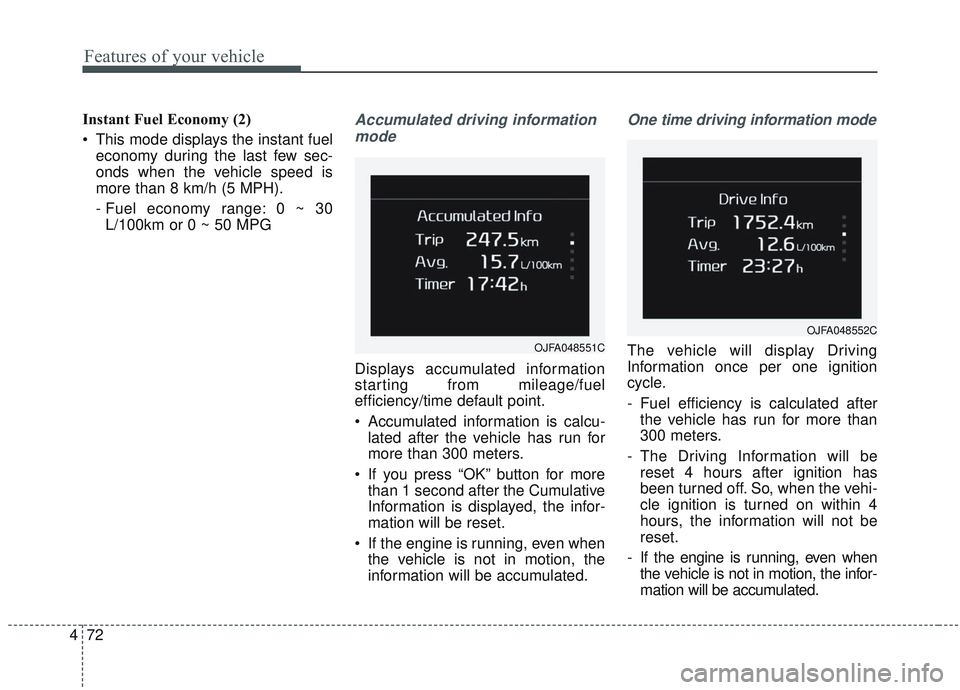
Displays accumulated information
starting from mileage/fuel
efficiency/time default point.
Accumulated information is calcu- lated after the vehicle has run for
more than 300 meters.
If you press “OK” button for more than 1 second after the Cumulative
Information is displayed, the infor-
mation will be reset.
If the engine is running, even when the vehicle is not in motion, the
information will be accumulated.
One time driving information mode
The vehicle will display Driving
Information once per one ignition
cycle.
- Fuel efficiency is calculated afterthe vehicle has run for more than
300 meters.
- The Driving Information will be reset 4 hours after ignition has
been turned off. So, when the vehi-
cle ignition is turned on within 4
hours, the information will not be
reset.
- If the engine is running, even when the vehicle is not in motion, the infor-
mation will be accumulated.OJFA048551C
OJFA048552C
Page 208 of 589
473
Features of your vehicle
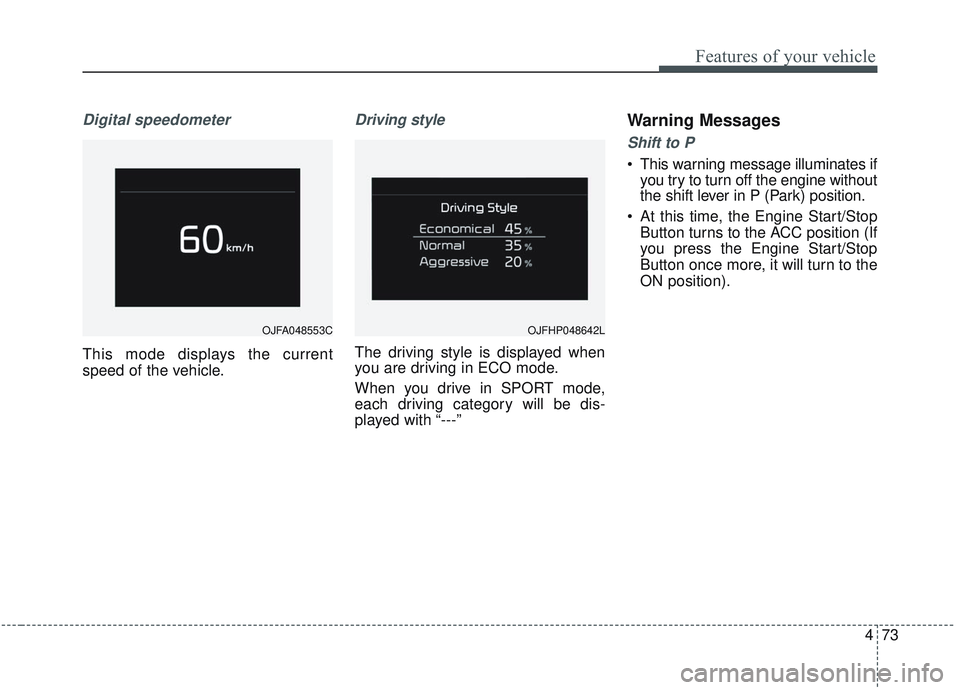
Digital speedometer
This mode displays the current
speed of the vehicle.
Driving style
The driving style is displayed when
you are driving in ECO mode.
When you drive in SPORT mode,
each driving category will be dis-
played with “---”
Warning Messages
Shift to P
This warning message illuminates ifyou try to turn off the engine without
the shift lever in P (Park) position.
At this time, the Engine Start/Stop Button turns to the ACC position (If
you press the Engine Start/Stop
Button once more, it will turn to the
ON position).
OJFA048553C OJFHP048642L
Page 216 of 589
481
Features of your vehicle
❈Example of a deceleration event is
going down an extended hill, slow-
ing down approaching a toll booth,
and approaching reduced speed
zones.
• User settings
Press the Engine Start/Stop button
and put the shift lever in P(Park). In
the User Settings Mode, select
Driving Assist, Coasting Guide, and
then On to turn on the system.
Cancel the selection of coasting
guide to turn off the system. For the
explanation of the system, press and
hold the [OK] button.
To activate the system, take the fol-
lowing procedures. Enter your desti-
nation information on the navigation
and select the driving route. Select
the ECO mode in the Integrated
Driving Control System. Then, satisfy
the following.
- The driving speed should be
between 60 km/h (37 mph) and 160
km/h (99 mph).
❈ The operating speed may vary due
to difference between instrument
cluster and navigation effected by
tire inflation level.Unplug vehicle to start
(Plug-in hybrid)
This message is displayed when you
start the engine without unplugging
the charging cable. Unplug the
charging cable, and then start the
vehicle.
Remaining time (Plug-in hybrid)
This message is displayed to notify
the estimated remaining time to fully
charge the battery.
Shift to P to charge (Plug-in hybrid)
This message is displayed when the
charging connector is plugged with
the shift lever in R (Reverse), N
(Neutral) or D (Drive). Move the shift
lever to P (Park) and re-start the
charging process.
Page 217 of 589
Features of your vehicle
82
4
EV/HEV (Plug-in hybrid)
A corresponding message is dis-
played when a mode is selected by
pressing the HEV button.
Low battery. Maintaining Hybrid
mode (Plug-in hybrid)
This message is displayed when
unable to convert to EV mode even
when pressing the HEV button dur-
ing HEV mode driving due to insuffi-
cient high-voltage(hybrid) battery
level.
Charger Error! (Plug-in hybrid)
This message is displayed when
there is a problem with the charger.
The purpose of this message is to let
you know an error has occurred in
charger itself not in vehicle.
Low/High System Temp.Maintaining Hybrid (Plug-in hybrid)
This message is displayed when
unable to convert to EV mode even
when pressing the HEV button dur-
ing HEV mode driving due to
low/high system temperature.
Switching to Hybrid mode toallow heating (Plug-in hybrid)
When the coolant temperature is lower than -14°C (57°F), and you
turn the climate control On for
heating, this message will be dis-
played in the cluster. Then, the
vehicle will automatically switch to
HEV mode.
When the coolant temperature is higher than -14°C (57°F), or you
turn the climate control Off, the
vehicle will automatically return to
EV mode.
Wait until fuel door opens
(Plug-in hybrid)
This message is displayed when you
attempt to open the fuel filler lid with
the fuel tank pressurized. Wait until
the fuel tank is depressurized.
✽ ✽ NOTICE
• It may take up to 20 seconds to
open fuel filler lid.
• When the fuel filler lid is frozen and does not open after 20 seconds
at freezing temperature, slightly
tap the fuel filler lid and then
attempt to open it.
Page 231 of 589
Features of your vehicle
96
4
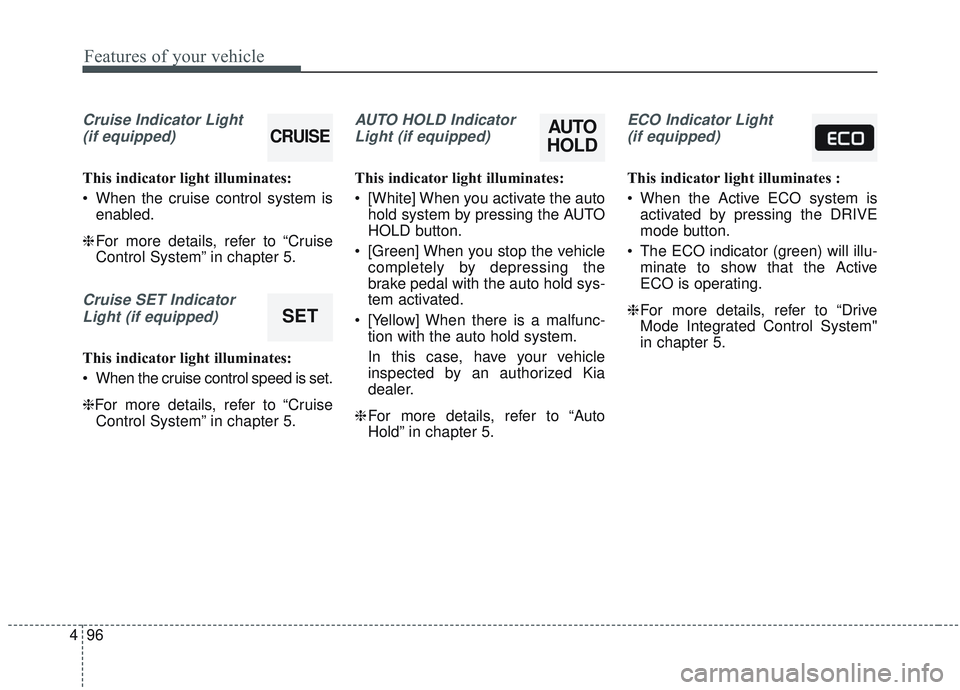
Cruise Indicator Light
(if equipped)
This indicator light illuminates:
When the cruise control system is enabled.
❈ For more details, refer to “Cruise
Control System” in chapter 5.
Cruise SET Indicator
Light (if equipped)
This indicator light illuminates:
When the cruise control speed is set.
❈For more details, refer to “Cruise Control System” in chapter 5.
AUTO HOLD Indicator
Light (if equipped)
This indicator light illuminates:
[White] When you activate the auto hold system by pressing the AUTO
HOLD button.
[Green] When you stop the vehicle completely by depressing the
brake pedal with the auto hold sys-
tem activated.
[Yellow] When there is a malfunc- tion with the auto hold system.
In this case, have your vehicle
inspected by an authorized Kia
dealer.
❈ For more details, refer to “Auto
Hold” in chapter 5.
ECO Indicator Light
(if equipped)
This indicator light illuminates :
When the Active ECO system is activated by pressing the DRIVE
mode button.
The ECO indicator (green) will illu- minate to show that the Active
ECO is operating.
❈ For more details, refer to “Drive
Mode Integrated Control System"
in chapter 5.
AUTO
HOLDCRUISE
SET
Page 252 of 589
4117
Features of your vehicle
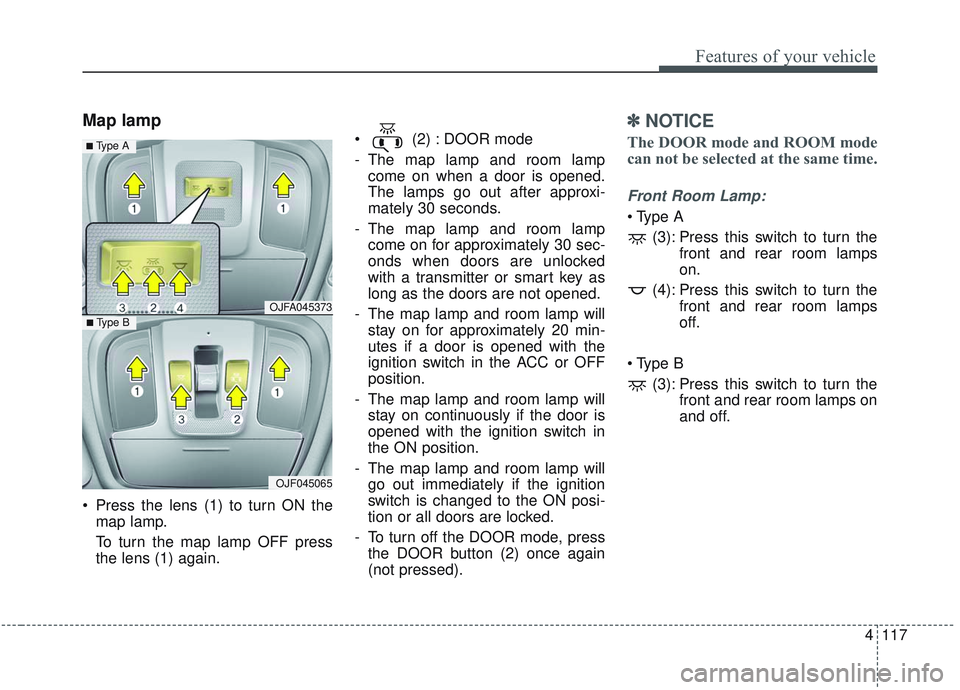
Map lamp
Press the lens (1) to turn ON themap lamp.
To turn the map lamp OFF press
the lens (1) again. (2) : DOOR mode
- The map lamp and room lamp
come on when a door is opened.
The lamps go out after approxi-
mately 30 seconds.
- The map lamp and room lamp come on for approximately 30 sec-
onds when doors are unlocked
with a transmitter or smart key as
long as the doors are not opened.
- The map lamp and room lamp will stay on for approximately 20 min-
utes if a door is opened with the
ignition switch in the ACC or OFF
position.
- The map lamp and room lamp will stay on continuously if the door is
opened with the ignition switch in
the ON position.
- The map lamp and room lamp will go out immediately if the ignition
switch is changed to the ON posi-
tion or all doors are locked.
- To turn off the DOOR mode, press the DOOR button (2) once again
(not pressed).
✽ ✽ NOTICE
The DOOR mode and ROOM mode
can not be selected at the same time.
Front Room Lamp:
(3): Press this switch to turn the front and rear room lamps
on.
(4): Press this switch to turn the front and rear room lamps
off.
(3): Press this switch to turn the front and rear room lamps on
and off.
OJFA045373
OJF045065
■ Type B
■ Type A
Page 256 of 589
4121
Features of your vehicle
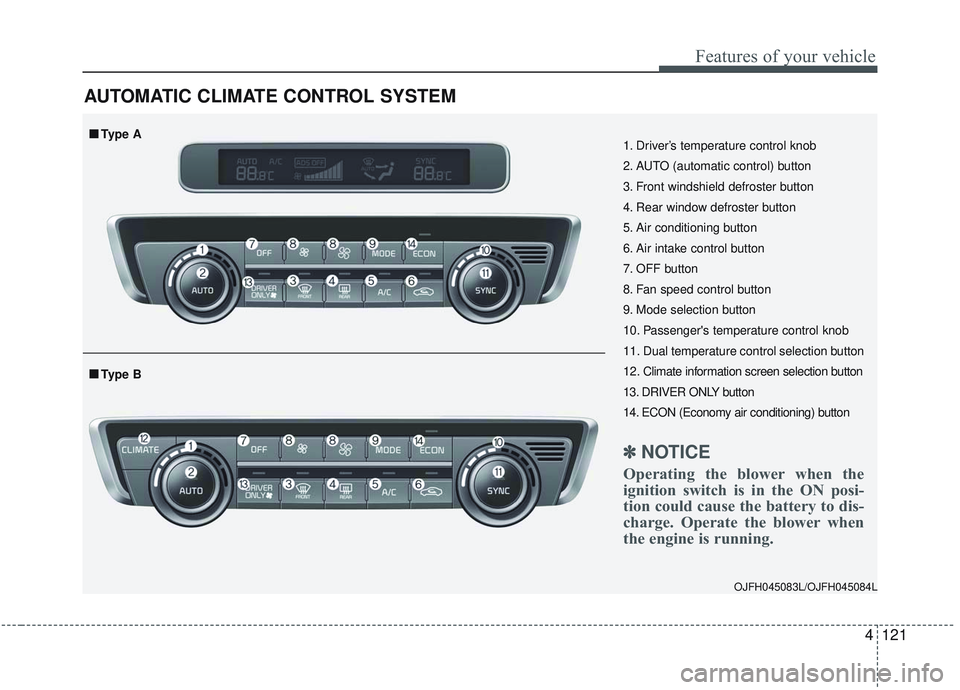
AUTOMATIC CLIMATE CONTROL SYSTEM
OJFH045083L/OJFH045084L
1. Driver’s temperature control knob
2. AUTO (automatic control) button
3. Front windshield defroster button
4. Rear window defroster button
5. Air conditioning button
6. Air intake control button
7. OFF button
8. Fan speed control button
9. Mode selection button
10. Passenger's temperature control knob
11. Dual temperature control selection button
12. Climate information screen selection button
13. DRIVER ONLY button
14. ECON (Economy air conditioning) button
✽ ✽NOTICE
Operating the blower when the
ignition switch is in the ON posi-
tion could cause the battery to dis-
charge. Operate the blower when
the engine is running.
■ ■Type B
■ ■Type A
Page 262 of 589
4127
Features of your vehicle
Adjusting the driver and passenger
side temperature individually
Press the “SYNC” button again toadjust the driver and passenger
side temperature individually. The
illumination of button turns off.
Operate the driver side tempera- ture control knob to adjust the driv-
er side temperature.
Operate the passenger side tem- perature control knob to adjust the
passenger side temperature.
Temperature conversion
You can switch the temperature
mode from Centigrade to Fahrenheit
as follows:
While pressing the OFF button,
press the AUTO button for 3 seconds
or more.
The display will change from
Centigrade to Fahrenheit, or from
Fahrenheit to Centigrade.
If the battery has been discharged or
disconnected, the temperature mode
display will reset to Fahrenheit.Air intake control
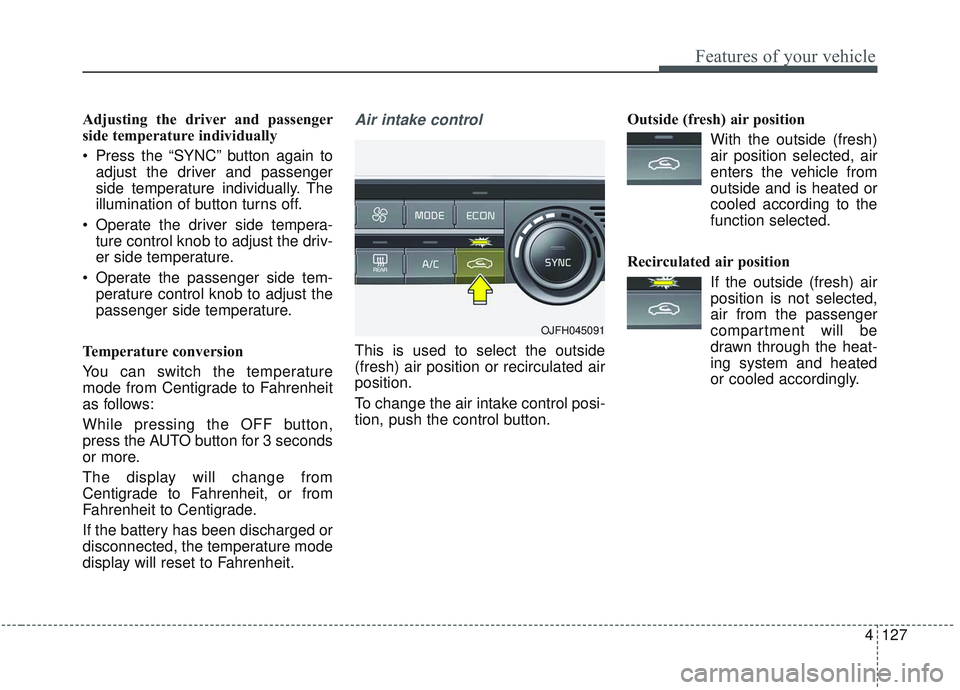
This is used to select the outside
(fresh) air position or recirculated air
position.
To change the air intake control posi-
tion, push the control button. Outside (fresh) air position
With the outside (fresh)air position selected, air
enters the vehicle from
outside and is heated or
cooled according to the
function selected.
Recirculated air position If the outside (fresh) airposition is not selected,
air from the passenger
compartment will be
drawn through the heat-
ing system and heated
or cooled accordingly.
OJFH045091
Page 266 of 589
4131
Features of your vehicle
Automatic Ventilation (if equipped)
When the ignition is ON or when the
engine is running and the outside
temperature is below 59°F (15°C),
the automatic ventilation feature will
activate if the recirculated air intake
position is selected for more than 5
minutes while A/C is off and floor
mode is selected. In this condition
the air intake position will automati-
cally switch to the outside (fresh) air
intake position.
To cancel or reset the Automatic
Ventilation
When the air conditioning system is
on, select Face Level mode and
while pressing the A/C button, press
the recirculated air position button
five times within three seconds.
When the automatic ventilation is
canceled, the indicator blinks 3
times. When the automatic ventila-
tion is activated, the indicator blinks
6 times.
System operation
Ventilation
1.Set the mode to the position.
2.Set the air intake control to the out- side (fresh) air position.
3.Set the temperature control to the desired position.
4.Set the fan speed control to the desired speed.
Heating
1.Set the mode to the position.
2.Set the air intake control to the out-side (fresh) air position.
3.Set the temperature control to the desired position.
4.Set the fan speed control to the desired speed.
5.If dehumidified heating is desired, turn the air conditioning system (if
equipped) on.
If the windshield fogs up, set the mode to the
orposition. Operation Tips
To keep dust or unpleasant fumes
from entering the vehicle through
the ventilation system, temporarily
set the air intake control to the
recirculated air position. Be sure to
return the control to the fresh air
position when the irritation has
passed to keep fresh air in the
vehicle. This will help keep the driv-
er more alert and comfortable.
Air for the heating/cooling system is drawn in through the grilles just
ahead of the windshield. Care
should be taken that these are not
blocked by leaves, snow, ice or
other obstructions.
To prevent interior fog on the wind- shield, set the air intake control to
the fresh air position and fan speed
to the desired position, turn on the
air conditioning system, and adjust
the temperature control to desired
temperature.