warning KIA OPTIMA 2020 Owner's Manual
[x] Cancel search | Manufacturer: KIA, Model Year: 2020, Model line: OPTIMA, Model: KIA OPTIMA 2020Pages: 589, PDF Size: 11.37 MB
Page 53 of 589
Introduction
21
We want to help you get the greatest
possible driving pleasure from your
vehicle. Your Owner’s Manual can
assist you in many ways. We strong-
ly recommend that you read the
entire manual. In order to minimize
the chance of death or injury, you
must read the WARNING and CAU-
TION sections in the manual.
Illustrations complement the words
in this manual to best explain how to
enjoy your vehicle. By reading your
manual, you will learn about fea-
tures, important safety information,
and driving tips under various road
conditions.
The general layout of the manual is
provided in the Table of Contents.
Use the index when looking for a
specific area or subject; it has an
alphabetical listing of all information
in your manual.
Sections: This manual has 8 sections
plus an index. Each section begins
with a brief list of contents so you
can tell at a glance if that section has
the information you want.You will find various WARNINGs,
CAUTIONs, and NOTICEs in this
manual. These WARNINGs were pre-
pared to enhance your personal safe-
ty. You should carefully read and follow
ALL procedures and recommenda-
tions provided in these WARNINGs,
CAUTIONs and NOTICEs.
✽ ✽
NOTICE
A NOTICE indicates interesting or
helpful information is being provided.
HOW TO USE THIS MANUAL
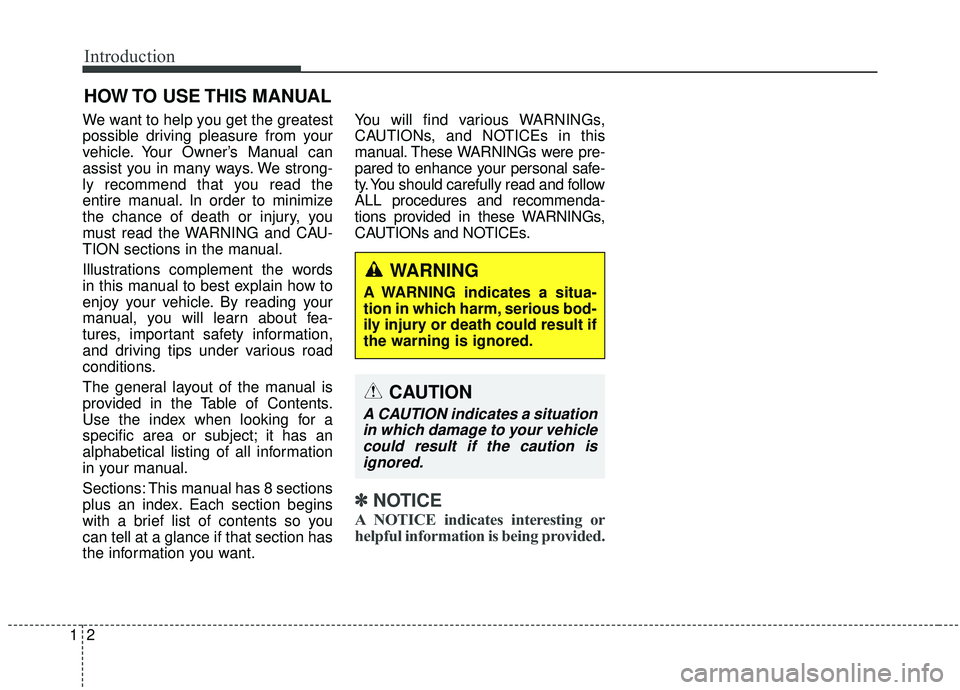
WARNING
A WARNING indicates a situa-
tion in which harm, serious bod-
ily injury or death could result if
the warning is ignored.
CAUTION
A CAUTION indicates a situation
in which damage to your vehiclecould result if the caution isignored.
Page 54 of 589

13
Introduction
Your new vehicle is designed to use
only unleaded fuel having a pump
octane number ((R+M)/2) of 87
(Research Octane Number 91) or
higher. (Do not use methanol blend-
ed fuels.)
Your new vehicle is designed to
obtain maximum performance with
UNLEADED FUEL, as well as mini-
mize exhaust emissions and spark
plug fouling.
Never add any fuel system cleaning
agents to the fuel tank other than
what has been specified. (Consult an
authorized Kia dealer for details.)
Tighten the cap until it clicks onetime, otherwise the Check Engine light will illuminate.Gasoline containing alcohol and
methanol
Gasohol, a mixture of gasoline and
ethanol (also known as grain alco-
hol), and gasoline or gasohol con-
taining methanol (also known as
wood alcohol) are being marketed
along with or instead of leaded or
unleaded gasoline.
Do not use gasohol containing more
than 15% ethanol, and do not use
gasoline or gasohol containing any
methanol. Either of these fuels may
cause drivability problems and dam-
age to the fuel system, engine con-
trol system and emission control sys-
tem.
Discontinue using gasohol of any
kind if drivability problems occur.
Vehicle damage or drivability prob-
lems may not be covered by the
manufacturer’s warranty if they result
from the use of:
1. Gasoline or gasohol containing methanol.
2. Leaded fuel or leaded gasohol.
3. Gasohol containing more than 15% ethanol.
WARNING - Refueling
• Do not "top off" after the noz- zle automatically shuts off.
Attempts to force more fuel
into the tank can cause fuel
overflow onto you and the
ground causing a risk of fire.
Always check that the fuel cap is installed securely to pre-
vent fuel spillage, especially
in the event of an accident.
FUEL REQUIREMENTS
Page 61 of 589
23
Your vehicle at a glance
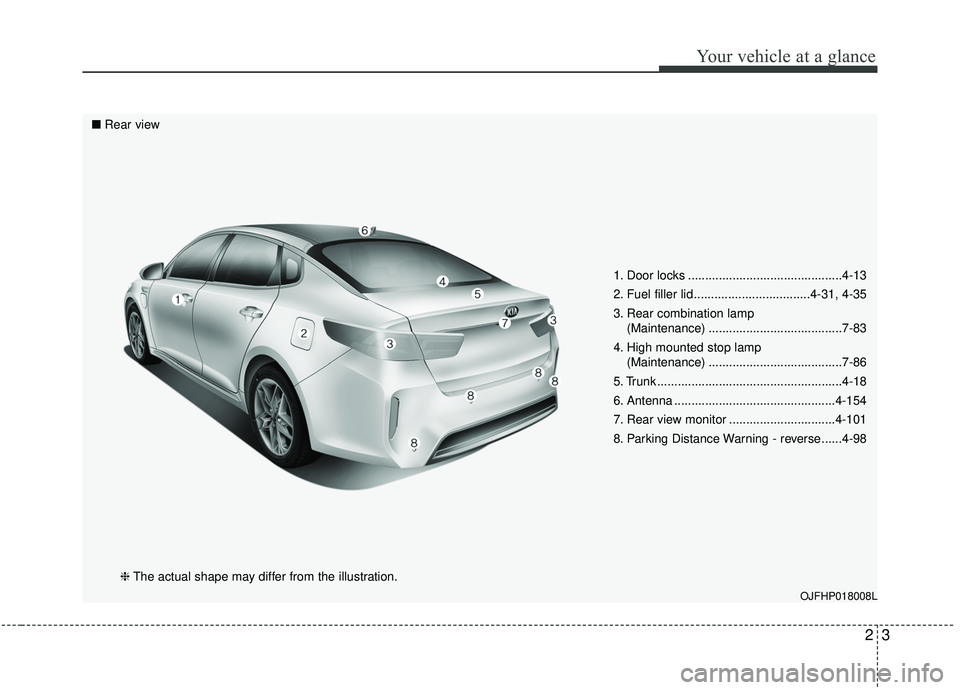
1. Door locks .............................................4-13
2. Fuel filler lid ..................................4-31, 4-35
3. Rear combination lamp (Maintenance) .......................................7-83
4. High mounted stop lamp (Maintenance) .......................................7-86
5. Trunk ......................................................4-18
6. Antenna ...............................................4-154
7. Rear view monitor ...............................4-101
8. Parking Distance Warning - reverse ......4-98
OJFHP018008L
■ Rear view
❈The actual shape may differ from the illustration.
Page 63 of 589
25
Your vehicle at a glance
INSTRUMENT PANEL OVERVIEW
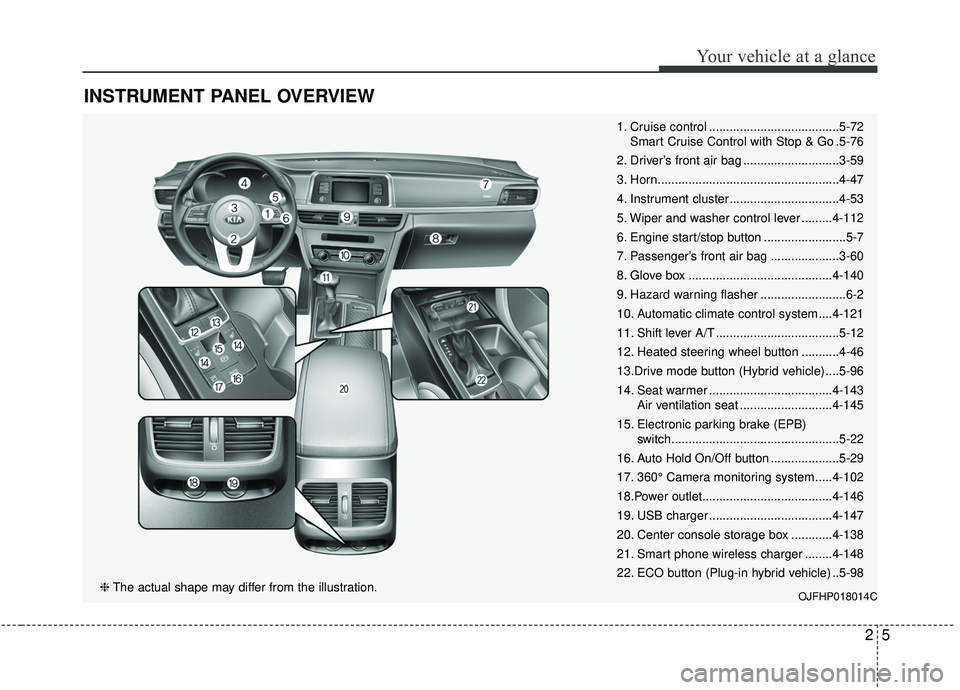
1. Cruise control ......................................5-72Smart Cruise Control with Stop & Go .5-76
2. Driver’s front air bag ............................3-59
3. Horn.....................................................4-47
4. Instrument cluster ................................4-53
5. Wiper and washer control lever .........4-112
6. Engine start/stop button ........................5-7
7. Passenger’s front air bag ....................3-60
8. Glove box ..........................................4-140
9. Hazard warning flasher .........................6-2
10. Automatic climate control system ....4-121
11. Shift lever A/T ....................................5-12
12. Heated steering wheel button ...........4-46
13.Drive mode button (Hybrid vehicle) ....5-96
14. Seat warmer ....................................4-143 Air ventilation seat ...........................4-145
15. Electronic parking brake (EPB) switch.................................................5-22
16. Auto Hold On/Off button ....................5-29
17. 360° Camera monitoring system .....4-102
18.Power outlet......................................4-146
19. USB charger ....................................4-147
20. Center console storage box ............4-138
21. Smart phone wireless charger ........4-148
22. ECO button (Plug-in hybrid vehicle) ..5-98
OJFHP018014C❈ The actual shape may differ from the illustration.
Page 66 of 589
Safety features of your vehicle
23
You will find many safety precautions
and recommendations throughout
this section, and throughout this man-
ual. The safety precautions in this sec-
tion are among the most important.
Always wear your seat belt
A seat belt is your best protection in
all types of accidents. Air bags are
designed to supplement seat belts,
not replace them. So even though
your vehicle is equipped with air
bags, ALWAYS make sure you and
your passengers wear your seat
belts, and wear them properly.
Restrain all children
All children under age 13 should ride
in your vehicle properly restrained in
a rear seat, not the front seat. Infants
and small children should be
restrained in an appropriate child
restraint. Larger children should use
a booster seat with the lap/shoulder
belt until they can use the seat belt
properly without a booster seat.
Air bag hazards
While air bags can save lives, they
can also cause serious or fatal
injuries to occupants who sit too
close to them, or who are not prop-
erly restrained. Infants, young chil-
dren, and shorter adults are at the
greatest risk of being injured by an
inflating air bag. Follow all instruc-
tions and warnings in this manual.
Driver distraction
Driver distraction presents a serious
and potentially deadly danger, espe-
cially for inexperienced drivers.
Safety should be the first concern
when behind the wheel and drivers
need to be aware of the wide array of
potential distractions, such as drowsi-
ness, reaching for objects, eating,
personal grooming, other passen-
gers, and using cellular phones.
Drivers can become distracted when
they take their eyes and attention off
the road or their hands off the wheel
to focus on activities other than driv-
ing. To reduce your risk of distraction
or getting into an accident:
• ALWAYS set up your mobiledevices (i.e., MP3 players, phones,
navigation units, etc.) when your
vehicle is parked or safely stopped.
IMPORTANT SAFETY PRECAUTIONS
Page 69 of 589
35
Safety features of your vehicle
WARNING- Uprightingseat
Do not press the release lever
on a manual seatback without
holding and controlling the
seatback. The seatback will
spring upright possibly impact-
ing you or other passengers.
WARNING- Loose objects
Do not place anything in the dri-
ver's foot well or under the front
seats. Loose objects in the dri-
ver's foot area could interfere
with the operation of the foot
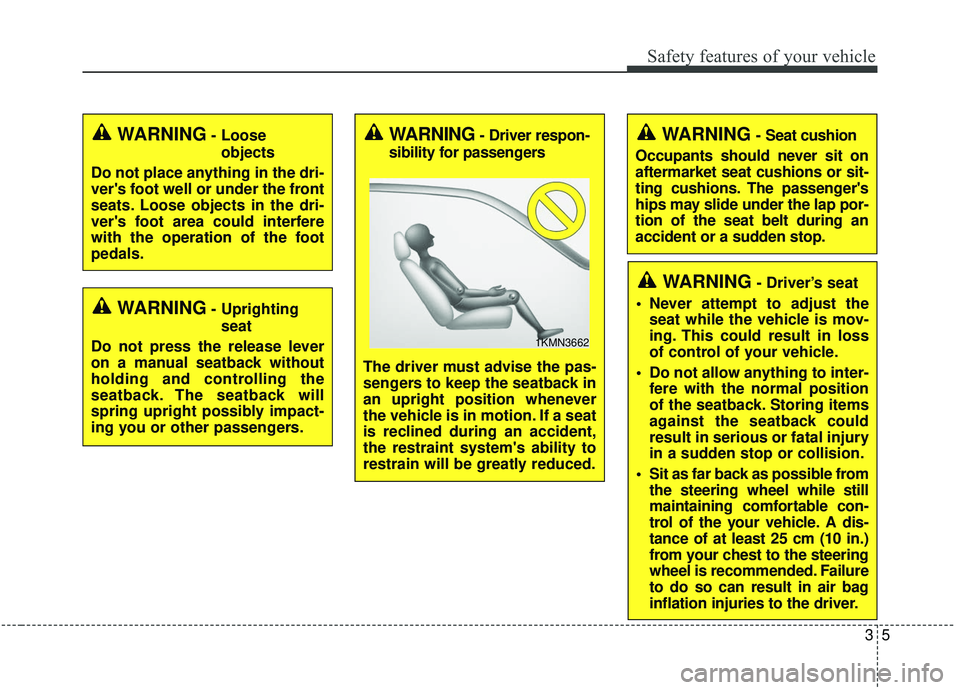
pedals.WARNING- Driver respon-
sibility for passengers
The driver must advise the pas-
sengers to keep the seatback in
an upright position whenever
the vehicle is in motion. If a seat
is reclined during an accident,
the restraint system's ability to
restrain will be greatly reduced.
1KMN3662
WARNING- Seat cushion
Occupants should never sit on
aftermarket seat cushions or sit-
ting cushions. The passenger's
hips may slide under the lap por-
tion of the seat belt during an
accident or a sudden stop.
WARNING- Driver’s seat
Never attempt to adjust the seat while the vehicle is mov-
ing. This could result in loss
of control of your vehicle.
Do not allow anything to inter- fere with the normal position
of the seatback. Storing items
against the seatback could
result in serious or fatal injury
in a sudden stop or collision.
Sit as far back as possible from the steering wheel while still
maintaining comfortable con-
trol of the your vehicle. A dis-
tance of at least 25 cm (10 in.)
from your chest to the steering
wheel is recommended. Failure
to do so can result in air bag
inflation injuries to the driver.
Page 70 of 589
Safety features of your vehicle
63
Feature of Seat Leather
Leather is made from the outerskin of an animal, which goes
through a special process to be
available for use. Since it is a natu-
ral substance, each part differs in
thickness or density.
Wrinkles may appear as a natural
result of stretching and shrinking
depending on the temperature and
humidity.
The seat is made of stretchable fabric to improve comfort.
The parts contacting the body are curved and the side supporting
area is high which provides driving
comfort and stability.
Wrinkles may appear naturally from usage. It is not a fault of the
product.
WARNING- Unexpected
Seat Movement
After adjusting a manual seat,
always check that it is locked by
shifting your weight to the front
and back. Sudden or unexpect-
ed movement of the driver's
seat could cause you to lose
control of the vehicle.
WARNING - Rear seatbacks
Always lock the rear seatback
before driving. Failure to do so
could result in passengers or
objects being thrown forward
injuring vehicle occupants.WARNING- Seat adjustment
Do not adjust the seat while wearing seat belts. Moving the
seat forward will cause strong
pressure on the abdomen.
Do not place your hand near the seat bottom or seat track
while adjusting the seat. Your
hand could get caught in the
seat mechanism.
WARNING- Small
Objects
Use extreme caution when pick-
ing up small objects trapped
under the seats or between the
seat and the center console.
Your hands might be cut or
injured by the sharp edges of
the seats mechanism.
Page 72 of 589
Safety features of your vehicle
83
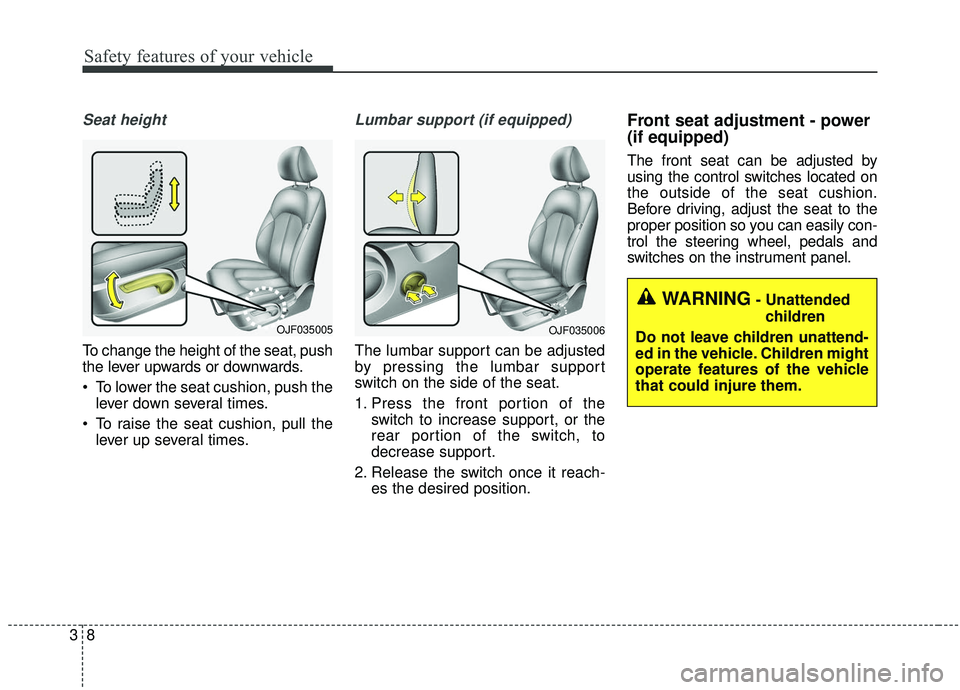
Seat height
To change the height of the seat, push
the lever upwards or downwards.
To lower the seat cushion, push thelever down several times.
To raise the seat cushion, pull the lever up several times.
Lumbar support (if equipped)
The lumbar support can be adjusted
by pressing the lumbar support
switch on the side of the seat.
1. Press the front portion of the switch to increase support, or the
rear portion of the switch, to
decrease support.
2. Release the switch once it reach- es the desired position.
Front seat adjustment - power
(if equipped)
The front seat can be adjusted by
using the control switches located on
the outside of the seat cushion.
Before driving, adjust the seat to the
proper position so you can easily con-
trol the steering wheel, pedals and
switches on the instrument panel.
WARNING- Unattended
children
Do not leave children unattend-
ed in the vehicle. Children might
operate features of the vehicle
that could injure them.
OJF035006OJF035005
Page 75 of 589

311
Safety features of your vehicle
Driver position memory system
(if equipped, for power seat)
A driver position memory system is
provided to store and recall the driv-
er seat and outside rearview mirror
position with a simple button opera-
tion. By saving the desired position
into the system memory, different
drivers can reposition the driver seat
and outside rearview mirror based
upon their driving preference. If the
battery is disconnected, the desired
seat position memory will need to be
re-saved.
Storing positions into memoryusing the buttons on the door
Storing driver’s seat positions
1. Shift the shift lever into P while the engine start/stop button is ON.
2. Adjust the driver’s seat and out- side rearview mirror comfortable
for the driver.
3. Press SET button on the control panel. The system will beep once.
4. Press one of the memory buttons (1 or 2) within 5 seconds after
pressing the SET button. The sys-
tem will beep twice when memory
has been successfully stored.
When recalling an adjustment mem-
ory button while sitting in the vehicle,
you can be surprised by the setting
chosen if the memory has been
adjusted by someone else. If that
occurs, immediately push the seat
position control knob in the direction
of the desired position to stop further
undesired movement.
WARNING - Driver
Position Memory System
Never attempt to operate the
driver position memory system
while the vehicle is moving.
This could result in loss of con-
trol, and an accident causing
death or serious injury.
OJF035065L
Page 77 of 589

313
Safety features of your vehicle
Also, adjust the headrest as close to
your head as possible. For this rea-
son, the use of a cushion that holds
the body away from the seatback is
not recommended.Adjusting the height up and down
To raise the headrest, pull it up to the
desired position (1). To lower the
headrest, push and hold the release
button (2) on the headrest support
and lower the headrest to the desired
position (3).
✽ ✽
NOTICE
If you recline the seatback towards
the front with the headrest and seat
cushion raised, the headrest may
come in contact with the sunvisor or
other parts of the vehicle.
WARNING- Headrest
removal/adjustment
Do not operate the vehicle with the headrests removed.
Headrests can provide critical
neck and head support in a
crash.
Do not adjust the headrest height while the vehicle is in
motion. Driver may lose con-
trol of the vehicle.
OJF035013
OYFH034205