stop start KIA OPTIMA 2020 Manual Online
[x] Cancel search | Manufacturer: KIA, Model Year: 2020, Model line: OPTIMA, Model: KIA OPTIMA 2020Pages: 589, PDF Size: 11.37 MB
Page 327 of 589
Driving your vehicle
34
5
The ABS warning light will stay on for
approximately 3 seconds after the
engine start/stop button is ON.
During that time, the ABS will go
through self-diagnosis and the light
will go off if everything is normal. If
the light stays on, you may have a
problem with your ABS. Contact an
authorized Kia dealer as soon as
possible. When you drive on a road having
poor traction, such as an icy road,
and have operated your brakes
continuously, the ABS will be active
continuously and the ABS warning
light may illuminate. Pull your vehi-
cle over to a safe place and stop
the engine.
Restart the engine. If the ABS warning light goes off, then your
ABS system is normal. Otherwise,
you may have a problem with the
ABS. Contact an authorized Kia
dealer as soon as possible.
✽ ✽ NOTICE
When you jump start your vehicle
because of a drained battery, the
engine may not run as smoothly and
the ABS warning light may turn on at
the same time. This happens because
of low battery voltage. It does not
mean your ABS has malfunctioned.
• Do not pump your brakes!
• Have the battery recharged before
driving the vehicle.
Electronic stability control
(ESC)
The Electronic Stability control
(ESC) system is designed to stabi-
lize the vehicle during cornering
maneuvers. ESC checks where you
are steering and where the vehicle is
actually going. ESC applies the
brakes on individual wheels and
intervenes with the engine manage-
ment system to stabilize the vehicle.
W-78
OJFHP058023
Page 329 of 589
Driving your vehicle
36
5
ESC operation
ESC ON condition
When the engine start/stopbutton is turned ON, ESC
and ESC OFF indicator
lights illuminate for approxi-
mately 3 seconds, then
ESC is turned on.
ton for at least half a sec-
ond after turning the igni-
tion ON to turn ESC off.
(ESC OFF indicator will
illuminate). To turn the
ESC on, press the ESC
OFF button (ESC OFF
indicator light will go off).
you may hear a slight tick-
ing sound. This is the ESC
performing an automatic
system self-check and does
not indicate a problem. When operating
When the ESC is in opera-
tion, the ESC indicator light
blinks.
Stability Control is operat-
ing properly, you can feel a
slight pulsation in the vehi-
cle. This is only the effect
of brake control and indi-
cates nothing unusual.
mud or driving on a slip-
pery road, pressing the
accelerator pedal may not
cause the engine rpm
(revolutions per minute) to
increase.
ESC operation off
ESC OFF state
This car has 2 kinds of ESC
off states.
If the engine stops when
ESC is off, ESC remains off.
Upon restarting the engine,
the ESC will automatically
turn on again.
-
Page 333 of 589
Driving your vehicle
40
5
Malfunction indicator
The VSM can be deactivated even if
you don’t cancel the VSM operation
by pressing the ESC OFF button. It
indicates that a malfunction has
been detected somewhere in the
Electric Power Steering system or
VSM system. If the ESC indicator
light ( ) or EPS warning light
remains on, take your vehicle to an
authorized Kia dealer and have the
system checked.
✽ ✽
NOTICE
• The VSM is designed to function
above approximately 22 km/h (13
mph) on curves.
• The VSM is designed to function above approximately 10 km/h (6
mph) when a vehicle is braking on
a split-mu surface. A split-mu sur-
face is made of two surfaces which
have different friction forces.
The Vehicle Stability Management
system is not a substitute for safe
driving practices but a supplemen-
tary function only. It is the respon-
sibility of the driver to always check
the speed and the distance to the
vehicle ahead. Always hold the
steering wheel firmly while driving.
Your vehicle is designed to activate according to the driver’s intention,
even with installed VSM. Always fol-
low all the normal precautions for
driving at safe speeds for the condi-
tions – including driving in inclement
weather and on a slippery road.Hill-start assist control (HAC)
A vehicle has the tendency to roll
back on a steep hill when it starts to
go after stopping. The Hill-start
Assist Control (HAC) prevents the
vehicle from rolling back by applying
the brakes automatically for about 2
seconds. The brakes are released
when the accelerator pedal is
depressed or after about 2 seconds.
The HAC is activated only for about 2
seconds, so when the vehicle is
starting off always depress the accel-
erator pedal.
WARNING
For maximum protection, always
wear your seat belt. No system,
no matter how advanced, can
compensate for all driver error
and/or driving conditions.
Always drive responsibly.
Page 338 of 589
545
Driving your vehicle
Prerequisite for activation
The FCA gets ready to be activated,
when the FCA is selected on the
LCD display, and when the following
prerequisites are satisfied.
- The ESC (Electronic StabilityControl) is activated.
- Vehicle speed is over 8 km/h (5 mph). (The FCA is only activated
within a certain speed range.)
- The system detects a vehicle or pedestrian in front, which may col-
lide with your vehicle. (The FCA
may not be activated or may sound
a warning alarm in accordance
with the driving situation or vehicle
condition.)
❈ The FCA may not operate properly
according to the frontal situation,
the direction and speed of pedes-
trian.
FCA warning message and
system control
The FCA system produces warning
messages, warning alarms, and
emergency braking based on the
level of risk of a frontal collision, such
as when a vehicle ahead suddenly
brakes.
The driver can select the initial warn-
ing activation time in the User
Settings in the LCD display. The
options for the initial Forward
Collision Warning include Early,
Normal or Late initial warning time.
WARNING
Completely stop the vehicle
on a safe location before
operating the switch on the
steering wheel to activate/
deactivate the FCA system.
The FCA automatically acti- vates upon placing the Engine
Start/Stop button to the ON
position. The driver can deac-
tivate the FCA by canceling
the system setting on the LCD
display. To avoid driver dis-
tractions, do not attempt to
set or cancel the FCA while
driving the vehicle.
The FCA automatically deac- tivates upon canceling the
ESC (Electronic Stability
Control). When the ESC is
canceled, the FCA cannot be
activated on the LCD display.
The FCA warning light will
illuminate, but it does not
indicate a malfunction of the
system.
Page 352 of 589
559
Driving your vehicle
Prerequisite for activation
The FCA gets ready to be activated,
when the FCA is selected on the
LCD display, and when the following
prerequisites are satisfied.
- The ESC (Electronic StabilityControl) is activated.
- Vehicle speed is over 8 km/h (5 mph). (The FCA is only activated
within a certain speed range.)
- The system detects a vehicle or pedestrian in front, which may col-
lide with your vehicle. (The FCA
may not be activated or may sound
a warning alarm in accordance
with the driving situation or vehicle
condition.)
❈ The FCA may not operate properly
according to the frontal situation,
the direction and speed of pedes-
trian.
FCA warning message and
system control
The FCA system produces warning
messages, warning alarms, and
emergency braking based on the
level of risk of a frontal collision, such
as when a vehicle ahead suddenly
brakes.
The driver can select the initial warn-
ing activation time in the User
Settings in the LCD display. The
options for the initial Forward
Collision Warning include Early,
Normal or Late initial warning time.
WARNING
Completely stop the vehicle
on a safe location before
operating the switch on the
steering wheel to activate/
deactivate the FCA system.
The FCA automatically acti- vates upon placing the Engine
Start/Stop button to the ON
position. The driver can deac-
tivate the FCA by canceling
the system setting on the LCD
display. To avoid driver dis-
tractions, do not attempt to
set or cancel the FCA while
driving the vehicle.
The FCA automatically deac- tivates upon canceling the
ESC (Electronic Stability
Control). When the ESC is
canceled, the FCA cannot be
activated on the LCD display.
The FCA warning light will
illuminate, but it does not
indicate a malfunction of the
system.
Page 369 of 589
Driving your vehicle
76
5
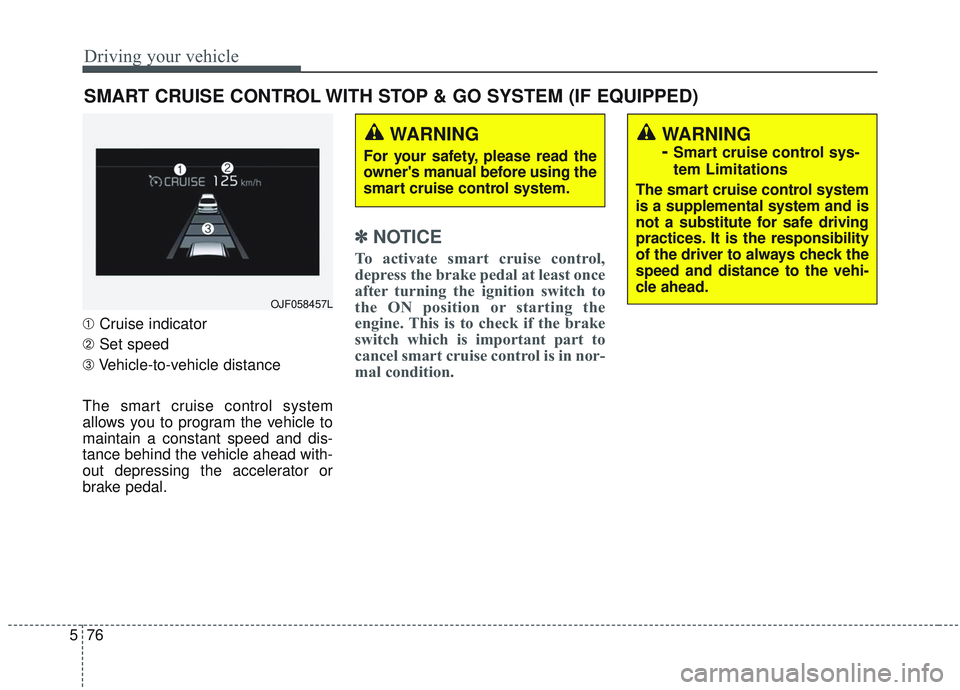
➀ Cruise indicator
➁ Set speed
➂ Vehicle-to-vehicle distance
The smart cruise control system
allows you to program the vehicle to
maintain a constant speed and dis-
tance behind the vehicle ahead with-
out depressing the accelerator or
brake pedal.
✽ ✽ NOTICE
To activate smart cruise control,
depress the brake pedal at least once
after turning the ignition switch to
the ON position or starting the
engine. This is to check if the brake
switch which is important part to
cancel smart cruise control is in nor-
mal condition.
SMART CRUISE CONTROL WITH STOP & GO SYSTEM (IF EQUIPPED)
WARNING
For your safety, please read the
owner's manual before using the
smart cruise control system.
WARNING
-
Smart cruise control sys-
tem Limitations
The smart cruise control system
is a supplemental system and is
not a substitute for safe driving
practices. It is the responsibility
of the driver to always check the
speed and distance to the vehi-
cle ahead.
OJF058457L
Page 374 of 589
581
Driving your vehicle
Smart cruise control will be tem-porarily canceled when:
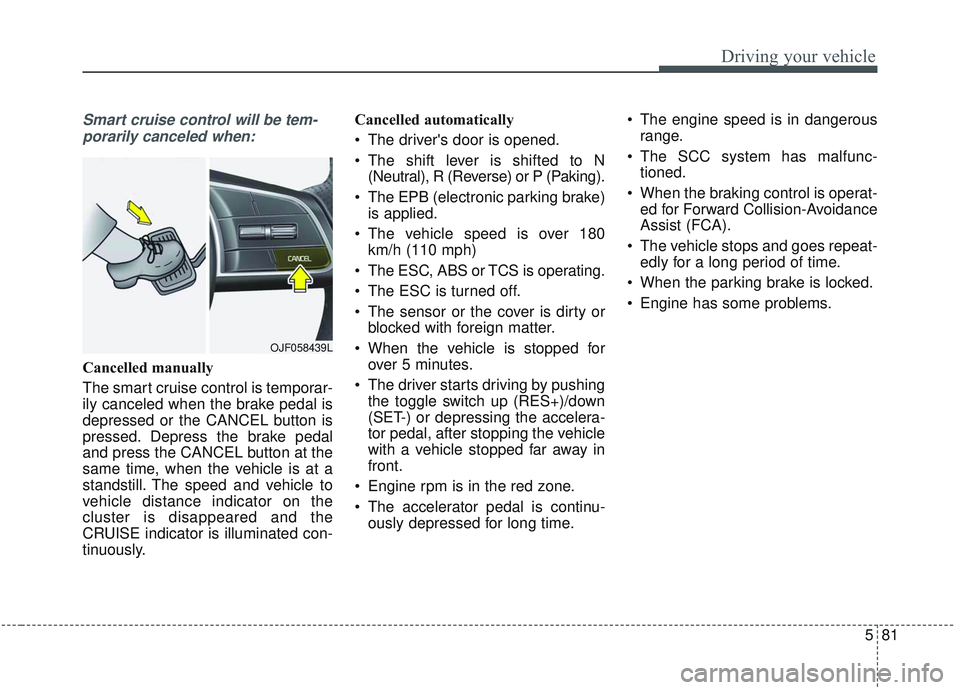
Cancelled manually
The smart cruise control is temporar-
ily canceled when the brake pedal is
depressed or the CANCEL button is
pressed. Depress the brake pedal
and press the CANCEL button at the
same time, when the vehicle is at a
standstill. The speed and vehicle to
vehicle distance indicator on the
cluster is disappeared and the
CRUISE indicator is illuminated con-
tinuously. Cancelled automatically
The driver's door is opened.
The shift lever is shifted to N
(Neutral), R (Reverse) or P (Paking).
The EPB (electronic parking brake) is applied.
The vehicle speed is over 180 km/h (110 mph)
The ESC, ABS or TCS is operating.
The ESC is turned off.
The sensor or the cover is dirty or blocked with foreign matter.
When the vehicle is stopped for over 5 minutes.
The driver starts driving by pushing the toggle switch up (RES+)/down
(SET-) or depressing the accelera-
tor pedal, after stopping the vehicle
with a vehicle stopped far away in
front.
Engine rpm is in the red zone.
The accelerator pedal is continu- ously depressed for long time. The engine speed is in dangerous
range.
The SCC system has malfunc- tioned.
When the braking control is operat- ed for Forward Collision-Avoidance
Assist (FCA).
The vehicle stops and goes repeat- edly for a long period of time.
When the parking brake is locked.
Engine has some problems.
OJF058439L
Page 379 of 589
Driving your vehicle
86
5
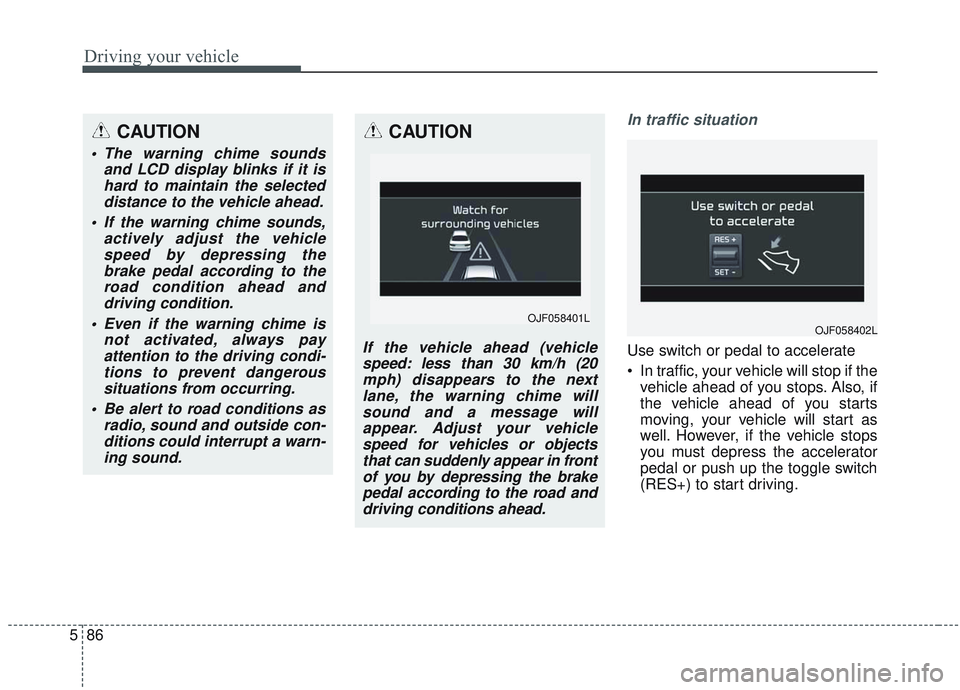
In traffic situation
Use switch or pedal to accelerate
In traffic, your vehicle will stop if the
vehicle ahead of you stops. Also, if
the vehicle ahead of you starts
moving, your vehicle will start as
well. However, if the vehicle stops
you must depress the accelerator
pedal or push up the toggle switch
(RES+) to start driving.
CAUTION
The warning chime sounds and LCD display blinks if it ishard to maintain the selecteddistance to the vehicle ahead.
If the warning chime sounds, actively adjust the vehiclespeed by depressing thebrake pedal according to theroad condition ahead anddriving condition.
Even if the warning chime is not activated, always payattention to the driving condi-tions to prevent dangeroussituations from occurring.
Be alert to road conditions as radio, sound and outside con-ditions could interrupt a warn-ing sound.
CAUTION
If the vehicle ahead (vehiclespeed: less than 30 km/h (20mph) disappears to the nextlane, the warning chime willsound and a message willappear. Adjust your vehiclespeed for vehicles or objectsthat can suddenly appear in frontof you by depressing the brakepedal according to the road anddriving conditions ahead.
OJF058402LOJF058401L
Page 380 of 589

587
Driving your vehicle
If you push the smart cruise controltoggle switch (RES+ or SET-) while
Auto Hold and smart cruise control
is operating, the Auto Hold will be
released regardless of accelerator
pedal operation and the vehicle will
start to move. The AUTO HOLD
indicator changes from green to
white. (if equipped with EPB
(Electronic Parking Brake))Radar to detect distance to the
vehicle ahead
The sensor detects the distance to
the vehicle ahead.
If the sensor is covered with dirt or
other foreign matter, the vehicle to
vehicle distance control may not
operate correctly.
Always keep the area in front of the
sensor clean.
Warning message
When the sensor lens cover is cov-
ered with dirt, snow, or debris, the
Smart Cruise Control System opera-
tion may stop temporarily. If this
occurs, a warning message will
appear on the LCD display. Remove
any dirt, snow, or debris and clean the
radar sensor lens cover before operat-
ing the Smart Cruise Control System.
The Smart Cruise Control system may
not properly activate, if the radar is
totally blocked, or if any substance is
not detected after turning ON the
engine (e.g. in an open terrain).OJFHP058304L
OJF058404L
Page 386 of 589
593
Driving your vehicle
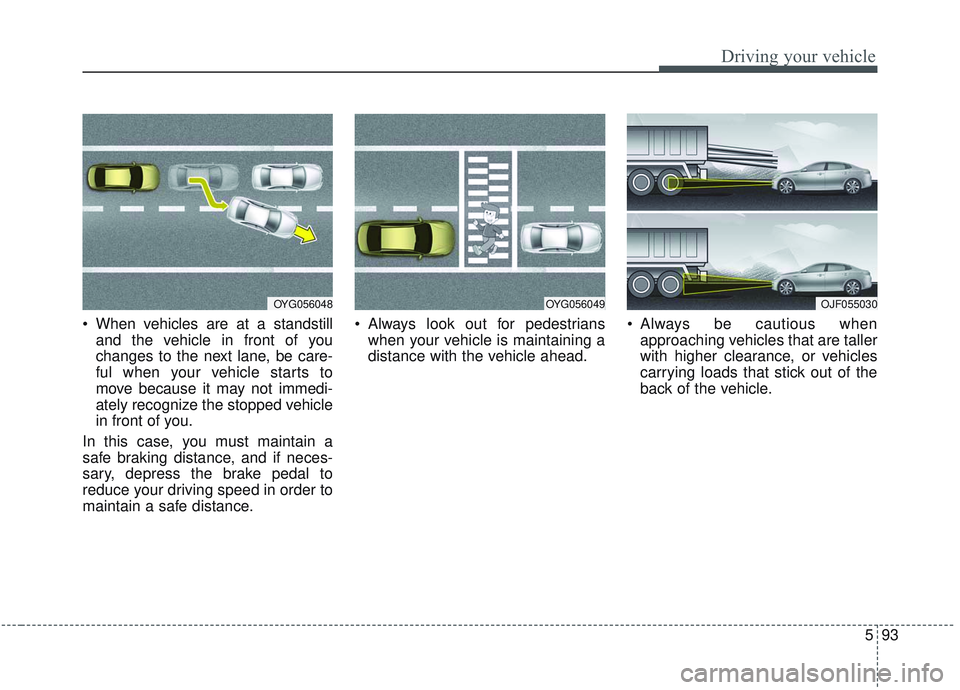
When vehicles are at a standstilland the vehicle in front of you
changes to the next lane, be care-
ful when your vehicle starts to
move because it may not immedi-
ately recognize the stopped vehicle
in front of you.
In this case, you must maintain a
safe braking distance, and if neces-
sary, depress the brake pedal to
reduce your driving speed in order to
maintain a safe distance. Always look out for pedestrians
when your vehicle is maintaining a
distance with the vehicle ahead. Always be cautious when
approaching vehicles that are taller
with higher clearance, or vehicles
carrying loads that stick out of the
back of the vehicle.
OYG056048OJF055030OYG056049