brake sensor KIA OPTIMA 2020 Owners Manual
[x] Cancel search | Manufacturer: KIA, Model Year: 2020, Model line: OPTIMA, Model: KIA OPTIMA 2020Pages: 589, PDF Size: 11.37 MB
Page 133 of 589

369
Safety features of your vehicle
In an angled collision, the force ofimpact may direct the occupants in
a direction where the air bags
would not be able to provide any
additional benefit, and thus the
sensors may not deploy any air
bags. Just before impact, drivers often
brake heavily. Such heavy braking
lowers the front portion of the vehi-
cle causing it to “ride” under a vehi-
cle with a higher ground clearance.
Air bags may not inflate in this
"under-ride" situation because
deceleration forces that are detect-
ed by sensors may be significantly
reduced by such “under-ride” colli-
sions. Front air bags may not inflate in all
rollover accidents where the
SRSCM indicates that the front air
bag deployment would not provide
additional occupant protection.
OJF035056OJF035057OJF035058
Page 234 of 589

499
Features of your vehicle
Types of warning sound
When an object is 120 cm to 61 cm(47 in. to 24 in.) from the rear
bumper: Buzzer beeps intermit-
tently.
When an object is 60 cm to 31 cm (24 in. to 12 in.) from the rear
bumper: Buzzer beeps more fre-
quently.
When an object is within 30 cm (12 in.) of the rear bumper:
Buzzer sounds continuously.
Non-operational conditions of
the parking distance warning-
reverse system
The parking distance warning-
reverse system may not operate
properly when:
1. Moisture is frozen to the sensor. (It will operate normally once the
moisture clears.)
2. The sensor is covered with foreign matter, such as snow or water, or
the sensor cover is blocked. (It will
operate normally when the materi-
al is removed or the sensor is no
longer blocked.)
3. Driving on uneven road surfaces (unpaved roads, gravel, bumps,
gradient).
4. Objects generating excessive noise (vehicle horns, loud motor-
cycle engines, or truck air brakes)
are within range of the sensor.
5. Heavy rain or water spray exists.
6. Wireless transmitters or mobile phones are within range of the
sensor.
7. The sensor is covered with snow.
8. Trailer towing. The detecting range may decrease
when:
1. The sensor is covered with foreign
matter such as snow or water.
(The sensing range will return to
normal when removed.)
2. Outside air temperature is extremely hot or cold.
The following objects may not be
recognized by the sensor:
1. Sharp or slim objects such as ropes, chains or small poles.
2. Objects which tend to absorb the sensor frequency such as clothes,
sound absorbent material or snow.
3. Undetectable objects smaller than 1 m (40 in.) in height and narrower
than 14 cm (6 in.) in diameter.
Page 294 of 589
Driving your vehicle
Before driving . . . . . . . . . . . . . . . . . . . . . . . . . . . . . . 5-5
• Before entering vehicle . . . . . . . . . . . . . . . . . . . . . . . . . 5-5
. . . . . . . . . . . . . . . . . . . . . . . . . . 5-5
. . . . . . . . . . . . . . . . . . . . . . . . . . . . . . . 5-5
Engine start/stop button . . . . . . . . . . . . . . . . . . . . . 5-7
. . . . . . . . . . . . . . 5-7
. . . . . . . . . . . . . . . . . . . . . . 5-9
Automatic transmission . . . . . . . . . . . . . . . . . . . . . 5-12
. . . . . . . . . . . . . . . 5-12
. . . . . . . . . . . . . . . . . . . . . . . . 5-18
Brake system . . . . . . . . . . . . . . . . . . . . . . . . . . . . . . 5-19
. . . . . . . . . . . . . . . . . . . . . . . . . . . . . . . . 5-19
. . . . . . . . . . . . . . . . . . . . . 5-21
. . . . . . . . . . . . . . . . 5-22
. . . . . . . . . . . . . . . . . . . . . . . . . . . . . . . . . . . 5-\
29
. . . . . . . . . . . . . . . . . . . . . . . . . . . . 5-31
. . . . . . . . . . . . . . 5-34
. . . . . . . . . . . . 5-39
. . . . . . . . . . . . . . . . . 5-40
Forward Collision-avoidance Assist (FCA) system . . . . . . . . . . . . . . . . . . . . . . . . . . . . . . . . . . 5-43\
. . . . . . . . . . . . . . . . . . . 5-43
. . . . . . . . 5-45
. . . . . . . . . . . . . . . . . . . . . . . . . . . . . . 5-47
. . . . . . . . . . . . . . . . . . . . . . . . . . . 5-49
. . . . . . . . . . . . . . . . . . . . . . . 5-51
Forward Collision-avoidance Assist (FCA) system - sensor fusion type (front radar+front view
camera) . . . . . . . . . . . . . . . . . . . . . . . . . . . . . . . . . 5-57
. . . . . . . . . . . . . . . . . . . 5-57
. . . . . . . . 5-59
. . . . . . . . . . . . . . . . . . . . . . . . . . . . . . 5-61
. . . . 5-62
. . . . . . . . . . . . . . . . . . . . . . . . . . . 5-64
. . . . . . . . . . . . . . . . . . . . . . . 5-65
Cruise Control System . . . . . . . . . . . . . . . . . . . . . . 5-72
. . . . . . . . . . . . . . . . . . . . . 5-73
. . . . . . . . . . . . . . . . . . 5-74
To temporarily accelerate with the cruise control on . 5-74
do one of the following . . . 5-74
5
Page 357 of 589

Driving your vehicle
64
5
The system will operate normally
when such dirt, snow or debris is
removed.
However, the FCA system may not
properly operate in an area (e.g.
open terrain), where any substances
are not detected after turning ON the
engine.
Although a warning message will not
appear on the LCD display, the FCA
may not properly operate.System malfunction
When the FCA is not working prop-
erly, the FCA warning light ( ) will
illuminate and the warning mes-
sage will appear for a few seconds.
After the message disappears, the
master warning light ( ) will illu-
minate. In this case, have the vehi-
cle inspected by an authorized Kia
dealer.
The FCA warning message may appear along with the illumination
of the ESC warning light.
OJF058394L
WARNING
The FCA is only a supplemen-tal system for the driver's con-
venience. It is the driver's
responsibility to control the
vehicle operation. Do not
solely depend on the FCA
system. Rather, maintain a
safe braking distance, and, if
necessary, depress the brake
pedal to reduce the driving
speed or stop the vehicle.
In certain instances and under certain driving condi-
tions, the FCA system may
activate unintentionally.
Also, due to sensing limita-
tions, in certain situations,
the front radar sensor or front
view camera recognition sys-
tem may not detect the vehi-
cle or pedestrians ahead. The
FCA system may not activate
and the warning message
may not be displayed.
(Continued)
Page 374 of 589
581
Driving your vehicle
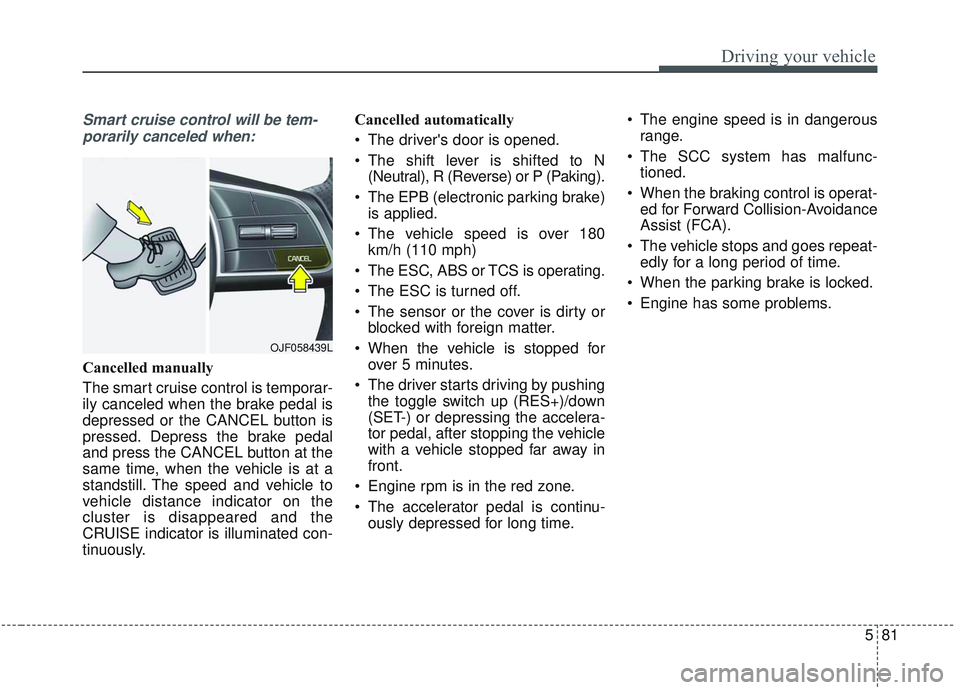
Smart cruise control will be tem-porarily canceled when:
Cancelled manually
The smart cruise control is temporar-
ily canceled when the brake pedal is
depressed or the CANCEL button is
pressed. Depress the brake pedal
and press the CANCEL button at the
same time, when the vehicle is at a
standstill. The speed and vehicle to
vehicle distance indicator on the
cluster is disappeared and the
CRUISE indicator is illuminated con-
tinuously. Cancelled automatically
The driver's door is opened.
The shift lever is shifted to N
(Neutral), R (Reverse) or P (Paking).
The EPB (electronic parking brake) is applied.
The vehicle speed is over 180 km/h (110 mph)
The ESC, ABS or TCS is operating.
The ESC is turned off.
The sensor or the cover is dirty or blocked with foreign matter.
When the vehicle is stopped for over 5 minutes.
The driver starts driving by pushing the toggle switch up (RES+)/down
(SET-) or depressing the accelera-
tor pedal, after stopping the vehicle
with a vehicle stopped far away in
front.
Engine rpm is in the red zone.
The accelerator pedal is continu- ously depressed for long time. The engine speed is in dangerous
range.
The SCC system has malfunc- tioned.
When the braking control is operat- ed for Forward Collision-Avoidance
Assist (FCA).
The vehicle stops and goes repeat- edly for a long period of time.
When the parking brake is locked.
Engine has some problems.
OJF058439L
Page 380 of 589

587
Driving your vehicle
If you push the smart cruise controltoggle switch (RES+ or SET-) while
Auto Hold and smart cruise control
is operating, the Auto Hold will be
released regardless of accelerator
pedal operation and the vehicle will
start to move. The AUTO HOLD
indicator changes from green to
white. (if equipped with EPB
(Electronic Parking Brake))Radar to detect distance to the
vehicle ahead
The sensor detects the distance to
the vehicle ahead.
If the sensor is covered with dirt or
other foreign matter, the vehicle to
vehicle distance control may not
operate correctly.
Always keep the area in front of the
sensor clean.
Warning message
When the sensor lens cover is cov-
ered with dirt, snow, or debris, the
Smart Cruise Control System opera-
tion may stop temporarily. If this
occurs, a warning message will
appear on the LCD display. Remove
any dirt, snow, or debris and clean the
radar sensor lens cover before operat-
ing the Smart Cruise Control System.
The Smart Cruise Control system may
not properly activate, if the radar is
totally blocked, or if any substance is
not detected after turning ON the
engine (e.g. in an open terrain).OJFHP058304L
OJF058404L
Page 384 of 589

591
Driving your vehicle
On inclines
During uphill or downhill driving,the smart cruise control system
may not immediately detect a mov-
ing vehicle in your lane, and may
cause your vehicle to accelerate to
the set speed. Also, the vehicle
speed will rapidly down when the
vehicle ahead is recognized sud-
denly.
Select the appropriate set speed on inclines and adjust your vehicle
speed by depressing the accelera-
tor or brake pedal according to the
road and driving conditions ahead.
Lane changing
A vehicle which moves into yourlane from an adjacent lane cannot
be recognized by the sensor until it
is in the sensor's detection range.
The sensor may not detect imme- diately when a vehicle cuts in sud-
denly. Always pay attention to the
traffic, road and driving conditions.
If a vehicle which moves into your lane is slower than your vehicle,
your speed may decrease to main-
tain the distance to the vehicle
ahead. If a vehicle which moves into your
lane is faster than your vehicle,
your vehicle will accelerate to the
selected speed.
OJF055027OYG056045
Page 385 of 589

Driving your vehicle
92
5
Your vehicle may accelerate when
a vehicle ahead of you disappears.
When you are warned that the vehicle ahead of you is not detect-
ed, drive with caution.
Vehicle recognition
Some vehicles ahead in your lane
cannot be recognized by the sensor
as follows:
- Narrow vehicles such as motorcy-cles or bicycles
- Vehicles offset to one side
- Slow-moving vehicles or sudden- decelerating vehicles
- Stopped vehicles
- Vehicles with small rear profiles such as trailers with no loads A vehicle ahead cannot be recog-
nized correctly by the sensor if any of
following occurs:
- When the vehicle is pointing
upwards due to overloading in the
trunk(tailgate)
- While making turns by steering
- When driving to one side of the lane
- When driving on narrow lanes or on curves
Adjust your vehicle speed by
depressing the brake pedal accord-
ing to the road condition ahead and
driving condition.
OYG056047
OYG056046
Page 399 of 589

Driving your vehicle
106
5
If the vehicle detected by the sensors
approaches from the rear left/right
side of your vehicle, the warning
chime will sound, the warning light
on the outside rearview mirror will
blink and a message will appear on
the LCD display.
The warning will stop when:
- The vehicle moving at the rear
left/right side of your vehicle is not
in the detection range.
- The vehicle is right behind your vehicle.
- The vehicle is not driving towards your vehicle.
- The vehicle’s approaching speed is decreased.
WARNING
Drive safely even though thevehicle is equipped with a
Rear Cross-Traffic Collision
Warning (RCCW) System. Do
not solely rely on the system
but check your surrounding
when backing the vehicle up.
The RCCW system may not
detect every object alongside
the vehicle.
The driver is responsible for accurate brake control.
Always pay extreme caution while driving. The Rear Cross-
Traffic Collision Warning
System may not operate prop-
erly or unnecessarily operate
in accordance with your driv-
ing situations.
CAUTION
If the operating conditions of RCCW are satisfied, a warningis issued every time a vehiclecomes to the rear side, even ifyour vehicle is stopped (vehi-cle speed 0 km/h (0 mph)).
The system's warning may not operate properly if theleft/right of your vehicle's rearbumper is blocked by a vehi-cle or obstacle.
The driver should always use extreme caution while operat-ing the vehicle, whether or notthe warning light on the out-side rearview mirror illumi-nates or there is a warningalarm.
Playing the vehicle audio sys- tem at high volume may pre-vent occupants from hearingthe system's warning sounds.
The warning of the Rear Cross- Traffic Collision WarningSystem may not sound if warn-ing sounds from other systemsare activated.
Page 451 of 589
What to do in an emergency
14
6
You may not be able to identify a low
tire by simply looking at it. Always
use a good quality tire pressure
gauge to measure the tire's inflation
pressure. Please note that a tire that
is hot (from being driven) will have a
higher pressure measurement than a
tire that is cold (from sitting station-
ary for at least 3 hours and driven
less than 1.6 km (1 mile) during that
3 hour period).
Allow the tire to cool before measur-
ing the inflation pressure. Always be
sure the tire is cold before inflating to
the recommended pressure.
A cold tire means the vehicle has
been sitting for 3 hours and driven for
less than 1.6 km (1 mile) in that 3
hour period.
Never use tire sealant if your vehicle
is equipped with a Tire Pressure
Monitoring System. The liquid
sealant can damage the tire pres-
sure sensors. The TPMS cannot alert you to
severe and sudden tire damage
caused by external factors such as
nails or road debris.
If you feel any vehicle instability, immediately take your foot off the
accelerator, apply the brakes grad-
ually and with light force, and slow-
ly move to a safe position off the
road.✽ ✽ NOTICE - Protecting TPMS
Tampering with, modifying, or dis-
abling the Tire Pressure Monitoring
System (TPMS) components may
interfere with the system's ability to
warn the driver of low tire pressure
conditions and/or TPMS malfunc-
tions. Tampering with, modifying,
or disabling the Tire Pressure
Monitoring System (TPMS) compo-
nents may void the warranty for
that portion of the vehicle.