horn KIA OPTIMA 2020 Owners Manual
[x] Cancel search | Manufacturer: KIA, Model Year: 2020, Model line: OPTIMA, Model: KIA OPTIMA 2020Pages: 589, PDF Size: 11.37 MB
Page 63 of 589
25
Your vehicle at a glance
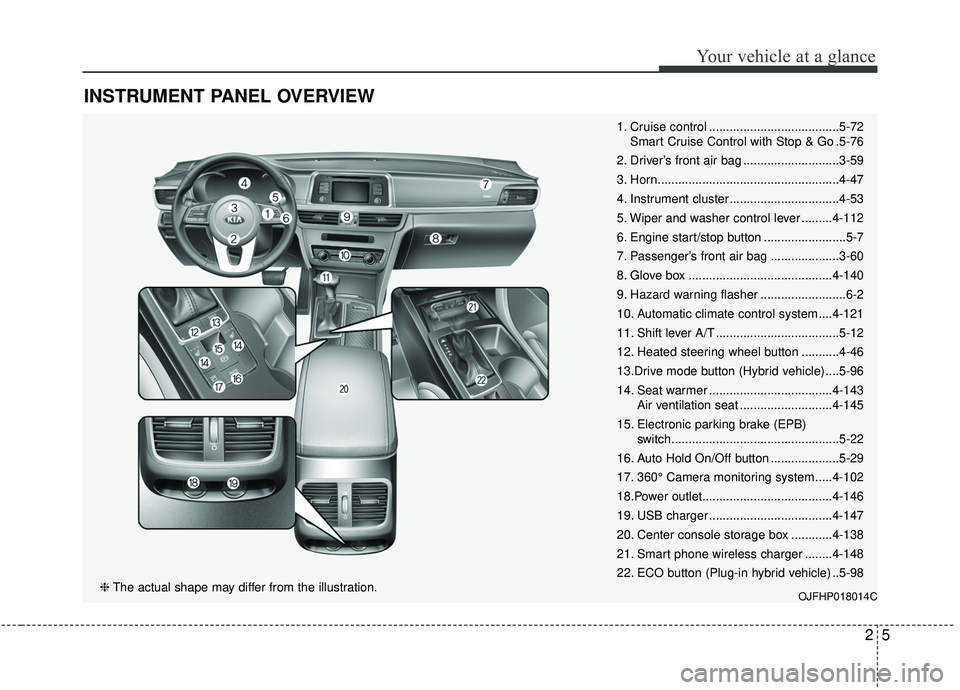
INSTRUMENT PANEL OVERVIEW
1. Cruise control ......................................5-72Smart Cruise Control with Stop & Go .5-76
2. Driver’s front air bag ............................3-59
3. Horn.....................................................4-47
4. Instrument cluster ................................4-53
5. Wiper and washer control lever .........4-112
6. Engine start/stop button ........................5-7
7. Passenger’s front air bag ....................3-60
8. Glove box ..........................................4-140
9. Hazard warning flasher .........................6-2
10. Automatic climate control system ....4-121
11. Shift lever A/T ....................................5-12
12. Heated steering wheel button ...........4-46
13.Drive mode button (Hybrid vehicle) ....5-96
14. Seat warmer ....................................4-143 Air ventilation seat ...........................4-145
15. Electronic parking brake (EPB) switch.................................................5-22
16. Auto Hold On/Off button ....................5-29
17. 360° Camera monitoring system .....4-102
18.Power outlet......................................4-146
19. USB charger ....................................4-147
20. Center console storage box ............4-138
21. Smart phone wireless charger ........4-148
22. ECO button (Plug-in hybrid vehicle) ..5-98
OJFHP018014C❈ The actual shape may differ from the illustration.
Page 141 of 589

Features of your vehicle
64
✽ ✽NOTICE
You can activate or deactivate the
Two Press Unlock function. Refer to
“User settings” in this chapter.
Trunk unlocking
If you are within 0.7 ~ 1 m (28 ~ 40 in.)
from the outside trunk handle, with
your smart key in possession, the
trunk will unlock and open when you
press the trunk handle switch.
The hazard warning lights will blink
twice to indicate that the trunk is
unlocked.
Also, once the trunk is opened and
then closed, the trunk will lock auto-
matically.
Panic
1. Press the panic button (4) for more
than 1 second.
2. The horn sounds and hazard warning light flash for about 27
seconds.
✽ ✽NOTICE
To stop the horn and lights, press
any button on the smart key.
Engine start
You can start the engine without
inserting the key. For detailed infor-
mation refer to the “Engine start/stop
button” in chapter 5.
Loss of the smart key
A maximum of 2 smart keys can be
registered to a single vehicle.
If you happen to lose your smart key,
you will not be able to start the
engine. You should immediately take
the vehicle and remaining key to your
authorized Kia dealer (tow the vehi-
cle, if necessary) to protect it from
potential theft.
Page 146 of 589

411
Features of your vehicle
Do not arm the system until all
passengers have left the vehicle. If
the system is armed while a pas-
senger(s) remains in the vehicle,
the alarm may be activated when
the remaining passenger(s) leave
the vehicle. If any door (or trunk)
or engine hood is opened within
30 seconds after the system
enters the armed stage, the sys-
tem is disarmed to prevent an
unnecessary alarm.Theft-alarm stage
The alarm will be activated if any of
the following occurs while the system
is armed.
A front or rear door is opened with-out using the smart key.
The trunk is opened without using smart key.
The engine hood is opened.
The horn will sound and the hazard
warning lights will blink continuously
for approximately 27 seconds, and
repeat the horn 3 times unless the
system is disarmed. To turn off the
system, unlock the doors with the
smart key.
Disarmed stage
The system will be disarmed when
The doors (and trunk) are unlocked with the smart key.
After depressing the unlock button,
the hazard warning lights will blink
and the chime will sound twice (in
smart key) to indicate that the sys-
tem is disarmed.
After depressing the unlock button, if
any door (or trunk) is not opened
within 30 seconds, the system will be
rearmed.
Page 182 of 589
447
Features of your vehicle
Horn
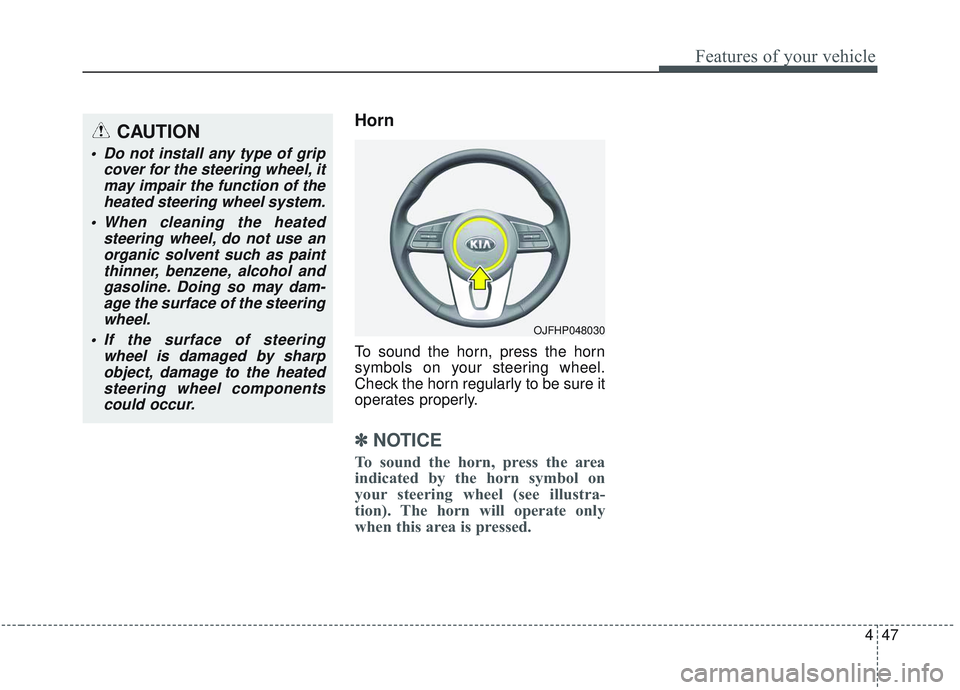
To sound the horn, press the horn
symbols on your steering wheel.
Check the horn regularly to be sure it
operates properly.
✽ ✽NOTICE
To sound the horn, press the area
indicated by the horn symbol on
your steering wheel (see illustra-
tion). The horn will operate only
when this area is pressed.
OJFHP048030
CAUTION
Do not install any type of grip
cover for the steering wheel, itmay impair the function of theheated steering wheel system.
When cleaning the heated steering wheel, do not use anorganic solvent such as paintthinner, benzene, alcohol andgasoline. Doing so may dam-age the surface of the steeringwheel.
If the surface of steering wheel is damaged by sharpobject, damage to the heatedsteering wheel componentscould occur.
Page 201 of 589
Features of your vehicle
66
4
Door
Automatically Lock :
- Enable on Speed : All doors willbe automatically locked when the
vehicle speed exceeds 15 km/h
(9.3 mph).
- Enable on Shift : All doors will be automatically locked if the trans-
mission shift lever is shifted from
the P (Park) position to the R
(Reverse), N (Neutral), or D
(Drive) position.
Automatically Unlock : - Disable : The auto door unlockoperation will be canceled.
- Vehicle Off/On key out : All doors will be automatically unlocked
when the ignition key is removed
from the ignition switch or the
Engine Start/Stop button is set to
the OFF position.
- On Shift to P : All doors will be automatically unlocked if the
automatic transmission shift lever
is shifted to the P (Park) position. Two Press Unlock :
- If this item is checked, the twopress unlock function will be acti-
vated.
Horn Feedback (if equipped) : - If this item is checked, the hornfeedback function will be activat-
ed.
Smart Trunk (if equipped) : - If this item is checked, the smarttrunk function will be activated.
❈ For more details, refer to “Smart
Trunk” in this chapter. Lights
One Touch Turn Signal :
- Off: The one touch turn signalfunction will be deactivated.
- 3, 5, 7 Flashes : The lane change signals will blink 3, 5 or 7 times
when the turn signal lever is
moved slightly.
❈ For more details, refer to “Lighting”
in this chapter.
Ambient Light Brightness (if equipped) :
- To select the brightness of theambient light. (Level 1 ~ 4)
Ambient Light Color (if equipped) : - To select the color of the ambientlight. (White / Orange / Red / Green
/ Blue / Violet / Link to Driver Mode)
Headlight Delay : - If this item is checked, the headlamp delay function will be acti-
vated.
❈ For more details, refer to “Lighting”
in this chapter.
Page 234 of 589

499
Features of your vehicle
Types of warning sound
When an object is 120 cm to 61 cm(47 in. to 24 in.) from the rear
bumper: Buzzer beeps intermit-
tently.
When an object is 60 cm to 31 cm (24 in. to 12 in.) from the rear
bumper: Buzzer beeps more fre-
quently.
When an object is within 30 cm (12 in.) of the rear bumper:
Buzzer sounds continuously.
Non-operational conditions of
the parking distance warning-
reverse system
The parking distance warning-
reverse system may not operate
properly when:
1. Moisture is frozen to the sensor. (It will operate normally once the
moisture clears.)
2. The sensor is covered with foreign matter, such as snow or water, or
the sensor cover is blocked. (It will
operate normally when the materi-
al is removed or the sensor is no
longer blocked.)
3. Driving on uneven road surfaces (unpaved roads, gravel, bumps,
gradient).
4. Objects generating excessive noise (vehicle horns, loud motor-
cycle engines, or truck air brakes)
are within range of the sensor.
5. Heavy rain or water spray exists.
6. Wireless transmitters or mobile phones are within range of the
sensor.
7. The sensor is covered with snow.
8. Trailer towing. The detecting range may decrease
when:
1. The sensor is covered with foreign
matter such as snow or water.
(The sensing range will return to
normal when removed.)
2. Outside air temperature is extremely hot or cold.
The following objects may not be
recognized by the sensor:
1. Sharp or slim objects such as ropes, chains or small poles.
2. Objects which tend to absorb the sensor frequency such as clothes,
sound absorbent material or snow.
3. Undetectable objects smaller than 1 m (40 in.) in height and narrower
than 14 cm (6 in.) in diameter.
Page 532 of 589
Maintenance
66
7
Fuse NameFuse ratingCircuit Protected
MULTI
FUSE
MDPS 180AMDPS Unit (Column)
COOLING FAN60ARLY. 2 (Cooling Fan Relay)
B+550APCB Block (Engine Control Relay, Fuse -FUEL PUMP/ECU2/TCU1/HORN/WIPER1/BATTERY
C/FAN)
B+350ASmart Junction Block (IPS 2 (IPS 5), IPS 3 (IPS 6), IPS 7, IPS 8)
REAR HEATED50ARLY. 11 (Rear Heated Relay)
ACTIVE
HYDRAULIC
BOOSTER 240AIntegrated Brake Actuation Unit
BLOWER40ARLY. 4 (Blower Relay)
POWER
OUTLET140ARLY. 7 (Power Outlet Relay)
IG230APCB Block (IG2 Relay)
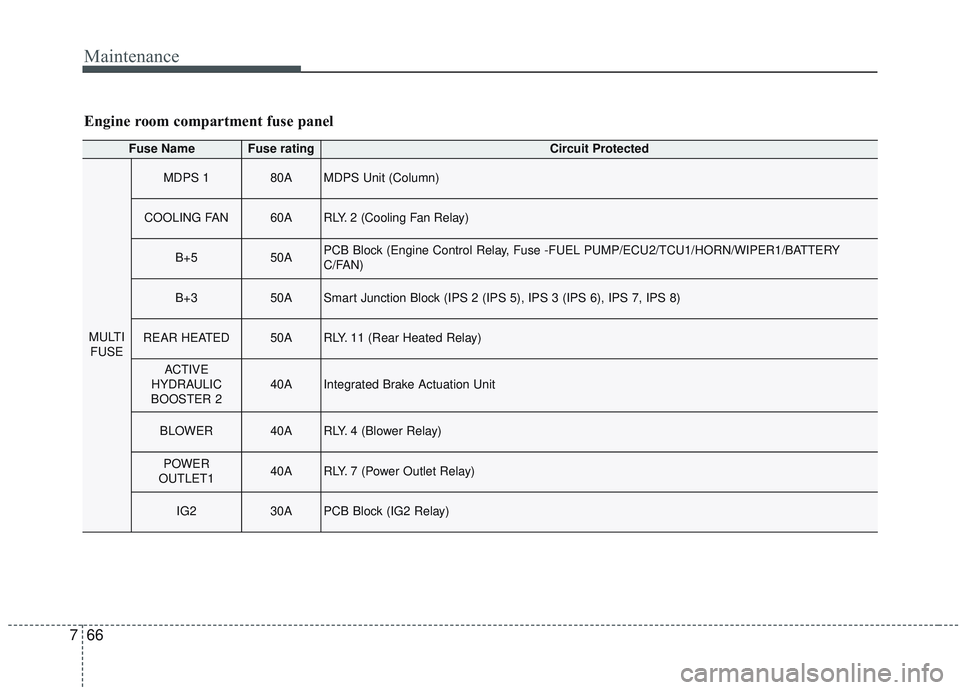
Engine room compartment fuse panel
Page 536 of 589

Maintenance
70
7
Fuse NameFuse ratingCircuit Protected
FUSE
SENSOR 115AOxygen Sensor (Up/Down), E/R Junction Block (Cooling Fan Relay)
IGN COIL20AIgnition Coil #1/#2/#3/#4
ECU 210APCM
TCU 110APCM
HEV ECU 210AHPCU, E/R Junction Block (Battery C/Fan Relay)
ECU 310APCM
POWER OUT-
LET220AFront Power Outlet #1
HORN20AHorn Relay, ICM Relay Box (Burglar Alarm Horn Relay)
WIPER 130AWiper Power Relay
BATTERYC/FAN15AE/R Junction Block (Battery C/Fan Relay)
Page 587 of 589
I9
Index
Smart Cruise Control switch ......................................5-78
To adjust the sensitivity of smart cruise control ........5-89
To convert to cruise control mode ..............................5-89
Vehicle to vehicle distance setting ..............................5-83
When the lane ahead is clear ......................................5-84
When there is a vehicle ahead of you in your lane ....5-85
Smart key ........................................................................\
4-4 Battery replacement ......................................................4-8
Loss of the smart key ....................................................4-7
Record your key number ..............................................4-4
Smart key function ........................................................4-4
Smart key immobilizer system ....................................4-8
Smart key precautions ..................................................4-7
Smart trunk ....................................................................4-18\
Detecting area ............................................................4-22
Emergency trunk safety release ..................................4-22
How to deactivate the Smart Trunk function using the smart key ..................................................................4-21
How to use the Smart Trunk ......................................4-18
Special driving conditions ..........................................5-132 Driving at night ........................................................5-133
Driving in flooded areas ..........................................5-135
Driving in the rain ....................................................5-134
Hazardous driving conditions ..................................5-132
Highway driving ......................................................5-135
Rocking the vehicle ..................................................5-132
Smooth cornering ......................................................5-133 Steering wheel ..............................................................4-44
Electric Power Steering (EPS) ....................................4-44
Heated steering wheel ................................................4-46
Horn ........................................................................\
....4-47
Tilt and telescopic steering ........................................4-45
Storage compartments ................................................4-140 Center console storage ..............................................4-140
Glove box ..................................................................4-140
Sunglass holder ........................................................4-141
Theft-alarm system ........................................................4-10 Armed stage ................................................................4-10
Disarmed stage ............................................................4-11
Theft-alarm stage ........................................................4-11
Tire Pressure Monitoring System (TPMS) ......................6-9 Changing a tire with TPMS ........................................6-13
Check tire pressure.....................................................\
...6-9
Low tire pressure position telltale ..............................6-11
Tire specification and pressure label ..............................8-9
Tires and wheels ....................................................7-39, 8-4 All season tires ..........................................................7-51
Checking tire inflation pressure ..................................7-40
Radial-ply tires ............................................................7-52
Recommended cold tire inflation pressures................7-39
Snow tires....................................................................7-51\
Summer tires ..............................................................7-51
T