clock KIA Optima Hybrid 2016 4.G User Guide
[x] Cancel search | Manufacturer: KIA, Model Year: 2016, Model line: Optima Hybrid, Model: KIA Optima Hybrid 2016 4.GPages: 466, PDF Size: 14.92 MB
Page 412 of 466
Maintenance
72
7
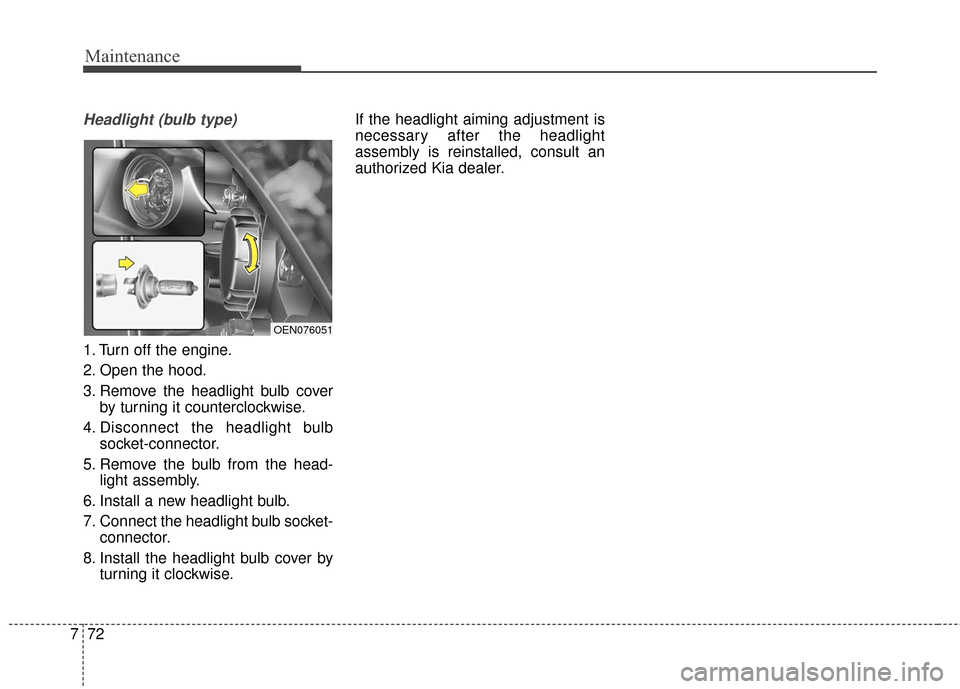
Headlight (bulb type)
1. Turn off the engine.
2. Open the hood.
3. Remove the headlight bulb cover
by turning it counterclockwise.
4. Disconnect the headlight bulb socket-connector.
5. Remove the bulb from the head- light assembly.
6. Install a new headlight bulb.
7. Connect the headlight bulb socket- connector.
8. Install the headlight bulb cover by turning it clockwise. If the headlight aiming adjustment is
necessary after the headlight
assembly is reinstalled, consult an
authorized Kia dealer.
OEN076051
Page 413 of 466
773
Maintenance
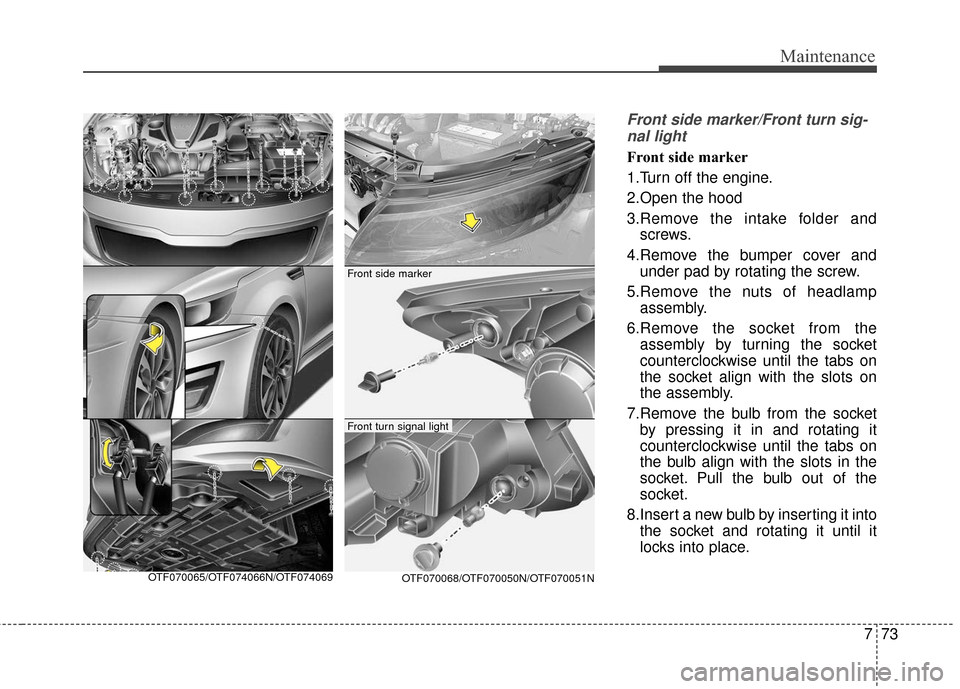
Front side marker/Front turn sig-nal light
Front side marker
1.Turn off the engine.
2.Open the hood
3.Remove the intake folder and screws.
4.Remove the bumper cover and under pad by rotating the screw.
5.Remove the nuts of headlamp assembly.
6.Remove the socket from the assembly by turning the socket
counterclockwise until the tabs on
the socket align with the slots on
the assembly.
7.Remove the bulb from the socket by pressing it in and rotating it
counterclockwise until the tabs on
the bulb align with the slots in the
socket. Pull the bulb out of the
socket.
8.Insert a new bulb by inserting it into the socket and rotating it until it
locks into place.
OTF070065/OTF074066N/OTF074069OTF070068/OTF070050N/OTF070051N
Front side marker
Front turn signal light
Page 414 of 466
Maintenance
74
7
9.Install the socket in the assembly
by aligning the tabs on the socket
with the slots in the assembly.
Push the socket into assembly and
turn the socket clockwise.
10. Reinstall the headlamp assem- bly, under pad and bumper to the
body of the vehicle. Front turn signal light
1.Turn off the engine.
2.Open the hood
3.Remove the socket from the
assembly by turning the socket
counterclockwise until the tabs on
the socket align with the slots on
the assembly.
4.Remove the bulb from the socket by pressing it in and rotating it
counterclockwise until the tabs on
the bulb align with the slots in the
socket. Pull the bulb out of the
socket.
5.Insert a new bulb by inserting it into the socket and rotating it until it
locks into place.
6.Install the socket in the assembly by aligning the tabs on the socket
with the slots in the assembly.
Push the socket into assembly and
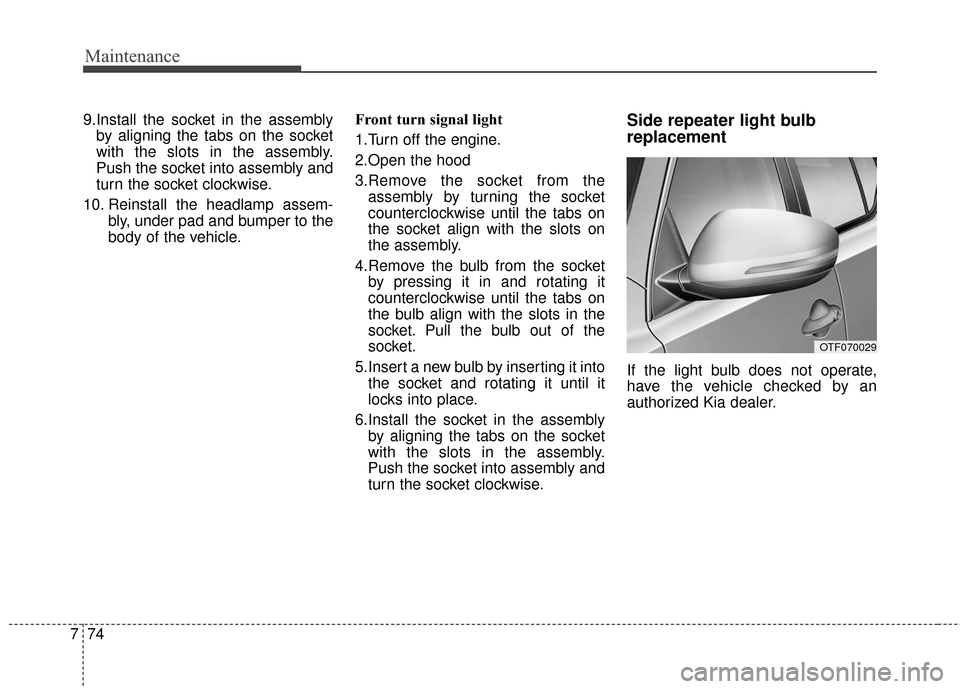
turn the socket clockwise.Side repeater light bulb
replacement
If the light bulb does not operate,
have the vehicle checked by an
authorized Kia dealer.
OTF070029
Page 415 of 466
775
Maintenance
Front fog light
1.Turn off the engine.
2.Remove the under cover by rotat-ing the screws.
3.Reach your hand into the back of the front bumper.
4.Disconnect the power connector.
5.Remove the bulb-socket from the housing by turning the socket
counter clockwise until the tabs on
the socket align with the slots on
the housing. 6.Install the new bulb-socket into the
housing by aligning the tabs on the
socket with the slots in the hous-
ing.
Push the socket into the housing
and turn the socket clockwise.
7.Connect the power connector.
8.Reinstall the front under cover.
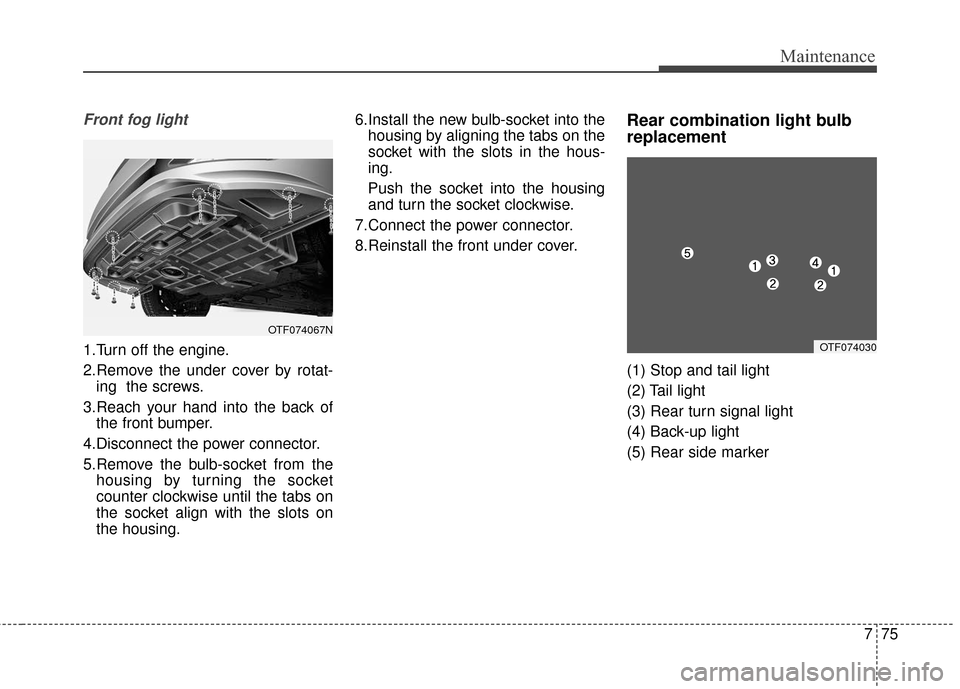
Rear combination light bulb
replacement
(1) Stop and tail light
(2) Tail light
(3) Rear turn signal light
(4) Back-up light
(5) Rear side marker
OTF074067N
OTF074030
Page 416 of 466
Maintenance
76
7
If the light (LED) does not operate,
have the vehicle checked by an
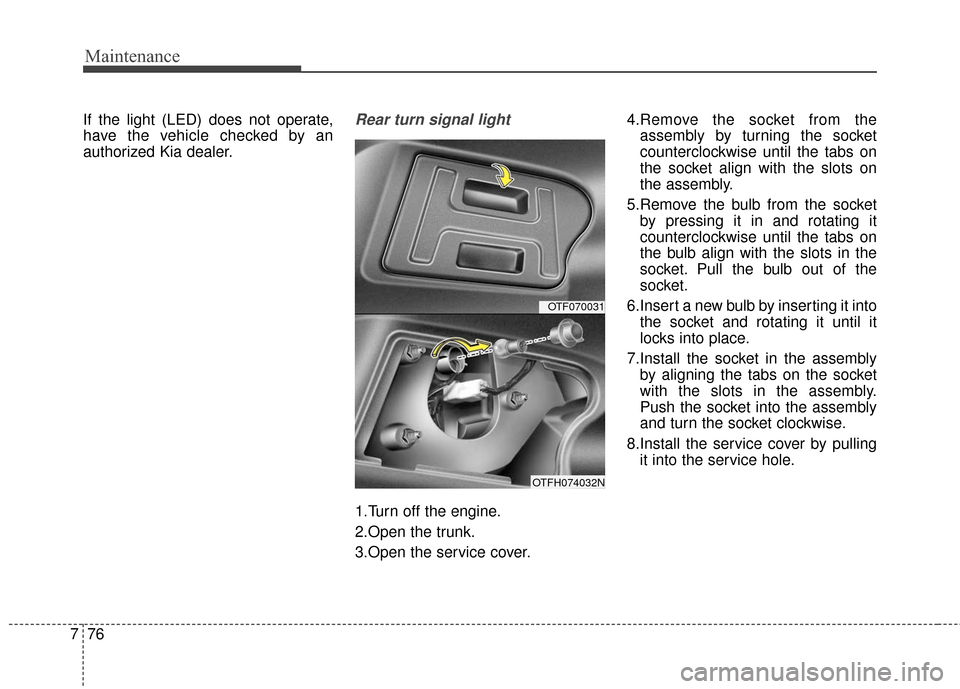
authorized Kia dealer.Rear turn signal light
1.Turn off the engine.
2.Open the trunk.
3.Open the service cover. 4.Remove the socket from the
assembly by turning the socket
counterclockwise until the tabs on
the socket align with the slots on
the assembly.
5.Remove the bulb from the socket by pressing it in and rotating it
counterclockwise until the tabs on
the bulb align with the slots in the
socket. Pull the bulb out of the
socket.
6.Insert a new bulb by inserting it into the socket and rotating it until it
locks into place.
7.Install the socket in the assembly by aligning the tabs on the socket
with the slots in the assembly.
Push the socket into the assembly
and turn the socket clockwise.
8.Install the service cover by pulling it into the service hole.
OTF070031
OTFH074032N
Page 417 of 466
777
Maintenance
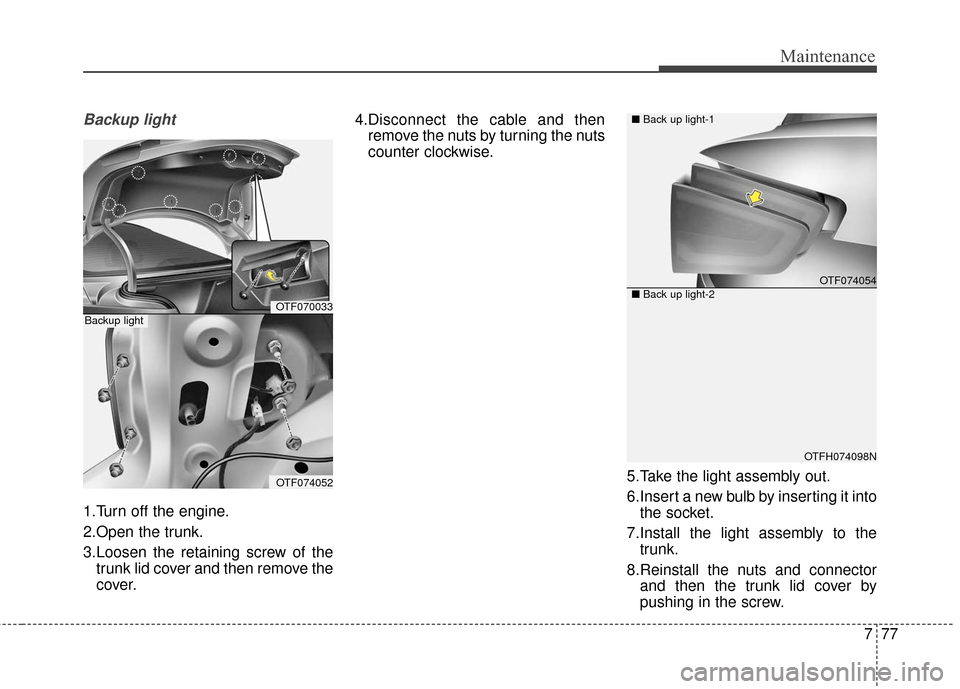
Backup light
1.Turn off the engine.
2.Open the trunk.
3.Loosen the retaining screw of thetrunk lid cover and then remove the
cover. 4.Disconnect the cable and then
remove the nuts by turning the nuts
counter clockwise.
5.Take the light assembly out.
6.Insert a new bulb by inserting it intothe socket.
7.Install the light assembly to the trunk.
8.Reinstall the nuts and connector and then the trunk lid cover by
pushing in the screw.
OTF070033
OTF074052
Backup light
OTF074054
OTFH074098N
■
Back up light-1
■ Back up light-2
Page 462 of 466
I5
Index
If the engine overheats . . . . . . . . . . . . . . . . . . . . . . . . . . 6-7
If the engine will not start . . . . . . . . . . . . . . . . . . . . . . . 6-4If engine doesn’t turn over or turns over slowly . . . . 6-4
If engine turns over normally but does not start . . . . 6-4
If you have a flat tire (with Spare Tire) . . . . . . . . . . . . . 6-8 Changing tires . . . . . . . . . . . . . . . . . . . . . . . . . . . . . . 6-9
Jack and tools . . . . . . . . . . . . . . . . . . . . . . . . . . . . . . . 6-8
Removing and storing the spare tire . . . . . . . . . . . . . 6-9
Use of temporary compact spare tire . . . . . . . . . . . . 6-14
If you have a flat tire (with Tire Mobility Kit). . . . . . . 6-17 Checking the tire inflation pressure . . . . . . . . . . . . . 6-21
Components of the Tire Mobility Kit . . . . . . . . . . . 6-19
Distributing the sealant . . . . . . . . . . . . . . . . . . . . . . 6-21
Introduction . . . . . . . . . . . . . . . . . . . . . . . . . . . . . . . 6-19
Notes on the safe use of the Tire Mobility Kit . . . . 6-18
Technical Data . . . . . . . . . . . . . . . . . . . . . . . . . . . . . 6-22
Using the Tire Mobility Kit . . . . . . . . . . . . . . . . . . . 6-20
In case of an emergency while driving . . . . . . . . . . . . . . 6-3 If engine stalls while driving . . . . . . . . . . . . . . . . . . . 6-3
If the engine stalls at a crossroad or crossing . . . . . . 6-3
If you have a flat tire while driving . . . . . . . . . . . . . . 6-3
Instrument cluster . . . . . . . . . . . . . . . . . . . . . . . . . . . . . 4-45 Gauges . . . . . . . . . . . . . . . . . . . . . . . . . . . . . . . . . . . 4-\
47
Instrument Cluster Control. . . . . . . . . . . . . . . . . . . . 4-46
LCD Display Control . . . . . . . . . . . . . . . . . . . . . . . . 4-46
Transaxle Shift Indicator . . . . . . . . . . . . . . . . . . . . . 4-50 Instrument panel overview . . . . . . . . . . . . . . . . . . . . . . . 2-5
Interior features. . . . . . . . . . . . . . . . . . . . . . . . . . . . . . 4-120
Clothes hanger . . . . . . . . . . . . . . . . . . . . . . . . . . . . 4-122
Cup holder . . . . . . . . . . . . . . . . . . . . . . . . . . . . . . . 4-120
Digital clock . . . . . . . . . . . . . . . . . . . . . . . . . . . . . . 4-122
Floor mat anchor(s) . . . . . . . . . . . . . . . . . . . . . . . . 4-123
Navigation system . . . . . . . . . . . . . . . . . . . . . . . . . 4-123
Power outlet . . . . . . . . . . . . . . . . . . . . . . . . . . . . . . 4-121
Sunvisor . . . . . . . . . . . . . . . . . . . . . . . . . . . . . . . . . 4-120
Interior light . . . . . . . . . . . . . . . . . . . . . . . . . . . . . . . . . 4-95 Automatic turn off function . . . . . . . . . . . . . . . . . . . 4-95
Glove box lamp . . . . . . . . . . . . . . . . . . . . . . . . . . . . 4-98
Map lamp . . . . . . . . . . . . . . . . . . . . . . . . . . . . . . . . . 4-95
Room lamp . . . . . . . . . . . . . . . . . . . . . . . . . . . . . . . . 4-96
Trunk room lamp . . . . . . . . . . . . . . . . . . . . . . . . . . . 4-97
Vanity mirror lamp . . . . . . . . . . . . . . . . . . . . . . . . . . 4-98
Interior overview. . . . . . . . . . . . . . . . . . . . . . . . . . . . . . . 2-4
LCD Display . . . . . . . . . . . . . . . . . . . . . . . . . . . . . . . . . 4-51 Hybrid information modes . . . . . . . . . . . . . . . . . . . . 4-52
LCD Modes . . . . . . . . . . . . . . . . . . . . . . . . . . . . . . . 4-51
Service Mode . . . . . . . . . . . . . . . . . . . . . . . . . . . . . . 4-55
User Settings Mode . . . . . . . . . . . . . . . . . . . . . . . . . 4-56
Warning Messages . . . . . . . . . . . . . . . . . . . . . . . . . . 4-59
Light bulbs . . . . . . . . . . . . . . . . . . . . . . . . . . . . . . . . . . 7-70\
Front light replacement . . . . . . . . . . . . . . . . . . . . . . 7-70
I
L