brake KIA OPTIMA PHEV 2017 User Guide
[x] Cancel search | Manufacturer: KIA, Model Year: 2017, Model line: OPTIMA PHEV, Model: KIA OPTIMA PHEV 2017Pages: 604, PDF Size: 13.16 MB
Page 53 of 604
15
Introduction
No special break-in period is needed.
By following a few simple precautions
for the first 600 miles (1,000 km) you
may add to the performance, econo-
my and life of your vehicle.
Do not race the engine.
While driving, keep your enginespeed (rpm, or revolutions per
minute) between 2,000 rpm and
4,000 rpm.
Do not maintain a single speed for long periods of time, either fast or
slow. Varying engine speed is
needed to properly break-in the
engine.
Avoid hard stops, except in emer- gencies, to allow the brakes to seat
properly.
Don't tow a trailer during the first 1,200 miles (2,000 km) of opera-
tion. By following a few simple precautions
for the first 600 miles (1,000 km) you
may add to the performance, econo-
my and life of your vehicle.
Do not race the engine.
Avoid hard stops, except in emer-
gencies, to allow the brakes to seat
properly.
VEHICLE BREAK-IN
PROCESS HEV POWERTRAIN
Page 54 of 604
Introduction
61
This vehicle is equipped with an
event data recorder (EDR). The
main purpose of an EDR is to
record, in certain crash or near
crash-like situations, such as an
air bag deployment or hitting a
road obstacle, data that will assist
in understanding how a vehicle's
systems performed. The EDR is
designed to record data related to
vehicle dynamics and safety sys-
tems for a short period of time,
typically 30 seconds or less. The
EDR in this vehicle is designed to
record such data as:
How various systems in yourvehicle were operating;
Whether or not the driver and passenger safety belts were
buckled/ fastened;
How far (if at all) the driver was depressing the accelerator
and/or brake pedal; and,
How fast the vehicle was travel- ing. These data can help provide a bet-
ter understanding of the circum-
stances in which crashes and
injuries occur. NOTE: EDR data
are recorded by your vehicle only
if a non-trivial crash situation
occurs; no data are recorded by
the EDR under normal driving
conditions and no personal data
(e.g., name, gender, age, and
crash location) are recorded.
However, other parties, such as
law enforcement, could combine
the EDR data with the type of per-
sonally identifying data routinely
acquired during a crash investiga-
tion.
To read data recorded by an EDR,
special equipment is required, and
access to the vehicle or the EDR is
needed. In addition to the vehicle
manufacturer, other parties, such
as law enforcement, that have the
special equipment, can read the
information if they have access to
the vehicle or the EDR.
VEHICLE DATA COLLECTION AND EVENT DATA RECORDERS
Page 58 of 604
Your vehicle at a glance
42
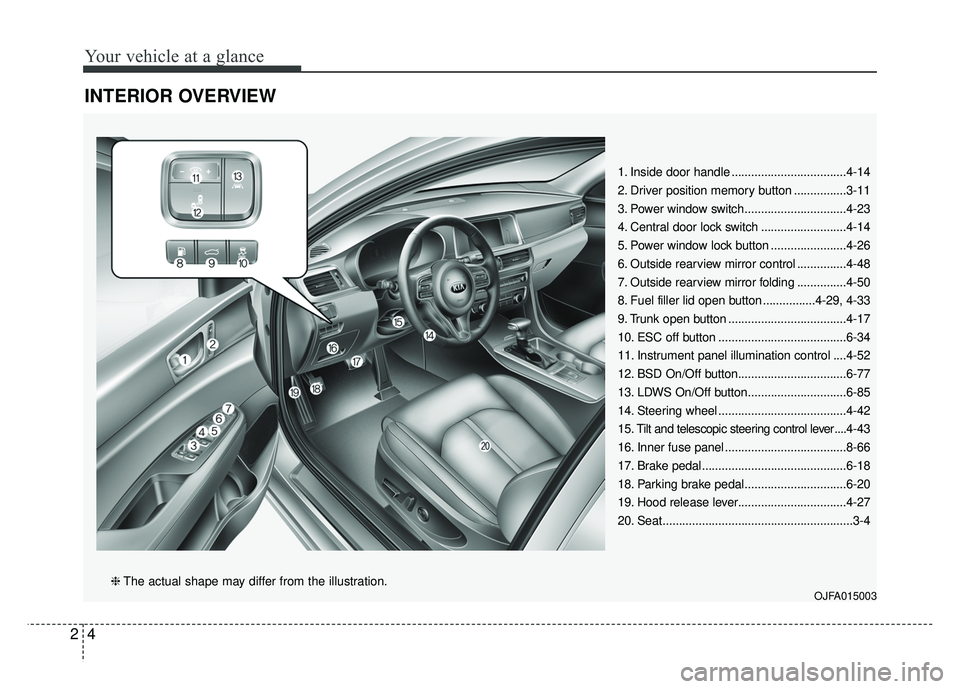
INTERIOR OVERVIEW
1. Inside door handle ...................................4-14
2. Driver position memory button ................3-11
3. Power window switch...............................4-23
4. Central door lock switch ..........................4-14
5. Power window lock button .......................4-26
6. Outside rearview mirror control ...............4-48
7. Outside rearview mirror folding ...............4-50
8. Fuel filler lid open button ................4-29, 4-33
9. Trunk open button ....................................4-17
10. ESC off button .......................................6-34
11. Instrument panel illumination control ....4-52
12. BSD On/Off button.................................6-77
13. LDWS On/Off button..............................6-85
14. Steering wheel .......................................4-42
15. Tilt and telescopic steering control lever ....4-43
16. Inner fuse panel .....................................8-66
17. Brake pedal............................................6-18
18. Parking brake pedal...............................6-20
19. Hood release lever.................................4-27
20. Seat..........................................................3-4
OJFA015003❈ The actual shape may differ from the illustration.
Page 59 of 604
25
Your vehicle at a glance
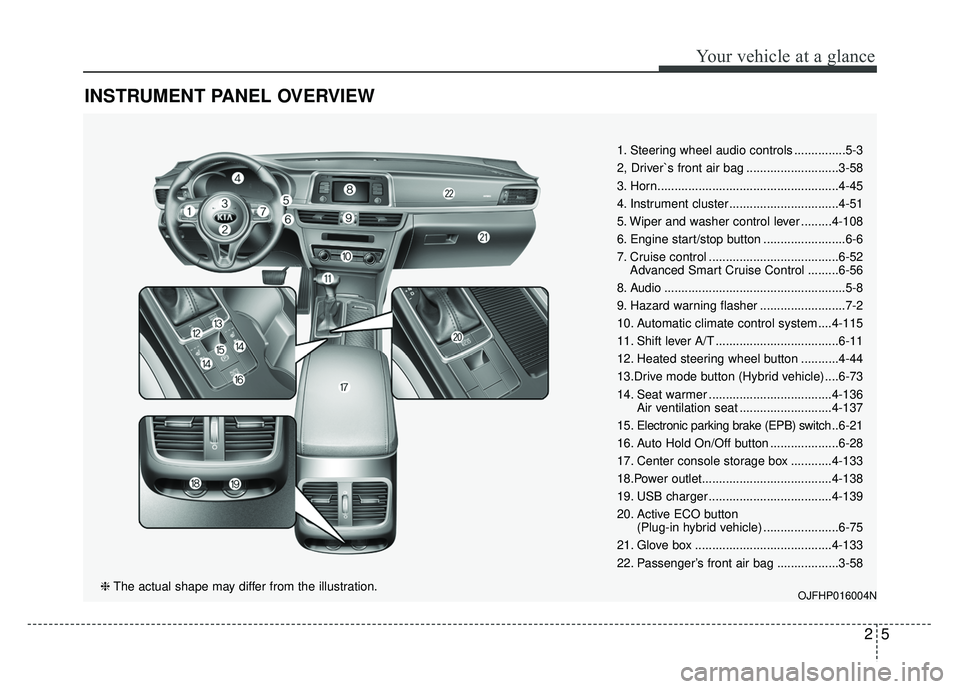
INSTRUMENT PANEL OVERVIEW
1. Steering wheel audio controls ...............5-3
2, Driver`s front air bag ...........................3-58
3. Horn.....................................................4-45
4. Instrument cluster ................................4-51
5. Wiper and washer control lever .........4-108
6. Engine start/stop button ........................6-6
7. Cruise control ......................................6-52Advanced Smart Cruise Control .........6-56
8. Audio .....................................................5-8
9. Hazard warning flasher .........................7-2
10. Automatic climate control system ....4-115
11. Shift lever A/T ....................................6-11
12. Heated steering wheel button ...........4-44
13.Drive mode button (Hybrid vehicle) ....6-73
14. Seat warmer ....................................4-136 Air ventilation seat ...........................4-137
15. Electronic parking brake (EPB) switch .. 6-21
16. Auto Hold On/Off button ....................6-28
17. Center console storage box ............4-133
18.Power outlet......................................4-138
19. USB charger ....................................4-139
20. Active ECO button (Plug-in hybrid vehicle) ......................6-75
21. Glove box ........................................4-133
22. Passenger’s front air bag ..................3-58
OJFHP016004N❈ The actual shape may differ from the illustration.
Page 60 of 604
Your vehicle at a glance
62
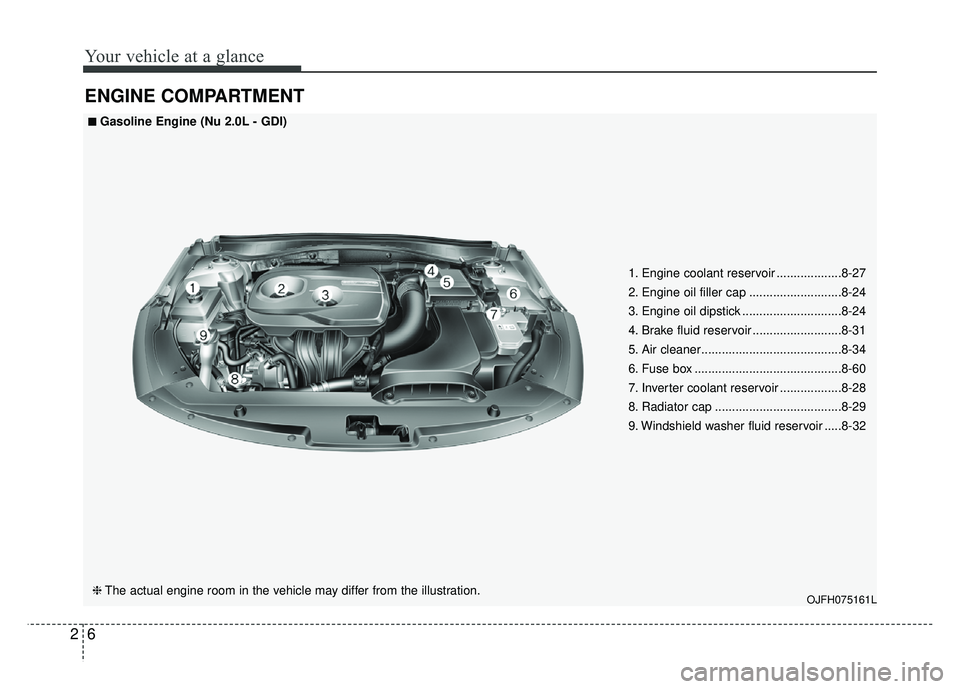
ENGINE COMPARTMENT
OJFH075161L
■
■
Gasoline Engine (Nu 2.0L - GDI)
❈ The actual engine room in the vehicle may differ from the illustration. 1. Engine coolant reservoir ...................8-27
2. Engine oil filler cap ...........................8-24
3. Engine oil dipstick .............................8-24
4. Brake fluid reservoir ..........................8-31
5. Air cleaner.........................................8-34
6. Fuse box ...........................................8-60
7. Inverter coolant reservoir ..................8-28
8. Radiator cap .....................................8-29
9. Windshield washer fluid reservoir .....8-32
Page 80 of 604
Safety features of your vehicle
20
3
When returning the rear seatbacks to
the upright position, remember to
return the rear shoulder belts to their
proper position.
CAUTION - Damaging
rear seat belt buckles
When you fold the rear seat- back, insert the buckle betweenthe rear seatback and cushion.Doing so can prevent the bucklefrom being damaged by the rearseatback.
WARNING - Cargo loading
Make sure the engine is off, the
automatic transaxle is in P (Park)
and the parking brake is secure-
ly applied whenever loading or
unloading cargo. Failure to take
these steps may allow the vehi-
cle to move if the shift lever is
inadvertently moved to another
position.
WARNING- Cargo
Cargo should always be
secured to prevent it from being
thrown about the vehicle in a
collision and causing injury to
the vehicle occupants. Do not
place objects in the rear seats,
since they cannot be properly
secured and may hit the front
seat occupants in a collision.WARNING - Rear
Seatback
To ensure maximum protection
in the event of an accident or
sudden stop, when returning the
rear seat to the upright position:
Be careful not to damage the seat belt webbing or buckle.
Do not allow the seat belt webbing or buckle to become
pinched or caught in the rear
seat.
Ensure the seatback is com- pletely locked into its upright
position by pushing on the
top of the seatback.
Failure to adhere to any of
these instructions could
result in serious injury or
death in the event of a crash.
Page 128 of 604
Safety features of your vehicle
68
3
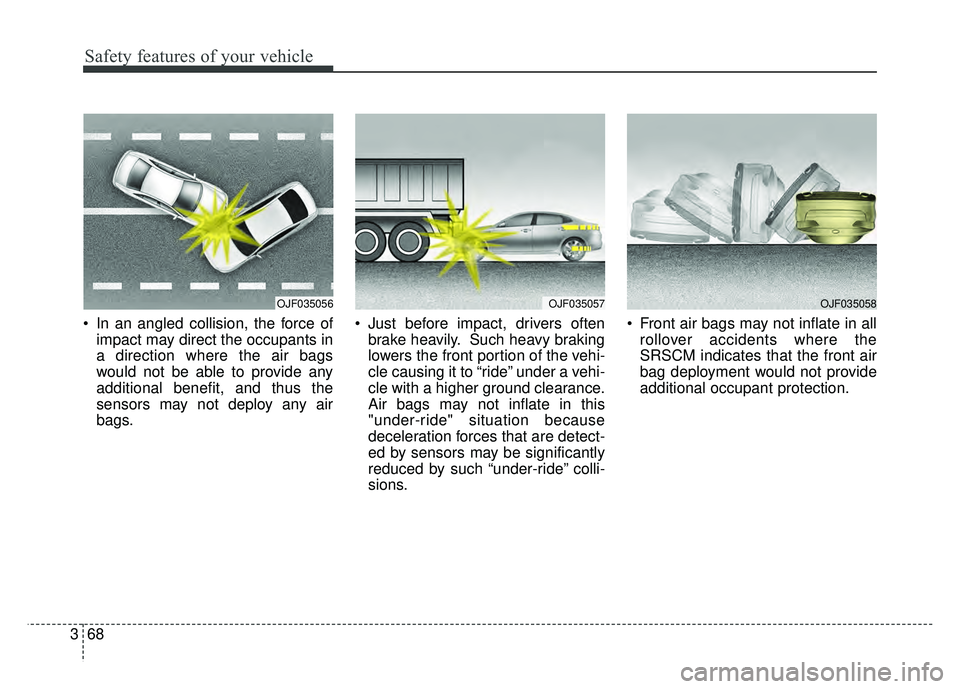
In an angled collision, the force of
impact may direct the occupants in
a direction where the air bags
would not be able to provide any
additional benefit, and thus the
sensors may not deploy any air
bags. Just before impact, drivers often
brake heavily. Such heavy braking
lowers the front portion of the vehi-
cle causing it to “ride” under a vehi-
cle with a higher ground clearance.
Air bags may not inflate in this
"under-ride" situation because
deceleration forces that are detect-
ed by sensors may be significantly
reduced by such “under-ride” colli-
sions. Front air bags may not inflate in all
rollover accidents where the
SRSCM indicates that the front air
bag deployment would not provide
additional occupant protection.
OJF035056OJF035057OJF035058
Page 143 of 604
413
Features of your vehicle
DOOR LOCKS
Operating door locks from
outside the vehicle
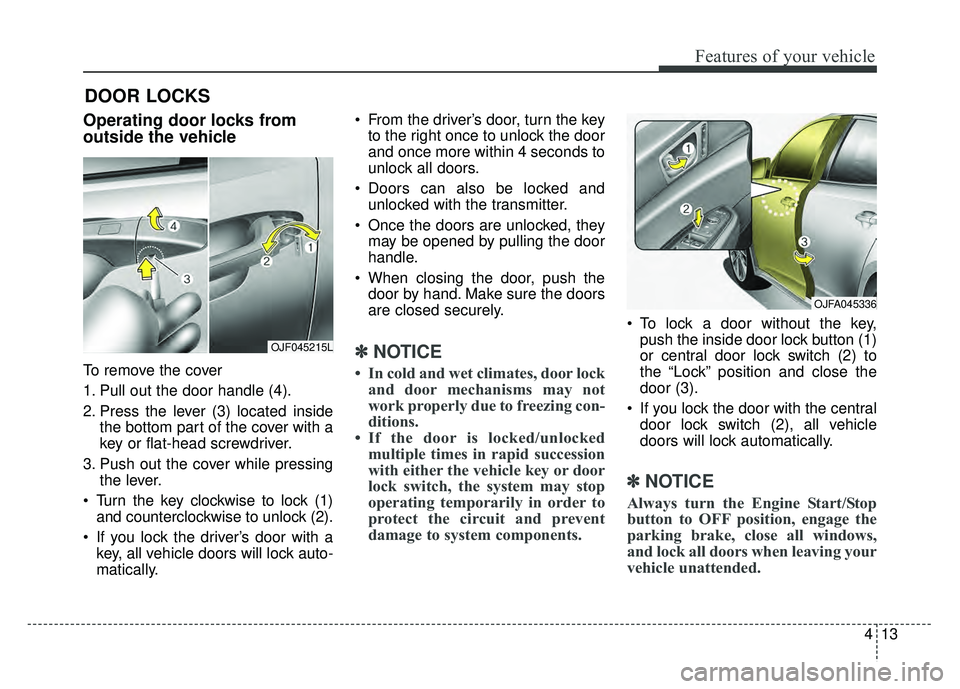
To remove the cover
1. Pull out the door handle (4).
2. Press the lever (3) located insidethe bottom part of the cover with a
key or flat-head screwdriver.
3. Push out the cover while pressing the lever.
Turn the key clockwise to lock (1) and counterclockwise to unlock (2).
If you lock the driver’s door with a key, all vehicle doors will lock auto-
matically. From the driver’s door, turn the key
to the right once to unlock the door
and once more within 4 seconds to
unlock all doors.
Doors can also be locked and unlocked with the transmitter.
Once the doors are unlocked, they may be opened by pulling the door
handle.
When closing the door, push the door by hand. Make sure the doors
are closed securely.
✽ ✽ NOTICE
• In cold and wet climates, door lock
and door mechanisms may not
work properly due to freezing con-
ditions.
• If the door is locked/unlocked multiple times in rapid succession
with either the vehicle key or door
lock switch, the system may stop
operating temporarily in order to
protect the circuit and prevent
damage to system components.
To lock a door without the key,
push the inside door lock button (1)
or central door lock switch (2) to
the “Lock” position and close the
door (3).
If you lock the door with the central door lock switch (2), all vehicle
doors will lock automatically.
✽ ✽ NOTICE
Always turn the Engine Start/Stop
button to OFF position, engage the
parking brake, close all windows,
and lock all doors when leaving your
vehicle unattended.
OJF045215L
OJFA045336
Page 147 of 604
417
Features of your vehicle
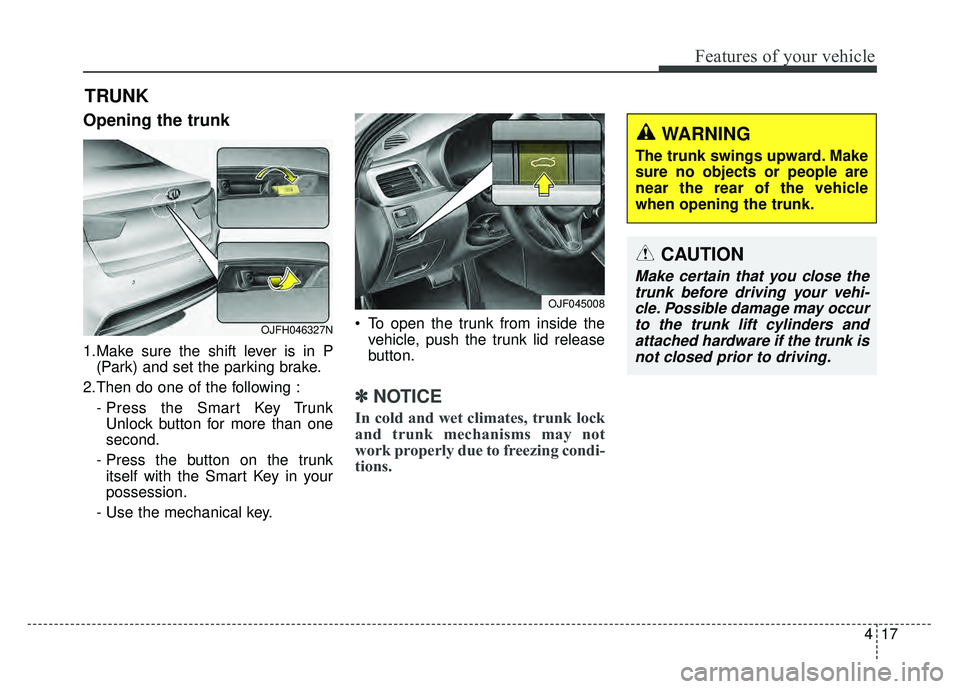
Opening the trunk
1.Make sure the shift lever is in P(Park) and set the parking brake.
2.Then do one of the following : - Press the Smart Key TrunkUnlock button for more than one
second.
- Press the button on the trunk itself with the Smart Key in your
possession.
- Use the mechanical key. To open the trunk from inside the
vehicle, push the trunk lid release
button.
✽ ✽ NOTICE
In cold and wet climates, trunk lock
and trunk mechanisms may not
work properly due to freezing condi-
tions.
TRUNK
CAUTION
Make certain that you close the
trunk before driving your vehi-cle. Possible damage may occurto the trunk lift cylinders andattached hardware if the trunk isnot closed prior to driving.
WARNING
The trunk swings upward. Make
sure no objects or people are
near the rear of the vehicle
when opening the trunk.
OJF045008
OJFH046327N
Page 157 of 604
427
Features of your vehicle
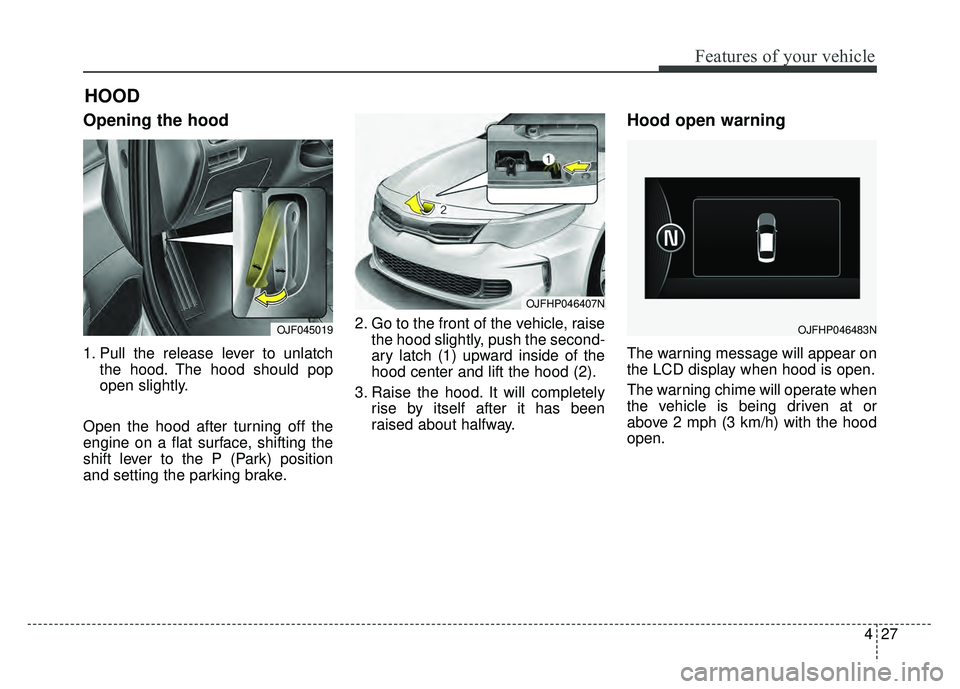
Opening the hood
1. Pull the release lever to unlatchthe hood. The hood should pop
open slightly.
Open the hood after turning off the
engine on a flat surface, shifting the
shift lever to the P (Park) position
and setting the parking brake. 2. Go to the front of the vehicle, raise
the hood slightly, push the second-
ary latch (1) upward inside of the
hood center and lift the hood (2).
3. Raise the hood. It will completely rise by itself after it has been
raised about halfway.
Hood open warning
The warning message will appear on
the LCD display when hood is open.
The warning chime will operate when
the vehicle is being driven at or
above 2 mph (3 km/h) with the hood
open.
HOOD
OJF045019
OJFHP046407N
OJFHP046483N