trunk KIA OPTIMA PHEV 2017 User Guide
[x] Cancel search | Manufacturer: KIA, Model Year: 2017, Model line: OPTIMA PHEV, Model: KIA OPTIMA PHEV 2017Pages: 604, PDF Size: 13.16 MB
Page 141 of 604
411
Features of your vehicle
Do not arm the system until all
passengers have left the vehicle. If
the system is armed while a pas-
senger(s) remains in the vehicle,
the alarm may be activated when
the remaining passenger(s) leave
the vehicle. If any door (or trunk)
or engine hood is opened within
30 seconds after the system
enters the armed stage, the sys-
tem is disarmed to prevent an
unnecessary alarm.Theft-alarm stage
The alarm will be activated if any of
the following occurs while the system
is armed.
A front or rear door is opened with-out using the smart key.
The trunk is opened without using smart key.
The engine hood is opened.
The horn will sound and the hazard
warning lights will blink continuously
for approximately 27 seconds, and
repeat the horn 3 times unless the
system is disarmed. To turn off the
system, unlock the doors with the
smart key.
Disarmed stage
The system will be disarmed when
The doors (and trunk) are unlocked with the smart key.
After depressing the unlock button,
the hazard warning lights will blink
and the chime will sound twice (in
smart key) to indicate that the sys-
tem is disarmed.
After depressing the unlock button, if
any door (or trunk) is not opened
within 30 seconds, the system will be
rearmed.
Page 147 of 604
417
Features of your vehicle
Opening the trunk
1.Make sure the shift lever is in P(Park) and set the parking brake.
2.Then do one of the following : - Press the Smart Key TrunkUnlock button for more than one
second.
- Press the button on the trunk itself with the Smart Key in your
possession.
- Use the mechanical key. To open the trunk from inside the
vehicle, push the trunk lid release
button.
✽ ✽ NOTICE
In cold and wet climates, trunk lock
and trunk mechanisms may not
work properly due to freezing condi-
tions.
TRUNK
CAUTION
Make certain that you close the
trunk before driving your vehi-cle. Possible damage may occurto the trunk lift cylinders andattached hardware if the trunk isnot closed prior to driving.
WARNING
The trunk swings upward. Make
sure no objects or people are
near the rear of the vehicle
when opening the trunk.
OJF045008
OJFH046327N
Page 148 of 604
Features of your vehicle
18
4
Closing the trunk
To close, lower the trunk lid, then
press down on it until it locks. To be
sure the trunk lid is securely fas-
tened, always check by trying to pull
it up again.
Emergency trunk safety
release
Your vehicle is equipped with an
emergency trunk release lever locat-
ed inside the trunk. If someone is
inadvertently locked in the trunk,
moving the handle in the direction of
the arrow will release the trunk latch
mechanism and open the trunk.
WARNING- Exhaust
Fumes
The trunk lid should always be
kept completely closed while
the vehicle is in motion. If it is
left open or ajar, poisonous
exhaust gases may enter the
car and serious illness or death
may result.
OJF045009
WARNING
• No one should be allowed to occupy the trunk at any time.
The trunk is a very dangerous
location in the event of a crash.
Use the release lever for emergencies only. Use
extreme caution, especially
while the vehicle is in motion.
Page 149 of 604
419
Features of your vehicle
On a vehicle equipped with a smart
key, the trunk can be opened with
no-touch activation using the Smart
Trunk system.
How to use the Smart Trunk
The trunk can be opened with no-
touch activation satisfying all the
conditions below.
After 15 seconds when all doorsare closed and locked
Positioned in the detecting area for more than 3 seconds.
✽ ✽ NOTICE
• The Smart Trunk does not operate
when:
- The smart key is detected within15 seconds after the doors are
closed and locked, and is contin-
uously detected.
- The smart key is detected within 15 seconds after the doors are
closed and locked, and 60 inches
(1.5 m) from the front door han-
dles. (for vehicles equipped with
Welcome Light)
- A door is not locked or closed.
- The smart key is in the vehicle.
SMART TRUNK (IF EQUIPPED)
OJFH045010
Page 150 of 604
Features of your vehicle
20
4
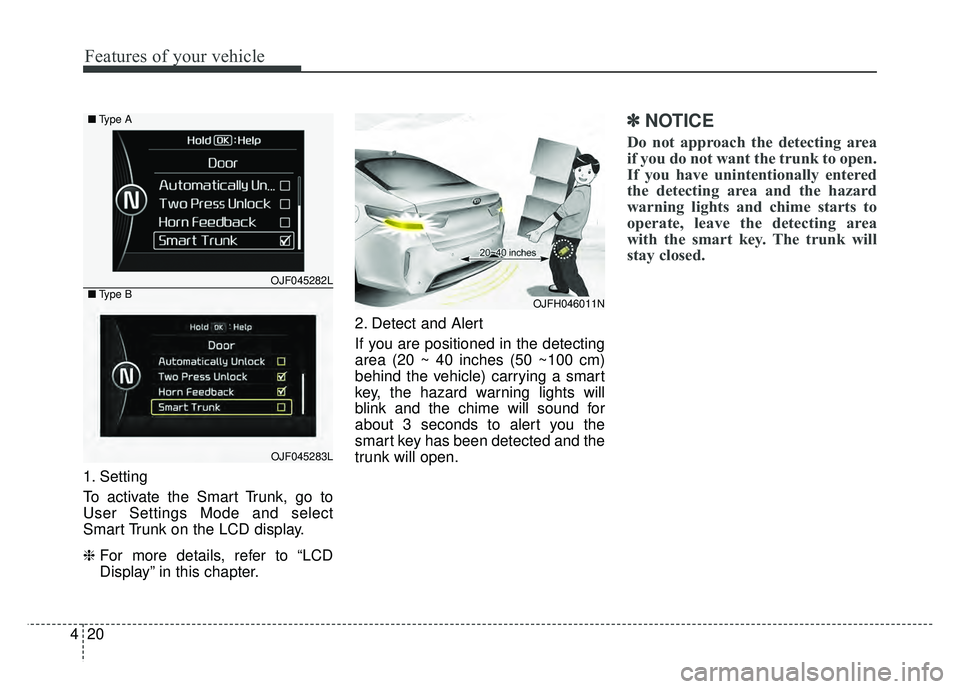
1. Setting
To activate the Smart Trunk, go to
User Settings Mode and select
Smart Trunk on the LCD display.
❈ For more details, refer to “LCD
Display” in this chapter. 2. Detect and Alert
If you are positioned in the detecting
area (20 ~ 40 inches (50 ~100 cm)
behind the vehicle) carrying a smart
key, the hazard warning lights will
blink and the chime will sound for
about 3 seconds to alert you the
smart key has been detected and the
trunk will open.
✽ ✽
NOTICE
Do not approach the detecting area
if you do not want the trunk to open.
If you have unintentionally entered
the detecting area and the hazard
warning lights and chime starts to
operate, leave the detecting area
with the smart key. The trunk will
stay closed.
OJFH046011N
OJF045282L
OJF045283L
■
Type A
■ Type B
Page 151 of 604
421
Features of your vehicle
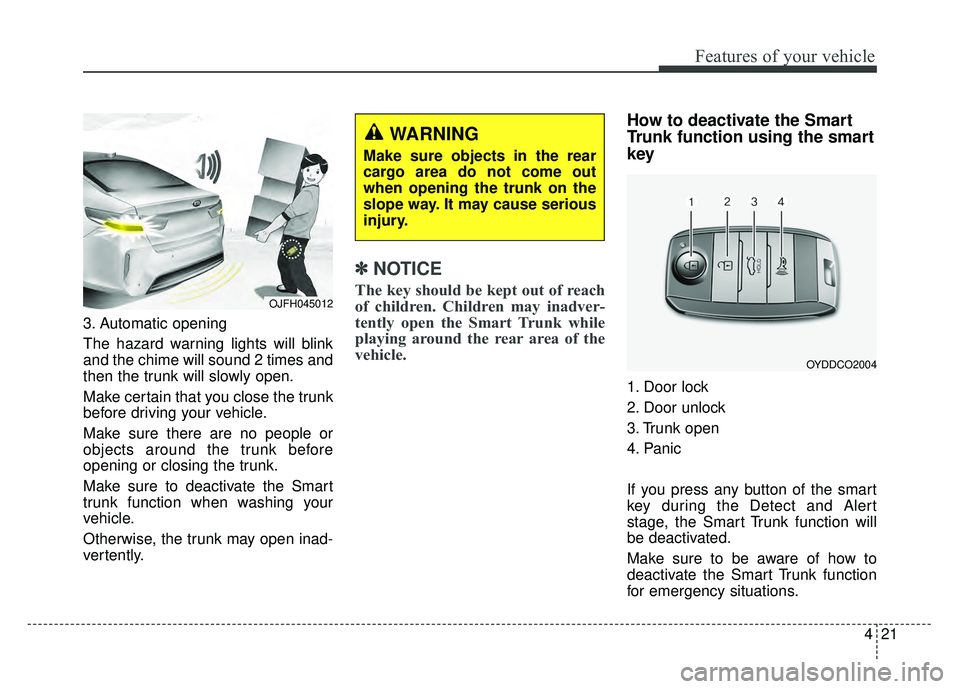
3. Automatic opening
The hazard warning lights will blink
and the chime will sound 2 times and
then the trunk will slowly open.
Make certain that you close the trunk
before driving your vehicle.
Make sure there are no people or
objects around the trunk before
opening or closing the trunk.
Make sure to deactivate the Smart
trunk function when washing your
vehicle.
Otherwise, the trunk may open inad-
vertently.
✽ ✽NOTICE
The key should be kept out of reach
of children. Children may inadver-
tently open the Smart Trunk while
playing around the rear area of the
vehicle.
How to deactivate the Smart
Trunk function using the smart
key
1. Door lock
2. Door unlock
3. Trunk open
4. Panic
If you press any button of the smart
key during the Detect and Alert
stage, the Smart Trunk function will
be deactivated.
Make sure to be aware of how to
deactivate the Smart Trunk function
for emergency situations.
OJFH045012
WARNING
Make sure objects in the rear
cargo area do not come out
when opening the trunk on the
slope way. It may cause serious
injury.
OYDDCO2004
Page 152 of 604
Features of your vehicle
22
4
✽
✽
NOTICE
• If you press the door unlock but-
ton (2), the Smart Trunk function
will be deactivated temporarily.
But, if you do not open any door
for 30 seconds, the smart trunk
function will be activated again.
• If you press the trunk open button (3) for more than 1 second, the
trunk opens.
• If you press the door lock button (1) or trunk open button (3) when
the Smart Trunk function is not in
the Detect and Alert stage, the
smart trunk function will not be
deactivated.
• In case you have deactivated the Smart Trunk function by pressing
the smart key button and opened a
door, the smart trunk function can
be activated again by closing and
locking all doors.
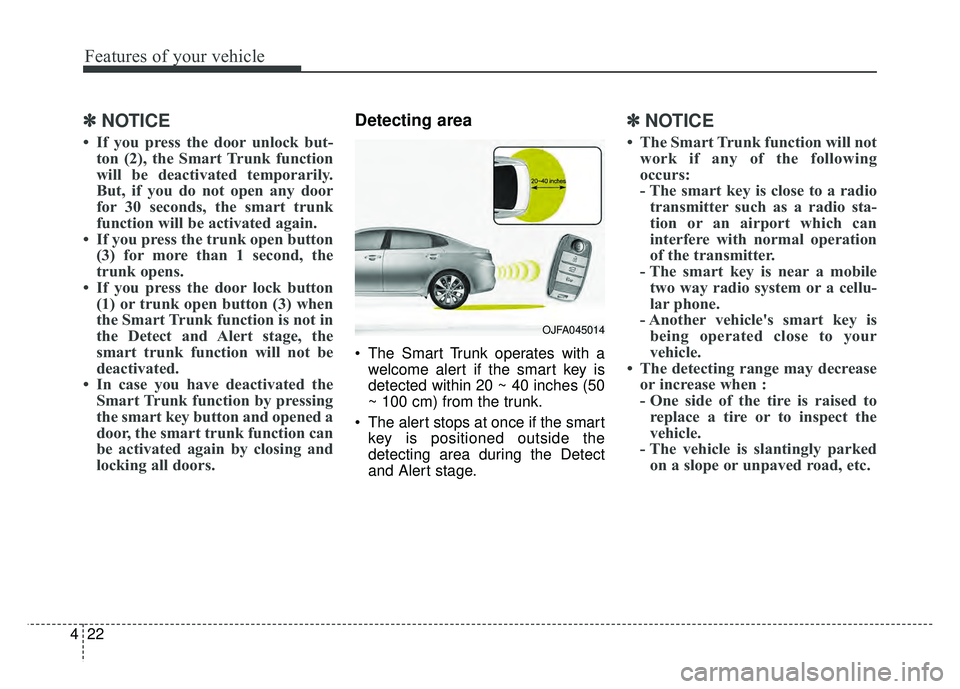
Detecting area
The Smart Trunk operates with a
welcome alert if the smart key is
detected within 20 ~ 40 inches (50
~ 100 cm) from the trunk.
The alert stops at once if the smart key is positioned outside the
detecting area during the Detect
and Alert stage.
✽ ✽ NOTICE
• The Smart Trunk function will not
work if any of the following
occurs:
- The smart key is close to a radiotransmitter such as a radio sta-
tion or an airport which can
interfere with normal operation
of the transmitter.
- The smart key is near a mobile two way radio system or a cellu-
lar phone.
- Another vehicle's smart key is being operated close to your
vehicle.
• The detecting range may decrease or increase when :
- One side of the tire is raised toreplace a tire or to inspect the
vehicle.
- The vehicle is slantingly parked on a slope or unpaved road, etc.
OJFA045014
Page 193 of 604
463
Features of your vehicle
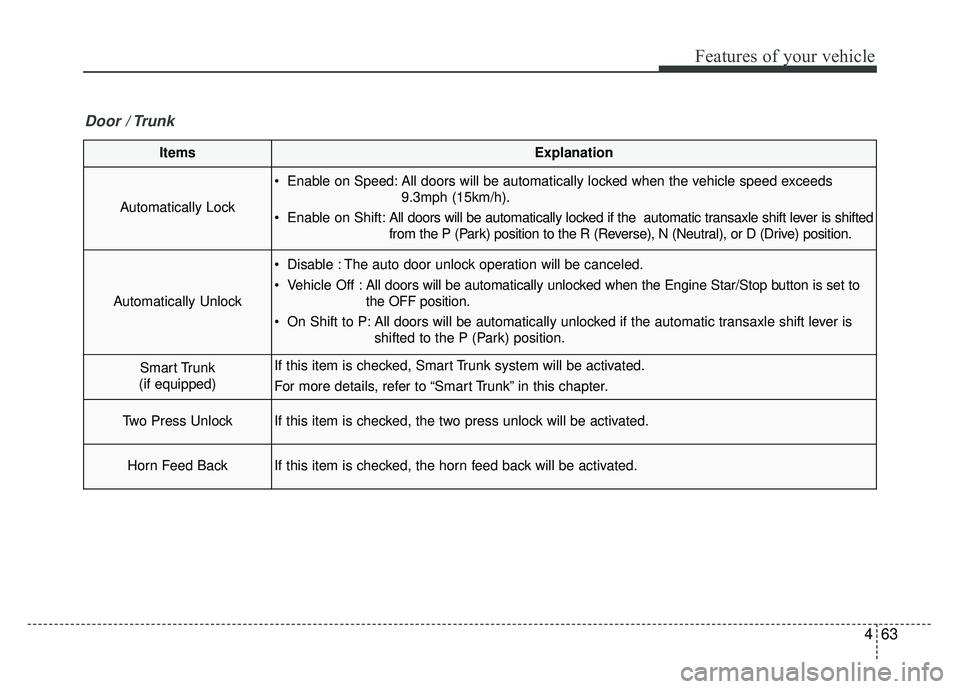
ItemsExplanation
Automatically Lock
Enable on Speed: All doors will be automatically locked when the vehicle speed exceeds9.3mph (15km/h).
Enable on Shift: All doors will be automatically locked if the automatic transaxle shift lever is shifted
from the P (Park) position to the R (Reverse), N (Neutral), or D (Drive) position.
Automatically Unlock
Disable : The auto door unlock operation will be canceled.
Vehicle Off :All doors will be automatically unlocked when the Engine Star/Stop button is set to
the OFF position.
On Shift to P: All doors will be automatically unlocked if the automatic transaxle shift lever is shifted to the P (Park) position.
Smart Trunk
(if equipped)If this item is checked, Smart Trunk system will be activated.
For more details, refer to “Smart Trunk” in this chapter.
Two Press UnlockIf this item is checked, the two press unlock will be activated.
Horn Feed BackIf this item is checked, the horn feed back will be activated.
Door / Trunk
Page 204 of 604

Features of your vehicle
74
4
Press start button again
(for smart key system)
This warning message illuminates if you can not operate the Engine
Start/Stop Button when there is a
problem with the Engine Start/Stop
Button system.
It means that you could start the engine by pressing the Engine
Start/ Stop Button once more.
If the warning illuminates each time you press the Engine
Start/Stop Button, have your vehi-
cle inspected by an authorized Kia
dealer.
Press start button with key
(for smart key system)
This warning message illuminates if you press the Engine Start/Stop
Button while the warning message
“Key not detected” is illuminating.
At this time, the immobilizer indica- tor light blinks.
Check fuse BRAKE SWITCH
(for smart key system)
This warning message illuminates if the brake switch fuse is discon-
nected.
It means that you should replace the fuse with a new one. If that is
not possible, you can start the
engine by pressing the Engine
Start/Stop Button for 10 seconds in
the ACC position.
Shift to P or N to start engine
(for smart key system)
This warning message illuminates if you try to start the engine with
the shift lever not in the P (Park) or
N (Neutral) position.
✽ ✽ NOTICE
You can start the engine with the
shift lever in the N (Neutral) position;
however; we recommend that you
start the engine with the shift lever in
the P (Park) position for your safety.
Door / Hood / Trunk Open
It means that any door, hood, or
trunk is open.
The hood warning message will appear on the LCD display when
hood is open.
The warning chime will operate
when the vehicle is being driven at
or above 2 mph (3 km/h) with the
hood open.
OJF045224L
Page 236 of 604
Features of your vehicle
106
4
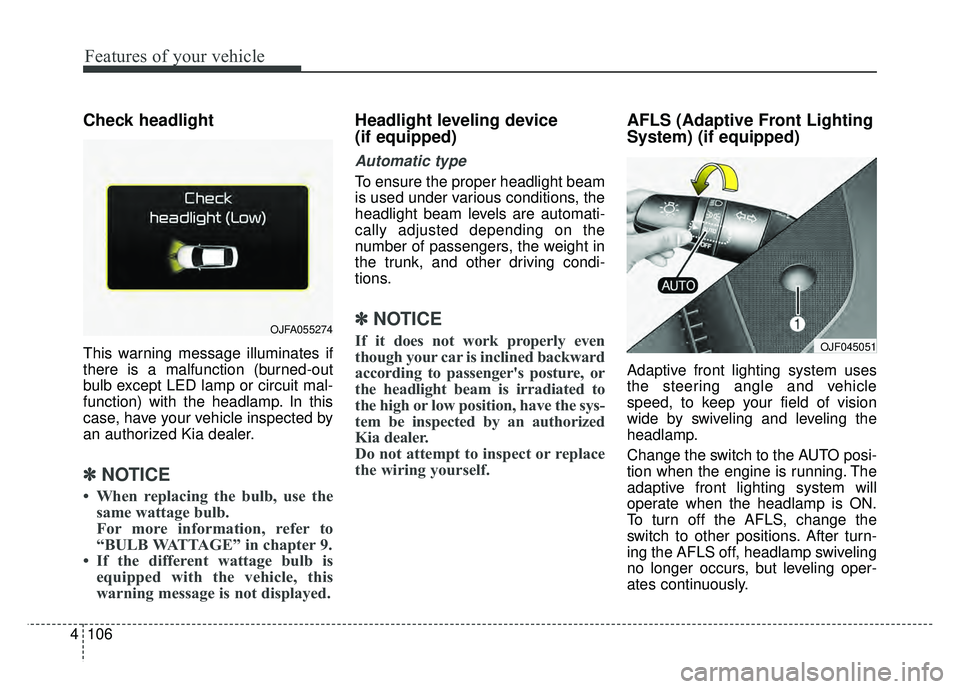
Check headlight
This warning message illuminates if
there is a malfunction (burned-out
bulb except LED lamp or circuit mal-
function) with the headlamp. In this
case, have your vehicle inspected by
an authorized Kia dealer.
✽ ✽
NOTICE
• When replacing the bulb, use the
same wattage bulb.
For more information, refer to
“BULB WATTAGE” in chapter 9.
• If the different wattage bulb is equipped with the vehicle, this
warning message is not displayed.
Headlight leveling device
(if equipped)
Automatic type
To ensure the proper headlight beam
is used under various conditions, the
headlight beam levels are automati-
cally adjusted depending on the
number of passengers, the weight in
the trunk, and other driving condi-
tions.
✽ ✽ NOTICE
If it does not work properly even
though your car is inclined backward
according to passenger's posture, or
the headlight beam is irradiated to
the high or low position, have the sys-
tem be inspected by an authorized
Kia dealer.
Do not attempt to inspect or replace
the wiring yourself.
AFLS (Adaptive Front Lighting
System) (if equipped)
Adaptive front lighting system uses
the steering angle and vehicle
speed, to keep your field of vision
wide by swiveling and leveling the
headlamp.
Change the switch to the AUTO posi-
tion when the engine is running. The
adaptive front lighting system will
operate when the headlamp is ON.
To turn off the AFLS, change the
switch to other positions. After turn-
ing the AFLS off, headlamp swiveling
no longer occurs, but leveling oper-
ates continuously.
OJFA055274
OJF045051