alarm KIA OPTIMA PHEV 2019 User Guide
[x] Cancel search | Manufacturer: KIA, Model Year: 2019, Model line: OPTIMA PHEV, Model: KIA OPTIMA PHEV 2019Pages: 553, PDF Size: 11.97 MB
Page 330 of 553
Driving your vehicle
48
6
✽ ✽
NOTICE
• Do not apply foreign objects such
as a bumper sticker or a bumper
guard near the radar sensor.
Doing so may adversely affect the
sensing performance of the radar.
• Always keep the radar sensor and cover clean and free of dirt and
debris.
• Use only soft cloth to wash the vehicle. Do not spray pressurized
water directly on the sensor or
sensor cover.
• Be careful not to apply unneces- sary force on the radar sensor or
sensor cover. If the sensor is
forcibly moved out of proper
alignment, the FCA system may
not operate correctly. In this case,
a warning message may not be dis-
played. Have the vehicle inspected
by an authorized Kia dealer
• If the front bumper becomes dam- aged in the area around the radar
sensor, the FCA system may not
operate properly. In this case,
have your vehicle inspected by an
authorized Kia dealer. (Continued)(Continued)
• Use only genuine parts to repair or
replace a damaged sensor or sen-
sor cover. Do not apply paint to
the sensor cover.
• Do not tint the window or install stickers or accessories around the
inside mirror where the camera is
installed.
• Make sure the frontal camera installation point does not get wet.
• Do not impact or remove any radar/camera components.
• Do not place reflective objects(white paper or mirror etc.)
on the dashboard.
The system may activate unneces-
sarily due to reflect of the sunlight.
• Excessive audio system volume may prevent occupants from hear-
ing the FCA system warning
alarm.
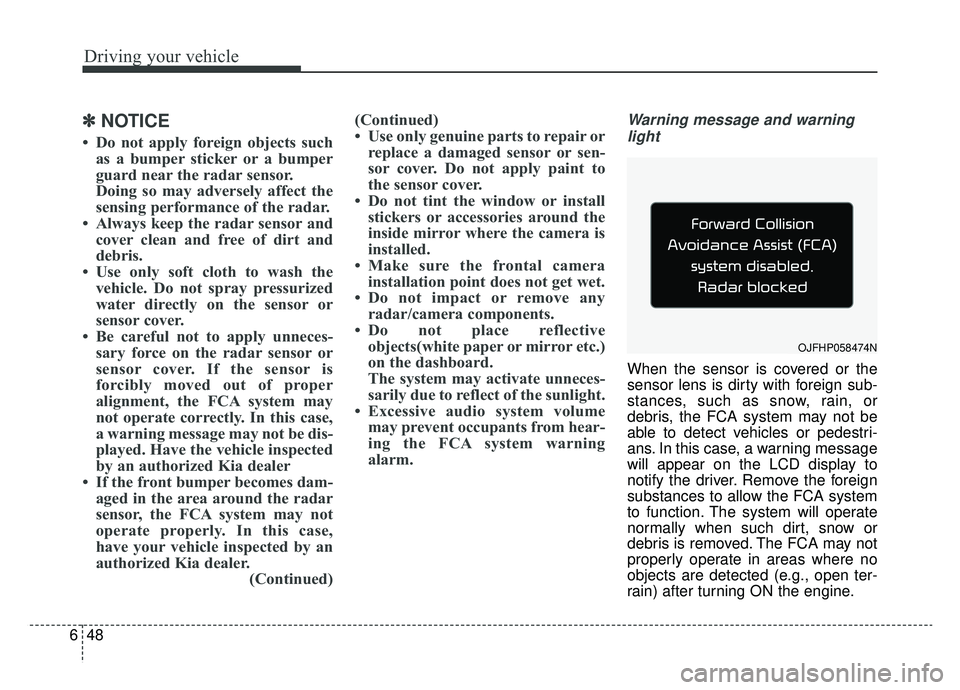
Warning message and warning
light
When the sensor is covered or the
sensor lens is dirty with foreign sub-
stances, such as snow, rain, or
debris, the FCA system may not be
able to detect vehicles or pedestri-
ans. In this case, a warning message
will appear on the LCD display to
notify the driver. Remove the foreign
substances to allow the FCA system
to function. The system will operate
normally when such dirt, snow or
debris is removed. The FCA may not
properly operate in areas where no
objects are detected (e.g., open ter-
rain) after turning ON the engine.
OJFHP058474N
Page 332 of 553
Driving your vehicle
50
6
(Continued)
The FCA may unnecessarily
produce the warning message
and the warning alarms. Also,
due to the sensing limitation,
the FCA may not produce the
warning message and the
warning alarm at all.
When there is a malfunction with the FCA, the braking con-
trol does not operate upon
detecting a collision risk even
with other braking systems
normally operating.
The FCA operates only for the vehicle / pedestrian in front,
while driving forward. It does
not operate for any animals or
vehicles in the opposite direc-
tion.
The FCA does not recognize the vehicle, which horizontally
drives across the crossroad,
or the vehicle, which is parked
in the horizontal direction.
(Continued)(Continued)
The FCA system operatesonly to detect vehicles in front
of the vehicle.
The FCA system does not operate when the vehicle is in
reverse.
The FCA system is not designed to detect other
objects on the road such as
animals.
The FCA system does not detect vehicles in the oppo-
site lane.
The FCA system does not detect cross traffic vehicles
that are approaching.
(Continued)(Continued)
If the vehicle in front stopssuddenly, you may have less
control of the brake system.
Therefore, always keep safe
distance between your vehicle
and the vehicle in front of you.
The FCA system may activate during braking and the vehicle
may stop suddenly. And the
load in the vehicle may endan-
ger passengers. Therefore,
always be mindful of the load
volume in the vehicle.
The FCA system may not acti- vate if the driver applies the
brake pedal to avoid risk of
collision.
If there is a malfunction with the FCA system, the
autonomous emergency brak-
ing is not applied even thought
the braking system is operat-
ing normally.
(Continued)
Page 335 of 553
653
Driving your vehicle
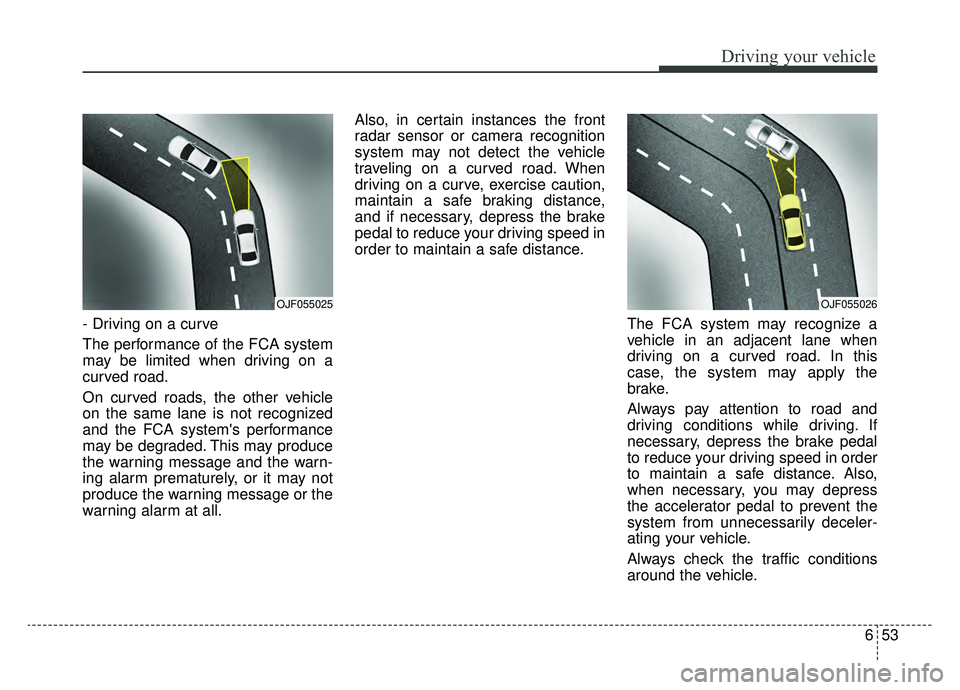
- Driving on a curve
The performance of the FCA system
may be limited when driving on a
curved road.
On curved roads, the other vehicle
on the same lane is not recognized
and the FCA system's performance
may be degraded. This may produce
the warning message and the warn-
ing alarm prematurely, or it may not
produce the warning message or the
warning alarm at all.Also, in certain instances the front
radar sensor or camera recognition
system may not detect the vehicle
traveling on a curved road. When
driving on a curve, exercise caution,
maintain a safe braking distance,
and if necessary, depress the brake
pedal to reduce your driving speed in
order to maintain a safe distance.
The FCA system may recognize a
vehicle in an adjacent lane when
driving on a curved road. In this
case, the system may apply the
brake.
Always pay attention to road and
driving conditions while driving. If
necessary, depress the brake pedal
to reduce your driving speed in order
to maintain a safe distance. Also,
when necessary, you may depress
the accelerator pedal to prevent the
system from unnecessarily deceler-
ating your vehicle.
Always check the traffic conditions
around the vehicle.
OJF055025OJF055026
Page 336 of 553
Driving your vehicle
54
6
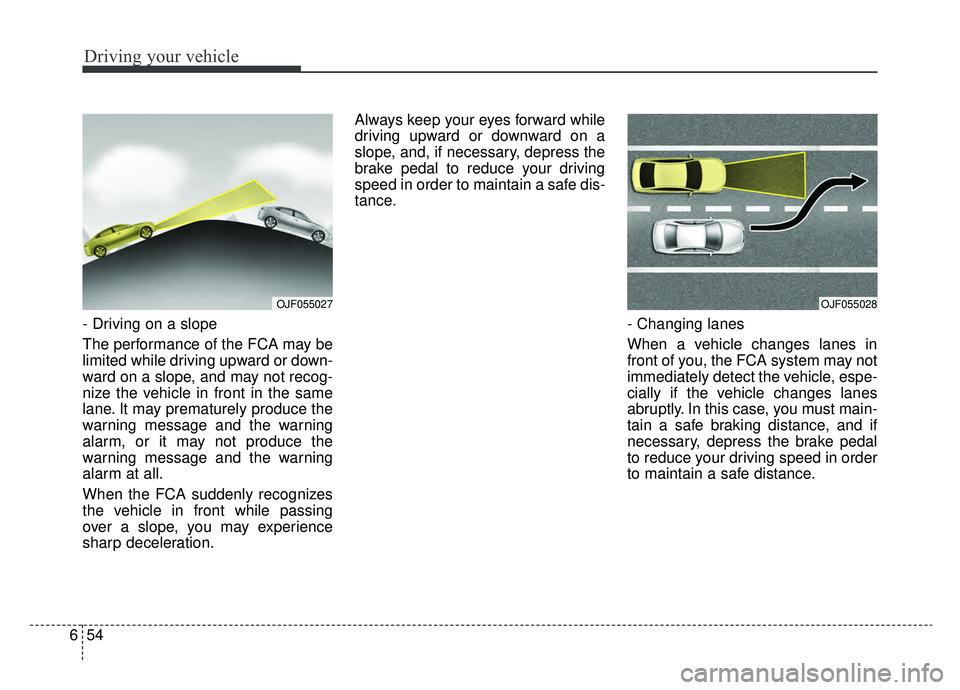
- Driving on a slope
The performance of the FCA may be
limited while driving upward or down-
ward on a slope, and may not recog-
nize the vehicle in front in the same
lane. It may prematurely produce the
warning message and the warning
alarm, or it may not produce the
warning message and the warning
alarm at all.
When the FCA suddenly recognizes
the vehicle in front while passing
over a slope, you may experience
sharp deceleration. Always keep your eyes forward while
driving upward or downward on a
slope, and, if necessary, depress the
brake pedal to reduce your driving
speed in order to maintain a safe dis-
tance.
- Changing lanes
When a vehicle changes lanes in
front of you, the FCA system may not
immediately detect the vehicle, espe-
cially if the vehicle changes lanes
abruptly. In this case, you must main-
tain a safe braking distance, and if
necessary, depress the brake pedal
to reduce your driving speed in order
to maintain a safe distance.
OJF055027OJF055028
Page 371 of 553
689
Driving your vehicle
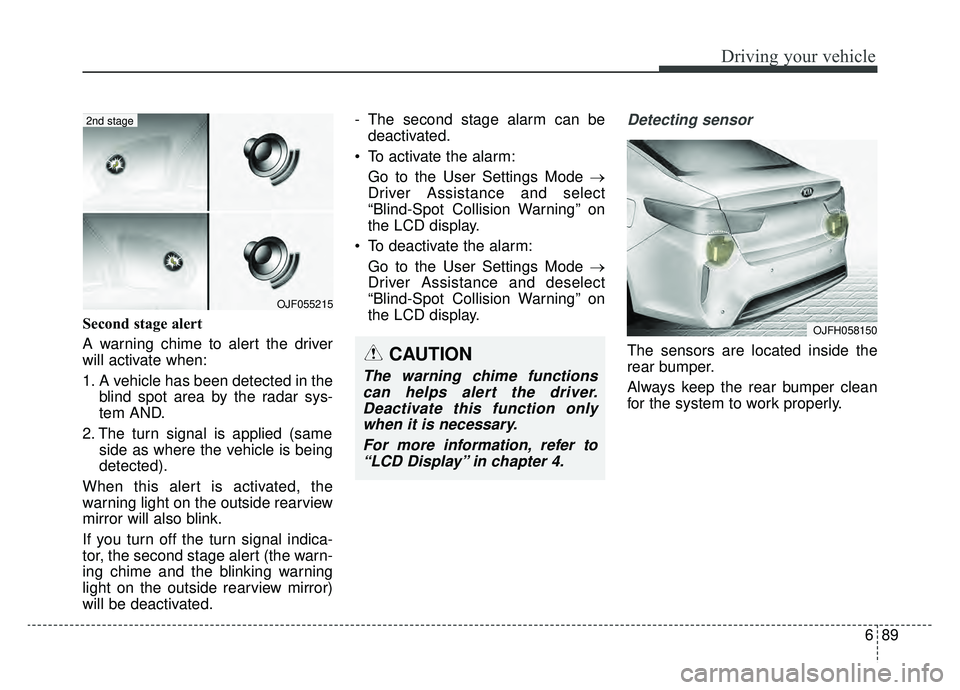
Second stage alert
A warning chime to alert the driver
will activate when:
1. A vehicle has been detected in theblind spot area by the radar sys-
tem AND.
2. The turn signal is applied (same side as where the vehicle is being
detected).
When this alert is activated, the
warning light on the outside rearview
mirror will also blink.
If you turn off the turn signal indica-
tor, the second stage alert (the warn-
ing chime and the blinking warning
light on the outside rearview mirror)
will be deactivated. - The second stage alarm can be
deactivated.
To activate the alarm: Go to the User Settings Mode →
Driver Assistance and select
“Blind-Spot Collision Warning” on
the LCD display.
To deactivate the alarm: Go to the User Settings Mode →
Driver Assistance and deselect
“Blind-Spot Collision Warning” on
the LCD display.
Detecting sensor
The sensors are located inside the
rear bumper.
Always keep the rear bumper clean
for the system to work properly.
OJF055215
2nd stage
CAUTION
The warning chime functionscan helps alert the driver.Deactivate this function onlywhen it is necessary.
For more information, refer to“LCD Display” in chapter 4.
OJFH058150
Page 486 of 553
859
Maintenance
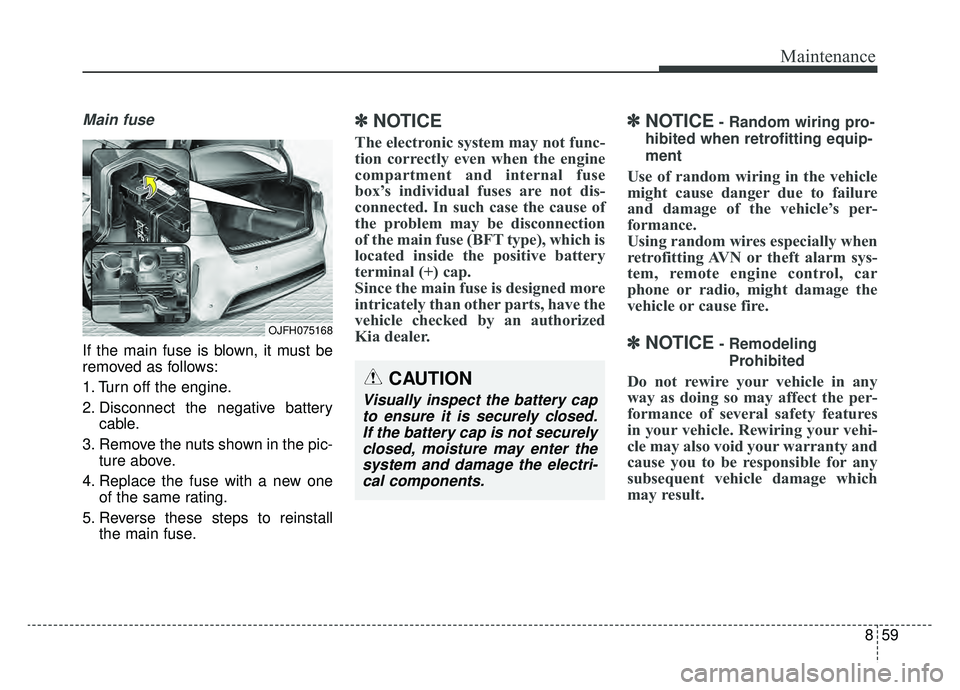
Main fuse
If the main fuse is blown, it must be
removed as follows:
1. Turn off the engine.
2. Disconnect the negative batterycable.
3. Remove the nuts shown in the pic- ture above.
4. Replace the fuse with a new one of the same rating.
5. Reverse these steps to reinstall the main fuse.
✽ ✽NOTICE
The electronic system may not func-
tion correctly even when the engine
compartment and internal fuse
box’s individual fuses are not dis-
connected. In such case the cause of
the problem may be disconnection
of the main fuse (BFT type), which is
located inside the positive battery
terminal (+) cap.
Since the main fuse is designed more
intricately than other parts, have the
vehicle checked by an authorized
Kia dealer.
✽ ✽NOTICE- Random wiring pro-
hibited when retrofitting equip-
ment
Use of random wiring in the vehicle
might cause danger due to failure
and damage of the vehicle’s per-
formance.
Using random wires especially when
retrofitting AVN or theft alarm sys-
tem, remote engine control, car
phone or radio, might damage the
vehicle or cause fire.
✽ ✽ NOTICE- Remodeling
Prohibited
Do not rewire your vehicle in any
way as doing so may affect the per-
formance of several safety features
in your vehicle. Rewiring your vehi-
cle may also void your warranty and
cause you to be responsible for any
subsequent vehicle damage which
may result.CAUTION
Visually inspect the battery capto ensure it is securely closed.If the battery cap is not securelyclosed, moisture may enter thesystem and damage the electri-cal components.
OJFH075168
Page 498 of 553
871
Maintenance
Fuse NameFuse ratingCircuit Protected
FUSE
SENSOR 115AOxygen Sensor (Up/Down), E/R Junction Block (Cooling Fan Relay)
IGN COIL20AIgnition Coil #1/#2/#3/#4
ECU 210APCM
TCU 110APCM
HEV ECU 210AHPCU, E/R Junction Block (Battery C/Fan Relay)
ECU 310APCM
POWER OUT-LET220AFront Power Outlet #1
HORN20AHorn Relay, ICM Relay Box (Burglar Alarm Horn Relay)
WIPER 130AWiper Power Relay
BATTERYC/FAN15AE/R Junction Block (Battery C/Fan Relay)
Page 550 of 553

I9
Index
Smart trunk . . . . . . . . . . . . . . . . . . . . . . . . . . . . . . . . . . 4-18\
Detecting area. . . . . . . . . . . . . . . . . . . . . . . . . . . . . . 4-21
Emergency trunk safety release . . . . . . . . . . . . . . . . 4-22
How to deactivate the Smart Trunk function using the smart key . . . . . . . . . . . . . . . . . . . . . . . . . . . . . . . . 4-20
How to use the Smart Trunk . . . . . . . . . . . . . . . . . . 4-18
Special driving conditions . . . . . . . . . . . . . . . . . . . . . 6-104 Driving at night . . . . . . . . . . . . . . . . . . . . . . . . . . . 6-105
Driving in flooded areas. . . . . . . . . . . . . . . . . . . . . 6-107
Driving in the rain . . . . . . . . . . . . . . . . . . . . . . . . . 6-106
Driving off-road . . . . . . . . . . . . . . . . . . . . . . . . . . . 6-107
Hazardous driving conditions . . . . . . . . . . . . . . . . 6-104
Highway driving . . . . . . . . . . . . . . . . . . . . . . . . . . . 6-107
Rocking the vehicle . . . . . . . . . . . . . . . . . . . . . . . . 6-104
Smooth cornering . . . . . . . . . . . . . . . . . . . . . . . . . . 6-105
Starting the hybrid/plug-in hybrid vehicle (smart key). . H32
Steering wheel . . . . . . . . . . . . . . . . . . . . . . . . . . . . . . . 4-43 Electric Power Steering (EPS) . . . . . . . . . . . . . . . . . 4-43
Heated steering wheel . . . . . . . . . . . . . . . . . . . . . . . 4-45
Horn . . . . . . . . . . . . . . . . . . . . . . . . . . . . . . . . . . . . \
. 4-46
Tilt and telescopic steering. . . . . . . . . . . . . . . . . . . . 4-44
Storage compartments . . . . . . . . . . . . . . . . . . . . . . . . 4-137 Center console storage . . . . . . . . . . . . . . . . . . . . . . 4-137
Glove box . . . . . . . . . . . . . . . . . . . . . . . . . . . . . . . . 4-137
Sunglass holder . . . . . . . . . . . . . . . . . . . . . . . . . . . 4-138 Theft-alarm system . . . . . . . . . . . . . . . . . . . . . . . . . . . . 4-10
Armed stage . . . . . . . . . . . . . . . . . . . . . . . . . . . . . . . 4-10
Disarmed stage . . . . . . . . . . . . . . . . . . . . . . . . . . . . . 4-11
Theft-alarm stage . . . . . . . . . . . . . . . . . . . . . . . . . . . 4-11
Tire Pressure Monitoring System (TPMS) . . . . . . . . . . . 7-9 Changing a tire with TPMS . . . . . . . . . . . . . . . . . . . 7-13
Check tire pressure . . . . . . . . . . . . . . . . . . . . . . . . . . . 7-9
Low tire pressure position telltale . . . . . . . . . . . . . . 7-11
Tire specification and pressure label . . . . . . . . . . . . . . . 9-9
Tires and wheels . . . . . . . . . . . . . . . . . . . . . . . . . . . . . . . 9-4
Tires and wheels . . . . . . . . . . . . . . . . . . . . . . . . . . . . . . 8-39 All season tires . . . . . . . . . . . . . . . . . . . . . . . . . . . . . 8-51
Checking tire inflation pressure . . . . . . . . . . . . . . . . 8-40
Low aspect ratio tire. . . . . . . . . . . . . . . . . . . . . . . . . 8-53
Radial-ply tires . . . . . . . . . . . . . . . . . . . . . . . . . . . . . 8-52
Recommended cold tire inflation pressures . . . . . . . 8-39
Snow tires . . . . . . . . . . . . . . . . . . . . . . . . . . . . . . . . . 8-51
Summer tires . . . . . . . . . . . . . . . . . . . . . . . . . . . . . . 8-51
Tire care . . . . . . . . . . . . . . . . . . . . . . . . . . . . . . . . . 8-39
Tire chains . . . . . . . . . . . . . . . . . . . . . . . . . . . . . . . . 8-52
Tire maintenance . . . . . . . . . . . . . . . . . . . . . . . . . . . 8-44
Tire pressure . . . . . . . . . . . . . . . . . . . . . . . . . . . . . . . 8-40
Tire replacement . . . . . . . . . . . . . . . . . . . . . . . . . . . . 8-43
Tire rotation . . . . . . . . . . . . . . . . . . . . . . . . . . . . . . . 8-41
Tire sidewall labeling . . . . . . . . . . . . . . . . . . . . . . . . 8-44T