audio KIA OPTIMA PLUG-IN HYBRID 2017 User Guide
[x] Cancel search | Manufacturer: KIA, Model Year: 2017, Model line: OPTIMA PLUG-IN HYBRID, Model: KIA OPTIMA PLUG-IN HYBRID 2017Pages: 686, PDF Size: 35.24 MB
Page 298 of 686
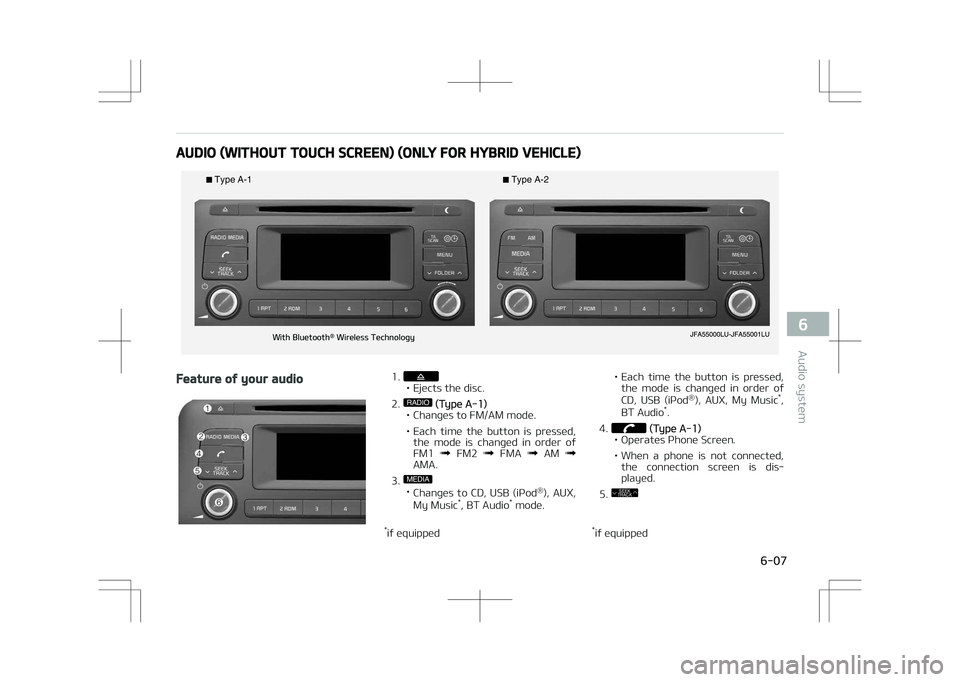
AUDIO (WITHOUT TOUCH SCREEN) (ONLY FOR HYBRID VEHICLE)
Type
Page 300 of 686
• Moves focus in all selection me‐nus and selects menus.
*if equipped 14.
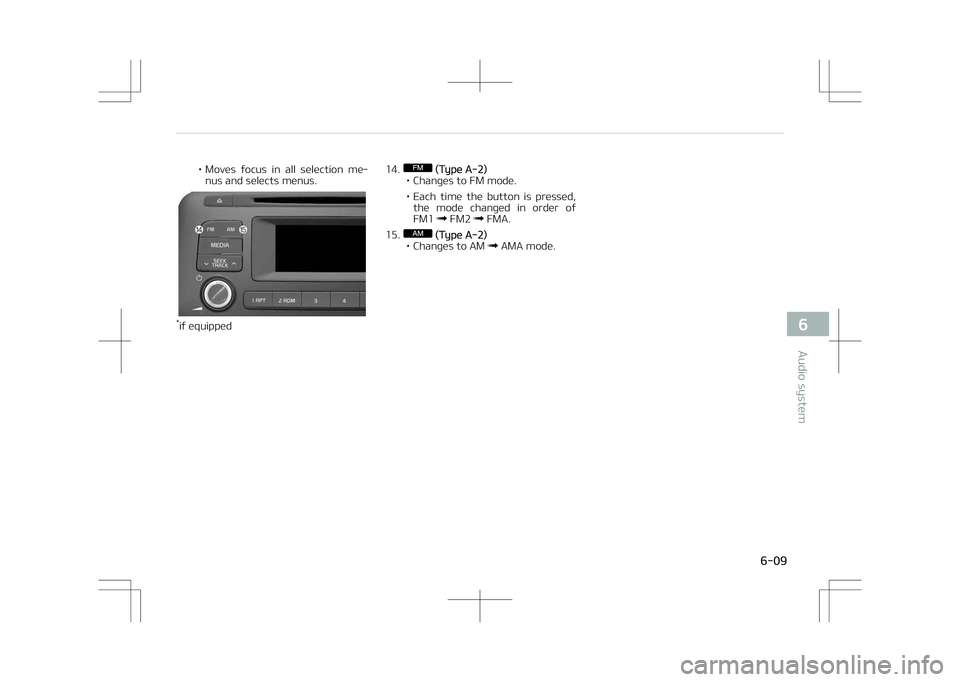
FM (Type A-2)
• Changes to FM mode.
• Each time the button is pressed, the mode changed in order of FM1
FM2 FMA.
15.
AM (Type A-2)
• Changes to AM AMA mode.
6-09
6
Audio system
Page 301 of 686
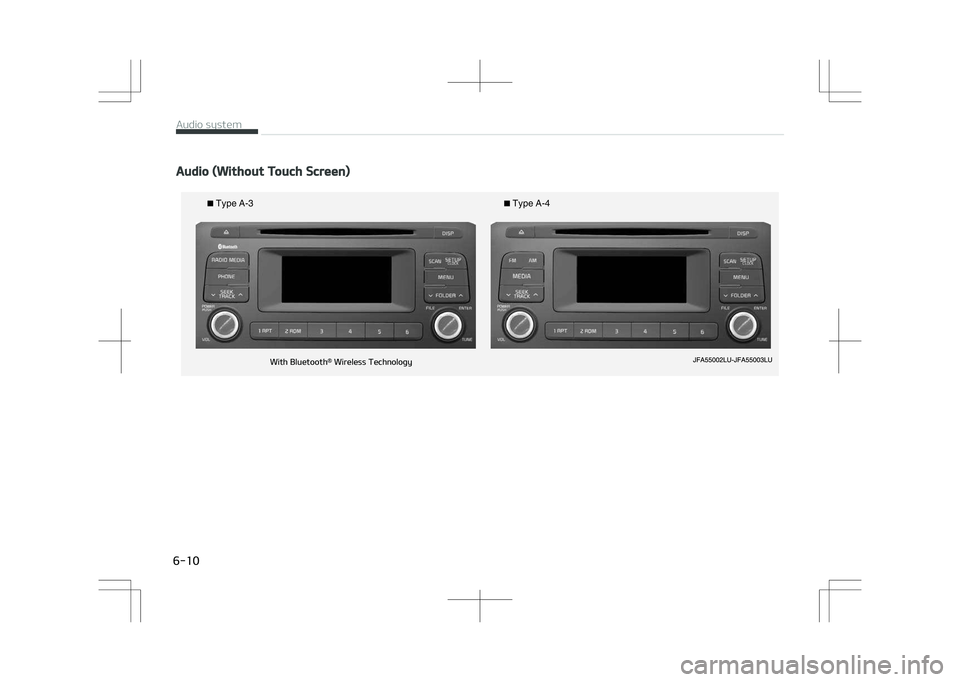
Audio (Without Touch Screen)
Type
Page 302 of 686
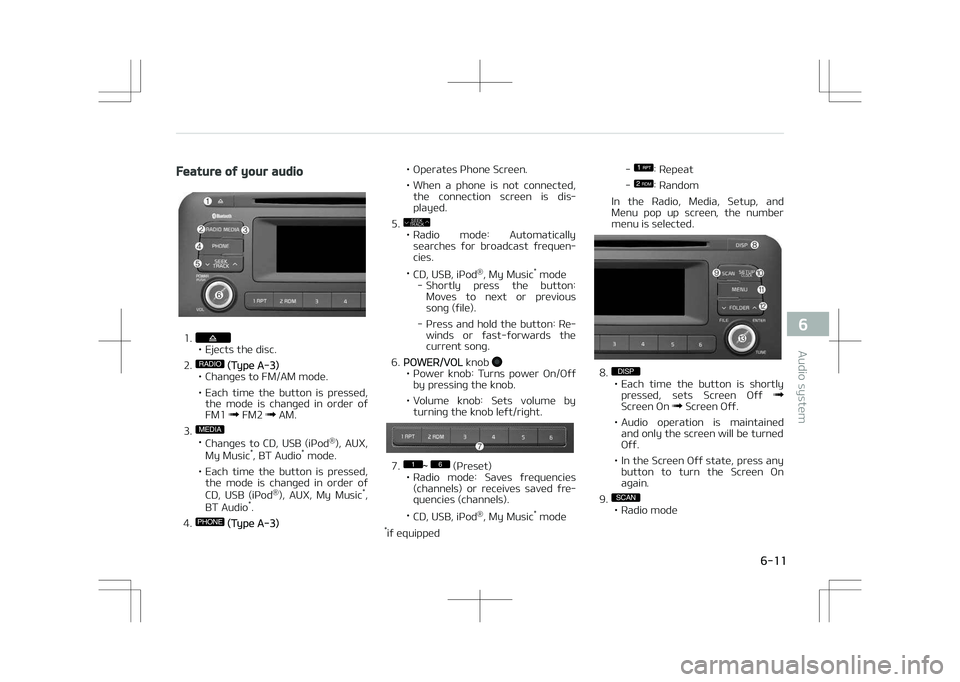
Feature of your audio
1.• Ejects the disc.
2.
RADIO (Type A-3)
• Changes to FM/AM mode.
• Each time the button is pressed, the mode is changed in order of FM1
FM2 AM.
3.
MEDIA
• Changes to CD, UêB (içod ®
), AUX,
My Music *
, BT Audio *
mode.
• Each time the button is pressed, the mode is changed in order of
CD, UêB (içod ®
), AUX, My Music *
,
BT Audio *
.
4.
PHONE (Type A-3) • Operates çhone êcreen.
• When a phone is not connected,
the connection screen is dis‐ played.
5.
SEEK
TRACK
• éadio mode: Automatically
searches for broadcast frequen‐ cies.
• CD, UêB, içod ®
, My Music *
mode
- êhortly press the button: Moves to next or previoussong (file).
- çress and hold the button: ée‐ winds or fast-forwards thecurrent song.
6.
çOWEé/VOL knob • çower knob: Turns power On/Off
by pressing the knob.
• Volume knob: êets volume by turning the knob left/right.
7.1
Page 303 of 686

- çress the button: çreviewseach broadcast for 5 secondseach.
• CD, UêB, My Music *
mode
- çress the button: çreviews each song (file) for 10 secondseach.
- çress the button again to con‐ tinue listening to the currentsong (file).
10.
• êhortly press the button: Moves to the Display, êound, Clock, çhone, êystem setting modes.
• çress and hold the button: Move to the Time setting screen.
11.
MENU
• Displays menus for the current mode.
• içod ®
List: Move to parent cate‐
gory.
12.
FOLDER
• Mç3 CD / UêB mode: Folder êearch.
13.
TUNE knob
• éadio mode: Changes frequency by turning the knob left/right.
* if equipped •
CD, UêB, içod ®
, My Music *
mode:
êearches songs (files) by turning the knob left/right.
When the desired song is dis‐
played, press the knob to playthe song.
• Moves focus in all selection me‐ nus and selects menus.
14.FM (Type A-4)
• Changes to FM mode.
• Each time the button is pressed, the mode changed in order of FM1
FM2.
15.
AM (Type A-4)
• Changes to AM mode.
* if equipped
Before using the audio system
NOTICE
nUsing the Discs
•If the temperature inside the car is
too high, open the car windows to
ventilate before using the system.
•It is illegal to copy and use
Mç3/WMA files without permis‐
sion. Use CDs that are created only
by lawful means.
•Do not apply volatile agents, such
as benzene and thinner, normal
cleaners and magnetic sprays
made for analogue disc onto CDs.
•To prevent the disc surface from
getting damaged, hold CDs by the
edges or the center hole only.
•Clean the disc surface with a piece
of soft cloth before playback (wipe
it from the center to the outside
edge).
(Continued)
Audio system
6-12
Page 304 of 686

(Continued)
•Do not damage the disc surface or
attach pieces of sticky tape or pa‐
per.
•Make certain only CDs are inserted
into the CD player (Do not insert
more than one CD at a time).
•Keep CDs in their cases after use
to protect them from scratches or
dirt.
•Depending on the type of CDé/
CD-éW CDs, certain CDs may not
operate normally according to
manufacturing companies or mak‐
ing and recording methods. In such
circumstances, continued use may
cause malfunctions to your audio
system.
NOTICE
nçlaying an Incompatible Copy
çrotected Audio CD
(Continued)
(Continued)
êome copy protected CDs, which do
not comply with international audio
CD standards (éed Book), may not
play on your car audio. çlease note
that inabilities to properly play a
copy protected CD may indicate that
the CD is defective, not the CD play‐
er.
❈NOTE: Order of playing files (folders):
1. êong playing order: 1 to 14 se‐ quentially.
2. Folder playing order:
❈ If no song file is contained in the
folder, that folder is not displayed.
6-13
6
Audio system
Page 305 of 686
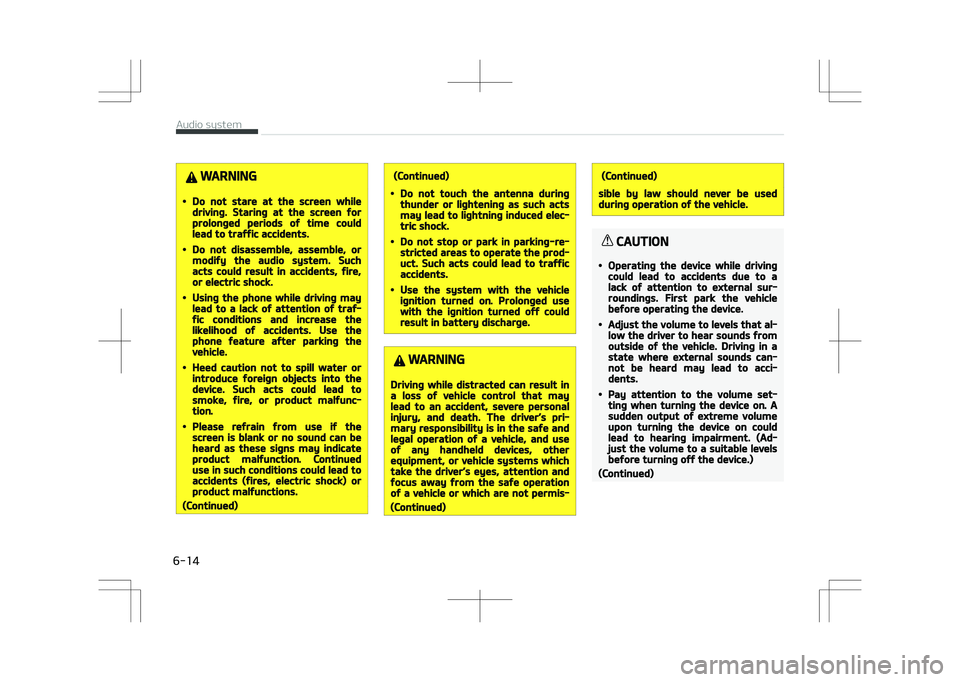
WARNING
•Do not stare at the screen whiledriving. Staring at the screen forprolonged periods of time couldlead to traffic accidents.
•Do not disassemble, assemble, ormodify the audio system. Suchacts could result in accidents, fire,or electric shock.
•Using the phone while driving maylead to a lack of attention of traf‐fic conditions and increase thelikelihood of accidents. Use thephone feature after parking thevehicle.
•Heed caution not to spill water orintroduce foreign objects into thedevice. Such acts could lead tosmoke, fire, or product malfunc‐tion.
•Please refrain from use if thescreen is blank or no sound can beheard as these signs may indicateproduct malfunction. Continueduse in such conditions could lead toaccidents (fires, electric shock) orproduct malfunctions.
(Continued)
(Continued)
•Do not touch the antenna duringthunder or lightening as such actsmay lead to lightning induced elec‐tric shock.
•Do not stop or park in parking-re‐stricted areas to operate the prod‐uct. Such acts could lead to trafficaccidents.
•Use the system with the vehicleignition turned on. Prolonged usewith the ignition turned off couldresult in battery discharge.
WARNING
Driving while distracted can result ina loss of vehicle control that maylead to an accident, severe personalinjury, and death. The driver’s pri‐mary responsibility is in the safe andlegal operation of a vehicle, and useof any handheld devices, otherequipment, or vehicle systems whichtake the driver’s eyes, attention andfocus away from the safe operationof a vehicle or which are not permis‐
(Continued)
(Continued)
sible by law should never be usedduring operation of the vehicle.
CAUTION
•Operating the device while drivingcould lead to accidents due to alack of attention to external sur‐roundings. First park the vehiclebefore operating the device.
•Adjust the volume to levels that al‐low the driver to hear sounds fromoutside of the vehicle. Driving in astate where external sounds can‐not be heard may lead to acci‐dents.
•Pay attention to the volume set‐ting when turning the device on. Asudden output of extreme volumeupon turning the device on couldlead to hearing impairment. (Ad‐just the volume to a suitable levelsbefore turning off the device.)
(Continued)
Audio system
6-14
Page 306 of 686

(Continued)
•If you want to change the positionof device installation, please in‐quire with your place of purchaseor service maintenance center.Technical expertise is required toinstall or disassemble the device.
•Turn on the car ignition before us‐ing this device. Do not operate theaudio system for long periods oftime with the ignition turned offas such operations may lead tobattery discharge.
•Do not subject the device to severeshock or impact. Direct pressureonto the front side of the monitormay cause damage to the LCD ortouch screen.
•When cleaning the device, makesure to turn off the device and usea dry and smooth cloth. Never usetough materials, chemical cloths,or solvents (alcohol, benzene, thin‐ners, etc.) as such materials maydamage the device panel or causecolor/quality deterioration.
(Continued)
(Continued)
•Do not place beverages close tothe audio system. Spilling beverag‐es may lead to system malfunc‐tion.
•In case of product malfunction,please contact your place of pur‐chase or After Service center.
•Placing the audio system within anelectromagnetic environment mayresult in noise interference.
NOTICE
nUsing the UêB device
•To use an external UêB device,
make sure the device is not con‐
nected when starting up the vehi‐
cle. Connect the device after start‐
ing up.
•If you start the engine when the
UêB device is connected, it may
damage the UêB device. (UêB
flashdrives are very sensitive to
electric shock.)
(Continued)
(Continued)
•If the engine is started up or
turned off while the external UêB
device is connected, the external
UêB device may not work.
•The êystem may not play inau‐
thentic Mç3 or WMA files.
1.It can only play Mç3 files with
the compression rate between
8Kbps ~ 320Kbps.
2.It can only play WMA music files
with the compression rate be‐
tween 8Kbps ~ 320Kbps.
•Take precautions for static elec‐
tricity when connecting or discon‐
necting the external UêB device.
•An encrypted Mç3 çLAYEé is not
recognizable.
•Depending on the condition of the
external UêB device, the connec‐
ted external UêB device can be un‐
recognizable.
(Continued)
6-15
6
Audio system
Page 307 of 686
(Continued)
•When the formatted byte/sector
setting of External UêB device is
not either 512BYTE or 2048BYTE,
then the device will not be recog‐
nized.
•Use only a UêB device formatted
to FAT 12/16/32.
•UêB devices without UêB I/F au‐
thentication may not be recogniz‐
able.
•Make sure the UêB connection ter‐
minal does not come in contact
with the human body or other ob‐
jects.
•If you repeatedly connect or dis‐
connect the UêB device in a short
period of time, it may break the
device.
•You may hear a strange noise
when connecting or disconnecting
a UêB device.
(Continued)
(Continued)
•If you disconnect the external UêB
device during playback in UêB
mode, the external UêB device can
be damaged or may malfunction.
Therefore, disconnect the external
UêB device when the audio is
turned off or in another mode.
(e.g, éadio, CD)
•Depending on the type and capaci‐
ty of the external UêB device or
the type of the files stored in the
device, there is a difference in the
time taken for recognition of the
device.
•Do not use the UêB device for pur‐
poses other than playing music
files.
•çlaying videos through the UêB is
not supported.
•Use of UêB accessories such as re‐
chargers or heaters using UêB I/F
may lower performance or cause
trouble.
(Continued)
(Continued)
•If you use devices such as a UêB
hub purchased separately, the ve‐
hicleL
Page 308 of 686

(Continued)
•êome non-standard UêB devices
(METAL COVEé TYçE UêB) can be
unrecognizable.
•êome UêB flash memory readers
(such as CF, êD, micro êD, etc.) or
external-HDD type devices can be
unrecognizable.
•Music files protected by DéM (DIG‐
ITAL éIGHTê MANAGEMENT) are
not recognizable.
•The data in the UêB memory may
be lost while using this audio. Al‐
ways back up important data on a
personal storage device.
•
çlease avoid using UêB
memory products
which can be used as
key chains or cellular
phone accessories as
they could cause dam‐
age to the UêB jack.
çlease make certain only to use
plug type connector products.
NOTICE
nUsing the içod® device
•êome içod® models may not sup‐
port communication protocol and
files may not properly play.
êupported içod® models:
-içhone® 3Gê/4
-içod touch® 1st~4th generation
-içod nano® 1st~6th generation
-içod classic®
•The order of search or playback of
songs in the içod® can be different
from the order searched in the au‐
dio system.
•If the içod® disabled due to its
own malfunction, reset the içod®.
(éeset: éefer to içod® manual)
•An içod® may not operate normal‐
ly on low battery.
(Continued)
(Continued)
•êome içod® devices, such as the
içhone®, can be connected
through the Bluetooth® Wireless
Technology interface. The device
must have audio Bluetooth® Wire‐
less Technology capability (such as
for stereo headphone Bluetooth®
Wireless Technology). The device
can play, but it will not be control‐
led by the audio system.
•To use içod® features within the
audio, use the cable provided upon
purchasing an içod® device.
•êkipping or improper operation
may occur depending on the char‐
acteristics of your içod®/içhone®
device.
(Continued)
6-17
6
Audio system