set clock KIA PICANTO 2017 Owner's Manual
[x] Cancel search | Manufacturer: KIA, Model Year: 2017, Model line: PICANTO, Model: KIA PICANTO 2017Pages: 488, PDF Size: 31.26 MB
Page 251 of 488
![KIA PICANTO 2017 Owners Manual Features of your vehicle
1764
Bluetooth®Wireless Technology
System Off
This feature is used when you do not wish to use the
Bluetooth®Wireless
Technology system.
Select [Bluetooth System Off] Set](/img/2/57964/w960_57964-250.png "KIA PICANTO 2017 Owners Manual Features of your vehicle
1764
Bluetooth®Wireless Technology
System Off
This feature is used when you do not wish to use the
Bluetooth®Wireless
Technology system.
Select [Bluetooth System Off] Set")
Features of your vehicle
1764
Bluetooth®Wireless Technology
System Off
This feature is used when you do not wish to use the
Bluetooth®Wireless
Technology system.
Select [Bluetooth System Off] Set
through TUNE knob ❈ If a phone is already connected, dis- connect the currently connected
phone and turn the Bluetooth®
Wireless Technology system off. Using the
Bluetooth®Wireless
Technology System
To use
Bluetooth®Wireless Technology
when the system is currently off, follow
these next steps.
Turning On
Bluetooth®Wireless
Technology through the Key
Press the key Screen Guidance ❈ Moves to the screen where
Bluetooth®
Wireless Technology functions can be
used and displays guidance.
Turning On
Bluetooth®Wireless
Technology through the Key
Press the key Select [Phone] ➀ A screen asking whether to turn on
Bluetooth®Wireless Technology will be
displayed.
➁ On the screen, select to turn on
Bluetooth®Wireless Technology and
display guidance. ❈
If the
Bluetooth®Wireless Technology
system is turned on, the system will
automatically try to connect the mostrecently connected
Bluetooth®
Wireless Technology mobile phone.
YES
SETUP CLOCK
SETUPCLOCK
PHONE
PHONE
CAUTION
Bluetooth®Wireless Technology
connection may become intermit- tently disconnected in some
mobile phones. Follow these nextsteps to try again.
1) Turn the Bluetooth
®Wireless
Technology function within the
mobile phone ON/OFF and try to connect again.
2) Turn the mobile phone power ON/OFF and try to connect again.
3) Completely remove the mobile phone battery, reboot, and thentry to connect again.
4) Reboot the audio system and try to connect again
5) Delete all paired devices in your mobile phone and the audio sys-
tem and pair again for use.
Page 252 of 488
![KIA PICANTO 2017 Owners Manual 177
Features of your vehicle
4
SYSTEM SETTINGS
Press the key Select [System]
Memory Information
Displays currently used memory and
total system memory.
Select [Memory Information] OK
The curren](/img/2/57964/w960_57964-251.png "KIA PICANTO 2017 Owners Manual 177
Features of your vehicle
4
SYSTEM SETTINGS
Press the key Select [System]
Memory Information
Displays currently used memory and
total system memory.
Select [Memory Information] OK
The curren")
177
Features of your vehicle
4
SYSTEM SETTINGS
Press the key Select [System]
Memory Information
Displays currently used memory and
total system memory.
Select [Memory Information] OK
The currently used memory is displayed on the left side while the total system
memory is displayed on the right side.
RADIO (for RDS model) ❈
RADIO may differ depending on the
selected audio.
Changing RADIO mode SEEK
Press the key
Shortly pressing the key (under 0.8 seconds): Changes the frequency.
Pressing and holding the key (over 0.8 seconds): Automatically searches for
the next frequency. Preset SEEK Press
the ~ key
seconds): Plays the frequency saved in
the corresponding key.
seconds): Pressing and holding thedesired key from ~ will
save the currently playing broadcast to
the selected key and sound a BEEP.
SCAN
Press the key
seconds): The broadcast frequency
increases and previews each broadcast
for 5 seconds each. After scanning all
frequencies, returns and plays the cur-
rent broadcast frequency.
TA
SCAN
61
61
SEEK
TRACK
SETUP
CLOCK
Page 263 of 488
![KIA PICANTO 2017 Owners Manual Features of your vehicle
1884
Bluetooth®Wireless Technology audio
can be used only when the [Audio
Streaming] of Phone is turned On.
❈ Setting
Bluetooth®Wireless
Technology Audio Streaming : Pre](/img/2/57964/w960_57964-262.png "KIA PICANTO 2017 Owners Manual Features of your vehicle
1884
Bluetooth®Wireless Technology audio
can be used only when the [Audio
Streaming] of Phone is turned On.
❈ Setting
Bluetooth®Wireless
Technology Audio Streaming : Pre")
Features of your vehicle
1884
Bluetooth®Wireless Technology audio
can be used only when the [Audio
Streaming] of Phone is turned On.
❈ Setting
Bluetooth®Wireless
Technology Audio Streaming : Press the /key Select
[Phone] through the tune knob
Select [Audio Streaming] through the TUNE knob Set / Starting
Bluetooth®Wireless
Technology Audio
Press the key to change the mode in order of CD ➟USB ➟AUX ➟
My Music ➟BT Audio.
If BT Audio is selected,
Bluetooth®
Wireless Technology audio will start
playing.
❈ Audio may not automatically start play-
ing in some mobile phones. Using the
Bluetooth®Wireless
Technology audio features
Press the TUNE knob to play and pause the current song. ❈ The previous song / next song / play /
pause functions may not be supported
in some mobile phones.
MEDIA
OFFON
SETUP CLOCK
Page 355 of 488

611
What to do in an emergency
6. Loosen the wheel lug nuts coun-terclockwise one turn each, but do
not remove any nut until the tire
has been raised off the ground. 7. Place the jack at the front or rear
jacking position closest to the tire
you are changing. Place the jackat the designated locations under
the frame. The jacking positions
are plates welded to the frame
with two tabs and a raised dot to
index with the jack.
WARNING - Changing a tire
To prevent vehicle movement
while changing a tire, always
set the parking brake fully,
and always block the wheel
diagonally opposite the wheel
being changed.
We recommend that the wheels of the vehicle be
blocked, and that no person
remain in the vehicle that is
being jacked.
OTA060003OSA067023
Page 375 of 488
631
What to do in an emergency
When towing your vehicle in an emer- gency without wheel dollies :
1. Set the ignition switch in the ACC posi-tion.
2. Place the shift lever in N (Neutral).
3. Release the parking brake.
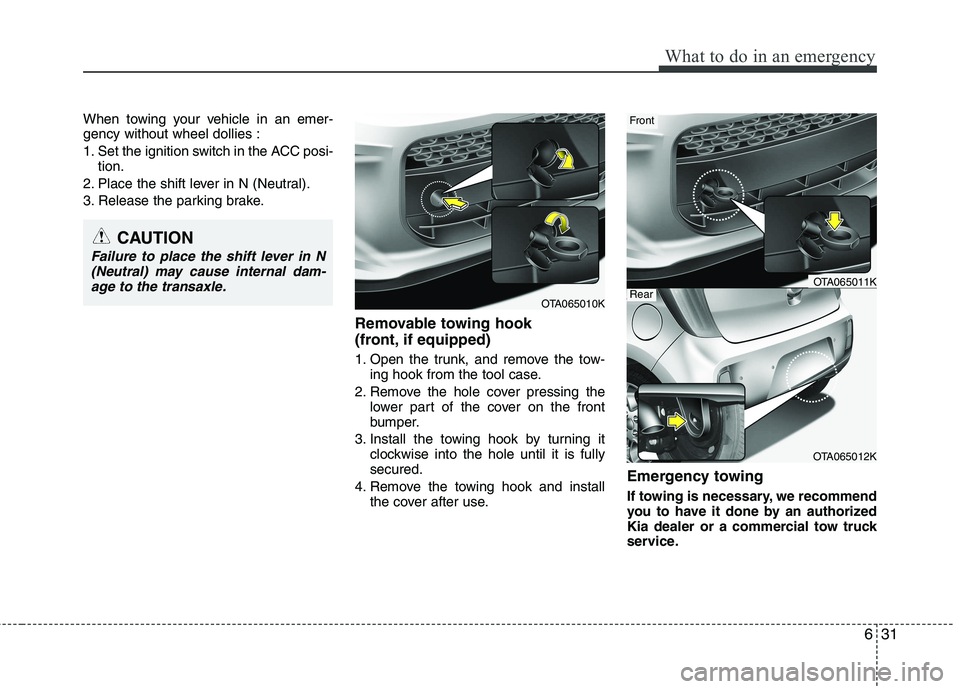
Removable towing hook
(front, if equipped)
1. Open the trunk, and remove the tow-ing hook from the tool case.
2. Remove the hole cover pressing the lower part of the cover on the front
bumper.
3. Install the towing hook by turning it clockwise into the hole until it is fullysecured.
4. Remove the towing hook and install the cover after use. Emergency towing
If towing is necessary, we recommend
you to have it done by an authorized
Kia dealer or a commercial tow truck
service.
CAUTION
Failure to place the shift lever in N
(Neutral) may cause internal dam- age to the transaxle.
OTA065010K
OTA065012K
Front
RearOTA065011K
Page 421 of 488
743
Maintenance
Reset items
Items should be reset after the battery
has been discharged or the battery hasbeen disconnected.
Auto up/down window (See section 4)
Sunroof (See section 4)
Trip computer (See section 4)
Climate control system (See section 4)
Clock (See section 4)
Audio (See section 4)
WARNING
Before performing maintenance or recharging the battery, turn off all accessories and stop the
engine.
The negative battery cable must be removed first and installed
last when the battery is discon-nected.
Operation related to the battery is recommended to an authorized
Kia dealer.
CAUTION
Keep the battery away from water
or any liquid.
For your safety, we recommend that you use parts for replacementfrom an authorized Kia dealer.
Page 434 of 488
Maintenance
56
7
If you do not have a spare, use a fuse of
the same rating from a circuit you maynot need for operating the vehicle, suchas the cigarette lighter fuse.
If the headlights or other electrical com-
ponents do not work and the fuses are
OK, check the fuse panel in the engine
compartment. If a fuse is blown, it mustbe replaced.
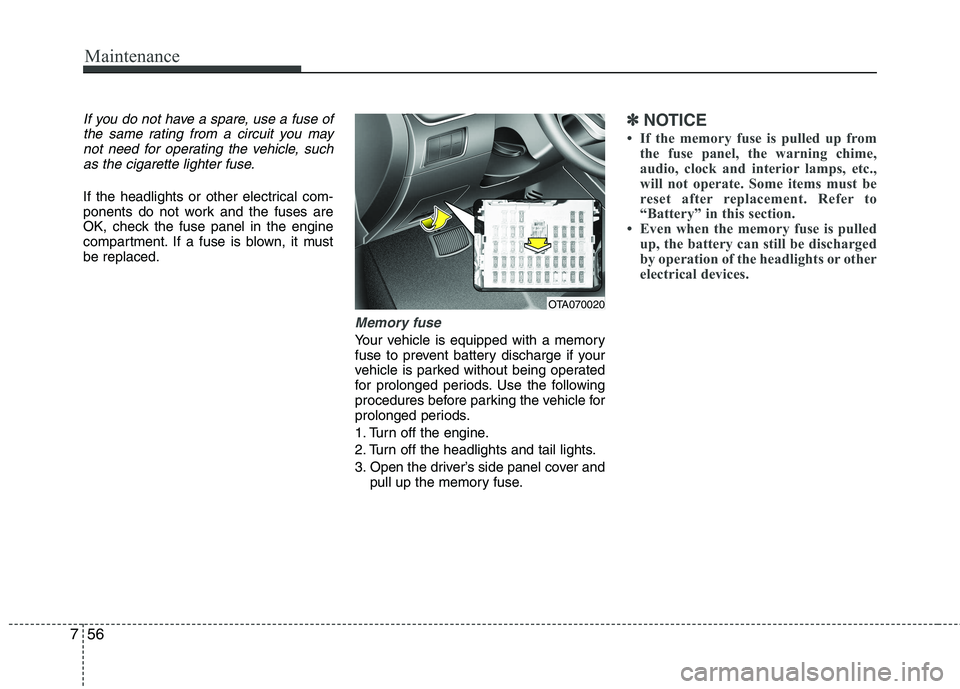
Memory fuse
Your vehicle is equipped with a memory
fuse to prevent battery discharge if your
vehicle is parked without being operated
for prolonged periods. Use the following
procedures before parking the vehicle for
prolonged periods.
1. Turn off the engine.
2. Turn off the headlights and tail lights.
3. Open the driver’s side panel cover and pull up the memory fuse.
✽✽ NOTICE
If the memory fuse is pulled up from the fuse panel, the warning chime,
audio, clock and interior lamps, etc.,
will not operate. Some items must be
reset after replacement. Refer to
“Battery” in this section.
Even when the memory fuse is pulled
up, the battery can still be discharged
by operation of the headlights or other
electrical devices.
OTA070020