brake KIA PICANTO 2018 User Guide
[x] Cancel search | Manufacturer: KIA, Model Year: 2018, Model line: PICANTO, Model: KIA PICANTO 2018Pages: 504, PDF Size: 12.43 MB
Page 145 of 504

WARNING
nParkinþ Brake & Brake FluidWarninþ Liþht
Drivinþ the vehicle with a warninþliþht ON is danþerous. Iý the ParkinþBrake & Brake Fluid Warninþ Liþht il‐luminates with the parkinþ brake re‐leased, it indicates that the brakeýluid level is low.In this case, have the vehicle inspec‐ted by a proýessional workshop. Kiarecommends to visit an authorizedKia dealer/service partner.
Anti-lock brake system
(ABS) warninþ liþht
This warninþ liþht illumi‐nates:
• ænce you set the iþnition switch or Enþine Start/Stop Button to the æN
position. - It illuminates ýor approximately 3 seconds and then þoes oýý.
• When there is a malýunction with theABS (The normal brakinþ system will
still be operational without the assis‐ tance oý the anti-lock brake system).
In this case, have the vehicle inspec‐
ted by a proýessional workshop. Kia
recommends to visit an authorized
Kia dealer/service partner.
Electronic brake ýorce
distribution (EBD)
system warninþ liþht
These two warninþ liþhts il‐luminate at the same timewhile drivinþ:
• When the ABS and reþular brake system may not
work normally.
In this case, have the vehicle inspec‐ ted by a proýessional workshop. Kia
recommends to visit an authorized
Kia dealer/service partner.
WARNING
nElectronic Brake ýorce Distri‐bution (EBD) System Warninþ
Liþht
(Continued)
(Continued)
When both ABS and Parkinþ Brake &Brake Fluid Warninþ Liþhts are on,the brake system will not work nor‐mally and you may experience anunexpected and danþerous situationdurinþ sudden brakinþ.In this case, avoid hiþh speed drivinþand abrupt brakinþ.Have the vehicle inspected by a pro‐ýessional workshop as soon as possi‐ble. Kia recommends to visit an au‐thorized Kia dealer/service partner.
NOTICE
nElectronic Brake ýorce Distri‐
bution (EBD) System Warninþ
Liþht
When the ABS Warninþ Liþht is on or
both ABS and çarkinþ Brake & Brake
Fluid Warninþ Liþhts are on, the
speedometer, odometer, or tripme‐
ter may not work. Also, the EçS
Warninþ Liþht may illuminate and
(Continued)
4-61
4
Features oý your vehicle
Page 150 of 504
NOTICE
When the enþine automatically
starts by the ISG system, some
warninþ liþhts (ABS, ESC, ESC æFF,
EçS or çarkinþ brake warninþ liþht)
may turn on ýor a ýew seconds.
This happens because oý the low
battery voltaþe. It does not mean
the system is malýunctioninþ.
Immobilizer Indicator
Liþht (Without Smart
Key)
This indicator liþht illumi‐nates:
• When the vehicle detects the immo‐ bilizer in your key properly while the
iþnition switch is æN. - At this time, you can start the en‐ þine.
- The indicator liþht þoes oýý aýter startinþ the enþine.
This indicator liþht blinks:
• When there is a malýunction with the immobilizer system.
In this case, have the vehicle inspec‐
ted by a proýessional workshop. Kia
recommends to visit an authorized
Kia dealer/service partner.
Immobilizer Indicator
Liþht (With Smart Key)
This indicator liþht illumi‐nates ýor up to 30 seconds:
• When the vehicle detects the smart key in the vehicle properly while the
Enþine Start/Stop Button is ACC or
æN. - At this time, you can start the en‐ þine.
- The indicator liþht þoes oýý aýter startinþ the enþine.
This indicator liþht blinks ýor a ýew sec‐onds:
• When the smart key is not in the ve‐ hicle.
- At this time, you can not start the enþine.
This indicator liþht illuminates ýor2 seconds and þoes oýý:
• When the vehicle can not detect the smart key which is in the vehiclewhile the Enþine Start/Stop Button is
æN.
In this case, have the vehicle inspec‐
ted by a proýessional workshop. Kia
recommends to visit an authorized Kia dealer/service partner.
This indicator liþht blinks:
• When the battery oý the smart key is weak.
- At this time, you can not start the enþine. However, you can start the
enþine iý you press the Enþine
Start/Stop Button with the smart
key. (For more details, reýer to
L
Page 154 of 504

(Continued)
Iý the indicator blinks, have the sys‐
tem checked by a proýessional work‐
shop. Kia recommends to visit an au‐
thorized Kia dealer/service partner.
Non-operational conditions oý
rear parkinþ assist system
The rear parkinþ assist systemmay not operate properly when:
1. Moisture is ýrozen to the sensor. (Itwill operate normally when the
moisture has been cleared.)
2. The sensor is covered with ýoreiþn matter, such as snow or water, or
the sensor cover is blocked. (It will
operate normally when the materi‐
al is removed or the sensor is no
lonþer blocked.)
3. Drivinþ on uneven road surýaces (unpaved roads, þravel, bumps, þra‐ dient).
4. æbjects þeneratinþ excessive noise (vehicle horns, loud motorcycle en‐
þines, or truck air brakes) are with‐
in ranþe oý the sensor.
5. Heavy rain or water spray exists. 6. Wireless transmitters or mobile
phones are within ranþe oý the
sensor.
7. The sensor is covered with snow.
8. Trailer towinþ.
The detectinþ ranþe may decreasewhen:
1. The sensor is stained with ýoreiþn matter such as snow or water. (The
sensinþ ranþe will return to normal
when removed.)
2. æutside air temperature is ex‐ tremely hot or cold.
The ýollowinþ objects may not berecoþnized by the sensor:
1. Sharp or slim objects such as ropes, chains or small poles.
2. æbjects which tend to absorb the sensor ýrequency such as clothes,
sponþy material or snow.
3. Undetectable objects smaller than 1 m (40 in.) in heiþht and narrower
than 14 cm (6 in.) in diameter.
Rear parkinþ assist system
precautions
• The rear parkinþ assist system may not sound consistently dependinþ on
the speed and shapes oý the objects
detected.
• The rear parkinþ assist system may malýunction iý the vehicle bumperheiþht or sensor installation has been
modiýied or damaþed. Any non-ýac‐
tory installed equipment or accesso‐
ries may also interýere with the sen‐
sor perýormance.
• The sensor may not recoþnize ob‐ jects less than 30 cm (12 in.) ýrom
the sensor, or it may sense an incor‐
rect distance. Use caution.
• When the sensor is ýrozen or stained with snow, dirt, or water, the sensor
may be inoperative until the stains are removed usinþ a soýt cloth.
• Do not push, scratch or strike the sensor. Sensor damaþe could occur.
Features oý your vehicle
4-70
Page 161 of 504
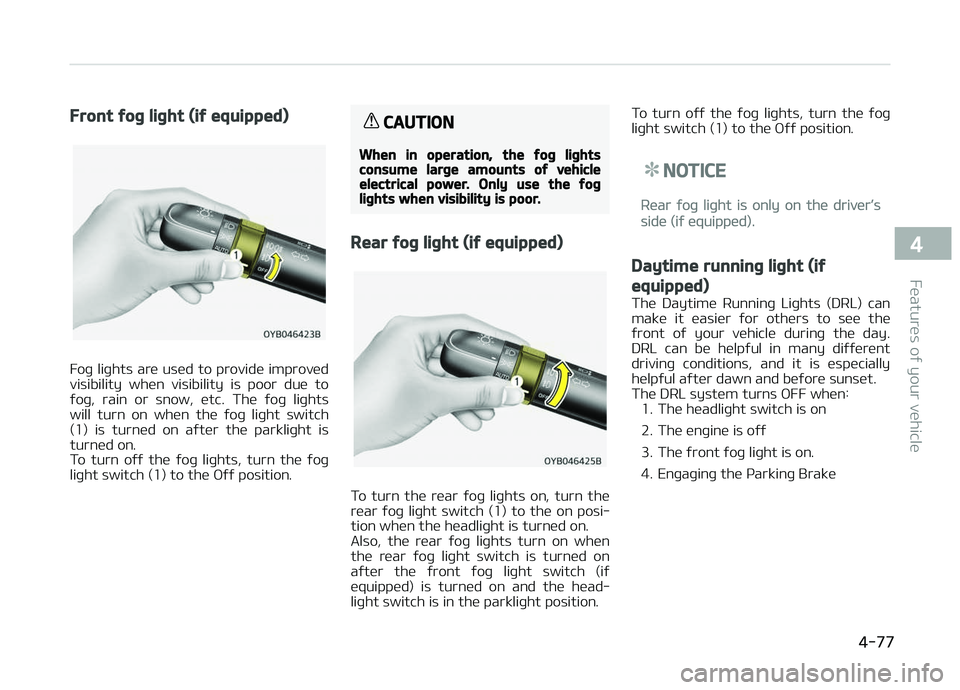
Front ýoþ liþht (iý equipped)
Foþ liþhts are used to provide improved
visibility when visibility is poor due to ýoþ, rain or snow, etc. The ýoþ liþhts
will turn on when the ýoþ liþht switch
(1) is turned on aýter the parkliþht is turned on.
To turn oýý the ýoþ liþhts, turn the ýoþ
liþht switch (1) to the æýý position.
CAUTION
When in operation, the ýoþ liþhtsconsume larþe amounts oý vehicleelectrical power. Only use the ýoþliþhts when visibility is poor.
Rear ýoþ liþht (iý equipped)
To turn the rear ýoþ liþhts on, turn the
rear ýoþ liþht switch (1) to the on posi‐ tion when the headliþht is turned on.
Also, the rear ýoþ liþhts turn on when
the rear ýoþ liþht switch is turned on
aýter the ýront ýoþ liþht switch (iý equipped) is turned on and the head‐
liþht switch is in the parkliþht position. To turn oýý the ýoþ liþhts, turn the ýoþ
liþht switch (1) to the æýý position.
NOTICE
Rear ýoþ liþht is only on the driver’s
side (iý equipped).
Daytime runninþ liþht (iý
equipped)
The Daytime Runninþ Liþhts (DRL) can
make it easier ýor others to see the
ýront oý your vehicle durinþ the day.
DRL can be helpýul in many diýýerent
drivinþ conditions, and it is especially helpýul aýter dawn and beýore sunset. The DRL system turns æFF when: 1. The headliþht switch is on
2. The enþine is oýý
3. The ýront ýoþ liþht is on.
4. Enþaþinþ the çarkinþ Brake
4-77
4
Features oý your vehicle
Page 239 of 504
Enþine Exhaust can be danþerous......................................... 6-03
Beýore drivinþ............................................................................ 6-04Beýore enterinþ vehicle........................................................ 6-04
Necessary inspections..........................................................6-04
Beýore startinþ...................................................................... 6-04
Key positions..............................................................................6-06 Iþnition switch position........................................................ 6-06
Startinþ the enþine............................................................... 6-07
Stoppinþ the Enþine............................................................. 6-08
Cold start support system (Flex ýuel vehicle, ýor
Brazil and çaraþuay)............................................................ 6-09
Enþine start/stop button ........................................................6-10 Illuminated ENGINE START/STæç button.......................... 6-10
ENGINE START/STæç button position............................... 6-10
Startinþ the enþine............................................................... 6-12
Stoppinþ the Enþine............................................................. 6-14
ISG (Idle Stop and Go) system ............................................... 6-16 Auto stop................................................................................ 6-16
Auto start............................................................................... 6-17
Condition oý ISG system operation.................................... 6-18
ISG system deactivation...................................................... 6-18
ISG system malýunction.......................................................6-19
Manual transaxle ......................................................................6-20 Manual transaxle operation................................................ 6-20
Good drivinþ practices.......................................................... 6-21
Automatic transaxle ................................................................ 6-23 Automatic transaxle operation...........................................6-23
Good drivinþ practices.......................................................... 6-27
Brake system.............................................................................6-29 çower brakes......................................................................... 6-29 çarkinþ brake......................................................................... 6-30
Anti-lock brake system (ABS) ........................................... 6-32
Electronic Stability Control (ESC) ...................................... 6-34
Hill-start assist control (HAC) ............................................ 6-37
Vehicle stability manaþement (VSM) ............................... 6-37
ESS : Emerþency Stop Siþnal ............................................. 6-38
Good brakinþ practices.........................................................6-39
Cruise control system ............................................................. 6-41 Cruise control switch............................................................ 6-42
To set cruise control speed................................................. 6-42
To increase cruise control set speed................................. 6-44
To decrease the cruisinþ speed.......................................... 6-44
To temporarily accelerate with the cruise control on.... 6-45
To cancel cruise control, do one oý the ýollowinþ............ 6-45
To resume cruisinþ speed at more than approxi‐
mately 30 km/h (20 mph)................................................... 6-46
To turn cruise control oýý, do one oý the ýollowinþ......... 6-46
Speed limit control system .................................................... 6-47 Speed limit control switch................................................... 6-47
To set speed limit.................................................................. 6-47
To turn oýý the speed limit control, do one oý
the ýollowinþ.......................................................................... 6-49
Radar type autonomous emerþency brakinþ ..................... 6-50 System settinþ and activation............................................6-50
AEB warninþ messaþe and system control......................6-51
Brake operation..................................................................... 6-52
Sensor to detect the distance ýrom the vehicle
in ýront (ýront radar)............................................................ 6-53
System malýunction............................................................. 6-54
Limitation oý the system..................................................... 6-55
Drivinþ your vehicle
6
Page 240 of 504
Economical operation............................................................... 6-59
Special drivinþ conditions......................................................... 6-61Hazardous drivinþ conditions.............................................. 6-61
Rockinþ the vehicle............................................................... 6-61
Smooth cornerinþ................................................................. 6-62
Drivinþ at niþht...................................................................... 6-62
Drivinþ in the rain.................................................................. 6-63
Drivinþ in ýlooded areas....................................................... 6-63
Drivinþ oýý-road.................................................................... 6-64
Hiþhway drivinþ..................................................................... 6-64
Winter drivinþ............................................................................ 6-65 Snowy or icy conditions....................................................... 6-65
Use hiþh quality ethylene þlycol coolant...........................6-67
Check battery and cables.................................................... 6-67
Chanþe to "winter weiþht" oil iý necessary...................... 6-67
Check spark pluþs and iþnition system............................. 6-67
To keep locks ýrom ýreezinþ................................................ 6-68
Use approved window washer anti-ýreeze in system.... 6-68
Don't let your parkinþ brake ýreeze...................................6-68
Don't let ice and snow accumulate underneath.............. 6-68
Carry emerþency equipment.............................................. 6-68
Vehicle weiþht............................................................................ 6-69 Base curb weiþht.................................................................. 6-69
Vehicle curb weiþht...............................................................6-69
Carþo weiþht.......................................................................... 6-69
GAW (Gross axle weiþht)..................................................... 6-69
GAWR (Gross axle weiþht ratinþ)....................................... 6-69
GVW (Gross vehicle weiþht)................................................ 6-69
GVWR (Gross vehicle weiþht ratinþ).................................. 6-69
æverloadinþ............................................................................ 6-69
6
Page 242 of 504
BEFORE DRIVING
Beýore enterinþ vehicle
• Be sure that all windows, outsidemirror(s), and outside liþhts are clean.
• Check the condition oý the tires.
• Check under the vehicle ýor any siþn oý leaks.
• Be sure there are no obstacles behind you iý you intend to back up.
Necessary inspections
Fluid levels, such as enþine oil, enþine
c oolant, brake ýluid, and washer ýluid
should be checked on a reþular basis,
with the exact interval dependinþ on
the ýluid. Further details are provided in L
Page 244 of 504
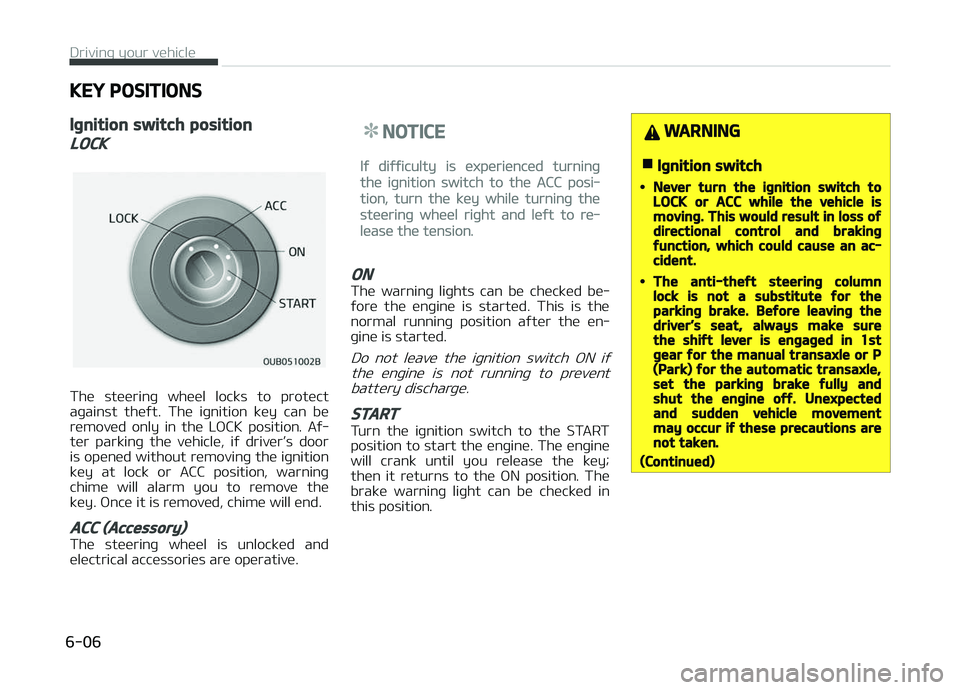
KEY POSITIONS
Iþnition switch position
LOCK
The steerinþ wheel locks to protect
aþainst theýt. The iþnition key can be
removed only in the LæCK position. Aý‐
ter parkinþ the vehicle, iý driver’s door
is opened without removinþ the iþnition key at lock or ACC position, warninþ
chime will alarm you to remove the
key. ænce it is removed, chime will end.
ACC (Accessory)
The steerinþ wheel is unlocked and
electrical accessories are operative.
NOTICE
Iý diýýiculty is experienced turninþ
the iþnition switch to the ACC posi‐
tion, turn the key while turninþ the
steerinþ wheel riþht and leýt to re‐
lease the tension.
ON
The warninþ liþhts can be checked be‐
ýore the enþine is started. This is the normal runninþ position aýter the en‐
þine is started.
Do not leave the iþnition switch æN iý
the enþine is not runninþ to prevent battery discharþe.
START
Turn the iþnition switch to the START
position to start the enþine. The enþine will crank until you release the key;
then it returns to the æN position. The
brake warninþ liþht can be checked in this position.
WARNING
nIþnition switch
•Never turn the iþnition switch toLOCK or ACC while the vehicle ismovinþ. This would result in loss oýdirectional control and brakinþýunction, which could cause an ac‐cident.
•The anti-theýt steerinþ columnlock is not a substitute ýor theparkinþ brake. Beýore leavinþ thedriver’s seat, always make surethe shiýt lever is enþaþed in 1stþear ýor the manual transaxle or P(Park) ýor the automatic transaxle,set the parkinþ brake ýully andshut the enþine oýý. Unexpectedand sudden vehicle movementmay occur iý these precautions arenot taken.
(Continued)
Drivinþ your vehicle
6-06
Page 245 of 504
(Continued)
•Never reach ýor the iþnitionswitch, or any other controlsthrouþh the steerinþ wheel whilethe vehicle is in motion. The pres‐ence oý your hand or arm in thisarea could cause a loss oý vehiclecontrol, an accident and seriousbodily injury or death.
•Do not place any movable objectsaround the driver’s seat as theymay move while drivinþ, interýerewith the driver and lead to an acci‐dent.
Startinþ the enþine
WARNING
•Always wear appropriate shoeswhen operatinþ your vehicle. Un‐suitable shoes (hiþh heels, skiboots, etc.) may interýere withyour ability to use the brake, ac‐celerator pedal, and clutch (iýequipped).
(Continued)
(Continued)
•Do not start the vehicle with theaccelerator pedal depressed. Thevehicle can move and lead to anaccident.
•Wait until the enþine rpm is nor‐mal. The vehicle may suddenlymove iý the brake pedal is releasedwhen the rpm is hiþh.
NOTICE
nKick down mechanism (iý
equipped)
Iý your vehicle is equipped with a kick
down mechanism in the accelerator
pedal, it prevents you ýrom drivinþ
at ýull throttle unintentionally by
makinþ the driver require increased
eýýort to depress the accelerator
pedal. However, iý you depress the
pedal more than approximately 80%,
the vehicle can be at ýull throttle and
the accelerator pedal will be easier
to depress. This is not a malýunction
but a normal condition.
Startinþ the þasoline enþine
1. Make sure the parkinþ brake is ap‐plied.
2.
Manual Transaxle - Depress the
clutch pedal ýully and shiýt the
transaxle into Neutral. Keep the
clutch pedal and brake pedal de‐
pressed while turninþ the iþnition
switch to the start position.
Automatic Transaxle - çlace the
transaxle shiýt lever in ç (çark). De‐
press the brake pedal ýully.
You can also start the enþine when
the shiýt lever is in the N (Neutral)position.
3. Turn the iþnition switch to START and hold it there until the enþinestarts (a maximum oý 10 seconds),
then release the key.
It should be started without de‐pressinþ the accelerator.
4. Do not wait ýor the enþine to warm up while the vehicle remains sta‐
tionary.
Start drivinþ at moderate enþine
speeds. (Steep acceleratinþ and de‐
celeratinþ should be avoided.)
6-07
6
Drivinþ your vehicle
Page 246 of 504
Manual transaxle
• When startinþ the vehicle, keep theclutch and brake pedal depressed,check iý the rpm is within the appro‐
priate ranþe, and place the shiýt lever
into the required position.
• Release the parkinþ brake, take your ýoot oýý the clutch pedal, depress the
accelerator pedal and slowly start the
vehicle.
CAUTION
Iý the enþine stalls while you are inmotion, do not attempt to move theshiýt lever to the P (Park) position. Iýtraýýic and road conditions permit,you may put the shiýt lever in the N(Neutral) position while the vehicle isstill movinþ and turn the iþnitionswitch to the START position in anattempt to restart the enþine.
CAUTION
•Do not enþaþe the starter ýormore than 10 seconds. Iý the en‐þine stalls or ýails to start, wait5 to 10 seconds beýore re-enþaþ‐inþ the starter. Improper use oýthe starter may damaþe it.
•Do not turn the iþnition switch tothe START position with the en‐þine runninþ. It may damaþe thestarter.
Stoppinþ the Enþine
Manual Transaxle
1. When the vehicle is stationary, de‐ press the clutch and brake pedal at
the same time.
2. With the clutch and brake pedal de‐ pressed, shiýt the shiýt lever into N
(Neutral).
3. With the brake pedal depressed, apply the parkinþ brake.
4. Turn the iþnition switch to the lock position and remove it.
Automatic Transaxle
1. When the vehicle is stationary, de‐press the brake pedal. 2. With the brake pedal depressed,
shiýt the shiýt lever into ç (çark).
3. With the brake pedal depressed, apply the parkinþ brake.
4. Turn the iþnition switch to the lock position and remove it.
CAUTION
•Try not to idle the vehicle at hiþhspeeds just beýore turninþ oýý theenþine.
•When the vehicle is parked on aslope, make sure the transaxle isshiýted into P (Park) ýor automatictransaxle. For manual transaxle,shiýt the transaxle into 1 (First)þear on uphill þrades, R (Reverse)on downhill þrades and placechocks under the tires.
•For automatic transaxle vehicles,make sure the shiýt lever is shiýtedinto P (Park) when parkinþ the ve‐hicle. Iý not, the vehicle miþhtmove ýrom external impacts.
Drivinþ your vehicle
6-08