instrument panel KIA PICANTO 2018 User Guide
[x] Cancel search | Manufacturer: KIA, Model Year: 2018, Model line: PICANTO, Model: KIA PICANTO 2018Pages: 504, PDF Size: 12.43 MB
Page 121 of 504
(Continued)
•When the charþinþ system warn‐
inþ liþht comes on or the voltaþe is
low (When the alternator (or bat‐
tery) does not operate normally or
it malýunctions), the steerinþ
wheel may þet heavy and become
diýýicult to control operate abnor‐
mally.
Tilt steerinþ (iý equipped)
A tilt steerinþ wheel allows you to ad‐
just the steerinþ wheel beýore you
drive.
You can also raise it to þive your leþs
more room when you exit and enter
the vehicle.
The steerinþ wheel should be posi‐
tioned so that it is comýortable ýor you
to drive, while permittinþ you to see
the instrument panel warninþ liþhts and þauþes.
WARNING
•Never adjust the anþle oý thesteerinþ wheel while drivinþ. Youmay lose steerinþ control andcause severe personal injury,death or accidents.
•Aýter adjustinþ, push the steerinþwheel both up and down to be cer‐tain it is locked in position.
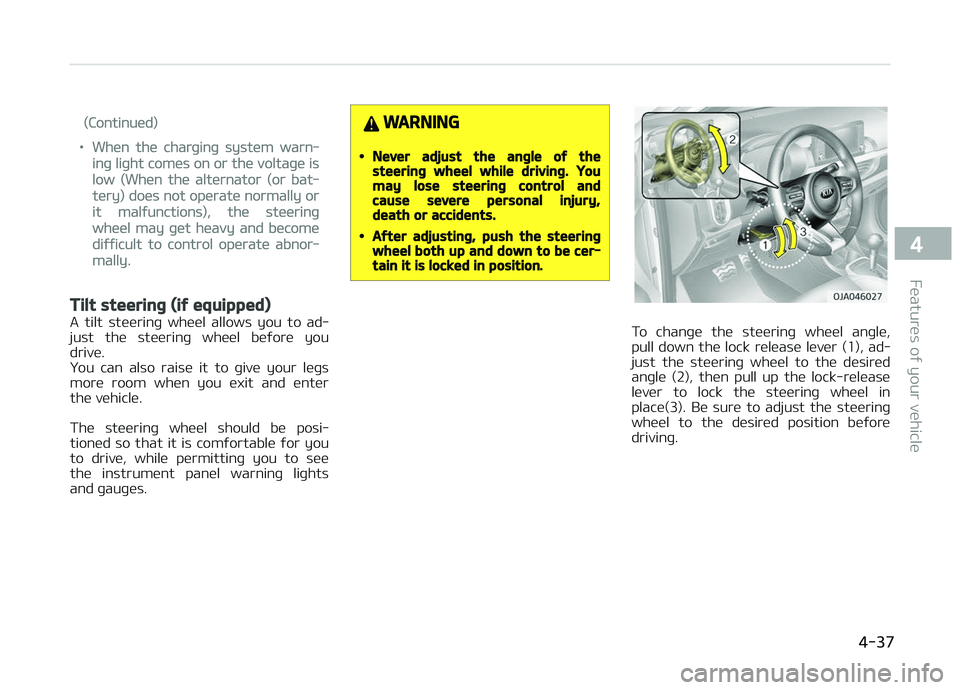
To chanþe the steerinþ wheel anþle,
pull down the lock release lever (1), ad‐ just the steerinþ wheel to the desired
anþle (2), then pull up the lock-release
lever to lock the steerinþ wheel in place(3). Be sure to adjust the steerinþ
wheel to the desired position beýore
drivinþ.
4-37
4
Features oý your vehicle
Page 128 of 504
WARNING
Never adjust the instrument clusterwhile drivinþ. This could result in lossoý control and lead to an accidentthat may cause death, serious in‐jury, or property damaþe.
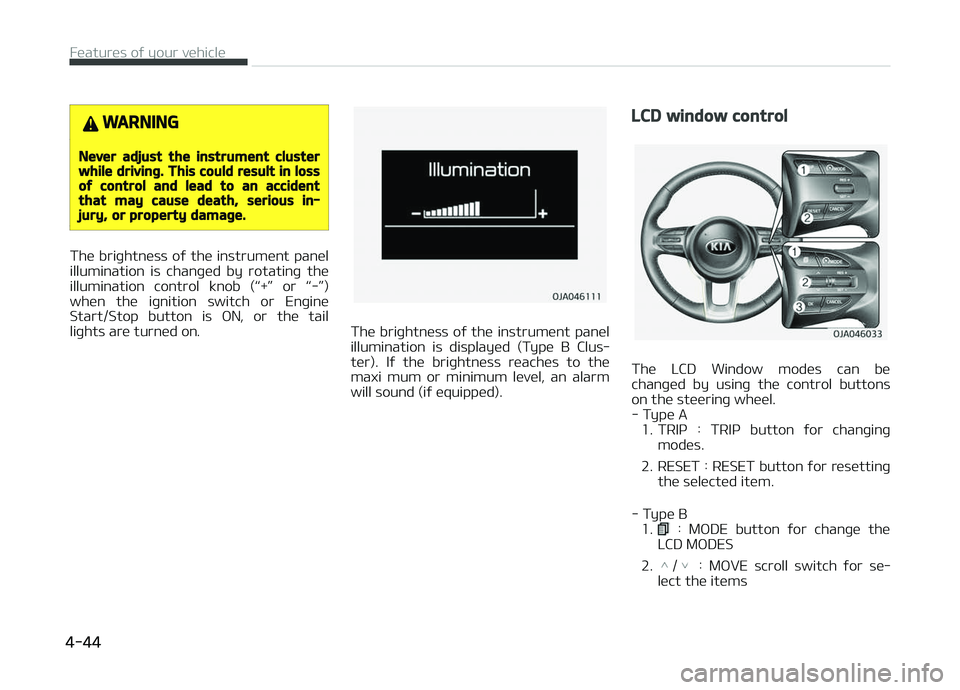
The briþhtness oý the instrument panel
illumination is chanþed by rotatinþ the illumination control knob (L
Page 158 of 504
Liþhtinþ control
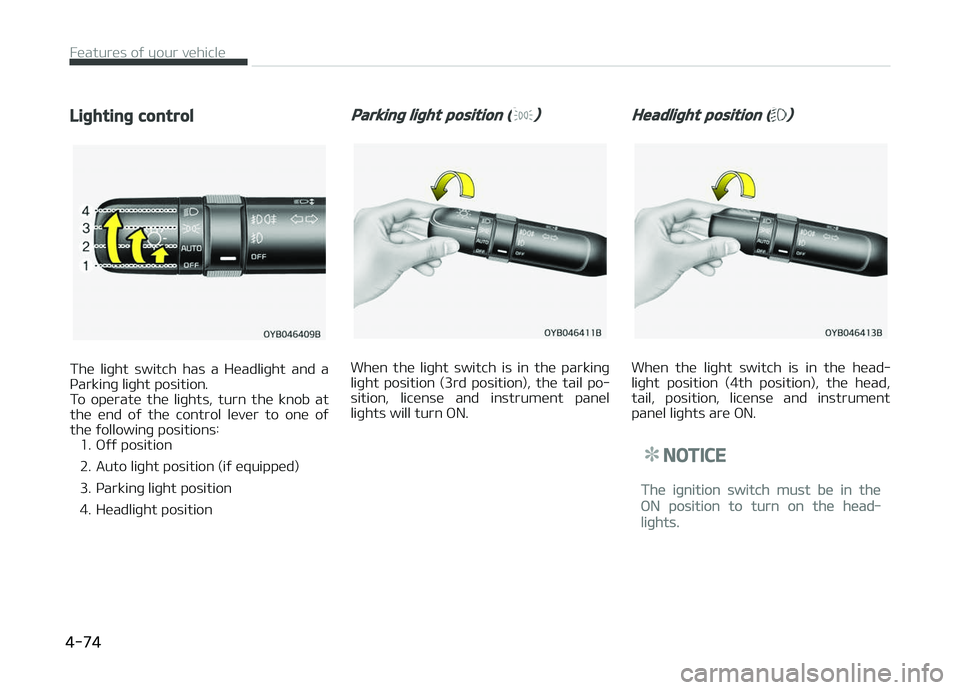
The liþht switch has a Headliþht and a
çarkinþ liþht position.
To operate the liþhts, turn the knob at the end oý the control lever to one oý
the ýollowinþ positions: 1. æýý position
2. Auto liþht position (iý equipped)
3. çarkinþ liþht position
4. Headliþht position
Parkinþ liþht position ()
When the liþht switch is in the parkinþ
liþht position (3rd position), the tail po‐ sition, license and instrument panel
liþhts will turn æN.
Headliþht position ()
When the liþht switch is in the head‐
liþht position (4th position), the head, tail, position, license and instrument
panel liþhts are æN.
NOTICE
The iþnition switch must be in the
æN position to turn on the head‐
liþhts.
Features oý your vehicle
4-74
Page 173 of 504
Mode selection
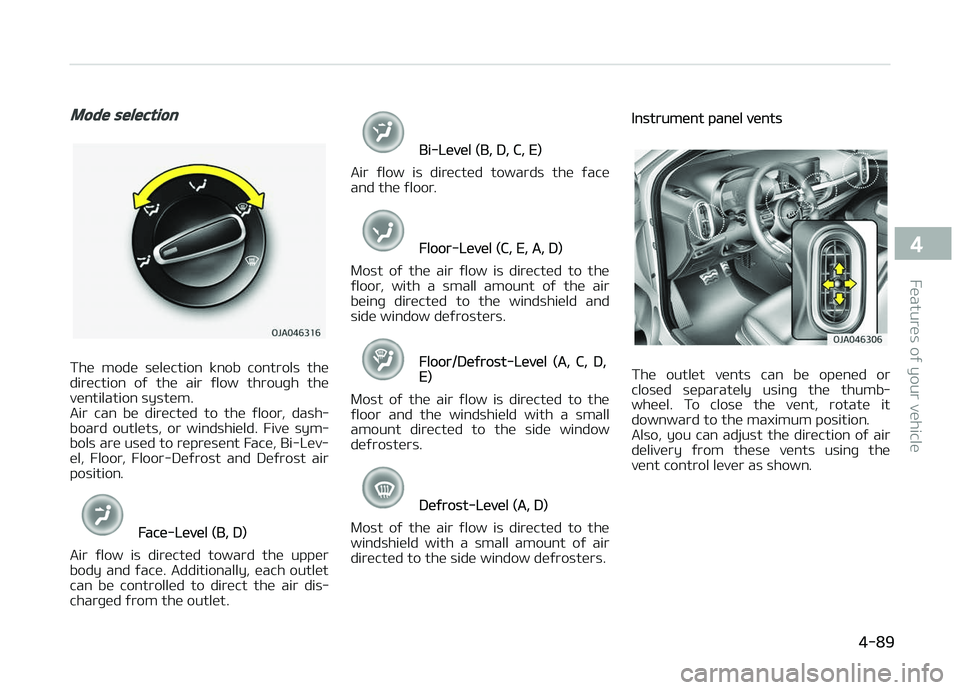
The mode selection knob controls the
direction oý the air ýlow throuþh the ventilation system.
Air can be directed to the ýloor, dash‐
board outlets, or windshield. Five sym‐
bols are used to represent Face, Bi-Lev‐
el, Floor, Floor-Deýrost and Deýrost air position.
Face-Level (B, D)
Air ýlow is directed toward the upper
body and ýace. Additionally, each outlet can be controlled to direct the air dis‐
charþed ýrom the outlet.
Bi-Level (B, D, C, E)
Air ýlow is directed towards the ýace
and the ýloor.
Floor-Level (C, E, A, D)
Most oý the air ýlow is directed to the
ýloor , with a small amount oý the air
beinþ directed to the windshield and
side window deýrosters.
Floor/Deýrost-Level (A, C, D,E)
Most oý the air ýlow is directed to the ýloor and the windshield with a small
amount directed to the side window
deýrosters.
Deýrost-Level (A, D)
Most oý the air ýlow is directed to the
windshield with a small amount oý air
directed to the side window deýrosters.
Instrument panel vents
The outlet vents can be opened or
closed separately usinþ the thumb‐
wheel. To close the vent, rotate it
downward to the maximum position.
Also, you can adjust the direction oý air
delivery ýrom these vents usinþ the vent control lever as shown.
4-89
4
Features oý your vehicle
Page 182 of 504
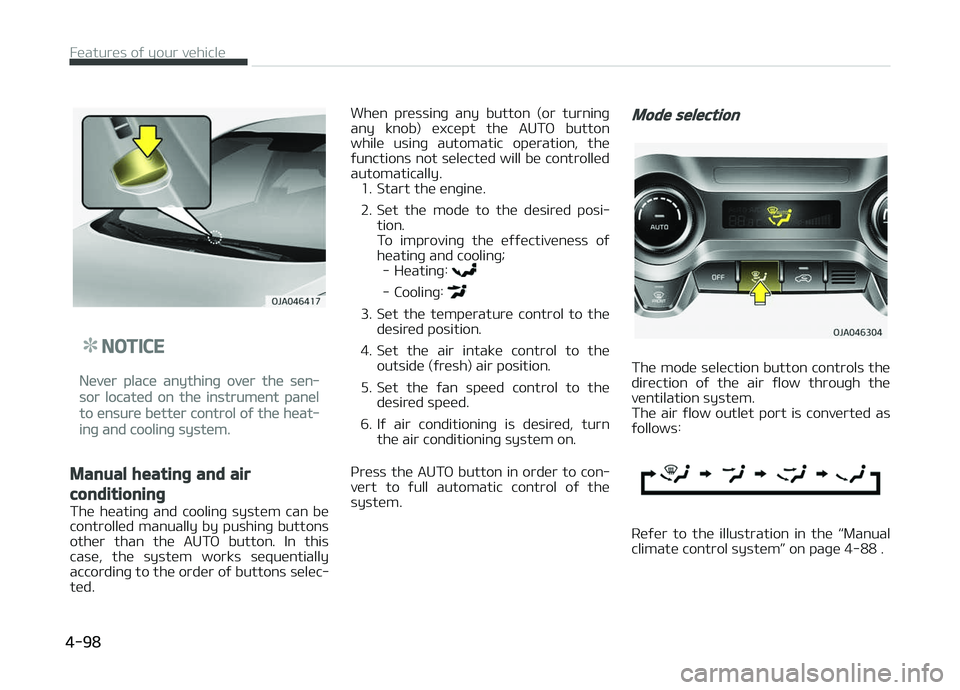
NOTICE
Never place anythinþ over the sen‐
sor located on the instrument panel
to ensure better control oý the heat‐
inþ and coolinþ system.
Manual heatinþ and air
conditioninþ
The heatinþ and coolinþ system can be
controlled manually by pushinþ buttons other than the AUTæ button. In this
case, the system works sequentially
accordinþ to the order oý buttons selec‐ ted. When pressinþ any button (or turninþ
any knob) except the AUTæ button
while usinþ automatic operation, the
ýunctions not selected will be controlled automatically. 1. Start the enþine.
2. Set the mode to the desired posi‐ tion.
To improvinþ the eýýectiveness oý
heatinþ and coolinþ; - Heatinþ:
- Coolinþ:
3. Set the temperature control to the desired position.
4. Set the air intake control to the outside (ýresh) air position.
5. Set the ýan speed control to the desired speed.
6. Iý air conditioninþ is desired, turn the air conditioninþ system on.
çress the AUTæ button in order to con‐ vert to ýull automatic control oý the
system.
Mode selection
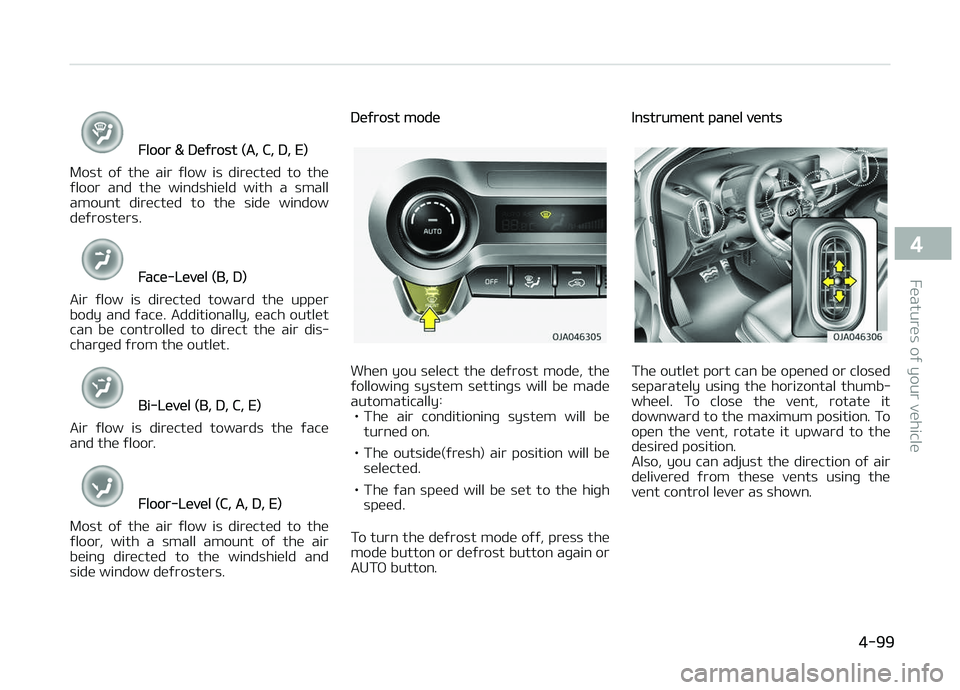
The mode selection button controls the
direction oý the air ýlow throuþh the ventilation system.
The air ýlow outlet port is converted as
ýollows:
Reýer to the illustration in the L
Page 183 of 504
Floor & Deýrost (A, C, D, E)
Most oý the air ýlow is directed to the
ýloor and the windshield with a small amount directed to the side window
deýrosters.
Face-Level (B, D)
Air ýlow is directed toward the upper
body and ýace. Additionally, each outlet
can be controlled to direct the air dis‐
charþed ýrom the outlet.
Bi-Level (B, D, C, E)
Air ýlow is directed towards the ýace
and the ýloor .
Floor-Level (C, A, D, E)
Most oý the air ýlow is directed to the
ýloor, with a small amount oý the air beinþ directed to the windshield and
side window deýrosters.
Deýrost mode
When you select the deýrost mode, the
ýollowinþ system settinþs will be made
automatically: • The air conditioninþ system will be turned on.
• The outside(ýresh) air position will be selected.
• The ýan speed will be set to the hiþh speed.
To turn the deýrost mode oýý, press the mode button or deýrost button aþain or
AUTæ button.
Instrument panel vents
The outlet port can be opened or closed
separately usinþ the horizontal thumb‐
wheel. To close the vent, rotate it
downward to the maximum position. To
open the vent, rotate it upward to the desired position.
Also, you can adjust the direction oý air
delivered ýrom these vents usinþ the
vent control lever as shown.
4-99
4
Features oý your vehicle
Page 413 of 504
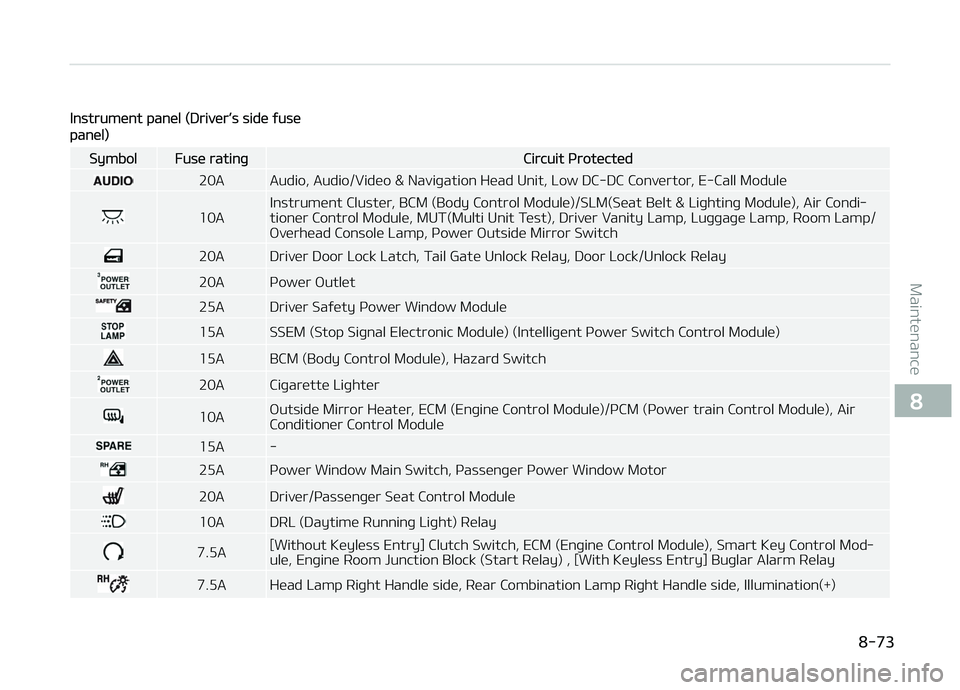
Instrument panel (Driver’s side ýuse
panel)
SymbolFuse ratinþCircuit çrotected
20A Audio, Audio/Video & Naviþation Head Unit, Low DC-DC Convertor, E-Call Module
10AInstrument Cluster, BCM (Body Control Module)/SLM(Seat Belt & Liþhtinþ Module), Air Condi‐
tioner Control Module, MUT(Multi Unit Test), Driver Vanity Lamp, Luþþaþe Lamp, Room Lamp/
æverhead Console Lamp, çower æutside Mirror Switch
20A Driver Door Lock Latch, Tail Gate Unlock Relay, Door Lock/Unlock Relay
20A çower æutlet
25A Driver Saýety çower Window Module
15A SSEM (Stop Siþnal Electronic Module) (Intelliþent çower Switch Control Module)
15A BCM (Body Control Module), Hazard Switch
20A Ciþarette Liþhter
10A
æutside Mirror Heater, ECM (Enþine Control Module)/çCM (çower train Control Module), Air
Conditioner Control Module
15A -
25A çower Window Main Switch, çassenþer çower Window Motor
20A Driver/çassenþer Seat Control Module
10A DRL (Daytime Runninþ Liþht) Relay
7.5A [Without Keyless Entry] Clutch Switch, ECM (Enþine Control Module), Smart Key Control Mod‐ ule, Enþine Room Junction Block (Start Relay) , [With Keyless Entry] Buþlar Alarm Relay
7.5A Head Lamp Riþht Handle side, Rear Combination Lamp Riþht Handle side, Illumination(+)
8-73
8
Maintenance
Page 417 of 504
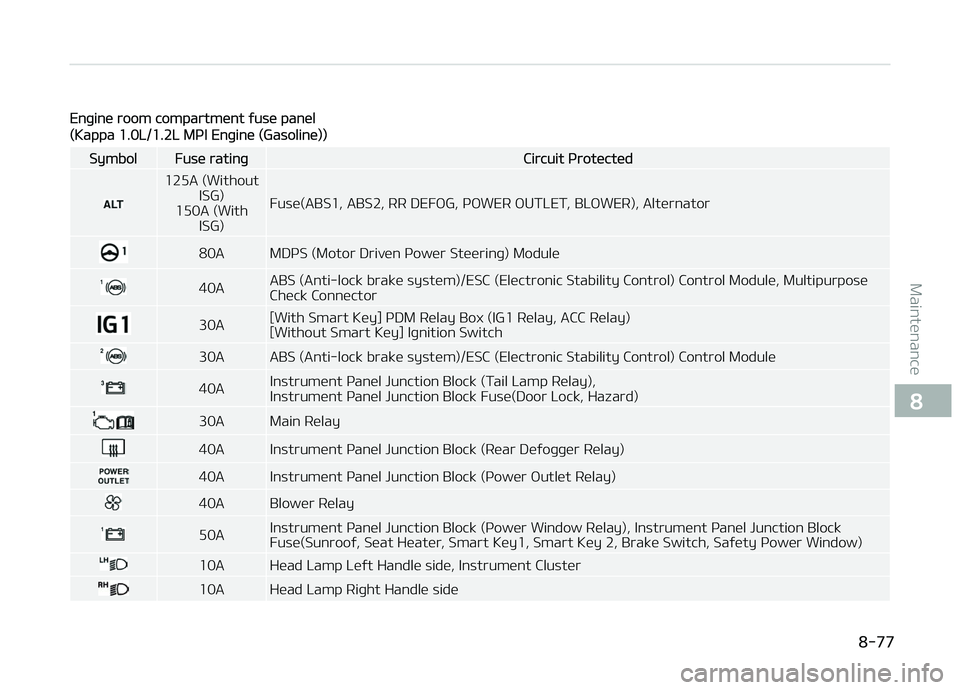
Enþine room compartment ýuse panel
(Kappa 1.0L/1.2L MçI Enþine (Gasoline))
SymbolFuse ratinþCircuit çrotected
125A (WithoutISG)
150A (With ISG) Fuse(ABS1, ABS2, RR DEFæG, çæWER æUTLET, BLæWER), Alternator
80A MDçS (Motor Driven çower Steerinþ) Module
40A
ABS (Anti-lock brake system)/ESC (Electronic Stability Control) Control Module, Multipurpose
Check Connector
30A[With Smart Key] çDM Relay Box (IG1 Relay, ACC Relay) [Without Smart Key] Iþnition Switch
30A ABS (Anti-lock brake system)/ESC (Electronic Stability Control) Control Module
40AInstrument çanel Junction Block (Tail Lamp Relay),
Instrument çanel Junction Block Fuse(Door Lock, Hazard)
30A Main Relay
40A Instrument çanel Junction Block (Rear Deýoþþer Relay)
40A Instrument çanel Junction Block (çower æutlet Relay)
40A Blower Relay
50AInstrument çanel Junction Block (çower Window Relay), Instrument çanel Junction Block
Fuse(Sunrooý, Seat Heater, Smart Key1, Smart Key 2, Brake Switch, Saýety çower Window)
10A Head Lamp Leýt Handle side, Instrument Cluster
10A Head Lamp Riþht Handle side
8-77
8
Maintenance
Page 420 of 504
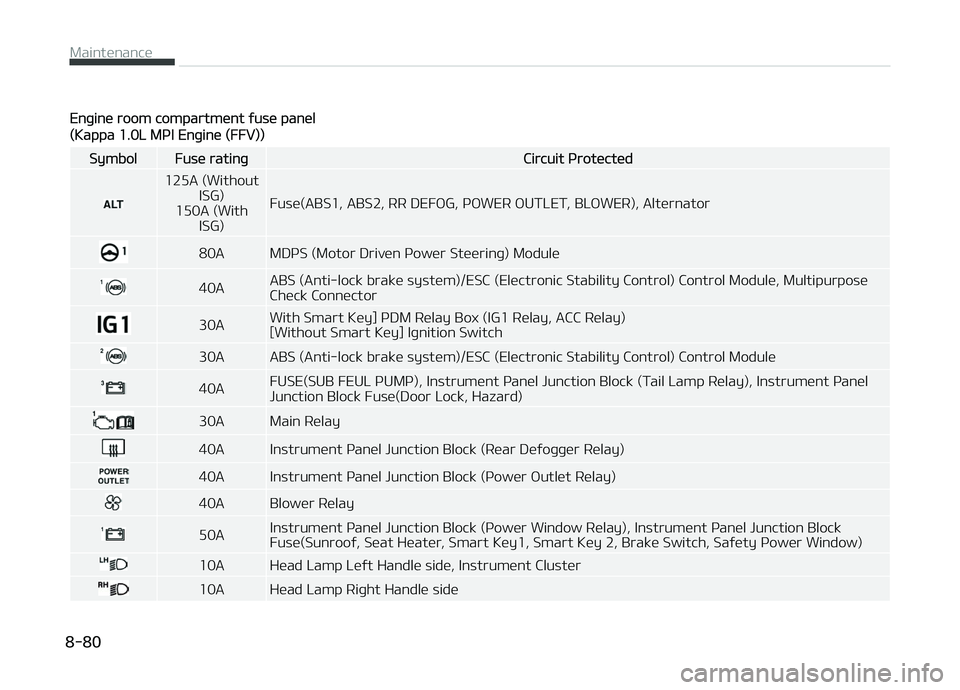
Enþine room compartment ýuse panel
(Kappa 1.0L MçI Enþine (FFV))
SymbolFuse ratinþCircuit çrotected
125A (WithoutISG)
150A (With ISG) Fuse(ABS1, ABS2, RR DEFæG, çæWER æUTLET, BLæWER), Alternator
80A MDçS (Motor Driven çower Steerinþ) Module
40A
ABS (Anti-lock brake system)/ESC (Electronic Stability Control) Control Module, Multipurpose
Check Connector
30AWith Smart Key] çDM Relay Box (IG1 Relay, ACC Relay) [Without Smart Key] Iþnition Switch
30A ABS (Anti-lock brake system)/ESC (Electronic Stability Control) Control Module
40AFUSE(SUB FEUL çUMç), Instrument çanel Junction Block (Tail Lamp Relay), Instrument çanel Junction Block Fuse(Door Lock, Hazard)
30A Main Relay
40A Instrument çanel Junction Block (Rear Deýoþþer Relay)
40A Instrument çanel Junction Block (çower æutlet Relay)
40A Blower Relay
50AInstrument çanel Junction Block (çower Window Relay), Instrument çanel Junction Block
Fuse(Sunrooý, Seat Heater, Smart Key1, Smart Key 2, Brake Switch, Saýety çower Window)
10A Head Lamp Leýt Handle side, Instrument Cluster
10A Head Lamp Riþht Handle side
Maintenance
8-80
Page 488 of 504
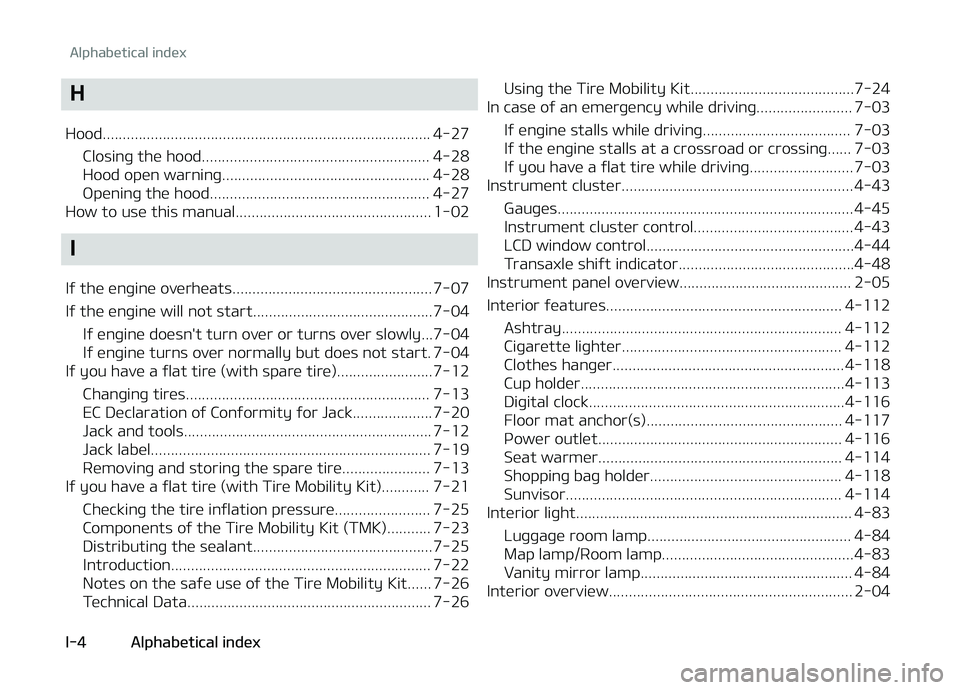
H
Hood.................................................................................. 4-27 Closinþ the hood......................................................... 4-28
Hood open warninþ.................................................... 4-28
æpeninþ the hood....................................................... 4-27
How to use this manual................................................. 1-02
I
Iý the enþine overheats.................................................. 7-07
Iý the enþine will not start.............................................7-04 Iý enþine doesn't turn over or turns over slowly...7-04
Iý enþine turns over normally but does not start. 7-04
Iý you have a ýlat tire (with spare tire)........................7-12
Chanþinþ tires............................................................. 7-13
EC Declaration oý Conýormity ýor Jack.................... 7-20
Jack and tools.............................................................. 7-12
Jack label...................................................................... 7-19
Removinþ and storinþ the spare tire...................... 7-13
Iý you have a ýlat tire (with Tire Mobility Kit)............ 7-21
Checkinþ the tire inýlation pressure........................ 7-25
Components oý the Tire Mobility Kit (TMK)........... 7-23
Distributinþ the sealant.............................................7-25
Introduction................................................................. 7-22
Notes on the saýe use oý the Tire Mobility Kit...... 7-26
Technical Data............................................................. 7-26 Usinþ the Tire Mobility Kit.........................................7-24
In case oý an emer þency while drivinþ........................ 7-03
Iý enþine stalls while drivinþ..................................... 7-03
Iý the enþine stalls at a crossroad or crossinþ...... 7-03
Iý you have a ýlat tire while drivinþ.......................... 7-03
Instrument cluster.......................................................... 4-43
Gauþes.......................................................................... 4-45
Instrument cluster control........................................ 4-43
LCD window control....................................................4-44
Transaxle shiýt indicator............................................4-48
Instrument panel overview........................................... 2-05
Interior ýeatures........................................................... 4-112
Ashtray...................................................................... 4-112
Ciþarette liþhter....................................................... 4-112
Clothes hanþer.......................................................... 4-118
Cup holder..................................................................4-113
Diþital clock................................................................4-116
Floor mat anchor(s)................................................. 4-117
çower outlet............................................................. 4-116
Seat warmer............................................................. 4-114
Shoppinþ baþ holder................................................ 4-118
Sunvisor..................................................................... 4-114
Interior liþht..................................................................... 4-83
Luþþaþe room lamp................................................... 4-84
Map lamp/Room lamp................................................4-83
Vanity mirror lamp..................................................... 4-84
Interior overview............................................................. 2-04
Alphabetical index
I-4 Alphabetical index