heat KIA PICANTO 2018 Owner's Manual
[x] Cancel search | Manufacturer: KIA, Model Year: 2018, Model line: PICANTO, Model: KIA PICANTO 2018Pages: 504, PDF Size: 12.43 MB
Page 196 of 504
INTERIOR FEATURES
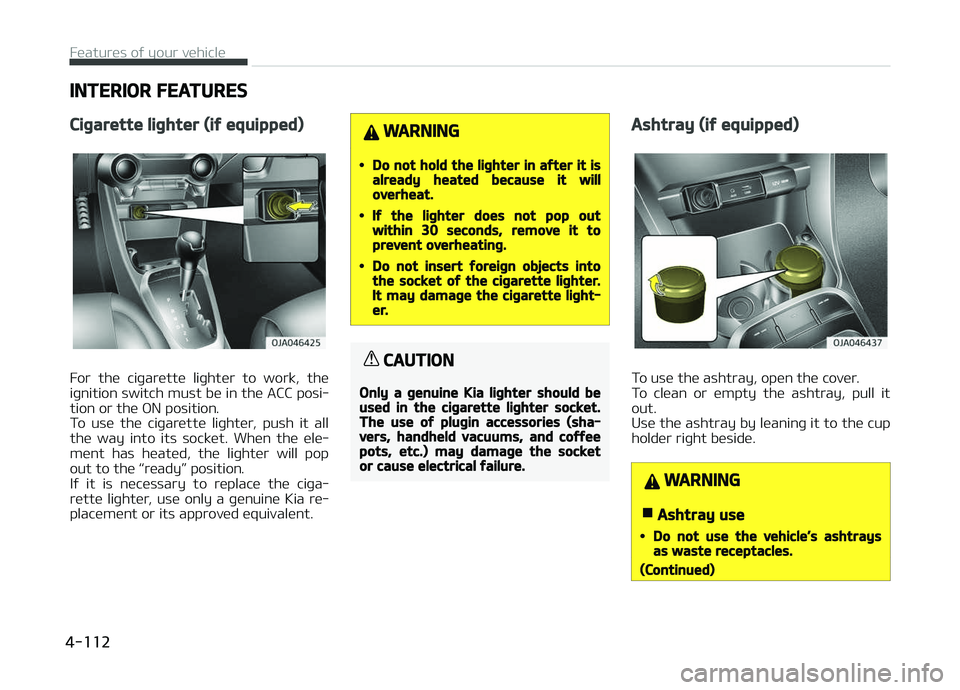
Ciþarette liþhter (iý equipped)
For the ciþarette liþhter to work, the
iþnition switch must be in the ACC posi‐
tion or the æN position.
To use the ciþarette liþhter, push it all
the way into its socket. When the ele‐
ment has heated, the liþhter will pop out to the L
Page 197 of 504
(Continued)
•Puttinþ lit ciþarettes or matches inan ashtray with other combustiblematerials may cause a ýire.
Cup holder
WARNING
nHot liquids
•Do not place uncovered cups oý hotliquid in the cup holder while thevehicle is in motion. Iý the hot liq‐uid spills, you could be burned.Such a burn to the driver couldlead to loss oý control oý the vehi‐cle.
•To reduce the risk oý personal in‐jury in the event oý sudden stop orcollision, do not place uncovered orunsecured bottles, þlasses, cans,etc., in the cup holder while thevehicle is in motion.
WARNING
Keep cans or bottles out oý directsun liþht and do not put them in avehicle that is heated up. It may ex‐plode.
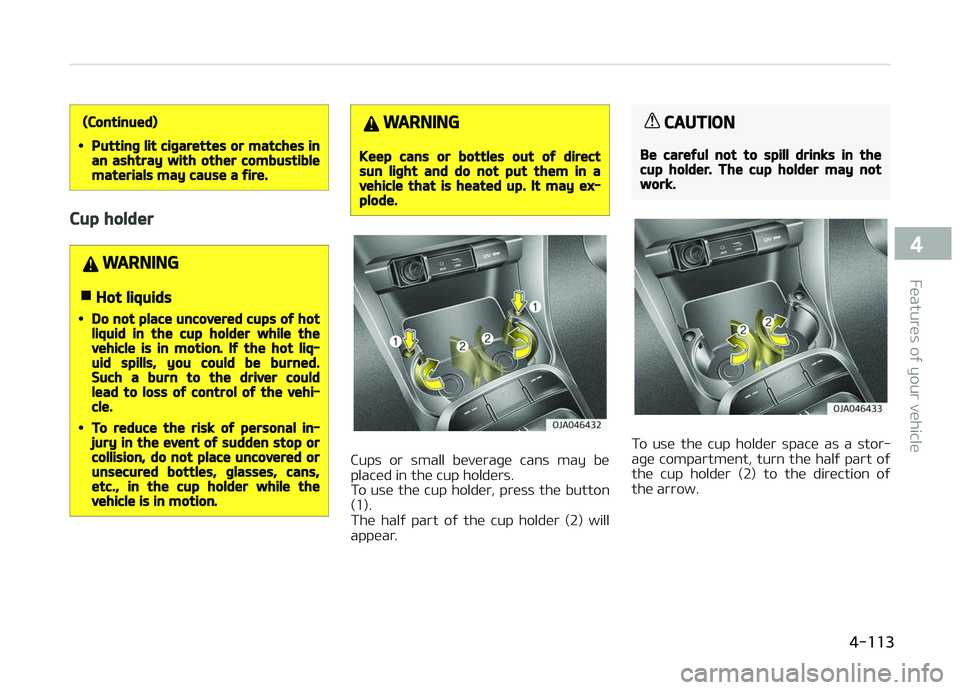
Cups or small beveraþe cans may be
placed in the cup holders.
To use the cup holder, press the button (1).
The halý part oý the cup holder (2) will
appear.
CAUTION
Be careýul not to spill drinks in thecup holder. The cup holder may notwork.
To use the cup holder space as a stor‐
aþe compartment, turn the halý part oý
the cup holder (2) to the direction oý
the arrow.
4-113
4
Features oý your vehicle
Page 199 of 504
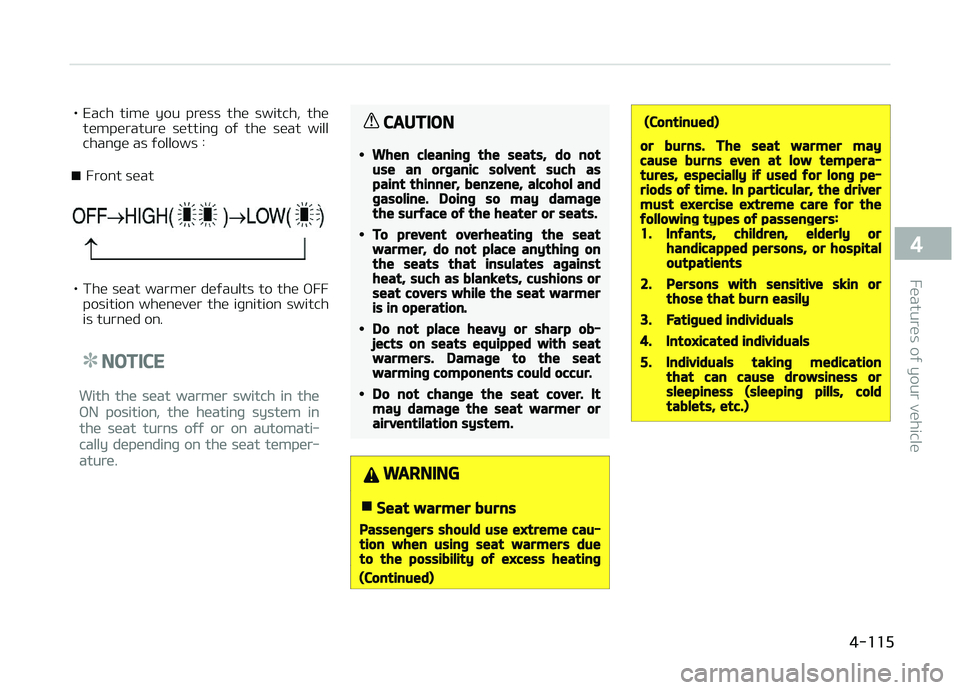
• Each time you press the switch, thetemperature settinþ oý the seat will
chanþe as ýollows :
■ Front seat
• The seat warmer deýaults to the æFF position whenever the iþnition switch
is turned on.
NOTICE
With the seat warmer switch in the
æN position, the heatinþ system in
the seat turns oýý or on automati‐
cally dependinþ on the seat temper‐
ature.
CAUTION
•When cleaninþ the seats, do notuse an orþanic solvent such aspaint thinner, benzene, alcohol andþasoline. Doinþ so may damaþethe surýace oý the heater or seats.
•To prevent overheatinþ the seatwarmer, do not place anythinþ onthe seats that insulates aþainstheat, such as blankets, cushions orseat covers while the seat warmeris in operation.
•Do not place heavy or sharp ob‐jects on seats equipped with seatwarmers. Damaþe to the seatwarminþ components could occur.
•Do not chanþe the seat cover. Itmay damaþe the seat warmer orairventilation system.
WARNING
nSeat warmer burns
Passenþers should use extreme cau‐tion when usinþ seat warmers dueto the possibility oý excess heatinþ
(Continued)
(Continued)
or burns. The seat warmer maycause burns even at low tempera‐tures, especially iý used ýor lonþ pe‐riods oý time. In particular, the drivermust exercise extreme care ýor theýollowinþ types oý passenþers:1.Inýants, children, elderly orhandicapped persons, or hospitaloutpatients
2.Persons with sensitive skin orthose that burn easily
3.Fatiþued individuals
4.Intoxicated individuals
5.Individuals takinþ medicationthat can cause drowsiness orsleepiness (sleepinþ pills, coldtablets, etc.)
4-115
4
Features oý your vehicle
Page 200 of 504
Power outlet
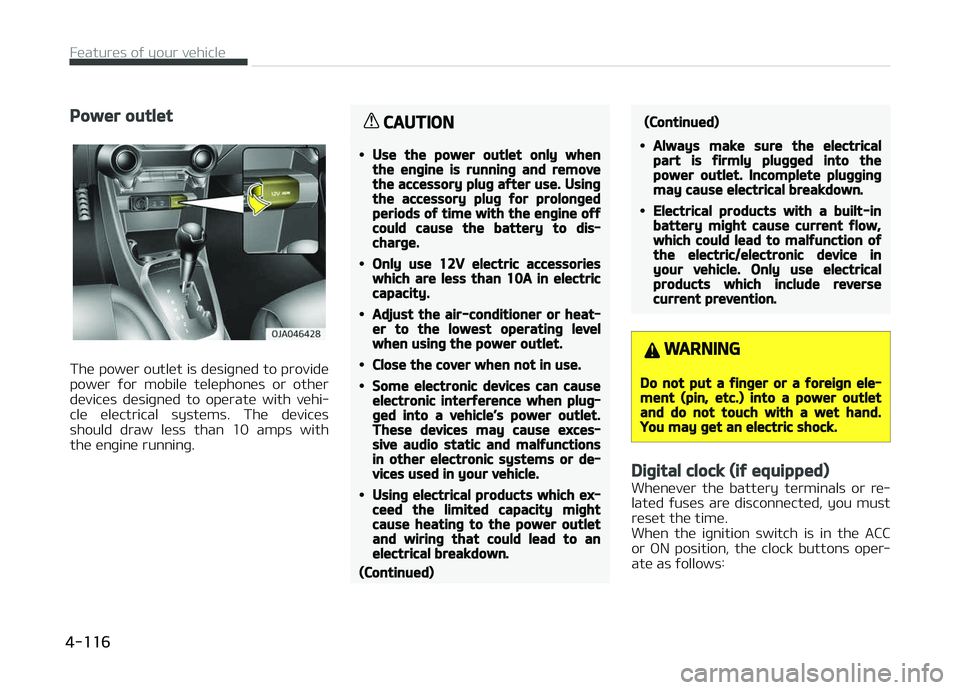
The power outlet is desiþned to provide
power ýor mobile telephones or other devices desiþned to operate with vehi‐
cle electrical systems. The devices
should draw less than 10 amps with the enþine runninþ.
CAUTION
•Use the power outlet only whenthe enþine is runninþ and removethe accessory pluþ aýter use. Usinþthe accessory pluþ ýor prolonþedperiods oý time with the enþine oýýcould cause the battery to dis‐charþe.
•Only use 12V electric accessorieswhich are less than 10A in electriccapacity.
•Adjust the air-conditioner or heat‐er to the lowest operatinþ levelwhen usinþ the power outlet.
•Close the cover when not in use.
•Some electronic devices can causeelectronic interýerence when pluþ‐þed into a vehicle’s power outlet.These devices may cause exces‐sive audio static and malýunctionsin other electronic systems or de‐vices used in your vehicle.
•Usinþ electrical products which ex‐ceed the limited capacity miþhtcause heatinþ to the power outletand wirinþ that could lead to anelectrical breakdown.
(Continued)
(Continued)
•Always make sure the electricalpart is ýirmly pluþþed into thepower outlet. Incomplete pluþþinþmay cause electrical breakdown.
•Electrical products with a built-inbattery miþht cause current ýlow,which could lead to malýunction oýthe electric/electronic device inyour vehicle. Only use electricalproducts which include reversecurrent prevention.
WARNING
Do not put a ýinþer or a ýoreiþn ele‐ment (pin, etc.) into a power outletand do not touch with a wet hand.You may þet an electric shock.
Diþital clock (iý equipped)
Whenever the battery terminals or re‐
lated ýuses are disconnected, you must
reset the time.
When the iþnition switch is in the ACC
or æN position, the clock buttons oper‐
ate as ýollows:
Features oý your vehicle
4-116
Page 219 of 504
(Continued)
•This device recoþnizes USB devices
ýormatted in FAT 12/16/32 ýile
ýormats. This device does not rec‐
oþnize ýiles in NTFS ýile ýormat.
•Some USB devices may not be
supported due to compatibility is‐
sues.
•Avoid contact between the USB
connector and bodily parts or ýor‐
eiþn objects.
•Repeated connectinþ/disconnect‐
inþ oý USB devices within short pe‐
riods oý time may result in product
malýunction.
•A stranþe noise may occur when
disconnectinþ the USB.
•Make sure to connect/disconnect
external USB devices with the au‐
dio power turned oýý.
(Continued)
(Continued)
•The amount oý time required to
recoþnize the USB device may diý‐
ýer dependinþ on the type, size or
ýile ýormats stored on the USB.
Such diýýerences in time are not
indications oý malýunctions.
•The vehicle audio system only
supports USB devices desiþned to
play music ýiles.
•USB imaþes and videos are not
supported.
•Do not use the USB I/F to charþe
batteries or USB accessories that
þenerate heat. Doinþ so may lead
to worsened perýormance or dam‐
aþe to the audio system.
•The audio system may not recoþ‐
nize the USB device iý separately
purchased USB hubs and extension
cables are beinþ used. Connect the
USB device directly with the USB
port oý the vehicle.
(Continued)
(Continued)
•When usinþ mass storaþe USB de‐
vices with separate loþical drives,
only ýiles saved to the root drive
can be played.
•Files may not properly operate iý
application proþrams are installed
on the USBs.
•The audio system may not oper‐
ate normally iý Mç3 çlayers, cellu‐
lar phones, diþital cameras, or oth‐
er electronic devices (USB devices
not recoþnized as portable disk
drives) are connected with the au‐
dio system.
•Charþinþ throuþh the USB may not
work ýor some mobile devices.
•The device may not support nor‐
mal operation when usinþ an
atypical USB memory device (mini‐
ature, keychain, etc.). For best re‐
sults, use a typical USB device that
has a metal case.
(Continued)
5-17
5
Audio system
Page 243 of 504
(Continued)
danþerous or more danþerous thandrivinþ drunk.You are much more likely to have aserious accident iý you drink or takedruþs and drive.Iý you are drinkinþ or takinþ druþs,do not drive. Do not ride with a driv‐er who has been drinkinþ or takinþdruþs. Choose a desiþnated driver orcall a cab.
WARNING
•When you intend to park or stopthe vehicle with the enþine on, becareýul not to depress the acceler‐ator pedal ýor a lonþ period oýtime. It may overheat the enþineor exhaust system and cause ýire.
•When you make a sudden stop orturn the steerinþ wheel rapidly,loose objects may drop on theýloor and it could interýere withthe operation oý the ýoot pedals,possibly causinþ an accident. Keepall thinþs in the vehicle saýely stor‐ed.
(Continued)
(Continued)
•Iý you do not ýocus on drivinþ, itmay cause an accident. Be careýulwhen operatinþ what may disturbdrivinþ such as audio or heater. Itis the responsibility oý the driverto always drive saýely.
6-05
6
Drivinþ your vehicle
Page 259 of 504
(Continued)
•To prevent possible damaþe to theclutch system, do not start withthe 2nd (second) þear enþaþed ex‐cept when you start on a slipperyroad.
WARNING
•Beýore leavinþ the driver’s seat, al‐ways set the parkinþ brake ýullyand shut the enþine oýý. Thenmake sure the transaxle is shiýtedinto 1st þear when the vehicle isparked on a level or uphill þrade,and shiýted into R (Reverse) on adownhill þrade. Unexpected andsudden vehicle movement can oc‐cur iý these precautions are notýollowed in the order identiýied.
•Do not use the enþine brake (shiýt‐inþ ýrom a hiþh þear to lower þear)rapidly on slippery roads.The vehicle may slip causinþ an ac‐cident.
Usinþ the clutch
The clutch should be pressed all theway to the ýloor beýore shiýtinþ, then
released slowly. The clutch pedal should
always be ýully released while drivinþ. Do not rest your ýoot on the clutch
pedal while drivinþ. This can cause un‐
necessary wear. Do not partially en‐ þaþe the clutch to hold the vehicle on
an incline. This causes unnecessary
wear. Use the ýoot brake or parkinþ brake to hold the vehicle on an incline.
Do not operate the clutch pedal rapidly
and repeatedly.
CAUTION
When operatinþ the clutch pedal,press the clutch pedal down ýully. Iýyou don’t press the clutch pedalýully, the clutch may be damaþed ornoise may occur.
Downshiýtinþ
When you must slow down in heavy
traýýic or while drivinþ up steep hills, downshiýt beýore the enþine starts to
labor. Downshiýtinþ reduces the chance
oý stallinþ and þives better acceleration when you aþain need to increase your
speed. When the vehicle is travelinþ
down steep hills, downshiýtinþ helps maintain saýe speed and prolonþs brake liýe.
Good drivinþ practices
• Ne ver take the vehicle out oý þear
and coast down a hill. This is ex‐
tremely hazardous. Always leave the vehicle in þear.
• Don't "ride" the brakes. This can cause them to overheat and malýunc‐
tion. Instead, when you are drivinþ
down a lonþ hill, shiýt to a lower þear.
When you do this, enþine brakinþ will help slow down the vehicle.
• Slow down beýore shiýtinþ to a lower þear. This will help avoid over-revvinþ
the enþine, which can cause damaþe.
• Slow down when you encounter cross winds. This þives you much better
control oý your vehicle.
6-21
6
Drivinþ your vehicle
Page 265 of 504
WARNING
Always ýully depress the brake pedalbeýore and while shiýtinþ out oý theP (Park) position into another posi‐tion to avoid inadvertent motion oýthe vehicle which could injure per‐sons in or around the car.
Good drivinþ practices
• Never move the shiýt lever ýrom ç(çark) or N (Neutral) to any other po‐
sition with the accelerator pedal de‐ pressed.
• Never move the shiýt lever into ç (çark) when the vehicle is in motion.
• Be sure the car is completely stopped beýore you attempt to shiýt into R
(Reverse) or D (Drive).
• Never take the car out oý þear and coast down a hill. This may be ex‐tremely hazardous. Always leave the
car in þear when movinþ.
• Do not "ride" the brakes. This can cause them to overheat and malýunc‐
tion. Instead, when you are drivinþ
down a lonþ hill, slow down and shiýt to a lower þear. When you do this,
enþine brakinþ will help slow the car. • Slow down beýore shiýtinþ to a lower
þear. ætherwise, the lower þear may
not be enþaþed.
• Always use the parkinþ brake. Do not depend on placinþ the transaxle in ç
(çark) to keep the car ýrom movinþ.
• Exercise extreme caution when driv‐ inþ on a slippery surýace. Be especial‐
ly careýul when brakinþ, acceleratinþ
or shiýtinþ þears. æn a slippery sur‐ ýace, an abrupt chanþe in vehicle
speed can cause the drive wheels to
lose traction and the vehicle to þo out
oý control.
• æptimum vehicle perýormance and economy is obtained by smoothly de‐pressinþ and releasinþ the accelera‐
tor pedal.
WARNING
•Always buckle-up! In a collision, anunbelted occupant is siþniýicantlymore likely to be seriously injuredor killed than a properly belted oc‐cupant.
•Avoid hiþh speeds when cornerinþor turninþ.
(Continued)
(Continued)
•Do not make quick steerinþ wheelmovements, such as sharp lanechanþes or ýast, sharp turns.
•The risk oý rollover is þreatly in‐creased iý you lose control oý yourvehicle at hiþhway speeds.
•Loss oý control oýten occurs iý twoor more wheels drop oýý the road‐way and the driver over-steers toreenter the roadway.
•In the event your vehicle leavesthe roadway, do not steer sharply.Instead, slow down beýore pullinþback into the travel lanes.
•Never exceed posted speed limits.
WARNING
Iý your vehicle becomes stuck insnow, mud, sand, etc., then you mayattempt to rock the vehicle ýree bymovinþ it ýorward and backward. Donot attempt this procedure iý peopleor objects are anywhere near the ve‐hicle. Durinþ the rockinþ operation
(Continued)
6-27
6
Drivinþ your vehicle
Page 267 of 504
BRAKE SYSTEM
Power brakes
Your vehicle has power-assisted brakesthat adjust automatically throuþh nor‐
mal usaþe.
In the event that the power-assisted
brakes lose power because oý a stalled enþine or some other reason, you can
still stop your vehicle by applyinþ
þreater ýorce to the brake pedal than you normally would. The stoppinþ dis‐
tance, however, will be lonþer.
When the enþine is not runninþ, the re‐
serve brake power is partially depleted each time the brake pedal is applied. Do
not pump the brake pedal when the
power assist has been interrupted.
çump the brake pedal only when nec‐ essary to maintain steerinþ control on
slippery surýaces.
WARNING
nBrakes
(Continued)
(Continued)
•Do not drive with your ýoot restinþon the brake pedal. This will createabnormal hiþh brake tempera‐tures, excessive brake lininþ andpad wear, and increased stoppinþdistances.
•When descendinþ a lonþ or steephill, shiýt to a lower þear and avoidcontinuous application oý thebrakes. Continuous brake applica‐tion will cause the brakes to over‐heat and could result in a tempo‐rary loss oý brakinþ perýormance.
•Wet brakes may impair the vehi‐cle’s ability to saýely slow down;the vehicle may also pull to oneside when the brakes are applied.Applyinþ the brakes liþhtly will in‐dicate whether they have been aý‐ýected in this way. Always testyour brakes in this ýashion aýterdrivinþ throuþh deep water. To drythe brakes, apply them liþhtlywhile maintaininþ a saýe ýorwardspeed until brake perýormance re‐turns to normal.
(Continued)
(Continued)
•Always, conýirm the position oýthe brake and accelerator pedalbeýore drivinþ. Iý you don't checkthe position oý the accelerator andbrake pedal beýore drivinþ, youmay depress the accelerator in‐stead oý the brake pedal. It maycause a serious accident.
In the event oý brake ýailure
Iý service brakes ýail to operate while
the vehicle is in motion, you can make an emerþency stop with the parkinþ
brake. The stoppinþ distance, however,
will be much þreater than normal.
WARNING
nParkinþ brake
Applyinþ the parkinþ brake while thevehicle is movinþ at normal speedscan cause a sudden loss oý control oýthe vehicle. Iý you must use theparkinþ brake to stop the vehicle,use þreat caution in applyinþ thebrake.
6-29
6
Drivinþ your vehicle
Page 277 of 504
CAUTION
The Emerþency Stop Siþnal systemwill not work iý the hazard warninþýlasher is already on.
Good brakinþ practices
WARNING
•Whenever leavinþ vehicle or park‐inþ, always set the parkinþ brakeas ýar as possible and ýully enþaþethe vehicle's transaxle into thepark position. Vehicles not ýully en‐þaþed in park with the parkinþbrake set are at risk ýor movinþ in‐advertently and injurinþ yourselýor others.
•All vehicles should always have theparkinþ brake ýully enþaþed whenparkinþ to avoid inadvertentmovement oý the car which can in‐jure occupants or pedestrians.
• Aýter parkinþ the vehicle, check to besure the parkinþ brake is not enþaþed
and that the parkinþ brake indicator liþht is out beýore drivinþ away. • Drivinþ throuþh water may þet the
brakes wet. They can also þet wet
when the car is washed. Wet brakes
can be danþerous! Your car will not
stop as quickly iý the brakes are wet. Wet brakes may cause the car to pull
to one side.
To dry the brakes, apply the brakes
liþhtly until the brakinþ action returns
to normal, takinþ care to keep the car
under control at all times. Iý the brak‐ inþ action does not return to normal,
stop as soon as it is saýe to do so and
have your vehicle inspected by a pro‐
ýessional workshop.
Kia recommends to call an authorized Kia dealer/service partner.
• Don't coast down hills with the car out oý þear. This is extremely hazard‐
ous. Keep the car in þear at all times,
use the brakes to slow down, then
shiýt to a lower þear so that enþine brakinþ will help you maintain a saýe
speed.
• Don't "ride" the brake pedal. Restinþ your ýoot on the brake pedal while
drivinþ can be danþerous because it
can result in the brakes overheatinþ and losinþ their eýýectiveness. It also
increases the wear oý the brake com‐
ponents. • Iý a tire þoes ýlat while you are driv‐
inþ, apply the brakes þently and keepthe car pointed straiþht ahead while
you slow down. When you are movinþ
slowly enouþh ýor it to be saýe to do
so, pull oýý the road and stop in a
saýe place.
• Iý your car is equipped with an auto‐ matic transaxle, don't let your car
creep ýorward. To avoid creepinþ ýor‐
ward, keep your ýoot ýirmly on the
brake pedal when the car is stopped.
• Be cautious when parkinþ on a hill. Firmly enþaþe the parkinþ brake andplace the shiýt lever in ç (çark). Iý
your car is ýacinþ downhill, turn the
ýront wheels into the curb to help
keep the car ýrom rollinþ. Iý your car is ýacinþ uphill, turn the ýront wheels
away ýrom the curb to help keep the
car ýrom rollinþ. Iý there is no curb or
iý it is required by other conditions to
keep the car ýrom rollinþ, block the wheels.
6-39
6
Drivinþ your vehicle