Setting KIA QUORIS 2014 Owners Manual
[x] Cancel search | Manufacturer: KIA, Model Year: 2014, Model line: QUORIS, Model: KIA QUORIS 2014Pages: 486, PDF Size: 31.74 MB
Page 14 of 486

Your vehicle at a glance
6
2
1. Audio remote control buttons ..............4-163
2. Bluetooth hands free buttons ..............4-162
3. LDWS On/Off button .............................5-85
4. Steering wheel warmer On/Off Button ..4-42
5. Light control / Turn signals lever..........4-111
6. Wiper and washer control lever ...........4-118
7. LCD display control ...............................4-51
8. Advanced smart cruise control switch
(vehicle to vehicle distance setting) ......5-75
9. Cruise control switch / Advanced smart cruise control switch ...................5-65/5-70
OKH012005
❈The actual shape may differ from the illustration.
■■■■TTTTyyyyppppeeee AAAA
■■■■TTTTyyyyppppeeee BBBB
Page 31 of 486

Safety features of your vehicle
16
3
Rear control lock
You can activate or deactivate the rear seat control, rear audio control
and climate control by using the
REAR LOCK button on the rear arm-
rest or “System Settings” in the AVN
(Audio, Video, and Navigation).
Detailed information for the “System
Settings” is described in a separately
supplied manual.
If the rear control button has deacti-
vated through AVN, you can reacti-
vate the rear control button only
through AVN. Headrest-rear The rear seat(s) is equipped with headrests in all the seating positions
for the occupant's safety and com-
for t.
The headrest not only provides com-
fort for passengers, but also helps
protect the head and neck in the
event of a collision.
WARNING
For maximum effectiveness in case of an accident, the head- rest should be adjusted so the
middle of the headrest is atthe same height of the center
of gravity of an occupant's
head. Generally, the center of
gravity of most people's headis similar with the height of
the top of their eyes. Also
adjust the headrest as close
to your head as possible. Theuse of a cushion that holds
the body away from the seat-
back is not recommended.
Do not operate the vehicle with the headrests removed
as severe injury to an occu-
pant may occur in the event of
an accident. Headrests may
provide protection against
severe neck injuries when
properly adjusted.
OHBBSA2009OKH032040L
Page 86 of 486
47
Features of your vehicle
Trunk unlock (3)
Non-powered trunk.
1. Press the trunk unlock button formore than 1 second.
2. The hazard warning light will blink twice to indicate that the trunk is
unlocked.
✽✽ NOTICE
After unlocking the trunk, the trunk will lock automatically unless
it is opened within 30 seconds.
Once the trunk is opened and then closed, the trunk will lock auto-
matically.
The word "HOLD" is written on the button to inform you that you
must press and hold the button.
Power trunk
1. Press the trunk unlock button for more than 1 second.
2. The hazard warning light will blink and chime will sound twice to indi-
cate the trunk is unlocked andopened.
✽✽ NOTICE
Once the trunk is opened and then closed, the trunk will lock auto-
matically.
The word "HOLD" is written on the button to inform you that you
must press and hold the button.
Alarm (4)
1. Press the alarm button for more than 1 second.
2. The horn will sound and hazard warning light will sound for 27 sec-
onds.
You can activate or deactivate the
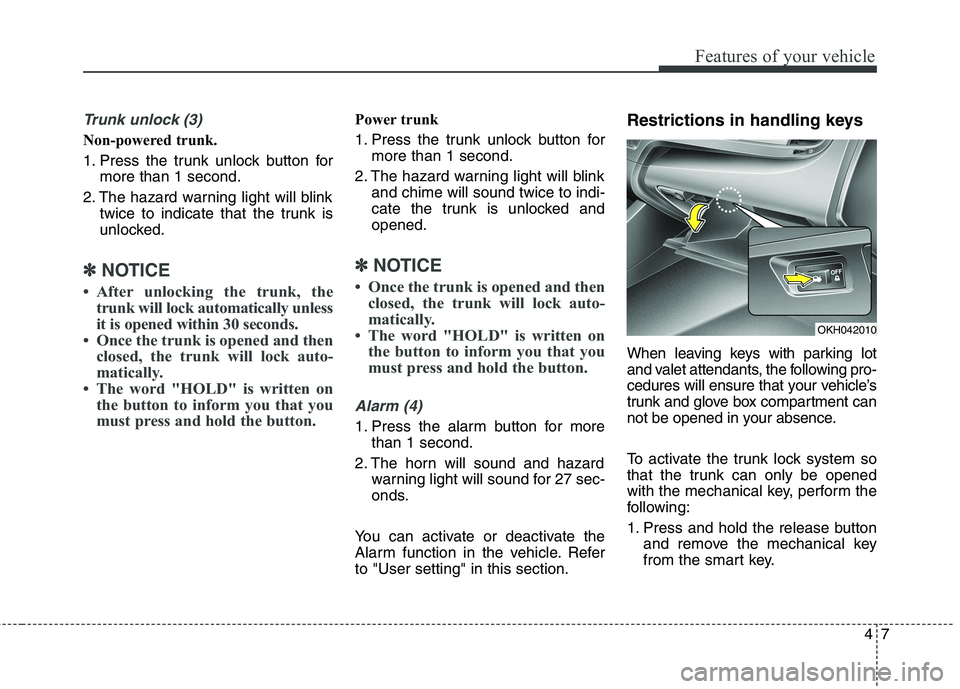
Alarm function in the vehicle. Referto "User setting" in this section. Restrictions in handling keys
When leaving keys with parking lot
and valet attendants, the following pro-
cedures will ensure that your vehicle’s
trunk and glove box compartment can
not be opened in your absence.
To activate the trunk lock system so
that the trunk can only be opened
with the mechanical key, perform the
following:
1. Press and hold the release button
and remove the mechanical key
from the smart key.
OKH042010
Page 111 of 486
Features of your vehicle
32
4
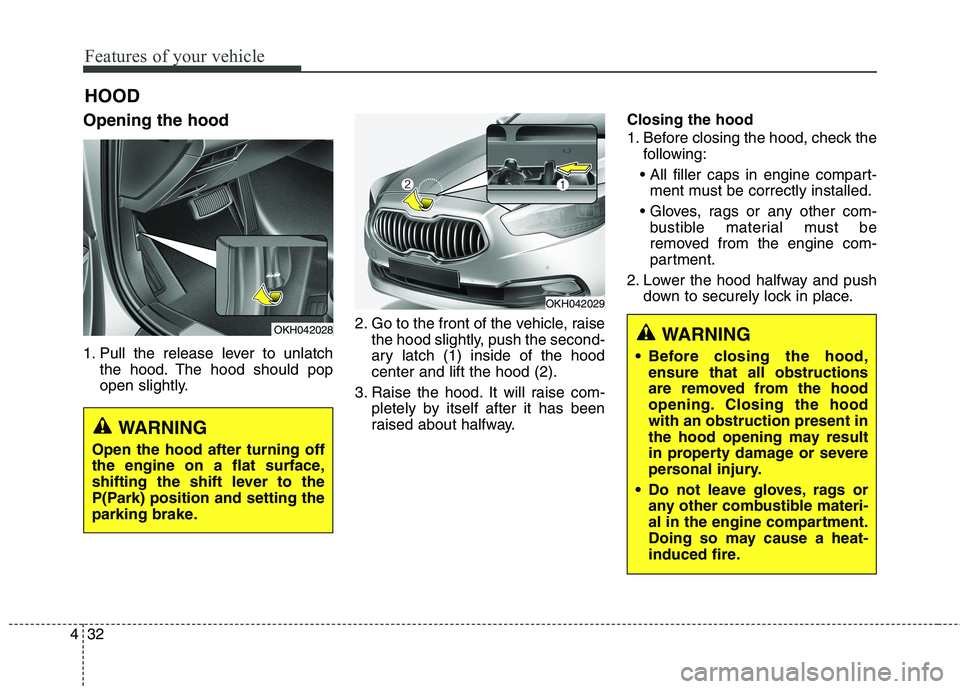
Opening the hood
1. Pull the release lever to unlatch
the hood. The hood should pop
open slightly. 2. Go to the front of the vehicle, raise
the hood slightly, push the second-
ary latch (1) inside of the hoodcenter and lift the hood (2).
3. Raise the hood. It will raise com- pletely by itself after it has been
raised about halfway. Closing the hood
1. Before closing the hood, check the
following:
ment must be correctly installed.
bustible material must be
removed from the engine com-
partment.
2. Lower the hood halfway and push down to securely lock in place.
HOOD
OKH042028
OKH042029
WARNING
Before closing the hood, ensure that all obstructions
are removed from the hood
opening. Closing the hoodwith an obstruction present in
the hood opening may result
in property damage or severe
personal injury.
Do not leave gloves, rags or any other combustible materi-
al in the engine compartment.
Doing so may cause a heat-
induced fire.
WARNING
Open the hood after turning off
the engine on a flat surface,
shifting the shift lever to the
P(Park) position and setting the
parking brake.
Page 119 of 486
Features of your vehicle
40
4
Resetting the sunroof
Whenever the vehicle battery is dis- connected or discharged, or related
fuse is blown, you must reset your
sunroof system as follows:
1. Turn the engine start/stop button
to the ON position and close the
sunroof completely.
2. Release the control lever.
3. Pull and hold the control lever downward until the sunroof tilts
and slightly moves up and down.
Then, release the lever.
4. Pull and hold the control lever downward until the sunroof is
operated as follows;
TILT DOWN SLIDE OPEN
SLIDE CLOSE
Then, release the control lever.
When this is complete, the sunroof system is reset.CAUTION
If the sunroof is not reset when the vehicle battery is discon-nected or discharged, or related fuse is blown, the sunroof mayoperate improperly.
Page 123 of 486

Features of your vehicle
44
4
Inside rearview mirror
Adjust the rearview mirror to center
on the view through the rear window.
Make this adjustment before you
start driving.Electric chromic mirror (ECM)
The electric chromic mirror automati- cally controls the glare from the head-
lights of the car behind you in night-
time or low light driving conditions. Thesensor mounted in the mirror senses
the light level around the vehicle, andautomatically controls the headlight
glare from vehicles behind you.
When the engine is running, the
glare is automatically controlled by
the sensor mounted in the rearview
mirror. Whenever the shift lever is shifted
into R (Reverse), the mirror will auto-
matically go to the brightest setting in
order to improve the drivers view
behind the vehicle.
MIRRORS
CAUTION
When cleaning the mirror, use a
paper towel or similar materialdampened with glass cleaner. Do not spray glass cleanerdirectly on the mirror as thatmay cause the liquid cleaner toenter the mirror housing.WARNING - Rear visibility
Do not place objects in the rear
seat or cargo area which would
interfere with your vision
through the rear window.
WARNING
Do not modify the inside mirror
and don’t install a wide mirror. It
could result in injury, during an
accident or deployment of the
air bag.
OKH042291L
Sensor
Page 125 of 486
Features of your vehicle
46
4
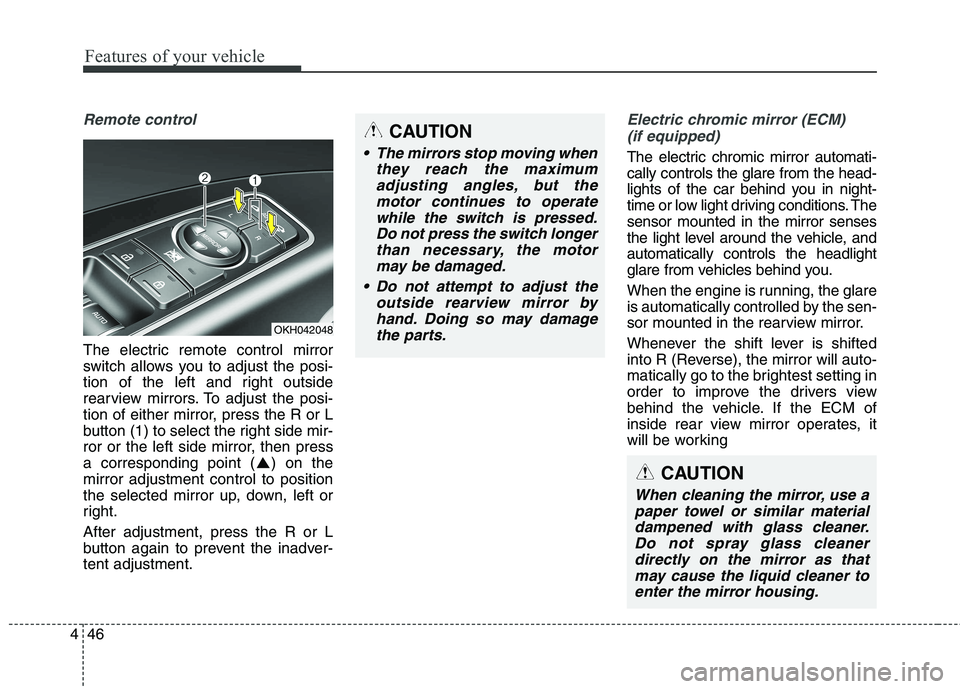
Remote control
The electric remote control mirror
switch allows you to adjust the posi-
tion of the left and right outside
rearview mirrors. To adjust the posi-
tion of either mirror, press the R or L
button (1) to select the right side mir-
ror or the left side mirror, then press
a corresponding point ( ) on themirror adjustment control to position
the selected mirror up, down, left or
right. After adjustment, press the R or L
button again to prevent the inadver-tent adjustment.
Electric chromic mirror (ECM)
(if equipped)
The electric chromic mirror automati- cally controls the glare from the head-
lights of the car behind you in night-
time or low light driving conditions. Thesensor mounted in the mirror senses
the light level around the vehicle, andautomatically controls the headlight
glare from vehicles behind you.
When the engine is running, the glare
is automatically controlled by the sen-
sor mounted in the rearview mirror.
Whenever the shift lever is shifted
into R (Reverse), the mirror will auto-
matically go to the brightest setting in
order to improve the drivers view
behind the vehicle. If the ECM of
inside rear view mirror operates, it
will be working
OKH042048
CAUTION
The mirrors stop moving when they reach the maximumadjusting angles, but the motor continues to operatewhile the switch is pressed.Do not press the switch longer than necessary, the motormay be damaged.
Do not attempt to adjust the outside rearview mirror byhand. Doing so may damage the parts.
CAUTION
When cleaning the mirror, use apaper towel or similar materialdampened with glass cleaner. Do not spray glass cleanerdirectly on the mirror as thatmay cause the liquid cleaner toenter the mirror housing.
Page 130 of 486
451
Features of your vehicle
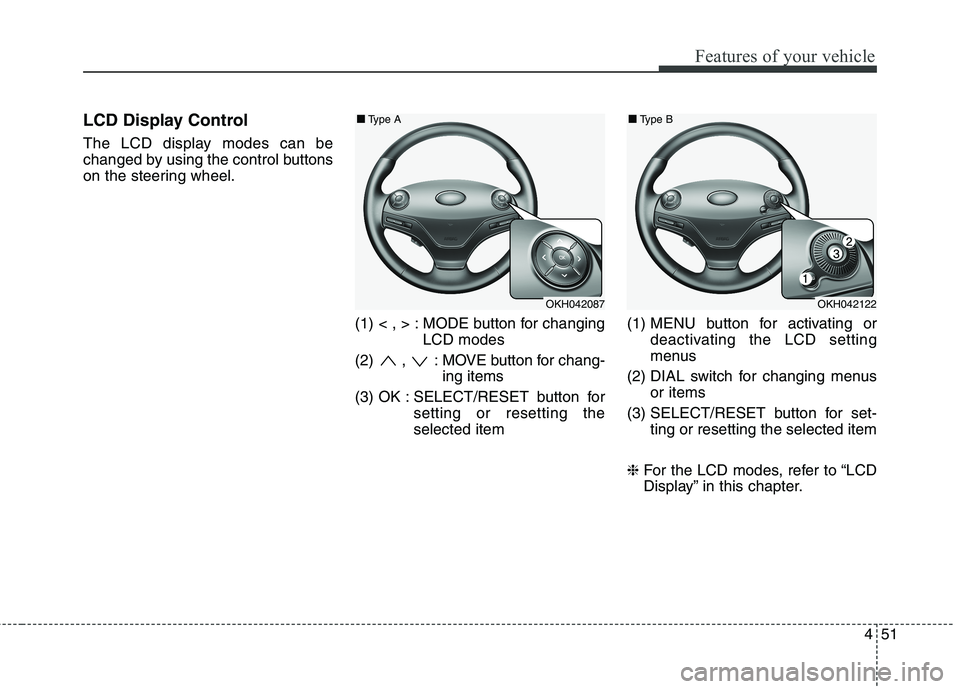
LCD Display Control
The LCD display modes can be
changed by using the control buttons
on the steering wheel.(1) < , > : MODE button for changingLCD modes
(2) , : MOVE button for chang- ing items
(3) OK : SELECT/RESET button for setting or resetting theselected item (1) MENU button for activating or
deactivating the LCD setting
menus
(2) DIAL switch for changing menus or items
(3) SELECT/RESET button for set- ting or resetting the selected item
❈ For the LCD modes, refer to “LCD
Display” in this chapter.
OKH042087
■
■
Type A
OKH042122
■
■
Type B
Page 135 of 486

Features of your vehicle
56
4
LCD Modes
LCD DISPLAY (TYPE A)
Modes SymbolExplanation
Trip Computer This mode displays driving information like the tripmeter, fuel economy, and so on.
For more details, refer to “Trip Computer” in this chapter.
User SettingsOn this mode, you can change settings of the doors, lamps, and so on.
SCC/LDWS
(if equipped)
This mode displays the state of the Advanced Smart Cruise Control (ASCC) and Lane
Departure Warning System (LDWS).
For more details, refer to “Advanced Smart Cruise Control (ASCC)” and “Lane Departure
Warning System (LDWS)” in chapter 5.
A/V
(if equipped)This mode displays the state of the A/V system.
Tu r n B y Tu r n (if equipped)This mode displays the state of the navigation.
❈ For controlling the LCD modes, refer to "LCD Display Control" in this chapter.
Page 136 of 486

457
Features of your vehicle
User Settings Mode
Description
On this mode, you can change set-
ting of the doors, lamps, Head-Up
Display (HUD), and so on.
Door
Auto Door Lock
Off:The auto door lock operation willbe deactivated.
Speed:
All doors will be automaticallylocked when the vehicle speed
exceeds 15km/h (9.3mph).
Shift Lever:
All doors will be automaticallylocked if the automatic transmis-
sion shift lever is shifted from the P
(Park) position to the R (Reverse),
N (Neutral), or D (Drive) position. Auto Door Unlock
Off:
The auto door unlock operation willbe canceled.
Power Off:
All doors will be automaticallyunlocked when the Engine Star/Stop Button is set to the OFF position.
Shift Lever: All doors will be automatically
unlocked if the automatic transmis-
sion shift lever is shifted to the P
(Park) position.
Driver Door Unlock: All doors will be automatically
unlocked if the driver's door is
unlocked.
OKH042908