Setting KIA QUORIS 2014 User Guide
[x] Cancel search | Manufacturer: KIA, Model Year: 2014, Model line: QUORIS, Model: KIA QUORIS 2014Pages: 486, PDF Size: 31.74 MB
Page 137 of 486

Features of your vehicle
58
4
Lamp
Head Lamp Delay (Headlight Escort)
On:
The headlight escort function will
be activated.
Off:
The headlight escort function will
be deactivated.
For more details, refer to “Lighting” in
this chapter.
Welcome Light
On: The welcome light function will be
activated.
Off:
The welcome light function will be
deactivated.
For more details, refer to “Welcome
System” in this chapter. Travel Mode (Traffic Change)
(if equipped)
On:
The traffic change function will be
activated.
Off: The traffic change function will be
deactivated.
For more details, refer to “Lighting” in
this chapter.
HUD (if equipped)
Display Height Adjust the height of the HUD image
on the windshield glass (1 to 20 level).
Illumination Adjust the intensity of the HUD illu-
mination (1 to 20 level).
Speedometer Color Choose the speedometer color of the
HUD (White, Orange, Green).
Speedometer Size
Choose the font size of the HUD
(Large, Medium, Small).
Contents Settings
Activate or deactivate each contents
of the HUD (TBT, SCC, LDWS). ❈ TBT : Turn By Turn
SCC : Smart Cruise Control
LDWS : Lane Departure Warning System
Page 138 of 486
459
Features of your vehicle
Settings
One Touch Turn Lamp
Off:The one touch turn lamp function
will be deactivated.
3, 5, 7 Flashing :
The lane change signals will blink
3, 5, or 7 times when the turn sig-
nal lever is moved slight.
For more details, refer to “Lighting” in
this chapter.
Seat Easy Access
On: The driver’s seat will automatically
move forward or rearward for the
driver to enter or exit the vehicle
comfortably.
Off:
The seat easy access function will
be deactivated.
For more details, refer to “Seat” inchapter 3. Steering Easy Access
On:
The steering wheel will automati-
cally move forward or rearward for
the driver to enter or exit the vehi-
cle comfortably.
Off:
The steering easy access function
will be deactivated.
For more details, refer to “Steering
Wheel” in this chapter.
Welcome Sound
On: The welcome sound operates
when the instrument cluster is
turned on.
Off:
The welcome sound function will
be deactivated. AVG Fuel Eco Reset
Auto Reset:
The average fuel economy will reset automatically when refueling.
Manual Reset:
The average fuel economy will not
reset automatically whenever refu-eling.
For more details, refer to “Trip
Computer” in this chapter.
AVSM (if equipped)
On: The AVSM system will be activat- ed.
Off: The AVSM system will be deacti-
vated.
For more details, refer to “Advanced
Vehicle Safety Management (AVSM)
System” in chapter 5. ❈ AVSM: Advanced Vehicle Safety Management
Page 140 of 486

461
Features of your vehicle
LCD MenusLCD DISPLAY (TYPE B)
MenusExplanation
Vehicle Settings
On this mode, you can change settings of the doors, lamps, seats, and so on.
Auto Door Lock: Off / Speed / Shift Lever
Auto Door Unlock: Off / Power Off / Shift Lever / Driver Door Unlock
Seat Easy Access: On / Off
Steering Easy Access: On / Off
Head Lamp Delay: On / Off
Welcome Light: On / Off
One Touch Turn Lamp: Off / 3 Flashing / 5 Flashing / 7 Flashing
Travel Mode: On / Off
AVSM (if equipped): On / Off
HUD Settings
(if equipped)
On this mode, you can change settings of the HUD.
Display Height: 1 to 20 level
Illumination: 1 to 20 level
Speedometer Color: White / Orange / Green
Speedometer size: Large / Medium / Small
Contents Settings: TBT / SCC / LDWS
Page 141 of 486
Features of your vehicle
62
4
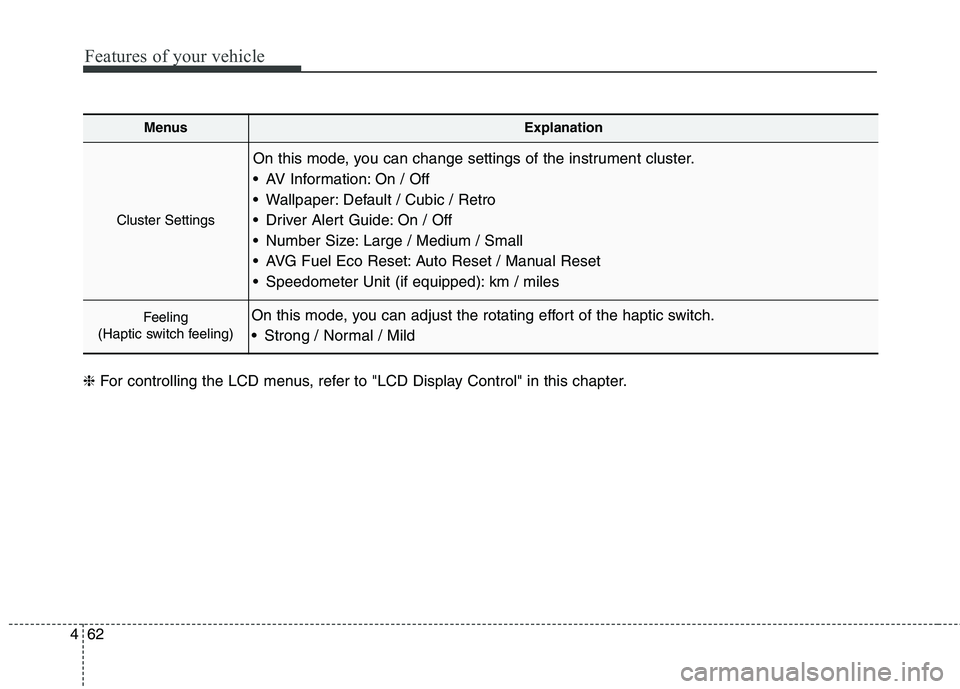
MenusExplanation
Cluster Settings
On this mode, you can change settings of the instrument cluster.
AV Information: On / Off
Wallpaper: Default / Cubic / Retro
Driver Alert Guide: On / Off
Number Size: Large / Medium / Small
AVG Fuel Eco Reset: Auto Reset / Manual Reset
Speedometer Unit (if equipped): km / miles
Feeling
(Haptic switch feeling)On this mode, you can adjust the rotating effort of the haptic switch.
Strong / Normal / Mild
❈ For controlling the LCD menus, refer to "LCD Display Control" in this chapter.
Page 142 of 486

463
Features of your vehicle
Vehicle SettingsDoor
Auto Door Lock
Off:The auto door lock operation willbe deactivated.
Speed:
All doors will be automaticallylocked when the vehicle speed
exceeds 15km/h (9.3mph).
Shift Lever:
All doors will be automaticallylocked if the automatic transmis-
sion shift lever is shifted from the P
(Park) position to the R (Reverse),
N (Neutral), or D (Drive) position. Auto Door Unlock
Off:
The auto door unlock operation willbe canceled.
Power Off:
All doors will be automaticallyunlocked when the Engine Star/Stop Button is set to the OFF position.
Shift Lever: All doors will be automatically
unlocked if the automatic transmis-
sion shift lever is shifted to the P
(Park) position.
Driver Door Unlock: All doors will be automatically
unlocked if the driver's door is
unlocked.
OKH042912
Page 144 of 486

465
Features of your vehicle
AVSM (if equipped)
On:The AVSM system will be activat- ed.
Off: The AVSM system will be deacti-
vated.
For more details, refer to “Advanced
Vehicle Safety Management (AVSM)
System” in chapter 5. ❈ AVSM: Advanced Vehicle Safety ManagementHUD Settings (if equipped)
Display Height Adjust the height of the HUD image
on the windshield glass (1 to 20 level).
Illumination Adjust the intensity of the HUD illu-
mination (1 to 20 level). Speedometer Color Choose the speedometer color of the
HUD (White, Orange, Green).
Speedometer Size
Choose the font size of the HUD
(Large, Medium, Small).
Contents Settings
Activate or deactivate each contents
of the HUD (TBT, SCC, LDWS). ❈
TBT : Turn By Turn
SCC : Smart Cruise Control
LDWS : Lane Departure Warning System
✽✽NOTICE
If you select the TBT as contents of
the HUD, the TBT information on
the instrument cluster will not be
displayed.
OKH042911
Page 145 of 486
Features of your vehicle
66
4
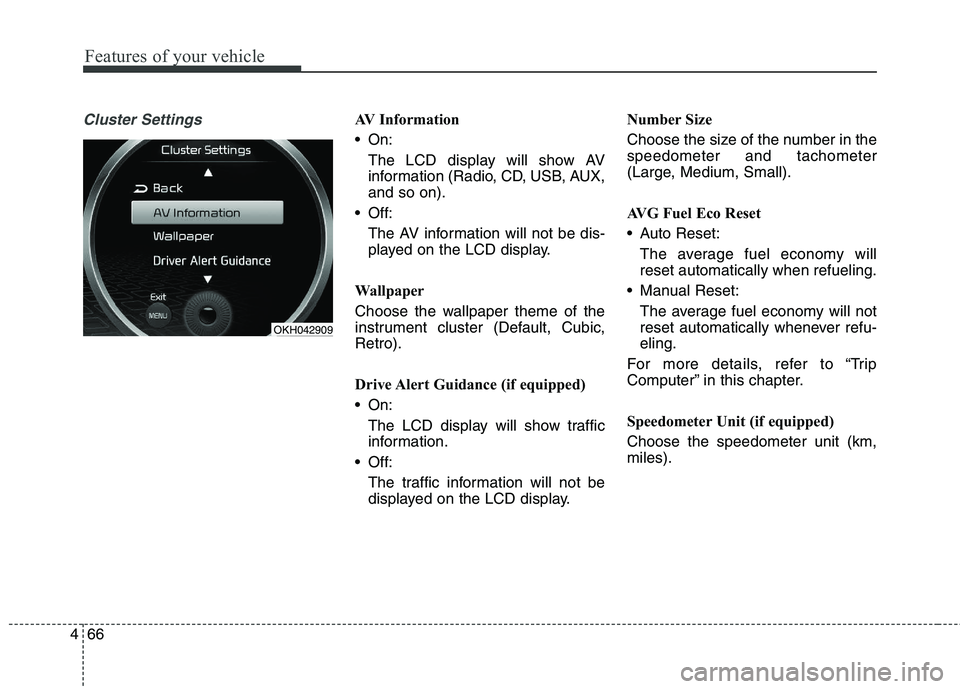
Cluster SettingsAV Information
On:
The LCD display will show AV
information (Radio, CD, USB, AUX,and so on).
Off: The AV information will not be dis-
played on the LCD display.
Wallpaper
Choose the wallpaper theme of the
instrument cluster (Default, Cubic,Retro).
Drive Alert Guidance (if equipped)
On: The LCD display will show traffic
information.
Off:
The traffic information will not be
displayed on the LCD display. Number Size
Choose the size of the number in the speedometer and tachometer
(Large, Medium, Small).
AVG Fuel Eco Reset
Auto Reset:
The average fuel economy will reset automatically when refueling.
Manual Reset: The average fuel economy will not
reset automatically whenever refu-eling.
For more details, refer to “Trip
Computer” in this chapter.
Speedometer Unit (if equipped) Choose the speedometer unit (km, miles).
OKH042909
Page 158 of 486

479
Features of your vehicle
Automatic reset
To make the average fuel economy
be reset automatically whenever refu-
eling, select the “Auto Reset” mode in
"User Settings" mode (Type A) or
"Cluster Settings" menu (Type B) of
the LCD display. ❈For more defails, refer to "LCD
Display" in this chapter.
Under “Auto Reset” mode, the aver-
age fuel economy will be cleared to
zero (---) when the vehicle speed
exceeds 1 km/h after refueling morethan 6 liters (1.6 gallons).
✽✽ NOTICE
The average fuel economy is not dis-
played for more accurate calculation
if the vehicle does not drive more
than 10 seconds or 50 meters (0.03
miles) since the ignition switch or
Engine Start/Stop button is turned
to ON.
Instant Fuel Economy
This mode displays the instant fuel economy during the last few sec-
onds when the vehicle speed ismore than 10 km/h (6.2 MPH).
- Fuel economy range: 0.0 ~ 20.0L/100km or 0.0 ~ 50.0 MPG
Page 173 of 486
![KIA QUORIS 2014 User Guide Features of your vehicle
94
4
AUTO HOLD Indicator
Light (if equipped)
This indicator light illuminates:
[White] When you activate the auto hold system by pressing the AUTO
HOLD button.
[Green] Whe](/img/2/57974/w960_57974-172.png "KIA QUORIS 2014 User Guide Features of your vehicle
94
4
AUTO HOLD Indicator
Light (if equipped)
This indicator light illuminates:
[White] When you activate the auto hold system by pressing the AUTO
HOLD button.
[Green] Whe")
Features of your vehicle
94
4
AUTO HOLD Indicator
Light (if equipped)
This indicator light illuminates:
[White] When you activate the auto hold system by pressing the AUTO
HOLD button.
[Green] When you stop the vehicle completely by depressing the
brake pedal with the auto hold sys-
tem activated.
[Yellow] When there is a malfunc- tion with the auto hold system.
In this case, we recommend that
you have the vehicle inspected by
an authorized Kia dealer.
❈ For more details, refer to “Auto
Hold” in chapter 5.
Lane Departure Warning
System (LDWS) Indicator Light (if equipped)
This indicator light illuminates:
[Green] When you activate the lane departure warning system by
pressing the LDWS button.
[Yellow] When there is a malfunc- tion with the lane departure warn-ing system.
In this case, we recommend that
you have the vehicle inspected by
an authorized Kia dealer.
❈ For more details, refer to “Lane
Departure Warning System
(LDWS)” in chapter 5.
Advanced Vehicle Safety
Management (AVSM) OFF Indicator Light (if equipped)
This indicator light illuminates:
Once you set the Engine Start/Stop Button to the ON position.
- It illuminates for approximately 3seconds and then goes off.
When you deactivate the AVSM sys- tem by setting on the LCD display.
❈ For more details, refer to “LCD
Display” in this chapter.
If this indicator stays on when AVSM
OFF is not selected, the AVSM may
have malfunctioned.
In this case, we recommend that you
have the vehicle inspected by an
authorized Kia dealer. ❈ For more details, refer to “Advanced
Vehicle Safety Management
(AVSM) System” in chapter 5.
AUTO
HOLDAVSM OFF
Page 176 of 486

497
Features of your vehicle
Head Up Display ON/OFF
The head up display is always acti-vated whenever you set the Engine
Start/Stop Button to the ON posi-tion.
To deactivate the head up display, press the HUD button. If you press
the HUD button again, the head up
display will be activated. Head Up Display Information
1. Turn By Turn navigation information
2. Road signs
3. Speedometer
4. Cruise setting speed
5. Smart Cruise Control (SCC) infor-
mation
6. Lane Departure Warning System (LDWS) information
7. Blind Spot Detection (BSD) sys- tem information
8. Warning lights (Low fuel, BSD)CAUTION
When replacing the front wind- shield glass of the vehiclesequipped with the head up dis- play, replace it with a windshieldglass designed for the head updisplay operation. Otherwise, duplicated images may be dis-played on the windshield glass.
OKH042165OKH042167