ECO mode KIA QUORIS 2015 Owners Manual
[x] Cancel search | Manufacturer: KIA, Model Year: 2015, Model line: QUORIS, Model: KIA QUORIS 2015Pages: 486, PDF Size: 35.55 MB
Page 1 of 486
Kia, THE COMPANY
Enjoy your vehicle and Kia’s “Family-like Care” experience!
Thank you for becoming the owner of a new Kia vehicle.
As a global car manufacturer focused on building high-quality, value for
money prices, Kia Motors is dedicated to providing you with a customer
service experience that exceeds your expectations.
At all of our Kia dealerships you will be treated with warmth, hospitality
and professionalism by people who care based on our “Family-like Care”
promise.
All information contained in this Owner’s Manual is accurate at the
time of publication. However, Kia reserves the right to make changes
at any time so that our policy of continual product improvement can be
carried out.
This manual applies to all Kia models and includes descriptions and
explanations of optional as well as standard equipment. As a result, you
may encounter material in this manual that is not applicable to your
specific Kia vehicle.
Page 2 of 486
iThank you for choosing a Kia vehicle.
This manual will familiarize you with operational, maintenance and safety information about your new
vehicle. It is
supplemented by a Warranty and Maintenance book that provides important information on all warranties regardi ng
your vehicle. Kia urges you to read these publications carefully and follow the recommendations to help ass ure
enjoyable and safe operation of your new vehicle.
Kia offers a great variety of options, components and features for its various models. Therefore, some of the equip-
ment described in this manual, along with the various illustrations, may not be applicable to your partic ular vehicle.
The information and specifications provided in this manual were accurate at the time of printing. Kia reserves the
right to discontinue or change specifications or design at any time without notice and without incurring any obli ga-
tion. If you have questions, always check with your authorized Kia dealer.
Kia assures you of our continuing interest in your motoring pleasure and satisfaction in your Kia vehicle.
© 2014 Kia MOTORS Corp.
All rights reserved. Reproduction by any means, electronic or mechanical, including photocopying, recording, or by
any information storage and retrieval system or translation in whole or part is not permitted without writ ten author-
ization from Kia MOTORS Corporation.
Printed in Korea
FF oo rreeww oorrdd
Page 137 of 486
Features of your vehicle
56
4
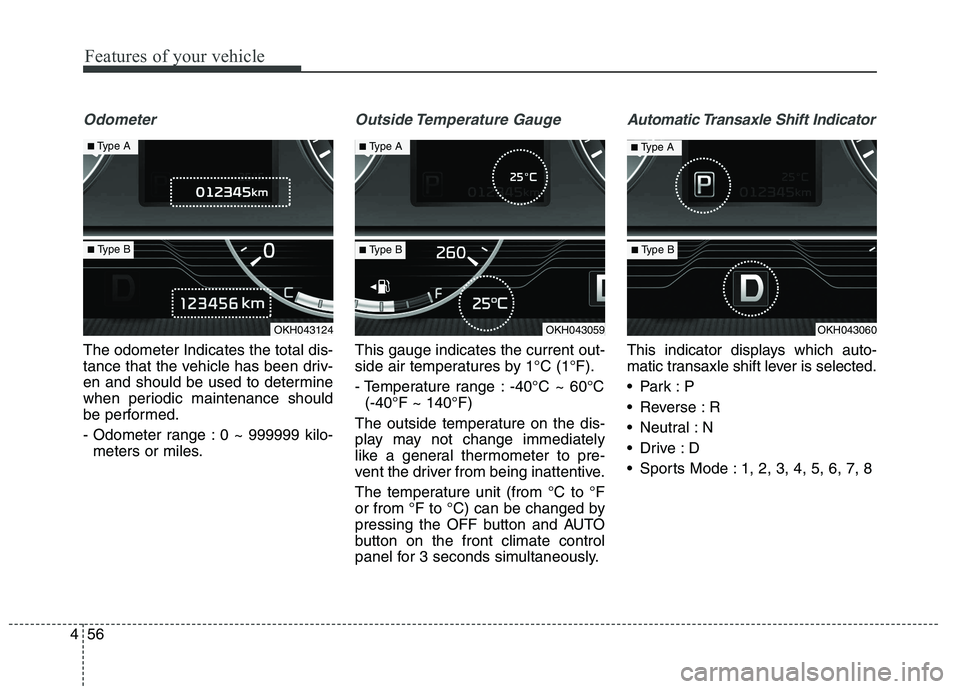
Odometer
The odometer Indicates the total dis-
tance that the vehicle has been driv-
en and should be used to determine
when periodic maintenance should
be performed.
- Odometer range : 0 ~ 999999 kilo-
meters or miles.
Outside Temperature Gauge
This gauge indicates the current out-
side air temperatures by 1°C (1°F).
- Temperature range : -40°C ~ 60°C(-40°F ~ 140°F)
The outside temperature on the dis-
play may not change immediately
like a general thermometer to pre-
vent the driver from being inattentive.
The temperature unit (from °C to °F
or from °F to °C) can be changed by
pressing the OFF button and AUTO
button on the front climate control
panel for 3 seconds simultaneously.
Automatic Transaxle Shift Indicator
This indicator displays which auto-
matic transaxle shift lever is selected.
Reverse : R
Neutral : N
Sports Mode : 1, 2, 3, 4, 5, 6, 7, 8
OKH043124OKH043059OKH043060
■ Type A
■ Type B
■Type A■Type A
■ Type B■ Type B
Page 138 of 486
457
Features of your vehicle
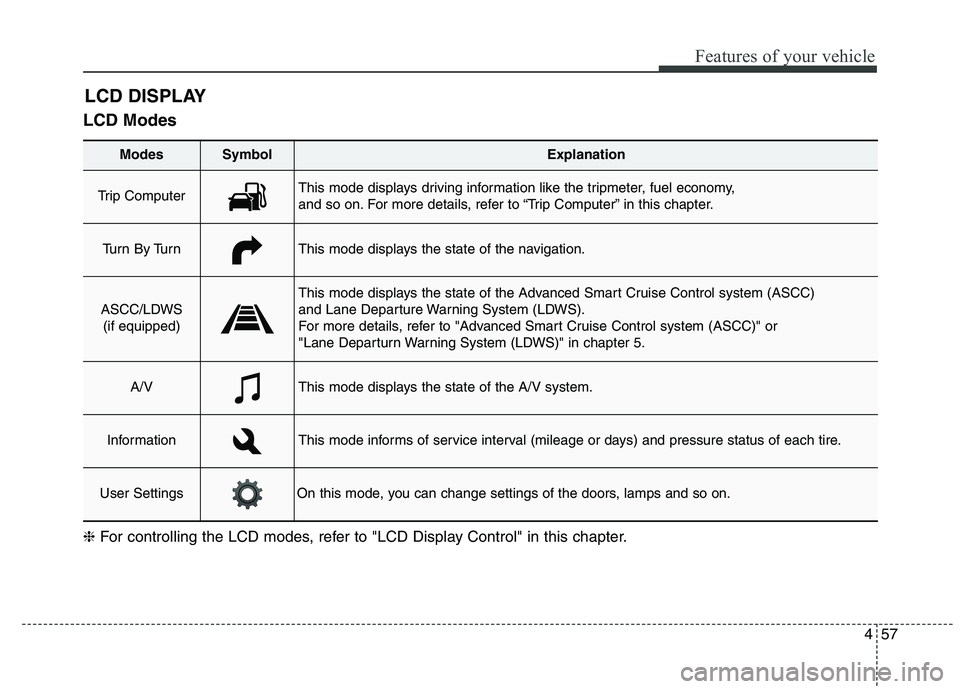
LCD ModesLCD DISPLAY
Modes SymbolExplanation
Trip Computer This mode displays driving information like the tripmeter, fuel economy,
and so on. For more details, refer to “Trip Computer” in this chapter.
Tu r n B y Tu r nThis mode displays the state of the navigation.
ASCC/LDWS
(if equipped)
This mode displays the state of the Advanced Smart Cruise Control system (ASCC)
and Lane Departure Warning System (LDWS).
For more details, refer to "Advanced Smart Cruise Control system (ASCC)" or
"Lane Departurn Warning System (LDWS)" in chapter 5.
A/VThis mode displays the state of the A/V system.
InformationThis mode informs of service interval (mileage or days) and pressure status of each tire.
User SettingsOn this mode, you can change settings of the doors, lamps and so on.
❈ For controlling the LCD modes, refer to "LCD Display Control" in this chapter.
Page 139 of 486
Features of your vehicle
58
4
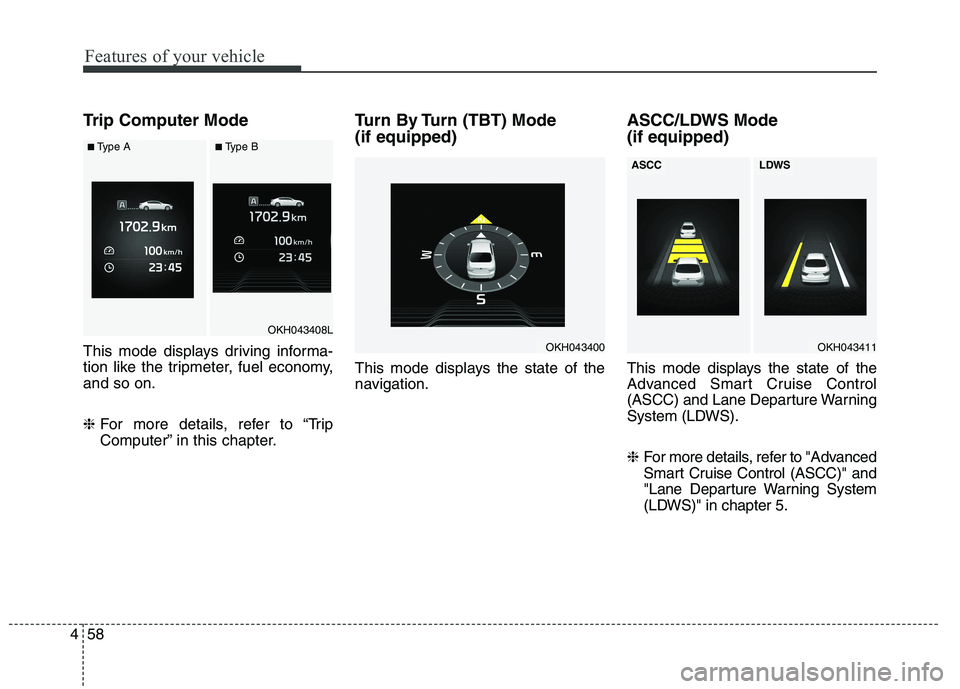
Trip Computer Mode
This mode displays driving informa-
tion like the tripmeter, fuel economy,and so on. ❈ For more details, refer to “Trip
Computer” in this chapter. Turn By Turn (TBT) Mode (if equipped)
This mode displays the state of the
navigation.
ASCC/LDWS Mode (if equipped)
This mode displays the state of the
Advanced Smart Cruise Control
(ASCC) and Lane Departure Warning
System (LDWS). ❈
For more details, refer to "Advanced
Smart Cruise Control (ASCC)" and
"Lane Departure Warning System
(LDWS)" in chapter 5.
OKH043400
OKH043408L
■Type A■Type B
OKH043411
ASCCLDWS
Page 140 of 486
459
Features of your vehicle
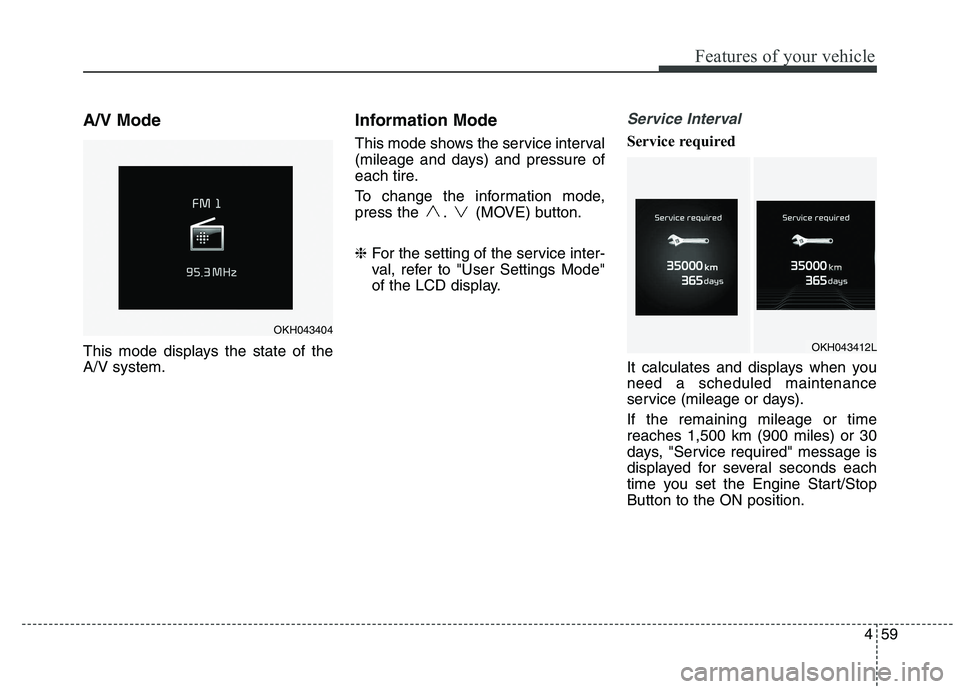
A/V Mode
This mode displays the state of the A/V system.Information Mode
This mode shows the service interval
(mileage and days) and pressure of
each tire.
To change the information mode,
press the . (MOVE) button. ❈
For the setting of the service inter-
val, refer to "User Settings Mode"
of the LCD display.Service Interval
Service required
It calculates and displays when you need a scheduled maintenance
service (mileage or days). If the remaining mileage or time reaches 1,500 km (900 miles) or 30
days, "Service required" message is
displayed for several seconds each
time you set the Engine Start/StopButton to the ON position.
OKH043404
OKH043412L
Page 141 of 486
Features of your vehicle
60
4
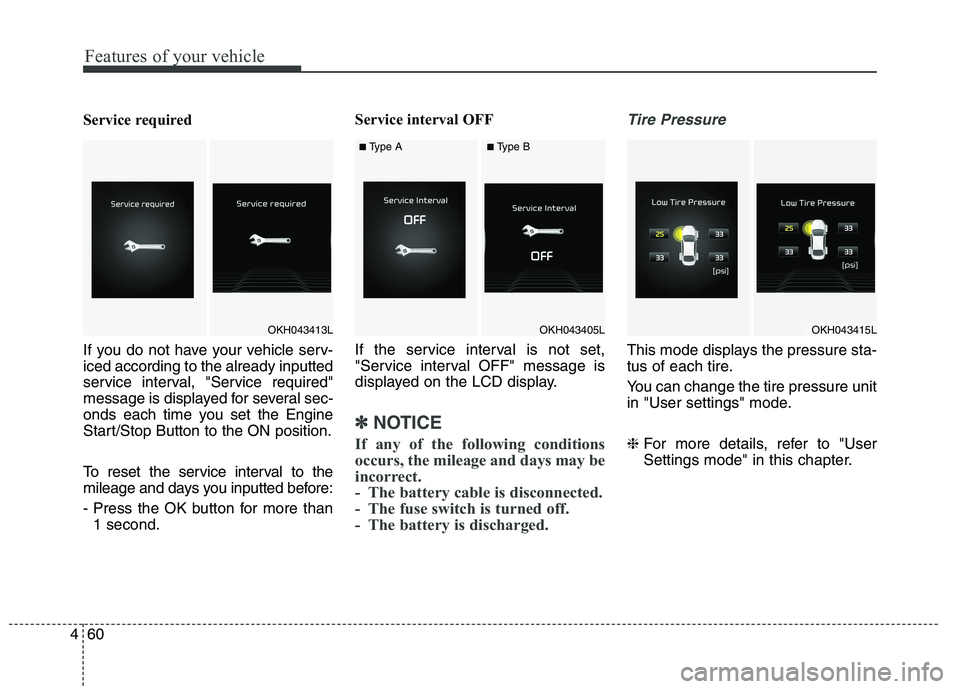
Service required
If you do not have your vehicle serv- iced according to the already inputted
service interval, "Service required"
message is displayed for several sec-
onds each time you set the Engine
Start/Stop Button to the ON position.
To reset the service interval to the
mileage and days you inputted before:
- Press the OK button for more than
1 second. Service interval OFF
If the service interval is not set,
"Service interval OFF" message is
displayed on the LCD display.
✽✽
NOTICE
If any of the following conditions
occurs, the mileage and days may be
incorrect.
- The battery cable is disconnected.
- The fuse switch is turned off.
- The battery is discharged.
Tire Pressure
This mode displays the pressure sta-
tus of each tire.
You can change the tire pressure unit
in "User settings" mode. ❈ For more details, refer to "User
Settings mode" in this chapter.
OKH043413LOKH043415LOKH043405L
■Type A■Type B
Page 155 of 486
Features of your vehicle
74
4
Overview
Description
The trip computer is a microcomput-
er-controlled driver information sys-
tem that displays information related
to driving.
✽✽
NOTICE
Some driving information stored in
the trip computer (for example
Average Vehicle Speed) resets if the
battery is disconnected.
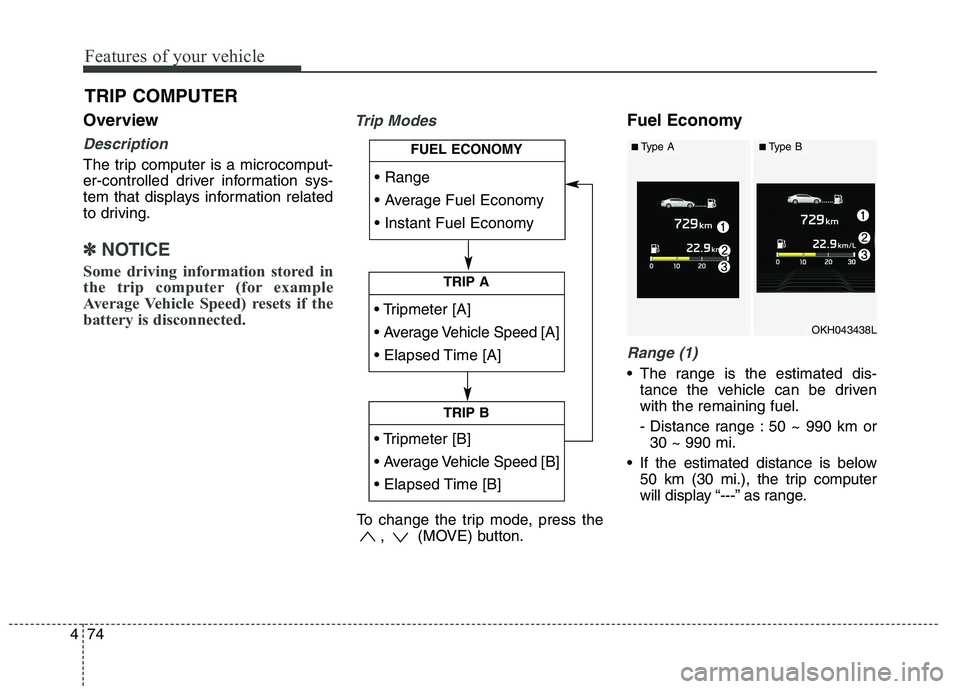
Trip ModesFuel Economy
Range (1)
The range is the estimated dis- tance the vehicle can be driven with the remaining fuel.
- Distance range : 50 ~ 990 km or30 ~ 990 mi.
If the estimated distance is below 50 km (30 mi.), the trip computer
will display “---” as range.
TRIP COMPUTER
TRIP A
TRIP B
FUEL ECONOMY
To change the trip mode, press the , (MOVE) button.
OKH043438L
■Type A■Type B
Page 156 of 486
475
Features of your vehicle
✽✽NOTICE
If the vehicle is not on level ground or the battery power has been
interrupted, the range function
may not operate correctly.
The range may differ from the actual driving distance as it is an
estimate of the available driving
distance.
The trip computer may not register additional fuel if less than 6 liters
(1.6 gallons) of fuel are added to the
vehicle.
The fuel economy and range may vary significantly based on driving
conditions, driving habits, and con-
dition of the vehicle.Average Fuel Economy (2)
The average fuel economy is calcu-lated by the total driving distance and fuel consumption since the last
average fuel economy reset.
- Fuel economy range: 0.0 ~ 99.9L/100km or MPG
The average fuel economy can be reset both manually and automati-
cally.
Manual reset
To clear the average fuel economy
manually, press the OK (RESET) but-
ton on the steering wheel for more
than 1 second when the average fuel
economy is displayed. Automatic reset
To make the average fuel economy
be reset automatically whenever refu-
eling, select the “Auto Reset” mode in
User Setting menu of the LCD display
(Refer to “LCD Display”).
Under “Auto Reset” mode, the aver-
age fuel economy will be cleared to
zero (---) when the vehicle speed
exceeds 1 km/h after refueling morethan 6 liters (1.6 gallons).
✽✽
NOTICE
The average fuel economy is not dis-
played for more accurate calculation
if the vehicle does not drive more
than 300 meters (0.19 miles) since
the Engine Start/Stop button is
turned to ON.
Page 157 of 486
Features of your vehicle
76
4
Instant Fuel Economy (3)
This mode displays the instant fuel
economy during the last few sec-
onds when the vehicle speed ismore than 10 km/h (6.2 MPH).
- Fuel economy range: 0 ~ 20L/100km or 0 ~ 50 MPG Trip A/B
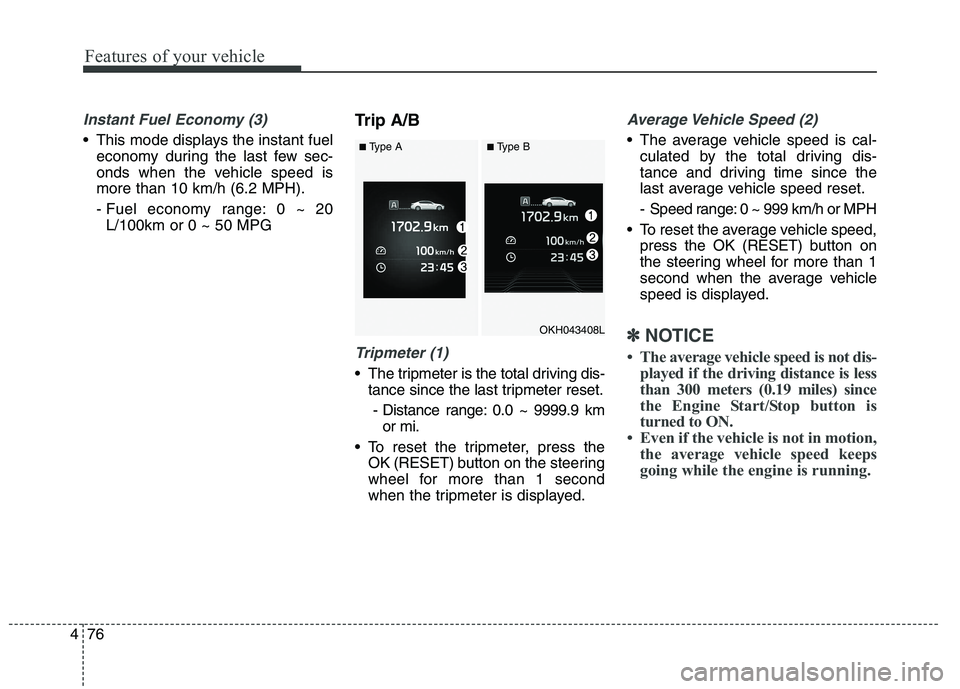
Tripmeter (1)
The tripmeter is the total driving dis-
tance since the last tripmeter reset.
- Distance range: 0.0 ~ 9999.9 km or mi.
To reset the tripmeter, press the OK (RESET) b utton on the steering
wheel for more than 1 second
when the tripmeter is displayed.
Average Vehicle Speed (2)
The average vehicle speed is cal- culated by the total driving dis-
tance and driving time since the
last average vehicle speed reset.
- Speed range: 0 ~ 999 km/h or MPH
To reset the average vehicle speed, press the OK (RESET) button on
the steering wheel for more than 1
second when the average vehicle
speed is displayed.
✽✽ NOTICE
The average vehicle speed is not dis- played if the driving distance is less
than 300 meters (0.19 miles) since
the Engine Start/Stop button is
turned to ON.
Even if the vehicle is not in motion, the average vehicle speed keeps
going while the engine is running.OKH043408L
■Type A■Type B