instrument panel KIA QUORIS 2016 User Guide
[x] Cancel search | Manufacturer: KIA, Model Year: 2016, Model line: QUORIS, Model: KIA QUORIS 2016Pages: 513, PDF Size: 30.14 MB
Page 207 of 513
Features of your vehicle
120
4
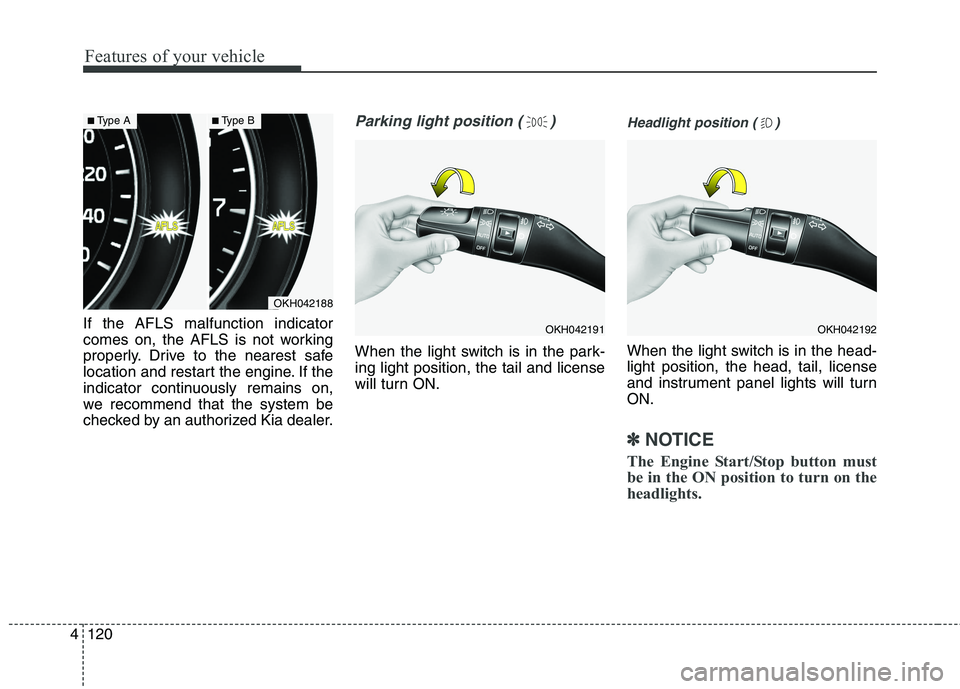
If the AFLS malfunction indicator
comes on, the AFLS is not working
properly. Drive to the nearest safe
location and restart the engine. If the
indicator continuously remains on,
we recommend that the system be
checked by an authorized Kia dealer.
Parking light position ( )
When the light switch is in the park- ing light position, the tail and license
will turn ON.
Headlight position ( )
When the light switch is in the head- light position, the head, tail, license
and instrument panel lights will turnON.
✽✽
NOTICE
The Engine Start/Stop button must
be in the ON position to turn on the
headlights.
OKH042188
■ Type A■Type B
OKH042191OKH042192
Page 209 of 513
Features of your vehicle
122
4
Turn signals and lane change signals
The Engine Start/Stop button must
be on for the turn signals to function.
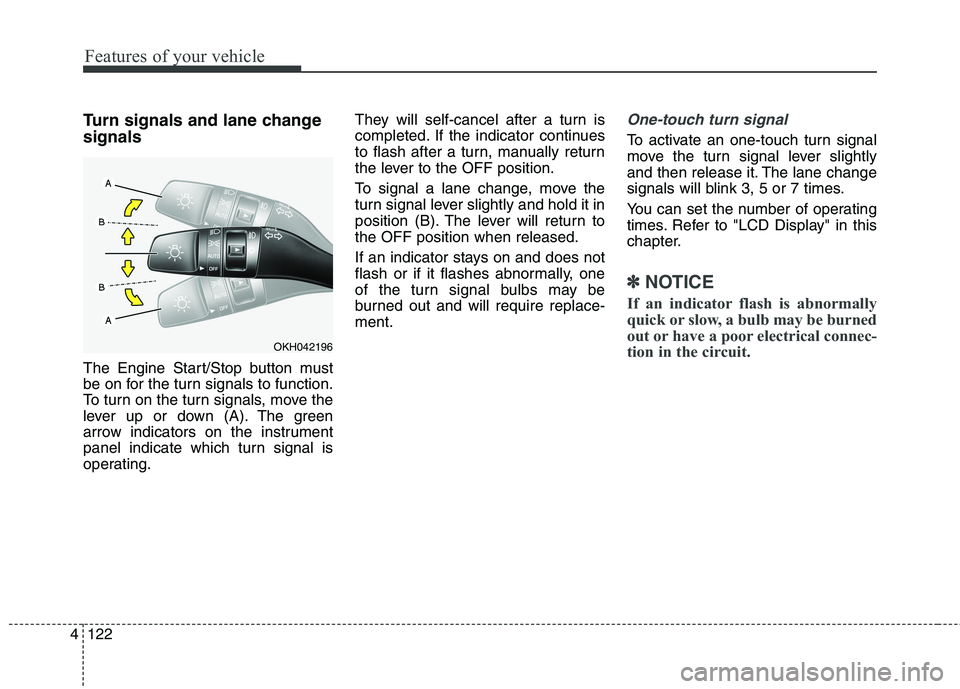
To turn on the turn signals, move the
lever up or down (A). The green
arrow indicators on the instrument
panel indicate which turn signal is
operating. They will self-cancel after a turn is
completed. If the indicator continues
to flash after a turn, manually return
the lever to the OFF position.
To signal a lane change, move the
turn signal lever slightly and hold it in
position (B). The lever will return tothe OFF position when released.
If an indicator stays on and does not
flash or if it flashes abnormally, one
of the turn signal bulbs may be
burned out and will require replace-ment.One-touch turn signal
To activate an one-touch turn signal
move the turn signal lever slightly
and then release it. The lane change
signals will blink 3, 5 or 7 times.
You can set the number of operating
times. Refer to "LCD Display" in this
chapter.
✽✽
NOTICE
If an indicator flash is abnormally
quick or slow, a bulb may be burned
out or have a poor electrical connec-
tion in the circuit.
OKH042196
Page 220 of 513
4133
Features of your vehicle
DEFROSTER
✽✽NOTICE
If you want to defrost and defog the
front windshield, refer to
“Windshield defrosting and defog-
ging” in this section.
Rear window defroster
The defroster heats the window to
remove frost, fog and thin ice from
the rear window, while the engine is
running.
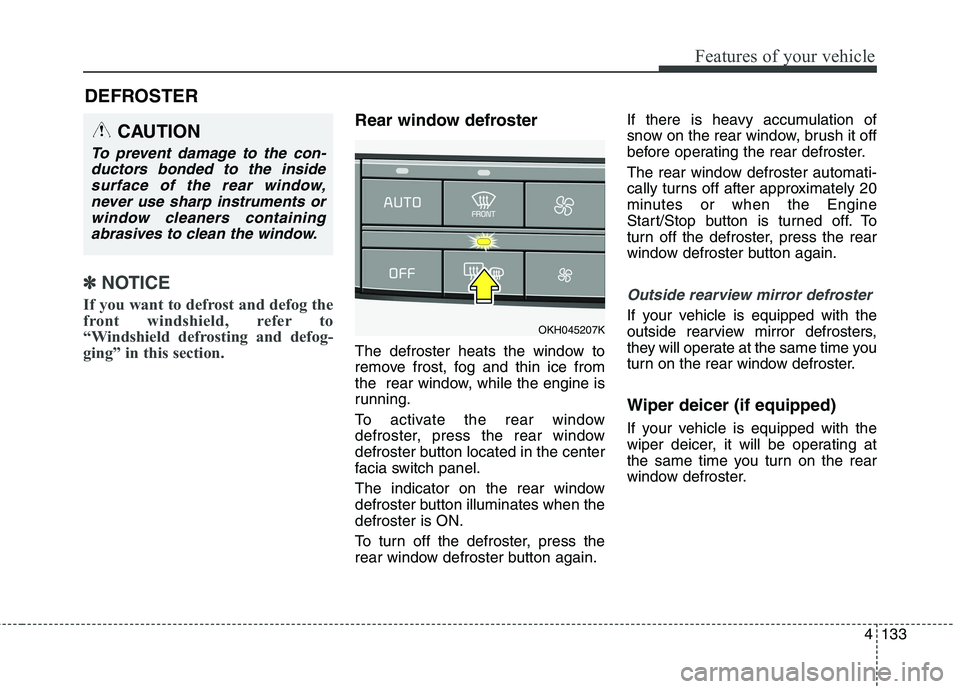
To activate the rear window
defroster, press the rear window
defroster button located in the center
facia switch panel.
The indicator on the rear window
defroster button illuminates when thedefroster is ON.
To turn off the defroster, press the
rear window defroster button again. If there is heavy accumulation of
snow on the rear window, brush it off
before operating the rear defroster.
The rear window defroster automati-
cally turns off after approximately 20
minutes or when the Engine
Start/Stop button is turned off. To
turn off the defroster, press the rear
window defroster button again.
Outside rearview mirror defroster
If your vehicle is equipped with the
outside rearview mirror defrosters,
they will operate at the same time you
turn on the rear window defroster. Wiper deicer (if equipped)
If your vehicle is equipped with the
wiper deicer, it will be operating at
the same time you turn on the rear
window defroster.
CAUTION
To prevent damage to the con-
ductors bonded to the insidesurface of the rear window, never use sharp instruments orwindow cleaners containingabrasives to clean the window.
OKH045207K
Page 223 of 513
Features of your vehicle
136
4
✽✽
NOTICE
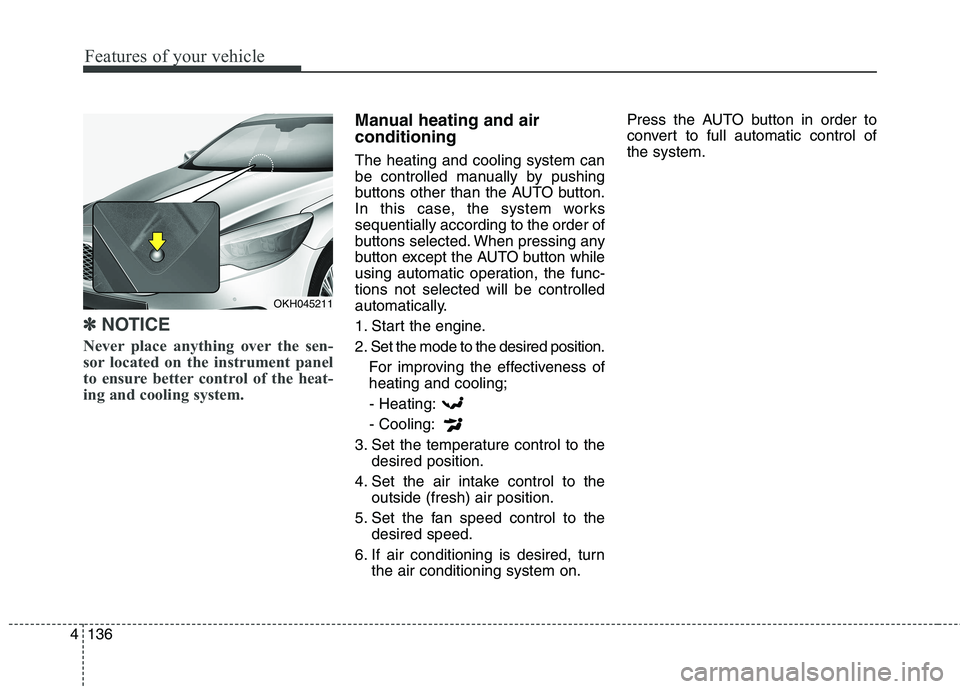
Never place anything over the sen-
sor located on the instrument panel
to ensure better control of the heat-
ing and cooling system.
Manual heating and air conditioning The heating and cooling system can
be controlled manually by pushing
buttons other than the AUTO button.
In this case, the system workssequentially according to the order of
buttons selected. When pressing any
button except the AUTO button while
using automatic operation, the func-tions not selected will be controlled
automatically.
1. Start the engine.
2. Set the mode to the desired position. For improving the effectiveness of heating and cooling;
- Heating: - Cooling:
3. Set the temperature control to the desired position.
4. Set the air intake control to the outside (fresh) air position.
5. Set the fan speed control to the desired speed.
6. If air conditioning is desired, turn the air conditioning system on. Press the AUTO button in order to
convert to full automatic control ofthe system.
OKH045211
Page 224 of 513
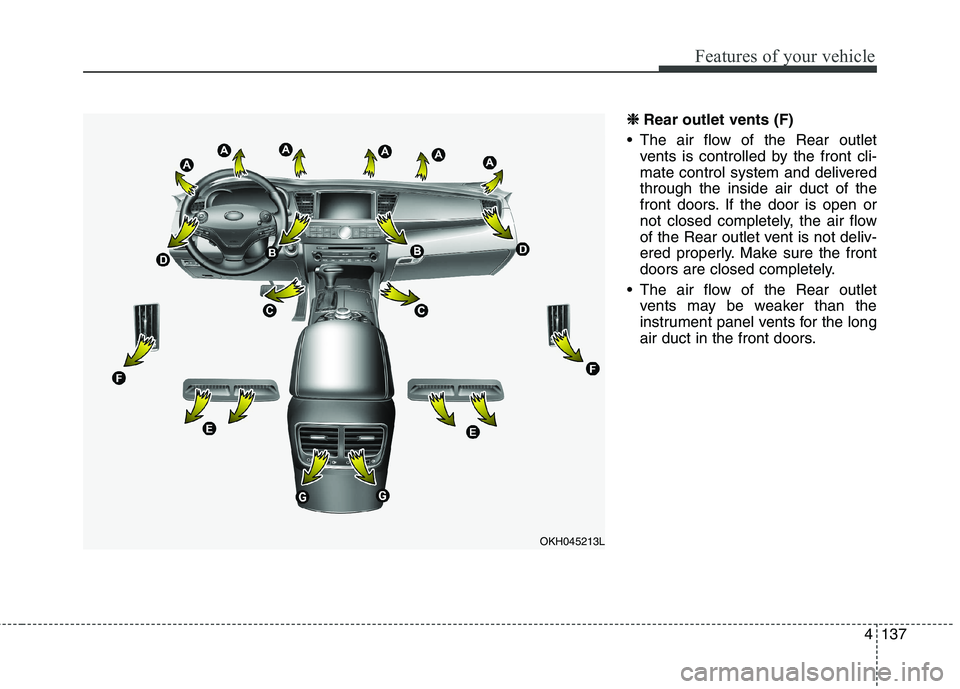
4137
Features of your vehicle
❈❈
Rear outlet vents (F)
The air flow of the Rear outlet vents is controlled by the front cli-
mate control system and deliveredthrough the inside air duct of the
front doors. If the door is open or
not closed completely, the air flow
of the Rear outlet vent is not deliv-
ered properly. Make sure the front
doors are closed completely.
The air flow of the Rear outlet vents may be weaker than the
instrument panel vents for the long
air duct in the front doors.
OKH045213L
Page 226 of 513

4139
Features of your vehicle
Defrost-Level (A)
Most of the air flow is directed to the windshield with a small amount of air
directed to the side window defrosters.Instrument panel vents
The outlet vents can be opened or
closed separately using the horizon-
tal thumbwheel. To close the vent,
rotate it left to the maximum position.
To open the vent, rotate it right to thedesired position.
Also, you can adjust the direction of
air delivery from these vents using
the vent control lever as shown.
Temperature control
The temperature will increase to the
maximum (HI) by pushing the up ( )
button (for front) or turn the knob to the
right (for rear).
OKH045214KOKH045215KOKH045216K
OKH042217
■
Front
■Rear
Page 382 of 513
What to do in an emergency
12
6
If either telltale illuminates, immedi-
ately reduce your speed, avoid hard
cornering and anticipate increased
stopping distances. You should stop
and check your tires as soon as pos-
sible. Inflate the tires to the proper
pressure as indicated on the vehicle’splacard or tire inflation pressure label
located on the driver’s side center pil-
lar outer panel. If you cannot reach a
service station or if the tire cannot
hold the newly added air, replace the
low pressure tire with a spare tire.
If you drive the vehicle for about 10
minutes at speeds above 25 km/h
after replaceing the low pressure tire
with the spare tire, the below willhappen:
The TPMS malfunction indicator
may blink for approximately 1
minute and then remain continu-ously illuminated because theTPMS sensor is not mounted onthe spare wheel.
✽✽ NOTICE
The spare tire is not equipped with a
tire pressure sensor.
WARNING - Low
pressure damage
Significantly low tire pressure
makes the vehicle unstable and
can contribute to loss of vehicle
control and increased brakingdistances.
Continued driving on low pres- sure tires can cause the tires to
overheat and fail.
CAUTION
In winter or cold weather, the low tire pressure telltale mayilluminate if the tire pressurewas adjusted to the recom-mended tire inflation pressure in warm weather. It does notmean your TPMS is malfunc-tioning because the decreasedtemperature leads to a lower- ing of tire pressure.
When you drive your vehicle from a warm area to a coldarea or from a cold area to awarm area, or the outside tem- perature is higher or lower,you should check the tireinflation pressure and adjust the tires to the recommendedtire inflation pressure.
The tire pressure may vary depending on various factorsincluding the temperature con- ditions of parking area, drivingconditions and ambient tem-perature, altitude above sea level.
(Continued)
(Continued)
The low tire pressure position telltale warning may illuminatewhen the tire pressure issame or higher than nearby tires. This is normal since thetire pressure changes alongwith the Internal temperature of each tire.
The tire pressure displayed on the instrument panel may bedifferent from the tire pres-sure measured by a tire pres- sure gauge.
Page 457 of 513
757
Maintenance
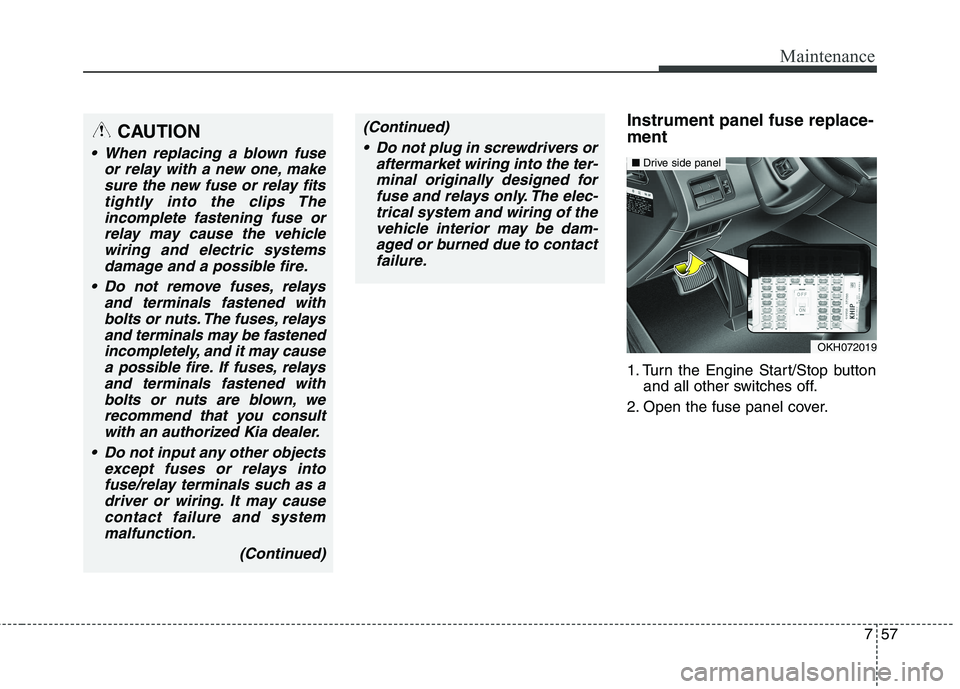
Instrument panel fuse replace- ment
1. Turn the Engine Start/Stop buttonand all other switches off.
2. Open the fuse panel cover.CAUTION
When replacing a blown fuse or relay with a new one, makesure the new fuse or relay fitstightly into the clips Theincomplete fastening fuse or relay may cause the vehiclewiring and electric systemsdamage and a possible fire.
Do not remove fuses, relays and terminals fastened withbolts or nuts. The fuses, relaysand terminals may be fastenedincompletely, and it may causea possible fire. If fuses, relays and terminals fastened withbolts or nuts are blown, werecommend that you consult with an authorized Kia dealer.
Do not input any other objects except fuses or relays intofuse/relay terminals such as adriver or wiring. It may cause contact failure and systemmalfunction.
(Continued)
OKH072019
■Drive side panel
(Continued)
Do not plug in screwdrivers or aftermarket wiring into the ter-minal originally designed for fuse and relays only. The elec-trical system and wiring of thevehicle interior may be dam-aged or burned due to contact failure.
Page 462 of 513
Maintenance
62
7
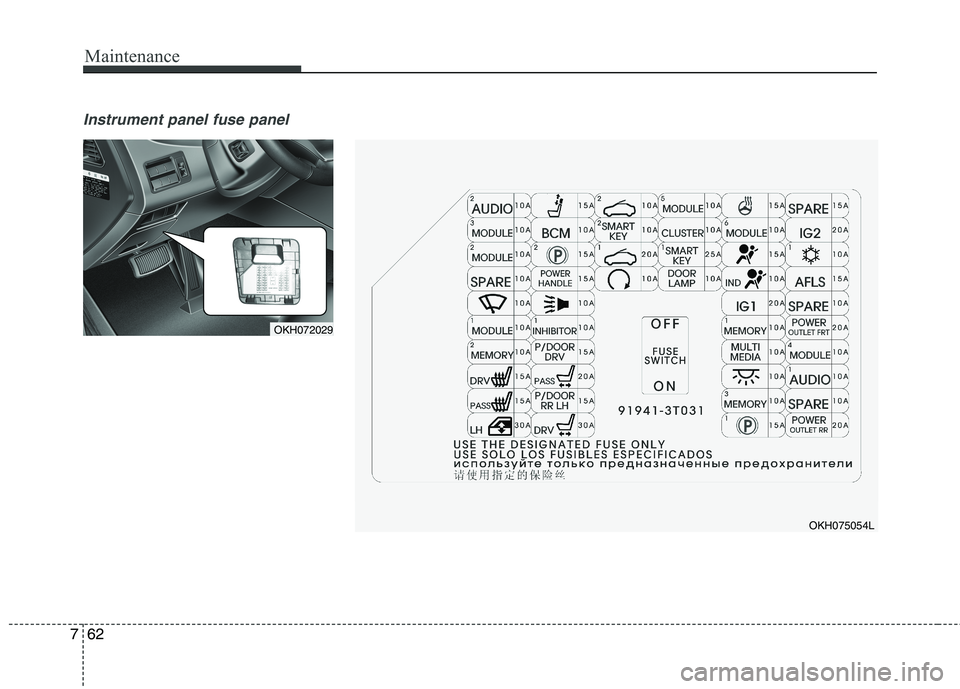
Instrument panel fuse panel
OKH072029
OKH075054L
Page 506 of 513
Index
4
I
Display illumination, see instrument panel illumination