light KIA QUORIS 2016 User Guide
[x] Cancel search | Manufacturer: KIA, Model Year: 2016, Model line: QUORIS, Model: KIA QUORIS 2016Pages: 513, PDF Size: 30.14 MB
Page 73 of 513

Safety features of your vehicle
56
3
Driver's and passenger's front
air bag
Your vehicle is equipped with a
Supplemental Restraint (Air Bag)System and the lap/shoulder belts at
both the driver and passenger seat-
ing positions. The indications of the system's pres-
ence are the letters "SRS AIR BAG"
embossed on the air bag pad cover
in the steering wheel and/or on the
cover of the driver's side knee bolster
located below the steering wheel andthe passenger's side front panel pad
above the glove box.
OKH032053
OKH032054
■
Driver’s knee air bag
■ Driver’s front air bag
(Continued)
The SRS can function only
when the Engine Start/Stop
button is in the ON position. If
the SRS air bag warning light
does not illuminate, or continu-
ously remains on after illumi-
nating for about 6 seconds
when the Engine Start/Stop
button is turned to the ON posi-
tion, or after the engine is start-
ed, comes on while driving, the
SRS is not working properly.
If this occurs, we recommend that the system be inspected
by an authorized Kia dealer.
Before you replace a fuse or disconnect a battery terminal,
turn the engine start/stop but-
ton to the OFF position. Never
remove or replace the air bagrelated fuse(s) when the
engine start/stop button is in
the ON position. Failure toheed this warning will cause
the SRS “ ” warning light to
illuminate.
Page 75 of 513
Safety features of your vehicle
58
3
(Continued)
Front air bags are not intended
to deploy in side-impact, rear-
impact or rollover crashes. In
addition, front air bags will not
deploy in frontal crashes below
the deployment threshold.
A child restraint system must never be placed in the front
seat. The infant or child could
be severely injured or killed
by an air bag deployment incase of an accident.
Children age 12 and under must always be properlyrestrained in the rear seat.
Never allow children to ride in
the front passenger seat. If a
child over 12 must be seated
in the front seat, he or she
must be properly belted and
the seat should be moved as
far back as possible.
(Continued)(Continued)
Do not tamper with or discon-nect SRS wiring or other com- ponents of the SRS system.
Doing so could result in injury,
due to accidental deployment
of the air bags or by rendering
the SRS inoperative.
If the SRS air bag warning light remains illuminated
while the vehicle is being driv-
en, we recommend that the
system be inspected by an
authorized Kia dealer.
Air bags can only be used once – we recommend that
the system be replaced by an
authorized Kia dealer.
The SRS is designed to deploy the front air bags only when an
impact is sufficiently severe.
Additionally, the air bags will
only deploy once. Seat belts
must be worn at all times.
(Continued)(Continued)
Front and side air bags caninjure occupants improperly
positioned in the front seats.
Move your seat as far back as practical from the front air
bags, while still maintaining
control of the vehicle.
You and your passengers should never sit or lean unnec-
essarily close to the air bags.
Improperly positioned drivers
and passengers can be severe-
ly injured by inflating air bags.
Never lean agai nst the door or
center console – always sit in an upright position.
No objects should be placed over or near the air bag mod- ules on the steering wheel,
instrument panel or the front
passenger's panel above the
glove box, because any suchobject could cause harm if the
vehicle is in a crash severe
enough to cause the air bags
to deploy.
(Continued)
Page 85 of 513
Safety features of your vehicle
68
3
SRS Care
The SRS is virtually maintenance-free
and so there are no parts you can
safely service by yourself. If the SRS
air bag warning light does not illumi-
nate, or continuously remains on, werecommend that the system be
inspected by an authorized Kia dealer.(Continued)
No objects should be placed
over or near the air bag mod- ules on the steering wheel,
instrument panel, and the
front passenger's panel above
the glove box, because any
such object could cause harm
if the vehicle is in a crash
severe enough to cause the
air bags to inflate.
If the air bags inflate, we rec- ommend that the system be
replaced by an authorized Kia
dealer.
Do not tamper with or discon- nect SRS wiring, or othercomponents of the SRS sys-
tem. Doing so could result in
injury, due to accidental infla-
tion of the air bags or by ren-
dering the SRS inoperative.
(Continued)
WARNING
Modification to SRS compo- nents or wiring, including the
addition of any kind of badges
to the pad covers or modifica-
tions to the body structure,
can adversely affect SRS per-
formance and lead to possible
injury.
For cleaning the air bag pad covers, use only a soft, dry
cloth or one which has been
moistened with plain water.
Solvents or cleaners could
adversely affect the air bag
covers and proper deploy-ment of the system.
(Continued)
(Continued)
If components of the air bagsystem must be discarded, or
if the vehicle must be
scrapped, certain safety pre-
cautions must be observed.
An authorized Kia dealer
knows these precautions and
can give you the necessary
information. Failure to follow
these precautions and proce-dures could increase the risk
of personal injury.
If your car was flooded and has soaked carpeting or water
on flooring, you shouldn't try
to start the engine; we recom-
mend that you contact an
authorized Kia dealer.
Page 89 of 513
LCD display . . . . . . . . . . . . . . . . . . . . . . . . . . . . . . 4-61
. . . . . . . . . . . . . . . . . . . . . . . . . . 4-62
. . . . . . . . . . . . . . . . . . . . . 4-63
. . . . . . . . . . . . . . . . . . . . . . . . . . . . . . . . . 4-63
. . . . . . . . . . . . . . . . . . . . . . . . . . . . . . . . . . . 4-63
. . . . . . . . . . . . . . . . . . . . . . . . . . . . 4-64
. . . . . . . . . . . . . . . . . . . . . . . . . . . . 4-74
Trip computer . . . . . . . . . . . . . . . . . . . . . . . . . . . . . 4-85
. . . . . . . . . . . . . . . . . . . . . . . . . . . . . . . . 4-85
. . . . . . . . . . . . . . . . . . . . . . . . . . . . . . . . . . . . 4-87
Warning and indicator lights . . . . . . . . . . . . . . . . 4-89 . . . . . . . . . . . . . . . . . . . . . . . . . . . . . . . 4-89
Head up display (HUD) . . . . . . . . . . . . . . . . . . . . 4-103 . . . . . . . . . . . . . . . . . . . . . . . . . . . . . . . . . 4-103
. . . . . . . . . . . . . . . . . . . . . . . 4-104
. . . . . . . . . . . . . . . . . . 4-104
Parking assist system . . . . . . . . . . . . . . . . . . . . . . 4-106 . . . . . . . . . . 4-106
. 4-108
. . . . . . . . . . . . . . . . . . . . . . . . . . . . . . . 4-110 Rearview camera . . . . . . . . . . . . . . . . . . . . . . . . . 4-111
Parking guide system . . . . . . . . . . . . . . . . . . . . . . 4-112
. . . . . . . . . . . . . 4-112
. . . . . . . . . . . . . . . . . . . . . . . . . . . . . 4-113
Front blind spot monitoring system . . . . . . . . . . 4-115
Surroud view monitoring system . . . . . . . . . . . . 4-117
Lighting . . . . . . . . . . . . . . . . . . . . . . . . . . . . . . . . 4-117 . . . . . . . . . . . . . . . . . . . . . . 4-117
. . . . . . . . . . . . . . . . . . . . . 4-117
. . . . . . . . . . . . . . . . . . . . . . . . 4-117
. . . . . . . . . . . . . . . . . . . 4-118
. . . . . . . . . . . . . . . . . . . . . . . . . . . . . 4-118
. . . . . . . . . . . . . . . . . . . . . . . . 4-121
. . . . . . . . . . . 4-122
. . . . . . . . . . . . . . . . . . . . . . . . . . . . . 4-123
. . . . . . . . . . . . . . . . . . . . . . . . . . . . . . . 4-123
. . . . . . . . . . . . . . . . . . . . . 4-124
. . . . . . . . . . . . . . . . . . . . . . . . . . . . 4-124
Wipers and washers . . . . . . . . . . . . . . . . . . . . . . . 4-125
Interior light . . . . . . . . . . . . . . . . . . . . . . . . . . . . . 4-128 . . . . . . . . . . . . . . . . . . . . . . . . . . . 4-128
. . . . . . . . . . . . . . . . . . . . . . . . . . . . 4-129
. . . . . . . . . . . . . . . . . . . . . . . . . . . 4-130
. . . . . . . . . . . . . . . . . . . . . . . . . . 4-130
. . . . . . . . . . . . . . . . . . . . . . . . . . . . . 4-131
. . . . . . . . . . . . . . . . . . . . . . . . . . 4-131
4
Page 92 of 513
45
Features of your vehicle
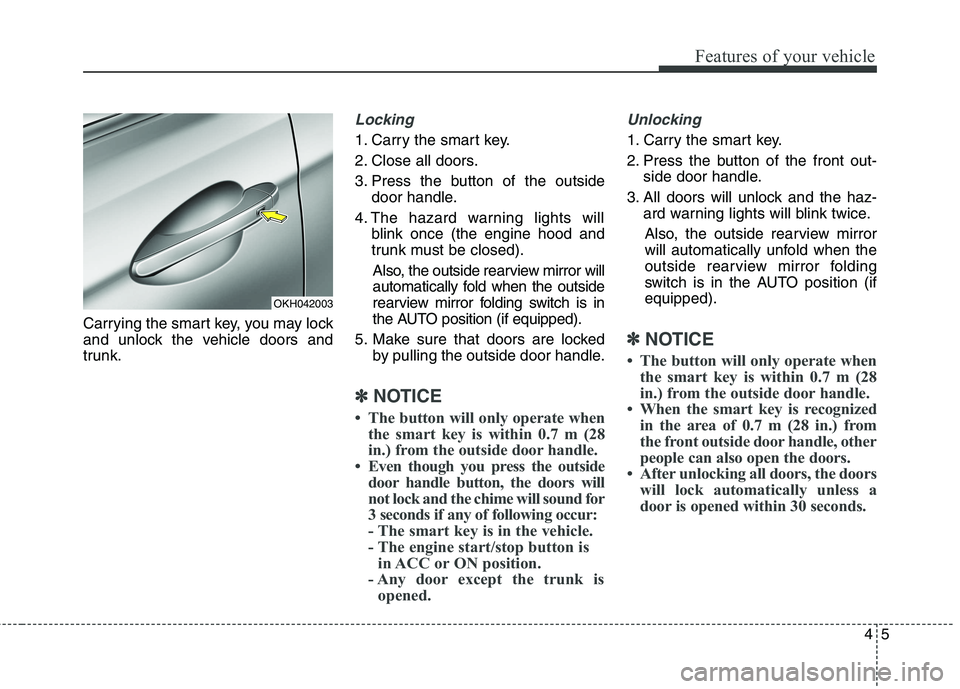
Carrying the smart key, you may lock
and unlock the vehicle doors and
trunk.
Locking
1. Carry the smart key.
2. Close all doors.
3. Press the button of the outsidedoor handle.
4. The hazard warning lights will blink once (the engine hood and
trunk must be closed).
Also, the outside rearview mirror will
automatically fold when the outside
rearview mirror folding switch is in
the AUTO position (if equipped).
5. Make sure that doors are locked by pulling the outside door handle.
✽✽ NOTICE
The button will only operate when the smart key is within 0.7 m (28
in.) from the outside door handle.
Even though you press the outside door handle button, the doors will
not lock and the chime will sound for
3 seconds if any of following occur:
- The smart key is in the vehicle.
- The engine start/stop button isin ACC or ON position.
- Any door except the trunk is opened.
Unlocking
1. Carry the smart key.
2. Press the button of the front out- side door handle.
3. All doors will unlock and the haz- ard warning lights will blink twice.
Also, the outside rearview mirror
will automatically unfold when the
outside rearview mirror folding
switch is in the AUTO position (ifequipped).
✽✽ NOTICE
The button will only operate when the smart key is within 0.7 m (28
in.) from the outside door handle.
When the smart key is recognized in the area of 0.7 m (28 in.) from
the front outside door handle, other
people can also open the doors.
After unlocking all doors, the doors will lock automatically unless a
door is opened within 30 seconds.
OKH042003
Page 93 of 513
Features of your vehicle
6
4
Trunk unlocking
Power trunk
1. Carry the smart key.
2. Press the trunk handle switch.
3. The trunk will unlock and open.
Non-powered trunk
1. Carry the smart key.
2. Press the trunk handle switch.
3. The trunk will unlock.
✽✽
NOTICE
Once the trunk is opened and then closed, the trunk will lock auto-
matically.
The button will only operate when the smart key is within 0.7 m (28
in.) from the trunk handle.
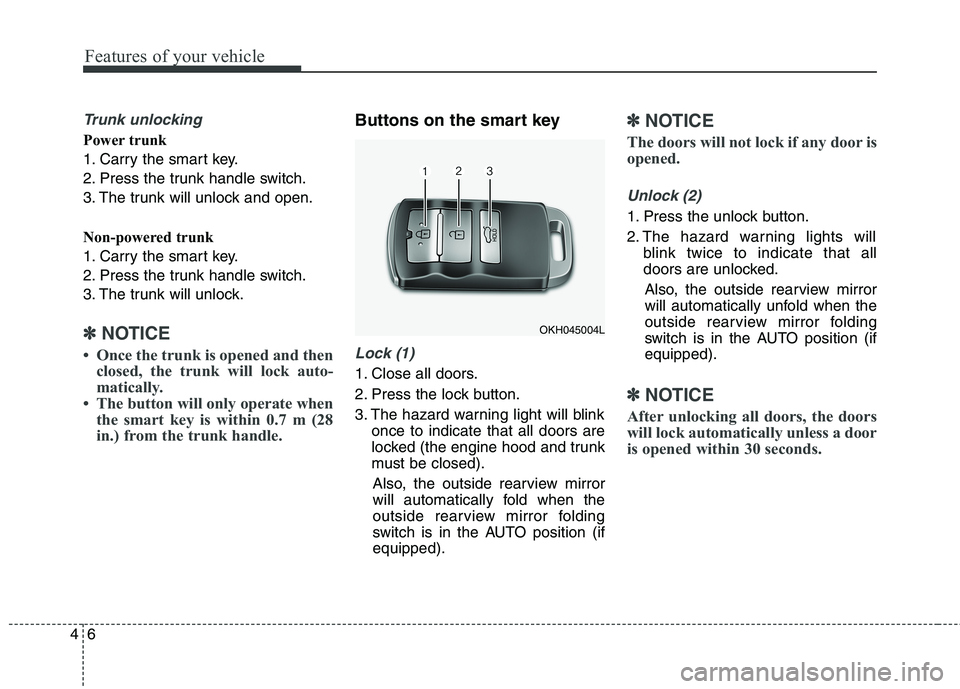
Buttons on the smart key
Lock (1)
1. Close all doors.
2. Press the lock button.
3. The hazard warning light will blink once to indicate that all doors are
locked (the engine hood and trunk
must be closed).
Also, the outside rearview mirror
will automatically fold when the
outside rearview mirror folding
switch is in the AUTO position (ifequipped).
✽✽ NOTICE
The doors will not lock if any door is
opened.
Unlock (2)
1. Press the unlock button.
2. The hazard warning lights will blink twice to indicate that all
doors are unlocked.
Also, the outside rearview mirror
will automatically unfold when the
outside rearview mirror folding
switch is in the AUTO position (ifequipped).
✽✽ NOTICE
After unlocking all doors, the doors
will lock automatically unless a door
is opened within 30 seconds.
OKH045004L
Page 94 of 513
47
Features of your vehicle
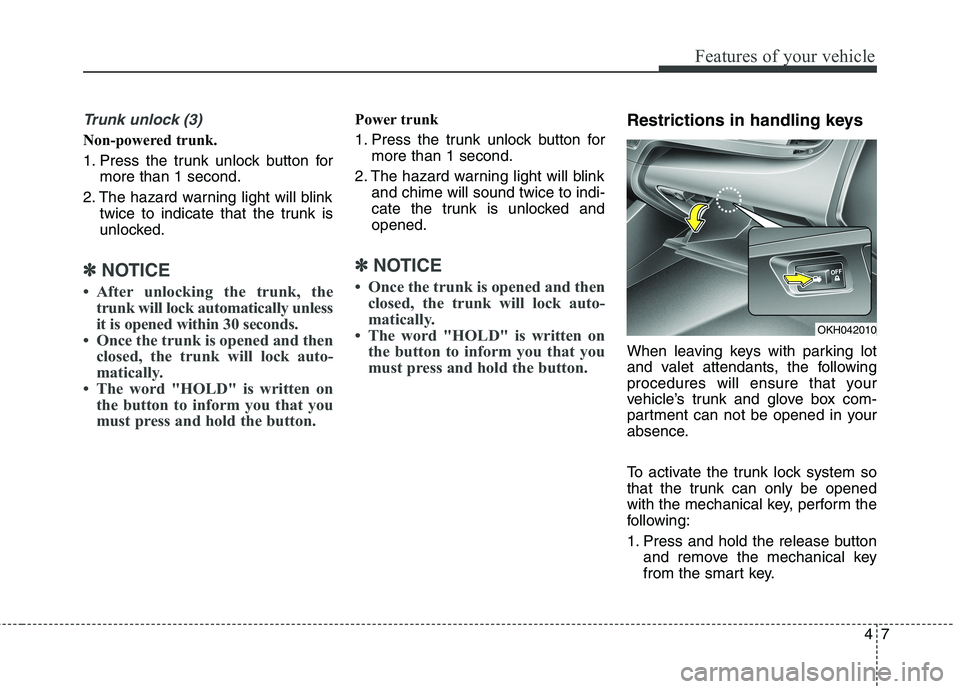
Trunk unlock (3)
Non-powered trunk.
1. Press the trunk unlock button formore than 1 second.
2. The hazard warning light will blink twice to indicate that the trunk is
unlocked.
✽✽ NOTICE
After unlocking the trunk, the trunk will lock automatically unless
it is opened within 30 seconds.
Once the trunk is opened and then closed, the trunk will lock auto-
matically.
The word "HOLD" is written on the button to inform you that you
must press and hold the button.
Power trunk
1. Press the trunk unlock button for more than 1 second.
2. The hazard warning light will blink and chime will sound twice to indi-
cate the trunk is unlocked andopened.
✽✽ NOTICE
Once the trunk is opened and then closed, the trunk will lock auto-
matically.
The word "HOLD" is written on the button to inform you that you
must press and hold the button.
Restrictions in handling keys
When leaving keys with parking lot
and valet attendants, the following
procedures will ensure that your
vehicle’s trunk and glove box com-
partment can not be opened in your
absence.
To activate the trunk lock system so
that the trunk can only be opened
with the mechanical key, perform the
following:
1. Press and hold the release button and remove the mechanical key
from the smart key.
OKH042010
Page 99 of 513
Features of your vehicle
12
4
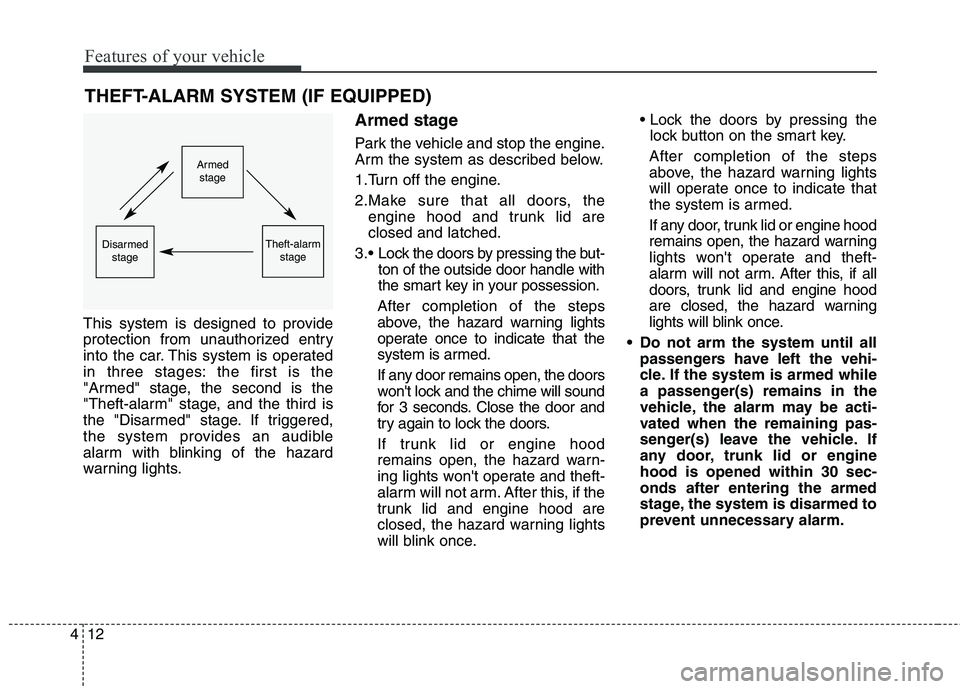
THEFT-ALARM SYSTEM (IF EQUIPPED)
This system is designed to provide
protection from unauthorized entry
into the car. This system is operated
in three stages: the first is the
"Armed" stage, the second is the
"Theft-alarm" stage, and the third is
the "Disarmed" stage. If triggered,
the system provides an audible
alarm with blinking of the hazard
warning lights. Armed stage
Park the vehicle and stop the engine.
Arm the system as described below.
1.Turn off the engine.
2.Make sure that all doors, the
engine hood and trunk lid are closed and latched.
Lock the doors by pressing the but- ton of the outside door handle with
the smart key in your possession.
After completion of the steps
above, the hazard warning lights
operate once to indicate that the
system is armed.
If any door remains open, the doors
won't lock and the chime will sound
for 3 seconds. Close the door and
try again to lock the doors.
If trunk lid or engine hood
remains open, the hazard warn-
ing lights won't operate and theft-
alarm will not arm. After this, if the
trunk lid and engine hood are
closed, the hazard warning lights
will blink once.
lock button on the smart key.
After completion of the steps
above, the hazard warning lights
will operate once to indicate that
the system is armed.
If any door, trunk lid or engine hood
remains open, the hazard warning
lights won't operate and theft-
alarm will not arm. After this, if all
doors, trunk lid and engine hood
are closed, the hazard warning
lights will blink once.
Do not arm the system until all passengers have left the vehi-
cle. If the system is armed while
a passenger(s) remains in the
vehicle, the alarm may be acti-
vated when the remaining pas-
senger(s) leave the vehicle. If
any door, trunk lid or enginehood is opened within 30 sec-onds after entering the armed
stage, the system is disarmed to
prevent unnecessary alarm.
Armedstage
Theft-alarm stageDisarmedstage
Page 100 of 513
413
Features of your vehicle
Theft-alarm stage
The alarm will be activated if any of
the following occurs while the system
is armed.
A door is opened without using thesmart key.
The trunk is opened without using the smart key.
The engine hood is opened.
The horn will sound and the hazard
warning lights will blink continuously
for approximately 27 seconds. To turn
off the system, unlock the doors with
the smart key. Opening the trunk with the alarm armed (if equipped)
When the alarm is armed, the alarm
will not sound if the trunk lid is
opened with the smart key.
Once the trunk is opened and then
closed, the trunk will lock automatical-
ly and the system will be armed again.
Also, if any of the doors or hood is
opened while the trunk lid is opened
and the alarm armed, the alarm willsound.
Disarmed stage
The system will be disarmed when
the doors are unlocked with the
smart key.
After depressing the unlock button,
the hazard warning lights will blinktwice to indicate that the system is
disarmed.
After depressing the unlock button, if
any door (or trunk) is not opened
within 30 seconds, the system will be
rearmed.
✽✽
NOTICE
Avoid trying to start the engine while the alarm is activated. The
vehicle starter motor is disabled
during the theft-alarm stage.
If the system is not disarmed with
the smart key, open the doors by
using the mechanical key and start
the engine by directly pressing the
engine Start/Stop button with the
smart key.
If you lose your keys, we recom- mend that you consult an author-
ized Kia dealer.
Page 103 of 513
Features of your vehicle
16
4
Power door latch (if equipped)
If a door isn’t closed completely but is closed to the first detent position,
the door will close automatically. Operating door locks from
inside the vehicle
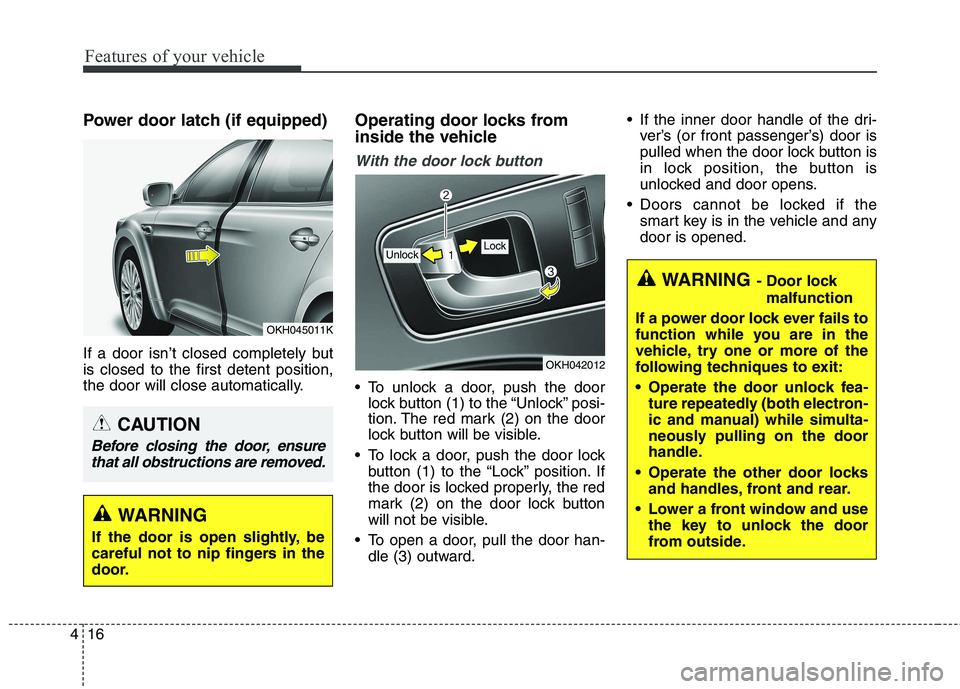
With the door lock button
To unlock a door, push the door
lock button (1) to the “Unlock” posi-
tion. The red mark (2) on the door
lock button will be visible.
To lock a door, push the door lock button (1) to the “Lock” position. If
the door is locked properly, the red
mark (2) on the door lock button
will not be visible.
To open a door, pull the door han- dle (3) outward. If the inner door handle of the dri-
ver’s (or front passenger’s) door is
pulled when the door lock button is
in lock position, the button is
unlocked and door opens.
Doors cannot be locked if the smart key is in the vehicle and anydoor is opened.
OKH042012
Lock Unlock
WARNING - Door lock
malfunction
If a power door lock ever fails to
function while you are in the
vehicle, try one or more of the
following techniques to exit:
Operate the door unlock fea- ture repeatedly (both electron-
ic and manual) while simulta-
neously pulling on the door
handle.
Operate the other door locks and handles, front and rear.
Lower a front window and use the key to unlock the door
from outside.
OKH045011K
WARNING
If the door is open slightly, be
careful not to nip fingers in the
door.
CAUTION
Before closing the door, ensure that all obstructions are removed.