Eco KIA Rio 2016 3.G Owner's Guide
[x] Cancel search | Manufacturer: KIA, Model Year: 2016, Model line: Rio, Model: KIA Rio 2016 3.GPages: 449, PDF Size: 14.93 MB
Page 74 of 449
43
Features of your vehicle
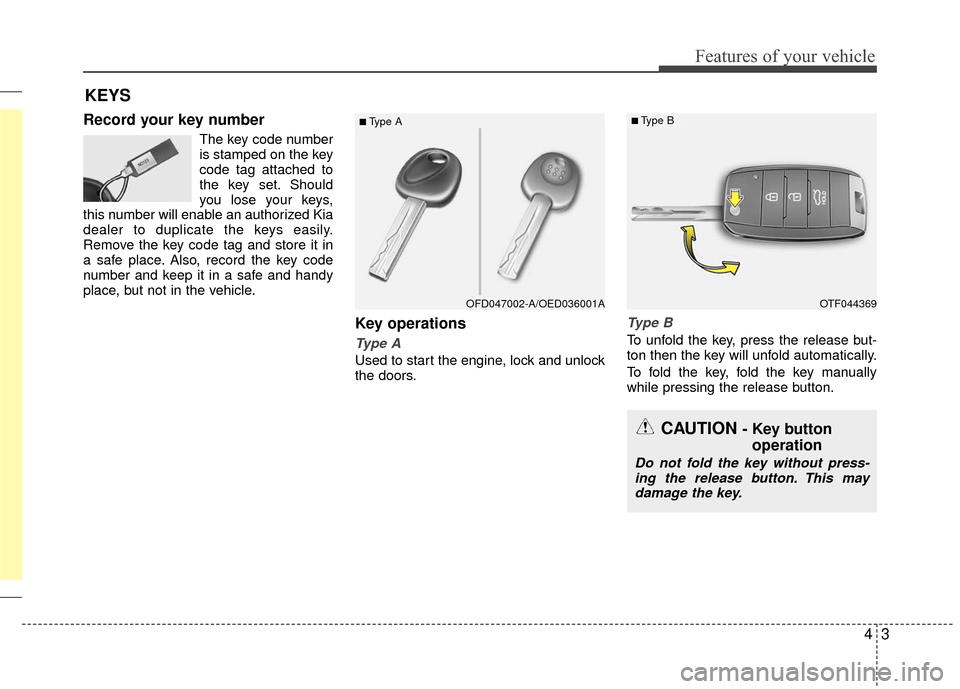
Record your key number
The key code number
is stamped on the key
code tag attached to
the key set. Should
you lose your keys,
this number will enable an authorized Kia
dealer to duplicate the keys easily.
Remove the key code tag and store it in
a safe place. Also, record the key code
number and keep it in a safe and handy
place, but not in the vehicle.
Key operations
Type A
Used to start the engine, lock and unlock
the doors.
Type B
To unfold the key, press the release but-
ton then the key will unfold automatically.
To fold the key, fold the key manually
while pressing the release button.
KEYS
■Type A
OTF044369
■Type B
OFD047002-A/OED036001A
CAUTION - Key button operation
Do not fold the key without press-
ing the release button. This may damage the key.
Page 77 of 449
Features of your vehicle
64
Even though you press the button, the
doors will not lock and the chime will
sound for 3 seconds if any of the follow-
ing occurs:
The smart key is in the vehicle.
The ignition switch is in the ACC or ONposition.
Any door except the trunk (or tailgate) is opened.Unlocking
Pressing the button of the driver's out-
side door handle with all doors closed
and locked, unlocks the driver's door. The
hazard warning lights will blink and the
chime will sound twice to indicate that the
driver's door is unlocked. All doors are
unlocked if the button is pressed once
more within 4 seconds. The hazard warn-
ing lights will blink and the chime will
sound twice to indicate that all the doors
are unlocked.
Pressing the button in the front passen-
ger's outside door handle with all doors
closed and locked, unlocks all the doors.
The hazard warning lights will blink and
the chime will sound twice to indicate that
all doors are unlocked. The button will
only operate when the smart key is with-
in 0.7~1 m (28~40 in.) from the outside
door handle.
Trunk unlocking (4 door)
The trunk is opened if the trunk unlock
button is pressed.
Once the trunk is opened and then
closed, the trunk will lock automatically.
If the trunk is closed with the smart key in
the trunk, the warning chime will sound
for about 5 seconds and the trunk will not
lock.
Tailgate unlocking (5 door) (if equipped)
If you are within 0.7 m (28 in.) from the
outside tailgate handle, with your smart
key in possession, the tailgate will unlock
and open when you press the tailgate
handle switch.
The hazard warning lights will blink twice
to indicate that the tailgate is unlocked.
Also, once the tailgate is opened and
then closed, the tailgate will lock auto-
matically.
Start-up
You can start the engine without inserting
the key. For detailed information refer to
“Starting the engine with a smart key” in
section 5.
Page 78 of 449
47
Features of your vehicle
Smart key precautions
If you lose your smart key, you will notbe able to start the engine. Tow the
vehicle, if necessary, and contact an
authorized Kia dealer.
A maximum of 2 smart keys can be registered to a single vehicle. If you
lose a smart key, you should immedi-
ately take the vehicle and key to your
authorized Kia dealer to protect it from
potential theft.
The smart key will not work if any of fol- lowing occurs:
- The smart key is close to a radiotransmitter such as a radio station or
an airport which can interfere with
normal operation of the smart key.
- The smart key near a mobile two-way radio system or a cellular phone.
- Another vehicle’s smart key is being operated close to your vehicle.
When the smart key does not work cor-
rectly, open and close the door with the
mechanical key. If you have a problem
with the smart key, contact an author-
ized Kia dealer. (Continued)(Continued)
If the smart key is in close proximity to
your cell phone or smart phone, the
signal from the smart key could be
blocked by normal operation of your
cell phone or smart phone. This is
especially important when the phone is
active such as making calls, receiving
calls, text messaging, and/or send-
ing/receiving emails. Avoid placing the
smart key and your cell phone or smart
phone in the same pants or jacket
pocket and maintain adequate dis-
tance between the two devices. This device complies`with Industry
Canada Standard RSS-210.
Operation is subject to the following two
conditions:
1. This device may not cause harmful
interference, and
2. This device must accept any interfer- ence received, including interference
that may cause undesired operation.
✽ ✽NOTICE
Changes or modifications not expressly
approved by the party responsible for
compliance could void the user’s author-
ity to operate the equipment. If the key-
less entry system is inoperative due to
changes or modifications not expressly
approved by the party responsible for
compliance, it will not be covered by
your manufacturer’s vehicle warranty.
CAUTION - Transmitter
Keep the smart key away from
water or any liquid as it canbecome damaged and not functionproperly.
Page 79 of 449
Features of your vehicle
84
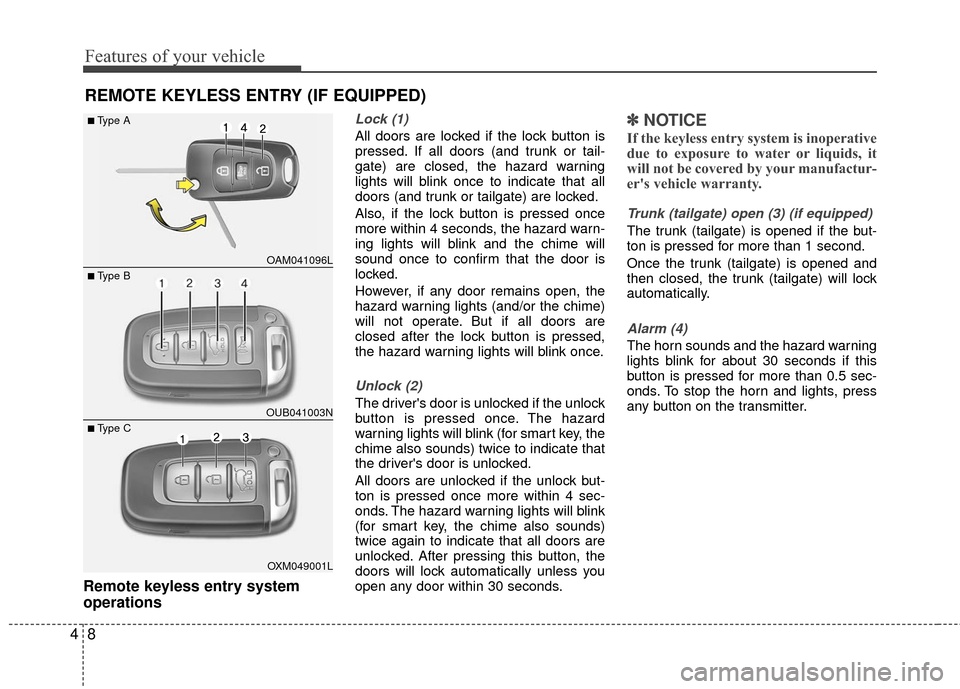
Remote keyless entry system
operations
Lock (1)
All doors are locked if the lock button is
pressed. If all doors (and trunk or tail-
gate) are closed, the hazard warning
lights will blink once to indicate that all
doors (and trunk or tailgate) are locked.
Also, if the lock button is pressed once
more within 4 seconds, the hazard warn-
ing lights will blink and the chime will
sound once to confirm that the door is
locked.
However, if any door remains open, the
hazard warning lights (and/or the chime)
will not operate. But if all doors are
closed after the lock button is pressed,
the hazard warning lights will blink once.
Unlock (2)
The driver's door is unlocked if the unlock
button is pressed once. The hazard
warning lights will blink (for smart key, the
chime also sounds) twice to indicate that
the driver's door is unlocked.
All doors are unlocked if the unlock but-
ton is pressed once more within 4 sec-
onds. The hazard warning lights will blink
(for smart key, the chime also sounds)
twice again to indicate that all doors are
unlocked. After pressing this button, the
doors will lock automatically unless you
open any door within 30 seconds.
✽ ✽NOTICE
If the keyless entry system is inoperative
due to exposure to water or liquids, it
will not be covered by your manufactur-
er's vehicle warranty.
Trunk (tailgate) open (3) (if equipped)
The trunk (tailgate) is opened if the but-
ton is pressed for more than 1 second.
Once the trunk (tailgate) is opened and
then closed, the trunk (tailgate) will lock
automatically.
Alarm (4)
The horn sounds and the hazard warning
lights blink for about 30 seconds if this
button is pressed for more than 0.5 sec-
onds. To stop the horn and lights, press
any button on the transmitter.
REMOTE KEYLESS ENTRY (IF EQUIPPED)
OAM041096L
OUB041003N
■Type A
■ Type B
OXM049001L
■ Type C
Page 83 of 449
Features of your vehicle
12
4
This device complies with Industry
Canada Standard RSS-210.
Operation is subject to the following two
conditions:
1. This device may not cause harmful
interference, and
2. This device must accept any interfer- ence received, including interference
that may cause undesired operation.
Changes or modifications not expressly
approved by the party responsible for
compliance could void the user's author-
ity to operate the equipment.Limp home (override) procedure
When you turn the ignition switch to the
ON position, if the immobilizer indicator
( ) goes off after blinking 5 times,
your transponder equipped in the ignition
key is out of order. You cannot start the
engine without the limp home procedure.
To start the engine, you have to input
your password by using the ignition
switch. Your password is only available
from an authorized Kia dealership.
Contact an authorized dealer for more
information.
The following procedure is how to input
your password of “2345” as an example.
1. Turn the ignition s witch to the ON posi-
tion. The immobilizer indicator ( )
will blink 5 times and go off indicating
the beginning of the limp home proce-
dure.
2. Turn the ignition switch to the ACC position.
3. To enter the first digit (in this example “2”), turn the ignition switch to the ON
and ACC position twice. Perform the
same procedure for the next digits
between 3 seconds and 10 seconds
(for example, for “3”, turn the ignition
ON and ACC 3 times). 4. If all of the digits have been input suc-
cessfully, you have to start the engine
within 30 seconds. If you attempt to
start the engine after 30 seconds, the
engine will not start and you will have
to input your password again.
After performing the limp home proce-
dure, you have to see an authorized Kia
dealer immediately to inspect and repair
your ignition key or immobilizer system.
Page 84 of 449
413
Features of your vehicle
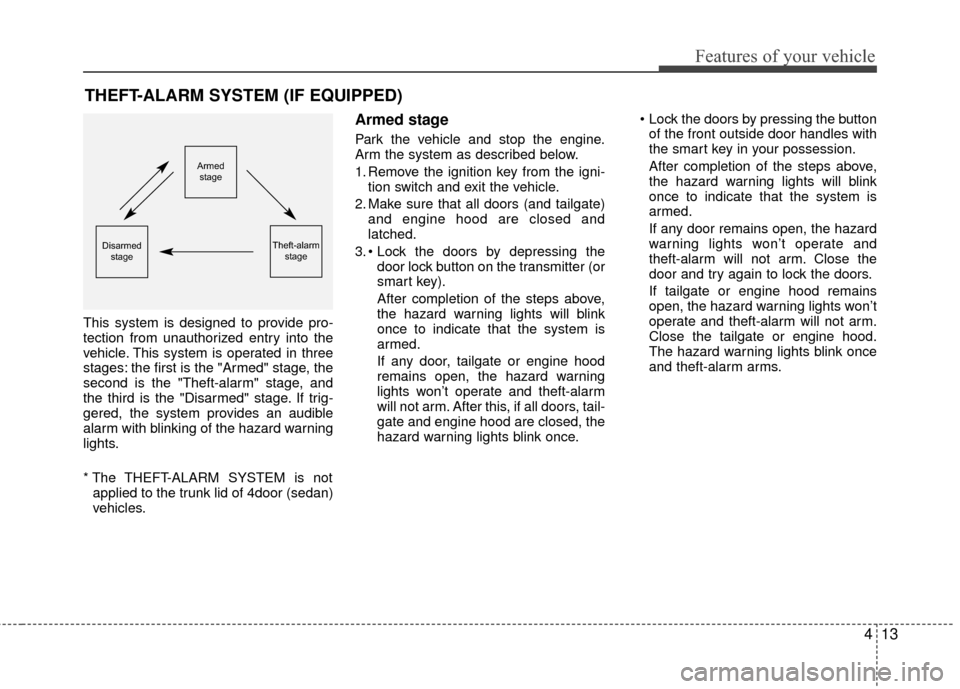
This system is designed to provide pro-
tection from unauthorized entry into the
vehicle. This system is operated in three
stages: the first is the "Armed" stage, the
second is the "Theft-alarm" stage, and
the third is the "Disarmed" stage. If trig-
gered, the system provides an audible
alarm with blinking of the hazard warning
lights.
* The THEFT-ALARM SYSTEM is notapplied to the trunk lid of 4door (sedan)
vehicles.
Armed stage
Park the vehicle and stop the engine.
Arm the system as described below.
1. Remove the ignition key from the igni- tion switch and exit the vehicle.
2. Make sure that all doors (and tailgate) and engine hood are closed and
latched.
3. door lock button on the transmitter (or
smart key).
After completion of the steps above,
the hazard warning lights will blink
once to indicate that the system is
armed.
If any door, tailgate or engine hood
remains open, the hazard warning
lights won’t operate and theft-alarm
will not arm. After this, if all doors, tail-
gate and engine hood are closed, the
hazard warning lights blink once. Lock the doors by pressing the button
of the front outside door handles with
the smart key in your possession.
After completion of the steps above,
the hazard warning lights will blink
once to indicate that the system is
armed.
If any door remains open, the hazard
warning lights won’t operate and
theft-alarm will not arm. Close the
door and try again to lock the doors.
If tailgate or engine hood remains
open, the hazard warning lights won’t
operate and theft-alarm will not arm.
Close the tailgate or engine hood.
The hazard warning lights blink once
and theft-alarm arms.
THEFT-ALARM SYSTEM (IF EQUIPPED)
Armed
stage
Theft-alarm stageDisarmedstage
Page 85 of 449
Features of your vehicle
14
4
✽
✽
NOTICE
The theft-alarm system by the key can be
activated by an authorized Kia dealer.
If you want this feature, consult an
authorized Kia dealer.
Do not arm the system until all pas-
sengers have left the vehicle. If the
system is armed while a passenger(s)
remains in the vehicle, the alarm may
be activated when the remaining pas-
senger(s) leaves the vehicle. If any
door (or tailgate) or engine hood is
opened within 30 seconds after the
system enters the armed stage, the
system will be disarmed to prevent
unnecessary alarm.
Theft-alarm stage
The alarm will be activated if any of the
following occurs while the system is
armed.
A front or rear door is opened without
using the transmitter (or smart key).
The tailgate is opened without using the transmitter (or smart key).
The engine hood is opened.
The horn will sound and the hazard
warning lights will blink continuously for
approximately 27 seconds. To turn off the
system, unlock the doors with the trans-
mitter (or smart key).
Disarmed stage
The system will be disarmed when:
Transmitter
- The door unlock button is pressed.
- The engine is started. (within 3 sec- onds)
- The ignition switch is in the “ON” posi- tion for 30 seconds or more.
Smart key
- The door unlock button is pressed.
- The button of the front outside door ispressed while carrying the smart key.
- The engine is started. (within 3 sec- onds)
After the doors are unlocked, the hazard
warning lights will blink twice to indicate
that the system is disarmed.
After pressing the unlock button, if any
door (or tailgate) is not opened within 30
seconds, the system will be rearmed.
Page 87 of 449
Features of your vehicle
16
4
DOOR LOCKS
Operating door locks from out-
side the vehicle
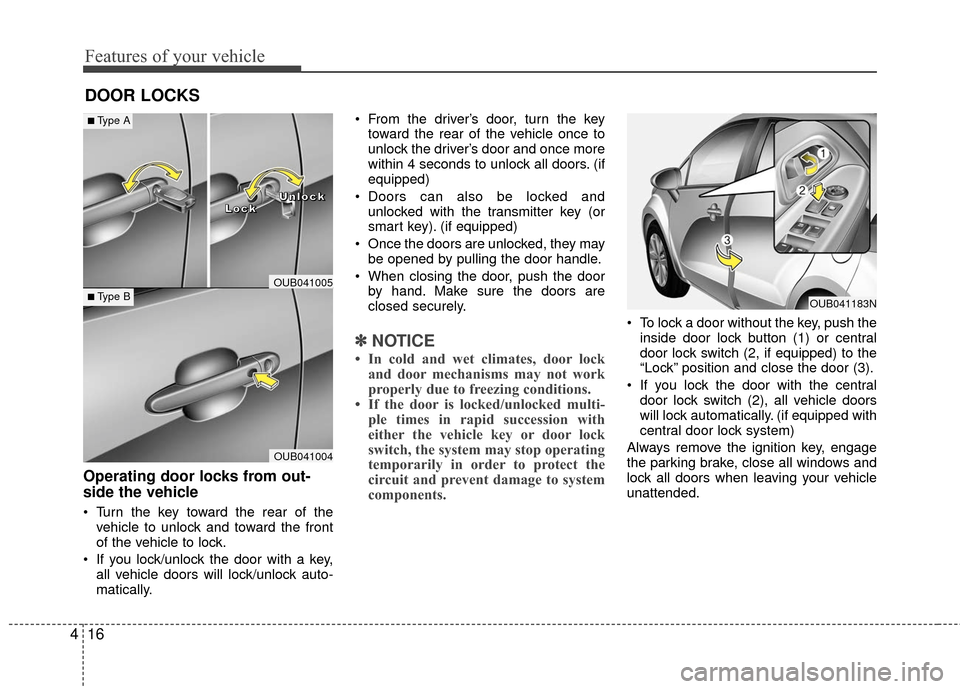
Turn the key toward the rear of the
vehicle to unlock and toward the front
of the vehicle to lock.
If you lock/unlock the door with a key, all vehicle doors will lock/unlock auto-
matically. From the driver’s door, turn the key
toward the rear of the vehicle once to
unlock the driver’s door and once more
within 4 seconds to unlock all doors. (if
equipped)
Doors can also be locked and unlocked with the transmitter key (or
smart key). (if equipped)
Once the doors are unlocked, they may be opened by pulling the door handle.
When closing the door, push the door by hand. Make sure the doors are
closed securely.
✽ ✽ NOTICE
• In cold and wet climates, door lock
and door mechanisms may not work
properly due to freezing conditions.
• If the door is locked/unlocked multi- ple times in rapid succession with
either the vehicle key or door lock
switch, the system may stop operating
temporarily in order to protect the
circuit and prevent damage to system
components.
To lock a door without the key, push the
inside door lock button (1) or central
door lock switch (2, if equipped )to the
“Lock” position and close the door (3).
If you lock the door with the central door lock switch (2), all vehicle doors
will lock automatically. (if equipped with
central door lock system)
Always remove the ignition key, engage
the parking brake, close all windows and
lock all doors when leaving your vehicle
unattended.
OUB041004
■ Type B
■Type A
OUB041005
L
L
L
L
o
o
o
o
c
c
c
c
k
k
k
k U
U
U
U
n
n
n
n
l
l
l
l
o
o
o
o
c
c
c
c
k
k
k
k
OUB041183N
Page 89 of 449
Features of your vehicle
18
4
Impact sensing door unlock sys-
tem (if equipped)
All doors will automatically unlock when
an impact causes the air bags to deploy.
Auto door lock/unlock feature
(if equipped)
All doors will automatically lock when
the transaxle shift lever is shifted out of
P (Park).
All doors will automatically unlock when the transaxle shift lever is shifted
into P (Park). An authorized Kia dealer can activate or
deactivate some auto door lock/ unlock
features as follows;
Auto door unlock by using the driver's
door lock button
Auto door lock/unlock by shifting the transaxle shift lever out of P (Park) or
into P (Park)
Auto door unlock when the ignition key is removed from the ignition switch (for
smart key, when the ENGINE
START/STOP button is turned to the
OFF position)
If you want to activate or deactivate some
door lock/unlock feature, consult an
authorized Kia dealer.
WARNING- Unattended children/
animals
Never leave children or animals
unattended in your vehicle.
An enclosed vehicle can become
extremely hot, causing death or
severe injury to unattended chil-
dren or animals who cannot escape
the vehicle.
WARNING - Doors
The doors should always be fully
closed and locked while the vehicle
is in motion to prevent accidental
opening of the door.
Page 93 of 449
Features of your vehicle
22
4
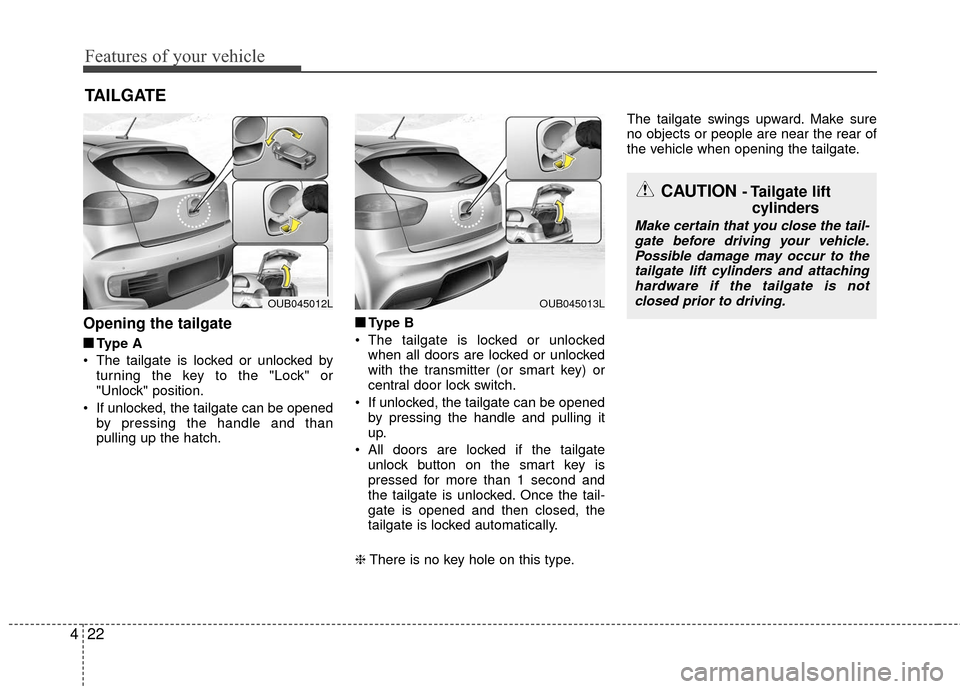
Opening the tailgate
■
■
Type A
The tailgate is locked or unlocked by turning the key to the "Lock" or
"Unlock" position.
If unlocked, the tailgate can be opened by pressing the handle and than
pulling up the hatch. ■ ■
Type B
The tailgate is locked or unlocked when all doors are locked or unlocked
with the transmitter (or smart key) or
central door lock switch.
If unlocked, the tailgate can be opened by pressing the handle and pulling it
up.
All doors are locked if the tailgate unlock button on the smart key is
pressed for more than 1 second and
the tailgate is unlocked. Once the tail-
gate is opened and then closed, the
tailgate is locked automatically.
❈ There is no key hole on this type. The tailgate swings upward. Make sure
no objects or people are near the rear of
the vehicle when opening the tailgate.
TAILGATE
CAUTION - Tailgate lift
cylinders
Make certain that you close the tail-
gate before driving your vehicle. Possible damage may occur to thetailgate lift cylinders and attachinghardware if the tailgate is not closed prior to driving.
OUB045013LOUB045012L