lock KIA Rio 2016 3.G Workshop Manual
[x] Cancel search | Manufacturer: KIA, Model Year: 2016, Model line: Rio, Model: KIA Rio 2016 3.GPages: 449, PDF Size: 14.93 MB
Page 192 of 449
Features of your vehicle
4121
AUDIO SYSTEM
If you install an aftermarket HID head
lamp, your vehicle’s audio and electronic
device may malfunction.
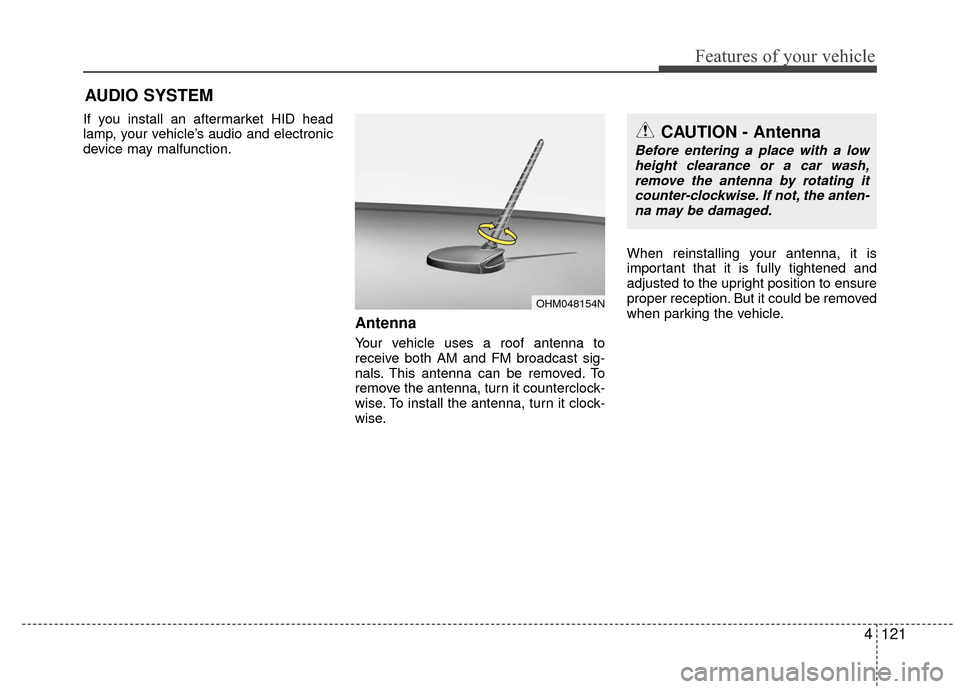
Antenna
Your vehicle uses a roof antenna to
receive both AM and FM broadcast sig-
nals. This antenna can be removed. To
remove the antenna, turn it counterclock-
wise. To install the antenna, turn it clock-
wise.When reinstalling your antenna, it is
important that it is fully tightened and
adjusted to the upright position to ensure
proper reception. But it could be removed
when parking the vehicle.
CAUTION - Antenna
Before entering a place with a low
height clearance or a car wash,remove the antenna by rotating it counter-clockwise. If not, the anten-na may be damaged.
OHM048154N
Page 196 of 449
Features of your vehicle
4125
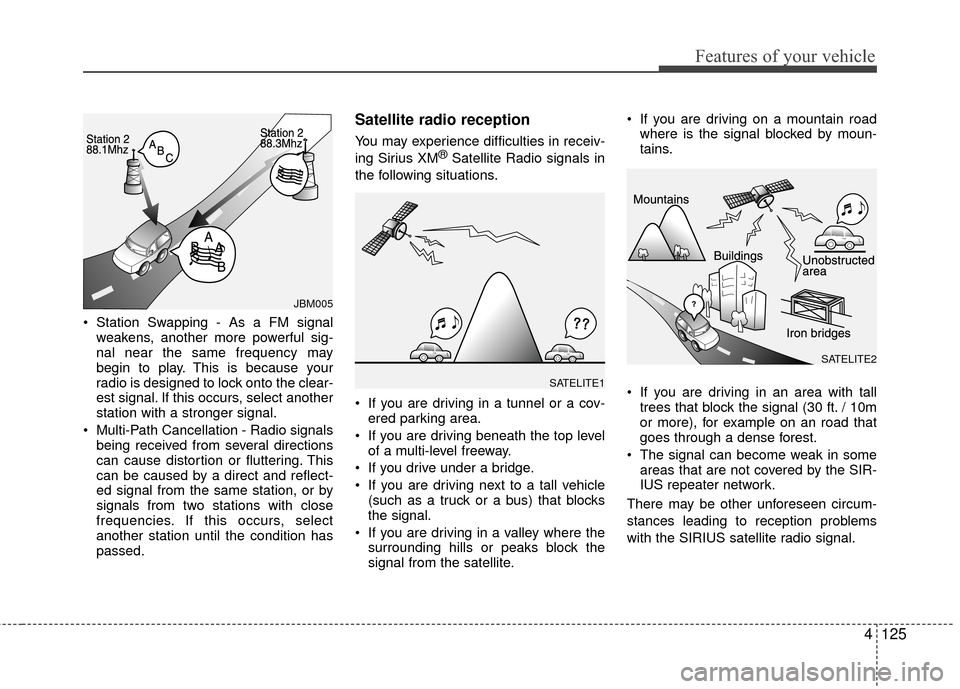
Station Swapping - As a FM signalweakens, another more powerful sig-
nal near the same frequency may
begin to play. This is because your
radio is designed to lock onto the clear-
est signal. If this occurs, select another
station with a stronger signal.
Multi-Path Cancellation - Radio signals being received from several directions
can cause distortion or fluttering. This
can be caused by a direct and reflect-
ed signal from the same station, or by
signals from two stations with close
frequencies. If this occurs, select
another station until the condition has
passed.
Satellite radio reception
You may experience difficulties in receiv-
ing Sirius XM®Satellite Radio signals in
the following situations.
If you are driving in a tunnel or a cov- ered parking area.
If you are driving beneath the top level of a multi-level freeway.
If you drive under a bridge.
If you are driving next to a tall vehicle (such as a truck or a bus) that blocks
the signal.
If you are driving in a valley where the surrounding hills or peaks block the
signal from the satellite. If you are driving on a mountain road
where is the signal blocked by moun-
tains.
If you are driving in an area with tall trees that block the signal (30 ft. / 10m
or more), for example on an road that
goes through a dense forest.
The signal can become weak in some areas that are not covered by the SIR-
IUS repeater network.
There may be other unforeseen circum-
stances leading to reception problems
with the SIRIUS satellite radio signal.
SATELITE1
JBM005
SATELITE2
Page 207 of 449
Features of your vehicle
136
4
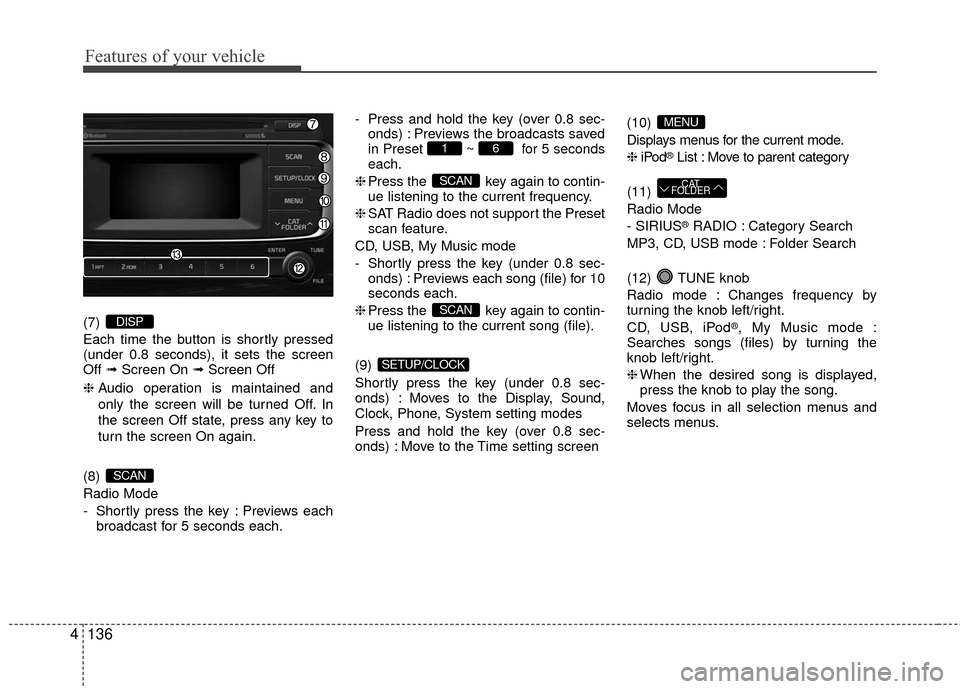
(7)
Each time the button is shortly pressed
(under 0.8 seconds), it sets the screen
Off ➟Screen On ➟ Screen Off
❈ Audio operation is maintained and
only the screen will be turned Off. In
the screen Off state, press any key to
turn the screen On again.
(8)
Radio Mode
- Shortly press the key : Previews each broadcast for 5 seconds each. - Press and hold the key (over 0.8 sec-
onds) : Previews the broadcasts saved
in Preset ~ for 5 seconds
each.
❈ Press the key again to contin-
ue listening to the current frequency.
❈ SAT Radio does not support the Preset
scan feature.
CD, USB, My Music mode
- Shortly press the key (under 0.8 sec- onds) : Previews each song (file) for 10
seconds each.
❈ Press the key again to contin-
ue listening to the current song (file).
(9)
Shortly press the key (under 0.8 sec-
onds) : Moves to the Display, Sound,
Clock, Phone, System setting modes
Press and hold the key (over 0.8 sec-
onds) : Move to the Time setting screen (10)
Displays menus for the current mode.
❈
iPod
®List : Move to parent category
(11)
Radio Mode
- SIRIUS
®RADIO : Category Search
MP3, CD, USB mode : Folder Search
(12) TUNE knob
Radio mode : Changes frequency by
turning the knob left/right.
CD, USB, iPod
®, My Music mode :
Searches songs (files) by turning the
knob left/right.
❈ When the desired song is displayed,
press the knob to play the song.
Moves focus in all selection menus and
selects menus.
CAT
FOLDER
MENU
SETUP/CLOCK
SCAN
SCAN
61
SCAN
DISP
Page 210 of 449
![KIA Rio 2016 3.G Workshop Manual Features of your vehicle
4139
SETUP
Display Settings
Press the key Select
[Display] through TUNE knob or
key Select menu through TUNE knob
Mode Pop up
[Mode Pop up] Changes /
selection mode
or ke](/img/2/2975/w960_2975-209.png "KIA Rio 2016 3.G Workshop Manual Features of your vehicle
4139
SETUP
Display Settings
Press the key Select
[Display] through TUNE knob or
key Select menu through TUNE knob
Mode Pop up
[Mode Pop up] Changes /
selection mode
or ke")
Features of your vehicle
4139
SETUP
Display Settings
Press the key Select
[Display] through TUNE knob or
key Select menu through TUNE knob
Mode Pop up
[Mode Pop up] Changes /
selection mode
or key to display the mode
change pop up screen.
Media Display
When playing an MP3 file, select the
desired display info from ‘Folder/File’ or
‘Album/Artist/Song’.
MEDIARADIO
OffOn
1 RPTSETUP/CLOCK
Page 211 of 449
![KIA Rio 2016 3.G Workshop Manual Features of your vehicle
140
4
SOUND SETTINGS
Press the key Select
[Sound] through TUNE knob or
key Select menu through TUNE knob
Sound Settings
This menu allows you to set the ‘Bass,
Middle, Tr](/img/2/2975/w960_2975-210.png "KIA Rio 2016 3.G Workshop Manual Features of your vehicle
140
4
SOUND SETTINGS
Press the key Select
[Sound] through TUNE knob or
key Select menu through TUNE knob
Sound Settings
This menu allows you to set the ‘Bass,
Middle, Tr")
Features of your vehicle
140
4
SOUND SETTINGS
Press the key Select
[Sound] through TUNE knob or
key Select menu through TUNE knob
Sound Settings
This menu allows you to set the ‘Bass,
Middle, Treble’ and the Sound Fader and
Balance.
Select [Sound Settings] Select menu
through
TUNE knobTu r n TUNE
knobleft/right to set
Bass, Middle, Treble : Selects the sound tone.
Fader, Balance : Moves the sound fader and balance.
Default : Restores default settings.
❈ Back : While adjusting values, pressing
the TUNE knob will restore the par-
ent menu.
Speed Dependent Volume Control
This feature is used to automatically con-
trol the volume level according to the
speed of the vehicle.
Select [Speed Dependent Vol.] Set
[Off/On] of
TUNEknob
Voice Recognition Volume
(if equipped)
Adjusts voice recognition volume.
Select [Voice Recognition Vol.] Set vol-
ume of
TUNEknob
2 RDM
SETUP/CLOCK
Page 212 of 449
![KIA Rio 2016 3.G Workshop Manual Features of your vehicle
4141
CLOCK SETTINGS
Press the key Select
[Clock] through TUNE knob or
key Select menu through TUNE
knob
Clock Settings
This menu is used to set the time.
Select [Clock Sett](/img/2/2975/w960_2975-211.png "KIA Rio 2016 3.G Workshop Manual Features of your vehicle
4141
CLOCK SETTINGS
Press the key Select
[Clock] through TUNE knob or
key Select menu through TUNE
knob
Clock Settings
This menu is used to set the time.
Select [Clock Sett")
Features of your vehicle
4141
CLOCK SETTINGS
Press the key Select
[Clock] through TUNE knob or
key Select menu through TUNE
knob
Clock Settings
This menu is used to set the time.
Select [Clock Settings] Set through
TUNE knob Press TUNE knob
❈ Adjust the number currently in focus to
set the [hour] and press the tune knob
to set the [minute] and [AM/PM].
Calendar Settings
This menu is used to set the date
(MM/DD/YYYY).
Select [Calendar Settings] Set through
TUNE knob Press TUNE knob
❈ Adjust the number currently in focus to
make the settings and press the tune
knob to move to the next setting. (Set
in order of Month/Day/Year)
Time Format
This function is used to set the 12/24
hour time format of the audio system.
Select [Time Format] Set 12Hr / 24Hr
through TUNE knob.
Clock Display when Power is OFF
Select [Clock Disp.(Pwr Off) Set /through TUNEknob
: Displays time/date on screen
: Turn off.
Off
On
OffOn
3
SETUP/CLOCK
Page 213 of 449
![KIA Rio 2016 3.G Workshop Manual Features of your vehicle
142
4
SYSTEM SETTINGS
Press the key Select
[System] Select menu through
TUNE knob
Memory Information
(if equipped)
Displays currently used memory and
total system memory.](/img/2/2975/w960_2975-212.png "KIA Rio 2016 3.G Workshop Manual Features of your vehicle
142
4
SYSTEM SETTINGS
Press the key Select
[System] Select menu through
TUNE knob
Memory Information
(if equipped)
Displays currently used memory and
total system memory.")
Features of your vehicle
142
4
SYSTEM SETTINGS
Press the key Select
[System] Select menu through
TUNE knob
Memory Information
(if equipped)
Displays currently used memory and
total system memory.
Select [Memory Information] OK
The currently used memory is displayed
on the left side while the total system
memory is displayed on the right side.
Prompt Feedback (if equipped)
This feature is used to change voice
command feedback between Normal and
Expert modes.
Select [Prompt Feedback] Set through
TUNEknob
On : This mode is for beginner users and provides detailed instructions dur-
ing voice command operation.
This mode is for expert users and omits some information during voice
command operation. (When using
Expert mode, guidance instructions can
be heard through the [Help] or [Menu]
commands.
Language
This menu is used to set the display and
voice recognition language.
Select [Language] Set through TUNE knob
❈ The system will reboot after the lan-
guage is changed.
❈ Language support by region
- English, Francais, Espanol
SETUP/CLOCK
Page 224 of 449
Features of your vehicle
4153
The Bluetooth®word mark and logos
are registered trademarks owned by
Bluetooth SIG, Inc. and any use of such
marks by Kia is under license. Other
trademarks and trade names are those
of their respective owners. A Bluetooth
®
enabled cell phone is required to useBluetooth®Wireless Technology.
Bluetooth®Wireless Technology
audio
can be used only when the [Audio
Streaming] of Phone is turned .
❈
Setting Bluetooth®Wireless TechnologyAudio Streaming : Press the key Select[Phone]
Select [Audio Streaming] through
the TUNE knob Set /
Starting Bluetooth®Wireless
Technology Audio
key to change the
mode in order of CD ➟ USB ➟ AUX ➟My Music ➟ BT Audio.
Bluetooth®
Wireless Technology audio w ill start
playing.
❈ Audio may not automatically start play-
ing in some mobile phones.
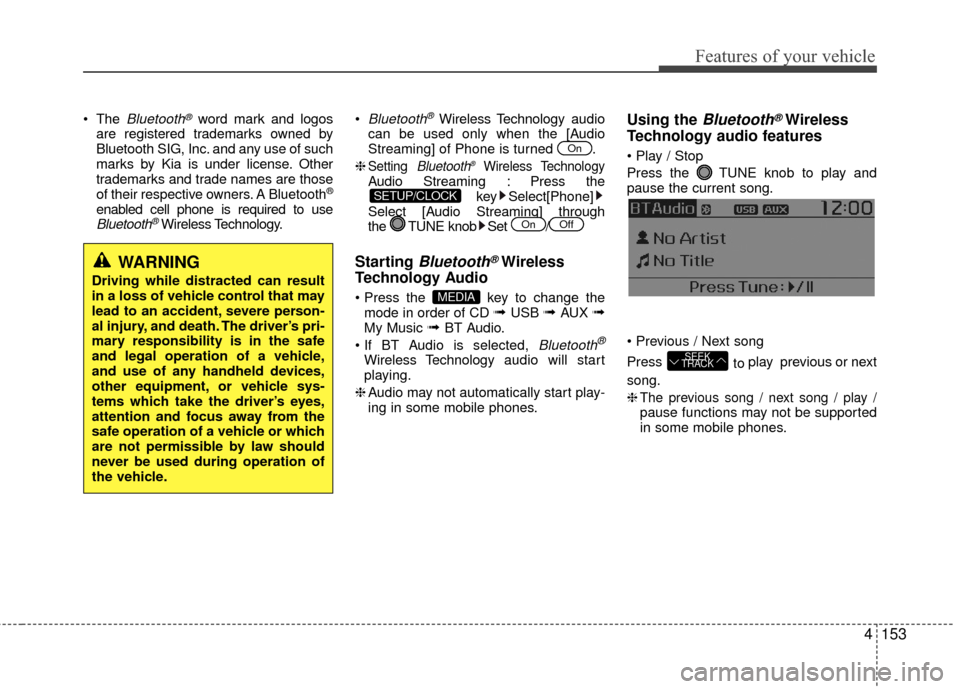
Using the Bluetooth®Wireless
Technology audio features
Press the TUNE knob to play and
pause the current song.
Press to play previous or next
song.
❈
The previous song / next song / play /pause functions may not be supported
in some mobile phones.
SEEK
TRACK
MEDIA
OffOn
SETUP/CLOCK
On
WARNING
Driving while distracted can result
in a loss of vehicle control that may
lead to an accident, severe person-
al injury, and death. The driver’s pri-
mary responsibility is in the safe
and legal operation of a vehicle,
and use of any handheld devices,
other equipment, or vehicle sys-
tems which take the driver’s eyes,
attention and focus away from the
safe operation of a vehicle or which
are not permissible by law should
never be used during operation of
the vehicle.
Page 228 of 449
![KIA Rio 2016 3.G Workshop Manual Features of your vehicle
4157
Pairing through [PHONE] Setup
Press the key Select
[Phone] Select [Pair Phone] Select TUNE knob
1. The following steps are the same as those described in the section "W](/img/2/2975/w960_2975-227.png "KIA Rio 2016 3.G Workshop Manual Features of your vehicle
4157
Pairing through [PHONE] Setup
Press the key Select
[Phone] Select [Pair Phone] Select TUNE knob
1. The following steps are the same as those described in the section \"W")
Features of your vehicle
4157
Pairing through [PHONE] Setup
Press the key Select
[Phone] Select [Pair Phone] Select TUNE knob
1. The following steps are the same as those described in the section "When
No Devices have been Paired" on the
previous page.
Bluetooth®Wireless Technology fea-
tures supported within the vehicle are
as follows. Some features may not be
supported depending on your
Bluetooth®Wireless Technology
device.
- Outgoing/Incoming Handsfree calls
- Operations during a call (Switch to Private, Switch to call waiting, MIC
on/off)
- Downloading Call History
- Downloading Mobile Contacts
-
Bluetooth®Wireless Technology
device auto connection
- Bluetooth Audio Streaming
Up to five
Bluetooth®Wireless
Technology devices can be paired to
the Car Handsfree system.
Only one
Bluetooth®device can be
connected at a time.
Only one
Bluetooth®Wireless
Technology device can be connected
at a time.
Other devices cannot be paired while a
Bluetooth®Wireless Technology device
is connected.
Only
Bluetooth®Wireless Technology
Handsfree and Bluetooth audio related
features are supported. Bluetooth related operations are possi-
ble only within devices that support
Handsfree or audio features, such as a
Bluetooth®Wireless Technology
mobile phone or a Bluetooth audio
device.
If a connected
Bluetooth®Wireless
Technology device becomes discon-
nected due to being out of communica-
tion range, turning the device OFF, or a
Bluetooth®Wireless Technology com-
munication error, corresponding
Bluetooth®Wireless Technology
devices are automatically searched
and reconnected.
If the system becomes unstable due to communication errors between the car
Handsfree and the
Bluetooth®
Wireless Technology device, reset the
device by turning off and back on
again. Upon resetting
Bluetooth®
Wireless Technology device, the sys-
tem will be restored.
After pairing is complete, a contacts download request is sent once to the
mobile phone. Some mobile phones
may require confirmation upon receiv-
ing a download request, ensure your
mobile phone accepts the connection.
Refer to your phones user’s manual for
additional information regarding phone
pairing and connections.
SETUP/CLOCK
Page 229 of 449
![KIA Rio 2016 3.G Workshop Manual Features of your vehicle
158
4 Connecting a Device
Press the
key Select
[Phone] Select [Phone List]
1) Connected Phone : Device that is cur- rently connected
2) Paired Phone : Device that is paired](/img/2/2975/w960_2975-228.png "KIA Rio 2016 3.G Workshop Manual Features of your vehicle
158
4 Connecting a Device
Press the
key Select
[Phone] Select [Phone List]
1) Connected Phone : Device that is cur- rently connected
2) Paired Phone : Device that is paired")
Features of your vehicle
158
4 Connecting a Device
Press the
key Select
[Phone] Select [Phone List]
1) Connected Phone : Device that is cur- rently connected
2) Paired Phone : Device that is paired but not connected From the paired phone list, select the
device you want to connect and select
[Connect].SETUP/CLOCK